set clock NISSAN NOTE 2016 Service Repair Manual
[x] Cancel search | Manufacturer: NISSAN, Model Year: 2016, Model line: NOTE, Model: NISSAN NOTE 2016Pages: 3641, PDF Size: 28.72 MB
Page 19 of 3641
![NISSAN NOTE 2016 Service Repair Manual AV-14
< SYSTEM DESCRIPTION >[BASE AUDIO]
DIAGNOSIS SYSTEM (AUDIO UNIT)
DIAGNOSIS SYSTEM (AUDIO UNIT)
Diagnosis DescriptionINFOID:0000000012432871
The audio unit on board diagnosis performs the functio](/img/5/57363/w960_57363-18.png "NISSAN NOTE 2016 Service Repair Manual AV-14
< SYSTEM DESCRIPTION >[BASE AUDIO]
DIAGNOSIS SYSTEM (AUDIO UNIT)
DIAGNOSIS SYSTEM (AUDIO UNIT)
Diagnosis DescriptionINFOID:0000000012432871
The audio unit on board diagnosis performs the functio")
AV-14
< SYSTEM DESCRIPTION >[BASE AUDIO]
DIAGNOSIS SYSTEM (AUDIO UNIT)
DIAGNOSIS SYSTEM (AUDIO UNIT)
Diagnosis DescriptionINFOID:0000000012432871
The audio unit on board diagnosis performs the functions listed in the table below:
On Board Diagn
osis FunctionINFOID:0000000012432872
METHOD OF STARTING
Hardware/Software Versions and Speaker Channel Check
1. Turn the ignition ON.
2. Turn the audio system OFF.
3. While pressing the preset 1 butt on, turn the volume control dial
clockwise or counterclockwise 30 clicks or more.
4. Initially, all display segments will be illuminated.
5. To exit hardware/software versions and speaker channel check, turn the ignition OFF.
Communication Diagnosis
1. Turn the ignition ON.
2. Turn the audio system OFF.
Mode Description
Hardware/Software Versions The following information is available for the audio unit:
• hardware version.
• software version.
• EQ pin info.
Speaker Channel Check The connection of the speakers to the audio unit can be confirmed.
Communication Diagnosis The AV communication (M-CAN) message history can be monitored.
AWNIA3042ZZ
ALNIA1382GB
Revision: August 2015 2016 Versa Note
cardiagn.com
Page 20 of 3641
![NISSAN NOTE 2016 Service Repair Manual AV
DIAGNOSIS SYSTEM (AUDIO UNIT)AV-15
< SYSTEM DESCRIPTION > [BASE AUDIO]
C
D
E
F
G H
I
J
K L
M B A
O P
3. While pressing the preset 6 button, turn the volume control dial clockwise or counterclockwis](/img/5/57363/w960_57363-19.png "NISSAN NOTE 2016 Service Repair Manual AV
DIAGNOSIS SYSTEM (AUDIO UNIT)AV-15
< SYSTEM DESCRIPTION > [BASE AUDIO]
C
D
E
F
G H
I
J
K L
M B A
O P
3. While pressing the preset 6 button, turn the volume control dial clockwise or counterclockwis")
AV
DIAGNOSIS SYSTEM (AUDIO UNIT)AV-15
< SYSTEM DESCRIPTION > [BASE AUDIO]
C
D
E
F
G H
I
J
K L
M B A
O P
3. While pressing the preset 6 button, turn the volume control dial clockwise or counterclockwise 30 clicks or more.
4. Initially, the communication diagnosis mode is displayed.
5. To exit communication diagnosis, turn the ignition OFF.
SELF DIAGNOSIS MODE
Hardware/Software Versions
1. Press the DISP button to enter versions display, and the audio head unit software version is displayed.
2. With each additional press of the DISP button, the following information is available:
- HARD V###### (hardware version)
- EEP V###### (EEPROM version)
- @@@@ EQ1-4 # (EQ pin info) If an EQ error is present, INVALID EQ is displayed
3. Hold the DISP button down to return to all display segments screen.
Speaker Channel Check
ALNIA1516ZZ
ALNIA1387GB
ALNIA1383GB
Revision: August 2015 2016 Versa Note
cardiagn.com
Page 76 of 3641
![NISSAN NOTE 2016 Service Repair Manual AV
DIAGNOSIS SYSTEM (AUDIO UNIT)AV-71
< SYSTEM DESCRIPTION > [DISPLAY AUDIO]
C
D
E
F
G H
I
J
K L
M B A
O P
DIAGNOSIS SYSTEM (AUDIO UNIT)
DescriptionINFOID:0000000012432960
The audio unit on board diag](/img/5/57363/w960_57363-75.png "NISSAN NOTE 2016 Service Repair Manual AV
DIAGNOSIS SYSTEM (AUDIO UNIT)AV-71
< SYSTEM DESCRIPTION > [DISPLAY AUDIO]
C
D
E
F
G H
I
J
K L
M B A
O P
DIAGNOSIS SYSTEM (AUDIO UNIT)
DescriptionINFOID:0000000012432960
The audio unit on board diag")
AV
DIAGNOSIS SYSTEM (AUDIO UNIT)AV-71
< SYSTEM DESCRIPTION > [DISPLAY AUDIO]
C
D
E
F
G H
I
J
K L
M B A
O P
DIAGNOSIS SYSTEM (AUDIO UNIT)
DescriptionINFOID:0000000012432960
The audio unit on board diagnosis performs the functions listed in the table below:
On Board Diagnosis FunctionINFOID:0000000012432961
METHOD OF STARTING
1. Turn the ignition ON.
2. Turn the audio unit OFF.
3. While pressing the preset 1 button, turn the volume control dial clockwise and counterclockwise quickly approximately 15 times
or more. Shifting from current screen to previous screen is per-
formed by pressing BACK button.
4. The trouble diagnosis initial screen is displayed, and Self Diag- nosis or Confirmation/Adjustment can be selected.
SELF DIAGNOSIS MODE
Audio Unit Self Diagnosis
1. Select Self Diagnosis.
Mode Description
Self Diagnosis Audio unit diagnosis.
Confirmation/ Adjustment Display Diagnosis
The following check functions are available: color tone check by color
spectrum bar display and gray scale check by gradation bar display.
Vehicle Signals Diagnosis of signals can be performed for vehicle speed, lights, reverse,
EQ pin, ignition, destination and camera type.
Speaker Test The connection of a speaker can be confirmed by test tone.
Error History The system malfunction and the frequency when occurring in the past are
displayed. When the malfunctioning item is selected, the time and place
that the selected malfunction last occurred are displayed.
Camera System Guiding line position that overlaps rear view camera image can be adjust-
ed.
AV COMM Diagnosis Displayed but not used.
Delete Unit Connection Log Erase the connection history of unit and error history.
Version Information Displays the audio system version information.
Initialize Setting Initializes the audio unit memory.
ALNIA1710ZZ
JSNIA0138GB
Revision: August 2015 2016 Versa Note
cardiagn.com
Page 336 of 3641
![NISSAN NOTE 2016 Service Repair Manual BCS
COMBINATION SWITCHBCS-75
< REMOVAL AND INSTALLATION > [WITH INTELLIGENT KEY SYSTEM]
C
D
E
F
G H
I
J
K L
B A
O P
N
COMBINATION SWITCH
Removal and InstallationINFOID:0000000012432359
CAUTION:
• Be](/img/5/57363/w960_57363-335.png "NISSAN NOTE 2016 Service Repair Manual BCS
COMBINATION SWITCHBCS-75
< REMOVAL AND INSTALLATION > [WITH INTELLIGENT KEY SYSTEM]
C
D
E
F
G H
I
J
K L
B A
O P
N
COMBINATION SWITCH
Removal and InstallationINFOID:0000000012432359
CAUTION:
• Be")
BCS
COMBINATION SWITCHBCS-75
< REMOVAL AND INSTALLATION > [WITH INTELLIGENT KEY SYSTEM]
C
D
E
F
G H
I
J
K L
B A
O P
N
COMBINATION SWITCH
Removal and InstallationINFOID:0000000012432359
CAUTION:
• Before servicing, turn the ignition
switch OFF, disconnect both battery terminals and wait at least
three minutes.
• Do not use air or electric tools when remo ving or installing the combination switch.
REMOVAL
1. Disconnect the negative and positive bat tery terminals, then wait at least three minutes. Refer to PG-70,
"Removal and Installation (Battery)".
2. Remove the steering column covers. Refer to IP-17, "
Removal and Installation".
3. Rotate steering wheel clockwise to access first combination switch screw (A) and remove.
4. Rotate steering wheel counter-clockwise to access second com- bination switch screw (A) and remove.
5. Disconnect the harness connector (B) from the combination switch (1) and remove.
INSTALLATION
Installation is in the reverse order of removal.
CAUTION:
• After the work is completed, make sure no system malfunction is detected by air bag warning lamp.
• In case a malfunction is detected by the air bag wa rning lamp, reset with the self-diagnosis function
and delete the memory with CONSULT.
• If a malfunction is still detected after the above operation, perform self-diagnosis to repair malfunc-
tions. Refer to BCS-58, "
Description".
ALMIA0648ZZ
ALMIA0649ZZ
Revision: August 2015 2016 Versa Note
cardiagn.com
Page 399 of 3641
![NISSAN NOTE 2016 Service Repair Manual BCS-138
< REMOVAL AND INSTALLATION >[WITHOUT INTELLIGENT KEY SYSTEM]
COMBINATION SWITCH
COMBINATION SWITCH
Removal and InstallationINFOID:0000000012432412
CAUTION:
• Before servicing, turn the ignit](/img/5/57363/w960_57363-398.png "NISSAN NOTE 2016 Service Repair Manual BCS-138
< REMOVAL AND INSTALLATION >[WITHOUT INTELLIGENT KEY SYSTEM]
COMBINATION SWITCH
COMBINATION SWITCH
Removal and InstallationINFOID:0000000012432412
CAUTION:
• Before servicing, turn the ignit")
BCS-138
< REMOVAL AND INSTALLATION >[WITHOUT INTELLIGENT KEY SYSTEM]
COMBINATION SWITCH
COMBINATION SWITCH
Removal and InstallationINFOID:0000000012432412
CAUTION:
• Before servicing, turn the ignition switch OFF, disconnect both battery terminals and wait at least
three minutes.
• Do not use air or electric tools when remo ving or installing the combination switch.
REMOVAL
1. Disconnect the negative and positive battery terminals, then wait at least three minutes. Refer to PG-70,
"Removal and Installation (Battery)".
2. Remove the steering column covers. Refer to IP-17, "
Removal and Installation".
3. Rotate steering wheel clockwise to access first combination switch screw (A) and remove.
4. Rotate steering wheel counter-c lockwise to access second com-
bination switch screw (A) and remove.
5. Disconnect the harness connector (B) from the combination switch (1) and remove.
INSTALLATION
Installation is in the reverse order of removal.
CAUTION:
• After the work is completed, make sure no system malfunction is detected by air bag warning lamp.
• In case a malfunction is detected by the air bag wa rning lamp, reset with the self-diagnosis function
and delete the memory with CONSULT.
• If a malfunction is still detected after the above operation, perform self-diagnosis to repair malfunc-
tions. Refer to BCS-121, "
Description".
ALMIA0648ZZ
ALMIA0649ZZ
Revision: August 2015 2016 Versa Note
cardiagn.com
Page 632 of 3641
CL-6
< PERIODIC MAINTENANCE >
CLUTCH PEDAL
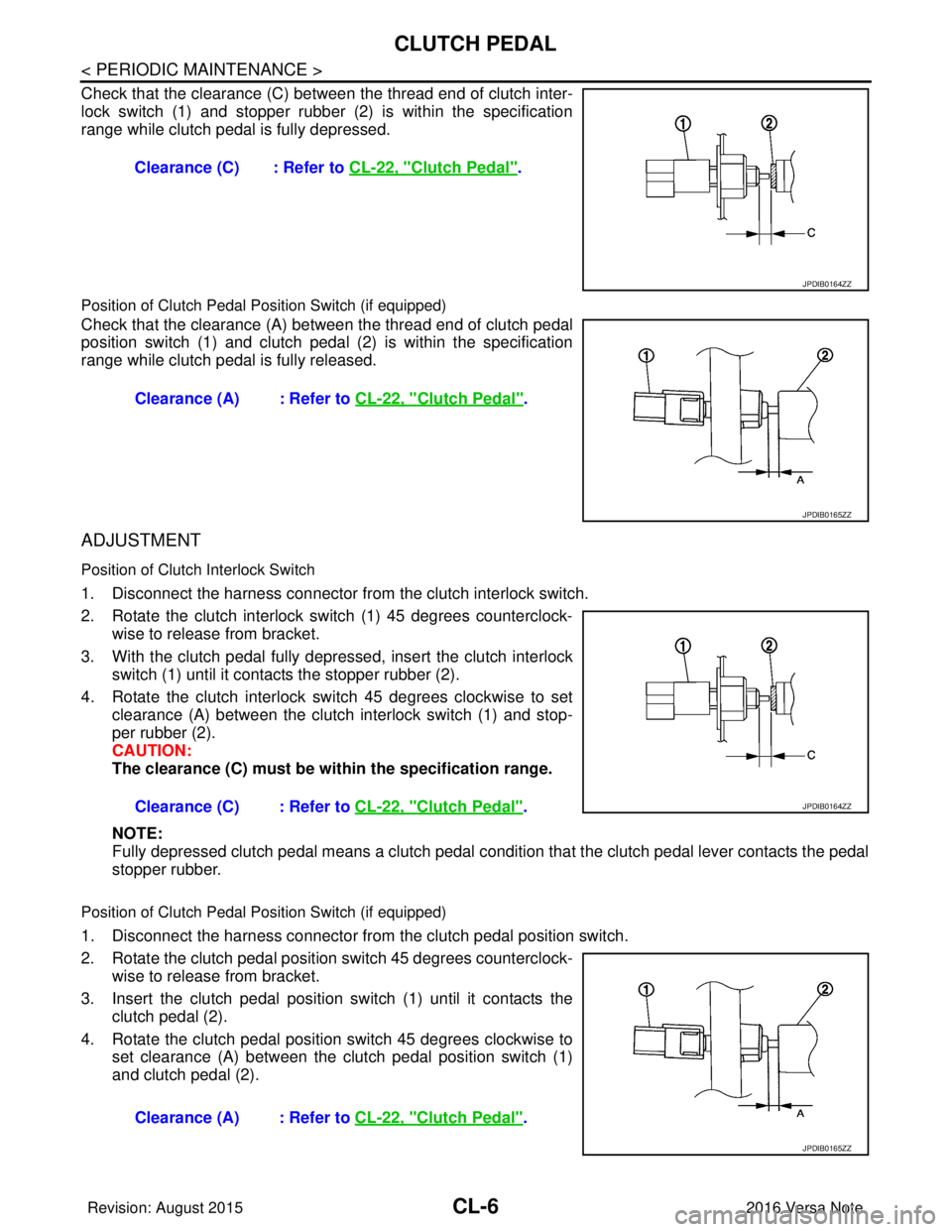
Check that the clearance (C) between the thread end of clutch inter-
lock switch (1) and stopper rubber (2) is within the specification
range while clutch pedal is fully depressed.
Position of Clutch Pedal Position Switch (if equipped)
Check that the clearance (A) between the thread end of clutch pedal
position switch (1) and clutch pedal (2) is within the specification
range while clutch pedal is fully released.
ADJUSTMENT
Position of Clutch Interlock Switch
1. Disconnect the harness connector from the clutch interlock switch.
2. Rotate the clutch interlock switch (1) 45 degrees counterclock- wise to release from bracket.
3. With the clutch pedal fully depressed, insert the clutch interlock switch (1) until it contacts the stopper rubber (2).
4. Rotate the clutch interlock switch 45 degrees clockwise to set clearance (A) between the clutch interlock switch (1) and stop-
per rubber (2).
CAUTION:
The clearance (C) must be wi thin the specification range.
NOTE:
Fully depressed clutch pedal means a clutch pedal condi tion that the clutch pedal lever contacts the pedal
stopper rubber.
Position of Clutch Pedal Position Switch (if equipped)
1. Disconnect the harness connector from the clutch pedal position switch.
2. Rotate the clutch pedal position switch 45 degrees counterclock- wise to release from bracket.
3. Insert the clutch pedal position switch (1) until it contacts the
clutch pedal (2).
4. Rotate the clutch pedal position switch 45 degrees clockwise to set clearance (A) between the clutch pedal position switch (1)
and clutch pedal (2).Clearance (C) : Refer to
CL-22, "
Clutch Pedal".
JPDIB0164ZZ
Clearance (A) : Refer to CL-22, "Clutch Pedal".
JPDIB0165ZZ
Clearance (C) : Refer to CL-22, "Clutch Pedal".JPDIB0164ZZ
Clearance (A) : Refer to CL-22, "Clutch Pedal".
JPDIB0165ZZ
Revision: August 2015 2016 Versa Note
cardiagn.com
Page 1011 of 3641
![NISSAN NOTE 2016 Service Repair Manual EM-10
< BASIC INSPECTION >[HR16DE]
CAMSHAFT VALVE CLEARANCE
BASIC INSPECTION
CAMSHAFT VALVE CLEARANCE
Inspection and AdjustmentINFOID:0000000012431690
INSPECTION
Perform inspection as follows after re](/img/5/57363/w960_57363-1010.png "NISSAN NOTE 2016 Service Repair Manual EM-10
< BASIC INSPECTION >[HR16DE]
CAMSHAFT VALVE CLEARANCE
BASIC INSPECTION
CAMSHAFT VALVE CLEARANCE
Inspection and AdjustmentINFOID:0000000012431690
INSPECTION
Perform inspection as follows after re")
EM-10
< BASIC INSPECTION >[HR16DE]
CAMSHAFT VALVE CLEARANCE
BASIC INSPECTION
CAMSHAFT VALVE CLEARANCE
Inspection and AdjustmentINFOID:0000000012431690
INSPECTION
Perform inspection as follows after removal, replacement or installation of camshaft or valve-related parts, or if
there are unusual engine conditions regarding valve clearance.
1. Remove rocker cover. Refer to
EM-48, "
Removal and Installation".
2. Measure the valve clearance with the following procedure:
a. Set No. 1 cylinder at TDC of its compression stroke. • Rotate crankshaft pulley (2) clockwise and align TDC mark (no
paint) (A) to timing indicator (1) on front cover.
• At the same time, check that both intake and exhaust cam lobes of No. 1 cylinder face inside ( ) as shown.
• If the lobes do not face inside, rotate the crankshaft pulley 360 degrees to align as shown.
b. Using suitable tool (A) measure the clearance between the valve lifter and camshaft.
(B) : White paint mark (Not used for service)
PBIC3673E
(1) : Camshaft (INT)
(2) : Camshaft (EXH)
: Engine front
JPBIA4738ZZ
Valve clearance : Refer to EM-117, "Camshaft".
JPBIA4116ZZ
Revision: August 2015 2016 Versa Note
cardiagn.com
Page 1018 of 3641
![NISSAN NOTE 2016 Service Repair Manual DRIVE BELTEM-17
< PERIODIC MAINTENANCE > [HR16DE]
C
D
E
F
G H
I
J
K L
M A
EM
NP
O
4. Tighten the lock nut to final tightening specification.
5. Check that belt tension is within the specification usin](/img/5/57363/w960_57363-1017.png "NISSAN NOTE 2016 Service Repair Manual DRIVE BELTEM-17
< PERIODIC MAINTENANCE > [HR16DE]
C
D
E
F
G H
I
J
K L
M A
EM
NP
O
4. Tighten the lock nut to final tightening specification.
5. Check that belt tension is within the specification usin")
DRIVE BELTEM-17
< PERIODIC MAINTENANCE > [HR16DE]
C
D
E
F
G H
I
J
K L
M A
EM
NP
O
4. Tighten the lock nut to final tightening specification.
5. Check that belt tension is within the specification using suitable tool. Refer to
EM-116, "
Drive Belt".
InspectionINFOID:0000000012431695
• Inspection should be done only when engine is cold or over 30
minutes after the engine is stopped.
• Visually check belt for wear, damage, and cracks on inside and edges.
• Turn crankshaft pulley clockwise twice, and check that the tension on all pulleys equalizes before testing.
• When measuring deflection, apply 98.1 N (10 kg, 22 lb) at the ( ) marked point.
• Measure the belt tension and frequency using suitable tool at the ( ) marked point.
CAUTION:
• When checking immediately after installation, first ad just it to the specified value. Then, after turning
crankshaft two turns or more, readjust to the specified value to avoid varia tion in deflection between
pulleys.
AdjustmentINFOID:0000000012431696
CAUTION:
• When belt is replaced with new one, adjust belt te nsion to the value for “New belt,” because new belt
will not fully seat in the pulley groove.
• When tension of the belt being used exceeds “Limit,” adjust it to the value for “After adjusted.”
• When installing a belt, check it is correctly engaged with the pulley groove.
• Do not allow engine oil or engine coolant to get on the belt.
• Do not twist or bend the belt strongly.
1. Partially remove the fender protector (RH) front side clip. Refer to EXT-38, "
Removal and Installation".
2. Loosen lock nut (A) and temporarily set to the following torque.
3. Adjust the belt tension by turning the adjusting bolt. Refer to EM-116, "
Drive Belt".
CAUTION: Lock nut (Final tightening) :
34.8 N·m (3.5 kg-m, 26 ft-lb)
(1) : Generator
(2) : Water pump
(3) : Crankshaft pulley
(4) : A/C compressor
(5) : Idler pulley
(6) : Drive belt
Belt deflection/belt tension and frequency : Refer to EM-116, "Drive Belt".
PBIC3642E
LocationLocation of adjuster and tightening method
Drive belt Adjusting bolt on idler pulley
Lock nut (A)
(Temporary tightening): 4.4 N·m (0.45 kg-m, 39 in-lb)
(1) : Generator
(2) : Water pump
(3) : Crankshaft pulley
(4) : A/C compressor
(5) : Idler pulley
(6) : Drive belt
(B) : Adjusting bolt
PBIC3643E
Revision: August 2015
2016 Versa Note
cardiagn.com
Page 1053 of 3641
![NISSAN NOTE 2016 Service Repair Manual EM-52
< REMOVAL AND INSTALLATION >[HR16DE]
TIMING CHAIN
1. Remove front wheel and tire (RH). Refer to
WT-48, "Removal and Installation".
2. Remove front fender protector (RH). Refer to EXT-38, "
Rem](/img/5/57363/w960_57363-1052.png "NISSAN NOTE 2016 Service Repair Manual EM-52
< REMOVAL AND INSTALLATION >[HR16DE]
TIMING CHAIN
1. Remove front wheel and tire (RH). Refer to
WT-48, \"Removal and Installation\".
2. Remove front fender protector (RH). Refer to EXT-38, \"
Rem")
EM-52
< REMOVAL AND INSTALLATION >[HR16DE]
TIMING CHAIN
1. Remove front wheel and tire (RH). Refer to
WT-48, "Removal and Installation".
2. Remove front fender protector (RH). Refer to EXT-38, "
Removal and Installation".
3. Drain engine oil. Refer to LU-8, "
Draining".
CAUTION:
• Perform this step when engine is cold.
• Do not spill engine oil on drive belt.
4. Drain coolant. Refer to CO-8, "
Draining Engine Coolant".
5. Remove the drive belt. Refer to EM-16, "
Removal and Installation".
6. Remove the rocker cover. Refer to EM-48, "
Removal and Installation".
7. Remove the water pump pulley. Refer to CO-18, "
Removal and Installation".
8. Support the bottom surface of engine (1) using a transmission jack (2), and then remove engine mounting insulator (RH). Refer
to EM-86, "
Exploded View".
CAUTION:
• Position a suitable jack under the engine and transaxle assembly as shown.
• Do not damage the front exhaust tube or transaxle oil pan with the jack.
9. Set No. 1 cylinder at TDC of its compression stroke:
a. Rotate crankshaft pulley (2) clockwise and align TDC mark (without paint mark) (A) to timing indicator (1) on front cover.
b. Check the matching marks on each camshaft sprocket are posi- tioned as shown.
• If not, rotate crankshaft pulley one more turn to align matchingmarks to the positions.
10. Remove crankshaft pulley:
ALBIA0894GB
(B) : White paint mark (Not use for service)
PBIC3673E
(1) : Timing chain
(2) : Camshaft sprocket (EXH)
(3) : Camshaft sprocket (INT)
(A) : Matching mark (Peripheral groove)
(B) : Pink link
(C) : Matching mark (Peripheral groove)
JPBIA4138ZZ
Revision: August 2015 2016 Versa Note
cardiagn.com
Page 1099 of 3641
![NISSAN NOTE 2016 Service Repair Manual EM-98
< UNIT DISASSEMBLY AND ASSEMBLY >[HR16DE]
CYLINDER BLOCK
• Install the main bearing cap while referring to the front mark
(B) and the journal number stamp (A).
NOTE:
Main bearing cap cannot be](/img/5/57363/w960_57363-1098.png "NISSAN NOTE 2016 Service Repair Manual EM-98
< UNIT DISASSEMBLY AND ASSEMBLY >[HR16DE]
CYLINDER BLOCK
• Install the main bearing cap while referring to the front mark
(B) and the journal number stamp (A).
NOTE:
Main bearing cap cannot be")
EM-98
< UNIT DISASSEMBLY AND ASSEMBLY >[HR16DE]
CYLINDER BLOCK
• Install the main bearing cap while referring to the front mark
(B) and the journal number stamp (A).
NOTE:
Main bearing cap cannot be replaced as a single part,
because it is machined together with cylinder block.
8. Tighten main bearing cap bolts in numerical order as shown with the following steps:
a. Apply new engine oil to threads and seat surfaces of the bolts.
b. Tighten main bearing cap bolts in numerical order.
c. Turn main bearing cap bolts 60 degrees clockwise (angle tight- ening) in numerical order as shown.
CAUTION:
Check and confirm the tightening angle by using the Tool
(A) or protractor. Do not judge by visual inspection without
the Tool (A).
• After installing the main bearing cap bolts, check that crankshaft can be rotated smoothly by hand.
• Check crankshaft end play. Refer to EM-102, "
Inspection".
9. Install piston to connecting rod with the following procedure:
a. Using a heat gun, heat the piston until the pist on pin can be pushed in by hand without excess force
[approximately 60 to 70 °C (140 to 158 °F)]. From the front to the rear, insert piston pin into piston and con-
necting rod.
b. Set so that the front mark (A) on the piston head and the cylin- der number (C) are in the position as shown.
NOTE:
The symbols without notes are for manufacturing.
CAUTION:
Press-fit the piston so as not to damage it.
NOTE:
The joint between the connecting rod and the piston pin is a
press fit.
: Engine front
JPBIA4204ZZ
: Engine front
Step 1 : 32.4 N·m (3.3 kg-m, 24 ft-lb)
Step 2 : 60° clockwise
JPBIA4203ZZ
Tool number (A) : KV10112100 (BT-8653-A)
PBIC3750E
(B) : Oil hole
(D) : Connecting rod big end grade
PBIC3766E
Revision: August 2015 2016 Versa Note
cardiagn.com