ECU NISSAN NOTE 2016 Service Repair Manual
[x] Cancel search | Manufacturer: NISSAN, Model Year: 2016, Model line: NOTE, Model: NISSAN NOTE 2016Pages: 3641, PDF Size: 28.72 MB
Page 2523 of 3641
![NISSAN NOTE 2016 Service Repair Manual PCS-20
< ECU DIAGNOSIS INFORMATION >[IPDM E/R]
IPDM E/R (INTELLIGENT POWER DI
STRIBUTION MODULE ENGINE ROOM)
NOTE:
The tail lamp turns OFF when the ignition switch is turned ON.
FRONT WIPER CONTROL
IP](/img/5/57363/w960_57363-2522.png "NISSAN NOTE 2016 Service Repair Manual PCS-20
< ECU DIAGNOSIS INFORMATION >[IPDM E/R]
IPDM E/R (INTELLIGENT POWER DI
STRIBUTION MODULE ENGINE ROOM)
NOTE:
The tail lamp turns OFF when the ignition switch is turned ON.
FRONT WIPER CONTROL
IP")
PCS-20
< ECU DIAGNOSIS INFORMATION >[IPDM E/R]
IPDM E/R (INTELLIGENT POWER DI
STRIBUTION MODULE ENGINE ROOM)
NOTE:
The tail lamp turns OFF when the ignition switch is turned ON.
FRONT WIPER CONTROL
IPDM E/R detects front wiper stop posit ion by a front wiper auto stop signal.
When a front wiper auto stop signal is in the conditions listed below, IPDM E/R stops power supply to wiper
after repeating a front wiper 10 second activation and 20 second stop five times.
NOTE:
This operation status can be confirmed on the IPDM E/ R “Data Monitor” that displays “BLOCK” for the item
“WIP PROT” while the wiper is stopped.
STARTER MOTOR PROTECTION FUNCTION
IPDM E/R turns OFF the starter control relay to protect the starter motor when the starter control relay remains
active for 90 seconds.
DTC IndexINFOID:0000000012433275
NOTE:
The details of TIME display are as follows.
• CRNT: The malfunctions that are detected now
• 1 - 39: The number is indicated when it is normal at present and a malfunction was detected in the past. It
increases like 0 → 1 → 2 · · · 38 → 39 after returning to the normal condition whenever IGN OFF → ON. It is
fixed to 39 until the self-diagnosis results are erased if it is over 39. It returns to 0 when a malfunction is
detected again in the process.
DTC Ignition switch Ignition relayTail lamp relay
—O NON—
—O FFO FF—
B2098: IGN RELAY ON OFFONON (10 minutes)
B2099: IGN RELAY OFF ONOFF —
Ignition switch Front wiper switch Auto stop signal
ON OFF
Front wiper stop position signal cannot be
input 10 seconds.
ON The signal does not change for 10 seconds.
CONSULT display Fail-safe
TIMENOTERefer to
No DTC is detected. Further testing may be required. ——— —
U1000: CAN COMM CIRCUIT ×CRNT 1 – 39 PCS-26
B2098: IGN RELAY ON ×CRNT 1 – 39 PCS-27
B2099: IGN RELAY OFF —CRNT 1 – 39 PCS-28
B210B: PNP RELAY ON stuck failure —CRNT 1 – 39 SEC-99
B210C: PNP RELAY OFF stuck failure —CRNT 1 – 39 SEC-100
B210D: STARTER relay ON stuck failure —CRNT 1 – 39 SEC-102
B210E: STARTER relay OFF stuck failure —CRNT 1 – 39 SEC-104
B210F: Interlock/NP switch ON stuck failure —CRNT 1 – 39 SEC-106
B2110: Interlock/NP switch OFF stuck failure —CRNT 1 – 39 SEC-108
Revision: August 2015 2016 Versa Note
cardiagn.com
Page 2536 of 3641
![NISSAN NOTE 2016 Service Repair Manual PCS
COMPONENT PARTSPCS-33
< SYSTEM DESCRIPTION > [POWER DISTRIBUTION SYSTEM]
C
D
E
F
G H
I
J
K L
B A
O P
N
SYSTEM DESCRIPTION
COMPONENT PARTS
Component Parts LocationINFOID:0000000012433288
AWMIA1438Z](/img/5/57363/w960_57363-2535.png "NISSAN NOTE 2016 Service Repair Manual PCS
COMPONENT PARTSPCS-33
< SYSTEM DESCRIPTION > [POWER DISTRIBUTION SYSTEM]
C
D
E
F
G H
I
J
K L
B A
O P
N
SYSTEM DESCRIPTION
COMPONENT PARTS
Component Parts LocationINFOID:0000000012433288
AWMIA1438Z")
PCS
COMPONENT PARTSPCS-33
< SYSTEM DESCRIPTION > [POWER DISTRIBUTION SYSTEM]
C
D
E
F
G H
I
J
K L
B A
O P
N
SYSTEM DESCRIPTION
COMPONENT PARTS
Component Parts LocationINFOID:0000000012433288
AWMIA1438ZZ
No.
Component Description
1. Accessory relay-2 • Accessory relay-2 is controlled by BCM.
• Accessory relay-2 supplies accessory power supply or ignition switch ACC signal to each ECU
when ignition switch is turned to ACC or ON.
• BCM compares status of accessory relay-2 control signal, and ignition switch position judged
by BCM.
2. BCM • BCM controls power distribution system.
• BCM judges ignition switch position by push-button ignition switch (push switch) and vehicle
condition.
• BCM checks ignition switch position internally.
3. Push-button ignition
switch Push-button ignition switch (push switch) is pressed, and transmits status signal to BCM and
IPDM E/R.
4. IPDM E/R • IPDM E/R detects push-button ignition switch (push switch) status, and transmits push-button
ignition switch status signal (CAN) to BCM.
• IPDM E/R receives ignition relay-1 (IPDM E/R) control signal and ignition switch ON signal
(CAN) from BCM, and controls igniti on relay-1 (built into IPDM E/R)
5. Blower relay (in fuse
block) • Blower relay is controlled by BCM.
• Blower relay supplies ignition switch ON power supply or ignition switch ON signal to air con-
ditioning system when ignition switch is turned ON.
• BCM compares status of blower relay control signal and ignition switch position judged by BCM.
6. Accessory relay-1 (in
fuse block) • Accessory relay-1 is controlled by BCM.
• Accessory relay-1 supplies accessory power supply or ignition switch ACC signal to each ECU
when ignition switch is turned ACC or ON.
• BCM compares status of accessory relay-1 control signal, and ignition switch position judged by BCM.
7. Ignition relay-2 (in fuse
block) • Ignition relay-2 is controlled by BCM.
• Ignition relay-2 supplies ignition switch ON power supply or ignition switch ON signal to each
ECU and system when ignition switch is turned ON.
• BCM compares status of ignition relay-2 control signal and ignition switch position judged by
BCM.
• BCM monitors ignition relay-2 operating status by ignition relay feedback signal.
Revision: August 2015 2016 Versa Note
cardiagn.com
Page 2540 of 3641
![NISSAN NOTE 2016 Service Repair Manual PCS
DIAGNOSIS SYSTEM (BCM)PCS-37
< SYSTEM DESCRIPTION > [POWER DISTRIBUTION SYSTEM]
C
D
E
F
G H
I
J
K L
B A
O P
N
DIAGNOSIS SYSTEM (BCM)
COMMON ITEM
COMMON ITEM : CONSULT Function (BCM - COMMON ITEM)I](/img/5/57363/w960_57363-2539.png "NISSAN NOTE 2016 Service Repair Manual PCS
DIAGNOSIS SYSTEM (BCM)PCS-37
< SYSTEM DESCRIPTION > [POWER DISTRIBUTION SYSTEM]
C
D
E
F
G H
I
J
K L
B A
O P
N
DIAGNOSIS SYSTEM (BCM)
COMMON ITEM
COMMON ITEM : CONSULT Function (BCM - COMMON ITEM)I")
PCS
DIAGNOSIS SYSTEM (BCM)PCS-37
< SYSTEM DESCRIPTION > [POWER DISTRIBUTION SYSTEM]
C
D
E
F
G H
I
J
K L
B A
O P
N
DIAGNOSIS SYSTEM (BCM)
COMMON ITEM
COMMON ITEM : CONSULT Function (BCM - COMMON ITEM)INFOID:0000000012542491
APPLICATION ITEM
CONSULT performs the following functions via CAN communication with BCM.
SYSTEM APPLICATION
BCM can perform the following functions.
Direct Diagnostic Mode
Description
ECU Identification The BCM part number is displayed.
Self Diagnostic Result The BCM self diagnostic results are displayed.
Data Monitor The BCM input/output data is displayed in real time.
Active Test The BCM activates outputs to test components.
Work support The settings for BCM functions can be changed.
Configuration • The vehicle specification can be read and saved.
• The vehicle specification can be written when replacing BCM.
CAN DIAG SUPPORT MNTR The result of transmit/receive diagnosis of CAN communication is displayed.
System Sub System Direct Diagnostic Mode
ECU Identification
Self Diagnostic Result
Data Monitor
Active Test
Work support
Configuration
CAN DIAG SUPPORT MNTR
Door lock
DOOR LOCK ×××
Rear window defogger REAR DEFOGGER ××
Warning chime BUZZER ××
Interior room lamp timer INT LAMP ×××
Exterior lamp HEAD LAMP ×××
Wiper and washer WIPER ×××
Turn signal and hazard warning lamps FLASHER ×××
Air conditioner AIR CONDITIONER ×
Intelligent Key system INTELLIGENT KEY ××××
Combination switch COMB SW ×
BCM BCM× × ×××
Immobilizer IMMU ××××
Interior room lamp battery saver BATTERY SAVER ×××
Vehicle security system THEFT ALM ××
RAP system RETAINED PWR ×
Signal buffer system SIGNAL BUFFER ×
TPMS AIR PRESSURE MONITOR ××××
Panic alarm system PANIC ALARM ×
Revision: August 2015 2016 Versa Note
cardiagn.com
Page 2544 of 3641
![NISSAN NOTE 2016 Service Repair Manual PCS
BCM, IPDM E/RPCS-41
< ECU DIAGNOSIS INFORMATION > [POWER DISTRIBUTION SYSTEM]
C
D
E
F
G H
I
J
K L
B A
O P
N
ECU DIAGNOSIS INFORMATION
BCM, IPDM E/R
List of ECU ReferenceINFOID:0000000012433293
ECU](/img/5/57363/w960_57363-2543.png "NISSAN NOTE 2016 Service Repair Manual PCS
BCM, IPDM E/RPCS-41
< ECU DIAGNOSIS INFORMATION > [POWER DISTRIBUTION SYSTEM]
C
D
E
F
G H
I
J
K L
B A
O P
N
ECU DIAGNOSIS INFORMATION
BCM, IPDM E/R
List of ECU ReferenceINFOID:0000000012433293
ECU")
PCS
BCM, IPDM E/RPCS-41
< ECU DIAGNOSIS INFORMATION > [POWER DISTRIBUTION SYSTEM]
C
D
E
F
G H
I
J
K L
B A
O P
N
ECU DIAGNOSIS INFORMATION
BCM, IPDM E/R
List of ECU ReferenceINFOID:0000000012433293
ECU
Reference
BCM BCS-30, "
Reference Value"
BCS-48, "Fail-safe"
BCS-49, "DTCInspectionPriorityChart"
BCS-50, "DTCIndex"
IPDM E/R
PCS-13, "
Reference Value"
PCS-19, "Fail-safe"
PCS-20, "DTCIndex"
Revision: August 2015
2016 Versa Note
cardiagn.com
Page 2555 of 3641
![NISSAN NOTE 2016 Service Repair Manual PCS-52
< BASIC INSPECTION >[POWER DISTRIBUTION SYSTEM]
DIAGNOSIS AND REPAIR WORK FLOW
8.REPAIR OR REPLACE THE MALFUNCTIONING PART
1. Repair or replace the malfunctioning part.
2. Reconnect parts or co](/img/5/57363/w960_57363-2554.png "NISSAN NOTE 2016 Service Repair Manual PCS-52
< BASIC INSPECTION >[POWER DISTRIBUTION SYSTEM]
DIAGNOSIS AND REPAIR WORK FLOW
8.REPAIR OR REPLACE THE MALFUNCTIONING PART
1. Repair or replace the malfunctioning part.
2. Reconnect parts or co")
PCS-52
< BASIC INSPECTION >[POWER DISTRIBUTION SYSTEM]
DIAGNOSIS AND REPAIR WORK FLOW
8.REPAIR OR REPLACE THE MALFUNCTIONING PART
1. Repair or replace the malfunctioning part.
2. Reconnect parts or connectors disconnected during Diagnosis Procedure again after repair and replace- ment.
3. Check DTC. If DTC is detected, erase it.
>> GO TO 9.
9.FINAL CHECK
When DTC is detected in step 2, perform DTC CONFIRMATION PROCEDURE again, and then check that the
malfunction is repaired securely.
When symptom is described by the customer, refer to confirmed symptom in step 3 or 4, and check that the
symptom is not detected.
Is DTC detected and does symptom remain?
YES-1 >> DTC is detected: GO TO 7.
YES-2 >> Symptom remains: GO TO 4.
NO >> Inspection End.
Revision: August 2015 2016 Versa Note
cardiagn.com
Page 2578 of 3641
![NISSAN NOTE 2016 Service Repair Manual PCS
PUSH-BUTTON IGNITION SWITCH DOES NOT OPERATEPCS-75
< SYMPTOM DIAGNOSIS > [POWER DISTRIBUTION SYSTEM]
C
D
E
F
G H
I
J
K L
B A
O P
N
SYMPTOM DIAGNOSIS
PUSH-BUTTON IGNITION SW
ITCH DOES NOT OPERATE
D](/img/5/57363/w960_57363-2577.png "NISSAN NOTE 2016 Service Repair Manual PCS
PUSH-BUTTON IGNITION SWITCH DOES NOT OPERATEPCS-75
< SYMPTOM DIAGNOSIS > [POWER DISTRIBUTION SYSTEM]
C
D
E
F
G H
I
J
K L
B A
O P
N
SYMPTOM DIAGNOSIS
PUSH-BUTTON IGNITION SW
ITCH DOES NOT OPERATE
D")
PCS
PUSH-BUTTON IGNITION SWITCH DOES NOT OPERATEPCS-75
< SYMPTOM DIAGNOSIS > [POWER DISTRIBUTION SYSTEM]
C
D
E
F
G H
I
J
K L
B A
O P
N
SYMPTOM DIAGNOSIS
PUSH-BUTTON IGNITION SW
ITCH DOES NOT OPERATE
DescriptionINFOID:0000000012433320
Check that vehicle Operating Conditions are as listed in “Conditions of Vehicle” below before starting Diagno-
sis Procedure. Make sure to chec k each symptom in Diagnosis Procedure.
NOTE:
The engine start function, door lock function, power distribution system, and NATS-NVIS in the Intelligent Key
system are closely related to each other regarding c ontrol. The vehicle security function can operate only
when the door lock and power distribut ion system are operating normally.
Conditions of Vehicle (Operating Conditions)
• ENGINE START BY I-KEY in “Work support” is set to On. Refer to BCS-22, "INTELLIGENT KEY : CON-
SULT Function (BCM - INTELLIGENT KEY)".
• One or more of Intelligent Keys with registered Intelligent Key ID is in the vehicle.
Diagnosis ProcedureINFOID:0000000012433321
1.PERFORM WORK SUPPORT
Perform INSIDE ANT DIAGNOSIS in “Work Support” of “INTELLIGENT KEY” using CONSULT. Refer to BCS-
22, "INTELLIGENT KEY : CONSULT Func tion (BCM - INTELLIGENT KEY)".
>> GO TO 2.
2.PERFORM SELF DIAGNOSTIC RESULT
Perform “Self Diagnostic Result” of “BCM” using CONSULT.
Are any DTCs detected?
YES >> Refer to BCS-50, "DTCIndex".
NO >> GO TO 3.
3.CHECK PUSH-BUTTON IGNITION SWITCH
Check push-button ignition switch. Refer to PCS-71, "
Component Inspection".
Is the inspection result normal?
YES >> Refer to GI-42, "Intermittent Incident".
NO >> Repair or replace malfunctioning parts.
Revision: August 2015 2016 Versa Note
cardiagn.com
Page 2582 of 3641
PWO-2
< PRECAUTION >
PRECAUTIONS
PRECAUTION
PRECAUTIONS
Precaution for Supplemental Restraint System (SRS) "AIR BAG" and "SEAT BELT
PRE-TENSIONER"
INFOID:0000000012432097
The Supplemental Restraint System such as “A IR BAG” and “SEAT BELT PRE-TENSIONER”, used along
with a front seat belt, helps to reduce the risk or severity of injury to the driver and front passenger for certain
types of collision. Information necessary to service the system safely is included in the SR and SB section of
this Service Manual.
WARNING:
• To avoid rendering the SRS inopera tive, which could increase the risk of personal injury or death in
the event of a collision which would result in air bag inflation, all maintenance must be performed by
an authorized NISSAN/INFINITI dealer.
• Improper maintenance, including in correct removal and installation of the SRS, can lead to personal
injury caused by unintent ional activation of the system. For re moval of Spiral Cable and Air Bag
Module, see the SR section.
• Do not use electrical test equipmen t on any circuit related to the SRS unless instructed to in this
Service Manual. SRS wiring harn esses can be identified by yellow and/or orange harnesses or har-
ness connectors.
PRECAUTIONS WHEN USING POWER TOOLS (AIR OR ELECTRIC) AND HAMMERS
WARNING:
• When working near the Airbag Diagnosis Sensor Unit or other Airbag System sensors with the Igni-
tion ON or engine running, DO NOT use air or electri c power tools or strike near the sensor(s) with a
hammer. Heavy vibration could activate the sensor( s) and deploy the air bag(s), possibly causing
serious injury.
• When using air or electric power tools or hammers , always switch the Ignition OFF, disconnect the
battery and wait at least three minutes before performing any service.
Precaution for WorkINFOID:0000000012432098
• When removing or disassembling each component, be careful not to damage or deform it. If a component may be subject to interference, be sure to protect it with a shop cloth.
• When removing (disengaging) components with a screwdriver or similar tool, be sure to wrap the component with a shop cloth or vinyl tape to protect it.
• Protect the removed parts with a shop cloth and prevent them from being dropped.
• Replace a deformed or damaged clip.
• If a part is specified as a non-reusable part, always replace it with a new one.
• Be sure to tighten bolts and nuts securely to the specified torque.
• After installation is complete, be sure to check that each part works properly.
• Follow the steps below to clean components:
- Water soluble dirt:
• Dip a soft cloth into lukewarm water, wring the water out of the cloth and wipe the dirty area.
• Then rub with a soft, dry cloth.
- Oily dirt:
• Dip a soft cloth into lukewarm water with mild detergent (concentration: within 2 to 3%) and wipe the dirty area.
• Then dip a cloth into fresh water, wring the water out of the cloth and wipe the detergent off.
• Then rub with a soft, dry cloth.
- Do not use organic solvent such as thinner, benzene, alcohol or gasoline.
- For genuine leather seats, use a genuine leather seat cleaner.
Revision: August 2015 2016 Versa Note
cardiagn.com
Page 2657 of 3641
PG-70
< REMOVAL AND INSTALLATION >
BATTERY
REMOVAL AND INSTALLATION
BATTERY
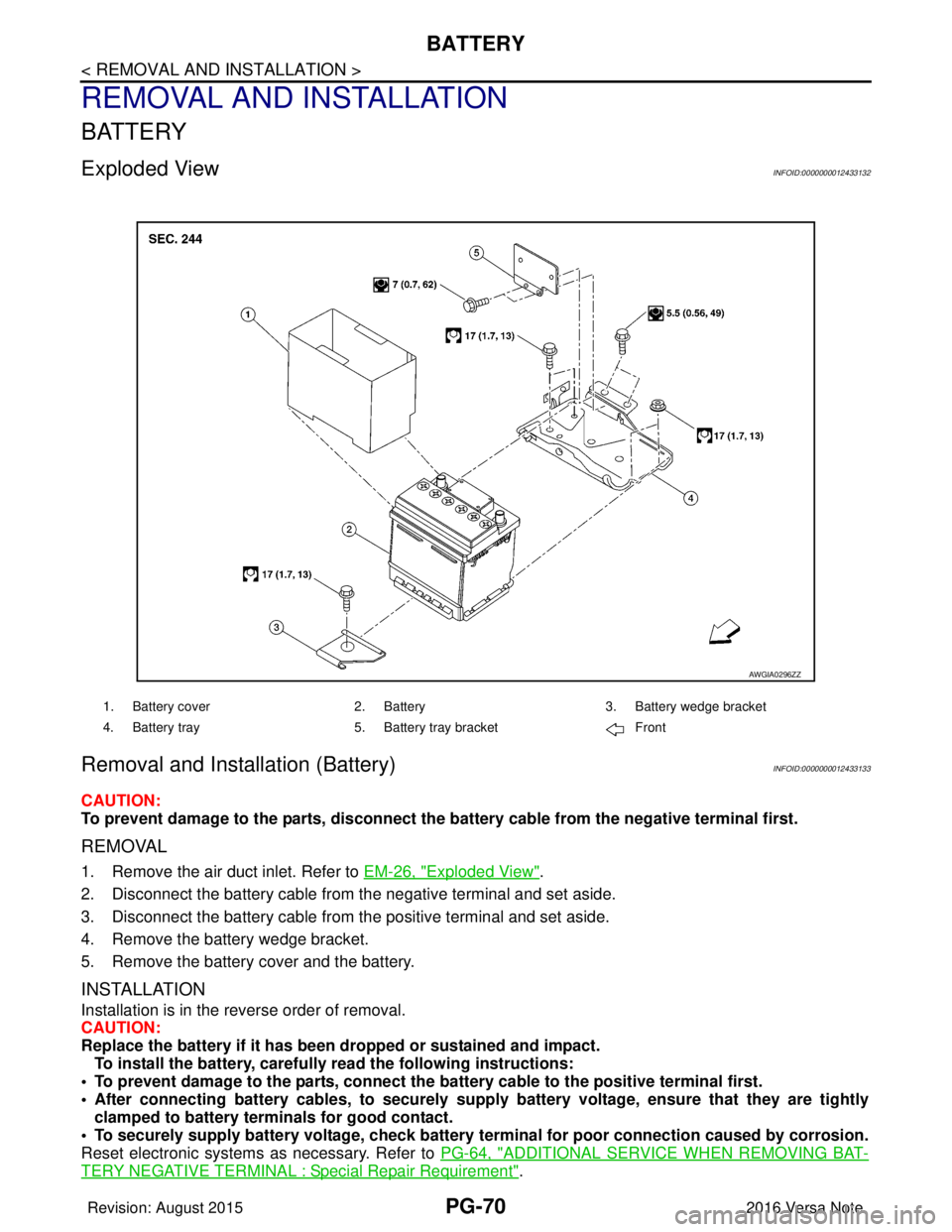
Exploded ViewINFOID:0000000012433132
Removal and Installation (Battery)INFOID:0000000012433133
CAUTION:
To prevent damage to the parts, disconnect the battery cable from the negative terminal first.
REMOVAL
1. Remove the air duct inlet. Refer to EM-26, "Exploded View".
2. Disconnect the battery cable from the negative terminal and set aside.
3. Disconnect the battery cable from the positive terminal and set aside.
4. Remove the battery wedge bracket.
5. Remove the battery cover and the battery.
INSTALLATION
Installation is in the reverse order of removal.
CAUTION:
Replace the battery if it has been dropped or sustained and impact. To install the battery, carefully read the following instructions:
• To prevent damage to the parts, connect the battery cable to the positive terminal first.
• After connecting battery cables, to securely supply battery voltage, ensure that they are tightly
clamped to battery term inals for good contact.
• To securely supply battery voltage, check battery terminal for poor connection caused by corrosion.
Reset electronic systems as necessary. Refer to PG-64, "
ADDITIONAL SERVICE WHEN REMOVING BAT-
TERY NEGATIVE TERMINAL : Special Repair Requirement".
AWGIA0296ZZ
1. Battery cover2. Battery3. Battery wedge bracket
4. Battery tray 5. Battery tray bracket Front
Revision: August 2015 2016 Versa Note
cardiagn.com
Page 2658 of 3641
PG
BATTERYPG-71
< REMOVAL AND INSTALLATION >
C
DE
F
G H
I
J
K L
B A
O P
N
Removal and Installation (Battery Tray)INFOID:0000000012433134
CAUTION:
To prevent damage to the parts, disconnect the battery cable from the negative terminal first.
REMOVAL
1. Remove the battery. Refer to
PG-70, "Removal and Installation (Battery)".
2. Remove the battery tray bracket. Refer to PG-70, "
Exploded View".
3. Remove the IPDM E/R. Refer to PCS-30, "
Removal and Installation".
4. Disconnect the harness from the TCM and remove the TCM bracket. Refer to TM-239, "
Removal and
Installation" (FOR CVT MODEL).
5. Disconnect the harness fr om the battery tray.
6. Remove the nuts and bolts and remove the battery tray. Refer to PG-70, "
Exploded View".
INSTALLATION
Installation is in the reverse order of removal.
CAUTION:
Replace electrical components as necessary, if any have been dropped or sustained and impact.
To install the battery, carefully read the following instructions:
• To prevent damage to the parts, connect the battery cable to the positive terminal first.
• After connecting battery cables, to securely supp ly battery voltage, ensure that they are tightly
clamped to battery terminals for good contact.
• To securely supply battery voltage, check battery terminal for poor connection caused by corrosion.
Reset electronic systems as necessary. Refer to PG-64, "
ADDITIONAL SERVICE WHEN REMOVING BAT-
TERY NEGATIVE TERMINAL : Special Repair Requirement".
Revision: August 2015 2016 Versa Note
cardiagn.com
Page 2659 of 3641
PG-72
< REMOVAL AND INSTALLATION >
BATTERY TERMINAL WITH FUSIBLE LINK
BATTERY TERMINAL WITH FUSIBLE LINK
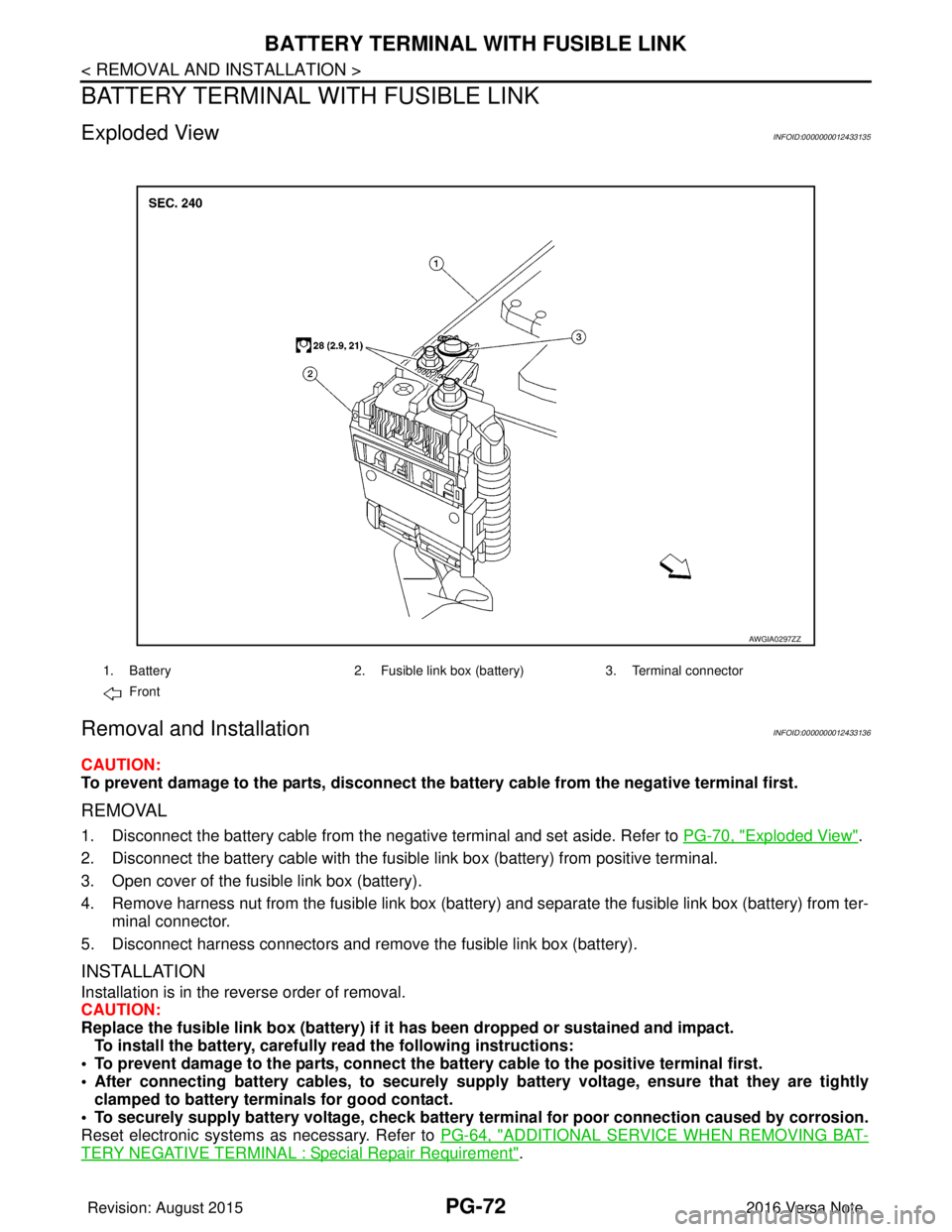
Exploded ViewINFOID:0000000012433135
Removal and InstallationINFOID:0000000012433136
CAUTION:
To prevent damage to the parts, disconnect the battery cable from the negative terminal first.
REMOVAL
1. Disconnect the battery cable from the negative terminal and set aside. Refer to PG-70, "Exploded View".
2. Disconnect the battery cable with the fusibl e link box (battery) from positive terminal.
3. Open cover of the fusible link box (battery).
4. Remove harness nut from the fusible link box (battery ) and separate the fusible link box (battery) from ter-
minal connector.
5. Disconnect harness connectors and remove the fusible link box (battery).
INSTALLATION
Installation is in the reverse order of removal.
CAUTION:
Replace the fusible link box (battery) if it has been dropped or sustained and impact.
To install the battery, carefully read the following instructions:
• To prevent damage to the parts, connect the battery cable to the positive terminal first.
• After connecting battery cables, to securely supply battery voltage, ensure that they are tightly
clamped to battery term inals for good contact.
• To securely supply battery voltage, check battery terminal for poor connection caused by corrosion.
Reset electronic systems as necessary. Refer to PG-64, "
ADDITIONAL SERVICE WHEN REMOVING BAT-
TERY NEGATIVE TERMINAL : Special Repair Requirement".
AWGIA0297ZZ
1. Battery2. Fusible link box (battery) 3. Terminal connector
Front
Revision: August 2015 2016 Versa Note
cardiagn.com