battery replacement NISSAN NOTE 2016 Service Repair Manual
[x] Cancel search | Manufacturer: NISSAN, Model Year: 2016, Model line: NOTE, Model: NISSAN NOTE 2016Pages: 3641, PDF Size: 28.72 MB
Page 509 of 3641
![NISSAN NOTE 2016 Service Repair Manual C1101, C1102, C1103, C1104 WHEEL SENSOR
BRC-61
< DTC/CIRCUIT DIAGNOSIS > [VDC/TCS/ABS]
C
D
E
G H
I
J
K L
M A
B
BRC
N
O P
4. Check the continuity between ABS actuator and electric unit (control unit) h](/img/5/57363/w960_57363-508.png "NISSAN NOTE 2016 Service Repair Manual C1101, C1102, C1103, C1104 WHEEL SENSOR
BRC-61
< DTC/CIRCUIT DIAGNOSIS > [VDC/TCS/ABS]
C
D
E
G H
I
J
K L
M A
B
BRC
N
O P
4. Check the continuity between ABS actuator and electric unit (control unit) h")
C1101, C1102, C1103, C1104 WHEEL SENSOR
BRC-61
< DTC/CIRCUIT DIAGNOSIS > [VDC/TCS/ABS]
C
D
E
G H
I
J
K L
M A
B
BRC
N
O P
4. Check the continuity between ABS actuator and electric unit (control unit) harness connector and wheel sensor harness connector. (Check the continuity while turning steering wheel left and right, or while mov-
ing center harness in wheel housing.)
Power Supply Circuit
Signal Circuit
Is the inspection result normal?
YES >> GO TO 10.
NO >> Repair / replace harness or connector, and GO TO 9.
9.PERFORM SELF-DIAGNOSIS (3)
With CONSULT
1. Connect ABS actuator and electric unit (control unit) harness connector.
2. Connect wheel sensor harness connector.
3. Erase “Self Diagnostic Result” of “ABS”.
4. Turn the ignition switch OFF → ON → OFF.
NOTE:
Wait at least 10 seconds after turning ignition switch OFF or ON.
5. Start the engine.
6. Drive the vehicle at approx. 50 km/h ( 31 MPH) or more for approx. 2 minutes.
NOTE:
Vehicle must be driven after repair or replacement to erase the previous DTCs.
7. Stop the vehicle.
8. Turn the ignition switch OFF. NOTE:
Wait at least 10 seconds after turning ignition switch OFF.
9. Start the engine.
NOTE:
Wait at least 10 seconds after starting the engine.
10. Perform “Self Diagnostic Result” of “ABS”.
Is DTC
“C1101”, “C1102”, “C1103” or “C1104” detected?
YES >> GO TO 10.
NO >> Inspection End.
10.CHECK WHEEL SENSOR OUTPUT SIGNAL
1. Disconnect ABS actuator and electric unit (control unit) harness connector.
2. Disconnect wheel sensor harness connector.
3. Connect ABS active wheel sensor tester (SST: J-45741-A) to wheel sensor using appropriate adapter.
4. Turn the ABS active wheel sensor tester power switch ON. NOTE:
The green POWER indicator should illuminate. If the POWER indicator does not illuminate, replace the
battery in the ABS active wheel sensor tester before proceeding.
5. Spin the wheel of the vehicle by hand and observe the red SENSOR indicator on the ABS active wheel
sensor tester. The red SENSOR indicator should flash ON and OFF to indicate an output signal.
ABS actuator and electric unit (control unit) Wheel sensor
Continuity
Connector Terminal Connector Terminal
E33 36
E51 (Front LH wheel)
2Yes
27
E52 (Front RH wheel)
29 B22 (Rear LH wheel)
34 B35 (Rear RH wheel)
ABS actuator and electric unit (control unit) Wheel sensor
Continuity
Connector Terminal Connector Terminal
E33 37
E51 (Front LH wheel)
1Yes
26
E52 (Front RH wheel)
30 B22 (Rear LH wheel)
33 B35 (Rear RH wheel)
Revision: August 2015 2016 Versa Note
cardiagn.com
Page 527 of 3641
![NISSAN NOTE 2016 Service Repair Manual C1115 WHEEL SENSORBRC-79
< DTC/CIRCUIT DIAGNOSIS > [VDC/TCS/ABS]
C
D
E
G H
I
J
K L
M A
B
BRC
N
O P
>> GO TO 6.
6.CHECK WHEEL SENSOR
Check the wheel sensor for damage.
Is the inspection result normal?](/img/5/57363/w960_57363-526.png "NISSAN NOTE 2016 Service Repair Manual C1115 WHEEL SENSORBRC-79
< DTC/CIRCUIT DIAGNOSIS > [VDC/TCS/ABS]
C
D
E
G H
I
J
K L
M A
B
BRC
N
O P
>> GO TO 6.
6.CHECK WHEEL SENSOR
Check the wheel sensor for damage.
Is the inspection result normal?")
C1115 WHEEL SENSORBRC-79
< DTC/CIRCUIT DIAGNOSIS > [VDC/TCS/ABS]
C
D
E
G H
I
J
K L
M A
B
BRC
N
O P
>> GO TO 6.
6.CHECK WHEEL SENSOR
Check the wheel sensor for damage.
Is the inspection result normal?
YES >> GO TO 7.
NO >> GO TO 8.
7.CHECK WHEEL SENSOR OUTPUT SIGNAL
1. Disconnect ABS actuator and electric unit (control unit) harness connector.
2. Connect ABS active wheel sensor tester (SST: J-45741-A) to wheel sensor using appropriate adapter.
3. Turn the ABS active wheel sensor tester power switch ON. NOTE:
The green POWER indicator should illuminate. If the POWER indicator does not illuminate, replace the
battery in the ABS active wheel sensor tester before proceeding.
4. Spin the wheel of the vehicle by hand and observe the red SENSOR indicator on the ABS active wheel
sensor tester. The red SENSOR indicator should flash ON and OFF to indicate an output signal.
NOTE:
If the red SENSOR indicator illuminates but does not flash, reverse the polarity of the tester leads and
retest.
Does the ABS active wheel s ensor tester detect a signal?
YES >> GO TO 11.
NO >> GO TO 8.
8.REPLACE WHEEL SENSOR (1)
With CONSULT
1. Replace the wheel sensor.
- Front: Refer to BRC-140, "
FRONT WHEEL SENSOR : Removal and Installation".
- Rear: Refer to BRC-141, "
REAR WHEEL SENSOR : Removal and Installation".
2. Connect ABS actuator and electric unit (control unit) harness connector.
3. Erase “Self Diagnostic Result” of “ABS”
4. Turn the ignition switch OFF → ON → OFF.
NOTE:
Wait at least 10 seconds after turning ignition switch OFF or ON.
5. Start the engine.
6. Select “DATA MONITOR” of “ABS”, check “FR LH SENSOR”, “FR RH SENSOR”, “RR LH SENSOR” and “RR RH SENSOR”.
NOTE:
Set the “DATA MONITOR” recording speed to “10 msec”.
7. Read the values (wheel speed) of both the norma l wheel sensors and malfunctioning wheel sensor.
NOTE:
Vehicle must be driven after repair or replacement to erase the previous DTCs.
Note the difference at 50 km/h (31 MPH) between t he wheel speed detected by the malfunctioning wheel sen-
sor and the maximum/minimum wheel speed detected by the normal wheel sensors, is the difference within
5%, respectively?
YES >> GO TO 9.
NO >> GO TO 19.
9.PERFORM SELF-DIAGNOSIS (2)
With CONSULT
1. Stop the vehicle.
2. Turn the ignition switch OFF.
NOTE:
Wait at least 10 seconds after turning ignition switch OFF.
3. Start the engine. NOTE:
Wait at least 10 seconds after starting the engine.
4. Perform “Self Diagnostic Result” of “ABS”.
Revision: August 2015 2016 Versa Note
cardiagn.com
Page 820 of 3641
![NISSAN NOTE 2016 Service Repair Manual INTELLIGENT KEY LOW BATTERY WARNING DOES NOT OPERATE
DLK-131
< SYMPTOM DIAGNOSIS > [WITH INTELLIGENT KEY SYSTEM]
C
D
E
F
G H
I
J
L
M A
B
DLK
N
O P
INTELLIGENT KEY LOW BATTERY WARNING DOES NOT OPERATE](/img/5/57363/w960_57363-819.png "NISSAN NOTE 2016 Service Repair Manual INTELLIGENT KEY LOW BATTERY WARNING DOES NOT OPERATE
DLK-131
< SYMPTOM DIAGNOSIS > [WITH INTELLIGENT KEY SYSTEM]
C
D
E
F
G H
I
J
L
M A
B
DLK
N
O P
INTELLIGENT KEY LOW BATTERY WARNING DOES NOT OPERATE")
INTELLIGENT KEY LOW BATTERY WARNING DOES NOT OPERATE
DLK-131
< SYMPTOM DIAGNOSIS > [WITH INTELLIGENT KEY SYSTEM]
C
D
E
F
G H
I
J
L
M A
B
DLK
N
O P
INTELLIGENT KEY LOW BATTERY WARNING DOES NOT OPERATE
Diagnosis ProcedureINFOID:0000000012430079
1.CHECK DTC WITH BCM
Check that DTC is not detected with BCM.
Is the inspection result normal?
YES >> GO TO 2.
NO >> Perform trouble diagnosis relevant to DTC indicated.
2.CHECK DTC WITH COMBINATION METER
Check that DTC is not detected with combination meter.
Is the inspection result normal?
YES >> GO TO 3.
NO >> Perform trouble diagnosis relevant to DTC indicated.
3.CHECK LO- BATT OF KEY FOB WARN SETTING IN WORK SUPPORT
1. Select “INTELLIGENT KEY” of BCM.
2. Select “LO- BATT OF KEY FOB WARN” in “Work support”.
3. Check “LO- BATT OF KEY FOB WARN” setting in “Work support”. Refer to BCS-22, "
INTELLIGENT KEY : CONSULT Function (BCM - INTELLIGENT KEY)".
Is the inspection result normal?
YES >> GO TO 4.
NO >> Set “ON” in “LO- BATT OF KEY FOB WARN”.
4.CHECK INTELLIGENT KEY
Check Intelligent Key.
Refer to DLK-104, "
ComponentFunctionCheck".
Is the inspection result normal?
YES >> GO TO 5.
NO >> Repair or replace the malfunctioning parts.
5.CHECK INSIDE KEY ANTENNA
Check inside key antenna.
• Instrument center: Refer to DLK-65, "
DTC Logic".
• Console: Refer to DLK-67, "
DTC Logic".
• Trunk room: Refer to DLK-69, "
DTC Logic".
Is the inspection result normal?
YES >> GO TO 6.
NO >> Repair or replace the malfunctioning parts.
6.CHECK KEY WARNING LAMP
Check key warning lamp.
Refer to DLK-105, "
ComponentFunctionCheck".
Is the inspection result normal?
YES >> GO TO 7.
NO >> Repair or replace the malfunctioning parts.
7.REPLACE BCM
1. Replace BCM. Refer to BCS-74, "
Removal and Installation".
2. Confirm the operation after replacement.
Is the result normal?
YES >> Inspection End.
NO >> Check intermittent incident. Refer to GI-42, "
Intermittent Incident".
Revision: August 2015 2016 Versa Note
cardiagn.com
Page 877 of 3641
![NISSAN NOTE 2016 Service Repair Manual DLK-188
< REMOVAL AND INSTALLATION >[WITH INTELLIGENT KEY SYSTEM]
INTELLIGENT KEY BATTERY
INTELLIGENT KEY BATTERY
Removal and InstallationINFOID:0000000012430149
1. Release the lock knob at the back o](/img/5/57363/w960_57363-876.png "NISSAN NOTE 2016 Service Repair Manual DLK-188
< REMOVAL AND INSTALLATION >[WITH INTELLIGENT KEY SYSTEM]
INTELLIGENT KEY BATTERY
INTELLIGENT KEY BATTERY
Removal and InstallationINFOID:0000000012430149
1. Release the lock knob at the back o")
DLK-188
< REMOVAL AND INSTALLATION >[WITH INTELLIGENT KEY SYSTEM]
INTELLIGENT KEY BATTERY
INTELLIGENT KEY BATTERY
Removal and InstallationINFOID:0000000012430149
1. Release the lock knob at the back of the Intelligent Key and remove the mechanical key.
2. Insert a suitable tool (A) wrapped wi
th a cloth into the slit of the
corner and rotate it to separate the upper part from the lower
part.
CAUTION:
• Do not touch the circuit board or battery terminal.
• The key fob is water-resistant. However, if it does get wet,
immediately wipe it dry.
3. Replace the battery with new one.
4. Align the tips of the upper and lower parts, and then push them together until it is securely closed.
CAUTION:
• When replacing battery, keep dirt, grease, and other for-eign materials off the electrode contact area.
• After replacing the battery, check that all Intelligent Key functions work normally.
PIIB6221E
Battery replacement :Coin-type lithium battery
(CR2025)
PIIB6222E
Revision: August 2015 2016 Versa Note
cardiagn.com
Page 999 of 3641
![NISSAN NOTE 2016 Service Repair Manual DLK-310
< REMOVAL AND INSTALLATION >[WITHOUT INTELLIGENT KEY SYSTEM]
KEYFOB BATTERY
KEYFOB BATTERY
Removal and InstallationINFOID:0000000012430286
REPLACEMENT
1. Remove screw from the rear of keyfob.](/img/5/57363/w960_57363-998.png "NISSAN NOTE 2016 Service Repair Manual DLK-310
< REMOVAL AND INSTALLATION >[WITHOUT INTELLIGENT KEY SYSTEM]
KEYFOB BATTERY
KEYFOB BATTERY
Removal and InstallationINFOID:0000000012430286
REPLACEMENT
1. Remove screw from the rear of keyfob.")
DLK-310
< REMOVAL AND INSTALLATION >[WITHOUT INTELLIGENT KEY SYSTEM]
KEYFOB BATTERY
KEYFOB BATTERY
Removal and InstallationINFOID:0000000012430286
REPLACEMENT
1. Remove screw from the rear of keyfob.
2. Place the key with the lower case facing up. Use a suitable tool wrapped with tape between upper case
and lower case and separate the lower case from the upper case.
CAUTION:
• Do not touch the circuit board or battery termi nal. Doing so could cause the keyfob to malfunc-
tion
• The keyfob is water-resistant. However, if it does get wet, immediately wipe it dry.
3. When replacing the circuit board assembly, remove circuit board assembly from the upper case.
[Circuit board assembly: Switch rubber + Board surface]
CAUTION:
Do not touch the printed circuits directly.
4. Remove the battery from the lower case and replace it.
CAUTION:
When replacing battery, keep dirt, grease, and other foreign materials off the electrode contact
area.
5. After replacement, fit the lower and upper cases together and tighten with the screw. CAUTION:
After replacing the battery, Be sure to check that door locking operates normally using the keyfob.
Refer to DLK-247, "
ComponentFunctionCheck".
Battery replacement : Coin-type lithium battery
(CR1620)
Revision: August 2015 2016 Versa Note
cardiagn.com
Page 1252 of 3641
![NISSAN NOTE 2016 Service Repair Manual ADDITIONAL SERVICE WHEN REPLACING ECMEC-125
< BASIC INSPECTION > [HR16DE]
C
D
E
F
G H
I
J
K L
M A
EC
NP
O
ADDITIONAL SERVICE WHEN REPLACING ECM
DescriptionINFOID:0000000012431350
When replacing ECM, t](/img/5/57363/w960_57363-1251.png "NISSAN NOTE 2016 Service Repair Manual ADDITIONAL SERVICE WHEN REPLACING ECMEC-125
< BASIC INSPECTION > [HR16DE]
C
D
E
F
G H
I
J
K L
M A
EC
NP
O
ADDITIONAL SERVICE WHEN REPLACING ECM
DescriptionINFOID:0000000012431350
When replacing ECM, t")
ADDITIONAL SERVICE WHEN REPLACING ECMEC-125
< BASIC INSPECTION > [HR16DE]
C
D
E
F
G H
I
J
K L
M A
EC
NP
O
ADDITIONAL SERVICE WHEN REPLACING ECM
DescriptionINFOID:0000000012431350
When replacing ECM, the following procedure mu
st be performed. (For details, refer to EC-125, "Work Proce-
dure".)
PROGRAMMING OPERATION
NOTE:
After replacing with a blank ECM, programming is required to write ECM information. Be sure to follow the pro-
cedure to perform the programming.
Work ProcedureINFOID:0000000012431351
1.CHECK ECM PART NUMBER
Check ECM part number to see whether it is blank ECM or not.
NOTE:
• Part number of blank ECM is 23703 - ×××××.
• Check the part number when ordering ECM or with the one included in the label on the container box.
Is the ECM a blank ECM?
YES >> GO TO 2.
NO >> GO TO 4.
2.SAVE ECM PART NUMBER
Read out the part number from the old ECM and save the number, following the programming instructions.
Refer to “CONSULT Operation Manual”.
NOTE:
• The ECM part number is saved in CONSULT.
• Even when ECM part number is not saved in CONSULT, go to 3.
>> GO TO 3.
3.PERFORM ECM PROGRAMMING
After replacing ECM, perform the ECM program ming. Refer to “CONSULT Operation Manual”.
NOTE:
• Refer to EC-477, "
Removal and Installation" for replacement of ECM.
• During programming, maintain the following conditions:
- Ignition switch: ON
- Electric load: OFF
- Brake pedal: Not depressed
- Battery voltage: 12 – 13.5 V (Be sure to check the va lue of battery voltage by selecting “BATTERY VOLT” in
“Data monitor” of CONSULT.)
>> GO TO 4.
4.REPLACE ECM
Replace ECM. Refer to EC-477, "
Removal and Installation".
>> GO TO 5.
5.PERFORM VIN REGISTRATION
Refer to EC-127, "
Description".
>> GO TO 6.
6.PERFORM INITIALIZATION OF NATS SYSTEM AND REGISTRATION OF ALL NATS IGNITION KEY IDS
Refer to SEC-49, "
ECM : Description"(with I-Key), SEC-142, "ECM RE-COMMUNICATING FUNCTION :
Description"(without I-Key).
Revision: August 2015 2016 Versa Note
cardiagn.com
Page 2096 of 3641

INL-2
DTC/CIRCUIT DIAGNOSIS ...................... ...39
POWER SUPPLY AND GROUND CIRCUIT .. ...39
BCM (BODY CONTROL SYSTEM) (WITH INTEL-
LIGENT KEY SYSTEM) ..... .......................................
39
BCM (BODY CONTROL S YSTEM) (WITH INTEL-
LIGENT KEY SYSTEM) : Dia gnosis Procedure .....
39
BCM (BODY CONTROL SYST EM) (WITHOUT IN-
TELLIGENT KEY SYSTEM) . ....................................
39
BCM (BODY CONTROL SYSTEM) (WITHOUT
INTELLIGENT KEY SYSTEM) : Diagnosis Proce-
dure ..................................................................... ...
39
BATTERY SAVER OUTPUT/POWER SUP-
PLY CIRCUIT .....................................................
41
Description ........................................................... ...41
Component Function Check ...................................41
Diagnosis Procedure ..............................................41
INTERIOR ROOM LAMP CONTROL CIRCUIT
...
43
Description ........................................................... ...43
Component Function Check ...................................43
Diagnosis Procedure ..............................................43
CARGO LAMP CONTROL CIRCUIT ................46
Description ........................................................... ...46
Component Function Check ...................................46
Diagnosis Procedure ..............................................46
PUSH-BUTTON IGNITION SWITCH ILLUMI-
NATION CIRCUIT ..............................................
48
Description ........................................................... ...48
Component Function Check ...................................48
Diagnosis Procedure ............................................ ...48
SYMPTOM DIAGNOSIS ............................50
INTERIOR LIGHTING SYSTEM SYMPTOMS ...50
Symptom Table .................................................... ...50
REMOVAL AND INSTALLATION ..............51
MAP LAMP ........................................................51
Exploded View ..................................................... ...51
Removal and Installation .........................................51
Bulb Replacement ................................................ ...51
INTERIOR ROOM LAMP ...................................53
Exploded View ..................................................... ...53
Removal and Installation .........................................53
Bulb Replacement ................................................ ...53
CARGO ROOM LAMP ......................................54
Exploded View ..................................................... ...54
Removal and Installation .........................................54
Bulb Replacement ................................................ ...54
SHIFT SELECTOR LAMP .................................55
Bulb Replacement ...................................................55
ILLUMINATION CONTROL SWITCH ...............56
Removal and Installation .........................................56
SERVICE DATA AND SPECIFICATIONS
(SDS) .......... ................................. ...............
57
SERVICE DATA AND SPECIFICATIONS
(SDS) .............................................................. ...
57
Bulb Specifications ............................................... ...57
Revision: August 2015 2016 Versa Note
cardiagn.com
Page 2323 of 3641
MA-8
< PERIODIC MAINTENANCE >
PERIODIC MAINTENANCE
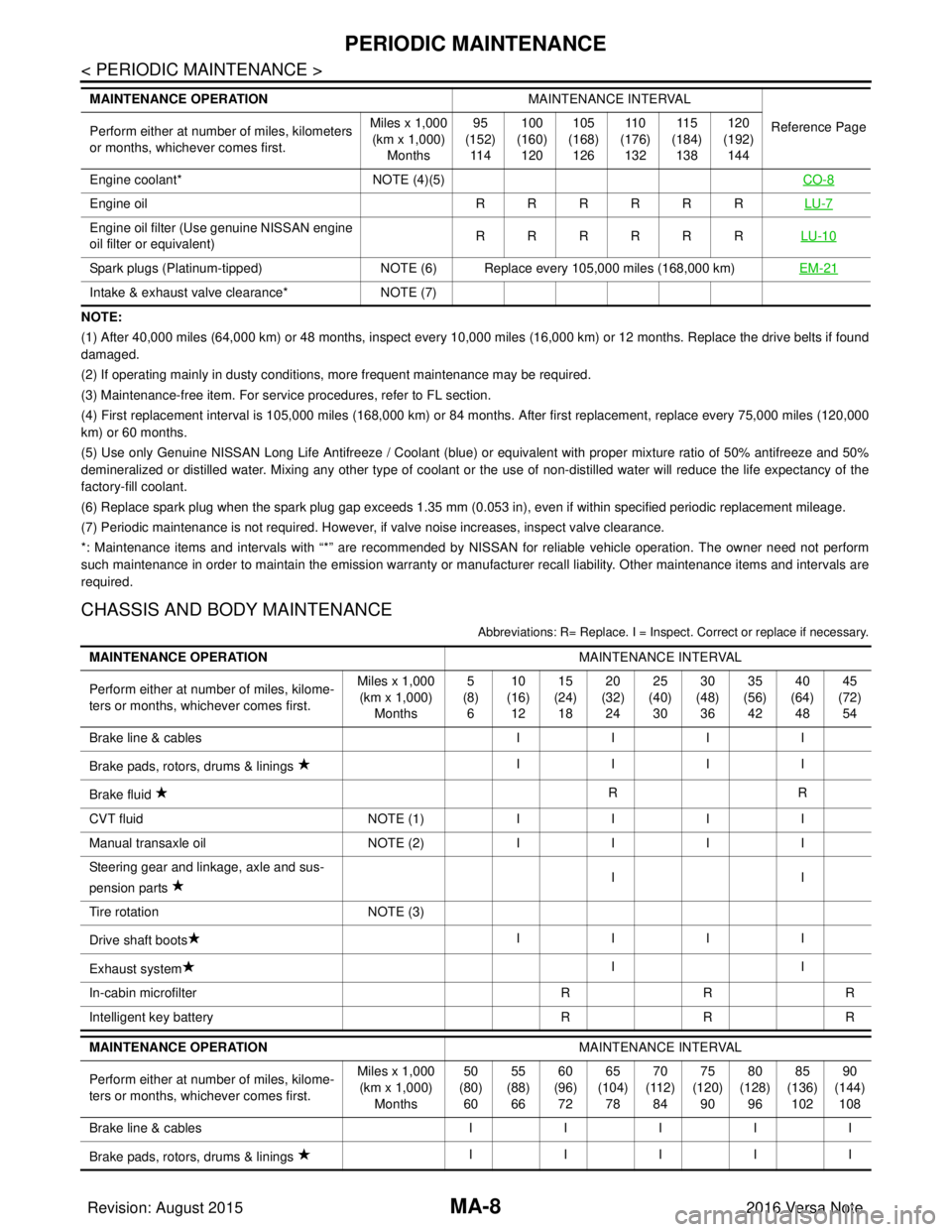
NOTE:
(1) After 40,000 miles (64,000 km) or 48 months, inspect every 10,000 miles (16,000 km) or 12 months. Replace the drive belts if found
damaged.
(2) If operating mainly in dusty conditions, more frequent maintenance may be required.
(3) Maintenance-free item. For service procedures, refer to FL section.
(4) First replacement interval is 105,000 miles (168,000 km) or 84 months. After first replacement, replace every 75,000 miles (120,000
km) or 60 months.
(5) Use only Genuine NISSAN Long Life Antifreeze / Coolant (blue) or equivalent with proper mixture ratio of 50% antifreeze and 50%
demineralized or distilled water. Mixing any other type of coolant or the use of non-distilled water will reduce the life expec tancy of the
factory-fill coolant.
(6) Replace spark plug when the spark plug gap exceeds 1.35 mm (0.053 in), even if within specified periodic replacement mileag e.
(7) Periodic maintenance is not required. However, if valve noise increases, inspect valve clearance.
*: Maintenance items and intervals with “*” are recommended by NISSAN for reli able vehicle operation. The owner need not perform
such maintenance in order to maintain the emission warranty or manufacturer recall liability. Other maintenance items and inter vals are
required.
CHASSIS AND BODY MAINTENANCE
Abbreviations: R= Replace. I = Inspec t. Correct or replace if necessary.
Engine coolant* NOTE (4)(5) CO-8
Engine oil RRRRRRLU-7
Engine oil filter (Use genuine NISSAN engine
oil filter or equivalent) RRRRRR
LU-10
Spark plugs (Platinum-tipped)NOTE (6) Replace every 105,000 miles (168,000 km) EM-21
Intake & exhaust valve clearance*NOTE (7)
MAINTENANCE OPERATION
MAINTENANCE INTERVAL
Reference Page
Perform either at number of miles, kilometers
or months, whichever comes first. Miles x 1,000
(km x 1,000)
Months 95
(152)
11 4 100
(160)
120 105
(168)
126 11 0
(176)
132 11 5
(184)
138 120
(192)
144
MAINTENANCE OPERATION MAINTENANCE INTERVAL
Perform either at number of miles, kilome-
ters or months, whichever comes first. Miles x 1,000
(km x 1,000)
Months 5
(8)
6 10
(16)
12 15
(24)
18 20
(32)
24 25
(40)
30 30
(48)
36 35
(56)
42 40
(64)
48 45
(72)
54
Brake line & cables IIII
Brake pads, rotors, drums & linings IIII
Brake fluid RR
CVT fluid NOTE (1)IIII
Manual transaxle oil NOTE (2)IIII
Steering gear and linkage, axle and sus-
pension parts II
Tire rotation NOTE (3)
Drive shaft boots IIII
Exhaust system II
In-cabin microfilter RRR
Intelligent key battery RRR
MAINTENANCE OPERATION MAINTENANCE INTERVAL
Perform either at number of miles, kilome-
ters or months, whichever comes first. Miles x 1,000
(km x 1,000) Months 50
(80) 60 55
(88) 66 60
(96) 72 65
(104) 78 70
(112) 84 75
(120) 90 80
(128) 96 85
(136) 102 90
(144) 108
Brake line & cables III II
Brake pads, rotors, drums & linings IIIII
Revision: August 2015
2016 Versa Note
cardiagn.com
Page 2872 of 3641
![NISSAN NOTE 2016 Service Repair Manual SYSTEMSEC-15
< SYSTEM DESCRIPTION > [WITH INTELLIGENT KEY SYSTEM]
C
D
E
F
G H
I
J
L
M A
B
SEC
N
O P
NISSAN ANTI-THEFT SYSTEM : System DescriptionINFOID:0000000012430342
SYSTEM DIAGRAM
SYSTEM DESCRIPT](/img/5/57363/w960_57363-2871.png "NISSAN NOTE 2016 Service Repair Manual SYSTEMSEC-15
< SYSTEM DESCRIPTION > [WITH INTELLIGENT KEY SYSTEM]
C
D
E
F
G H
I
J
L
M A
B
SEC
N
O P
NISSAN ANTI-THEFT SYSTEM : System DescriptionINFOID:0000000012430342
SYSTEM DIAGRAM
SYSTEM DESCRIPT")
SYSTEMSEC-15
< SYSTEM DESCRIPTION > [WITH INTELLIGENT KEY SYSTEM]
C
D
E
F
G H
I
J
L
M A
B
SEC
N
O P
NISSAN ANTI-THEFT SYSTEM : System DescriptionINFOID:0000000012430342
SYSTEM DIAGRAM
SYSTEM DESCRIPTION
• The Nissan Anti-Theft System (NATS) prevents the engine from being started by Intelligent Key whose ID is
not registered to the vehicle (BCM). It has higher protection against auto theft involving the duplication of
mechanical keys.
• The ignition key integrated in the Intelligent Key cannot start the engine. When the Intelligent Key battery is
discharged, the NATS ID verification is performed between the transponder integrated with Intelligent Key
and BCM via NATS antenna amp. when the Intelligent Ke y backside is contacted to push-button ignition
switch while brake pedal is depressed. If the verifica tion result is OK, the engine start operation can be per-
formed by the push-button ignition switch operation.
• Locate the security indicator lamp and always blinks it when the ignition switch is in any position except ON
to warn that the vehicle is equipped with Nissan Anti-Theft System (NATS).
• Up to 4 Intelligent Keys can be registered (including the standard ignition key) upon request from the owner.
• When replacing ECM, BCM or Intelligent Key, the spec ified procedure (Initialization and registration) using
CONSULT is required.
• For initialization and registration of Intelligent Keys, refer to CONSULT Immobilizer mode and follow the on-
screen instructions.
• Possible symptom of NATS malfunction is “Engine c an not start”. This symptom also occurs because of
other than NATS malfunction, so start the trouble diagnosis according to SEC-46, "
Work Flow".
• If ECM other than genuine part is installed, the engine cannot be started. For ECM replacement procedure, refer to EC-477, "
Removal and Installation".
ALKIA3647GB
Revision: August 2015 2016 Versa Note
cardiagn.com
Page 3148 of 3641
SR-32
< REMOVAL AND INSTALLATION >
OCCUPANT CLASSIFICATION SYSTEM CONTROL UNIT
OCCUPANT CLASSIFICATION SYSTEM CONTROL UNIT
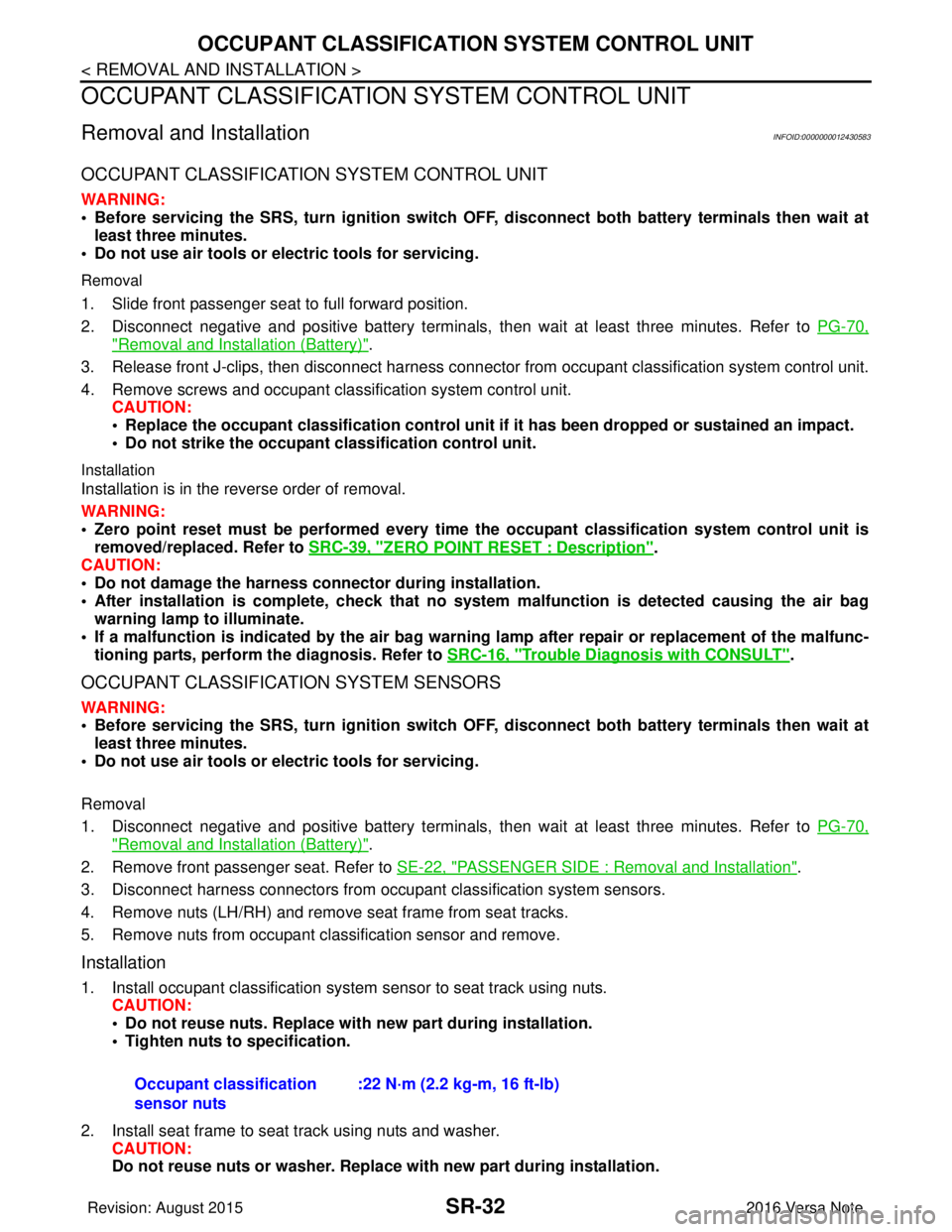
Removal and InstallationINFOID:0000000012430583
OCCUPANT CLASSIFICATION SYSTEM CONTROL UNIT
WARNING:
• Before servicing the SRS, turn ignition switch OFF, disconnect bot h battery terminals then wait at
least three minutes.
• Do not use air tools or el ectric tools for servicing.
Removal
1. Slide front passenger seat to full forward position.
2. Disconnect negative and positive battery terminals, then wait at least three minutes. Refer to PG-70,
"Removal and Installation (Battery)".
3. Release front J-clips, then disconnect harness connector from occupant classification system control unit.
4. Remove screws and occupant classification system control unit. CAUTION:
• Replace the occupant classification control unit if it has been dropped or sustained an impact.
• Do not strike the occupant classification control unit.
Installation
Installation is in the reverse order of removal.
WARNING:
• Zero point reset must be performed every time the occupant classification system control unit is
removed/replaced. Refer to SRC-39, "
ZERO POINT RESET : Description".
CAUTION:
• Do not damage the harness connector during installation.
• After installation is complete, check that no syst em malfunction is detected causing the air bag
warning lamp to illuminate.
• If a malfunction is indicated by the air bag warnin g lamp after repair or replacement of the malfunc-
tioning parts, perform the diagnosis. Refer to SRC-16, "
Trouble Diagnosis with CONSULT".
OCCUPANT CLASSIFICATION SYSTEM SENSORS
WARNING:
• Before servicing the SRS, turn ignition switch OFF, disconnect bot h battery terminals then wait at
least three minutes.
• Do not use air tools or el ectric tools for servicing.
Removal
1. Disconnect negative and positive battery terminals, then wait at least three minutes. Refer to PG-70,
"Removal and Installation (Battery)".
2. Remove front passenger seat. Refer to SE-22, "
PASSENGER SIDE : Removal and Installation".
3. Disconnect harness connectors from occu pant classification system sensors.
4. Remove nuts (LH/RH) and remove seat frame from seat tracks.
5. Remove nuts from occupant classification sensor and remove.
Installation
1. Install occupant classification system sensor to seat track using nuts. CAUTION:
• Do not reuse nuts. Replace with new part during installation.
• Tighten nuts to specification.
2. Install seat frame to seat track using nuts and washer. CAUTION:
Do not reuse nuts or washer. Replace with new part during installation.
Occupant classification
sensor nuts
:22 N·m (2.2 kg-m, 16 ft-lb)
Revision: August 2015
2016 Versa Note
cardiagn.com