diagram NISSAN NOTE 2016 Service Repair Manual
[x] Cancel search | Manufacturer: NISSAN, Model Year: 2016, Model line: NOTE, Model: NISSAN NOTE 2016Pages: 3641, PDF Size: 28.72 MB
Page 2133 of 3641
POWER SUPPLY AND GROUND CIRCUITINL-39
< DTC/CIRCUIT DIAGNOSIS >
C
DE
F
G H
I
J
K
M A
B
INL
N
O P
DTC/CIRCUIT DIAGNOSIS
POWER SUPPLY AND GROUND CIRCUIT
BCM (BODY CONTROL SYSTEM) (W ITH INTELLIGENT KEY SYSTEM)
BCM (BODY CONTROL SYSTEM) (WITH IN TELLIGENT KEY SYSTEM) : Diagnosis
Procedure
INFOID:0000000012542978
Regarding Wiring Diagram information, refer to BCS-52, "Wiring Diagram".
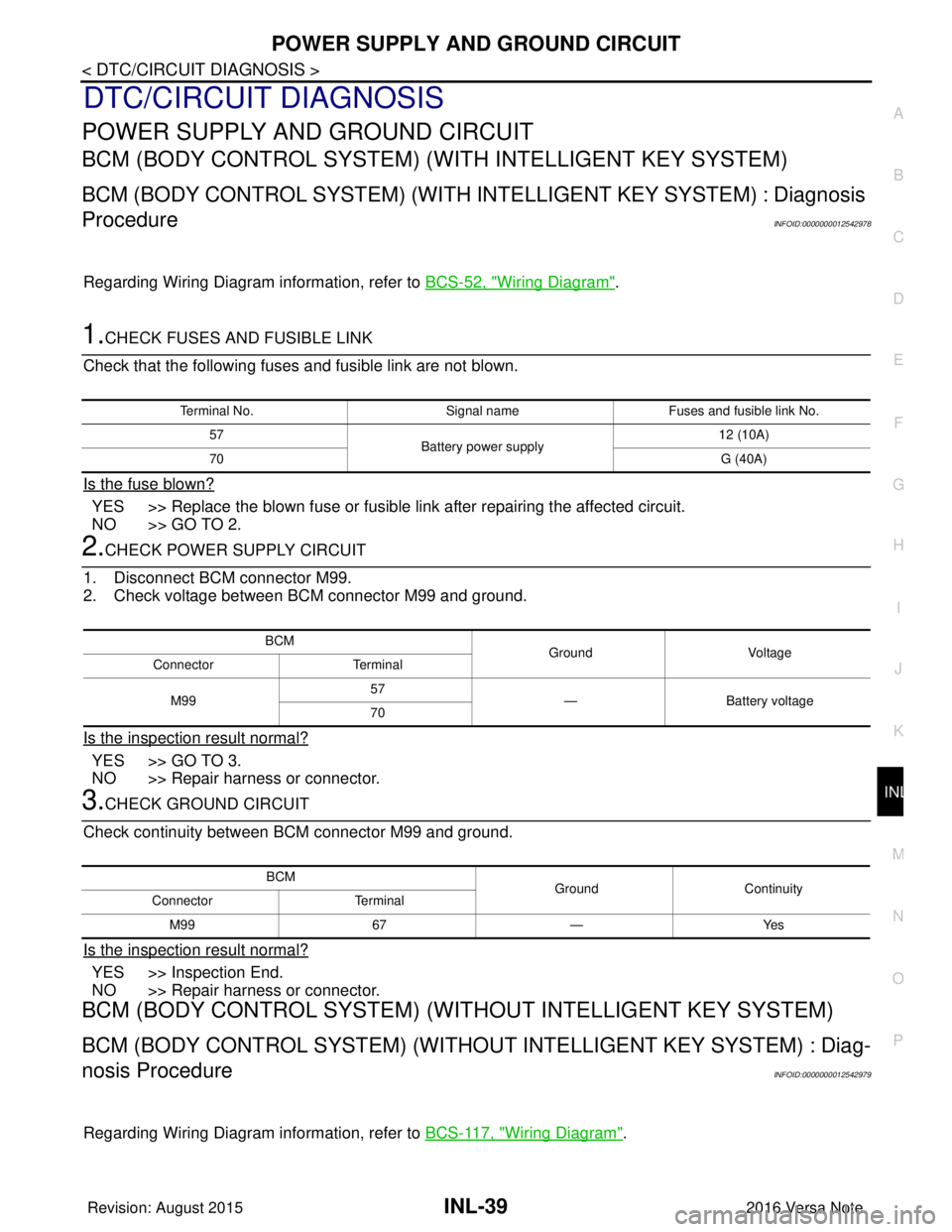
1.CHECK FUSES AND FUSIBLE LINK
Check that the following fuses and fusible link are not blown.
Is the fuse blown?
YES >> Replace the blown fuse or fusible link after repairing the affected circuit.
NO >> GO TO 2.
2.CHECK POWER SUPPLY CIRCUIT
1. Disconnect BCM connector M99.
2. Check voltage between BCM connector M99 and ground.
Is the inspection result normal?
YES >> GO TO 3.
NO >> Repair harness or connector.
3.CHECK GROUND CIRCUIT
Check continuity between BCM connector M99 and ground.
Is the inspection result normal?
YES >> Inspection End.
NO >> Repair harness or connector.
BCM (BODY CONTROL SYSTEM) (WIT HOUT INTELLIGENT KEY SYSTEM)
BCM (BODY CONTROL SYSTEM) (WITHOUT INTELLIGENT KEY SYSTEM) : Diag-
nosis Procedure
INFOID:0000000012542979
Regarding Wiring Diagram information, refer to BCS-117, "Wiring Diagram".
Terminal No.Signal nameFuses and fusible link No.
57 Battery power supply 12 (10A)
70 G (40A)
BCM
Ground Voltage
Connector Terminal
M99 57
— Battery voltage
70
BCM GroundContinuity
Connector Terminal
M99 67—Yes
Revision: August 2015 2016 Versa Note
cardiagn.com
Page 2135 of 3641
BATTERY SAVER OUTPUT/POWER SUPPLY CIRCUITINL-41
< DTC/CIRCUIT DIAGNOSIS >
C
DE
F
G H
I
J
K
M A
B
INL
N
O P
BATTERY SAVER OUTPUT/POWER SUPPLY CIRCUIT
DescriptionINFOID:0000000012432739
Provides the battery saver output/pow er supply. Also cuts the power supply when the interior lamp battery
saver is activated.
Component Function CheckINFOID:0000000012432740
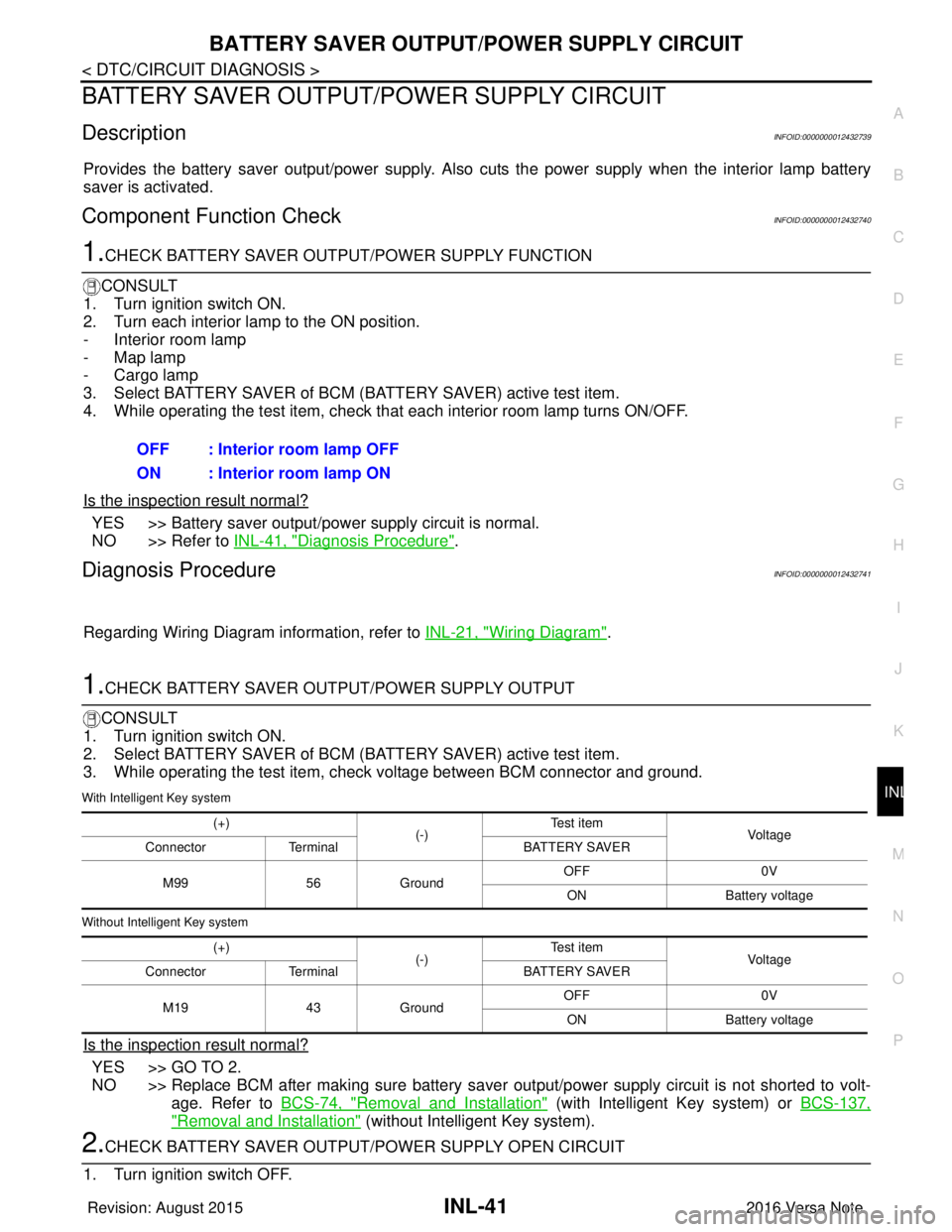
1.CHECK BATTERY SAVER OUTPUT /POWER SUPPLY FUNCTION
CONSULT
1. Turn ignition switch ON.
2. Turn each interior lamp to the ON position.
- Interior room lamp
- Map lamp
- Cargo lamp
3. Select BATTERY SAVER of BCM (BATTERY SAVER) active test item.
4. While operating the test item, check that each interior room lamp turns ON/OFF.
Is the inspection result normal?
YES >> Battery saver output/power supply circuit is normal.
NO >> Refer to INL-41, "
Diagnosis Procedure".
Diagnosis ProcedureINFOID:0000000012432741
Regarding Wiring Diagram information, refer to INL-21, "Wiring Diagram".
1.CHECK BATTERY SAVER OUTPUT/POWER SUPPLY OUTPUT
CONSULT
1. Turn ignition switch ON.
2. Select BATTERY SAVER of BCM (BATTERY SAVER) active test item.
3. While operating the test item, check voltage between BCM connector and ground.
With Intelligent Key system
Without Intelligent Key system
Is the inspection result normal?
YES >> GO TO 2.
NO >> Replace BCM after making sure battery saver out put/power supply circuit is not shorted to volt-
age. Refer to BCS-74, "
Removal and Installation" (with Intelligent Key system) or BCS-137,
"Removal and Installation" (without Intelligent Key system).
2.CHECK BATTERY SAVER OUTPUT/P OWER SUPPLY OPEN CIRCUIT
1. Turn ignition switch OFF. OFF : Interior room lamp OFF
ON : Interior room lamp ON
(+)
(-)Te s t i t e m
Vol tag e
Connector Terminal BATTERY SAVER
M99 56Ground OFF
0V
ON Battery voltage
(+) (-)Te s t i t e m
Vol tag e
Connector Terminal BATTERY SAVER
M19 43Ground OFF
0V
ON Battery voltage
Revision: August 2015 2016 Versa Note
cardiagn.com
Page 2137 of 3641
INTERIOR ROOM LAMP CONTROL CIRCUITINL-43
< DTC/CIRCUIT DIAGNOSIS >
C
DE
F
G H
I
J
K
M A
B
INL
N
O P
INTERIOR ROOM LAMP CONTROL CIRCUIT
DescriptionINFOID:0000000012432742
Controls each interior room lamp (ground side) by PWM signal.
NOTE:
PWM signal control period is approximately 250 Hz (in the gradual brightening/dimming).
Component Function CheckINFOID:0000000012432743
CAUTION:
Before performing the diagnosis, check that the following are normal.
• Interior room lamp power supply
• Map lamp bulb
• Room lamp bulb
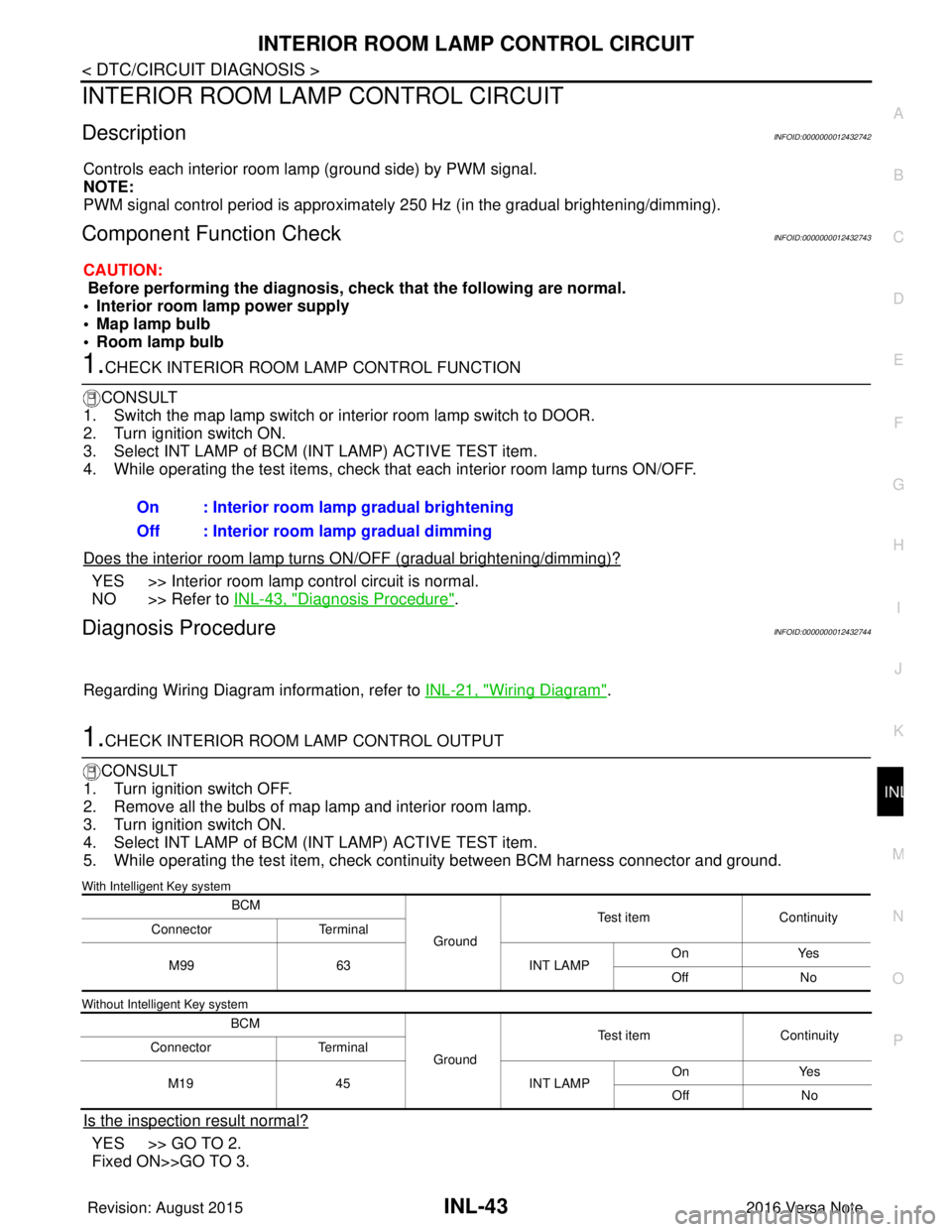
1.CHECK INTERIOR ROOM LAMP CONTROL FUNCTION
CONSULT
1. Switch the map lamp switch or interior room lamp switch to DOOR.
2. Turn ignition switch ON.
3. Select INT LAMP of BCM (INT LAMP) ACTIVE TEST item.
4. While operating the test items, check that each interior room lamp turns ON/OFF.
Does the interior room lamp turn s ON/OFF (gradual brightening/dimming)?
YES >> Interior room lamp control circuit is normal.
NO >> Refer to INL-43, "
Diagnosis Procedure".
Diagnosis ProcedureINFOID:0000000012432744
Regarding Wiring Diagram information, refer to INL-21, "Wiring Diagram".
1.CHECK INTERIOR ROOM LAMP CONTROL OUTPUT
CONSULT
1. Turn ignition switch OFF.
2. Remove all the bulbs of map lamp and interior room lamp.
3. Turn ignition switch ON.
4. Select INT LAMP of BCM (INT LAMP) ACTIVE TEST item.
5. While operating the test item, check c ontinuity between BCM harness connector and ground.
With Intelligent Key system
Without Intelligent Key system
Is the inspection result normal?
YES >> GO TO 2.
Fixed ON>>GO TO 3.On : Interior room lamp gradual brightening
Off : Interior room lamp gradual dimming
BCM
GroundTest item
Continuity
Connector Terminal
M99 63 INT LAMPOn
Yes
Off No
BCM GroundTest item
Continuity
Connector Terminal
M19 45 INT LAMPOn
Yes
Off No
Revision: August 2015 2016 Versa Note
cardiagn.com
Page 2140 of 3641
INL-46
< DTC/CIRCUIT DIAGNOSIS >
CARGO LAMP CONTROL CIRCUIT
CARGO LAMP CONTROL CIRCUIT
DescriptionINFOID:0000000012432745
Controls the cargo lamp (ground side) to turn the cargo lamp ON and OFF.
Component Function CheckINFOID:0000000012432746
CAUTION:
Before performing the diagnosis, check that the following is normal.
• Battery saver output/power supply
• Cargo lamp bulb
Diagnosis ProcedureINFOID:0000000012432747
Regarding Wiring Diagram information, refer to INL-21, "Wiring Diagram".
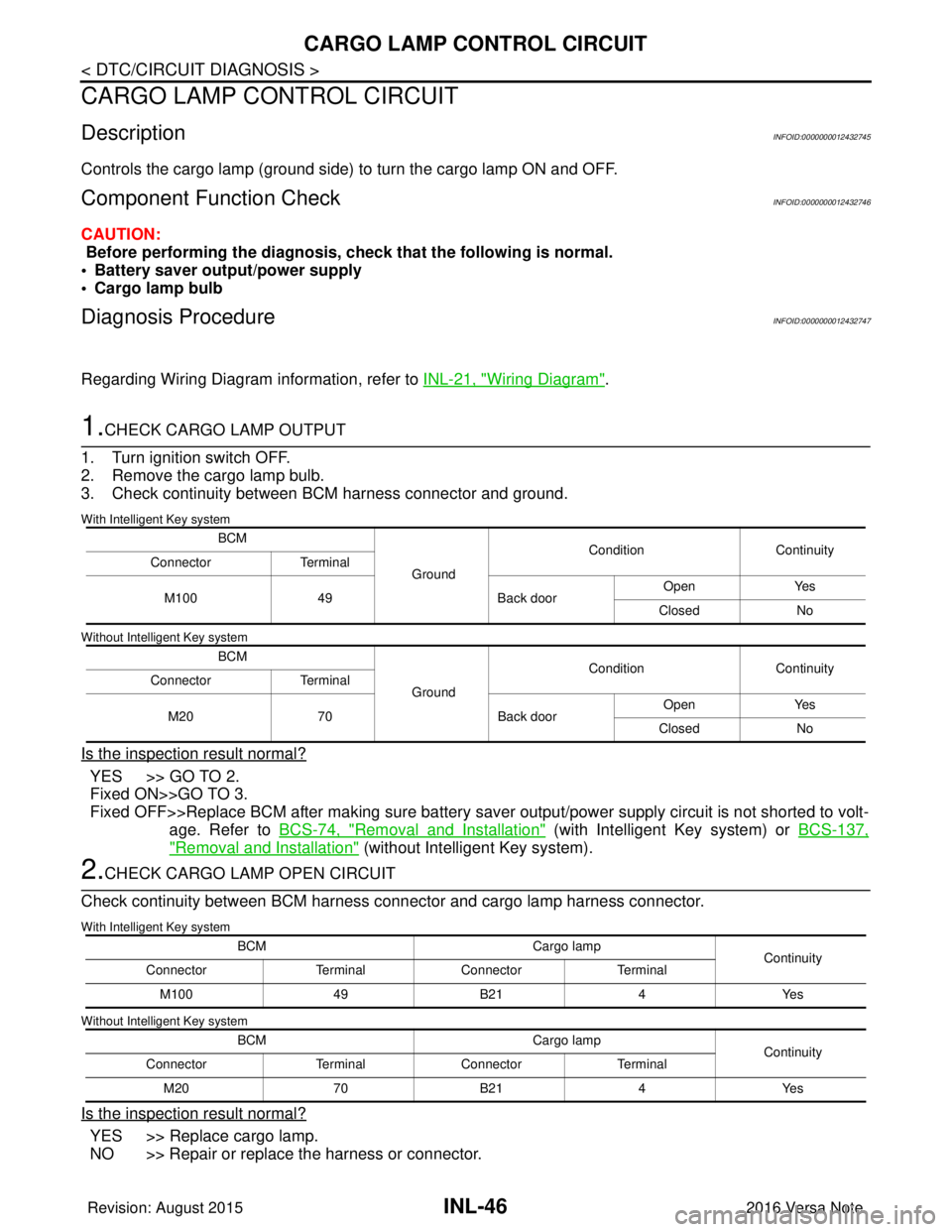
1.CHECK CARGO LAMP OUTPUT
1. Turn ignition switch OFF.
2. Remove the cargo lamp bulb.
3. Check continuity between BCM harness connector and ground.
With Intelligent Key system
Without Intelligent Key system
Is the inspection result normal?
YES >> GO TO 2.
Fixed ON>>GO TO 3.
Fixed OFF>>Replace BCM after making sure battery saver output/power supply circuit is not shorted to volt- age. Refer to BCS-74, "
Removal and Installation" (with Intelligent Key system) or BCS-137,
"Removal and Installation" (without Intelligent Key system).
2.CHECK CARGO LAMP OPEN CIRCUIT
Check continuity between BCM harness connector and cargo lamp harness connector.
With Intelligent Key system
Without Intelligent Key system
Is the inspection result normal?
YES >> Replace cargo lamp.
NO >> Repair or replace the harness or connector.
BCM
GroundCondition
Continuity
Connector Terminal
M100 49 Back doorOpen
Yes
Closed No
BCM GroundCondition
Continuity
Connector Terminal
M20 70 Back doorOpen
Yes
Closed No
BCM Cargo lamp
Continuity
Connector TerminalConnector Terminal
M100 49B21 4Yes
BCM Cargo lamp
Continuity
Connector TerminalConnector Terminal
M20 70B21 4Yes
Revision: August 2015 2016 Versa Note
cardiagn.com
Page 2142 of 3641
INL-48
< DTC/CIRCUIT DIAGNOSIS >
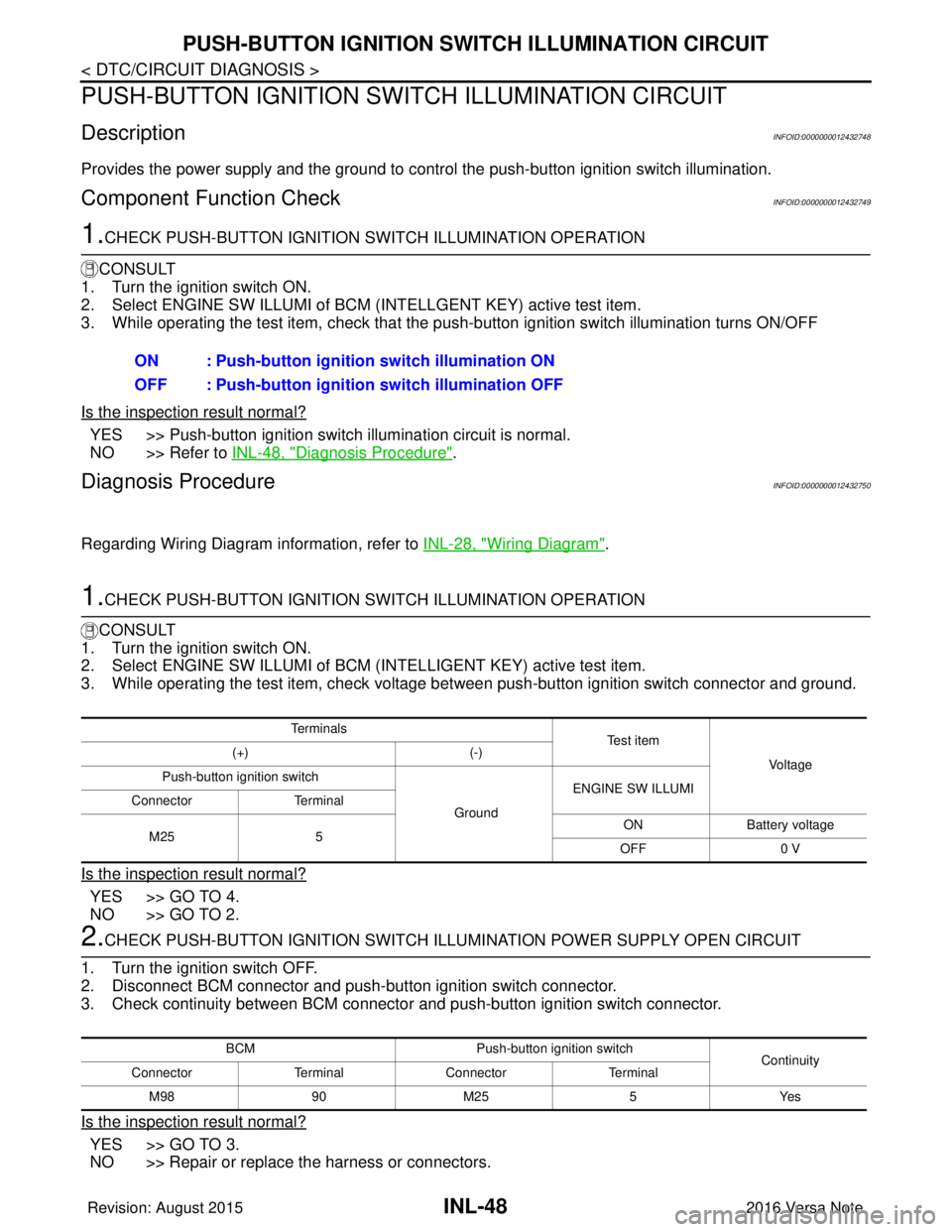
PUSH-BUTTON IGNITION SWITCH ILLUMINATION CIRCUIT
PUSH-BUTTON IGNITION SWITCH ILLUMINATION CIRCUIT
DescriptionINFOID:0000000012432748
Provides the power supply and the ground to control the push-button ignition switch illumination.
Component Function CheckINFOID:0000000012432749
1.CHECK PUSH-BUTTON IGNITION SWITCH ILLUMINATION OPERATION
CONSULT
1. Turn the ignition switch ON.
2. Select ENGINE SW ILLUMI of BCM (I NTELLGENT KEY) active test item.
3. While operating the test item, check that the push-button ignition switch illumination turns ON/OFF
Is the inspection result normal?
YES >> Push-button ignition switch illumination circuit is normal.
NO >> Refer to INL-48, "
Diagnosis Procedure".
Diagnosis ProcedureINFOID:0000000012432750
Regarding Wiring Diagram information, refer to INL-28, "Wiring Diagram".
1.CHECK PUSH-BUTTON IGNITION SWITCH ILLUMINATION OPERATION
CONSULT
1. Turn the ignition switch ON.
2. Select ENGINE SW ILLUMI of BCM (INTELLIGENT KEY) active test item.
3. While operating the test item, check voltage bet ween push-button ignition switch connector and ground.
Is the inspection result normal?
YES >> GO TO 4.
NO >> GO TO 2.
2.CHECK PUSH-BUTTON IGNITION SWITCH ILLUMINATION POWER SUPPLY OPEN CIRCUIT
1. Turn the ignition switch OFF.
2. Disconnect BCM connector and push-button ignition switch connector.
3. Check continuity between BCM connector and push-button ignition switch connector.
Is the inspection result normal?
YES >> GO TO 3.
NO >> Repair or replace the harness or connectors. ON : Push-button ignition switch illumination ON
OFF : Push-button ignition
switch illumination OFF
Te r m i n a l s
Te s t i t e m
Vo l ta g e
(+)
(-)
Push-button ignition switch
GroundENGINE SW ILLUMI
Connector Terminal
M25 5 ON
Battery voltage
OFF 0 V
BCM Push-button ignition switch
Continuity
Connector TerminalConnector Terminal
M 989 0M 25 5 Y es
Revision: August 2015 2016 Versa Note
cardiagn.com
Page 2189 of 3641

LAN
LAN-1
ELECTRICAL & POWER CONTROL
C
DE
F
G H
I
J
K L
B
SECTION LAN
A
O P
N
CONTENTS
LAN SYSTEM
CAN FUNDAMENTAL
HOW TO USE THIS MANU AL ......................
5
HOW TO USE THIS SECTION ....................... .....5
Information .......................................................... ......5
PRECAUTION ...............................................6
PRECAUTIONS .............................................. .....6
Precautions for Trouble Diagnosis ...................... ......6
Precautions for Harness Repair ................................6
SYSTEM DESCRIPTION . .............................7
SYSTEM ......................................................... .....7
CAN COMMUNICATION SYSTEM .............................7
CAN COMMUNICATION SYSTEM : System De-
scription ............................................................... ......
7
DIAG ON CAN ....................................................... ......7
DIAG ON CAN : System Description ........................7
TROUBLE DIAGNOSIS ......................................9
Component Description ....................................... ......9
Condition of Error Detection ......................................9
Symptom When Error Occurs in CAN Communi-
cation System ...................................................... ....
10
CAN Diagnosis with CONSULT ..............................12
Self-Diagnosis .........................................................13
CAN Diagnostic Support Monitor ............................13
How to Use CAN Communication Signal Chart ......15
BASIC INSPECTION ...................................16
DIAGNOSIS AND REPAIR WORKFLOW ..... ....16
Trouble Diagnosis Flow Chart ............................. ....16
CAN
HOW TO USE THIS MANU AL .....................
21
HOW TO USE THIS SECTION ....................... ....21
Information ........................................................... ....21
Abbreviation List ......................................................21
PRECAUTION ..............................................22
PRECAUTIONS .................................................22
Precaution for Supplemental Restraint System
(SRS) "AIR BAG" and "SEAT BELT PRE-TEN-
SIONER" ............................................................. ....
22
Precautions for Trouble Diagnosis ..........................22
Precautions for Harness Repair ..............................22
SYSTEM DESCRIPTION .............................24
COMPONENT PARTS ......................................24
Component Parts Location .................................. ....24
SYSTEM ............................................................25
CAN COMMUNICATION SYSTEM ........................ ....25
CAN COMMUNICATION SYSTEM : System De-
scription ............................................................... ....
25
CAN COMMUNICATION SYSTEM : CAN Com-
munication Control Circuit .......................................
28
CAN COMMUNICATION SYSTEM : CAN System
Specification Chart ..................................................
29
CAN COMMUNICATION SYSTEM : CAN Com-
munication Signal Chart ..........................................
30
WIRING DIAGRAM ......................................33
CAN SYSTEM .. .................................................33
Wiring Diagram .................................................... ....33
BASIC INSPECTION ...................................39
DIAGNOSIS AND REPAIR WORKFLOW ........39
Interview Sheet .................................................... ....39
DTC/CIRCUIT DIAGNOSIS .........................40
MALFUNCTION AREA CHART ........................40
Main Line ............................................................. ....40
Revision: August 2015 2016 Versa Note
cardiagn.com
Page 2195 of 3641
![NISSAN NOTE 2016 Service Repair Manual LAN
SYSTEMLAN-7
< SYSTEM DESCRIPTION > [CAN FUNDAMENTAL]
C
D
E
F
G H
I
J
K L
B A
O P
N
SYSTEM DESCRIPTION
SYSTEM
CAN COMMUNICATION SYSTEM
CAN COMMUNICATION SYSTEM : System DescriptionINFOID:0000000012](/img/5/57363/w960_57363-2194.png "NISSAN NOTE 2016 Service Repair Manual LAN
SYSTEMLAN-7
< SYSTEM DESCRIPTION > [CAN FUNDAMENTAL]
C
D
E
F
G H
I
J
K L
B A
O P
N
SYSTEM DESCRIPTION
SYSTEM
CAN COMMUNICATION SYSTEM
CAN COMMUNICATION SYSTEM : System DescriptionINFOID:0000000012")
LAN
SYSTEMLAN-7
< SYSTEM DESCRIPTION > [CAN FUNDAMENTAL]
C
D
E
F
G H
I
J
K L
B A
O P
N
SYSTEM DESCRIPTION
SYSTEM
CAN COMMUNICATION SYSTEM
CAN COMMUNICATION SYSTEM : System DescriptionINFOID:0000000012433330
CAN (Controller Area Network) is a serial communication line for real time application. It is an on-vehicle mul-
tiplex communication line with high data communication speed and excellent error detection ability. Many elec-
tronic control units are equipped onto a vehicle, and each
control unit shares information and links with other
control units during operation (not independent). In CAN communication, control units are connected with 2
communication lines (CAN-H line, CAN-L line) allowing a high rate of information transmission with less wiring.
Each control unit transmits/receives data but selectively reads required data only.
DIAG ON CAN
DIAG ON CAN : System DescriptionINFOID:0000000012433331
SYSTEM DIAGRAM
JSMIA0526GB
Revision: August 2015 2016 Versa Note
cardiagn.com
Page 2213 of 3641
![NISSAN NOTE 2016 Service Repair Manual LAN
SYSTEMLAN-25
< SYSTEM DESCRIPTION > [CAN]
C
D
E
F
G H
I
J
K L
B A
O P
N
SYSTEM
CAN COMMUNICATION SYSTEM
CAN COMMUNICATION SYSTEM : System DescriptionINFOID:0000000012433346
SYSTEM DIAGRAM
DESCRIPT](/img/5/57363/w960_57363-2212.png "NISSAN NOTE 2016 Service Repair Manual LAN
SYSTEMLAN-25
< SYSTEM DESCRIPTION > [CAN]
C
D
E
F
G H
I
J
K L
B A
O P
N
SYSTEM
CAN COMMUNICATION SYSTEM
CAN COMMUNICATION SYSTEM : System DescriptionINFOID:0000000012433346
SYSTEM DIAGRAM
DESCRIPT")
LAN
SYSTEMLAN-25
< SYSTEM DESCRIPTION > [CAN]
C
D
E
F
G H
I
J
K L
B A
O P
N
SYSTEM
CAN COMMUNICATION SYSTEM
CAN COMMUNICATION SYSTEM : System DescriptionINFOID:0000000012433346
SYSTEM DIAGRAM
DESCRIPTION
CAN (Controller Area Network) is a serial communication line for real time application. It is an on-vehicle mul-
tiplex communication line with high data communication speed and excellent error detection ability. Many elec-
tronic control units are equipped onto a vehicle, and each
control unit shares information and links with other
control units during operation (not independent). In CAN communication, control units are connected with 2
communication lines (CAN-H line, CAN-L line) allowing a high rate of information transmission with less wiring.
Each control unit transmits/receives data but selectively reads required data only.
CAN Communication Signal Generation
• Termination circuits (resistors) are connected ac ross the CAN communication system. When transmitting a
CAN communication signal, each control unit passes a cu rrent to the CAN-H line and the current returns to
the CAN-L line.
JSMIA1430GB
JSMIA0450GB
Revision: August 2015 2016 Versa Note
cardiagn.com
Page 2221 of 3641
![NISSAN NOTE 2016 Service Repair Manual LAN
CAN SYSTEMLAN-33
< WIRING DIAGRAM > [CAN]
C
D
E
F
G H
I
J
K L
B A
O P
N
WIRING DIAGRAM
CAN SYSTEM
Wiring DiagramINFOID:0000000012433350
ABMWA3266GB
Revision: August 2015
2016 Versa Note
cardiagn.](/img/5/57363/w960_57363-2220.png "NISSAN NOTE 2016 Service Repair Manual LAN
CAN SYSTEMLAN-33
< WIRING DIAGRAM > [CAN]
C
D
E
F
G H
I
J
K L
B A
O P
N
WIRING DIAGRAM
CAN SYSTEM
Wiring DiagramINFOID:0000000012433350
ABMWA3266GB
Revision: August 2015
2016 Versa Note
cardiagn.")
LAN
CAN SYSTEMLAN-33
< WIRING DIAGRAM > [CAN]
C
D
E
F
G H
I
J
K L
B A
O P
N
WIRING DIAGRAM
CAN SYSTEM
Wiring DiagramINFOID:0000000012433350
ABMWA3266GB
Revision: August 2015
2016 Versa Note
cardiagn.com
Page 2222 of 3641
![NISSAN NOTE 2016 Service Repair Manual LAN-34
< WIRING DIAGRAM >[CAN]
CAN SYSTEM
ABMIA4657GB
Revision: August 2015
2016 Versa Note
cardiagn.com](/img/5/57363/w960_57363-2221.png "NISSAN NOTE 2016 Service Repair Manual LAN-34
< WIRING DIAGRAM >[CAN]
CAN SYSTEM
ABMIA4657GB
Revision: August 2015
2016 Versa Note
cardiagn.com")
LAN-34
< WIRING DIAGRAM >[CAN]
CAN SYSTEM
ABMIA4657GB
Revision: August 2015
2016 Versa Note
cardiagn.com