display NISSAN NOTE 2016 Service Repair Manual
[x] Cancel search | Manufacturer: NISSAN, Model Year: 2016, Model line: NOTE, Model: NISSAN NOTE 2016Pages: 3641, PDF Size: 28.72 MB
Page 3367 of 3641
![NISSAN NOTE 2016 Service Repair Manual TM-126
< BASIC INSPECTION >[CVT: RE0F11A]
ADDITIONAL SERVICE WHEN REPLACING TCM
Displayed approximately 4 – 5 seconds after the
selector lever is moved to the “P” position.
Does the shift posit](/img/5/57363/w960_57363-3366.png "NISSAN NOTE 2016 Service Repair Manual TM-126
< BASIC INSPECTION >[CVT: RE0F11A]
ADDITIONAL SERVICE WHEN REPLACING TCM
Displayed approximately 4 – 5 seconds after the
selector lever is moved to the “P” position.
Does the shift posit")
TM-126
< BASIC INSPECTION >[CVT: RE0F11A]
ADDITIONAL SERVICE WHEN REPLACING TCM
Displayed approximately 4 – 5 seconds after the
selector lever is moved to the “P” position.
Does the shift position indicator display
“P”?
YES >> GO TO 5.
NO >> GO TO 8.
5.STORE CALIBRATION DATA
1. Turn ignition switch OFF and wait for 5 seconds.
2. Turn ignition switch ON.
Does the shift position indicator display
“P” at the same time when turning ON the ignition switch?
YES-1 (New TCM is blank)>>GO TO 6.
YES-2 (New TCM is not blank)>>GO TO 7.
NO >> Check harness between battery and TCM harness connector terminal. Refer to TM-182, "
Diagno-
sis Procedure".
6.WRITE TCM DATA (VEHICLE SPECIFICATIONS)
NOTE:
Write data saved in CONSULT into a new TCM according to the following instructions: With CONSULT
1. Select “Programming”.
2. Perform programming according to the CONSULT display.
>> GO TO 7.
7.CALIBRATE G SENSOR
Refer to TM-130, "
Description".
>> WORK END
8.DETECT MALFUNCTIONING ITEM
Check the following items:
• Harness between the TCM and the ROM assembly insi de the transaxle assembly is open or shorted.
• Disconnected, loose, bent, collapsed, or otherwise abnormal connector housing terminals
Is the inspection result normal?
YES >> GO TO 4.
NO >> Repair or replace the malfunctioning parts.
Revision: August 2015 2016 Versa Note
cardiagn.com
Page 3368 of 3641
![NISSAN NOTE 2016 Service Repair Manual ADDITIONAL SERVICE WHEN REPLACING CONTROL VALVE OR TRANSAXLE
ASSEMBLY
TM-127
< BASIC INSPECTION > [CVT: RE0F11A]
C
EF
G H
I
J
K L
M A
B
TM
N
O P
ADDITIONAL SERVICE WHEN REPL ACING CONTROL VALVE OR TR](/img/5/57363/w960_57363-3367.png "NISSAN NOTE 2016 Service Repair Manual ADDITIONAL SERVICE WHEN REPLACING CONTROL VALVE OR TRANSAXLE
ASSEMBLY
TM-127
< BASIC INSPECTION > [CVT: RE0F11A]
C
EF
G H
I
J
K L
M A
B
TM
N
O P
ADDITIONAL SERVICE WHEN REPL ACING CONTROL VALVE OR TR")
ADDITIONAL SERVICE WHEN REPLACING CONTROL VALVE OR TRANSAXLE
ASSEMBLY
TM-127
< BASIC INSPECTION > [CVT: RE0F11A]
C
EF
G H
I
J
K L
M A
B
TM
N
O P
ADDITIONAL SERVICE WHEN REPL ACING CONTROL VALVE OR TRAN-
SAXLE ASSEMBLY
DescriptionINFOID:0000000012431044
When replacing the control valve or transaxle assembly , perform the following work. For work procedure, refer
to TM-130, "
Work Procedure".
ERASING, LOADING AND STORING OF CALIBRATION DATA• The TCM acquires calibration data (individual characteristic value) of each solenoid that is stored in the
ROM assembly (in the control valve). This enables the TCM to perform accurate control. For this reason,
after the control valve or transaxle assembly is replaced, it is necessary to erase the calibration data previ-
ously stored in TCM, to load new calibration data, and to store them.
ERASING THE LEARNED VALUE DATA• TCM learns indicated pressure for appropriate control of the transaxle assembly and records the learned
values. For this reason, the leaned values stored in TCM must be erased after replacing a transaxle assem-
bly.
ERASING CVT FLUID DEGR ADATION LEVEL DATA • TCM records the degradation level of the CVT fluid calculated from the vehicle driving status. Therefore, if
the transaxle assembly is replaced, it is necessary to erase the CVT fluid degradation level data recorded by
TCM.
Work ProcedureINFOID:0000000012431045
1.INITIALIZE TCM
With CONSULT
1. Set parking brake.
2. Turn ignition switch ON.
3. Select “Work Support” in “TRANSMISSION”.
4. Select “ERASE MEMORY DATA”.
5. While maintaining the conditions below, touch “Start”.
- Vehicle stop status
- With engine stopped
- Selector lever: “R” position
- Accelerator pedal: Depressed
NOTE:
Select “Start” and complete within approximately 20 seconds.
Is
“COMPLETED” displayed?
YES >> GO TO 2.
NO >> Turn the ignition switch OFF and wait for a minimum of 10 seconds then perform the work again.
2.CHECK AFTER TCM IS INITIALIZED
With CONSULT
1. Turn ignition switch OFF with the selector lever in “R” position and wait for 10 seconds or more.
2. Turn ignition switch ON with the selector lever in “R” position. CAUTION:
Never start the engine.
3. Select “Special function” in “TRANSMISSION”.
4. Select “CALIB DATA”.
5. Check that indicated value of “CALIB DATA” is equal to the value shown in the following table.
Item name Display value Item nameDisplay value
UNIT CLB ID1 00MAP NO HC/RB 00
UNIT CLB ID2 00MAP NO L/B 00
UNIT CLB ID3 00OFFSET2 LU 0
UNIT CLB ID4 00OFFSET2 PL 0
Revision: August 2015 2016 Versa Note
cardiagn.com
Page 3369 of 3641
![NISSAN NOTE 2016 Service Repair Manual TM-128
< BASIC INSPECTION >[CVT: RE0F11A]
ADDITIONAL SERVICE WHEN REPLACING
CONTROL VALVE OR TRANSAXLE
ASSEMBLY
Is the indicated value of “CALIB DATA” equal to the value shown in the table?
YES](/img/5/57363/w960_57363-3368.png "NISSAN NOTE 2016 Service Repair Manual TM-128
< BASIC INSPECTION >[CVT: RE0F11A]
ADDITIONAL SERVICE WHEN REPLACING
CONTROL VALVE OR TRANSAXLE
ASSEMBLY
Is the indicated value of “CALIB DATA” equal to the value shown in the table?
YES")
TM-128
< BASIC INSPECTION >[CVT: RE0F11A]
ADDITIONAL SERVICE WHEN REPLACING
CONTROL VALVE OR TRANSAXLE
ASSEMBLY
Is the indicated value of “CALIB DATA” equal to the value shown in the table?
YES >> GO TO 3.
NO >> GO TO 1.
3.LOAD CALIBRATION DATA
1. Shift the selector lever to the “P” position.
2. Check that “P” is displayed on shift position indicator on combination meter. NOTE:
Displayed approximately 4 – 5 seconds after the selector lever is moved to the “P” position.
Does shift position indicator display
“P”?
YES >> GO TO 5.
NO >> GO TO 4.
4.DETECT MALFUNCTIONING ITEMS
Check the following items:
• Harness between the TCM and the ROM assembly insi de the transaxle assembly is open or shorted.
• Disconnected, loose, bent, collapsed, or otherwise abnormal connector housing terminals
Is the inspection result normal?
YES >> GO TO 1.
NO >> Repair or replace the malfunctioning parts.
5.STORE CALIBRATION DATA
1. Turn ignition switch OFF and wait for 5 seconds.
2. Turn ignition switch ON.
Does the shift position indicator display
“P” at the same time when turning ON the ignition switch?
YES >> GO TO 6.
NO >> Check harness between battery and TCM harness connector terminal.
6.ERASE THE CVT FLUID DEGRADATION LEVEL DATA
With CONSULT
1. Select “WORK SUPPORT” in “TRANSMISSION”.
UNIT CLB ID5 00OFFSET2 PRI 0
UNIT CLB ID6 00OFFSET2 H/R 0
UNIT CLB ID7 00OFFSET2 L/B 0
UNIT CLB ID8 00INIT OFFSET H/R A 0
UNIT CLB ID9 00INIT OFFSET H/R B 0
UNIT CLB ID10 00INIT OFFSET H/R C 0
UNIT CLB ID11 00INIT OFFSET H/R D 0
GAIN LU 256INIT OFFSET H/R E 0
GAIN PL 256INIT OFFSET H/R F 0
GAIN PRI 256INIT OFSET LB A 0
GAIN HC/RB 256INIT OFSET LB B 0
GAIN L/B 256INIT OFSET LB C 0
OFFSET LU 0INIT OFSET LB D 0
OFFSET PL 0INIT OFSET LB E 0
OFFSET PRI 0INIT OFSET LB F 0
OFFSET HC/RB 0LB INITIALIZE LEARN −1
OFFSET L/B 0HC INITIALIZE LEARN −1
MAP NO LU 00LB INITIALIZE TEMP FF
MAP NO PL 00LB INITIALIZE TEMP FF
MAP NO PRI 00
Item name
Display value Item nameDisplay value
Revision: August 2015 2016 Versa Note
cardiagn.com
Page 3371 of 3641
![NISSAN NOTE 2016 Service Repair Manual TM-130
< BASIC INSPECTION >[CVT: RE0F11A]
CALIBRATION OF G SENSOR
CALIBRATION OF G SENSOR
DescriptionINFOID:0000000012431046
TCM stores calibration data (inherent characteristic value) of G sensor to](/img/5/57363/w960_57363-3370.png "NISSAN NOTE 2016 Service Repair Manual TM-130
< BASIC INSPECTION >[CVT: RE0F11A]
CALIBRATION OF G SENSOR
CALIBRATION OF G SENSOR
DescriptionINFOID:0000000012431046
TCM stores calibration data (inherent characteristic value) of G sensor to")
TM-130
< BASIC INSPECTION >[CVT: RE0F11A]
CALIBRATION OF G SENSOR
CALIBRATION OF G SENSOR
DescriptionINFOID:0000000012431046
TCM stores calibration data (inherent characteristic value) of G sensor to provide accurate control. Therefore,
it is required to perform calibration of G sensor after t
he following work is performed. For work procedure, refer
to TM-130, "
Work Procedure".
• Removal/installation or replacement of G sensor
• Replacement of TCM
Work ProcedureINFOID:0000000012431047
1.PREPARATION BEFORE CALIBRATION PROCEDURE
1. Park the vehicle on a level surface.
2. Adjust air pressure of all tires to the specified pressure. WT-54, "
Tire Air Pressure".
>> GO TO 2.
2.PERFORM CALIBRATION
With CONSULT
1. Turn ignition switch ON. CAUTION:
Never start engine.
2. Select “Work Support” in “TRANSMISSION”.
3. Select “G SENSOR CALIBRATION”.
4. Touch “Start”. CAUTION:
Never swing the vehicle durin g “G sensor calibration”.
Is
“COMPLETED” displayed?
YES >> GO TO 3.
NO >> Perform steps 1 and 2 again.
3.PERFORM THE SELF-DIAGNOSIS
With CONSULT
1. Turn ignition switch OFF and wait for 10 seconds.
2. Turn ignition switch ON.
3. Select “Self Diagnostic Results” in “TRANSMISSION”.
Is
“P1586” or “P1588” detected?
YES >> Go to TM-110, "DTC Index".
NO >> Calibration end
Revision: August 2015 2016 Versa Note
cardiagn.com
Page 3461 of 3641
![NISSAN NOTE 2016 Service Repair Manual TM-220
< DTC/CIRCUIT DIAGNOSIS >[CVT: RE0F11A]
SHIFT POSITION INDICATOR CIRCUIT
SHIFT POSITION INDICATOR CIRCUIT
Component Parts Fu
nction InspectionINFOID:0000000012431167
1.CHECK SHIFT POSITION INDI](/img/5/57363/w960_57363-3460.png "NISSAN NOTE 2016 Service Repair Manual TM-220
< DTC/CIRCUIT DIAGNOSIS >[CVT: RE0F11A]
SHIFT POSITION INDICATOR CIRCUIT
SHIFT POSITION INDICATOR CIRCUIT
Component Parts Fu
nction InspectionINFOID:0000000012431167
1.CHECK SHIFT POSITION INDI")
TM-220
< DTC/CIRCUIT DIAGNOSIS >[CVT: RE0F11A]
SHIFT POSITION INDICATOR CIRCUIT
SHIFT POSITION INDICATOR CIRCUIT
Component Parts Fu
nction InspectionINFOID:0000000012431167
1.CHECK SHIFT POSITION INDICATOR
1. Start the engine.
2. Shift selector lever.
3. Check that the selector lever position and the shift position indicator on the combination meter are identi-
cal.
Is the inspection result normal?
YES >> INSPECTION END
NO >> Go to TM-220, "
Diagnosis Procedure".
Diagnosis ProcedureINFOID:0000000012431168
1.CHECK TCM INPUT/OUTPUT SIGNAL
With CONSULT
1. Start the engine.
2. Select “Data Monitor” in “TRANSMISSION”.
3. Select “RANGE”.
4. Shift selector lever.
5. Check that selector lever position, “RANGE” on CONSULT screen, and shift position indicator display on
combination meter are identical.
Is the check result normal?
YES >> INSPECTION END
NO-1 (“RANGE” is changed but is not displayed on shift position indicator.>>Check “Self Diagnostic Result” in “TRANSMISSION”.
NO-2 (“RANGE” and shift position indicator are differ ent.)>>Check “Self Diagnostic Result” in “TRANSMIS-
SION”.
NO-3 (Specific“RANGE” is not displayed on shift position indicator.)>>Check “Self Diagnostic Result” in
“METER/M&A”.
Revision: August 2015 2016 Versa Note
cardiagn.com
Page 3480 of 3641
![NISSAN NOTE 2016 Service Repair Manual TCM
TM-239
< REMOVAL AND INSTALLATION > [CVT: RE0F11A]
C
EF
G H
I
J
K L
M A
B
TM
N
O P
TCM
Exploded ViewINFOID:0000000012431185
Removal and InstallationINFOID:0000000012431186
CAUTION:
• When replac](/img/5/57363/w960_57363-3479.png "NISSAN NOTE 2016 Service Repair Manual TCM
TM-239
< REMOVAL AND INSTALLATION > [CVT: RE0F11A]
C
EF
G H
I
J
K L
M A
B
TM
N
O P
TCM
Exploded ViewINFOID:0000000012431185
Removal and InstallationINFOID:0000000012431186
CAUTION:
• When replac")
TCM
TM-239
< REMOVAL AND INSTALLATION > [CVT: RE0F11A]
C
EF
G H
I
J
K L
M A
B
TM
N
O P
TCM
Exploded ViewINFOID:0000000012431185
Removal and InstallationINFOID:0000000012431186
CAUTION:
• When replacing TCM, note the “CVTF DETERIORATION DATE” value displayed on CONSULT “CON- FORM CVTF DETERIORATION” in MAINTENANCE BOOKLET, before starting the operation.
• When replacing TCM, perform "ADDITIONAL SERVICE WHEN REPLACING TCM". Refer to TM-125,
"Description".
• When replacing TCM and transaxle assembly simultaneously, replace transaxle assembly first and then replace TCM.
REMOVAL
1. Remove the battery. Refer to PG-70, "Removal and Installation (Battery)".
2. Disconnect the harness connector from the TCM.
3. Remove the TCM and bracket as an assembly.
4. Remove the TCM from the bracket (if necessary).
INSTALLATION
Installation is in the reverse order of removal.
AdjustmentINFOID:0000000012431187
ADJUSTMENT AFTER INSTALLATION
Perform "ADDITIONAL SERVICE WHEN REPLACING TCM". Refer to TM-125, "Description".
1. TCM2. Bracket3. Clip
Front
AWBIA1482ZZ
Revision: August 2015 2016 Versa Note
cardiagn.com
Page 3528 of 3641
WCS
DIAGNOSIS SYSTEM (COMBINATION METER)WCS-13
< SYSTEM DESCRIPTION >
C
DE
F
G H
I
J
K L
M B A
O P
DIAGNOSIS SYSTEM (C OMBINATION METER)
TYPE A
TYPE A : On Board Diagnosis FunctionINFOID:0000000012542982
ON BOARD DIAGNOSIS ITEM
Information display, speedometer and tachometer can be checked in self-diagnosis mode.
STARTING COMBINATION ME TER SELF-DIAGNOSIS MODE
METHOD OF STARTING
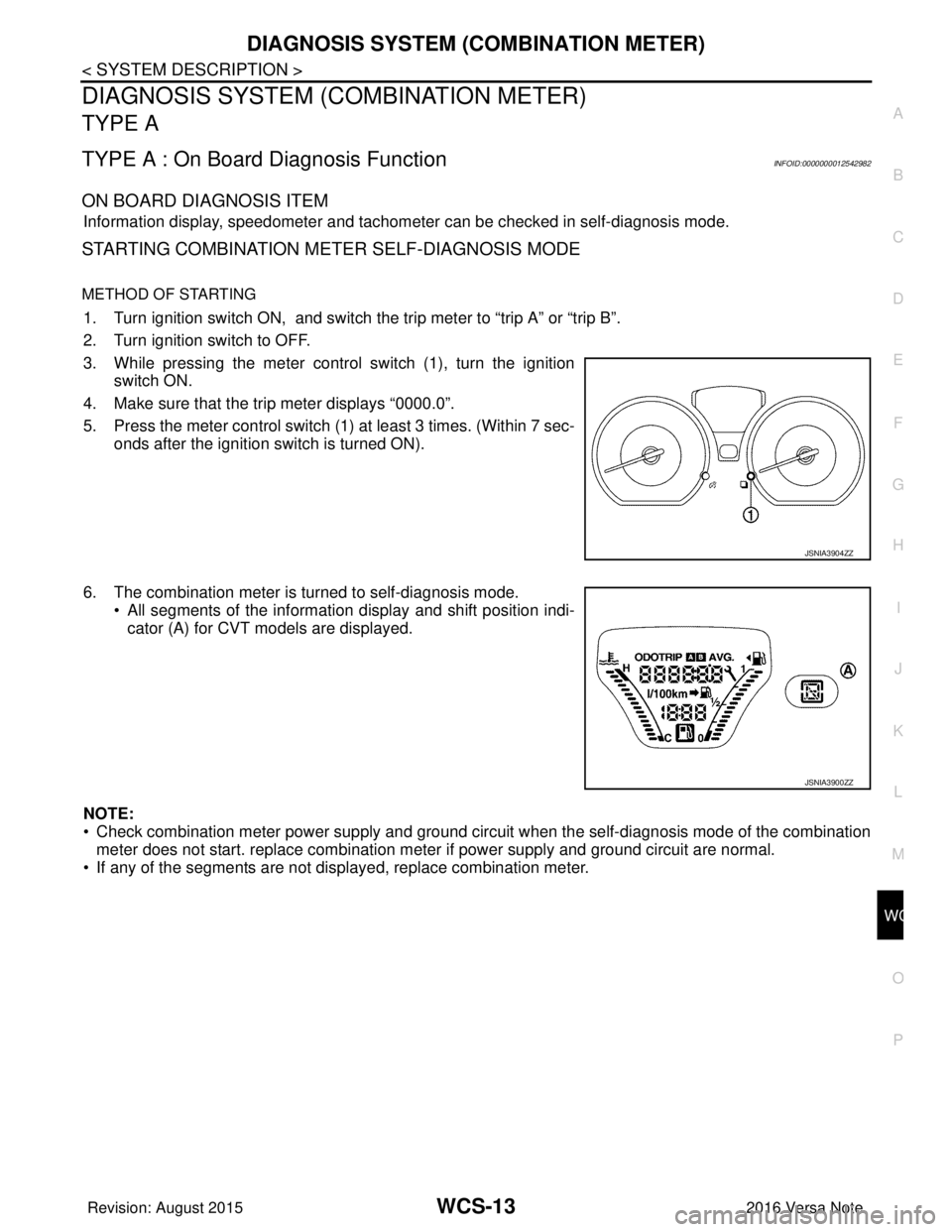
1. Turn ignition switch ON, and switch the trip meter to “trip A” or “trip B”.
2. Turn ignition switch to OFF.
3. While pressing the meter control switch (1), turn the ignition
switch ON.
4. Make sure that the trip meter displays “0000.0”.
5. Press the meter control switch (1) at least 3 times. (Within 7 sec- onds after the ignition switch is turned ON).
6. The combination meter is turned to self-diagnosis mode. • All segments of the information display and shift position indi-cator (A) for CVT models are displayed.
NOTE:
• Check combination meter power supply and ground circui t when the self-diagnosis mode of the combination
meter does not start. replace combination meter if power supply and ground circuit are normal.
• If any of the segments are not disp layed, replace combination meter.
JSNIA3904ZZ
JSNIA3900ZZ
Revision: August 2015 2016 Versa Note
cardiagn.com
Page 3529 of 3641
WCS-14
< SYSTEM DESCRIPTION >
DIAGNOSIS SYSTEM (COMBINATION METER)
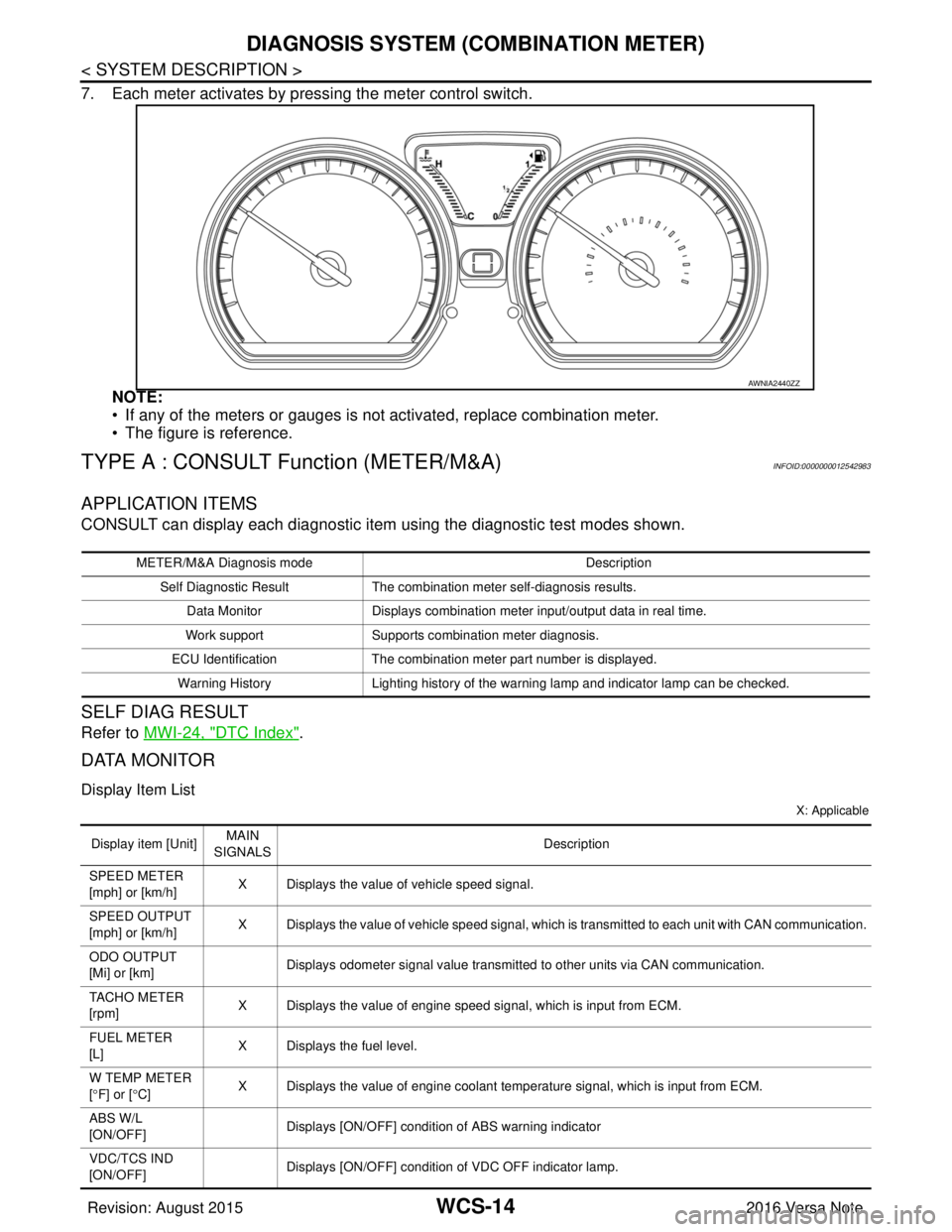
7. Each meter activates by pressing the meter control switch.NOTE:
• If any of the meters or gauges is not activated, replace combination meter.
• The figure is reference.
TYPE A : CONSULT Function (METER/M&A)INFOID:0000000012542983
APPLICATION ITEMS
CONSULT can display each diagnostic item using the diagnostic test modes shown.
SELF DIAG RESULT
Refer to MWI-24, "DTC Index".
DATA MONITOR
Display Item List
X: Applicable
AWNIA2440ZZ
METER/M&A Diagnosis mode Description
Self Diagnostic Result The combination meter self-diagnosis results.
Data Monitor Displays combination meter input/output data in real time.
Work support Supports combination meter diagnosis.
ECU Identification The combination meter part number is displayed.
Warning History Lighting history of the warning lamp and indicator lamp can be checked.
Display item [Unit]MAIN
SIGNALS Description
SPEED METER
[mph] or [km/h] X Displays the value of vehicle speed signal.
SPEED OUTPUT
[mph] or [km/h] X Displays the value of vehicle speed signal, which is transmitted to each unit with CAN communication.
ODO OUTPUT
[Mi] or [km] Displays odometer signal value transmitted to other units via CAN communication.
TACHO METER
[rpm] X Displays the value of engine speed signal, which is input from ECM.
FUEL METER
[L] X Displays the fuel level.
W TEMP METER
[ ° F] or [ °C] X Displays the value of engine coolant temperature signal, which is input from ECM.
ABS W/L
[ON/OFF] Displays [ON/OFF] conditio
n of ABS warning indicator
VDC/TCS IND
[ON/OFF] Displays [ON/OFF] condition
of VDC OFF indicator lamp.
Revision: August 2015 2016 Versa Note
cardiagn.com
Page 3530 of 3641
![NISSAN NOTE 2016 Service Repair Manual WCS
DIAGNOSIS SYSTEM (COMBINATION METER)WCS-15
< SYSTEM DESCRIPTION >
C
DE
F
G H
I
J
K L
M B A
O P
NOTE:
Some items are not available according to vehicle specification.
WORK SUPPORT
SLIP IND
[ON/OFF]](/img/5/57363/w960_57363-3529.png "NISSAN NOTE 2016 Service Repair Manual WCS
DIAGNOSIS SYSTEM (COMBINATION METER)WCS-15
< SYSTEM DESCRIPTION >
C
DE
F
G H
I
J
K L
M B A
O P
NOTE:
Some items are not available according to vehicle specification.
WORK SUPPORT
SLIP IND
[ON/OFF]")
WCS
DIAGNOSIS SYSTEM (COMBINATION METER)WCS-15
< SYSTEM DESCRIPTION >
C
DE
F
G H
I
J
K L
M B A
O P
NOTE:
Some items are not available according to vehicle specification.
WORK SUPPORT
SLIP IND
[ON/OFF] Displays [ON/OFF] condition of SLIP indicator lamp.
BRAKE W/L
[ON/OFF] Displays [ON/OFF] condition of brake warning indicator.
DOOR W/L
[ON/OFF] Displays [ON/OFF] condition of door warning indicator.
HI-BEAM IND
[ON/OFF] Displays [ON/OFF] condition of high beam indicator.
TURN IND
[ON/OFF] Displays [ON/OFF] condition of turn indicator.
LIGHT IND
[ON/OFF] Displays [ON/OFF] condition of light indicator.
OIL W/L
[ON/OFF] Displays [ON/OFF] condition of engine oil pressure warning indicator.
MIL
[ON/OFF] Displays [ON/OFF] condition of malfunction indicator.
CRUISE IND
[Off] Displays [ON/OFF]
condition of CRUISE indicator.
O/D OFF IND
[ON/OFF] Displays [ON/OFF] condition of O/D OFF indicator.
FUEL W/L
[ON/OFF] Displays [ON/OFF] condition of low-fuel warning indicator.
AIR PRES W/L
[ON/OFF] Displays [ON/OFF] condition of tire pressure warning lamp.
EPS W/L
[ON/OFF] Displays [ON/OFF] condition of EPS indicator.
CHG SIG
[On/Off] Displays [ON/OFF] condition of charge warning indicator.
PASS BUCKLE
SW
[ON/OFF] Status of seat belt buckle switch RH.
FUEL CAP W/L
[Off] Displays [ON/OFF] condition of loose fuel cap warning message.
PKB SW
[ON/OFF] Status of parking brake switch.
BUCKLE SW
[ON/OFF] Status of seat belt buckle switch LH.
BRAKE OIL SW
[ON/OFF] Status of brake fluid level switch.
DISTANCE
[M] or [Mi] Displays distance to empty.
FUEL LOW SIG
[ON/OFF] Displays [ON/OFF] condition
of low-fuel warning signal.
BUZZER
[ON/OFF] X Displays [ON/OFF] condition of buzzer.
TPMS PRESS L
[ON/OFF] Displays [ON/OFF] condition of check tire pressure warning message.
Display item [Unit]
MAIN
SIGNALS Description
Revision: August 2015
2016 Versa Note
cardiagn.com
Page 3531 of 3641
WCS-16
< SYSTEM DESCRIPTION >
DIAGNOSIS SYSTEM (COMBINATION METER)
WARNING HISTORY
W/L ON HISTORY
• Stores histories when warning/indicator lamp is turned on.
• “W/L ON HISTORY” indicates the “TIME” when the warning/ indicator lamp is turned on.
• The “TIME” above is:
- 0: The condition that the warning/indicator lamp has been turned on 1 or more times after starting the engine and waiting for 30 seconds.
- 1 - 39: The number of times the engine was restarted after the 0 condition.
- NO W/L ON HISTORY: Stores NO (0) turning on history of warning/indicator lamp.
NOTE:
• W/L ON HISTORY is not stored for approximately 30 seconds after the engine starts.
• Brake warning lamp does not store any history when the parking brake is applied or the brake fluid level gets low.
TYPE B
TYPE B : On Board Diagnosis FunctionINFOID:0000000012542984
ON BOARD DIAGNOSIS
The following meter functions can be checked during Combination Meter Self-Diagnosis Mode:
• Pointer sweep of speedometer, tachometer and gauges.
• Illumination of all lamps/LEDs that are controlled by the combination meter (regardless of switch status).
• Error code
STARTING COMBINATION ME TER SELF-DIAGNOSIS MODE
NOTE:
• Check combination meter power supply and ground circuits if self-diagnosis mode does not start. Refer to
MWI-98, "
COMBINATION METER : Diagnosis Procedure". Replace combination meter if power supply and
ground circuits are found to be normal and self-diagnosis mode does not start. Refer to MWI-115, "
Removal
and Installation".
• Combination meter self-diagnosis mode will function with the ignition switch in ON. Combination meter self- diagnosis mode will exit upon turning the ignition switch to OFF.
METHOD OF STARTING
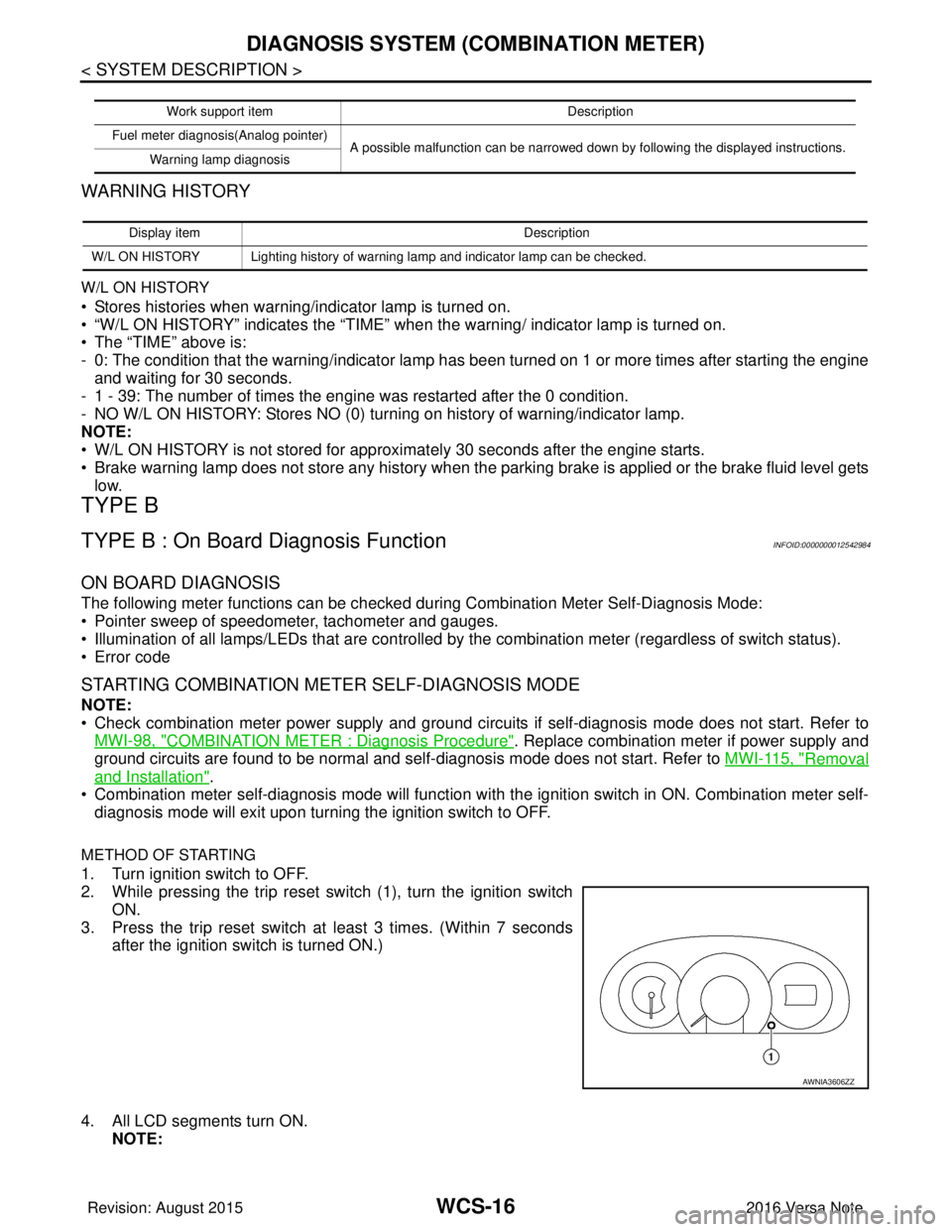
1. Turn ignition switch to OFF.
2. While pressing the trip reset switch (1), turn the ignition switch
ON.
3. Press the trip reset switch at least 3 times. (Within 7 seconds
after the ignition switch is turned ON.)
4. All LCD segments turn ON. NOTE:
Work support item Description
Fuel meter diagnosis(Analog pointer) A possible malfunction can be narrowed down by following the displayed instructions.
Warning lamp diagnosis
Display item Description
W/L ON HISTORY Lighting history of warning lamp and indicator lamp can be checked.
AWNIA3606ZZ
Revision: August 2015 2016 Versa Note
cardiagn.com