sensor NISSAN NOTE 2016 Service Repair Manual
[x] Cancel search | Manufacturer: NISSAN, Model Year: 2016, Model line: NOTE, Model: NISSAN NOTE 2016Pages: 3641, PDF Size: 28.72 MB
Page 3489 of 3641
![NISSAN NOTE 2016 Service Repair Manual TM-248
< REMOVAL AND INSTALLATION >[CVT: RE0F11A]
OUTPUT SPEED SENSOR
OUTPUT SPEED SENSOR
Exploded ViewINFOID:0000000012431201
Removal and InstallationINFOID:0000000012431202
REMOVAL
1. Disconnect the](/img/5/57363/w960_57363-3488.png "NISSAN NOTE 2016 Service Repair Manual TM-248
< REMOVAL AND INSTALLATION >[CVT: RE0F11A]
OUTPUT SPEED SENSOR
OUTPUT SPEED SENSOR
Exploded ViewINFOID:0000000012431201
Removal and InstallationINFOID:0000000012431202
REMOVAL
1. Disconnect the")
TM-248
< REMOVAL AND INSTALLATION >[CVT: RE0F11A]
OUTPUT SPEED SENSOR
OUTPUT SPEED SENSOR
Exploded ViewINFOID:0000000012431201
Removal and InstallationINFOID:0000000012431202
REMOVAL
1. Disconnect the harness connector from output speed sensor.
NOTE:
Lift up the vehicle and perform the work from rear of the transaxle assembly.
2. Remove the output speed sensor.
3. Remove the O-ring from the output speed sensor.
INSTALLATION
Installation is in the reverse order of removal.
CAUTION:
• Do not reuse O-ring.
• Apply Genuine NISSAN CVT Fluid NS-3 to the O-ring.
Inspection and AdjustmentINFOID:0000000012431203
INSPECTION AFTER INSTALLATION
Check for CVT fluid leakage. Refer to TM-228, "Inspection".
ADJUSTMENT AFTER INSTALLATION
Check the CVT fluid level. Refer to TM-229, "Adjustment".
1. Transaxle assembly 2. Output speed sensor 3. O-ring
Front Genuine NISSAN CVT Fluid NS-3
JSDIA1882GB
Revision: August 2015 2016 Versa Note
cardiagn.com
Page 3501 of 3641
![NISSAN NOTE 2016 Service Repair Manual TM-260
< UNIT REMOVAL AND INSTALLATION >[CVT: RE0F11A]
TRANSMISSION ASSEMBLY
• Primary speed sensor harness connector
• Secondary speed sensor harness connector
• Output speed sensor harness con](/img/5/57363/w960_57363-3500.png "NISSAN NOTE 2016 Service Repair Manual TM-260
< UNIT REMOVAL AND INSTALLATION >[CVT: RE0F11A]
TRANSMISSION ASSEMBLY
• Primary speed sensor harness connector
• Secondary speed sensor harness connector
• Output speed sensor harness con")
TM-260
< UNIT REMOVAL AND INSTALLATION >[CVT: RE0F11A]
TRANSMISSION ASSEMBLY
• Primary speed sensor harness connector
• Secondary speed sensor harness connector
• Output speed sensor harness connector
• Ground
3. Rotate the crankshaft and remove the nuts that secure the drive plate to the torque converter from the sta- tor motor mount.
CAUTION:
When turning crankshaft, turn it clockwise as viewed from the front of the engine.
4. Remove the bolts (engine to transaxle) that fasten the transaxle assembly and engine assembly.
5. Remove transaxle assembly from engine. CAUTION:
• Secure torque converter to prevent it from dropping.
• Secure transaxle assembly to a suitable jack.
INSTALLATION
Installation is in the reverse order of removal.
CAUTION:
• Do not reuse O-rings.
• Apply Genuine NISSAN CVT Fluid NS-3 to the O-rings.
• When installing the transaxle assembly onto the engine assembly,
check the engagement of the dowel pins ( ).
• When using suitable tool (A) for alignment, install it to the align- ment stud bolt used to align the torque converter to the drive plate.
JSDIA1839ZZ
Bolt position ABC D
Direction of insertion Transaxle assembly
⇒
Engine assembly Engine assembly
⇒ Transaxle assembly
Q ua ntit y 2213
JSDIA1184ZZ
JPDIA0683ZZ
Revision: August 2015 2016 Versa Note
cardiagn.com
Page 3508 of 3641

VTL-2
< PRECAUTION >
PRECAUTIONS
PRECAUTION
PRECAUTIONS
Precaution for Supplemental Restraint System (SRS) "AIR BAG" and "SEAT BELT
PRE-TENSIONER"
INFOID:0000000012430544
The Supplemental Restraint System such as “A IR BAG” and “SEAT BELT PRE-TENSIONER”, used along
with a front seat belt, helps to reduce the risk or severity of injury to the driver and front passenger for certain
types of collision. Information necessary to service the system safely is included in the SR and SB section of
this Service Manual.
WARNING:
• To avoid rendering the SRS inopera tive, which could increase the risk of personal injury or death in
the event of a collision which would result in air bag inflation, all maintenance must be performed by
an authorized NISSAN/INFINITI dealer.
• Improper maintenance, including in correct removal and installation of the SRS, can lead to personal
injury caused by unintent ional activation of the system. For re moval of Spiral Cable and Air Bag
Module, see the SR section.
• Do not use electrical test equipmen t on any circuit related to the SRS unless instructed to in this
Service Manual. SRS wiring harn esses can be identified by yellow and/or orange harnesses or har-
ness connectors.
PRECAUTIONS WHEN USING POWER TOOLS (AIR OR ELECTRIC) AND HAMMERS
WARNING:
• When working near the Airbag Diagnosis Sensor Unit or other Airbag System sensors with the Igni-
tion ON or engine running, DO NOT use air or electri c power tools or strike near the sensor(s) with a
hammer. Heavy vibration could activate the sensor( s) and deploy the air bag(s), possibly causing
serious injury.
• When using air or electric power tools or hammers , always switch the Ignition OFF, disconnect the
battery and wait at least three minutes before performing any service.
Precaution for WorkINFOID:0000000012430545
• When removing or disassembling each component, be careful not to damage or deform it. If a component may be subject to interference, be sure to protect it with a shop cloth.
• When removing (disengaging) components with a screwdriver or similar tool, be sure to wrap the component with a shop cloth or vinyl tape to protect it.
• Protect the removed parts with a shop cloth and prevent them from being dropped.
• Replace a deformed or damaged clip.
• If a part is specified as a non-reusable part, always replace it with a new one.
• Be sure to tighten bolts and nuts securely to the specified torque.
• After installation is complete, be sure to check that each part works properly.
• Follow the steps below to clean components:
- Water soluble dirt:
• Dip a soft cloth into lukewarm water, wring the water out of the cloth and wipe the dirty area.
• Then rub with a soft, dry cloth.
- Oily dirt:
• Dip a soft cloth into lukewarm water with mild detergent (concentration: within 2 to 3%) and wipe the dirty area.
• Then dip a cloth into fresh water, wring the water out of the cloth and wipe the detergent off.
• Then rub with a soft, dry cloth.
- Do not use organic solvent such as thinner, benzene, alcohol or gasoline.
- For genuine leather seats, use a genuine leather seat cleaner.
Revision: August 2015 2016 Versa Note
cardiagn.com
Page 3519 of 3641

WCS-4
< PRECAUTION >
PRECAUTIONS
PRECAUTION
PRECAUTIONS
Precaution for Supplemental Restraint System (SRS) "AIR BAG" and "SEAT BELT
PRE-TENSIONER"
INFOID:0000000012542981
The Supplemental Restraint System such as “A IR BAG” and “SEAT BELT PRE-TENSIONER”, used along
with a front seat belt, helps to reduce the risk or severity of injury to the driver and front passenger for certain
types of collision. Information necessary to service the system safely is included in the SR and SB section of
this Service Manual.
WARNING:
• To avoid rendering the SRS inopera tive, which could increase the risk of personal injury or death in
the event of a collision which would result in air bag inflation, all maintenance must be performed by
an authorized NISSAN/INFINITI dealer.
• Improper maintenance, including in correct removal and installation of the SRS, can lead to personal
injury caused by unintent ional activation of the system. For re moval of Spiral Cable and Air Bag
Module, see the SR section.
• Do not use electrical test equipmen t on any circuit related to the SRS unless instructed to in this
Service Manual. SRS wiring harn esses can be identified by yellow and/or orange harnesses or har-
ness connectors.
PRECAUTIONS WHEN USING POWER TOOLS (AIR OR ELECTRIC) AND HAMMERS
WARNING:
• When working near the Airbag Diagnosis Sensor Unit or other Airbag System sensors with the Igni-
tion ON or engine running, DO NOT use air or electri c power tools or strike near the sensor(s) with a
hammer. Heavy vibration could activate the sensor( s) and deploy the air bag(s), possibly causing
serious injury.
• When using air or electric power tools or hammers , always switch the Ignition OFF, disconnect the
battery and wait at least three minutes before performing any service.
Revision: August 2015 2016 Versa Note
cardiagn.com
Page 3535 of 3641

WCS-20
< SYSTEM DESCRIPTION >
DIAGNOSIS SYSTEM (COMBINATION METER)
NOTE:
Some items are not available according to vehicle specification.
WORK SUPPORT
WARNING HISTORY
W/L ON HISTORY
• Stores histories when warning/indicator lamp is turned on.
• “W/L ON HISTORY” indicates the “TIME” when the warning/ indicator lamp is turned on.
• The “TIME” above is:
- 0: The condition that the warning/indicator lamp has been turned on 1 or more times after starting the engine and waiting for 30 seconds.
- 1 - 39: The number of times the engine was restarted after the 0 condition.
- NO W/L ON HISTORY: Stores NO (0) turning on history of warning/indicator lamp.
NOTE:
• W/L ON HISTORY is not stored for approximately 30 seconds after the engine starts.
• Brake warning lamp does not store any history when the parking brake is applied or the brake fluid level gets low.
BUCKLE SW
[On/Off] Status of seat belt buckle switch (LH).
BRAKE OIL SW
[On/Off] Status of brake fluid level switch.
CHG SIG
[On/Off] Displays [ON/OFF] condition of charge warning indicator.
DISTANCE
[km] or [Mi] Displays distance to empty.
OUTSIDE TEMP
[ ° F] or [ °C] Displays the ambient temperature, which is input from ambient sensor.
FUEL LOW SIG
[ON/OFF] Displays [ON/OFF] condition
of low-fuel warning signal.
BUZZER
[On/Off] X Displays [ON/OFF] condition of buzzer.
FR FOG IND
[On/Off] Displays [ON/OFF] condition of front fog lamp indicator.
TPMS PRESS L
[On/Off] Displays [ON/OFF] condition of check tire pressure warning message.
Display item [Unit]
MAIN
SIGNALS Description
Work support item
Description
Outside air temperature diagnosis A possible malfunction can be narrowed down by following the displayed instructions.
Fuel meter diagnosis(Analog pointer)
Warning lamp diagnosis
Display item Description
W/L ON HISTORY Lighting history of warning lamp and indicator lamp can be checked.
Revision: August 2015 2016 Versa Note
cardiagn.com
Page 3537 of 3641
![NISSAN NOTE 2016 Service Repair Manual WCS-22
< SYSTEM DESCRIPTION >
DIAGNOSIS SYSTEM (BCM) (WITH INTELLIGENT KEY SYSTEM)
BUZZER
BUZZER : CONSULT Function (BCM - BUZZER)INFOID:0000000012542987
DATA MONITOR
ACTIVE TEST
Monitor Item [Unit] D](/img/5/57363/w960_57363-3536.png "NISSAN NOTE 2016 Service Repair Manual WCS-22
< SYSTEM DESCRIPTION >
DIAGNOSIS SYSTEM (BCM) (WITH INTELLIGENT KEY SYSTEM)
BUZZER
BUZZER : CONSULT Function (BCM - BUZZER)INFOID:0000000012542987
DATA MONITOR
ACTIVE TEST
Monitor Item [Unit] D")
WCS-22
< SYSTEM DESCRIPTION >
DIAGNOSIS SYSTEM (BCM) (WITH INTELLIGENT KEY SYSTEM)
BUZZER
BUZZER : CONSULT Function (BCM - BUZZER)INFOID:0000000012542987
DATA MONITOR
ACTIVE TEST
Monitor Item [Unit] Description
PUSH SW [On/Off] Indicates condition of push-button ignition switch.
UNLK SEN -DR [On/Off] Indicates condition of door unlock sensor.
VEH SPEED 1 [km/h] Indicates vehicle speed signal received from ABS on CAN communication line.
TAIL LAMP SW [On/Off] Indicates condition of combination switch.
FR FOG SW [On/Off] Indicates condition of front fog lamp switch.
DOOR SW-DR [On/Off] Indicates condition of front door switch LH.
CDL LOCK SW [On/Off] Indicates condition of lock signal from door lock and unlock switch.
Test Item Description
ID REGIST WARNING This test is able to check TPMS transmitter ID regist warning chime operation [On/Off].
SEAT BELT WARN TEST This test is able to check seat belt warning chime operation [On/Off].
LIGHT WARN ALM This test is able to check light warning chime operation [On/Off].
Revision: August 2015 2016 Versa Note
cardiagn.com
Page 3568 of 3641
PRECAUTIONSWW-3
< PRECAUTION >
C
DE
F
G H
I
J
K
M A
B
WW
N
O P
PRECAUTION
PRECAUTIONS
Precaution for Supplemental Restraint System (SRS) "AIR BAG" and "SEAT BELT
PRE-TENSIONER"
INFOID:0000000012433192
The Supplemental Restraint System such as “AIR BAG” and “SEAT BELT PRE-TENSIONER”, used along
with a front seat belt, helps to reduce the risk or severi ty of injury to the driver and front passenger for certain
types of collision. Information necessary to service the system safely is included in the SR and SB section of
this Service Manual.
WARNING:
• To avoid rendering the SRS inoper ative, which could increase the risk of personal injury or death in
the event of a collision which would result in air bag inflation, all maintenance must be performed by
an authorized NISSAN/INFINITI dealer.
• Improper maintenance, including in correct removal and installation of the SRS, can lead to personal
injury caused by unintentional act ivation of the system. For removal of Spiral Cable and Air Bag
Module, see the SR section.
• Do not use electrical test equipm ent on any circuit related to the SRS unless instructed to in this
Service Manual. SRS wiring harnesses can be identi fied by yellow and/or orange harnesses or har-
ness connectors.
PRECAUTIONS WHEN USING POWER TOOLS (AIR OR ELECTRIC) AND HAMMERS
WARNING:
• When working near the Airbag Diagnosis Sensor Un it or other Airbag System sensors with the Igni-
tion ON or engine running, DO NOT use air or el ectric power tools or strike near the sensor(s) with a
hammer. Heavy vibration could activate the sensor( s) and deploy the air bag(s), possibly causing
serious injury.
• When using air or electric power tools or hammers, always switch the Ignition OFF, disconnect the
battery and wait at least three mi nutes before performing any service.
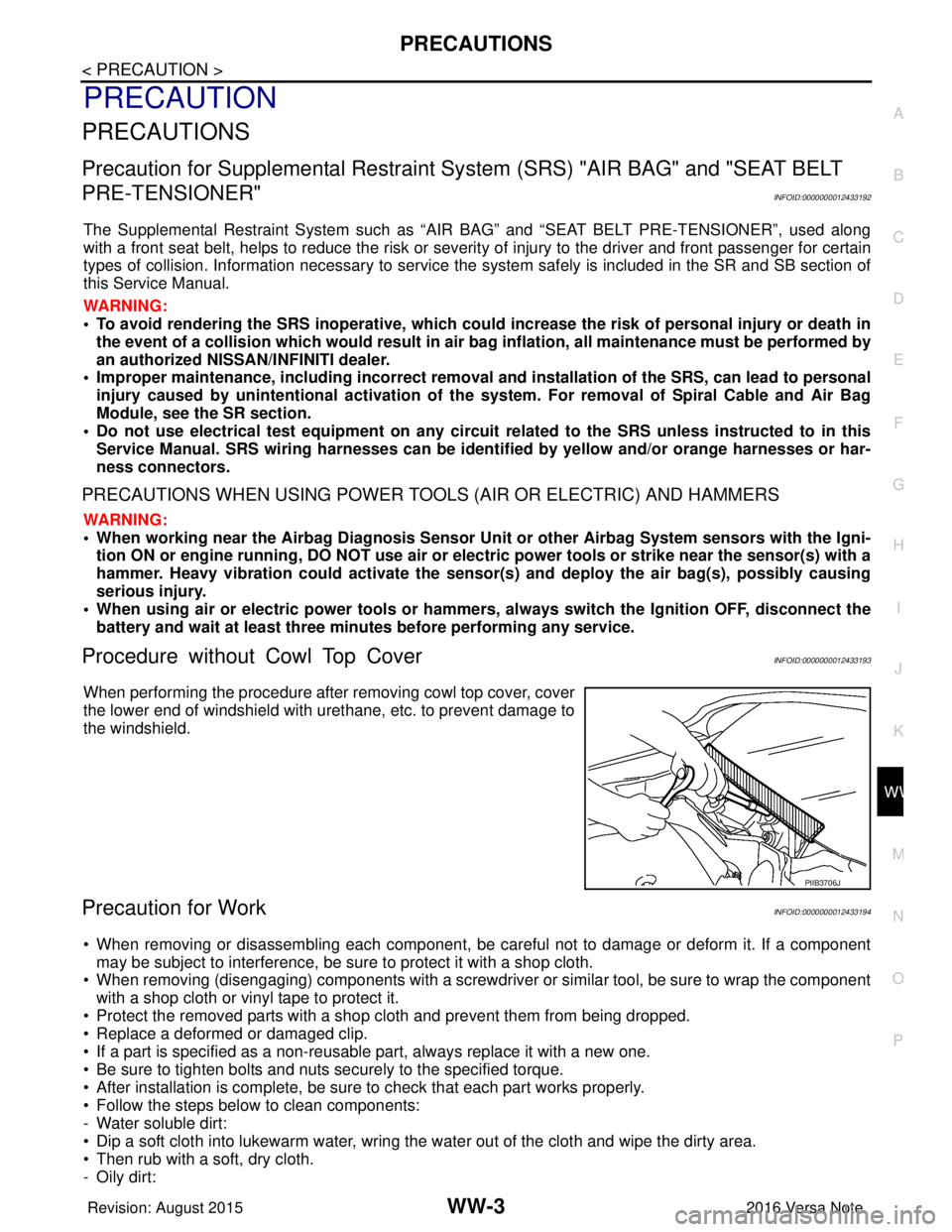
Procedure without Cowl Top CoverINFOID:0000000012433193
When performing the procedure after removing cowl top cover, cover
the lower end of windshield with urethane, etc. to prevent damage to
the windshield.
Precaution for WorkINFOID:0000000012433194
• When removing or disassembling each component, be ca reful not to damage or deform it. If a component
may be subject to interference, be sure to protect it with a shop cloth.
• When removing (disengaging) components with a screwdriver or similar tool, be sure to wrap the component with a shop cloth or vinyl tape to protect it.
• Protect the removed parts with a shop cloth and prevent them from being dropped.
• Replace a deformed or damaged clip.
• If a part is specified as a non-reusabl e part, always replace it with a new one.
• Be sure to tighten bolts and nuts securely to the specified torque.
• After installation is complete, be sure to check that each part works properly.
• Follow the steps below to clean components:
- Water soluble dirt:
• Dip a soft cloth into lukewarm water, wring the water out of the cloth and wipe the dirty area.
• Then rub with a soft, dry cloth.
-Oily dirt:
PIIB3706J
Revision: August 2015 2016 Versa Note
cardiagn.com