keyless NISSAN NOTE 2016 Service Manual PDF
[x] Cancel search | Manufacturer: NISSAN, Model Year: 2016, Model line: NOTE, Model: NISSAN NOTE 2016Pages: 3641, PDF Size: 28.72 MB
Page 938 of 3641
![NISSAN NOTE 2016 Service Manual PDF REMOTE KEYLESS ENTRY RECEIVERDLK-249
< DTC/CIRCUIT DIAGNOSIS > [WITHOUT INTELLIGENT KEY SYSTEM]
C
D
E
F
G H
I
J
L
M A
B
DLK
N
O P
NO >> Repair or replace harness between BCM and remote keyless entry r](/img/5/57363/w960_57363-937.png "NISSAN NOTE 2016 Service Manual PDF REMOTE KEYLESS ENTRY RECEIVERDLK-249
< DTC/CIRCUIT DIAGNOSIS > [WITHOUT INTELLIGENT KEY SYSTEM]
C
D
E
F
G H
I
J
L
M A
B
DLK
N
O P
NO >> Repair or replace harness between BCM and remote keyless entry r")
REMOTE KEYLESS ENTRY RECEIVERDLK-249
< DTC/CIRCUIT DIAGNOSIS > [WITHOUT INTELLIGENT KEY SYSTEM]
C
D
E
F
G H
I
J
L
M A
B
DLK
N
O P
NO >> Repair or replace harness between BCM and remote keyless entry receiver.
6.CHECK REMOTE KEYLESS EN TRY RECEIVER CIRCUIT 3
1. Check continuity between BCM connector and remote keyless entry receiver connector.
2. Check continuity between BCM connector and ground.
Is the inspection result normal?
YES >> GO TO 7.
NO >> Repair or replace harness between BCM and remote keyless entry.
7.CHECK INTERMITTENT INCIDENT
Refer to GI-42, "
Intermittent Incident".
>> Inspection End.
BCM
connector Te r m i n a l
Remote keyless entry receiver
connector Terminal
Continuity
M18 20 M23 2Yes
BCM connector Terminal
GroundContinuity
M18 20 No
Revision: August 2015 2016 Versa Note
cardiagn.com
Page 939 of 3641
![NISSAN NOTE 2016 Service Manual PDF DLK-250
< DTC/CIRCUIT DIAGNOSIS >[WITHOUT INTELLIGENT KEY SYSTEM]
KEYFOB BATTERY AND FUNCTION
KEYFOB BATTERY AND FUNCTION
DescriptionINFOID:0000000012430212
The following functions are available when](/img/5/57363/w960_57363-938.png "NISSAN NOTE 2016 Service Manual PDF DLK-250
< DTC/CIRCUIT DIAGNOSIS >[WITHOUT INTELLIGENT KEY SYSTEM]
KEYFOB BATTERY AND FUNCTION
KEYFOB BATTERY AND FUNCTION
DescriptionINFOID:0000000012430212
The following functions are available when")
DLK-250
< DTC/CIRCUIT DIAGNOSIS >[WITHOUT INTELLIGENT KEY SYSTEM]
KEYFOB BATTERY AND FUNCTION
KEYFOB BATTERY AND FUNCTION
DescriptionINFOID:0000000012430212
The following functions are available when having and carrying the keyfob:
• Door lock/unlock
• Panic mode (horn and head-lamp operation)
Remote control entry function and panic alarm functi
on are available when operating the remote buttons.
Component Function CheckINFOID:0000000012430213
NOTE:
The Signal Tech II Tool [- (J-50190)] can be used to perform the following functions: Refer to the Signal Tech II
User Guide for additional information.
• Check keyfob relative signal strength.
• Confirm vehicle antenna signal strength.
1.CHECK FUNCTION
With CONSULT
Check remote keyless entry receiver “KEYLESS LOCK”, “KEYLESS UNLOCK”, and “KEYLESS PANIC” in
“Data Monitor”.
Is the inspection result normal?
YES >> Keyfob is OK.
NO >> Refer to DLK-250, "
Diagnosis Procedure".
Diagnosis ProcedureINFOID:0000000012430214
NOTE:
The Signal Tech II Tool [- (J-50190)] can be used to perform the following functions: Refer to the Signal Tech II
User Guide for additional information.
• Check keyfob relative signal strength.
• Confirm vehicle antenna signal strength.
1.CHECK KEYFOB FUNCTION
Check keyfob function using Signal Tech II Tool [- (J-50190)] or
Remote Keyless Entry Tester [- (J-43241)] (shown).
Does the test pass?
YES >> Keyfob is OK.
NO >> GO TO 2.
2. CHECK KEYFOB COMPONENTS
Monitor item Condition
KEYLESS LOCK Checks whether value changes from “Off” to “On” when operating keyfob lock button.
KEYLESS UNLOCK Checks whether value changes from “Off” to “On” when operating keyfob unlock button.
KEYLESS PANIC Checks whether value changes from “Off” to “On” when operating keyfob panic button.
ALKIA2300ZZ
Revision: August 2015 2016 Versa Note
cardiagn.com
Page 940 of 3641
![NISSAN NOTE 2016 Service Manual PDF KEYFOB BATTERY AND FUNCTIONDLK-251
< DTC/CIRCUIT DIAGNOSIS > [WITHOUT INTELLIGENT KEY SYSTEM]
C
D
E
F
G H
I
J
L
M A
B
DLK
N
O P
1. Remove the screw (A).
2. Insert a small screwdriver into the slit of](/img/5/57363/w960_57363-939.png "NISSAN NOTE 2016 Service Manual PDF KEYFOB BATTERY AND FUNCTIONDLK-251
< DTC/CIRCUIT DIAGNOSIS > [WITHOUT INTELLIGENT KEY SYSTEM]
C
D
E
F
G H
I
J
L
M A
B
DLK
N
O P
1. Remove the screw (A).
2. Insert a small screwdriver into the slit of")
KEYFOB BATTERY AND FUNCTIONDLK-251
< DTC/CIRCUIT DIAGNOSIS > [WITHOUT INTELLIGENT KEY SYSTEM]
C
D
E
F
G H
I
J
L
M A
B
DLK
N
O P
1. Remove the screw (A).
2. Insert a small screwdriver into the slit of the corner (B) and twist it to separate the upper part from the power part. Use a cloth to
protect the casing.
CAUTION:
• Do not touch the circuit board or battery terminal.
• The keyfob is water-resistant. However, if it does get wet,
immediately wipe it dry.
3. Remove the keyfob battery.
CAUTION:
• Keep dirt, grease, and other fo reign materials off the elec-
trode contact area.
4. Visually inspect keyfob internal components.
Is the inspection result normal?
YES >> GO TO 3.
NO >> Repair or replace malfunctioning parts.
3.CHECK KEYFOB BATTERY
Check by connecting a resistance (approximately 300 Ω) so that the
current value becomes about 10 mA.
Is the measurement val ue within specification?
YES >> Keyfob battery is OK. Check remote keyless entry
receiver. Refer to DLK-247,
"ComponentFunctionCheck".
NO >> GO TO 4.
4. REPLACE KEYFOB BATTERY
1. Replace the keyfob battery with a new one. CAUTION:
• When replacing battery, keep dirt, grease, and other for-eign materials off the electrode contact area.
• Make sure that the + side faces the bottom of the case.
2. Align the tips of the upper and lower parts, and then push them
together until it is securely closed.
3. After replacing the battery, check that all keyfob functions work properly.
Is the inspection result normal?
YES >> Keyfob is OK.
NO >> Check remote keyless entry receiver. Refer to DLK-247,
"ComponentFunctionCheck".
ALKIA2301ZZ
Standard : Approx. 2.5 - 3.0V
OCC0607D
ALKIA2302ZZ
Revision: August 2015 2016 Versa Note
cardiagn.com
Page 949 of 3641
![NISSAN NOTE 2016 Service Manual PDF DLK-260
< SYMPTOM DIAGNOSIS >[WITHOUT INTELLIGENT KEY SYSTEM]
REMOTE KEYLESS ENTRY SYSTEM SYMPTOMS
REMOTE KEYLESS ENTR
Y SYSTEM SYMPTOMS
Symptom TableINFOID:0000000012430227
REMOTE KEYLESS ENTRY SYSTE](/img/5/57363/w960_57363-948.png "NISSAN NOTE 2016 Service Manual PDF DLK-260
< SYMPTOM DIAGNOSIS >[WITHOUT INTELLIGENT KEY SYSTEM]
REMOTE KEYLESS ENTRY SYSTEM SYMPTOMS
REMOTE KEYLESS ENTR
Y SYSTEM SYMPTOMS
Symptom TableINFOID:0000000012430227
REMOTE KEYLESS ENTRY SYSTE")
DLK-260
< SYMPTOM DIAGNOSIS >[WITHOUT INTELLIGENT KEY SYSTEM]
REMOTE KEYLESS ENTRY SYSTEM SYMPTOMS
REMOTE KEYLESS ENTR
Y SYSTEM SYMPTOMS
Symptom TableINFOID:0000000012430227
REMOTE KEYLESS ENTRY SYSTEM
Symptom Diagnoses/service procedureReference
page
All functions of remote keyless entry system do not
operate. 1. Keyfob battery and function check (use Remote Keyless Entry
Tester [- (J-43241)] or Signal
Tech II Tool [- (J-50190)]).
NOTE:
If the result of keyfob function check is OK, keyfob is not malfunc-
tioning. DLK-250
2. Check BCM and remote keyless entry receiver.
DLK-247
The new ID of keyfob cannot be entered.1. Keyfob battery and function check (use Remote Keyless Entry
Tester [- (J-43241)] or Signal
Tech II Tool [- (J-50190)]).
NOTE:
If the result of keyfob function check is OK, keyfob is not malfunc-
tioning. DLK-250
2. Door switch check.
DLK-232
3. Replace BCM.BCS-137
Door lock or unlock does not function.
(If the power door lock system does not operate
manually, check power door lock system)1. Keyfob battery and function check (use Remote Keyless Entry
Tester [- (J-43241)] or Signal
Tech II Tool [- (J-50190)]).
NOTE:
If the result of keyfob function check is OK, keyfob is not malfunc-
tioning. DLK-250
2. Replace BCM.
BCS-137
Hazard and horn reminder does not activate properly
when pressing lock or unlock button of keyfob.1. Check hazard and horn reminder mode with CONSULT
NOTE:
Hazard and horn reminder mode can be changed.
First check the hazard and horn reminder mode setting.
DLK-199
2. Door switch check
DLK-232
3. Replace BCM.BCS-137
Hazard reminder does not activate properly when
pressing lock or unlock button of keyfob.
(Horn reminder OK)1. Check hazard reminder mode with CONSULT
NOTE:
Hazard reminder mode can be changed.
First check the hazard reminder mode setting.
DLK-199
2. Check hazard function with hazard switch
—
3. Replace BCM. BCS-137
Horn reminder does not activate properly when
pressing lock or unlock button of keyfob.
(Hazard reminder OK)1. Check horn reminde
r mode with CONSULT
NOTE:
Horn reminder mode can be changed.
First check the horn reminder mode setting. DLK-199
2. Check horn function with horn switch
—
3. IPDM E/R operation check PCS-10
4. Replace BCM.BCS-137
Room lamp illumination does not operate properly.1. Room lamp operation check
INL-72. Door switch checkDLK-232
3. Replace BCM.BCS-137
Panic alarm (horn and headlamp) does not activate
when panic alarm button is continuously pressed.1. Keyfob battery and function check (use Remote Keyless Entry
Tester [- (J-43241)] or Signal
Tech II Tool [- (J-50190)]).
NOTE:
If the result of keyfob function check is OK, keyfob is not malfunc-
tioning. DLK-250
2. Replace BCM.
BCS-137
Revision: August 2015 2016 Versa Note
cardiagn.com
Page 950 of 3641
![NISSAN NOTE 2016 Service Manual PDF REMOTE KEYLESS ENTRY SYSTEM SYMPTOMSDLK-261
< SYMPTOM DIAGNOSIS > [WITHOUT INTELLIGENT KEY SYSTEM]
C
D
E
F
G H
I
J
L
M A
B
DLK
N
O P
Auto door lock operation does not activate properly.
(All other rem](/img/5/57363/w960_57363-949.png "NISSAN NOTE 2016 Service Manual PDF REMOTE KEYLESS ENTRY SYSTEM SYMPTOMSDLK-261
< SYMPTOM DIAGNOSIS > [WITHOUT INTELLIGENT KEY SYSTEM]
C
D
E
F
G H
I
J
L
M A
B
DLK
N
O P
Auto door lock operation does not activate properly.
(All other rem")
REMOTE KEYLESS ENTRY SYSTEM SYMPTOMSDLK-261
< SYMPTOM DIAGNOSIS > [WITHOUT INTELLIGENT KEY SYSTEM]
C
D
E
F
G H
I
J
L
M A
B
DLK
N
O P
Auto door lock operation does not activate properly.
(All other remote keyless entry functions OK.) 1. Check auto door lock operation mode with CONSULT
NOTE:
Auto door lock operation mode can be changed.
First check the auto door lock operation mode setting.
DLK-196
2. Replace BCM.
BCS-137
SymptomDiagnoses/service procedureReference
page
Revision: August 2015 2016 Versa Note
cardiagn.com
Page 998 of 3641
![NISSAN NOTE 2016 Service Manual PDF REMOTE KEYLESS ENTRY RECEIVERDLK-309
< REMOVAL AND INSTALLATION > [WITHOUT INTELLIGENT KEY SYSTEM]
C
D
E
F
G H
I
J
L
M A
B
DLK
N
O P
REMOTE KEYLESS ENTRY RECEIVER
Removal and InstallationINFOID:00000](/img/5/57363/w960_57363-997.png "NISSAN NOTE 2016 Service Manual PDF REMOTE KEYLESS ENTRY RECEIVERDLK-309
< REMOVAL AND INSTALLATION > [WITHOUT INTELLIGENT KEY SYSTEM]
C
D
E
F
G H
I
J
L
M A
B
DLK
N
O P
REMOTE KEYLESS ENTRY RECEIVER
Removal and InstallationINFOID:00000")
REMOTE KEYLESS ENTRY RECEIVERDLK-309
< REMOVAL AND INSTALLATION > [WITHOUT INTELLIGENT KEY SYSTEM]
C
D
E
F
G H
I
J
L
M A
B
DLK
N
O P
REMOTE KEYLESS ENTRY RECEIVER
Removal and InstallationINFOID:0000000012430285
REMOVAL
1. Remove glove box assembly. Refer to IP-25, "Removal and Installation".
2. Remove remote keyless entry receiver bolt (A).
3. Disconnect the harness connector and remove remote keyless entry receiver (1)
INSTALLATION
Installation is in the reverse order of removal.
JMKIA7947ZZ
Revision: August 2015 2016 Versa Note
cardiagn.com
Page 1662 of 3641
EXL-10
< SYSTEM DESCRIPTION >
SYSTEM
FRONT FOG LAMP SYSTEM : System Description
INFOID:0000000012432774
FRONT FOG LAMP OPERATION
When the combination switch (lighting and turn signal switch) is in front fog lamp ON position and also in 1ST
or 2ND position (headlamp is ON), the BCM detects FR FOG ON and the HEAD LAMP 1 or 2 ON. The BCM
sends a front fog lamp request ON signal through the CAN communication lines to the IPDM E/R. The IPDM
E/R then turns ON the front fog lamp relay sending power to the front fog lamps.
TURN SIGNAL AND HAZARD WARNING LAMP SYSTEM
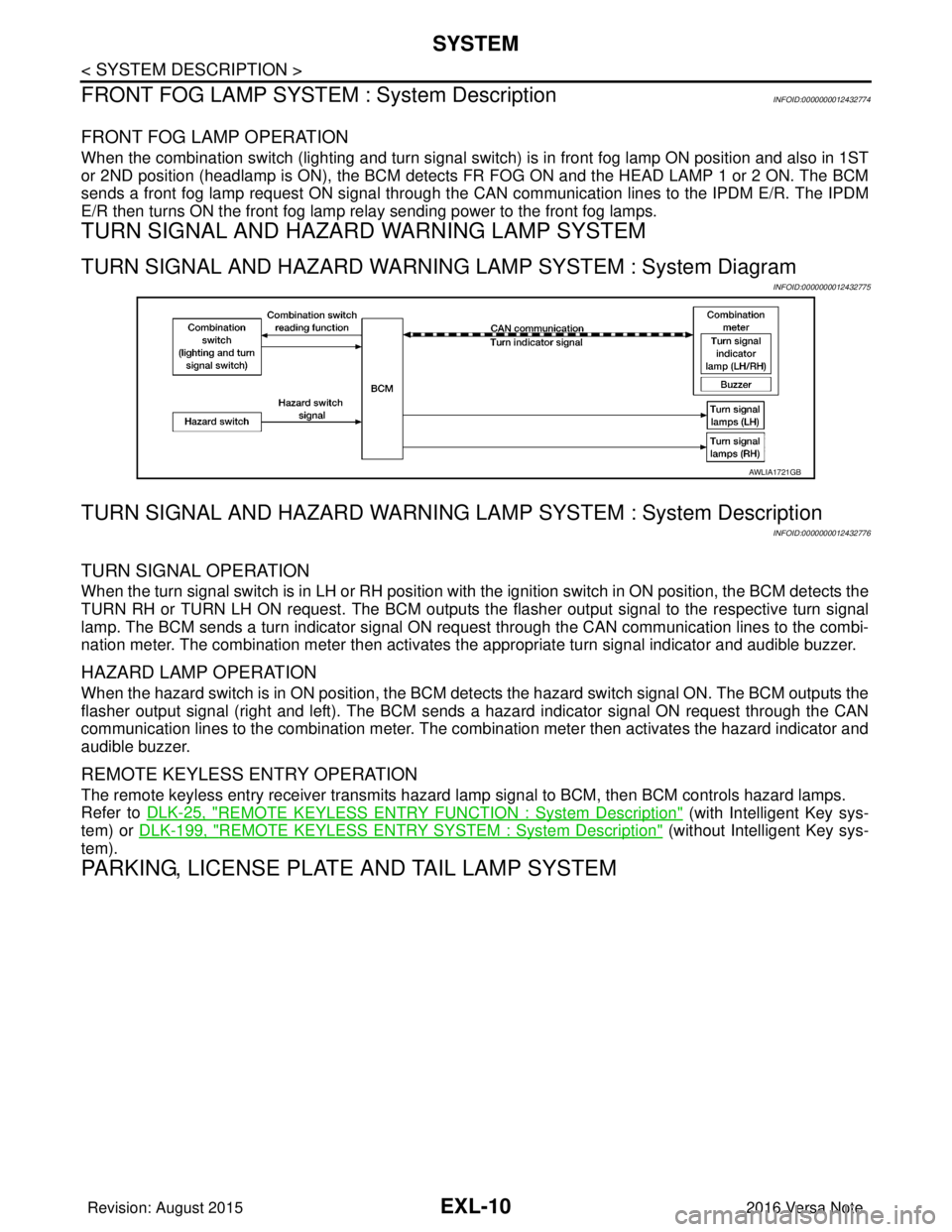
TURN SIGNAL AND HAZARD WARNING LAMP SYSTEM : System Diagram
INFOID:0000000012432775
TURN SIGNAL AND HAZARD WARNING LA MP SYSTEM : System Description
INFOID:0000000012432776
TURN SIGNAL OPERATION
When the turn signal switch is in LH or RH position with the ignition switch in ON position, the BCM detects the
TURN RH or TURN LH ON request. The BCM outputs the flasher output signal to the respective turn signal
lamp. The BCM sends a turn indicator signal ON request through the CAN communication lines to the combi-
nation meter. The combination meter then activates the appropriate turn signal indicator and audible buzzer.
HAZARD LAMP OPERATION
When the hazard switch is in ON position, the BCM det ects the hazard switch signal ON. The BCM outputs the
flasher output signal (right and left). The BCM sends a hazard indicator signal ON request through the CAN
communication lines to the combination meter. The combination meter then activates the hazard indicator and
audible buzzer.
REMOTE KEYLESS ENTRY OPERATION
The remote keyless entry receiver transmits hazard lamp signal to BCM, then BCM controls hazard lamps.
Refer to DLK-25, "
REMOTE KEYLESS ENTRY FUNCTION : System Description" (with Intelligent Key sys-
tem) or DLK-199, "
REMOTE KEYLESS ENTRY SYSTEM : System Description" (without Intelligent Key sys-
tem).
PARKING, LICENSE PLATE AND TAIL LAMP SYSTEM
AWLIA1721GB
Revision: August 2015 2016 Versa Note
cardiagn.com
Page 1668 of 3641

EXL-16
< SYSTEM DESCRIPTION >
DIAGNOSIS SYSTEM (BCM) (WITHOUT INTELLIGENT KEY SYSTEM)
DIAGNOSIS SYSTEM (BCM) (WITHOUT INTELLIGENT KEY SYSTEM)
COMMON ITEM
COMMON ITEM : CONSULT Function (BCM - COMMON ITEM)INFOID:0000000012542311
APPLICATION ITEM
CONSULT performs the following functions via CAN communication with BCM.
SYSTEM APPLICATION
BCM can perform the following functions.
Direct Diagnostic Mode Description
ECU Identification The BCM part number is displayed.
Self Diagnostic Result The BCM self diagnostic results are displayed.
Data Monitor The BCM input/output data is displayed in real time.
Active Test The BCM activates outputs to test components.
Work support The settings for BCM functions can be changed.
Configuration • The vehicle specification can be read and saved.
• The vehicle specification can be written when replacing BCM.
CAN DIAG SUPPORT MNTR The result of transmit/receive diagnosis of CAN communication is displayed.
System Sub System Direct Diagnostic Mode
ECU Identification
Self Diagnostic Result
Data Monitor
Active Test
Work support
Configuration
CAN DIAG SUPPORT MNTR
Door lock
DOOR LOCK ×××
Rear window defogger REAR DEFOGGER ××
Warning chime BUZZER ××
Interior room lamp timer INT LAMP ×××
Remote keyless entry system MULTI REMOTE ENT ×××
Exterior lamp HEAD LAMP ×××
Wiper and washer WIPER ×××
Turn signal and hazard warning lamps FLASHER ××
Air conditioner AIR CONDITIONER ×
Combination switch COMB SW ×
BCM BCM× × ×××
Immobilizer IMMU ×××
Interior room lamp battery saver BATTERY SAVER ×××
Vehicle security system THEFT ALM ××
RAP system RETAINED PWR ××
Signal buffer system SIGNAL BUFFER ×
TPMS AIR PRESSURE MONITOR ××××
Panic alarm system PANIC ALARM ×
Revision: August 2015 2016 Versa Note
cardiagn.com
Page 1669 of 3641

DIAGNOSIS SYSTEM (BCM) (WITHOUT INTELLIGENT KEY SYSTEM)EXL-17
< SYSTEM DESCRIPTION >
C
DE
F
G H
I
J
K
M A
B
EXL
N
O P
HEADLAMP
HEADLAMP : CONSULT Function (BCM - HEAD LAMP)INFOID:0000000012542312
DATA MONITOR
ACTIVE TEST
WORK SUPPORT
* : Initial setting
FLASHER
FLASHER : CONSULT Func tion (BCM - FLASHER)INFOID:0000000012542313
DATA MONITOR
Monitor Item [Unit] Description
IGN ON SW [On/Off] Indicates condition of ignition switch ON position.
ACC ON SW [On/Off] Indicates condition of ignition switch ACC position.
HI BEAM SW [On/Off]
Indicates condition of combination switch.
HEAD LAMP SW 1 [On/Off]
HEAD LAMP SW 2 [On/Off]
TAIL LAMP SW [On/Off]
PASSING SW [On/Off]
FR FOG SW [On/Off]
DOOR SW-DR [On/Off]
Indicates condition of front door switch LH.
DOOR SW-AS [On/Off] Indicates condition of front door switch RH.
DOOR SW-RR [On/Off] Indicates condition of rear door switch RH.
DOOR SW-RL [On/Off] Indicates condition of rear door switch LH.
DOOR SW-BK [On/Off] Indicates condition of back door switch.
TURN SIGNAL R [On/Off] Indicates condition of combination switch.
TURN SIGNAL L [On/Off]
KEY ON SW [On/Off] Indicates condition of key switch.
KEYLESS LOCK [On/Off] Indicates condition of lock signal from keyfob.
PKB SW [On/Off] Indicates park brake switch signal received from combination meter on CAN communica-
tion line.
ENGINE RUN [On/Off] Indicates engine run signal receiv ed from ECM on CAN communication line.
VEHICLE SPEED [km/h/mph] Indicates vehicle speed signal received from combination meter on CAN communication
line.
Test Item
Description
TAIL LAMP This test is able to check tail lamp operation [On/Off].
HEAD LAMP This test is able to check head lamp operation [Hi/Low/Off].
FR FOG LAMP This test is able to check front fog lamp operation [On/Off].
ILL DIM SIGNAL This test is able to check head lamp illumination dimming operation [On/Off].
Support ItemSetting Description
BATTERY SAVER SET On*
Exterior lamp battery saver function ON.
Off Exterior lamp battery saver function OFF.
Revision: August 2015 2016 Versa Note
cardiagn.com
Page 1671 of 3641
![NISSAN NOTE 2016 Service Manual PDF DIAGNOSIS SYSTEM (BCM) (WITHOUT INTELLIGENT KEY SYSTEM)EXL-19
< SYSTEM DESCRIPTION >
C
DE
F
G H
I
J
K
M A
B
EXL
N
O P
ACTIVE TEST
WORK SUPPORT
* : Initial setting CDL UNLOCK SW [On/Off]
Indicates cond](/img/5/57363/w960_57363-1670.png "NISSAN NOTE 2016 Service Manual PDF DIAGNOSIS SYSTEM (BCM) (WITHOUT INTELLIGENT KEY SYSTEM)EXL-19
< SYSTEM DESCRIPTION >
C
DE
F
G H
I
J
K
M A
B
EXL
N
O P
ACTIVE TEST
WORK SUPPORT
* : Initial setting CDL UNLOCK SW [On/Off]
Indicates cond")
DIAGNOSIS SYSTEM (BCM) (WITHOUT INTELLIGENT KEY SYSTEM)EXL-19
< SYSTEM DESCRIPTION >
C
DE
F
G H
I
J
K
M A
B
EXL
N
O P
ACTIVE TEST
WORK SUPPORT
* : Initial setting CDL UNLOCK SW [On/Off]
Indicates condition of unlock signal from door lock and unlock switch.
KEYLESS LOCK [On/Off] Indicates condition of lock signal from keyfob.
KEYLESS UNLOCK [On/Off] Indicates condition of unlock signal from keyfob.
KEY CYL LK-SW [On/Off] Indicates condition of lock signal from door key cylinder switch.
KEY CYL UN-SW [On/Off] Indicates condition of unlock signal from door key cylinder switch.
ACC SW [On/Off] Indicates condition of ignition switch ACC position.
Monitor Item [Unit]
Description
Test itemDescription
BATTERY SAVER This test is able to check battery saver operation [On/Off].
Support ItemSetting Description
ROOM LAMP TIMER SET MODE 3* 10 min.
Sets interior room lamp battery saver timer operating time.
MODE 2 60 min.
MODE 1 15 min.
Revision: August 2015 2016 Versa Note
cardiagn.com