Multiple NISSAN NOTE 2016 Service Repair Manual
[x] Cancel search | Manufacturer: NISSAN, Model Year: 2016, Model line: NOTE, Model: NISSAN NOTE 2016Pages: 3641, PDF Size: 28.72 MB
Page 244 of 3641
![NISSAN NOTE 2016 Service Repair Manual AV
NORMAL OPERATING CONDITIONAV-239
< SYMPTOM DIAGNOSIS > [NAVIGATION]
C
D
E
F
G H
I
J
K L
M B A
O P
Location Correction by Map-Matching is Slow
• The map-matching function needs to refer to the dat](/img/5/57363/w960_57363-243.png "NISSAN NOTE 2016 Service Repair Manual AV
NORMAL OPERATING CONDITIONAV-239
< SYMPTOM DIAGNOSIS > [NAVIGATION]
C
D
E
F
G H
I
J
K L
M B A
O P
Location Correction by Map-Matching is Slow
• The map-matching function needs to refer to the dat")
AV
NORMAL OPERATING CONDITIONAV-239
< SYMPTOM DIAGNOSIS > [NAVIGATION]
C
D
E
F
G H
I
J
K L
M B A
O P
Location Correction by Map-Matching is Slow
• The map-matching function needs to refer to the data of
the surrounding area. It is necessary to drive some
distance for the function to work.
• Because map-matching operates on this principle, when there are many roads running in similar directions
in the surrounding area, no matching determination ma y be made. The location may not be corrected until
some special feature is found.
Name of Road is Not Displayed
The current road name may not be displayed if there are no road names displayed on the map screen.
Contents of Display Differ for Birdview™ and the (Flat) Map Screen
Difference of the BIRDVIEW™ screen from the flat map screen are as follows.
• The current place name displays names which are primarily in the direction of vehicle travel.
• The amount of time before the vehicle travel or turn angle is updated on the screen is longer than for the
(flat) map display.
• The conditions for display of place names, roads, and other data are different for nearby areas and for more
distant areas.
• Some thinning of the character data is done to prevent the display becoming too complex. In some cases
and in some locations, the display contents may differ.
• The same place name, street name, et c. may be displayed multiple times.
Vehicle Mark Shows a Position Which is Completely Wrong
In the following cases, the vehicle mark may appear on completely different position in the map depending on
the GPS satellite signal receiving conditions. In this case, perform location correction and direction correction.
• When location correction has not been done
- If the receiving conditions of the GPS satellite signal is poor, if the vehicle mark becomes out of place, it may
move to a completely different location and not come back if location correction is not done. The position will
be corrected if the GPS signal can be received.
• When the vehicle has traveled by ferry, or when the vehicle has been being towed
Precautions
for driving Just after the engine is started
If the vehicle is driven just after the engine
is started when the gyroscope (angular
speed sensor) correction is not completed,
the vehicle can lose its direction and may
have deviated from the correct location. Wait for a short while before
driving after starting the engine.
Continuous driving without stopping When driving long distances without stop- ping, direction errors may accumulate, and
the current-location mark may deviate from
the correct road. Stop and adjust the orientation.
Abusive driving Spinning the wheels or engaging in other
kinds of abusive driving may result in the
system being unable perform correct detec-
tion, and may cause the vehicle mark to de-
viate from the correct road. If after travelling about 10 km (6
miles) the correct location has
not been restored, perform lo-
cation correction and, if neces-
sary, direction correction.
How to cor-
rect location Position correction accuracy
If the accuracy of location settings is poor,
accuracy may be reduced when the correct
road cannot be found, particularly in places
where there are many roads. Enter in the road displayed on
the screen with an accuracy of
approx. 1mm.
Caution: Whenever possible,
use detailed map for the correc-
tion.
Direction when location is corrected
If the accuracy of location settings during
correction is poor, accuracy may be re-
duced afterwards. Perform direction correction.
Cause (condition) –: While driving ooo: Display
Driving conditionRemarks (correction, etc.)
SEL701V
SEL702V
Revision: August 2015 2016 Versa Note
cardiagn.com
Page 490 of 3641
![NISSAN NOTE 2016 Service Repair Manual BRC-42
< ECU DIAGNOSIS INFORMATION >[VDC/TCS/ABS]
ABS ACTUATOR AND ELECTRIC UNIT (CONTROL UNIT)
DTC Inspection Priority Chart
INFOID:0000000012430845
When multiple DTCs are displayed simultaneously, c](/img/5/57363/w960_57363-489.png "NISSAN NOTE 2016 Service Repair Manual BRC-42
< ECU DIAGNOSIS INFORMATION >[VDC/TCS/ABS]
ABS ACTUATOR AND ELECTRIC UNIT (CONTROL UNIT)
DTC Inspection Priority Chart
INFOID:0000000012430845
When multiple DTCs are displayed simultaneously, c")
BRC-42
< ECU DIAGNOSIS INFORMATION >[VDC/TCS/ABS]
ABS ACTUATOR AND ELECTRIC UNIT (CONTROL UNIT)
DTC Inspection Priority Chart
INFOID:0000000012430845
When multiple DTCs are displayed simultaneously, check each one using the following priority list.
U1000 When CAN communication signal is not continuously transmitted or received for 2
seconds or more.
The following functions are sus-
pended:
•VDC
•TCS
U1002
When ABS actuator and electric unit (control unit) is not transmitting or receiving
CAN communication signal for 2 seconds or less.
U1010 When detecting error during the initial diagnosis of CAN controller of ABS actuator
and electric unit (control unit)
DTC
Malfunction detected condition Fail-safe condition
PriorityDetected item (DTC)
1 • U1000 CAN COMM CIRCUIT
• U1002 SYSTEM COMM(CAN)
• U1010 CAN CONTROLLER CIRCUIT
2 • C1110 CONTROLLER FAILURE
• C1153 EMERGENCY BRAKE
• C1170 VARIANT CODING
3 • C1130 ENGINE SIGNAL 1
• C1144 ST ANG SEN SIGNAL
4 • C1109 BATTERY VOLTAGE [ABNORMAL]
• C 1111 P U M P M O T O R
•C1140 ACTUATOR RLY
5 • C1101 RR RH SENSOR-1
• C1102 RR LH SENSOR-1
• C1103 FR RH SENSOR-1
• C1104 FR LH SENSOR-1
• C1105 RR RH SENSOR-2
• C1106 RR LH SENSOR-2
• C1107 FR RH SENSOR-2
• C1108 FR LH SENSOR-2
• C1115 ABS SENSOR [ABNORMAL SIGNAL]
• C1116 STOP LAMP SW
• C1120 FR LH IN ABS SOL
• C1121 FR LH OUT ABS SOL
• C1122 FR RH IN ABS SOL
• C1123 FR RH OUT ABS SOL
• C1124 RR LH IN ABS SOL
• C1125 RR LH OUT ABS SOL
• C1126 RR RH IN ABS SOL
• C1127 RR RH OUT ABS SOL
• C1142 PRESS SEN CIRCUIT
• C1143 ST ANG SEN CIRCUIT
• C1145 YAW RATE SENSOR
• C1146 SIDE G-SEN CIRCUIT
• C1154 PNP POSI SIG
•C1164 CV1
•C1165 CV2
•C1166 SV1
•C1167 SV2
6 • C1155 BR FLUID LEVEL LOW
Revision: August 2015 2016 Versa Note
cardiagn.com
Page 501 of 3641
![NISSAN NOTE 2016 Service Repair Manual DIAGNOSIS AND REPAIR WORK FLOWBRC-53
< BASIC INSPECTION > [VDC/TCS/ABS]
C
D
E
G H
I
J
K L
M A
B
BRC
N
O P
• Turn the ignition switch OFF → ON → OFF after erasing Self Diagnostic Result.
• B](/img/5/57363/w960_57363-500.png "NISSAN NOTE 2016 Service Repair Manual DIAGNOSIS AND REPAIR WORK FLOWBRC-53
< BASIC INSPECTION > [VDC/TCS/ABS]
C
D
E
G H
I
J
K L
M A
B
BRC
N
O P
• Turn the ignition switch OFF → ON → OFF after erasing Self Diagnostic Result.
• B")
DIAGNOSIS AND REPAIR WORK FLOWBRC-53
< BASIC INSPECTION > [VDC/TCS/ABS]
C
D
E
G H
I
J
K L
M A
B
BRC
N
O P
• Turn the ignition switch OFF → ON → OFF after erasing Self Diagnostic Result.
• Be sure to wait of 10 seconds after turning ignition switch OFF or ON.
>> GO TO 7.
6.IDENTIFY MALFUNCTIONING SY STEM BY SYMPTOM DIAGNOSIS
Identify malfunctioning system based on sym ptom diagnosis and perform inspection.
Can the malfunctioning system be identified?
YES >> GO TO 7.
NO >> Check harness and connectors based on the information obtained in the interview. Refer to GI-42,
"Intermittent Incident".
7.FINAL CHECK
With CONSULT
1. Select “DATA MONITOR” of “ABS”
2. Check the reference values. Refer to BRC-36, "
Reference Value".
3. Recheck the symptom and check that the sympt om is not reproduced on the same conditions.
Is the symptom reproduced?
YES >> GO TO 3.
NO >> Inspection End.
Diagnostic Work SheetINFOID:0000000012430849
DESCRIPTION
• In general, customers have their own criteria for a pr oblem. Therefore, it is important to understand the
symptom and status well enough by asking the customer about his/her concerns carefully. To systemize all
the information for the diagnosis, prepare the in terview sheet referring to the interview points.
• In some cases, multiple conditions that appear simultaneously may cause a DTC to be detected.
INTERVIEW SHEET SAMPLE
Interview sheet
Customer
name MR/MSRegistration
number
Initial year
registration
Vehicle type VIN
Storage date Engine/trac-
tion MotorMileage
km (Mile)
Symptom †
Does not operate ( ) function
† Warning lamp turns ON.
† or † or † †
† Other ( )
† Noise (Location: ) † Vibration (Location: )
† Other ( )
First occurrence † Recently † Other ( )
Frequency of occurrence † Always † Under a certain conditions of † Sometimes ( time(s)/day)
Climate con-
ditions †
Irrelevant
Weather † Fine † Cloud † Rain †Snow † Others ( )
Temperature † Hot †Warm † Cool † Cold † Temperature [Approx. °C ( °F)]
Relative humidity † High † Moderate † Low
Road conditions † Ordinary road † Highway † Mountainous road (uphill or downhill) †Rough road
Revision: August 2015 2016 Versa Note
cardiagn.com
Page 1224 of 3641
![NISSAN NOTE 2016 Service Repair Manual ECM
EC-97
< ECU DIAGNOSIS INFORMATION > [HR16DE]
C
D
E
F
G H
I
J
K L
M A
EC
NP
O
MISFIRE A1H Multiple cylinder misfires P0301 80H 24H
Misfiring counter at 1000 revolution of
the first cylinder
P0302](/img/5/57363/w960_57363-1223.png "NISSAN NOTE 2016 Service Repair Manual ECM
EC-97
< ECU DIAGNOSIS INFORMATION > [HR16DE]
C
D
E
F
G H
I
J
K L
M A
EC
NP
O
MISFIRE A1H Multiple cylinder misfires P0301 80H 24H
Misfiring counter at 1000 revolution of
the first cylinder
P0302")
ECM
EC-97
< ECU DIAGNOSIS INFORMATION > [HR16DE]
C
D
E
F
G H
I
J
K L
M A
EC
NP
O
MISFIRE A1H Multiple cylinder misfires P0301 80H 24H
Misfiring counter at 1000 revolution of
the first cylinder
P0302 81H 24H Misfiring counter at 1000 revolution of
the second cylinder
P0303 82H 24H Misfiring counter at 1000 revolution of
the third cylinder
P0304 83H 24H Misfiring counter at 1000 revolution of
the fourth cylinder
P0305 84H 24H Misfiring counter at 1000 revolution of
the fifth cylinder
P0306 85H 24H Misfiring counter at 1000 revolution of
the sixth cylinder
P0307 86H 24H Misfiring counter at 1000 revolution of
the seventh cylinder
P0308 87H 24H Misfiring counter at 1000 revolution of
the eighth cylinder
P0300 88H 24H Misfiring counter at 1000 revolution of
the multiple cylinders
P0301 89H 24H Misfiring counter at 200 revolution of
the first cylinder
P0302 8AH 24H Misfiring counter at 200 revolution of
the second cylinder
P0303 8BH 24H Misfiring counter at 200 revolution of
the third cylinder
P0304 8CH 24H Misfiring counter at 200 revolution of
the fourth cylinder
P0305 8DH 24H Misfiring counter at 200 revolution of
the fifth cylinder
P0306 8EH 24H Misfiring counter at 200 revolution of
the sixth cylinder
P0307 8FH 24H Misfiring counter at 200 revolution of
the seventh cylinder
P0308 90H 24H Misfiring counter at 200 revolution of
the eighth cylinder
P0300 91H 24H Misfiring counter at 1000 revolution of
the single cylinder
P0300 92H 24H Misfiring counter at 200 revolution of
the single cylinder
P0300 93H 24H Misfiring counter at 200 revolution of
the multiple cylinders
Item
OBD-
MID Self-diagnostic test item
DTCTest value and Test
limit
(GST display) Description
TID Unit and
Scaling ID
Revision: August 2015 2016 Versa Note
cardiagn.com
Page 1272 of 3641
![NISSAN NOTE 2016 Service Repair Manual HOW TO ERASE PERMANENT DTCEC-145
< BASIC INSPECTION > [HR16DE]
C
D
E
F
G H
I
J
K L
M A
EC
NP
O
HOW TO ERASE PERMANENT DTC
DescriptionINFOID:0000000012431367
OUTLINE
When a DTC is stored in ECM
When a](/img/5/57363/w960_57363-1271.png "NISSAN NOTE 2016 Service Repair Manual HOW TO ERASE PERMANENT DTCEC-145
< BASIC INSPECTION > [HR16DE]
C
D
E
F
G H
I
J
K L
M A
EC
NP
O
HOW TO ERASE PERMANENT DTC
DescriptionINFOID:0000000012431367
OUTLINE
When a DTC is stored in ECM
When a")
HOW TO ERASE PERMANENT DTCEC-145
< BASIC INSPECTION > [HR16DE]
C
D
E
F
G H
I
J
K L
M A
EC
NP
O
HOW TO ERASE PERMANENT DTC
DescriptionINFOID:0000000012431367
OUTLINE
When a DTC is stored in ECM
When a DTC is stored in ECM and MIL is ON, a permanent
DTC is erased with MIL shutoff if the same mal-
function is not detected after performing the drivi ng pattern for MIL shutoff three times in a raw.
When a DTC is not stored in ECM
The erasing method depends on a permanent DTC stor ed in ECM. Refer to the following table.
NOTE:
If the applicable permanent DTC includes multiple groups, perform the procedure of Group B first. If the per-
manent DTC is not erased, perform the procedure of Group A.
× : Applicable —: Not applicable
*: For group, refer to EC-87, "DTCIndex".
PERMANENT DTC ITEM
For permanent DTC items, MIL turns ON. Refer to EC-87, "DTCIndex".
*1: When the same malfunction is de-
tected in two consecutive trips, MIL
will illuminate. *2: MIL will turn off after vehicle is driven
3 times (driving pattern B) without
any malfunctions.
JSBIA0063GB
Group*Perform “DTC CONFIRMATION PROCEDURE” for applicable DTCs. Driving pattern
Reference
BD
A ×—— EC-146
B— ××EC-148
Revision: August 2015 2016 Versa Note
cardiagn.com
Page 1397 of 3641
![NISSAN NOTE 2016 Service Repair Manual EC-270
< DTC/CIRCUIT DIAGNOSIS >[HR16DE]
P0300, P0301,
P0302, P0303, P0304 MISFIRE
P0300, P0301, P0302, P0303, P0304 MISFIRE
DTC LogicINFOID:0000000012431476
DTC DETECTION LOGIC
When a misfire occurs](/img/5/57363/w960_57363-1396.png "NISSAN NOTE 2016 Service Repair Manual EC-270
< DTC/CIRCUIT DIAGNOSIS >[HR16DE]
P0300, P0301,
P0302, P0303, P0304 MISFIRE
P0300, P0301, P0302, P0303, P0304 MISFIRE
DTC LogicINFOID:0000000012431476
DTC DETECTION LOGIC
When a misfire occurs")
EC-270
< DTC/CIRCUIT DIAGNOSIS >[HR16DE]
P0300, P0301,
P0302, P0303, P0304 MISFIRE
P0300, P0301, P0302, P0303, P0304 MISFIRE
DTC LogicINFOID:0000000012431476
DTC DETECTION LOGIC
When a misfire occurs, engine speed will fluctuate. If the engine speed fluctuates enough to cause the crank-
shaft position (CKP) sensor (POS) signal to vary , ECM can determine that a misfire is occurring.
The misfire detection logic consists of the following two conditions.
1. One Trip Detection Logic (Three Way Catalyst Damage) On the 1st trip, when a misfire condition occurs that can damage the three way catalyst (TWC) due to
overheating, the MIL will blink.
When a misfire condition occurs, the ECM monitors the CKP sensor signal every 200 engine revolutions
for a change.
When the misfire condition decreases to a level that will not damage the TWC, the MIL will turn off.
If another misfire condition occurs that can dam age the TWC on a second trip, the MIL will blink.
When the misfire condition decreases to a level that will not damage the TWC, the MIL will remain on.
If another misfire condition occurs that can damage the TWC, the MIL will begin to blink again.
2. Two Trip Detection Logic (Exhaust quality deterioration) For misfire conditions that will not damage the TWC (but will affect vehicle emissions), the MIL will only
light when the misfire is detected on a second trip. Du ring this condition, the ECM monitors the CKP sen-
sor signal every 1,000 engine revolutions.
A misfire malfunction can be detected on any one cylinder or on multiple cylinders.
*: DTC is detected even where a malfunction occurs one side of the dual injector.
DTC CONFIRMATION PROCEDURE
1.PRECONDITIONING
If DTC Confirmation Procedure has been previously conducted, always perform the following procedure
before conducting the next test.
1. Turn ignition switch OFF and wait at least 10 seconds.
2. Turn ignition switch ON.
3. Turn ignition switch OFF and wait at least 10 seconds.
>> GO TO 2.
2.PERFORM DTC CONFIRMATION PROCEDURE-I
1. Start engine and warm it up to normal operating temperature.
2. Turn ignition switch OFF and wait at least 10 seconds.
3. Restart engine and let it idle for about 35 minutes.
4. Check 1st trip DTC.
Is 1st trip DTC detected?
YES >> Go to EC-271, "Diagnosis Procedure".
Sensor Input signal to ECM ECM function
Crankshaft position sensor (POS) Engine speed On board diagnosis of misfire
DTC No. Trouble diagnosis content DTC detecting condition Possible cause
P0300 Multiple cylinder misfire detected Multiple cylinder misfire. • Improper spark plug • Insufficient compression
• Incorrect fuel pressure
• The fuel injector circuit is open or shorted
• Fuel injector
*
• Intake air leak
• The ignition signal circuit is open or shorted
• Lack of fuel
• Signal plate
• A/F sensor 1
• Incorrect PCV hose connection
P0301 No.1 cylinder misfire detected No. 1 cylinder misfires.
P0302 No. 2 cylinder misfire detected No. 2 cylinder misfires.
P0303 No. 3 cylinder misfire detected No. 3 cylinder misfires.
P0304 No. 4 cylinder misfire detected No. 4 cylinder misfires.
Revision: August 2015
2016 Versa Note
cardiagn.com
Page 1899 of 3641
HOW TO READ WIRING DIAGRAMSGI-11
< HOW TO USE THIS MANUAL >
C
DE
F
G H
I
J
K L
M B
GI
N
O P
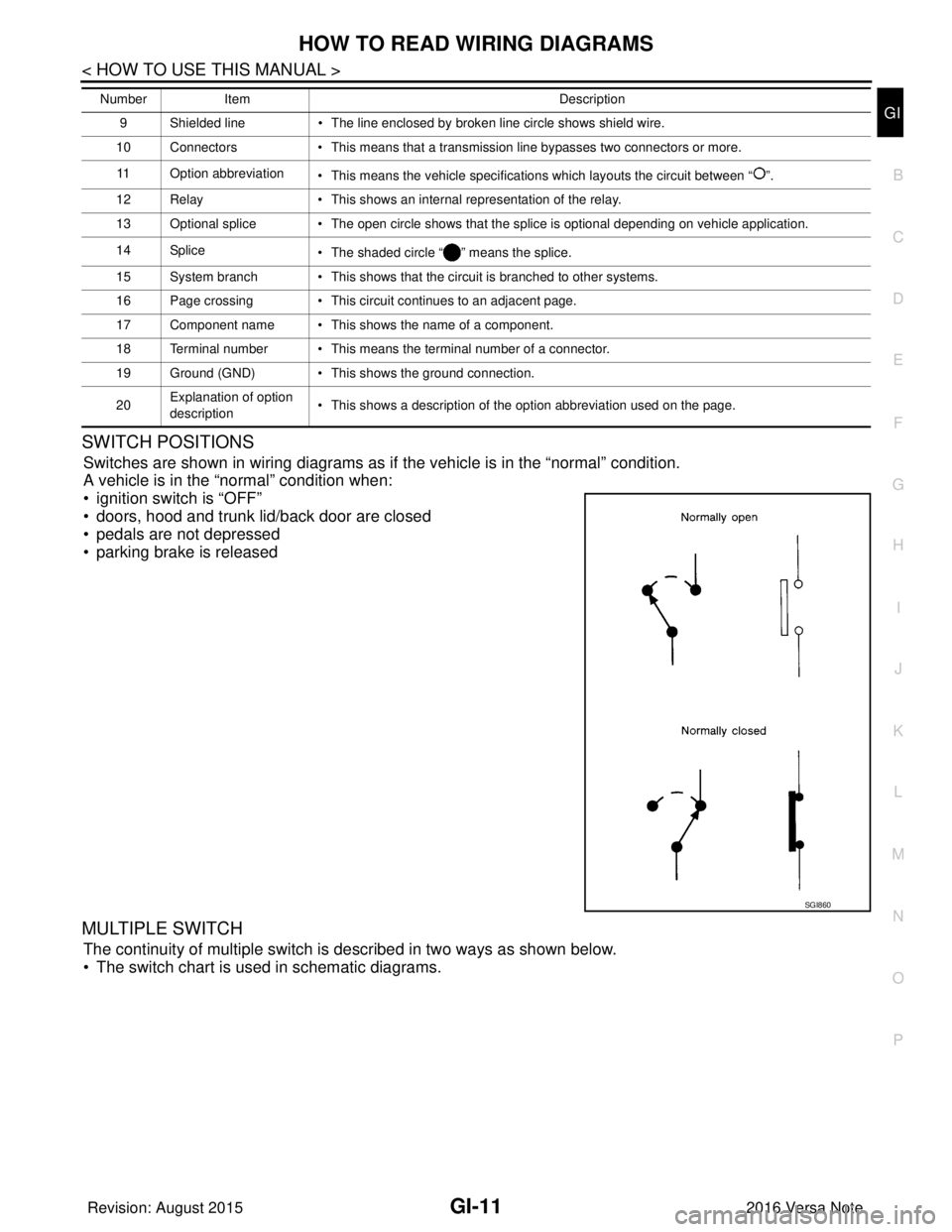
SWITCH POSITIONS
Switches are shown in wiring diagrams as if the vehicle is in the “normal” condition.
A vehicle is in the “normal” condition when:
• ignition switch is “OFF”
• doors, hood and trunk lid/back door are closed
• pedals are not depressed
• parking brake is released
MULTIPLE SWITCH
The continuity of multiple switch is described in two ways as shown below.
• The switch chart is used in schematic diagrams.
9 Shielded line • The line enclosed by broken line circle shows shield wire.
10 Connectors • This means that a transmission line bypasses two connectors or more.
11 Option abbreviation • This means the vehicle specifications which layouts the circuit between “ ”.
12 Relay • This shows an internal representation of the relay.
13 Optional splice • The open circle shows that the splice is optional depending on vehicle application.
14 Splice • The shaded circle “ ” means the splice.
15 System branch • This shows that the circuit is branched to other systems.
16 Page crossing • This circuit continues to an adjacent page.
17 Component name • This shows the name of a component.
18 Terminal number • This means the terminal number of a connector.
19 Ground (GND) • This shows the ground connection.
20 Explanation of option
description • This shows a description of the option abbreviation used on the page.
Number
Item Description
SGI860
Revision: August 2015 2016 Versa Note
cardiagn.com
Page 1934 of 3641

GI-46
< BASIC INSPECTION >
SERVICE INFORMATION FOR ELECTRICAL INCIDENT
Resistance Check Method
• Disconnect the battery negative cable and remove the blown fuse.
• Disconnect all loads (SW1 open, relay disconnected and solenoid disconnected) powered through the fuse.
• Connect one probe of the DMM to the load side of the fuse terminal. Connect the other probe to a knowngood ground.
• With SW1 open, check for continuity. continuity; short is between fuse terminal and SW1 (point A).
no continuity; short is further down the circuit than SW1.
• Close SW1 and disconnect the relay. Put probes at the load side of fuse terminal and a known good ground. Then, check for continuity.
continuity; short is between SW1 and the relay (point B).
no continuity; short is further down the circuit than the relay.
• Close SW1 and jump the relay contacts with jumper wire. Put probes at the load side of fuse terminal and a known good ground. Then, check for continuity.
continuity; short is between relay and solenoid (point C).
no continuity; check solenoid, retrace steps.
Voltage Check Method
• Remove the blown fuse and disconnect all loads (i.e. SW1 open, relay disconnected and solenoid discon-
nected) powered through the fuse.
• Turn the ignition key to the ON or START position. Verify battery voltage at the battery + side of the fuse ter- minal (one lead on the battery + terminal side of the fuse block and one lead on a known good ground).
• With SW1 open and the DMM leads across both fuse terminals, check for voltage. voltage; short is between fuse block and SW1 (point A).
no voltage; short is further down the circuit than SW1.
• With SW1 closed, relay and solenoid disconnected and the DMM leads across both fuse terminals, check for voltage.
voltage; short is between SW1 and the relay (point B).
no voltage; short is further down the circuit than the relay.
• With SW1 closed, relay contacts jumped with fused jumper wire check for voltage. voltage; short is down the circuit of the relay or between the relay and the disconnected solenoid (point C).
no voltage; retrace steps and check power to fuse block.
GROUND INSPECTION
• Ground connections are very important to the proper operation of electrical and electronic circuits. Ground
connections are often exposed to moisture, dirt and other corrosive elements. The corrosion (rust) can
become an unwanted resistance. This unwanted resistance can change the way a circuit works.
• Electronically controlled circuits are very sens itive to proper grounding. A loose or corroded ground can
drastically affect an electronically controlled circuit. A poor or corroded ground can easily affect the circuit.
Even when the ground connection looks clean, there c an be a thin film of rust on the surface.
• When inspecting a ground connection follow these rules:
- Remove the ground bolt or screw.
- Inspect all mating surfaces for tarnish, dirt, rust, etc.
- Clean as required to assure good contact.
- Reinstall bolt or screw securely.
- Inspect for “add-on” accessories which may be interfering with the ground circuit.
- If several wires are crimped into one ground eyelet terminal, check for proper crimps. Make sure all of the
wires are clean, securely fastened and providing a good ground path. If multiple wires are cased in one eye-
let make sure no ground wires have excess wire insulation.
Revision: August 2015 2016 Versa Note
cardiagn.com
Page 2198 of 3641
![NISSAN NOTE 2016 Service Repair Manual LAN-10
< SYSTEM DESCRIPTION >[CAN FUNDAMENTAL]
TROUBLE DIAGNOSIS
Symptom When Error Occurs in CAN Communication System
INFOID:0000000012433334
In CAN communication system, multiple control units mutu](/img/5/57363/w960_57363-2197.png "NISSAN NOTE 2016 Service Repair Manual LAN-10
< SYSTEM DESCRIPTION >[CAN FUNDAMENTAL]
TROUBLE DIAGNOSIS
Symptom When Error Occurs in CAN Communication System
INFOID:0000000012433334
In CAN communication system, multiple control units mutu")
LAN-10
< SYSTEM DESCRIPTION >[CAN FUNDAMENTAL]
TROUBLE DIAGNOSIS
Symptom When Error Occurs in CAN Communication System
INFOID:0000000012433334
In CAN communication system, multiple control units mutually transmit and receive signals. Each control unit
cannot transmit and receive signals if any error occurs on CAN communication line. Under this condition, mul-
tiple control units related to the root cause malfunction or go into fail-safe mode.
ERROR EXAMPLE
NOTE:
Each vehicle differs in symptom of each control unit under fail-safe mode and CAN communication line wiring.
Example: Main Line Between Data Link Connector and ABS Actuator and Electric Un it (Control Unit) Open Circuit
JSMIA0442GB
Unit name Major symptom
ECM Engine torque limiting is affected, and shift harshness increases.
BCM • Reverse warning buzzer does not sound.
• The front wiper moves under continuous operation mode even though the front wip-
er switch being in the intermittent position.
EPS control unit The steering effort increases.
Combination meter • The shift position indicator and OD OFF indicator turn OFF.
• The speedometer is inoperative.
• The odo/trip meter stops.
ABS actuator and electric unit (control unit) Normal operation.
TCM No impact on operation.
IPDM E/R When the ignition switch is ON,
• The headlamps (Lo) turn ON.
• The cooling fan continues to rotate.
Revision: August 2015
2016 Versa Note
cardiagn.com
Page 2205 of 3641
![NISSAN NOTE 2016 Service Repair Manual LAN
DIAGNOSIS AND REPAIR WORKFLOWLAN-17
< BASIC INSPECTION > [CAN FUNDAMENTAL]
C
D
E
F
G H
I
J
K L
B A
O P
N
• When a CAN communication system error is present, multiple control units may malfunctio](/img/5/57363/w960_57363-2204.png "NISSAN NOTE 2016 Service Repair Manual LAN
DIAGNOSIS AND REPAIR WORKFLOWLAN-17
< BASIC INSPECTION > [CAN FUNDAMENTAL]
C
D
E
F
G H
I
J
K L
B A
O P
N
• When a CAN communication system error is present, multiple control units may malfunctio")
LAN
DIAGNOSIS AND REPAIR WORKFLOWLAN-17
< BASIC INSPECTION > [CAN FUNDAMENTAL]
C
D
E
F
G H
I
J
K L
B A
O P
N
• When a CAN communication system error is present, multiple control units may malfunction or go into fail-
safe mode.
• Indication of the combination meter is important to detect the root cause because it is the most obvious to
the customer, and it performs CAN communication with many units.
>> GO TO 2.
2.INSPECTION OF VEHICLE CONDITION
Check whether the symptom is reproduced or not.
NOTE:
Do not turn the ignition switch OFF or disconnect the 12V battery cable while reproducing the error. The error
may temporarily correct itself, making it difficult to determine the root cause.
>> GO TO 3.
3.CHECK OF CAN SYSTEM TYPE (H OW TO USE CAN SYSTEM TYPE SPECIFICATION CHART)
Determine CAN system type based on vehicle equipment.
NOTE:
• This chart is used if CONSULT does not automatically recognize CAN system type.
• There are two styles for CAN system type specification charts. Depending on the number of available sys- tem types, either style A or style B may be used.
• CAN System Type Specification Chart (Style A) NOTE:
SKIB8717E
Revision: August 2015 2016 Versa Note
cardiagn.com