light NISSAN NV PASSENGER VAN 2018 Manual PDF
[x] Cancel search | Manufacturer: NISSAN, Model Year: 2018, Model line: NV PASSENGER VAN, Model: NISSAN NV PASSENGER VAN 2018Pages: 426, PDF Size: 4.52 MB
Page 268 of 426
∙ The TIRE PRES warning does not appearif the low tire pressure warning light illu-
minates to indicate a TPMS malfunc-
tion. Instead, TPMS ERROR will appear in
the trip computer.
∙ Tire pressure rises and falls depending on the heat caused by the vehicle’s op-
eration and the outside temperature.
Do not reduce the tire pressure af ter
driving because the tire pressure rises
af ter driving. Low outside temperature
can lower the temperature of the air
inside the tire which can cause a lower
tire inflation pressure. This may cause
the low tire pressure warning light to
illuminate. If the warning light illumi-
nates, check the tire pressure for all four
tires.
∙ The Tire and Loading Information label is located in the driver’s door opening.
For additional information, refer to “Low tire
pressure warning light” in the “Instruments
and controls” section and “Tire Pressure
Monitoring System (TPMS)” in the “In case of
emergency” section of this manual.WARNING
∙ Radio waves could adversely affect electric medical equipment. Those
who use a pacemaker should contact
the electric medical equipment
manufacturer for the possible influ-
ences before use.
∙ If the low tire pressure warning light illuminates while driving, avoid sud-
den steering maneuvers or abrupt
braking, reduce vehicle speed, pull off
the road to a safe location and stop
the vehicle as soon as possible. Driv-
ing with under-inflated tires may per-
manently damage the tires and in-
crease the likelihood of tire failure.
Serious vehicle damage could occur
and may lead to an accident and could
result in serious personal injury.
Check the tire pressure for all four
tires. Adjust the tire pressure to the
recommended COLD tire pressure
shown on the Tire and Loading Infor-
mation label to turn the low tire pres-
sure warning light off. If you have a flat
tire, replace it with a spare tire as soon
as possible. (For additional informa-
tion, refer to “Flat tire” in the “In case of
emergency ” section of this manual.) ∙ When replacing a wheel without the
TPMS such as the spare tire, when a
spare tire is mounted or a wheel is
replaced, tire pressure will not be indi-
cated, the TPMS will not function and
the low tire pressure warning light will
flash for approximately 1 minute. The
light will remain on af ter 1 minute.
Have your tires replaced and/or TPMS
system reset as soon as possible. It is
recommended that you visit a NISSAN
dealer for this service.
∙ Replacing tires with those not origi- nally specified by NISSAN could affect
the proper operation of the TPMS.
∙ Do not inject any tire liquid or aerosol tire sealant into the tires, as this may
cause a malfunction of the tire pres-
sure sensors.
CAUTION
Do not place metalized film or any
metal parts (antenna, etc.) on the win-
dows. This may cause poor reception of
the signals from the tire pressure sen-
sors, and the TPMS will not function
properly.
Starting and driving5-5
Page 269 of 426
Some devices and transmitters may tem-
porarily interfere with the operation of the
TPMS and cause the low tire pressure
warning light to illuminate.
Some examples are:∙ Facilities or electric devices using simi- lar radio frequencies are near the ve-
hicle.
∙ If a transmitter set to similar frequen- cies is being used in or near the vehicle.
∙ If a computer (or similar equipment) or a DC/AC converter is being used in or
near the vehicle.
The low tire pressure warning light may
illuminate in the following cases: ∙ If the vehicle is equipped with a wheel and tire without TPMS.
∙ If the TPMS has been replaced and the ID has not been registered.
∙ If the wheel is not originally specified by NISSAN. FCC Notice:
For USA:
This device complies with Part 15 of the
FCC Rules. Operation is subject to the fol-
lowing two conditions: (1) This device
may not cause harmful interference, and
(2) this device must accept any interfer-
ence received, including interference
that may cause undesired operation.
NOTE:
Changes or modifications not expressly
approved by the party responsible for
compliance could void the user’s author-
ity to operate the equipment.
For Canada:
This device complies with Industry
Canada licence-exempt RSS standard(s).
Operation is subject to the following two
conditions: (1) this device may not cause
interference, and (2) this device must ac-
cept any interference, including interfer-
ence that may cause undesired opera-
tion of the device.AVOIDING COLLISION AND
ROLLOVER
WARNING
Failure to operate this vehicle in a safe
and prudent manner may result in loss
of control or an accident.
Be alert and drive defensively at all times.
Obey all traffic regulations. Avoid excessive
speed, high speed cornering, or sudden
steering maneuvers, because these driving
practices could cause you to lose control of
your vehicle.
As with any vehicle, loss of control could
result in a collision with other vehicles or
objects or cause the vehicle to roll over,
particularly if the loss of control causes
the vehicle to slide sideways.
Be attentive at all times, and avoid driving
when tired. Never drive when under the in-
fluence of alcohol or drugs (including pre-
scription or over-the-counter drugs which
may cause drowsiness). Always wear your
seat belt as outlined in the “Safety – Seats,
seat belts and supplemental restraint sys-
tem” section of this manual, and also in-
struct your passengers to do so.
5-6Starting and driving
Page 271 of 426
3. When appropriate, slowly release theaccelerator pedal to gradually slow the
vehicle.
4. Gradually steer the vehicle to a safe location off the road and away from
traffic if possible.
5. Lightly apply the brake pedal to gradu- ally stop the vehicle.
6. Turn on the hazard warning flashers and contact a roadside emergency
service to change the tire. For addi-
tional information, refer to “Changing a
flat tire” in the “In case of emergency”
section of this manual.DRINKING ALCOHOL/DRUGS AND
DRIVING
WARNING
Never drive under the influence of alco-
hol or drugs. Alcohol in the bloodstream
reduces coordination, delays reaction
time and impairs judgement. Driving
af ter drinking alcohol increases the
likelihood of being involved in an acci-
dent injuring yourself and others. Addi-
tionally, if you are injured in an accident,
alcohol can increase the severity of the
injury.
NISSAN is committed to safe driving. How-
ever, you must choose not to drive under the
influence of alcohol. Every year thousands of
people are injured or killed in alcohol-related
collisions. Although the local laws vary on
what is considered to be legally intoxicated,
the fact is that alcohol affects all people dif-
ferently and most people underestimate
the effects of alcohol.
Remember, drinking and driving don’t mix!
That is true for drugs (over-the-counter,
prescription) and illegal drugs, too. Don’t
drive if your ability to operate your vehicle is
impaired by alcohol, drugs, or some other
physical condition.
WARNING
∙ Never remove the ignition key or placethe ignition switch in the LOCK posi-
tion while driving. The steering wheel
will lock. This may cause the driver to
lose control of the vehicle and could
result in serious vehicle damage or
personal injury.
IGNITION SWITCH
5-8Starting and driving
Page 272 of 426
AUTOMATIC TRANSMISSION
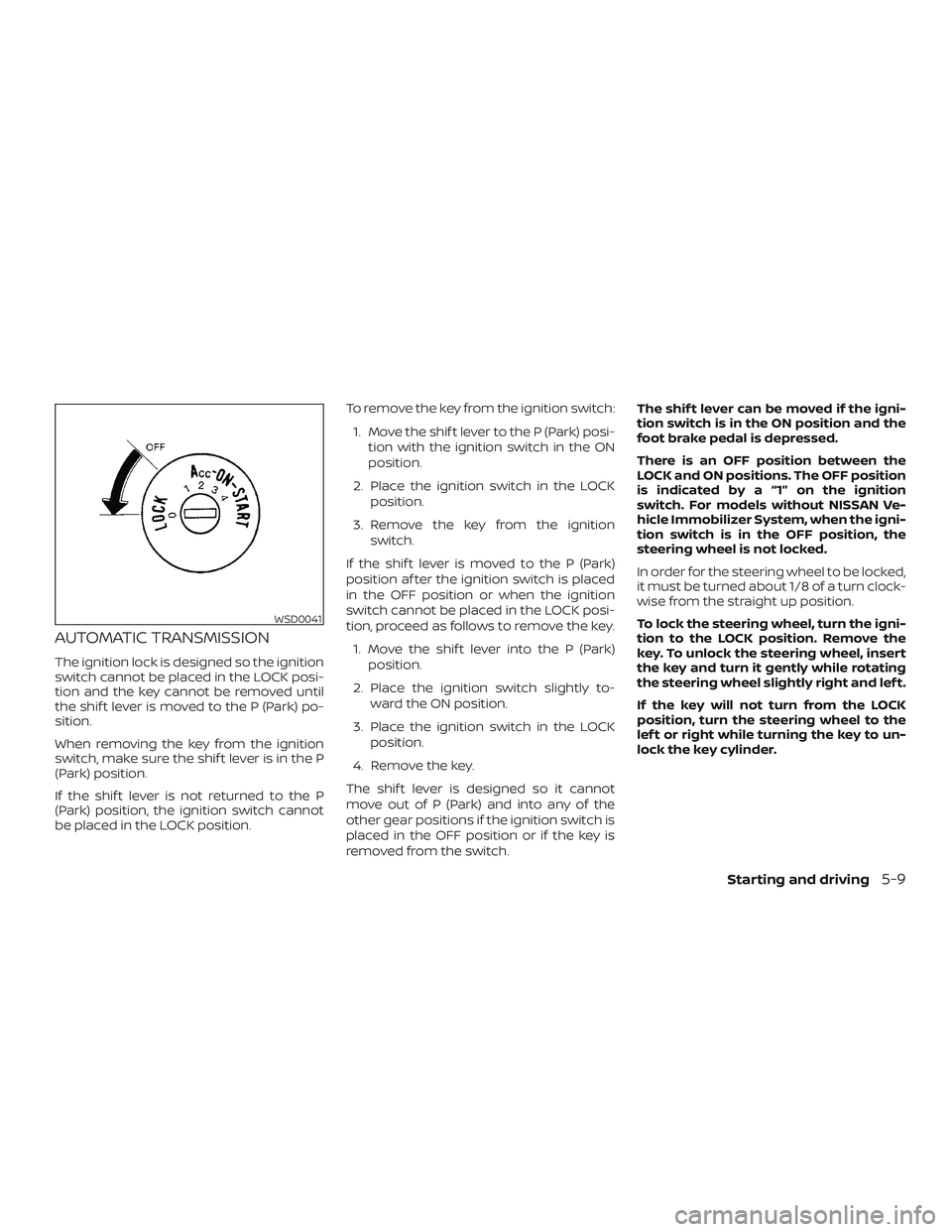
The ignition lock is designed so the ignition
switch cannot be placed in the LOCK posi-
tion and the key cannot be removed until
the shif t lever is moved to the P (Park) po-
sition.
When removing the key from the ignition
switch, make sure the shif t lever is in the P
(Park) position.
If the shif t lever is not returned to the P
(Park) position, the ignition switch cannot
be placed in the LOCK position.To remove the key from the ignition switch:
1. Move the shif t lever to the P (Park) posi- tion with the ignition switch in the ON
position.
2. Place the ignition switch in the LOCK position.
3. Remove the key from the ignition switch.
If the shif t lever is moved to the P (Park)
position af ter the ignition switch is placed
in the OFF position or when the ignition
switch cannot be placed in the LOCK posi-
tion, proceed as follows to remove the key. 1. Move the shif t lever into the P (Park) position.
2. Place the ignition switch slightly to- ward the ON position.
3. Place the ignition switch in the LOCK position.
4. Remove the key.
The shif t lever is designed so it cannot
move out of P (Park) and into any of the
other gear positions if the ignition switch is
placed in the OFF position or if the key is
removed from the switch. The shif t lever can be moved if the igni-
tion switch is in the ON position and the
foot brake pedal is depressed.
There is an OFF position between the
LOCK and ON positions. The OFF position
is indicated by a “1” on the ignition
switch. For models without NISSAN Ve-
hicle Immobilizer System, when the igni-
tion switch is in the OFF position, the
steering wheel is not locked.
In order for the steering wheel to be locked,
it must be turned about 1/8 of a turn clock-
wise from the straight up position.
To lock the steering wheel, turn the igni-
tion to the LOCK position. Remove the
key. To unlock the steering wheel, insert
the key and turn it gently while rotating
the steering wheel slightly right and lef t.
If the key will not turn from the LOCK
position, turn the steering wheel to the
lef t or right while turning the key to un-
lock the key cylinder.
WSD0041
Starting and driving5-9
Page 273 of 426
IGNITION SWITCH POSITIONS
LOCK: Normal parking position (0)
OFF: (1)
The engine can be turned off without lock-
ing the steering wheel.
ACC: (Accessories) (2)
This position activates electrical accesso-
ries such as the radio when the engine is
not running.
ON: Normal operating position (3)
This position turns on the ignition system
and the electrical accessories.
START: (4)
This position starts the engine. As soon as
the engine has started, release the key. It
automatically returns to the ON position.
NISSAN VEHICLE IMMOBILIZER
SYSTEM (if so equipped)
The NISSAN Vehicle Immobilizer System
will not allow the engine to start without
the use of the registered key.
If the engine fails to start using a registered
key (for example, when interference is
caused by another registered key, an auto-
mated toll road device or automatic pay-
ment device on the key ring), restart the
engine using the following procedures:1. Leave the ignition switch in the ON po- sition for approximately 5 seconds.
2. Place the ignition switch in the OFF or LOCK position, and wait approximately
10 seconds.
3. Repeat steps 1 and 2.
4. Restart the engine while holding the device (which may have caused the in-
terference) separate from the regis-
tered key.
If the no start condition re-occurs, NISSAN
recommends placing the registered key on
a separate key ring to avoid interference
from other devices. ∙ Make sure the area around the vehicle is
clear.
∙ Check fluid levels such as engine oil, coolant, brake fluid, and windshield-
washer fluid as frequently as possible,
or at least whenever you refuel.
∙ Check that all windows and lights are clean.
∙ Visually inspect tires for their appear- ance and condition. Also check tires for
proper inflation.
∙ Check that all doors are closed.
∙ Position seat and adjust head restraints/headrests.
∙ Adjust inside and outside mirrors.
∙ Fasten seat belts and ask all passen- gers to do likewise.
∙ Check the operation of warning lights when the ignition switch is placed in the
ON position. For additional information,
refer to “Warning lights, indicator lights
and audible reminders” in the “Instru-
ments and controls” section of this
manual.
BEFORE STARTING THE ENGINE
5-10Starting and driving
Page 275 of 426
ENGINE PROTECTION MODE
The engine has an engine protection mode
to reduce the chance of damage if the
coolant temperature becomes too high
(for example, when climbing steep grades
in high temperature with heavy loads, such
as when towing a trailer). When the engine
temperature reaches a certain level:∙ The engine coolant temperature gauge will move toward the H position.
∙ Engine power may be reduced.
∙ The air conditioning cooling function may be automatically turned off for a
short time (the blower will continue to
operate).
Engine power and, under some conditions,
vehicle speed will decrease. Vehicle speed
can be controlled with the accelerator
pedal, but the vehicle may not accelerate at
the desired speed. The transmission will
downshif t or upshif t as it reaches pre-
scribed shif t points. You can also shif t
manually.
As driving conditions change and engine
coolant temperature is reduced, vehicle
speed can be increased using the accel- erator pedal, and air conditioning cooling
function will automatically be turned back
on.
A malfunction may have occurred if:
∙ The engine coolant temperature is not reduced,
∙ The air conditioning cooling function does not turn back on, or
∙ The engine oil pressure warning light illuminates or the engine coolant tem-
perature gauge indicates an overheat-
ing condition.
If a malfunction occurs move the vehicle
off the road in a safe area and allow the
engine to cool. If the condition is still pres-
ent af ter checking the oil and coolant, do
not continue to drive. It is recommended
that you contact a NISSAN dealer.
The Malfunction Indicator Light (MIL) may
also come on. If onlyit remains on, you do
not need to have your vehicle towed, but
have it inspected soon. It is recommended
that you visit a NISSAN dealer for this ser-
vice. For additional information, refer to
“Malfunction Indicator Light (MIL)” in the “In-
struments and controls” section of this
manual.
WARNING
Overheating can result in reduced en-
gine power and vehicle speed. The re-
duced speed may be lower than other
traffic, which could increase the chance
of a collision. Be especially careful when
driving. If the vehicle cannot maintain a
safe driving speed, pull to the side of the
road in a safe area. Allow the engine to
cool and return to normal operation. For
additional information, refer to “If your
vehicle overheats” in the “In case of
emergency ” section of this manual.
CAUTION
Running the engine with the engine oil
pressure warning light on could cause
serious damage to the engine almost
immediately. Such damage is not cov-
ered by warranty. Turn off the engine as
soon as it is safe to do so.
DRIVING THE VEHICLE
5-12Starting and driving
Page 280 of 426
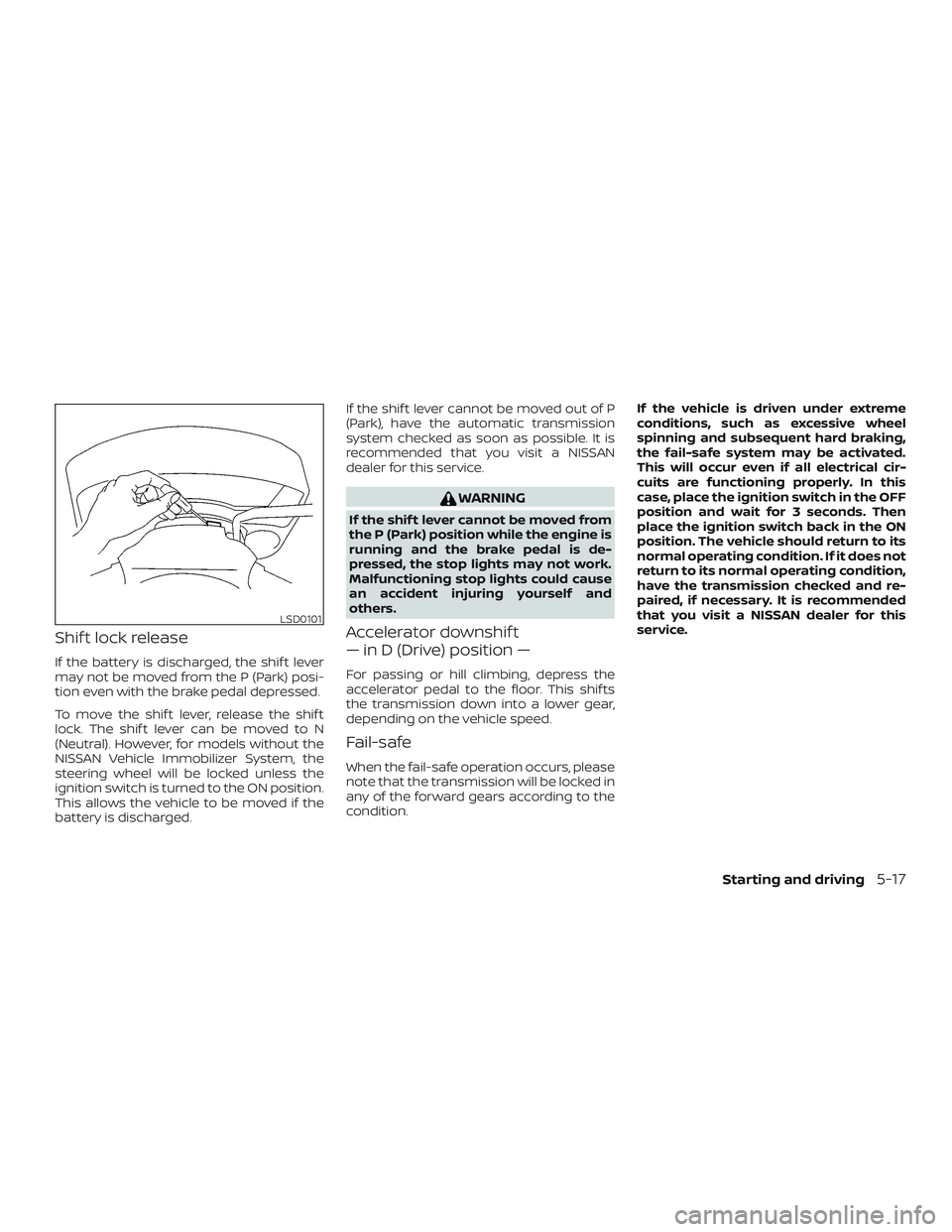
Shif t lock release
If the battery is discharged, the shif t lever
may not be moved from the P (Park) posi-
tion even with the brake pedal depressed.
To move the shif t lever, release the shif t
lock. The shif t lever can be moved to N
(Neutral). However, for models without the
NISSAN Vehicle Immobilizer System, the
steering wheel will be locked unless the
ignition switch is turned to the ON position.
This allows the vehicle to be moved if the
battery is discharged.If the shif t lever cannot be moved out of P
(Park), have the automatic transmission
system checked as soon as possible. It is
recommended that you visit a NISSAN
dealer for this service.
WARNING
If the shif t lever cannot be moved from
the P (Park) position while the engine is
running and the brake pedal is de-
pressed, the stop lights may not work.
Malfunctioning stop lights could cause
an accident injuring yourself and
others.
Accelerator downshif t
— in D (Drive) position —
For passing or hill climbing, depress the
accelerator pedal to the floor. This shif ts
the transmission down into a lower gear,
depending on the vehicle speed.
Fail-safe
When the fail-safe operation occurs, please
note that the transmission will be locked in
any of the forward gears according to the
condition.
If the vehicle is driven under extreme
conditions, such as excessive wheel
spinning and subsequent hard braking,
the fail-safe system may be activated.
This will occur even if all electrical cir-
cuits are functioning properly. In this
case, place the ignition switch in the OFF
position and wait for 3 seconds. Then
place the ignition switch back in the ON
position. The vehicle should return to its
normal operating condition. If it does not
return to its normal operating condition,
have the transmission checked and re-
paired, if necessary. It is recommended
that you visit a NISSAN dealer for this
service.
LSD0101
Starting and driving5-17
Page 281 of 426
WARNING
∙ Be sure the parking brake is fully re-leased before driving. Failure to do so
can cause brake failure and lead to an
accident.
∙ Do not release the parking brake from outside the vehicle.
∙ Do not use the shif t lever in place of the parking brake. When parking, be
sure the parking brake is fully
engaged.
∙ To help avoid risk of injury or death through unintended operation of the
vehicle and/or its systems, do not
leave children, people who require the
assistance of others or pets unat-
tended in your vehicle. Additionally,
the temperature inside a closed ve-
hicle on a warm day can quickly be-
come high enough to cause a signifi-
cant risk of injury or death to people
and pets. To engage:
Firmly depress the parking
brake.
To release:
1. Firmly apply the foot brake.
2. Move the shif t lever to the P (Park) po- sition.
3. Firmly depress the parking brake pedal and it will release.
4. Before driving, be sure the brake warn- ing light goes out.
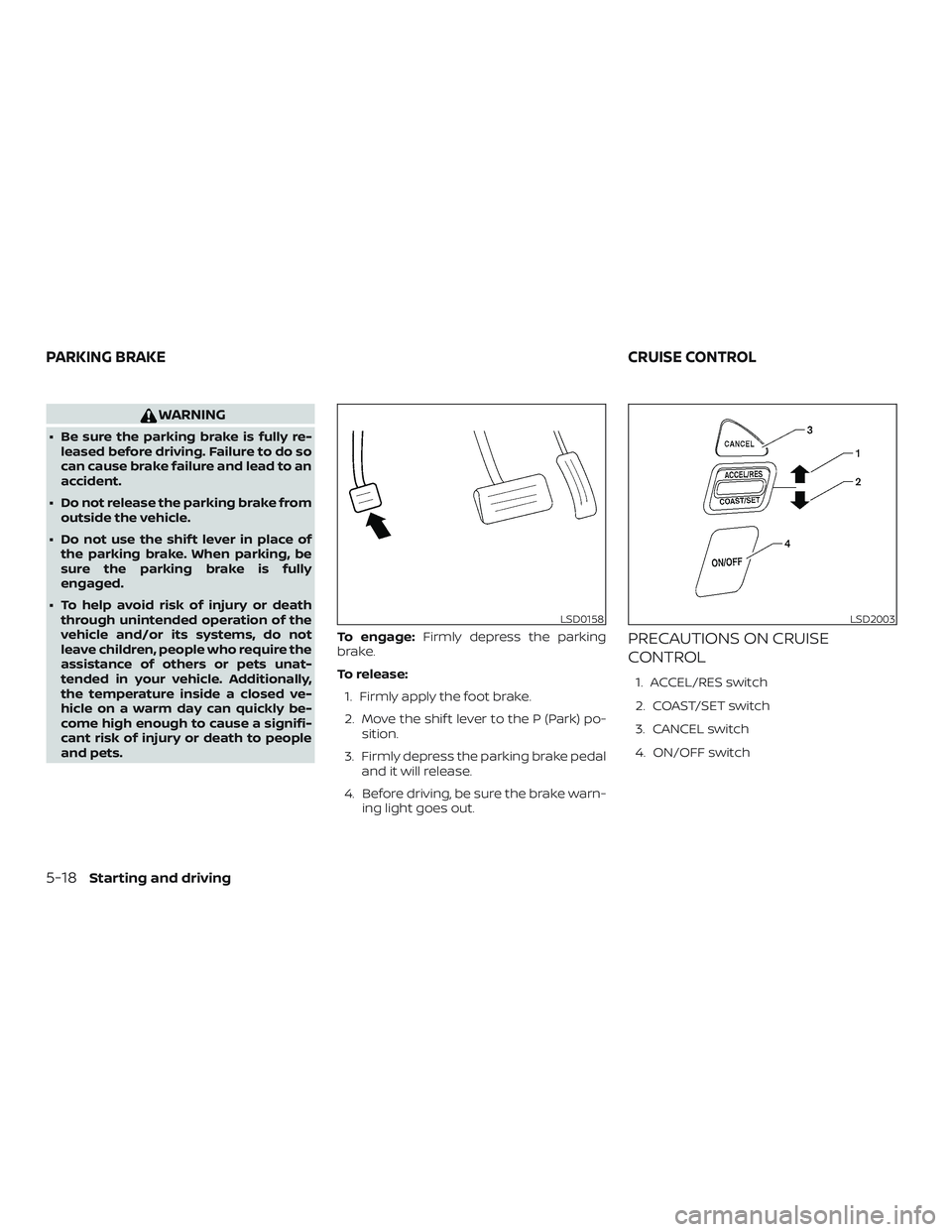
PRECAUTIONS ON CRUISE
CONTROL
1. ACCEL/RES switch
2. COAST/SET switch
3. CANCEL switch
4. ON/OFF switch
LSD0158LSD2003
PARKING BRAKE CRUISE CONTROL
5-18Starting and driving
Page 282 of 426
∙ If the cruise control system malfunc-tions, it cancels automatically. The SET
indicator light illuminates in the trip
computer then blinks to warn the driver.
For additional information, refer to
“Cruise set switch indicator light” in the
“Instruments and controls” section of
this manual.
∙ If the SET indicator light blinks, push the ON/OFF switch off and have the system
checked. It is recommended that you
visit a NISSAN dealer for this service.
∙ The SET indicator light may blink when the ON/OFF switch is pushed on while
pushing the ACCEL/RES, COAST/SET, or
CANCEL switch. To properly set the
cruise control system, use the following
procedures.
WARNING
Do not use the cruise control when driv-
ing under the following conditions:
∙ When it is not possible to keep thevehicle at a set speed.
∙ In heavy traffic or in traffic that varies in speed.
∙ On winding or hilly roads. ∙ On slippery roads (rain, snow, ice, etc.).
∙ In very windy areas.
Doing so could cause a loss of vehicle
control and result in an accident.
CRUISE CONTROL OPERATIONS
The cruise control allows driving at a speed
between 25 - 89 mph (40 - 144 km/h) without
keeping your foot on the accelerator pedal.
To turn on the cruise control,
push the
ON/OFF switch on. The CRUISE indicator
light in the trip computer will illuminate.
To set cruising speed, accelerate the ve-
hicle to the desired speed, push the
COAST/SET switch and release it. The SET
indicator light in the trip computer will illu-
minate. Take your foot off the accelerator
pedal. Your vehicle maintains the set
speed.
∙ To pass another vehicle, depress the
accelerator pedal. When you release the
pedal, the vehicle returns to the previ-
ously set speed.
∙ The vehicle may not maintain the set speed when going up or down steep
hills. If this happens, drive without the
cruise control. To cancel the preset speed,
use one of the
following three methods:
∙ Push the CANCEL switch; the SET indi- cator light in the trip computer goes
out.
∙ Tap the brake pedal; the SET indicator light goes out.
∙ Push the ON/OFF switch off. Both the CRUISE indicator light and SET indicator
light in the trip computer go out.
The cruise control is automatically can-
celed and the SET light in the trip computer
goes out if: ∙ You depress the brake pedal while pushing the ACCEL/RES or SET/COAST
switch. The preset speed is deleted
from memory.
∙ The vehicle slows down more than 8 mph (13 km/h) below the set speed.
∙ You move the shif t lever to N (Neutral).
To reset at a faster cruising speed, use
one of the following three methods:
∙ Depress the accelerator pedal. When the vehicle attains the desired speed,
push and release the COAST/SET
switch.
Starting and driving5-19
Page 283 of 426
∙ Push and hold the ACCEL/RES switch.When the vehicle attains the speed you
desire, release the switch.
∙ Push and release the ACCEL/RES switch. Each time you do this, the set
speed increases by about 1 mph
(1.6 km/h).
To reset at a slower cruising speed, use
one of the following three methods:
∙ Lightly tap the brake pedal. When the vehicle attains the desired speed, push
the COAST/SET switch and release it.
∙ Push and hold the COAST/SET switch. Release the switch when the vehicle
slows to the desired speed.
∙ Push and release the COAST/SET switch. Each time you do this, the set
speed decreases by about 1 mph
(1.6 km/h).
To resume the preset speed, push and
release the ACCEL/RES switch. The vehicle
returns to the last set cruising speed when
the vehicle speed is over 25 mph (40 km/h).CAUTION
During the first 1,200 miles (2,000 km),
follow these recommendations to ob-
tain maximum engine performance
and ensure the future reliability and
economy of your new vehicle. Failure to
follow these recommendations may re-
sult in shortened engine life and re-
duced engine performance.
∙ Avoid driving for long periods at con- stant speed, either fast or slow, and do
not run the engine over 4,000 RPM.
∙ Do not accelerate at full throttle in any gear.
∙ Avoid quick starts.
∙ Avoid hard braking as much as pos- sible.
∙ Do not tow a trailer for the first 500 miles (805 kilometers). Your engine, axle or
other parts could be damaged. Follow these easy-to-use Fuel Efficient
Driving Tips to help you achieve the most
fuel economy from your vehicle.
1. Use Smooth Accelerator and
Brake Pedal Application
∙ Avoid rapid starts and stops.
∙ Use smooth, gentle accelerator and brake application whenever possible.
∙ Maintain constant speed while com- muting and coast whenever pos-
sible.
2. Maintain Constant Speed
∙ Look ahead to try and anticipate and minimize stops.
∙ Synchronizing your speed with traffic lights allows you to reduce your num-
ber of stops.
∙ Maintaining a steady speed can mini- mize red light stops and improve fuel
efficiency.
BREAK-IN SCHEDULE FUEL EFFICIENT DRIVING TIPS
5-20Starting and driving