ECO mode NISSAN PATHFINDER 2008 R51 / 3.G Quick Reference Guide
[x] Cancel search | Manufacturer: NISSAN, Model Year: 2008, Model line: PATHFINDER, Model: NISSAN PATHFINDER 2008 R51 / 3.GPages: 36, PDF Size: 3.11 MB
Page 22 of 36
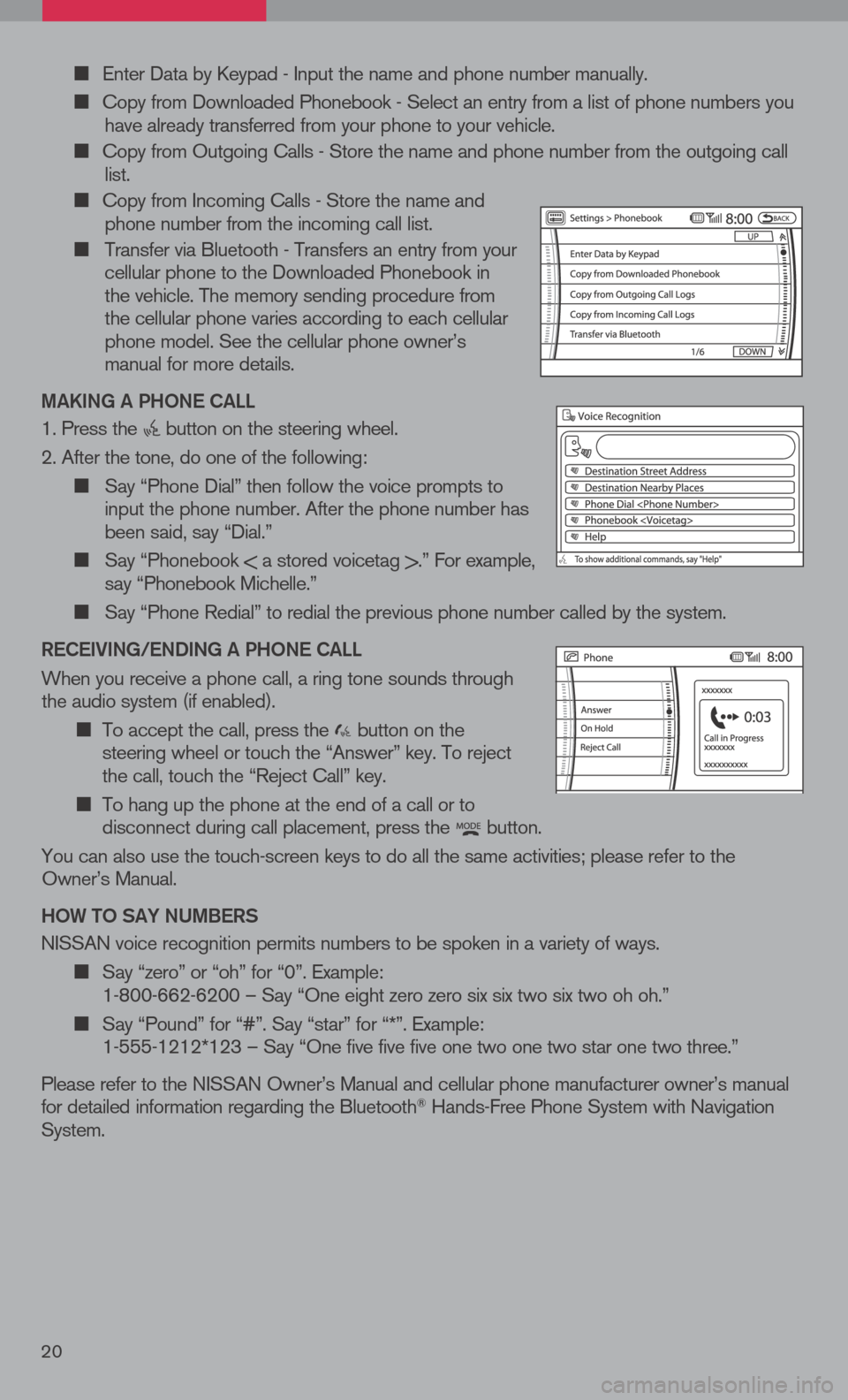
Enter Data by Keypad - Input the name and phone number manually.
Copy from Downloaded Phonebook - Select an entry from a list of phone numbers you have already transferred from your phone to your vehicle.
Copy from Outgoing Calls - Store the name and phone number from the outgoing call list.
Copy from Incoming Calls - Store the name and phone number from the incoming call list.
Transfer via Bluetooth - Transfers an entry from your cellular phone to the Downloaded Phonebook in the vehicle. The memory sending procedure from the cellular phone varies according to each cellular phone model. See the cellular phone owner’s manual for more details.
ma KiN g a P hON e C aLL
1. Press the button on the steering wheel.
2. After the tone, do one of the following:
Say “Phone Dial” then follow the voice prompts to input the phone number. After the phone number has been said, say “Dial.”
Say “Phonebook < a stored voicetag >.” For example, say “Phonebook Michelle.”
Say “Phone Redial” to redial the previous phone number called by the system.
R eC ei ViN g /e ND iN g a P hON e C aLL
When you receive a phone call, a ring tone sounds through the audio system (if enabled).
To accept the call, press the button on the steering wheel or touch the “Answer” key. To reject the call, touch the “Reject Call” key.
To hang up the phone at the end of a call or to disconnect during call placement, press the button.
You can also use the touch-screen keys to do all the same activities; please refer to the Owner’s Manual.
h OW tO S aY NU mBeRS
NISSAN voice recognition permits numbers to be spoken in a variety of ways.
Say “zero” or “oh” for “0”. Example: 1-800-662-6200 – Say “One eight zero zero six six two six two oh oh.”
Say “Pound” for “#”. Say “star” for “*”. Example: 1-555-1212*123 – Say “One five five five one two one two star one two three.”
Please refer to the NISSAN Owner’s Manual and cellular phone manufacturer owner’s manual for detailed information regarding the Bluetooth® Hands-Free Phone System with Navigation System.
20
Page 25 of 36
WiR eLe SS he a DPhON eS
The wireless headphones include separate buttons
for power and volume control. Headphones
automatically turn off after 30 seconds if no sound
is present.
For optimum wireless headphone performance,
increase the volume on the rear seat controller
to the maximum level and adjust the wireless
headphone volume using the volume control on
the wireless headphone. Using a lower volume
setting on the rear seat controller can cause static
noise in the wireless headphone.
The wireless headphone audio signal originates
from the rear audio controls. This signal needs an
unobstructed path to the headphones to maintain
performance.
23
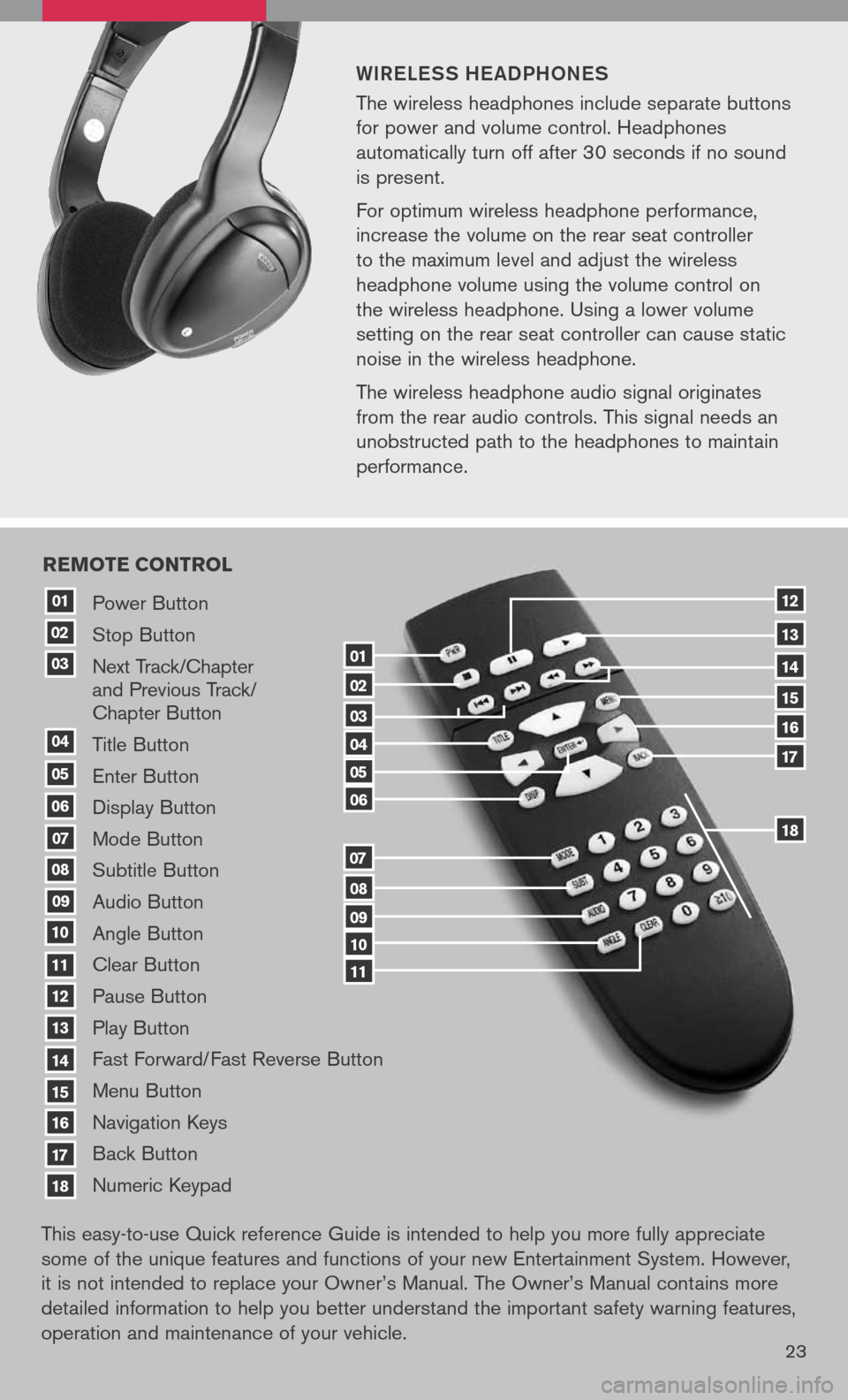
Power Button
Stop Button
Next Track/Chapter and Previous Track/ Chapter Button
Title Button
Enter Button
Display Button
Mode Button
Subtitle Button
Audio Button
Angle Button
Clear Button
Pause Button
Play Button
Fast Forward/Fast Reverse Button
Menu Button
Navigation Keys
Back Button
Numeric Keypad
10
09
01
08
18
17
07
16
03
02
04
05
06
07
15
14
08
13
12
09
1110
11
06
05
04
03
02
18
17
16
15
14
13
12
re Mote control
01
This easy-to-use Quick reference Guide is intended to help you more fully appreciate
some of the unique features and functions of your new Entertainment System. However,
it is not intended to replace your Owner’s Manual. The Owner’s Manual contains more
detailed information to help you better understand the important safety warning features,
operation and maintenance of your vehicle.