buttons NISSAN PATHFINDER 2009 Owner´s Manual
[x] Cancel search | Manufacturer: NISSAN, Model Year: 2009, Model line: PATHFINDER, Model: NISSAN PATHFINDER 2009Pages: 471, PDF Size: 5.9 MB
Page 244 of 471
cGive voice commands.
For information, see “NISSAN Voice Recog-
nition system (if so equipped)” later in this
section.
Stopping playback:
The system stops playing when:
cAnother mode (radio, CD, CompactFlash™
or AUX) is selected.
cThe audio system is turned off.
cThe ignition switch is placed in the OFF
position.
SEEK/CAT and TRACK buttons:
Press the
SEEK/CAT button or theTRACK button while a track is being played; the
next track or the beginning of the current track will
be played.
Press and hold the
SEEK/CAT (rewind)
button or the
TRACK (fast forward) button
for more than approximately 1.5 seconds; the
track will play while rewinding or fast forwarding.
When the
SEEK/CAT (rewind) button or
the
TRACK (fast forward) button is re-
leased, the track will return to the normal playing
speed.The NISSAN controller can also be used to se-
lect tracks.
For more information on how to use the NISSAN
controller, see “How to use the NISSAN control-
ler” earlier in this section.
Play mode selection:
To change to another album or artist, turn the
TUNE/FLDR knob.
SCAN·RPT button:
Pressing the SCAN·RPT button while a track is
playing, the play pattern can be changed as fol-
lows:
ALL Playlist RPT!1 Playlist RPT!1 TRK RPT
!ALL Playlist RDM!1 Playlist RDM!ALL
Playlist RPT
ALL Playlist RPT: the entire playlist will be re-
peated.
1 Playlist RPT: the playlist currently being played
will be repeated.
1 TRK RPT: the current track playing will be
repeated.
ALL Playlist RDM: all the tracks in the playlist will
be played randomly.
1 Playlist RDM: the tracks in the current playlist
will be played randomly.Music Box menu
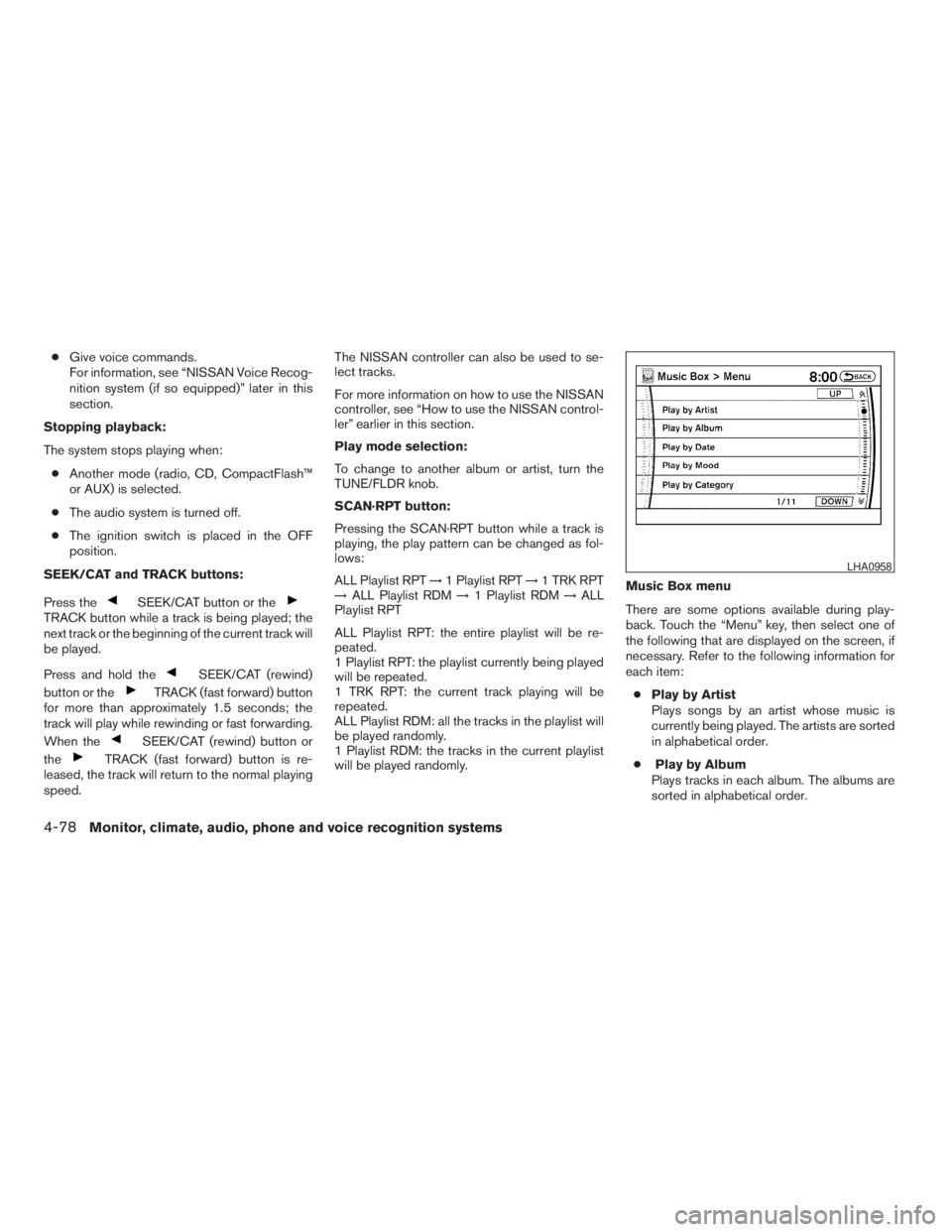
There are some options available during play-
back. Touch the “Menu” key, then select one of
the following that are displayed on the screen, if
necessary. Refer to the following information for
each item:
cPlay by Artist
Plays songs by an artist whose music is
currently being played. The artists are sorted
in alphabetical order.
cPlay by Album
Plays tracks in each album. The albums are
sorted in alphabetical order.
LHA0958
4-78Monitor, climate, audio, phone and voice recognition systems
ZREVIEW COPYÐ2009 Pathfinder(pat)
Owners ManualÐUSA_English(nna)
05/29/08Ðdebbie
X
Page 254 of 471
Press thebutton on the front radio control
panel; the headphones symbol and the message
“Headphones ON” illuminates on the front dis-
play when the headphones are on.
One or two infrared headphones and one remote
controller are included if the vehicle is equipped
with the DVD entertainment system.
For vehicles equipped with the FM/AM/SAT radio
with compact disc player, if the rear headphones
are turned on, the rear speakers will be disabled.
The rear passengers can use the wireless head-
phones to listen to a different media than the front
passengers. The rear passengers can listen to
the same media along with the front passengers
or they can listen to a different media.
For more information on the remote controller,
see “NISSAN Mobile Entertainment System
(MES)” later in this section.
VOL (volume) wireless headphones
dial:
The VOL dial on the wireless headphones allows
the rear passengers to adjust the headphone
volume level.
Speaker control (front panel) but-
ton:
Press the
button on the front radio control
panel to turn the rear speakers off and the wire-
less headphones on. Press the
button
again to turn rear speakers back on and wireless
headphones off.
MODE (remote control) button:
The MODE button on the remote controller al-
lows the rear passengers to change between
Preset A, Preset B, Preset C, Music Box**, CD*,
CompactFlash*, DVD* and AUX. When a source
of media is selected, the media type will be dis-
played on the rear screen.
*These modes are only available when compat-
ible media storage is inserted into the device.
**This mode is only available when music has
been downloaded into the Music Box hard-disk
drive audio system.
Seek (remote control)
buttons:
In AM or FM mode, the
or theseek
buttons on the remote controller allow the rear
seat passengers to find the next or previous
preset radio station.In CD, Music Box hard-disk drive audio system
and CompactFlash™ mode, the
or
the
seek buttons allow the rear passen-
gers to find the next or previous selection.
REW and FF (remote
control) buttons:
When the
(rewind) or the(fast for-
ward) button on the remote controller is pressed
while in AM or FM mode, the radio will tune to the
next frequency.
When the
(rewind) or the(fast for-
ward) button on the remote controller is pressed
while in CD, Music Box hard-disk audio system,
or CompactFlash™, the media will play while re-
winding or fast forwarding.
ANTENNA
Window antenna
The antenna pattern is printed inside the rear
passenger and driver side windows.
4-88Monitor, climate, audio, phone and voice recognition systems
ZREVIEW COPYÐ2009 Pathfinder(pat)
Owners ManualÐUSA_English(nna)
05/29/08Ðdebbie
X
Page 266 of 471
If the STOP button is pressed again when the
player is already in Stop mode, it will reinitialize
the pointer to the beginning of the disc. In effect,
it will ignore the last stored disc position and,
upon receipt of the next play message, it will
begin at the Title Menu, or at “the beginning of the
disc”.
DISPLAY:
If the DISPLAY control is pressed for less than 2
seconds, the display menu will appear on the
screen.
cThe display menu will remain on the screen
for 10 seconds if no subsequent control
activations occur.
cUse NAVIGATION KEYS to navigate within
the display menu, and use ENTER to select
the item.
NAVIGATION KEYS:
If media is in activated MENU mode, the NAVI-
GATION KEYS will be used to navigate Up,
Down, Left, and Right within the menu.
If display control menu is on, the NAVIGATION
KEYS will be used to navigate Up, Down, Left,
and Right within the menu.ENTER:
In MENU mode, press the ENTER button to se-
lect MENU items.
In the display menu, press the ENTER button to
select items for modification, as per the on-
screen instructions.
MENU:
If the media is in PLAY mode and the MENU
button is pressed, the DVD menu will appear on
the screen. Use Navigation Keys to navigate
within the menu, and use ENTER to select the
item.
Press the MENU button again to return to PLAY
mode.
TITLE:
Press TITLE button to return the DVD media to
the “title” of the DVD.
Press TITLE button again to return to the previous
stop point and play.
BACK:
Press the BACK button to exit the current active
menu and return to the previous menu.
SUBTITLE:
Press the SUBTITLE button to call up subtitle
selection menu.Repeatedly press the SUBTITLE button to cycle
through each available subtitle.
AUDIO:
Press the AUDIO button to call up audio menu.
Repeatedly press the AUDIO button to cycle
through each available audio track.
ANGLE:
Press the ANGLE button to call up camera angle
menu.
Repeatedly press the ANGLE button to cycle
through each available angle.
CLEAR:
Press the CLEAR button to clear all numeric
inputs, if actuated prior to expiration of the
3-second timer.
NUMERIC KEYPAD (0–9 &¸10):
Press the NUMERIC KEYPAD to directly access
disc chapters, titles or tracks by inputting their
numeric value.
The “¸10” button input numbers greater than or
equal to 10, allowing up three digits to be input
for selecting chapter/title/track number.
The subsequent actuation of numeric buttons will
continuously shift the previously input number to
the “left”.
4-100Monitor, climate, audio, phone and voice recognition systems
ZREVIEW COPYÐ2009 Pathfinder(pat)
Owners ManualÐUSA_English(nna)
05/29/08Ðdebbie
X
Page 275 of 471
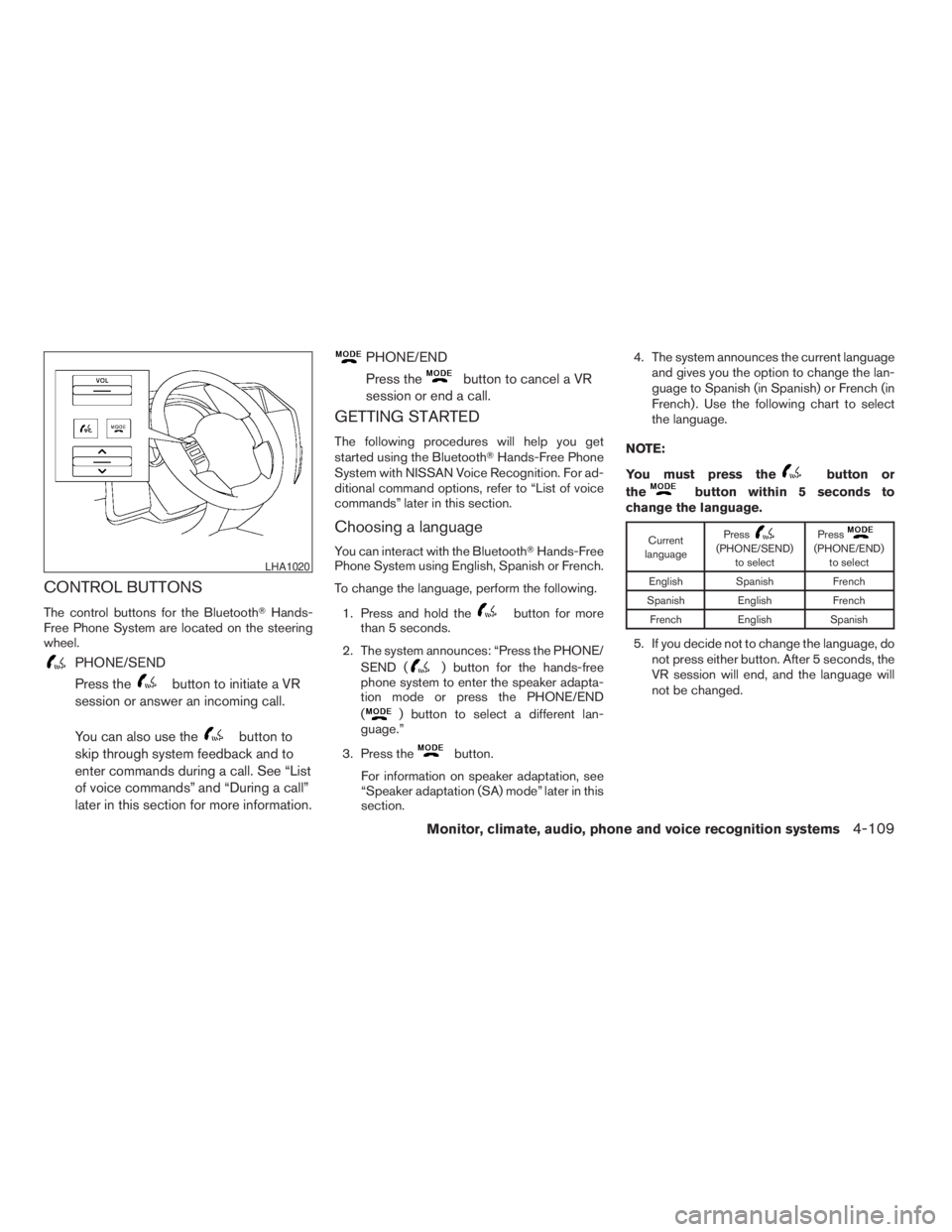
CONTROL BUTTONS
The control buttons for the BluetoothTHands-
Free Phone System are located on the steering
wheel.
PHONE/SEND
Press the
button to initiate a VR
session or answer an incoming call.
You can also use the
button to
skip through system feedback and to
enter commands during a call. See “List
of voice commands” and “During a call”
later in this section for more information.
PHONE/END
Press the
button to cancel a VR
session or end a call.
GETTING STARTED
The following procedures will help you get
started using the BluetoothTHands-Free Phone
System with NISSAN Voice Recognition. For ad-
ditional command options, refer to “List of voice
commands” later in this section.
Choosing a language
You can interact with the BluetoothTHands-Free
Phone System using English, Spanish or French.
To change the language, perform the following.
1. Press and hold the
button for more
than 5 seconds.
2. The system announces: “Press the PHONE/
SEND (
) button for the hands-free
phone system to enter the speaker adapta-
tion mode or press the PHONE/END
(
) button to select a different lan-
guage.”
3. Press the
button.
For information on speaker adaptation, see
“Speaker adaptation (SA) mode” later in this
section.4. The system announces the current language
and gives you the option to change the lan-
guage to Spanish (in Spanish) or French (in
French) . Use the following chart to select
the language.
NOTE:
You must press the
button or
the
button within 5 seconds to
change the language.
Current
languagePress(PHONE/SEND)
to selectPress(PHONE/END)
to select
English Spanish French
Spanish English French
French English Spanish
5. If you decide not to change the language, do
not press either button. After 5 seconds, the
VR session will end, and the language will
not be changed.
LHA1020
Monitor, climate, audio, phone and voice recognition systems4-109
ZREVIEW COPYÐ2009 Pathfinder(pat)
Owners ManualÐUSA_English(nna)
05/30/08Ðbarbara
X
Page 366 of 471
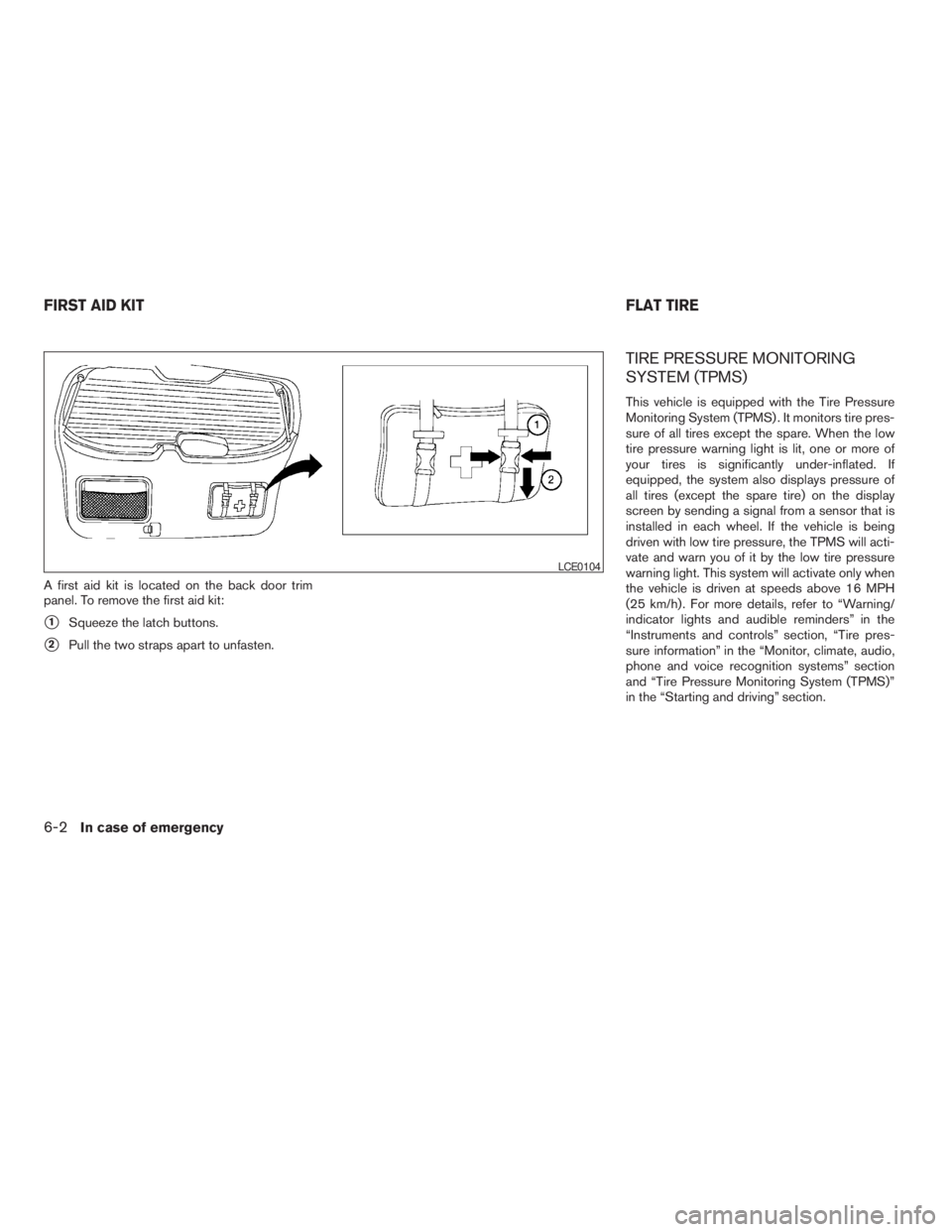
A first aid kit is located on the back door trim
panel. To remove the first aid kit:
s1Squeeze the latch buttons.
s2Pull the two straps apart to unfasten.
TIRE PRESSURE MONITORING
SYSTEM (TPMS)
This vehicle is equipped with the Tire Pressure
Monitoring System (TPMS) . It monitors tire pres-
sure of all tires except the spare. When the low
tire pressure warning light is lit, one or more of
your tires is significantly under-inflated. If
equipped, the system also displays pressure of
all tires (except the spare tire) on the display
screen by sending a signal from a sensor that is
installed in each wheel. If the vehicle is being
driven with low tire pressure, the TPMS will acti-
vate and warn you of it by the low tire pressure
warning light. This system will activate only when
the vehicle is driven at speeds above 16 MPH
(25 km/h) . For more details, refer to “Warning/
indicator lights and audible reminders” in the
“Instruments and controls” section, “Tire pres-
sure information” in the “Monitor, climate, audio,
phone and voice recognition systems” section
and “Tire Pressure Monitoring System (TPMS)”
in the “Starting and driving” section.
LCE0104
FIRST AID KITFLAT TIRE
6-2In case of emergency
ZREVIEW COPYÐ2009 Pathfinder(pat)
Owners ManualÐUSA_English(nna)
05/29/08Ðdebbie
X
Page 414 of 471
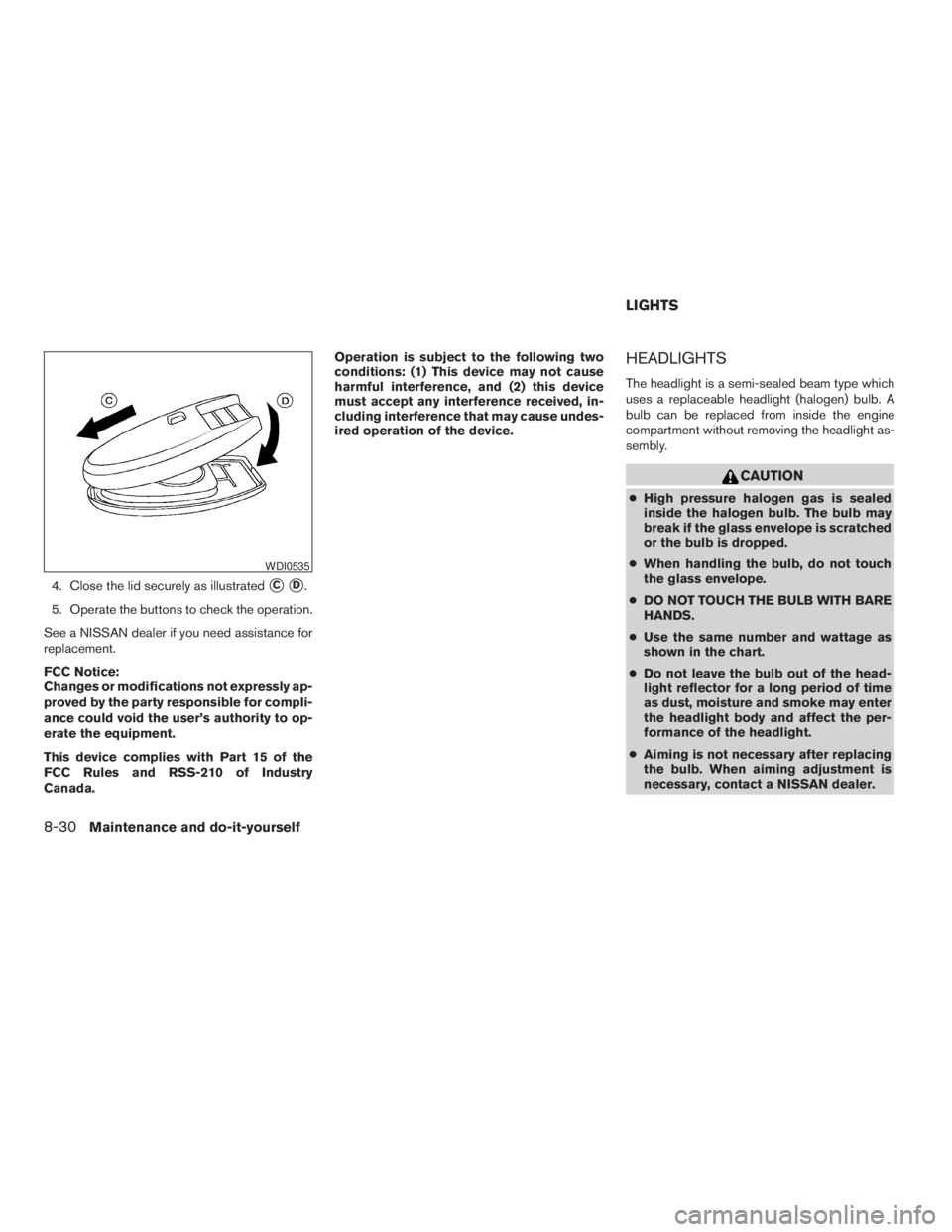
4. Close the lid securely as illustratedsCsD.
5. Operate the buttons to check the operation.
See a NISSAN dealer if you need assistance for
replacement.
FCC Notice:
Changes or modifications not expressly ap-
proved by the party responsible for compli-
ance could void the user’s authority to op-
erate the equipment.
This device complies with Part 15 of the
FCC Rules and RSS-210 of Industry
Canada.Operation is subject to the following two
conditions: (1) This device may not cause
harmful interference, and (2) this device
must accept any interference received, in-
cluding interference that may cause undes-
ired operation of the device.
HEADLIGHTS
The headlight is a semi-sealed beam type which
uses a replaceable headlight (halogen) bulb. A
bulb can be replaced from inside the engine
compartment without removing the headlight as-
sembly.
CAUTION
cHigh pressure halogen gas is sealed
inside the halogen bulb. The bulb may
break if the glass envelope is scratched
or the bulb is dropped.
cWhen handling the bulb, do not touch
the glass envelope.
cDO NOT TOUCH THE BULB WITH BARE
HANDS.
cUse the same number and wattage as
shown in the chart.
cDo not leave the bulb out of the head-
light reflector for a long period of time
as dust, moisture and smoke may enter
the headlight body and affect the per-
formance of the headlight.
cAiming is not necessary after replacing
the bulb. When aiming adjustment is
necessary, contact a NISSAN dealer.
WDI0535
LIGHTS
8-30Maintenance and do-it-yourself
ZREVIEW COPYÐ2009 Pathfinder(pat)
Owners ManualÐUSA_English(nna)
05/29/08Ðdebbie
X
Page 464 of 471
Bulb check/instrument panel..........2-14
Bulb replacement................8-32
C
Capacities and recommended
fuel/lubricants...................9-2
Car phone or CB radio............4-104
Cargo light...................2-54
Cargo net....................2-45
Cargo (See vehicle loading information) . . .9-12
CD care and cleaning.............4-84
CD changer (See audio system)........4-63
CD player (See audio system).....4-57, 4-71
Child restraint with top tether strap......1-24
Child restraints..........1-15, 1-21, 1-23
Precautions on child
restraints............1-21, 1-29, 1-36
Top tether strap anchor point locations . .1-24
Child safety rear door lock............3-6
Chimes, audible reminders...........2-22
Cleaning exterior and interior..........7-2
Clock...............4-56, 4-61, 4-69
(models with navigation system) . .4-13, 4-29
Clock set.................4-13, 4-29
C.M.V.S.S. certification label..........9-10
Cold weather driving..............5-39
Compact disc (CD) player.......4-57, 4-71
CompactFlash (CF) player...........4-73
Console box...................2-39
Control panel buttons.............4-18
Brightness/contrast button.....4-18, 4-34
Enter button..............4-4, 4-18
Setting button............4-11, 4-27
Startup screen...............4-21Without navigation system..........4-4
Controls
Audio controls (steering wheel)......4-86
Heater and air conditioner
controls................4-38, 4-45
Rear audio controls.............4-87
Rear seat air conditioner..........4-47
Coolant
Capacities and recommended
fuel/lubricants.................9-2
Changing engine coolant..........8-9
Checking engine coolant level........8-8
Engine coolant temperature gauge.....2-6
Corrosion protection...............7-5
Cruise control..................5-20
Cup holders...................2-41
Curtain side-impact and rollover air bag . . .1-53
D
Daytime running light system
(Canada only)..................2-30
Defroster switch
Rear window and outside mirror defroster
switch....................2-27
Digital video disc DVD.............4-89
Dimensions and weights.............9-8
Dimmer switch for instrument panel......2-31
Display controls
(see control panel buttons)........4-4, 4-18
Distance to empty.............4-7, 4-23
Door locks....................3-4
Door open warning light............2-16
Drive belt....................8-18
Drive positioner, Automatic...........3-30Driving
Cold weather driving............5-39
Driving with automatic transmission. . . .5-14
Precautions when starting and driving . . .5-2
E
Economy - fuel.................5-22
Emission control information label.......9-11
Emission control system warranty.......9-28
Engine
Before starting the engine.........5-13
Block heater.................5-41
Capacities and recommended
fuel/lubricants.................9-2
Changing engine coolant..........8-9
Changing engine oil............8-11
Changing engine oil filter..........8-12
Checking engine coolant level........8-8
Checking engine oil level..........8-9
Engine compartment check locations. . . .8-6
Engine coolant temperature gauge.....2-6
Engine cooling system............8-8
Engine oil...................8-9
Engine oil and oil filter recommendation . .9-5
Engine oil pressure warning light.....2-16
Engine oil viscosity..............9-5
Engine serial number............9-10
Engine specifications.............9-7
Starting the engine.............5-13
Engine oil pressure gauge............2-8
Enter button................4-4, 4-18
Event data recorders..............9-29
Exhaust gas (Carbon monoxide)........5-2
Eyeglass case..................2-40
10-2
ZREVIEW COPYÐ2009 Pathfinder(pat)
Owners ManualÐUSA_English(nna)
06/13/08Ðdebbie
X