key battery NISSAN PATHFINDER 2010 Owner´s Manual
[x] Cancel search | Manufacturer: NISSAN, Model Year: 2010, Model line: PATHFINDER, Model: NISSAN PATHFINDER 2010Pages: 463, PDF Size: 5.69 MB
Page 365 of 463
WARNING
Always follow the instructions below.
Failure to do so could result in damage to
the charging system and cause personal
injury.
1. If the booster battery is in another vehicle,
position the two vehicles to bring their bat-
teries near each other.
Do not allow the two vehicles to touch.
2. Apply the parking brake. Move the shift se-
lector to N (Neutral) (manual transmission)
or to P (Park) (automatic transmission) .
Switch off all unnecessary electrical sys-tems (lights, heater, air conditioner, etc.) .
3. Remove vent caps on the battery (if so
equipped) . Cover the battery with an old
cloth to reduce explosion hazard.
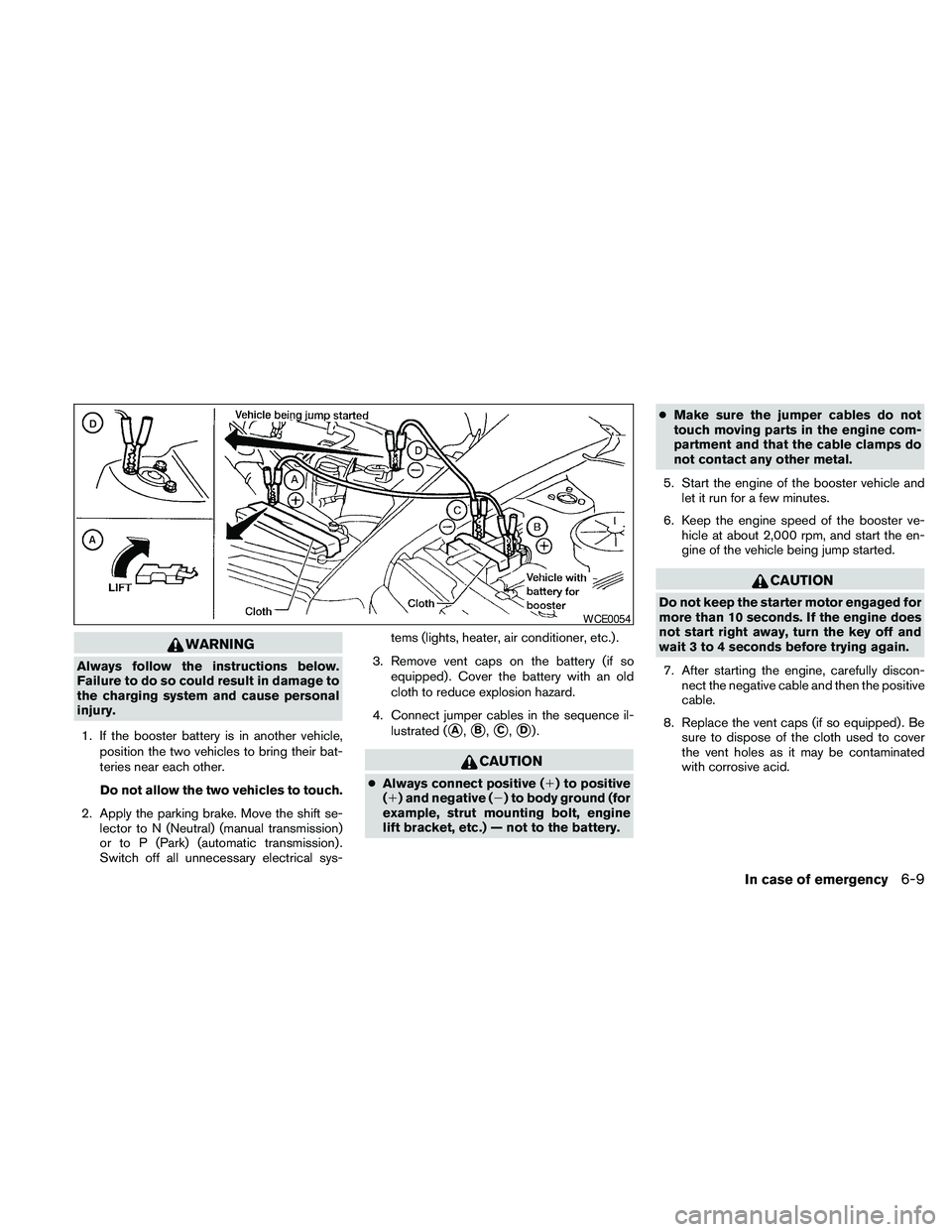
4. Connect jumper cables in the sequence il-
lustrated (
sA,sB,sC,sD).
CAUTION
cAlways connect positive (1) to positive
(1) and negative (2) to body ground (for
example, strut mounting bolt, engine
lift bracket, etc.) — not to the battery.cMake sure the jumper cables do not
touch moving parts in the engine com-
partment and that the cable clamps do
not contact any other metal.
5. Start the engine of the booster vehicle and
let it run for a few minutes.
6. Keep the engine speed of the booster ve-
hicle at about 2,000 rpm, and start the en-
gine of the vehicle being jump started.
CAUTION
Do not keep the starter motor engaged for
more than 10 seconds. If the engine does
not start right away, turn the key off and
wait 3 to 4 seconds before trying again.
7. After starting the engine, carefully discon-
nect the negative cable and then the positive
cable.
8. Replace the vent caps (if so equipped) . Be
sure to dispose of the cloth used to cover
the vent holes as it may be contaminated
with corrosive acid.
WCE0054
In case of emergency6-9
Page 377 of 463
8 Maintenance and do-it-yourself
Maintenance requirements..........................8-2
General maintenance..............................8-2
Explanation of general maintenance items.........8-2
Maintenance precautions...........................8-5
Engine compartment check locations................8-6
Engine cooling system.............................8-8
Checking engine coolant level...................8-8
Changing engine coolant........................8-9
Engine oil.........................................8-9
Checking engine oil level........................8-9
Changing engine oil...........................8-11
Changing engine oil filter.......................8-12
5-speed automatic transmission fluid...............8-13
Power steering fluid...............................8-13
Brake fluid.......................................8-14
Brake fluid....................................8-14
Window washer fluid.............................8-15
Window washer fluid reservoir..................8-15
Battery..........................................8-15
Jump starting.................................8-17
Variable voltage control system.....................8-17
Drive belt........................................8-18
Spark plugs......................................8-19Replacing spark plugs.........................8-19
Air cleaner.......................................8-19
In-cabin microfilter.............................8-20
Windshield wiper blades..........................8-21
Cleaning.....................................8-21
Replacing....................................8-22
Brakes..........................................8-24
Fuses...........................................8-25
Engine compartment...........................8-25
Passenger compartment.......................8-26
Battery replacement..............................8-27
Keyfob (if so equipped)........................8-28
NISSAN Intelligent Key™ (if so equipped)........8-29
Lights...........................................8-30
Headlights....................................8-30
Exterior and interior lights.......................8-32
Wheels and tires.................................8-35
Tire pressure..................................8-35
Tire labeling...................................8-39
Types of tires..................................8-41
Tire chains....................................8-42
Changing wheels and tires.....................8-42
Page 404 of 463
KEYFOB (if so equipped)
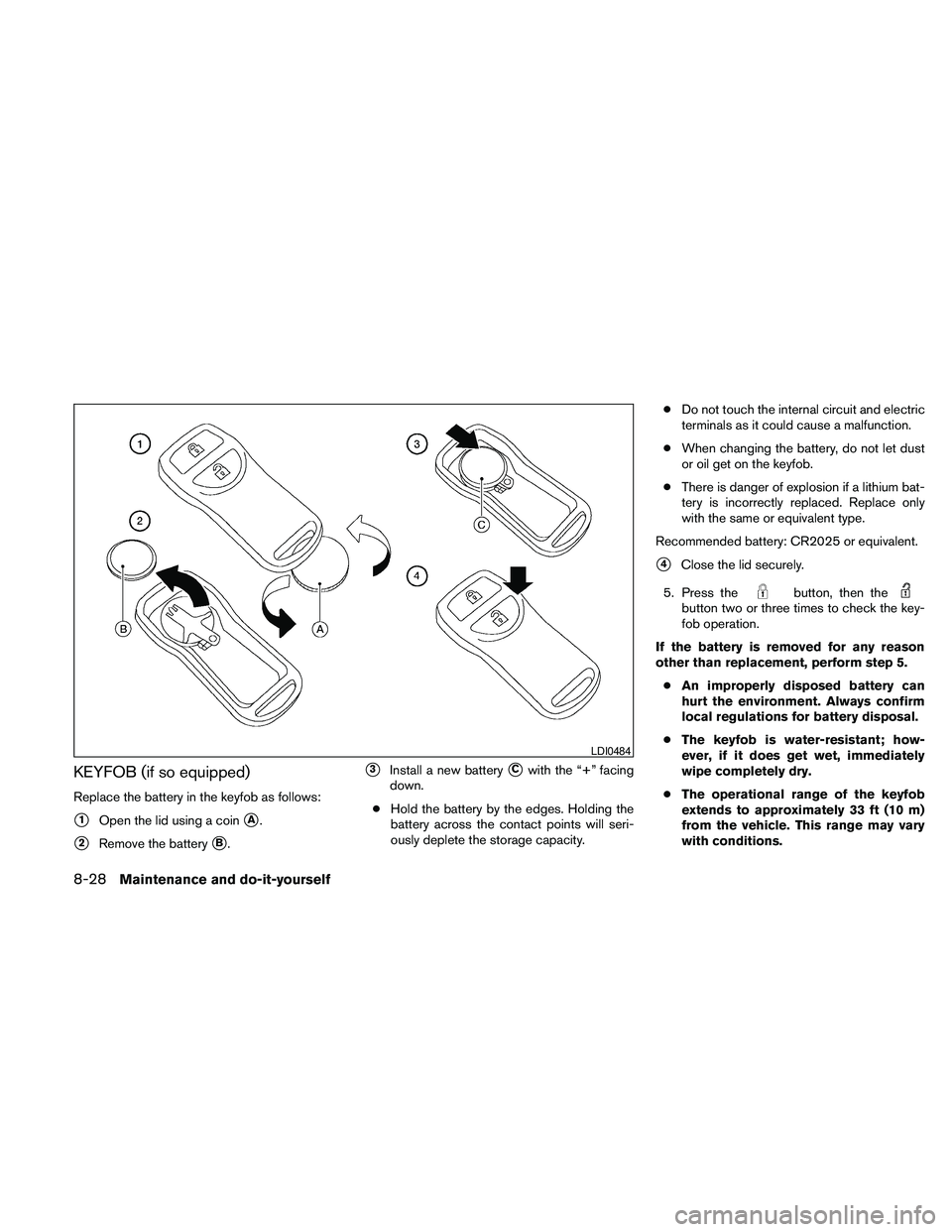
Replace the battery in the keyfob as follows:
s1Open the lid using a coinsA.
s2Remove the batterysB.
s3Install a new batterysCwith the “+” facing
down.
cHold the battery by the edges. Holding the
battery across the contact points will seri-
ously deplete the storage capacity.cDo not touch the internal circuit and electric
terminals as it could cause a malfunction.
cWhen changing the battery, do not let dust
or oil get on the keyfob.
cThere is danger of explosion if a lithium bat-
tery is incorrectly replaced. Replace only
with the same or equivalent type.
Recommended battery: CR2025 or equivalent.
s4Close the lid securely.
5. Press the
button, then thebutton two or three times to check the key-
fob operation.
If the battery is removed for any reason
other than replacement, perform step 5.
cAn improperly disposed battery can
hurt the environment. Always confirm
local regulations for battery disposal.
cThe keyfob is water-resistant; how-
ever, if it does get wet, immediately
wipe completely dry.
cThe operational range of the keyfob
extends to approximately 33 ft (10 m)
from the vehicle. This range may vary
with conditions.
LDI0484
8-28Maintenance and do-it-yourself
Page 405 of 463
FCC Notice:
Changes or modifications not expressly ap-
proved by the party responsible for compli-
ance could void the user’s authority to op-
erate the equipment.
This device complies with Part 15 of the
FCC Rules and RSS-210 of Industry
Canada.
Operation is subject to the following two
conditions: (1) This device may not cause
harmful interference, and (2) this device
must accept any interference received, in-
cluding interference that may cause undes-
ired operation of the device.NISSAN INTELLIGENT KEY™ (if so
equipped)
Replace the battery in the Intelligent Key as fol-
lows:
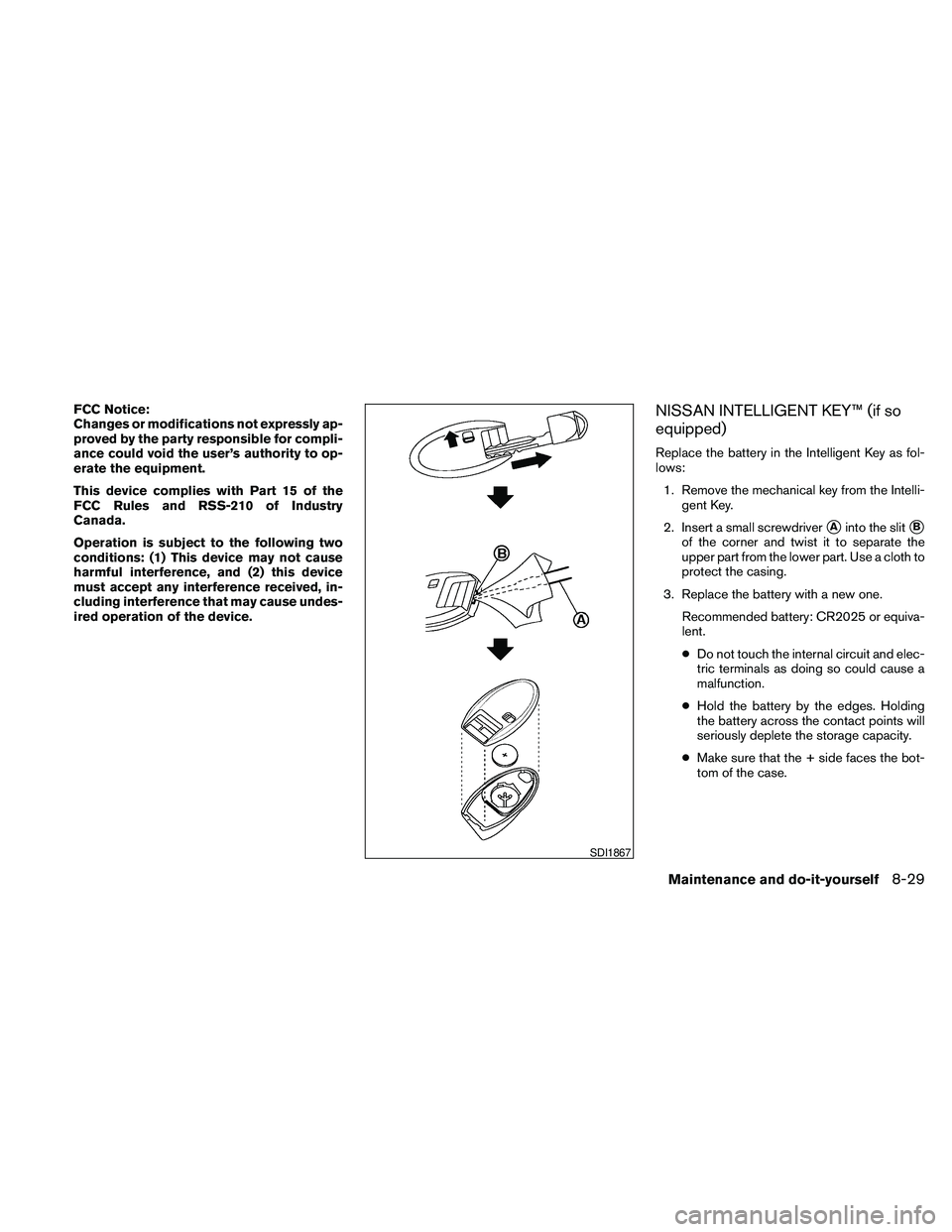
1. Remove the mechanical key from the Intelli-
gent Key.
2. Insert a small screwdriver
sAinto the slitsB
of the corner and twist it to separate the
upper part from the lower part. Use a cloth to
protect the casing.
3. Replace the battery with a new one.
Recommended battery: CR2025 or equiva-
lent.
cDo not touch the internal circuit and elec-
tric terminals as doing so could cause a
malfunction.
cHold the battery by the edges. Holding
the battery across the contact points will
seriously deplete the storage capacity.
cMake sure that the + side faces the bot-
tom of the case.
SDI1867
Maintenance and do-it-yourself8-29
Page 458 of 463
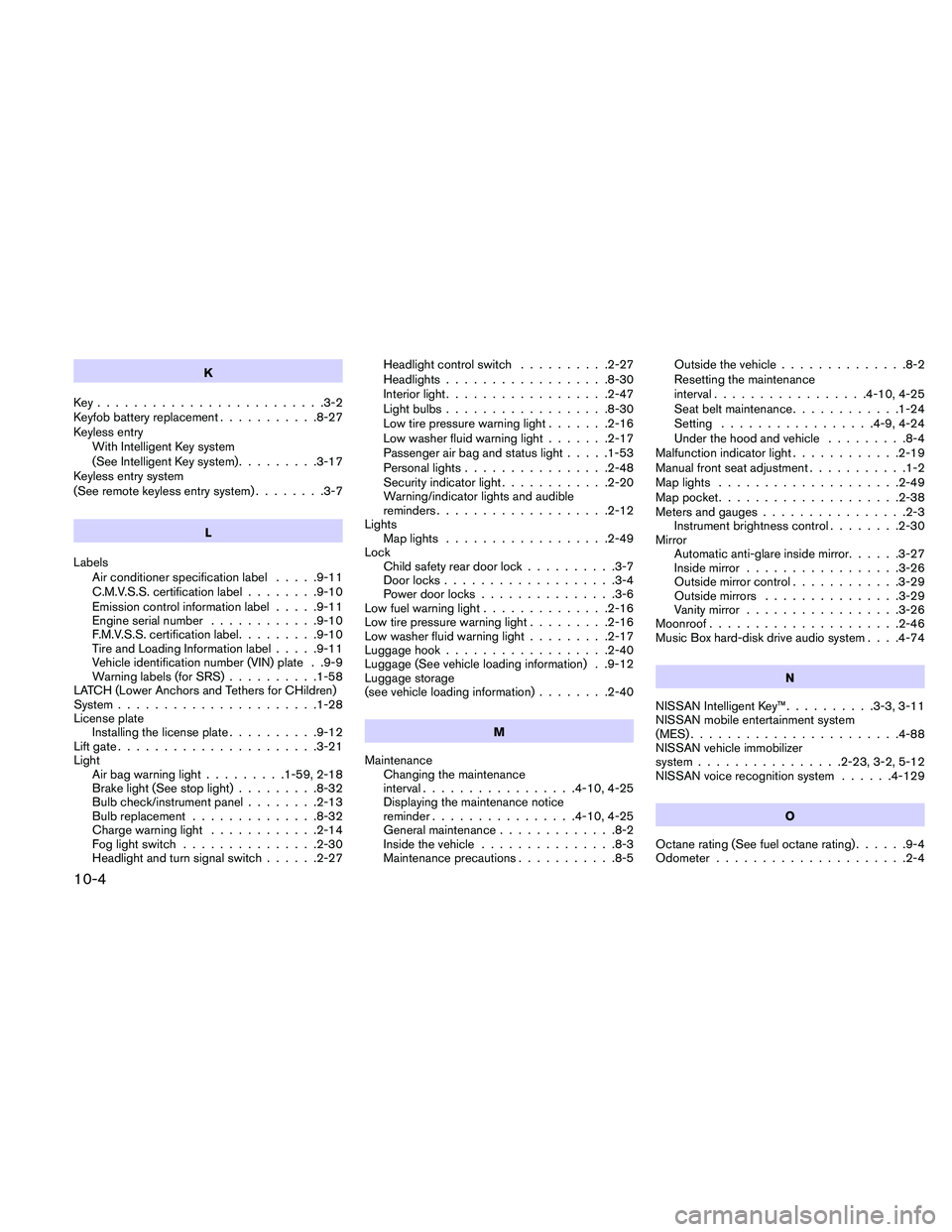
K
Key.........................3-2
Keyfob battery replacement...........8-27
Keyless entry
With Intelligent Key system
(See Intelligent Key system).........3-17
Keyless entry system
(See remote keyless entry system)........3-7
L
Labels
Air conditioner specification label.....9-11
C.M.V.S.S. certification label........9-10
Emission control information label.....9-11
Engine serial number............9-10
F.M.V.S.S. certification label.........9-10
Tire and Loading Information label.....9-11
Vehicle identification number (VIN) plate . .9-9
Warning labels (for SRS)..........1-58
LATCH (Lower Anchors and Tethers for CHildren)
System......................1-28
License plate
Installing the license plate..........9-12
Lift gate......................3-21
Light
Air bag warning light.........1-59, 2-18
Brake light (See stop light).........8-32
Bulb check/instrument panel........2-13
Bulb replacement..............8-32
Charge warning light............2-14
Fog light switch...............2-30
Headlight and turn signal switch......2-27Headlight control switch..........2-27
Headlights..................8-30
Interior light..................2-47
Light bulbs..................8-30
Low tire pressure warning light.......2-16
Low washer fluid warning light.......2-17
Passenger air bag and status light.....1-53
Personal lights................2-48
Security indicator light............2-20
Warning/indicator lights and audible
reminders...................2-12
Lights
Map lights..................2-49
Lock
Child safety rear door lock..........3-7
Door locks...................3-4
Power door locks...............3-6
Low fuel warning light..............2-16
Low tire pressure warning light.........2-16
Low washer fluid warning light.........2-17
Luggage hook..................2-40
Luggage (See vehicle loading information) . .9-12
Luggage storage
(see vehicle loading information)........2-40
M
Maintenance
Changing the maintenance
interval.................4-10, 4-25
Displaying the maintenance notice
reminder................4-10, 4-25
General maintenance.............8-2
Inside the vehicle...............8-3
Maintenance precautions...........8-5Outside the vehicle..............8-2
Resetting the maintenance
interval.................4-10, 4-25
Seat belt maintenance............1-24
Setting.................4-9, 4-24
Under the hood and vehicle.........8-4
Malfunction indicator light............2-19
Manual front seat adjustment...........1-2
Map lights....................2-49
Map pocket....................2-38
Meters and gauges................2-3
Instrument brightness control........2-30
Mirror
Automatic anti-glare inside mirror......3-27
Inside mirror.................3-26
Outside mirror control............3-29
Outside mirrors...............3-29
Vanity mirror.................3-26
Moonroof.....................2-46
Music Box hard-disk drive audio system. . . .4-74
N
NISSAN Intelligent Key™..........3-3, 3-11
NISSAN mobile entertainment system
(MES).......................4-88
NISSAN vehicle immobilizer
system................2-23, 3-2, 5-12
NISSAN voice recognition system......4-129
O
Octane rating (See fuel octane rating)......9-4
Odometer.....................2-4
10-4