service NISSAN PATHFINDER 2017 R52 / 4.G Navigation Manual
[x] Cancel search | Manufacturer: NISSAN, Model Year: 2017, Model line: PATHFINDER, Model: NISSAN PATHFINDER 2017 R52 / 4.GPages: 164, PDF Size: 0.78 MB
Page 48 of 164
![NISSAN PATHFINDER 2017 R52 / 4.G Navigation Manual — [By Name]:The Address Book entries are displayed
in alphabetic order.
— [By Icon]: By selecting a particular icon, a list that
contains only the Address Book entries
associated with that icon is](/img/5/542/w960_542-47.png "NISSAN PATHFINDER 2017 R52 / 4.G Navigation Manual — [By Name]:The Address Book entries are displayed
in alphabetic order.
— [By Icon]: By selecting a particular icon, a list that
contains only the Address Book entries
associated with that icon is")
— [By Name]:The Address Book entries are displayed
in alphabetic order.
— [By Icon]: By selecting a particular icon, a list that
contains only the Address Book entries
associated with that icon is displayed.
— [By Group]: By selecting a particular group (family,
friends, leisure, etc.) , the selected group
is displayed at the top of the list.
.When [Store] is touched, a new locationcan be stored.
5. Touch [Start] to start route guidance.
Voice command
1. Push <
>located on the steering-wheel.
2. After the tone sounds, speak a command.
To set the destination from the Stored Locations:
“ Stored Locations”
SEARCHING FROM HISTORY
A previous destination can be set as the
destination. Up to 100 previous destinations will be
automatically stored. If the number of previous
destinations exceeds 100, the oldest one will be
replaced by the newest one.
1. Push
2. Touch [Destination Menu].
3. Touch [Previous Destinations]. A list screen is displayed.
4. Touch the previous start point or the previous destination from the list.
5. Touch [Start] to start route guidance.
Voice command
1. Push <
>located on the steering-wheel.
2. After the tone sounds, speak a command.
To display the previous destinations list:
“Previous Destinations”
USING JOURNEY PLANNER
It is possible to set the route according to the
route plan created in advance by the NISSAN
Owner’s Portal Website.
INFO:
Use of NissanConnect
SMServices features is
dependent upon a valid subscription and the
telematics device being in operative condition, as
well as cellular connectivity, navigation map data
and GPS satellite signal reception being avail-
able.
1. Push
2. Touch [Destination Menu].
3. Touch [Journey Planner]. The system will connect to the NissanConnect
SMServices
Data Center and display the Journey Planner
list screen.
4-12
4. Setting destination
Page 49 of 164
![NISSAN PATHFINDER 2017 R52 / 4.G Navigation Manual 4. Select the preferred route plan from the list.
INFO:
.Touch [Update List] to update the listinformation.
.Touch [Details] to preview the route.
.Touchto display facility information.
5. The selecte](/img/5/542/w960_542-48.png "NISSAN PATHFINDER 2017 R52 / 4.G Navigation Manual 4. Select the preferred route plan from the list.
INFO:
.Touch [Update List] to update the listinformation.
.Touch [Details] to preview the route.
.Touchto display facility information.
5. The selecte")
4. Select the preferred route plan from the list.
INFO:
.Touch [Update List] to update the listinformation.
.Touch [Details] to preview the route.
.Touchto display facility information.
5. The selected route plan is displayed. Touch [Start] after confirming the location of the
displayed destination.
INFO:
. The Journey Planner can also be set by
pushing
sanConnect Services].
. Journey Planner is a NissanConnect
SM
Services feature. Subscription is required
to use the NissanConnectSMServices.
. Journey Planner cannot be used if [Decline]
is touched on the Start-up Screen.
. Refer to the NISSAN Owner’s Portal Web-
site for how to set the destination using
Journey Planner.
SETTING INTERSECTION
It is possible to set an intersection of any two
streets as the destination and have the system
calculate a route.
1. Push
2. Touch [Destination Menu] and touch [Inter- section].
3. The first street input screen is displayed.
INFO:
Touch [State/Province], [Country] or [City] to
narrow down the specified country and city.
4. Enter the name of the first street. After finishing the entry, touch [List]. A list screen
is displayed.
INFO:
If the country or city is changed after
selecting the first street, the first street that
was selected will be canceled.
5. Touch a street as the first street from the list.
6. The second street input screen is displayed.
7. Enter the name of the second street. After finishing the entry, touch [List]. A list screen
is displayed.
INFO:
Touch [Map] on the list to preview the
location of the selected junction.
8. Touch a street as the second street from the list.
9. Whole route map is displayed. Touch [Start] to start route guidance.
4-13
4. Setting destination
Page 52 of 164

INFO:
. The stored route only includes locations
(destination and waypoints) and route cal-
culation conditions, not the route itself.
Therefore, when the destination is set using
a stored route, a different route may be
suggested if the current vehicle location is
different from the one when the route was
stored.SEARCHING BY CONNECTING
DATA CENTER
It is possible to find a point of interest by
inputting a keyword and connecting to the
NissanConnect
SMServices Data Center. The
searched location can be set as a destination.
INFO:
Use of NissanConnect
SMServices features is
dependent upon a valid subscription and the
telematics device being in operative condition, as
well as cellular connectivity, navigation map data
and GPS satellite signal reception being avail-
able.
1. Push
2. Touch [Destination Menu].
3. Touch [Connected Search].
4. Enter the keyword and touch [Search]. The system will connect to the NissanConnect
SM
Services Data Center and the search results
will be displayed.
5. Touch the preferred destination from the list.
INFO:
.Touch [info] to display the facility informa- tion.
.Touch [Details] to display the informationfeeds screen.
“Screen information” (page 7-20)
6. The entire destination is shown. Touch [Start] to start route guidance.
INFO:
The Connected Search can also be set by
pushing
Connect Services].
4-16
4. Setting destination
Page 53 of 164
SETTING BY NISSANCON-
NECTSMSERVICES
It is possible to set the destination using the
NissanConnectSMServices features.“NissanConnectSMServices” (page 7-14)
INFO:
Use of NissanConnect
SMServices features is
dependent upon a valid subscription and the
telematics device being in operative condition, as
well as cellular connectivity, navigation map data
and GPS satellite signal reception being avail-
able.
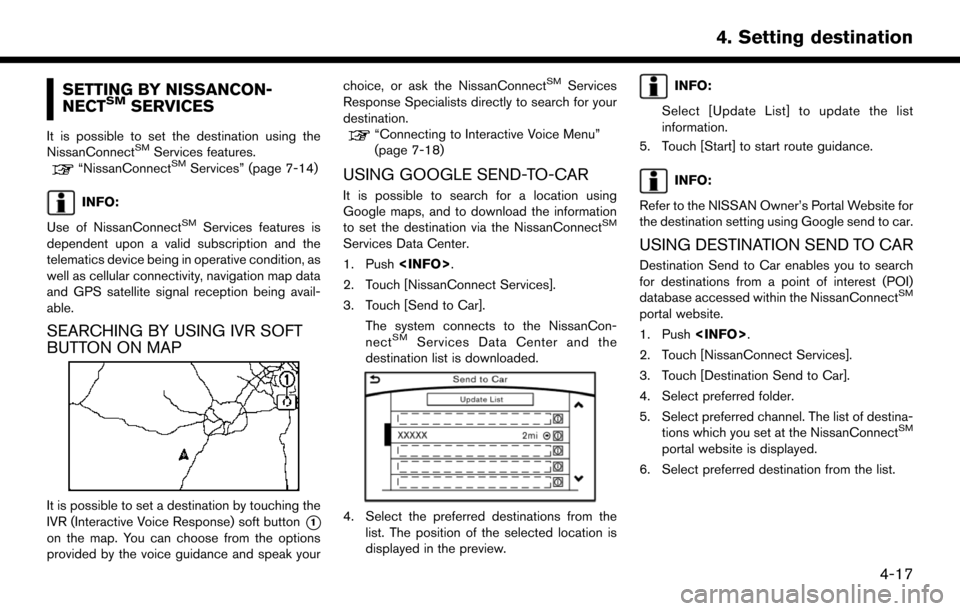
SEARCHING BY USING IVR SOFT
BUTTON ON MAP
It is possible to set a destination by touching the
IVR (Interactive Voice Response) soft button
*1
on the map. You can choose from the options
provided by the voice guidance and speak your choice, or ask the NissanConnect
SMServices
Response Specialists directly to search for your
destination.
“Connecting to Interactive Voice Menu”
(page 7-18)
USING GOOGLE SEND-TO-CAR
It is possible to search for a location using
Google maps, and to download the information
to set the destination via the NissanConnect
SM
Services Data Center.
1. Push
2. Touch [NissanConnect Services].
3. Touch [Send to Car].
The system connects to the NissanCon-
nect
SMServices Data Center and the
destination list is downloaded.
4. Select the preferred destinations from the list. The position of the selected location is
displayed in the preview.
INFO:
Select [Update List] to update the list
information.
5. Touch [Start] to start route guidance.
INFO:
Refer to the NISSAN Owner’s Portal Website for
the destination setting using Google send to car.
USING DESTINATION SEND TO CAR
Destination Send to Car enables you to search
for destinations from a point of interest (POI)
database accessed within the NissanConnect
SM
portal website.
1. Push
2. Touch [NissanConnect Services].
3. Touch [Destination Send to Car].
4. Select preferred folder.
5. Select preferred channel. The list of destina- tions which you set at the NissanConnect
SM
portal website is displayed.
6. Select preferred destination from the list.
4-17
4. Setting destination
Page 87 of 164

7 Information and settings
Information screen .................................................................... 7-2
SiriusXM Traffic information .................................................... 7-4Viewing traffic information ................................................. 7-4
Viewing available traffic information ................................ 7-4
Display urgent traffic information ..................................... 7-5
Traffic Information Settings ............................................... 7-6
Traffic information on map ................................................. 7-6
SiriusXM Travel Link
Š............................................................... 7-7
Viewing SiriusXM Travel LinkŠ......................................... 7-8
NissanConnectSMServices ................................................. 7-14
Subscription to NissanConnectSMServices ............. 7-14
Important information regarding access to
NissanConnect
SMServices ........................................... 7-14 NissanConnect
SMServices features ......................... 7-14
Connecting to Interactive Voice Menu ...................... 7-18
Setting route to a searched destination ................... 7-19
Viewing information feeds ............................................ 7-19
Emergency support ....................................................... 7-21
NissanConnect
SMServices settings ......................... 7-23
Settings screen ...................................................................... 7-24
Clock settings ................................................................. 7-26
Language setting ............................................................ 7-27
Volume settings .............................................................. 7-28
Screen Settings .............................................................. 7-29
Navigation settings ................................................................ 7-30
Page 89 of 164
![NISSAN PATHFINDER 2017 R52 / 4.G Navigation Manual [NissanConnect Services]Display the NissanConnectSMServices menu.“NissanConnectSMServices” (page 7-14)
[SXM Info] Display the SiriusXM Travel Link information menu.
“Viewing SiriusXM Travel Link](/img/5/542/w960_542-88.png "NISSAN PATHFINDER 2017 R52 / 4.G Navigation Manual [NissanConnect Services]Display the NissanConnectSMServices menu.“NissanConnectSMServices” (page 7-14)
[SXM Info] Display the SiriusXM Travel Link information menu.
“Viewing SiriusXM Travel Link")
[NissanConnect Services]Display the NissanConnectSMServices menu.“NissanConnectSMServices” (page 7-14)
[SXM Info] Display the SiriusXM Travel Link information menu.
“Viewing SiriusXM Travel LinkŠ” (page 7-8)
INFO:
. A SiriusXM Travel Link or SiriusXM Traffic subscription is necessary to receive SiriusXM information services.
. Use of NissanConnect
SMServices features is dependent upon a valid subscription and the telematics device being in operative condition, as well as
cellular connectivity, navigation map data and GPS satellite signal reception being available.
7-3
7. Information and settings
Page 90 of 164
SiriusXM TRAFFIC INFORMA-
TION
VIEWING TRAFFIC INFORMATION
SiriusXM Traffic information is a subscription
service offered by SiriusXM Satellite Radio.
This service provides real-time information re-
garding traffic flow, accidents, road construction
and other incidents, where available.
SiriusXM Traffic combines information from
commercial and public traffic data providers
including government departments of transpor-
tation, police, emergency services, road sensors,
cameras and aircraft reports. The traffic informa-
tion is broadcast to the vehicle by the SiriusXM
satellites. Traffic information available for the
route you selected is shown on the navigation
screen so traffic conditions between your vehicle
and the destination are known. Three types of
real-time traffic information for major roadways
are shown on the navigation system: . Unscheduled traffic data for example, acci-
dents and disabled vehicles.
. Scheduled traffic data, for example road
construction and road closures.
. Traffic flow information (rate of speed data) .
WARNING
SiriusXM Traffic information is not a
substitute for attentive driving. Traffic
conditions change constantly and emer-
gency situations can arise without warn-
ing. Relying only on SiriusXM Traffic
information may lead to a collision and
could result in serious personal injury.
NOTE:
Flow information is provided only for roads
equipped with traffic sensors and is not
available in all markets covered by the
service. Flow data may not be available on
portions of a road that is under construc-
tion.
SiriusXM Traffic information is available in for a
limited number of markets. To subscribe or to
check if this service is available in your area:
call 1-866-635-2349 or see www.siriusxm.com/
siriusxmtraffic
INFO:
If you do not have a contract for SiriusXM Traffic
information service, a message appears, and it
will not be possible to check the information on
the traffic information system.
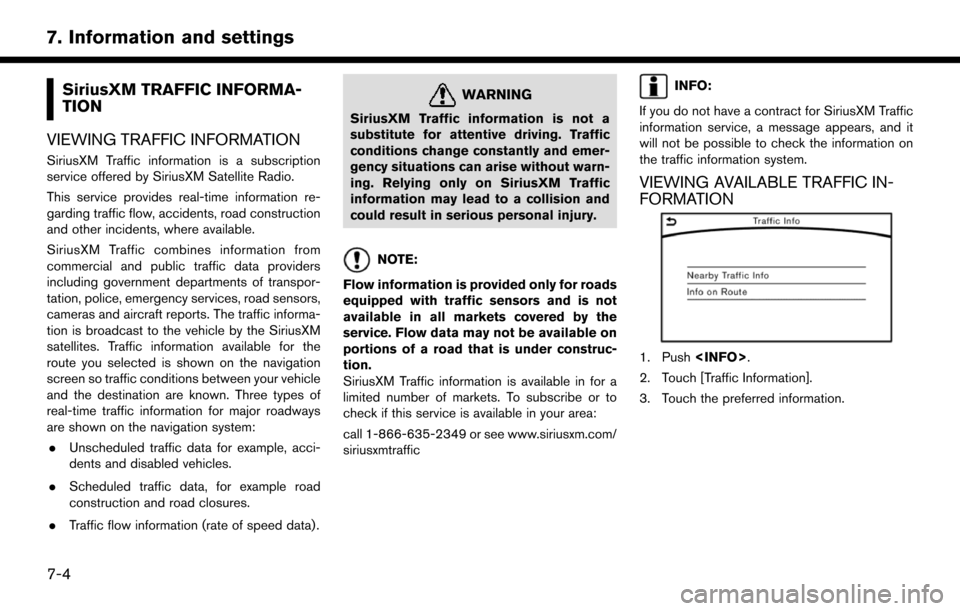
VIEWING AVAILABLE TRAFFIC IN-
FORMATION
1. Push
2. Touch [Traffic Information].
3. Touch the preferred information.
7-4
7. Information and settings
Page 92 of 164
![NISSAN PATHFINDER 2017 R52 / 4.G Navigation Manual TRAFFIC INFORMATION SETTINGS
This displays or changes the settings for the
traffic information related functions.
1. Push<SETTING>.
2. Touch [Navigation].
3. Touch [Traffic Info Settings].
4. Touch th](/img/5/542/w960_542-91.png "NISSAN PATHFINDER 2017 R52 / 4.G Navigation Manual TRAFFIC INFORMATION SETTINGS
This displays or changes the settings for the
traffic information related functions.
1. Push<SETTING>.
2. Touch [Navigation].
3. Touch [Traffic Info Settings].
4. Touch th")
TRAFFIC INFORMATION SETTINGS
This displays or changes the settings for the
traffic information related functions.
1. Push
2. Touch [Navigation].
3. Touch [Traffic Info Settings].
4. Touch the preferred setting. The indicator for the selected setting illuminates.
Available setting items . [Use Traffic Info]:
Enables all traffic information related func-
tions.
. [Show Incidents on Map]:
Displays the traffic incidents (e.g., accident)
on the map screen.
. [Show Traffic Info]:
Displays the traffic flow with an arrow on the
map screen. .
[Traffic Announcements]:
Announces the traffic information event on
the route.
INFO:
. Even when [Show Traffic Info] and [Show
Incidents on Map] are set to off, the list
display of [Info on Route] and [Nearby Traffic
Info] will not be affected.
. Even when [Traffic Announcement] is set to
off, the route guidance will not be affected.
Also, the announcement of emergency in-
formation and weather information will not be
turned off.
Voice command
1. Push <
>located on the steering-wheel.
2. After the tone sounds, speak a command. To turn the traffic information system on or
off:
“Traffic Information”
TRAFFIC INFORMATION ON MAP
With a subscription to SiriusXM Traffic service,
traffic information is displayed on both 2D map
and Birdview
TMmap screen.
“Notes on SiriusXM Traffic information”
(page 7-13)
Screen information
7-6
7. Information and settings
Page 93 of 164

*1Traffic indicator:
Displays the reception condition of traffic
information transmitted from the provider.When reception condition of traffic
information transmitted from the provider is
not detected, the traffic indicator will be
“grayed-out”.
*2Estimated travel time to destination calcu-
lated with consideration of traffic informa-
tion on route.
*3Road conditions
Free Flow: Green arrow
Moderate traffic: Yellow arrow
Heavy traffic: Red arrow
Section affected by serious traffic event:
Purple arrow
*4Traffic information icon:
If a route is not already set, all of the traffic
information icons on the map screen are
displayed in color. When a route is already
set, the icons on the route are displayed in
color, and the icons outside the route are
displayed in gray.
: Accident
: Closed road
: Information
: Road work
: Slippery road
: Weather
: Incident
Traffic information display and scale levels
2D map and Birdview Map
5 miles 10 km
2 miles 4 km
1 mile 2 km
1/2 mile 1 km
1/4 mile 400 m
1/8 mile 200 m
1/16 mile 100 m
1/32 mile 50 m
1/64 mile 25 m
SiriusXM TRAVEL LINKŠ
SiriusXM Travel Link information is a subscription
service offered by SiriusXM Satellite Radio. It is
necessary to subscribe to use the SiriusXM
Travel Link information.
This service provides real-time information re-
garding current weather, fuel prices, sports
scores, stock tickers and movie times where
available. The SiriusXM Travel Link is broadcast
to the vehicle by SiriusXM Satellite Radio.
The service enables you to view the following
information on the navigation system: *Current information around the destination
*Detailed information and forecasts of an area of
interest
*Countrywide and local maps with the current
weather, temperature, warnings and road condi-
tion information
*List of warning/watches events detected
around the current location
*Pop-up messages on the navigation screen with
voice announcements when warnings and
watches are detected around the current loca-
tion
7-7
7. Information and settings
Page 94 of 164

WARNING
SiriusXM Travel Link information is not a
substitute for attentive driving. Weather
conditions change constantly and emer-
gency situations can arise without warn-
ing. Relying only on SiriusXM Travel Link
information could result in serious per-
sonal injury.
VIEWING SiriusXM TRAVEL LINKŠ
SiriusXM Travel Link information is available in
limited markets. To subscribe to or check if this
service is available in the area, call 1-866-635-
2349 or access http://www.siriusxm.com/
travellink.
INFO:
. If a contract is not completed for the
SiriusXM Travel Link information service, a
message appears and it will not be possible
to check the information on the traffic
information system.
. The weather information is available only for
areas that provide weather information to SiriusXM Travel Link.
example
7-8
7. Information and settings