air condition NISSAN PATHFINDER 2017 R52 / 4.G Owner's Guide
[x] Cancel search | Manufacturer: NISSAN, Model Year: 2017, Model line: PATHFINDER, Model: NISSAN PATHFINDER 2017 R52 / 4.GPages: 555, PDF Size: 6.13 MB
Page 336 of 555
Selecting a category by touching the screen or
pressing the ENTER button will execute the com-
mand. After executing the category command,
only the commands related to the selected cat-
egory can be recognized.3. After the tone sounds and the icon on the screen changes from
to,
speak a command. You can also select a
command by directly touching the screen.
The Voice Recognition system will pause opera-
tion when the multi-function controller is moved.
To resume operation, push the
switch on
the steering wheel.
4. Continue to follow the voice menu prompts and speak after the tone sounds until the
preferred operation is completed.
To cancel the voice command, push and hold
the
switch.
You can interrupt the voice prompt at any time by
pushing the
switch.
Operating tips
● Speak a command after the tone.
● If the command is not accepted, the system
announces, “Please say again”. Repeat the
command in a clear voice. ●
Push the
switch on the steering-
wheel once to return to the previous screen.
● Voice commands spoken from the passen-
ger seat cannot be recognized.
● When the
switch on the steering
wheel is pushed while the air conditioner is
set to the Auto mode, the system controls
the air conditioner fan speed in order to
improve Voice Recognition performance.
When the fan speed is set higher than the
4th speed position, the fan speed is de-
creased to 4th speed. When the air condi-
tioner is set to the manual mode, the fan
speed does not change. The accuracy of
Voice Recognition may be affected depend-
ing on the fan speed and the air direction.
● To skip the voice guidance function and give
the command immediately, push the
switch on the steering wheel to interrupt the
system. Remember to speak after the tone.
● To cancel the command, push and hold
the
switch or theswitch on the
steering-wheel. ●
To adjust the volume of the system feedback,
push the volume switch on the steering
wheel or use the audio system
VOL/ON•OFF button while the system is
making the announcement.
Voice prompt interrupt
Push theswitch on the steering-wheel to
stop the voice prompt and give the command at
once. Remember to wait for the tone before
speaking.
How to see the voice command
screen
1. Push theswitch to display the first
screen of the voice command list.
2. Speak a command or select an item from the voice command list. The second screen is
displayed.
3. Speak a command. The list screen is dis- played.
4. Speak the preferred number from the list to perform operation.
The voice commands can be spoken one at a
time following prompts step by step or the com-
mand can be spoken successively in one step.
Monitor, climate, audio, phone and voice recognition systems4-137
Page 354 of 555
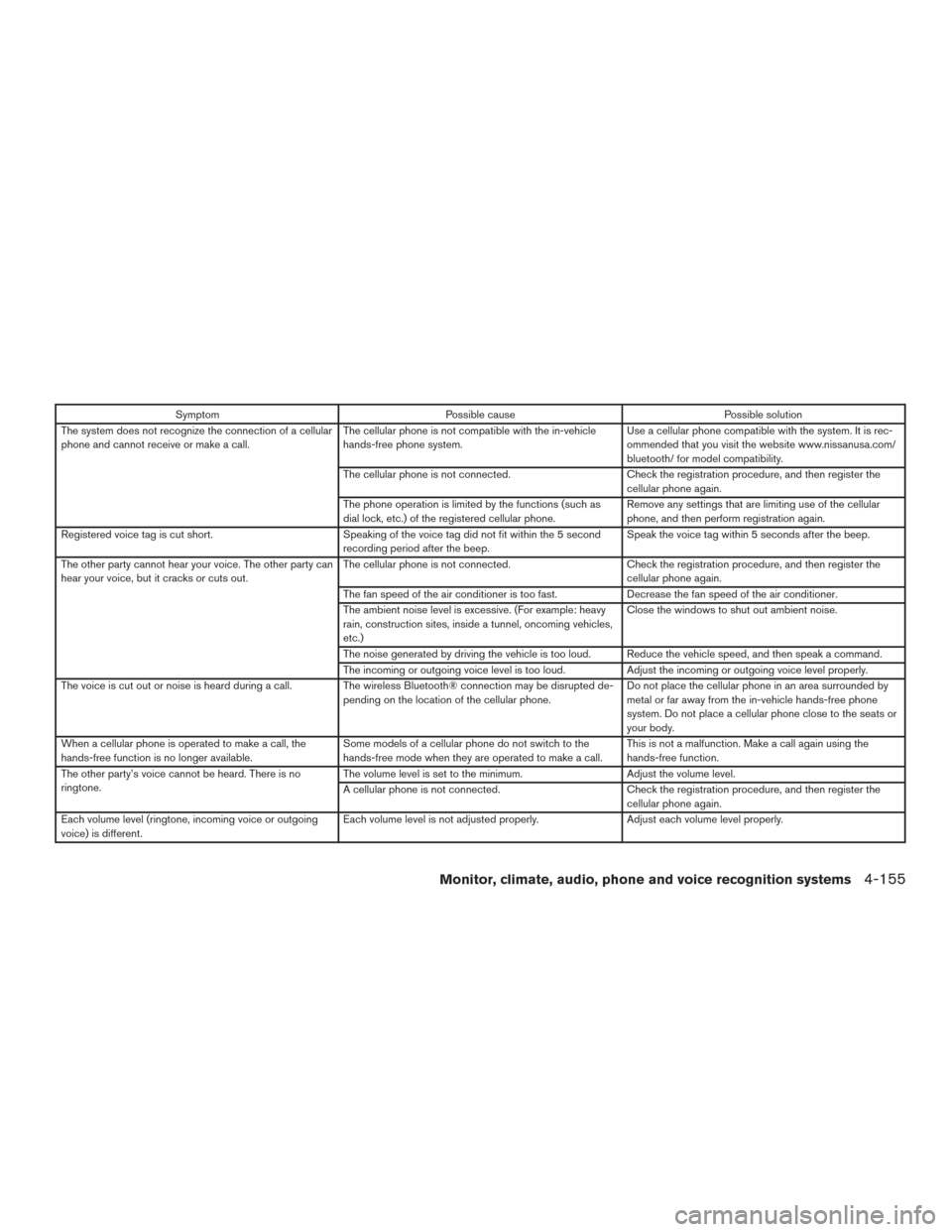
SymptomPossible cause Possible solution
The system does not recognize the connection of a cellular
phone and cannot receive or make a call. The cellular phone is not compatible with the in-vehicle
hands-free phone system. Use a cellular phone compatible with the system. It is rec-
ommended that you visit the website www.nissanusa.com/
bluetooth/ for model compatibility.
The cellular phone is not connected. Check the registration procedure, and then register the
cellular phone again.
The phone operation is limited by the functions (such as
dial lock, etc.) of the registered cellular phone. Remove any settings that are limiting use of the cellular
phone, and then perform registration again.
Registered voice tag is cut short. Speaking of the voice tag did not fit within the 5 second
recording period after the beep. Speak the voice tag within 5 seconds after the beep.
The other party cannot hear your voice. The other party can
hear your voice, but it cracks or cuts out. The cellular phone is not connected.
Check the registration procedure, and then register the
cellular phone again.
The fan speed of the air conditioner is too fast. Decrease the fan speed of the air conditioner.
The ambient noise level is excessive. (For example: heavy
rain, construction sites, inside a tunnel, oncoming vehicles,
etc.) Close the windows to shut out ambient noise.
The noise generated by driving the vehicle is too loud. Reduce the vehicle speed, and then speak a command.
The incoming or outgoing voice level is too loud. Adjust the incoming or outgoing voice level properly.
The voice is cut out or noise is heard during a call. The wireless Bluetooth® connection may be disrupted de- pending on the location of the cellular phone. Do not place the cellular phone in an area surrounded by
metal or far away from the in-vehicle hands-free phone
system. Do not place a cellular phone close to the seats or
your body.
When a cellular phone is operated to make a call, the
hands-free function is no longer available. Some models of a cellular phone do not switch to the
hands-free mode when they are operated to make a call. This is not a malfunction. Make a call again using the
hands-free function.
The other party’s voice cannot be heard. There is no
ringtone. The volume level is set to the minimum.
Adjust the volume level.
A cellular phone is not connected. Check the registration procedure, and then register the
cellular phone again.
Each volume level (ringtone, incoming voice or outgoing
voice) is different. Each volume level is not adjusted properly.
Adjust each volume level properly.
Monitor, climate, audio, phone and voice recognition systems4-155
Page 356 of 555
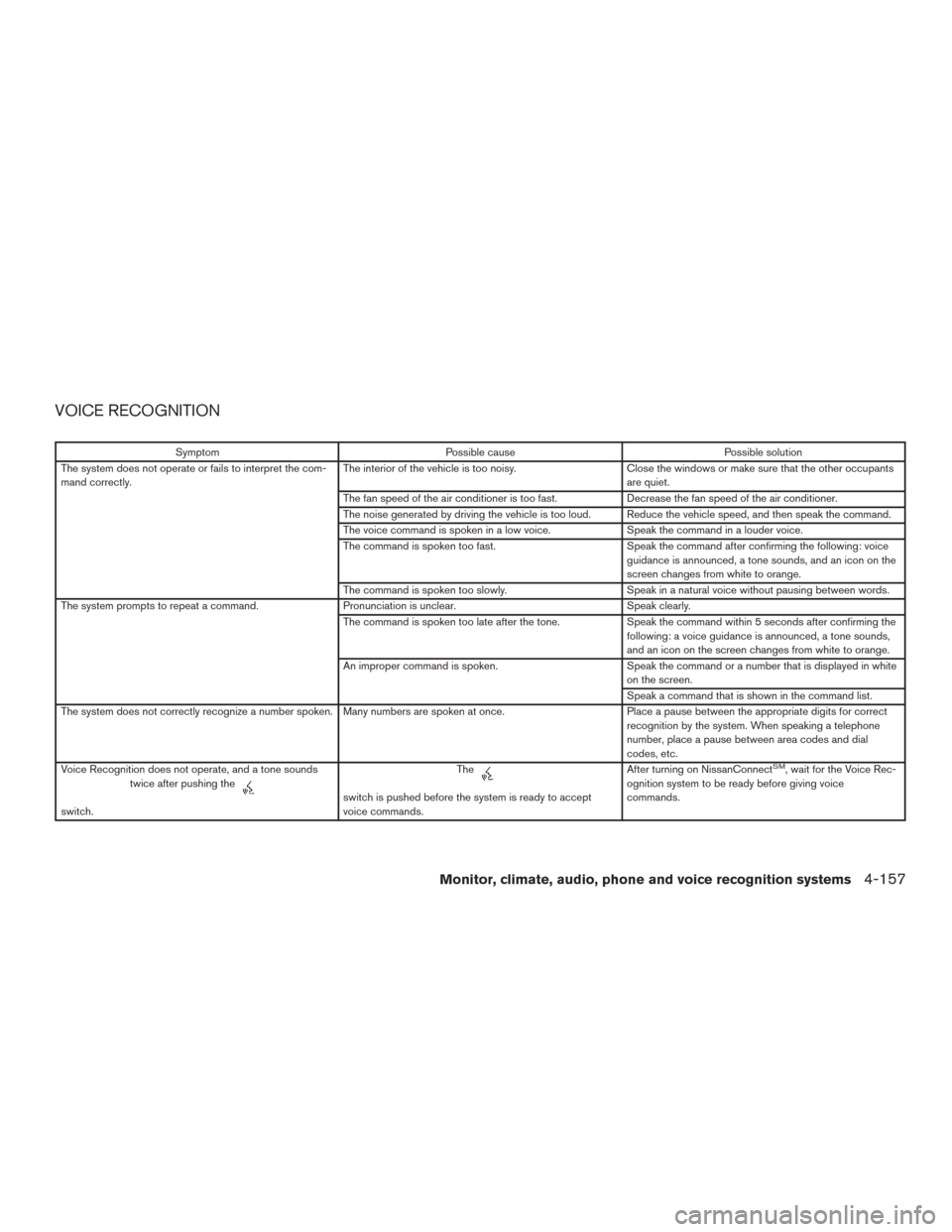
VOICE RECOGNITION
SymptomPossible cause Possible solution
The system does not operate or fails to interpret the com-
mand correctly. The interior of the vehicle is too noisy.
Close the windows or make sure that the other occupants
are quiet.
The fan speed of the air conditioner is too fast. Decrease the fan speed of the air conditioner.
The noise generated by driving the vehicle is too loud. Reduce the vehicle speed, and then speak the command.
The voice command is spoken in a low voice. Speak the command in a louder voice.
The command is spoken too fast. Speak the command after confirming the following: voice
guidance is announced, a tone sounds, and an icon on the
screen changes from white to orange.
The command is spoken too slowly. Speak in a natural voice without pausing between words.
The system prompts to repeat a command. Pronunciation is unclear. Speak clearly.
The command is spoken too late after the tone. Speak the command within 5 seconds after confirming the
following: a voice guidance is announced, a tone sounds,
and an icon on the screen changes from white to orange.
An improper command is spoken. Speak the command or a number that is displayed in white
on the screen.
Speak a command that is shown in the command list.
The system does not correctly recognize a number spoken. Many numbers are spoken at once. Place a pause between the appropriate digits for correct
recognition by the system. When speaking a telephone
number, place a pause between area codes and dial
codes, etc.
Voice Recognition does not operate, and a tone sounds twice after pushing the
switch. Theswitch is pushed before the system is ready to accept
voice commands.After turning on NissanConnect
SM, wait for the Voice Rec-
ognition system to be ready before giving voice
commands.
Monitor, climate, audio, phone and voice recognition systems4-157
Page 366 of 555
●Since the spare tire is not equipped with
the TPMS, when a spare tire is mounted
or a wheel is replaced, tire pressure will
not be indicated, the TPMS will not
function and the low tire pressure warn-
ing light will flash for approximately
1 minute. The light will remain on after
1 minute. Have your tires replaced
and/or TPMS system reset as soon as
possible. It is recommended that you
visit a NISSAN dealer for this service.
● Replacing tires with those not originally
specified by NISSAN could affect the
proper operation of the TPMS.
● Do not inject any tire liquid or aerosol
tire sealant into the tires, as this may
cause a malfunction of the tire pressure
sensors.
CAUTION
●The TPMS may not function properly
when the wheels are equipped with tire
chains or the wheels are buried in snow. ●
Do not place metalized film or any
metal parts (antenna, etc.) on the win-
dows. This may cause poor reception of
the signals from the tire pressure sen-
sors, and the TPMS will not function
properly.
Some devices and transmitters may temporarily
interfere with the operation of the TPMS and
cause the low tire pressure warning light to illu-
minate.
Some examples are: ● Facilities or electric devices using similar
radio frequencies are near the vehicle.
● If a transmitter set to similar frequencies is
being used in or near the vehicle.
● If a computer (or similar equipment) or a
DC/AC converter is being used in or near
the vehicle.
The low tire pressure warning light may illuminate
in the following cases. ● If the vehicle is equipped with a wheel and
tire without TPMS.
● If the TPMS has been replaced and the ID
has not been registered.
● If the wheel is not originally specified by
NISSAN. FCC Notice:
For USA:
This device complies with Part 15 of the
FCC Rules. Operation is subject to the fol-
lowing two conditions: (1) This device may
not cause harmful interference, and (2) this
device must accept any interference re-
ceived, including interference that may
cause undesired operation.
NOTE:
Changes or modifications not expressly ap-
proved by the party responsible for compli-
ance could void the user’s authority to op-
erate the equipment.
For Canada:
This device complies with Industry Canada
licence-exempt RSS standard(s) . Opera-
tion is subject to the following two condi-
tions: (1) this device may not cause inter-
ference, and (2) this device must accept any
interference, including interference that
may cause undesired operation of the de-
vice.
TPMS with Easy-Fill Tire Alert
When adding air to an under-inflated tire, the
TPMS with Easy-Fill Tire Alert provides visual and
Starting and driving5-5
Page 367 of 555
audible signals outside the vehicle to help you
inflate the tires to the recommended COLD tire
pressure.
Vehicle set-up1. Park the vehicle in a safe and level place.
2. Apply the parking brake and place the shift lever to the P (Park) position.
3. Place the ignition switch to the ON position. Do not start the engine.
Operation 1. Add air to the tire.
2. After a few seconds, the hazard indicators will start flashing.
3. When the designated pressure is reached, the horn beeps once and the hazard indica-
tors stop flashing.
4. Perform the above steps for each tire. ●If the tire is over-inflated more than ap-
proximately 4 psi (30 kPa) , the horn
beeps and the hazard indicators flash
three times. To correct the pressure, push
the core of the valve stem on the tire
briefly to release pressure. When the
pressure reaches the designated pres-
sure, the horn beeps once. ●
If the hazard indicator does not flash
within approximately 15 seconds after
starting to inflate the tire, it indicates that
the Easy-Fill Tire Alert is not operating.
● The TPMS will not activate the Easy-Fill
Tire Alert under the following conditions:
– If there is interference from an external device or transmitter.
– The air pressure from the inflation device is not sufficient to inflate the tire.
– There is a malfunction in the TPMS sys- tem.
– There is a malfunction in the horn or haz- ard indicators.
– The identification code of the tire pres- sure sensor is not registered to the sys-
tem.
– The battery of the tire pressure sensor is low.
● If the Easy-Fill Tire Alert does not operate
due to TPMS interference, move the ve-
hicle about 3 ft (1 m) backward or forward
and try again.
If the Easy-Fill Tire Alert is not working, use a tire
pressure gauge.ON-PAVEMENT AND OFF-ROAD
DRIVING PRECAUTIONS
Utility vehicles have a significantly higher
rollover rate than other types of vehicles.
They have higher ground clearance than passen-
ger cars to make them capable of performing in a
variety of on-pavement and off-road applications.
This gives them a higher center of gravity than
ordinary vehicles. An advantage of higher ground
clearance is a better view of the road, allowing
you to anticipate problems. However, they are not
designed for cornering at the same speeds as
conventional 2-wheel drive vehicles any more
than low-slung sports cars are designed to per-
form satisfactorily under off-road conditions. If at
all possible, avoid sharp turns at high speeds. As
with other vehicles of this type, failure to operate
this vehicle correctly may result in loss of control
or vehicle rollover. In a rollover crash, an unbelted
person is significantly more likely to die than a
person wearing a seat belt.
For additional information, refer to “Driving safety
precautions” in this section.
5-6Starting and driving
Page 368 of 555
AVOIDING COLLISION AND
ROLLOVER
WARNING
Failure to operate this vehicle in a safe
and prudent manner may result in loss of
control or an accident.
Be alert and drive defensively at all times. Obey
all traffic regulations. Avoid excessive speed,
high speed cornering, or sudden steering ma-
neuvers, because these driving practices could
cause you to lose control of your vehicle.
As with any vehicle, loss of control could
result in a collision with other vehicles or
objects or cause the vehicle to roll over,
particularly if the loss of control causes the
vehicle to slide sideways.
Be attentive at all times, and avoid driving when
tired. Never drive when under the influence of
alcohol or drugs (including prescription or over-
the-counter drugs which may cause drowsi-
ness) . Always wear your seat belt as outlined in
the “Safety – Seats, seat belts and supplemental
restraint system” section of this manual, and also
instruct your passengers to do so.
Seat belts help reduce the risk of injury in colli-
sions and rollovers. In a rollover crash, an
unbelted or improperly belted person is significantly more likely to be injured or
killed than a person properly wearing a
seat belt.
OFF-ROAD RECOVERY
While driving, the right side or left side wheels
may unintentionally leave the road surface. If this
occurs, maintain control of the vehicle by follow-
ing the procedure below. Please note that this
procedure is only a general guide. The vehicle
must be driven as appropriate based on the con-
ditions of the vehicle, road and traffic.
1. Remain calm and do not overreact.
2. Do not apply the brakes.
3. Maintain a firm grip on the steering wheel with both hands and try to hold a straight
course.
4. When appropriate, slowly release the accel- erator pedal to gradually slow the vehicle.
5. If there is nothing in the way, steer the ve- hicle to follow the road while vehicle speed
is reduced. Do not attempt to drive the ve-
hicle back onto the road surface until vehicle
speed is reduced.
6. When it is safe to do so, gradually turn the steering wheel until both tires return to the road surface. When all tires are on the road
surface, steer the vehicle to stay in the ap-
propriate driving lane.
● If you decide that it is not safe to return the
vehicle to the road surface based on ve-
hicle, road or traffic conditions, gradually
slow the vehicle to a stop in a safe place
off the road.
RAPID AIR PRESSURE LOSS
Rapid air pressure loss or a “blow-out” can occur
if the tire is punctured or is damaged due to
hitting a curb or pothole. Rapid air pressure loss
can also be caused by driving on under-inflated
tires.
Rapid air pressure loss can affect the handling
and stability of the vehicle, especially at highway
speeds.
Help prevent rapid air pressure loss by maintain-
ing the correct air pressure and visually inspect
the tires for wear and damage. For additional
information, refer to “Wheels and tires” in the
“Do-it-yourself” section of this manual. If a tire
rapidly loses air pressure or “blows-out” while
driving, maintain control of the vehicle by follow-
ing the procedure below. Please note that this
procedure is only a general guide. The vehicle
must be driven as appropriate based on the con-
ditions of the vehicle, road and traffic.
Starting and driving5-7
Page 369 of 555
WARNING
The following actions can increase the
chance of losing control of the vehicle if
there is a sudden loss of tire air pressure.
Losing control of the vehicle may cause a
collision and result in personal injury.
●The vehicle generally moves or pulls in
the direction of the flat tire.
● Do not rapidly apply the brakes.
● Do not rapidly release the accelerator
pedal.
● Do not rapidly turn the steering wheel.
1. Remain calm and do not overreact.
2. Maintain a firm grip on the steering wheel with both hands and try to hold a straight
course.
3. When appropriate, slowly release the accel- erator pedal to gradually slow the vehicle.
4. Gradually steer the vehicle to a safe location off the road and away from traffic if possible.
5. Lightly apply the brake pedal to gradually stop the vehicle.
6. Turn on the hazard warning flashers and contact a roadside emergency service to
change the tire. For additional information, refer to “Changing a flat tire” in the “In case
of emergency” section of this manual.DRINKING ALCOHOL/DRUGS AND
DRIVING
WARNING
Never drive under the influence of alcohol
or drugs. Alcohol in the bloodstream re-
duces coordination, delays reaction time
and impairs judgement. Driving after
drinking alcohol increases the likelihood
of being involved in an accident injuring
yourself and others. Additionally, if you
are injured in an accident, alcohol can
increase the severity of the injury.
NISSAN is committed to safe driving. However,
you must choose not to drive under the influence
of alcohol. Every year thousands of people are
injured or killed in alcohol-related collisions. Al-
though the local laws vary on what is considered
to be legally intoxicated, the fact is that alcohol
affects all people differently and most people
underestimate the effects of alcohol.
Remember, drinking and driving don’t mix! That is
true for drugs (over-the-counter, prescription)
and illegal drugs, too. Don’t drive if your ability to
operate your vehicle is impaired by alcohol,
drugs, or some other physical condition.
DRIVING SAFETY PRECAUTIONS
Your NISSAN is designed for both normal and
off-road use. However, avoid driving in deep wa-
ter or mud as your NISSAN is mainly designed for
leisure use, unlike a conventional off-road ve-
hicle.
Remember that 2-wheel drive models are less
capable than 4-wheel drive models for rough
road driving and extrication when stuck in deep
snow or mud, or the like.
Please observe the following precautions:
WARNING
● Spinning the front wheels on slippery
surface may cause the 4WD warning
message to display and the 4WD sys-
tem to automatically switch from the
4WD to the 2WD mode. This could re-
duce the traction. Be especially careful
when towing a trailer. (4WD models)
● Drive carefully when off the road and
avoid dangerous areas. Every person
who drives or rides in this vehicle
should be seated with their seat belt
fastened. This will keep you and your
passengers in position when driving
over rough terrain.
5-8Starting and driving
Page 380 of 555
system may be activated. The Malfunction
Indicator Light (MIL) may come on to indi-
cate the fail-safe mode is activated. For
additional information, refer to “Malfunc-
tion Indicator Light (MIL)” in the “Instru-
ments and controls” section of this manual.
This will occur even if all electrical circuits
are functioning properly. In this case, place
the ignition switch in the OFF position and
wait for 10 seconds. Then push the switch
back to the ON position. The vehicle should
return to its normal operating condition. If
it does not return to its normal operating
condition, have the transmission checked
and repaired, if necessary. It is recom-
mended that you visit a NISSAN dealer for
this service.
WARNING
When the high fluid temperature protec-
tion mode or fail-safe operation occurs,
vehicle speed may be gradually reduced.
The reduced speed may be lower than
other traffic, which could increase the
chance of a collision. Be especially careful
when driving. If necessary, pull to the side
of the road at a safe place and allow the
transmission to return to normal opera-
tion, or have it repaired if necessary.
WARNING
●Be sure the parking brake is fully re-
leased before driving. Failure to do so
can cause brake failure and lead to an
accident.
● Do not release the parking brake from
outside the vehicle.
● Do not use the shift lever in place of the
parking brake. When parking, be sure
the parking brake is fully engaged.
● To help avoid risk of injury or death
through unintended operation of the
vehicle and/or its systems, do not leave
children, people who require the assis-
tance of others or pets unattended in
your vehicle. Additionally, the tempera-
ture inside a closed vehicle on a warm
day can quickly become high enough to
cause a significant risk of injury or
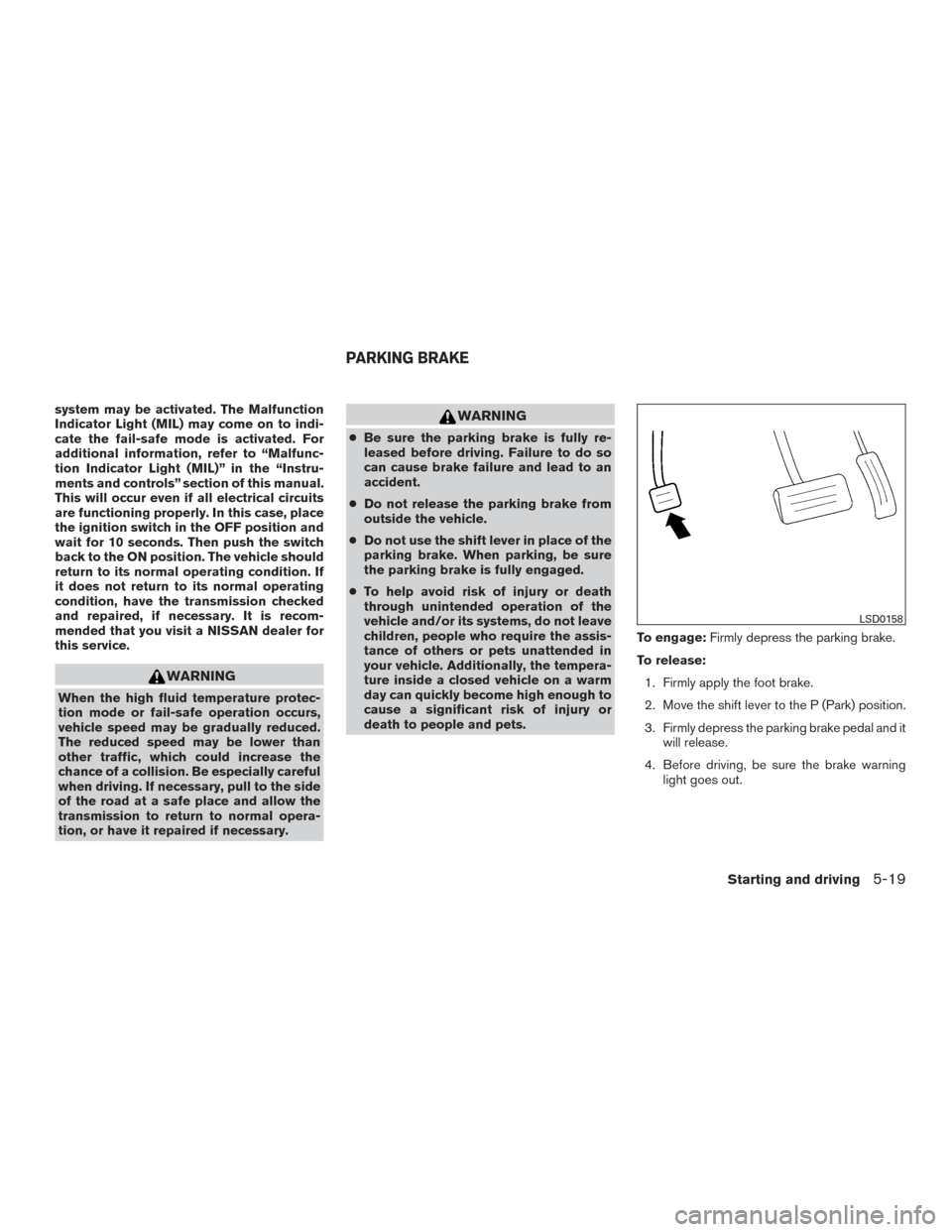
death to people and pets. To engage:
Firmly depress the parking brake.
To release: 1. Firmly apply the foot brake.
2. Move the shift lever to the P (Park) position.
3. Firmly depress the parking brake pedal and it will release.
4. Before driving, be sure the brake warning light goes out.
LSD0158
PARKING BRAKE
Starting and driving5-19
Page 402 of 555
ICC SYSTEM OPERATION
The ICC system maintains a selected distance
from the vehicle in front of you within the speed
range 0 to 90 mph (0 to 144 km/h) up to the set
speed. The set speed can be selected by the
driver between 20 to 90 mph (32 to 144 km/h),
based on road conditions.
The vehicle travels at the set speed when the
road ahead is clear.
The ICC system is designed to maintain a se-
lected distance from the vehicle in front of you
and can reduce the speed to match a slower
vehicle ahead. The system will decelerate the
vehicle as necessary and if the vehicle ahead
comes to a stop, the vehicle decelerates to a
standstill. However, the ICC system can only
apply up to 40% of the vehicle’s total braking
power.
This system should only be used when traffic
conditions allow vehicle speeds to remain fairly
constant or when vehicle speeds change gradu-
ally. If a vehicle moves into the traveling lane
ahead or if a vehicle traveling ahead rapidly de-
celerates, the distance between vehicles may
become closer because the ICC system cannot
decelerate the vehicle quickly enough. If this oc-
curs, the ICC system will sound a warning chime
and blink the system display to notify the driver to
take necessary action.
LSD2738
Starting and driving5-41
Page 422 of 555
Follow these easy-to-use Fuel Efficient Driving
Tips to help you achieve the most fuel economy
from your vehicle.1. Use Smooth Accelerator and Brake
Pedal Application
● Avoid rapid starts and stops.
● Use smooth, gentle accelerator and
brake application whenever possible.
● Maintain constant speed while commut-
ing and coast whenever possible.
2. Maintain Constant Speed
● Look ahead to try and anticipate and mini-
mize stops.
● Synchronizing your speed with traffic
lights allows you to reduce your number
of stops.
● Maintaining a steady speed can minimize
red light stops and improve fuel effi-
ciency.
3. Use Air Conditioning (A/C) at Higher
Vehicle Speeds
● Below 40 mph (64 km/h), it is more effi-
cient to open windows to cool the vehicle
due to reduced engine load. ●
Above 40 mph (64 km/h), it is more effi-
cient to use A/C to cool the vehicle due to
increased aerodynamic drag.
● Recirculating the cool air in the cabin
when the A/C is on reduces cooling load.
4. Drive at Economical Speeds and Dis-
tances
● Observing the speed limit and not ex-
ceeding 60 mph (97 km/h) (where legally
allowed) can improve fuel efficiency due
to reduced aerodynamic drag.
● Maintaining a safe following distance be-
hind other vehicles reduces unnecessary
braking.
● Safely monitoring traffic to anticipate
changes in speed permits reduced brak-
ing and smooth acceleration changes.
● Select a gear range suitable to road con-
ditions.
5. Use Cruise Control
● Using cruise control during highway driv-
ing helps maintain a steady speed.
● Cruise control is particularly effective in
providing fuel savings when driving on flat
terrains. 6.
Plan for the Shortest Route
● Utilize a map or navigation system to de-
termine the best route to save time.
7. Avoid Idling
● Shutting off your engine when safe for
stops exceeding 30–60 seconds saves
fuel and reduces emissions.
8. Buy an Automated Pass for Toll Roads
●
Automated passes permit drivers to use spe-
cial lanes to maintain cruising speed through
the toll and avoid stopping and starting.
9. Winter Warm Up
● Limit idling time to minimize impact to fuel
economy.
●
Vehicles typically need no more than
30 seconds of idling at start-up to effec-
tively circulate the engine oil before driving.
● Your vehicle will reach its ideal operating
temperature more quickly while driving
versus idling.
10. Keeping your Vehicle Cool
● Park your vehicle in a covered parking
area or in the shade whenever possible.
● When entering a hot vehicle, opening the
windows will help to reduce the inside
temperature faster, resulting in reduced
demand on your A/C system.
FUEL EFFICIENT DRIVING TIPS
Starting and driving5-61