Exit seat slide NISSAN PATHFINDER 2020 Owner´s Manual
[x] Cancel search | Manufacturer: NISSAN, Model Year: 2020, Model line: PATHFINDER, Model: NISSAN PATHFINDER 2020Pages: 482, PDF Size: 5.51 MB
Page 36 of 482
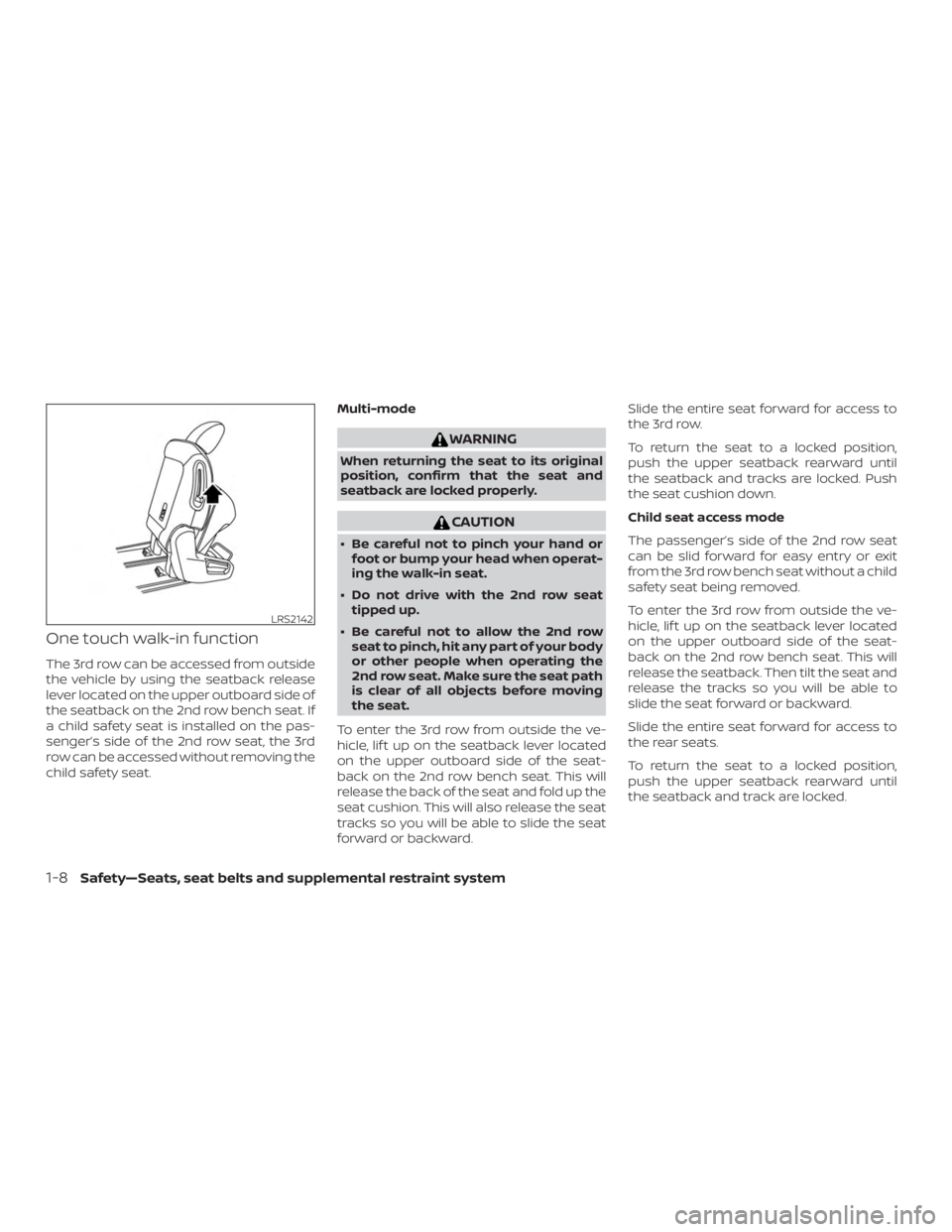
One touch walk-in function
The 3rd row can be accessed from outside
the vehicle by using the seatback release
lever located on the upper outboard side of
the seatback on the 2nd row bench seat. If
a child safety seat is installed on the pas-
senger’s side of the 2nd row seat, the 3rd
row can be accessed without removing the
child safety seat.Multi-mode
WARNING
When returning the seat to its original
position, confirm that the seat and
seatback are locked properly.
CAUTION
∙ Be careful not to pinch your hand or
foot or bump your head when operat-
ing the walk-in seat.
∙ Do not drive with the 2nd row seat tipped up.
∙ Be careful not to allow the 2nd row seat to pinch, hit any part of your body
or other people when operating the
2nd row seat. Make sure the seat path
is clear of all objects before moving
the seat.
To enter the 3rd row from outside the ve-
hicle, lif t up on the seatback lever located
on the upper outboard side of the seat-
back on the 2nd row bench seat. This will
release the back of the seat and fold up the
seat cushion. This will also release the seat
tracks so you will be able to slide the seat
forward or backward. Slide the entire seat forward for access to
the 3rd row.
To return the seat to a locked position,
push the upper seatback rearward until
the seatback and tracks are locked. Push
the seat cushion down.
Child seat access mode
The passenger’s side of the 2nd row seat
can be slid forward for easy entry or exit
from the 3rd row bench seat without a child
safety seat being removed.
To enter the 3rd row from outside the ve-
hicle, lif t up on the seatback lever located
on the upper outboard side of the seat-
back on the 2nd row bench seat. This will
release the seatback. Then tilt the seat and
release the tracks so you will be able to
slide the seat forward or backward.
Slide the entire seat forward for access to
the rear seats.
To return the seat to a locked position,
push the upper seatback rearward until
the seatback and track are locked.
LRS2142
1-8Safety—Seats, seat belts and supplemental restraint system
Page 37 of 482
WARNING
∙ Do not leave a child in the child safetyseat when operating the child seat ac-
cess mode.
∙ When returning the seat to its original position, confirm that the seat and
seatback are locked properly.
CAUTION
∙ Be careful not to pinch your hand orfoot or bump your head when operat-
ing the walk-in seat.
∙ Do not drive with the 2nd row seat tipped up.
∙ Be careful not to allow the 2nd row seat to pinch, hit any part of your body
or other people when operating the
2nd row seat. Make sure the seat path
is clear of all objects before moving
the seat. Exiting the 3rd row
To exit the 3rd row from either seating po-
sition, lif t the upper seatback release lever
to the uppermost position. This will release
the back of the seat, then fold the seat
cushion up and release the tracks.
Slide the entire seat forward.
To return the seat to a locked position,
push the upper seatback rearward until
the seatback and track are locked.
WARNING
When returning the seat to its original
position, confirm that the seat and
seatback are locked properly.
CAUTION
Be careful not to pinch your hand or
foot or bump your head when operat-
ing the walk-in seat.
3RD ROW BENCH SEAT
ADJUSTMENT
Reclining
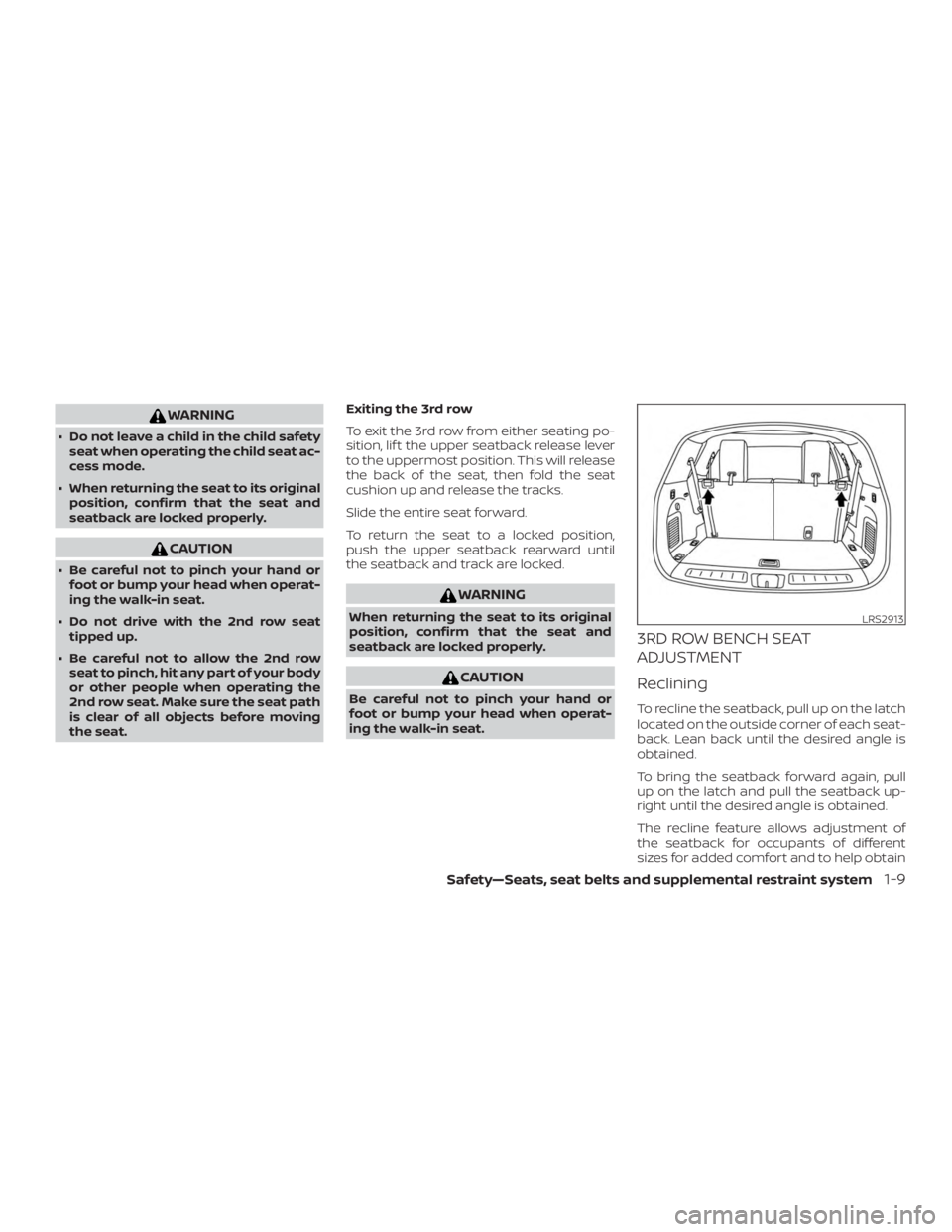
To recline the seatback, pull up on the latch
located on the outside corner of each seat-
back. Lean back until the desired angle is
obtained.
To bring the seatback forward again, pull
up on the latch and pull the seatback up-
right until the desired angle is obtained.
The recline feature allows adjustment of
the seatback for occupants of different
sizes for added comfort and to help obtain
LRS2913
Safety—Seats, seat belts and supplemental restraint system1-9
Page 127 of 482
Menu itemResult
Exit Seat Slide (if so equipped) When the exit seat slide is on the driver’s seat will move backward for easy exit when the ignition switch is placed
in the OFF position and the driver’s door is opened. Af ter getting into the vehicle and placing the ignition switch in
the ACC position, the driver’s seat will move to the previous set position.
For additional information, refer to “Automatic drive positioner” in the “Pre-driving checks and adjustments” sec-
tion of this manual.
Exit Steering Up (if so equipped) When the exit steering up feature is turned on, the steering wheel moves upward for easy exit when the ignition
switch is in the OFF position and the driver’s door is opened. Af ter getting into the vehicle and placing the ignition
switch in the ACC position, the steering wheel moves to the previous position.
For additional information, refer to “Automatic drive positioner” in the “Pre-driving checks and adjustments” sec-
tion of this manual.
Main Menu Selection
The main menu selection menu allows the
user to customize the information that ap-
pears in the vehicle information display
when the ignition is placed in the ON posi-
tion.
Menu item Result
Tire Pressures Allows user to turn the tire pressures display on or off.
Audio Allows user to turn the audio display on or off.
Navigation (if so equipped) Allows user to turn the navigation display on or off.
Driver Assistance Allows user to turn the driver assistance display on or off.
Trip Computer Allows user to turn the trip computer display on or off.
4WD (if so equipped) Allows user to turn the 4WD display on or off.
Fuel Economy Allows user to turn the fuel economy display on or off.
Instruments and controls2-23
Page 224 of 482
1. Adjust the driver’s seat, outside mirrorsand steering wheel (if so equipped) to
the desired positions by manually oper-
ating each adjusting switch. For addi-
tional information, refer to “Seats” in the
“Safety—Seats, seat belts and supple-
mental restraint system” section of this
manual and “Outside mirrors” in this
section.
2. Push the SET switch and, within 5 sec- onds, push the memory switch (1 or 2).
The indicator light for the pushed
memory switch will come on and stay
on for approximately 5 seconds.
The chime will sound when the memory is
stored.
NOTE:
If a new memory position is stored in the
same memory switch, the previous
memory position will be overwritten by
the new stored position.
Confirming memory storage
∙ Push the SET switch. ∙ If a memory position has been stored in
the switch (1 or 2) then the indicator light
for the respective switch will stay on for
approximately 5 seconds.
Linking a key fob to a stored
memory position
Each key fob can be linked to a stored
memory position (memory switch 1 or 2)
with the following procedure.
1. Follow steps 1-2 in the “Memory storage function” section for storing the
memory position.
2. While the indicator light is on, press the
button on the key fob. The
hazard lights will flash twice. The indi-
cator light of the linked memory switch
will blink and click twice. Af ter the indi-
cator light goes off, the key fob is linked
to that memory setting.
Once it is linked, when the ignition switch is
in the OFF position, pressing the
but-
ton on the key fob will move the driver’s
seat, steering wheel and outside mirrors to
the linked memory switch position. NOTE:
If a new memory position is stored in the
linked memory switch, then the key fob
will link the new position and overwrites
the previous position.
ENTRY/EXIT FUNCTION
This system is designed so that the driver’s
seat, steering column and steering wheel
(if so equipped) will automatically move
when the shif t lever is in the P (Park) posi-
tion. This allows the driver to easily get in
and out of the driver’s seat.
The driver’s seat will slide backward and
the steering column will move up:
∙ When the ignition is switched to OFF and the driver’s door is opened.
The driver’s seat and steering wheel will
return to the previous position: ∙ When the ignition is switched to ON.
3-40Pre-driving checks and adjustments
Page 225 of 482
The entry/exit function can be enabled or
disabled through “Vehicle Settings” in the
vehicle information display by performing
the following:∙ Switch the Exit Seat Slide from on to off.
∙ Switch the Exit Steering UP from on to off.
Restarting the entry/exit function
If the battery cable is disconnected, or if the
fuse opens, the stored memory positions
will be lost and some of the functions will
be restricted:
1. Drive the vehicle over 25 mph (40 km/h).
OR 2. Open and close the driver’s door more than two times with the ignition switch
in the OFF position.
The entry/exit function should now work
properly.
SETTING MEMORY FUNCTION
The position of the following settings can
be linked to the Intelligent Key and the
memorized settings can be available for
each Intelligent Key. ∙ Climate control system ∙ Navigation system (if so equipped)
∙ Audio system
To use the memory function, set the cli-
mate, navigation and audio systems to the
driver’s preferred settings. Lock the doors
with the Intelligent Key. Each Intelligent Key
may be set with the driver’s individual pref-
erences. When a new Intelligent Key is used,
“Connection with the key has been done”
will be displayed on the screen and the
memorized settings are available.
To engage the memorized settings, per-
form the following:
1. Carry the Intelligent Key that is linked to the memorized settings.
2. Unlock the doors by pushing the driv- er’s door handle request switch or
the
button on the Intelligent Key.
3. Place the ignition switch in the “ON” po- sition. The settings linked to the Intelli-
gent Key will start.
For additional information, refer to “Heater
and air conditioner (automatic)” in the
“Monitor, climate, audio, phone and voice
recognition systems” section of this
manual. For additional information on using the
navigation system (if so equipped), refer to
the separate NissanConnect® Owner’s
Manual.
SYSTEM OPERATION
The automatic drive positioner system will
not work or will stop operating under the
following conditions:
∙ When the vehicle speed is above 4 mph (7 km/h).
∙ When any of the memory switches are pushed while the automatic drive posi-
tioner is operating.
∙ When the switch for the driver’s seat and steering column is pushed while
the automatic drive positioner is oper-
ating.
∙ When the seat has already been moved to the memorized position.
∙ When no seat position is stored in the memory switch.
∙ When the shif t lever is moved from P (Park) to any other position.
Pre-driving checks and adjustments3-41