cruise control NISSAN PATHFINDER 2022 Owner´s Manual
[x] Cancel search | Manufacturer: NISSAN, Model Year: 2022, Model line: PATHFINDER, Model: NISSAN PATHFINDER 2022Pages: 647, PDF Size: 8.48 MB
Page 162 of 647
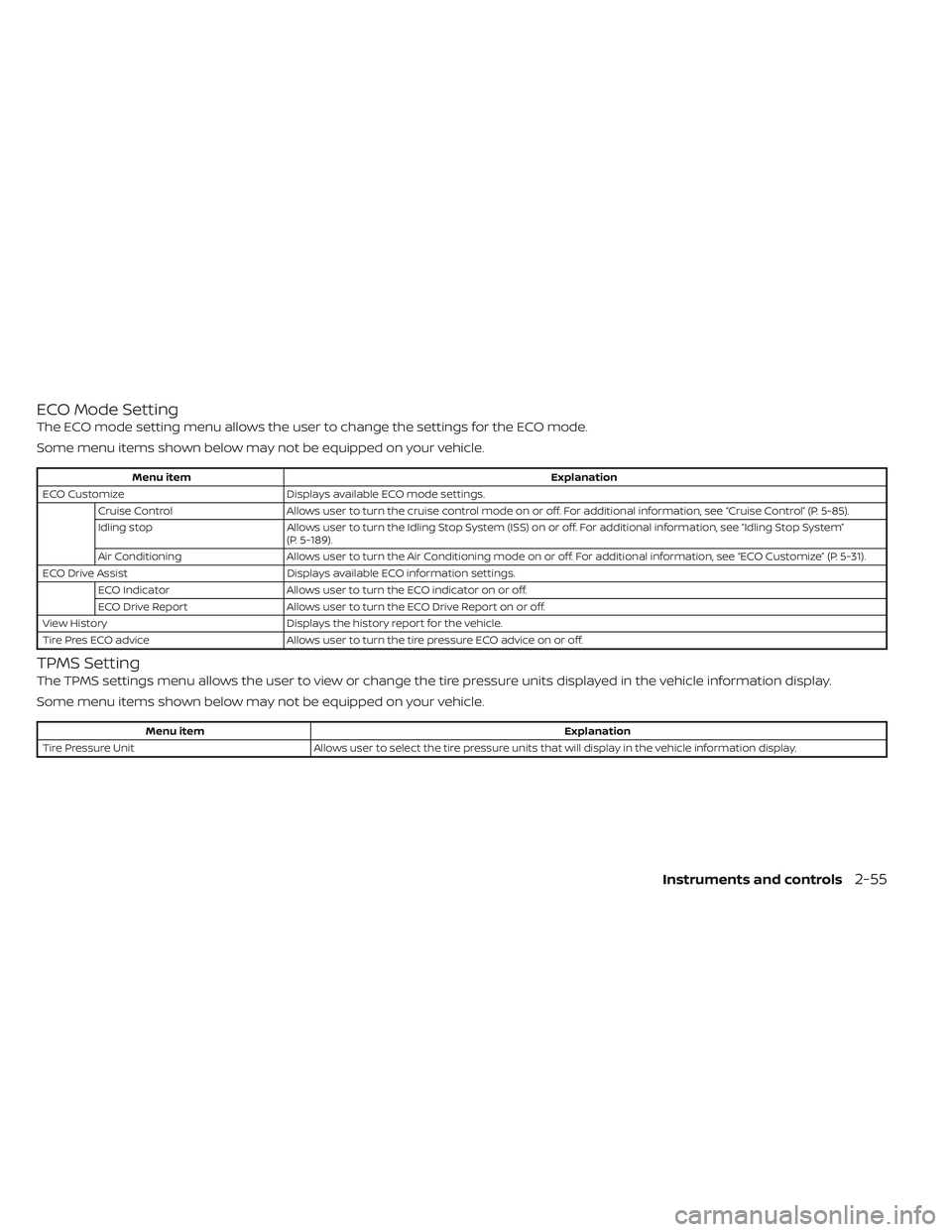
ECO Mode Setting
The ECO mode setting menu allows the user to change the settings for the ECO mode.
Some menu items shown below may not be equipped on your vehicle.
Menu itemExplanation
ECO Customize Displays available ECO mode settings.
Cruise Control Allows user to turn the cruise control mode on or off. For additional information, see “Cruise Control” (P. 5-85).
Idling stop Allows user to turn the Idling Stop System (ISS) on or off. For additional information, see “Idling Stop System”
(P. 5-189).
Air Conditioning Allows user to turn the Air Conditioning mode on or off. For additional information, see “ECO Customize” (P. 5-31).
ECO Drive Assist Displays available ECO information settings.
ECO Indicator Allows user to turn the ECO indicator on or off.
ECO Drive Report Allows user to turn the ECO Drive Report on or off.
View History Displays the history report for the vehicle.
Tire Pres ECO advice Allows user to turn the tire pressure ECO advice on or off.
TPMS Setting
The TPMS settings menu allows the user to view or change the tire pressure units displayed in the vehicle information display.
Some menu items shown below may not be equipped on your vehicle.
Menu item Explanation
Tire Pressure Unit Allows user to select the tire pressure units that will display in the vehicle information display.
Instruments and controls2-55
Page 166 of 647
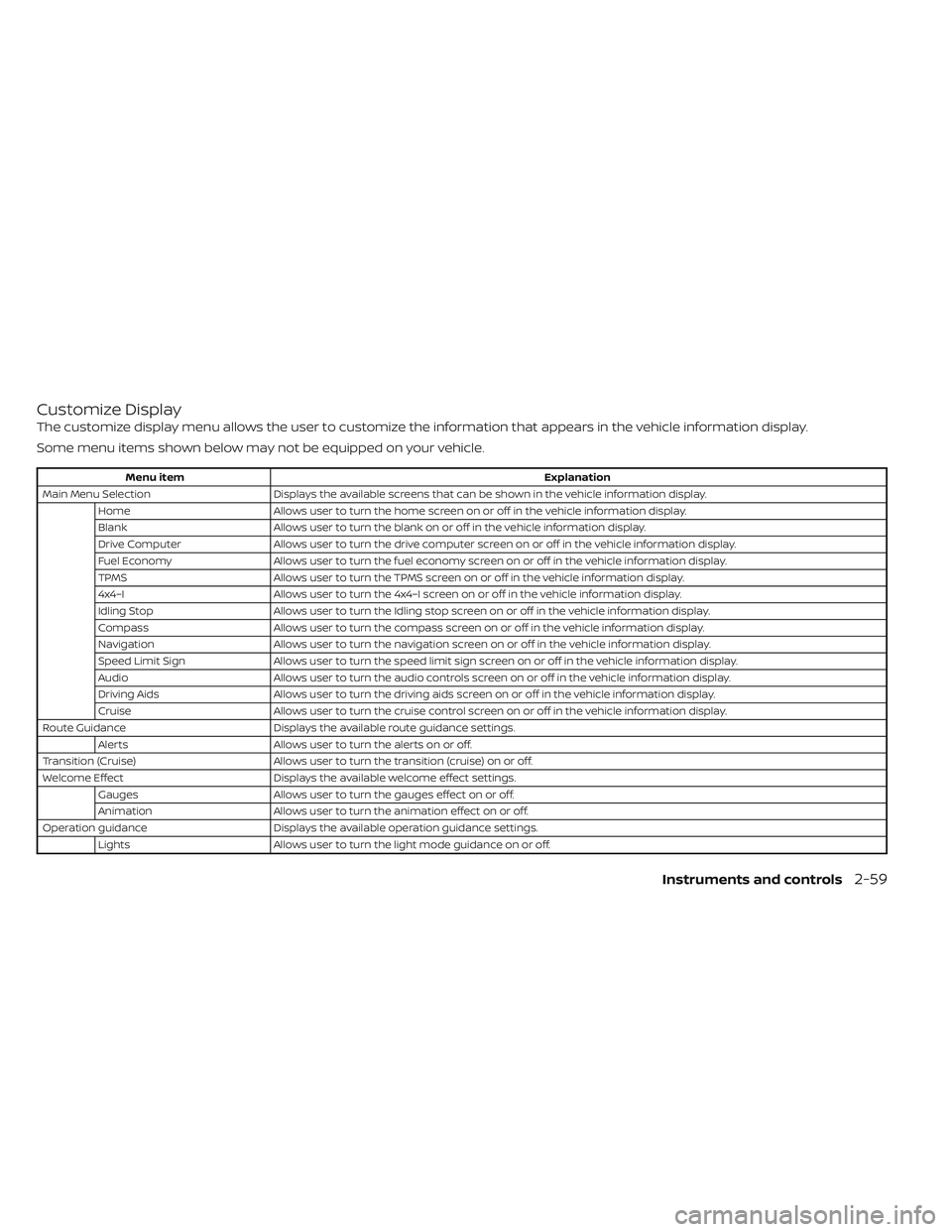
Customize Display
The customize display menu allows the user to customize the information that appears in the vehicle information display.
Some menu items shown below may not be equipped on your vehicle.
Menu itemExplanation
Main Menu Selection Displays the available screens that can be shown in the vehicle information display.
Home Allows user to turn the home screen on or off in the vehicle information display.
Blank Allows user to turn the blank on or off in the vehicle information display.
Drive Computer Allows user to turn the drive computer screen on or off in the vehicle information display.
Fuel Economy Allows user to turn the fuel economy screen on or off in the vehicle information display.
TPMS Allows user to turn the TPMS screen on or off in the vehicle information display.
4x4–I Allows user to turn the 4x4–I screen on or off in the vehicle information display.
Idling Stop Allows user to turn the Idling stop screen on or off in the vehicle information display.
Compass Allows user to turn the compass screen on or off in the vehicle information display.
Navigation Allows user to turn the navigation screen on or off in the vehicle information display.
Speed Limit Sign Allows user to turn the speed limit sign screen on or off in the vehicle information display.
Audio Allows user to turn the audio controls screen on or off in the vehicle information display.
Driving Aids Allows user to turn the driving aids screen on or off in the vehicle information display.
Cruise Allows user to turn the cruise control screen on or off in the vehicle information display.
Route Guidance Displays the available route guidance settings.
Alerts Allows user to turn the alerts on or off.
Transition (Cruise) Allows user to turn the transition (cruise) on or off.
Welcome Effect Displays the available welcome effect settings.
Gauges Allows user to turn the gauges effect on or off.
Animation Allows user to turn the animation effect on or off.
Operation guidance Displays the available operation guidance settings.
Lights Allows user to turn the light mode guidance on or off.
Instruments and controls2-59
Page 167 of 647
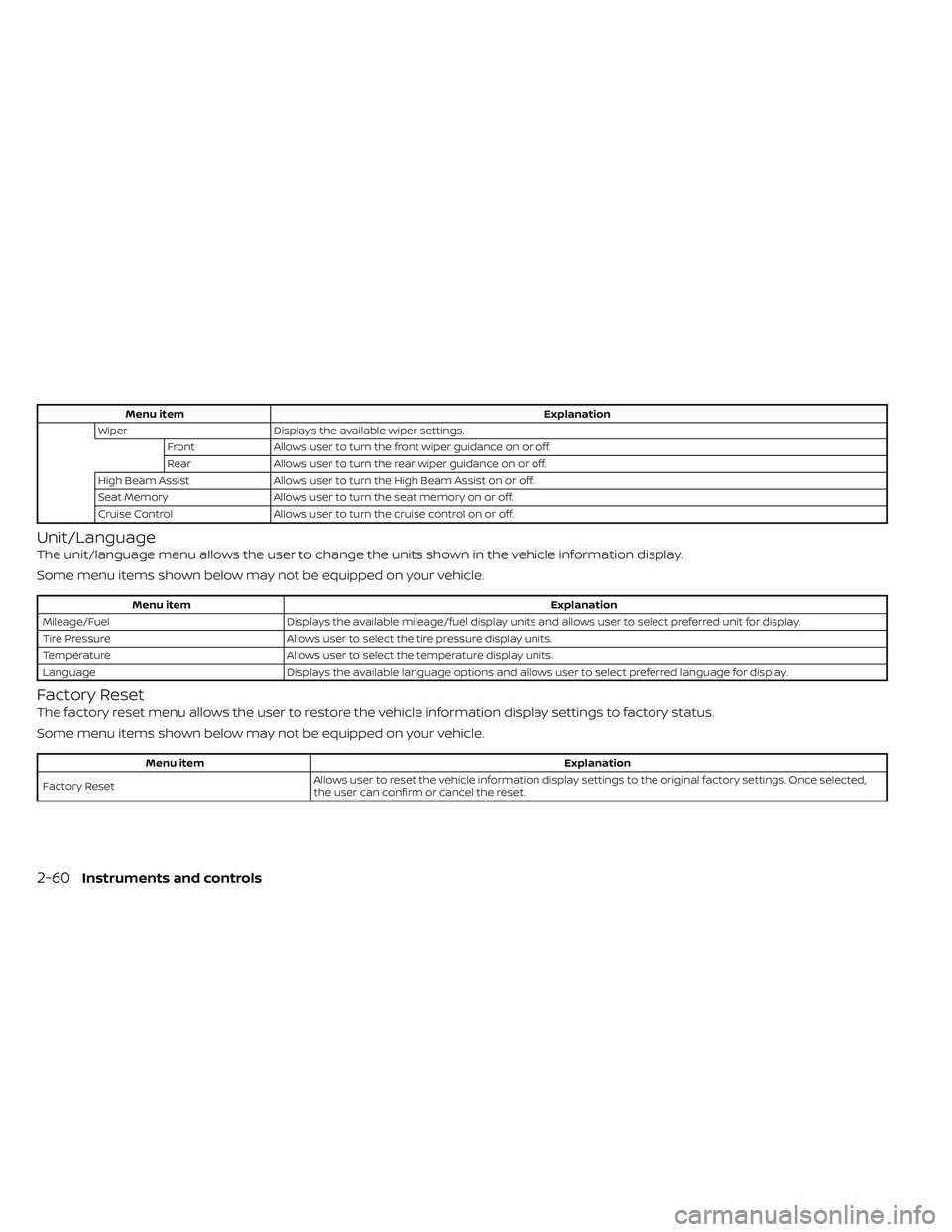
Menu itemExplanation
Wiper Displays the available wiper settings.
Front Allows user to turn the front wiper guidance on or off.
Rear Allows user to turn the rear wiper guidance on or off.
High Beam Assist Allows user to turn the High Beam Assist on or off.
Seat Memory Allows user to turn the seat memory on or off.
Cruise Control Allows user to turn the cruise control on or off.
Unit/Language
The unit/language menu allows the user to change the units shown in the vehicle information display.
Some menu items shown below may not be equipped on your vehicle.
Menu item Explanation
Mileage/Fuel Displays the available mileage/fuel display units and allows user to select preferred unit for display.
Tire Pressure Allows user to select the tire pressure display units.
Temperature Allows user to select the temperature display units.
Language Displays the available language options and allows user to select preferred language for display.
Factory Reset
The factory reset menu allows the user to restore the vehicle information display settings to factory status.
Some menu items shown below may not be equipped on your vehicle.
Menu item Explanation
Factory Reset Allows user to reset the vehicle information display setti
ngs to the original factory settings. Once selected,
the user can confirm or cancel the reset.
2-60Instruments and controls
Page 174 of 647
Have the system checked. It is recom-
mended that you visit a NISSAN dealer for
this service.
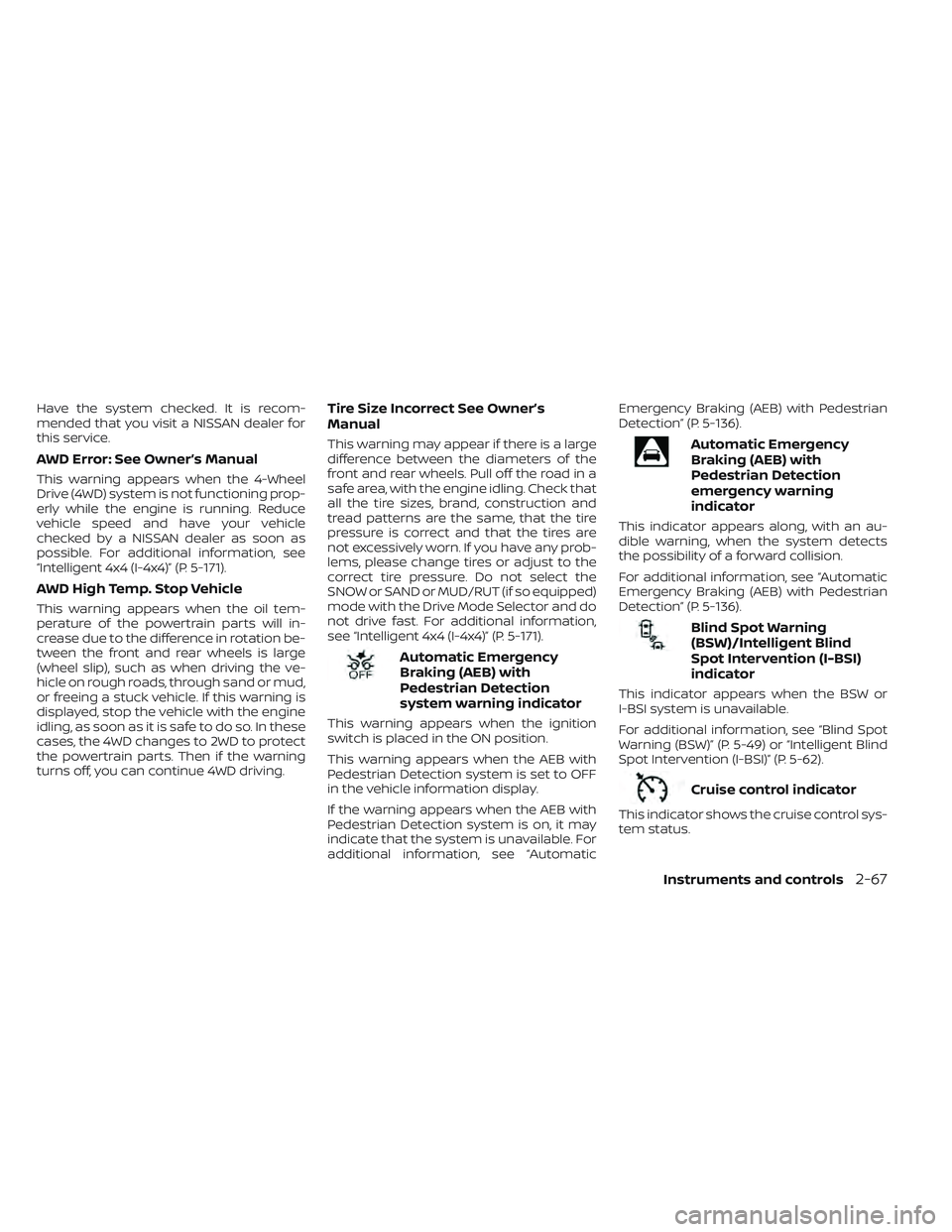
AWD Error: See Owner’s Manual
This warning appears when the 4-Wheel
Drive (4WD) system is not functioning prop-
erly while the engine is running. Reduce
vehicle speed and have your vehicle
checked by a NISSAN dealer as soon as
possible. For additional information, see
“Intelligent 4x4 (I-4x4)” (P. 5-171).
AWD High Temp. Stop Vehicle
This warning appears when the oil tem-
perature of the powertrain parts will in-
crease due to the difference in rotation be-
tween the front and rear wheels is large
(wheel slip), such as when driving the ve-
hicle on rough roads, through sand or mud,
or freeing a stuck vehicle. If this warning is
displayed, stop the vehicle with the engine
idling, as soon as it is safe to do so. In these
cases, the 4WD changes to 2WD to protect
the powertrain parts. Then if the warning
turns off, you can continue 4WD driving.
Tire Size Incorrect See Owner’s
Manual
This warning may appear if there is a large
difference between the diameters of the
front and rear wheels. Pull off the road in a
safe area, with the engine idling. Check that
all the tire sizes, brand, construction and
tread patterns are the same, that the tire
pressure is correct and that the tires are
not excessively worn. If you have any prob-
lems, please change tires or adjust to the
correct tire pressure. Do not select the
SNOW or SAND or MUD/RUT (if so equipped)
mode with the Drive Mode Selector and do
not drive fast. For additional information,
see “Intelligent 4x4 (I-4x4)” (P. 5-171).
Automatic Emergency
Braking (AEB) with
Pedestrian Detection
system warning indicator
This warning appears when the ignition
switch is placed in the ON position.
This warning appears when the AEB with
Pedestrian Detection system is set to OFF
in the vehicle information display.
If the warning appears when the AEB with
Pedestrian Detection system is on, it may
indicate that the system is unavailable. For
additional information, see “AutomaticEmergency Braking (AEB) with Pedestrian
Detection” (P. 5-136).
Automatic Emergency
Braking (AEB) with
Pedestrian Detection
emergency warning
indicator
This indicator appears along, with an au-
dible warning, when the system detects
the possibility of a forward collision.
For additional information, see “Automatic
Emergency Braking (AEB) with Pedestrian
Detection” (P. 5-136).
Blind Spot Warning
(BSW)/Intelligent Blind
Spot Intervention (I-BSI)
indicator
This indicator appears when the BSW or
I-BSI system is unavailable.
For additional information, see “Blind Spot
Warning (BSW)” (P. 5-49) or “Intelligent Blind
Spot Intervention (I-BSI)” (P. 5-62).
Cruise control indicator
This indicator shows the cruise control sys-
tem status.
Instruments and controls2-67
Page 175 of 647

When cruise control is activated, a green
circle will illuminate to indicate it is set. The
vehicle information display will also display
the speed the cruise control was set at. If
you accelerate past the set speed, the
speed will blink until you either cancel
cruise control or go back to the set speed.
If cruise control is on and canceled, the
speed will be displayed to show the speed
the vehicle will return to if the resume but-
ton is activated.
Currently not available
This message may appear when the Pro-
PILOT Assist system, Intelligent Blind Spot
Intervention (I-BSI) or the Intelligent Lane
Intervention (I-LI) system is engaged.
Under the following conditions, the Pro-
PILOT Assist, Intelligent Blind Spot Interven-
tion (I-BSI) or the Intelligent Lane Interven-
tion (I-LI) system is automatically canceled:
• When the VDC system is turned off
• The SNOW mode or the SAND or MUD/RUT mode is selected (4WD models).
The above system cannot be used in some
situations (VDC operates, wheel slip and
VDC system is off.)
Driver Attention Alert
Malfunction
This warning appears when the Intelligent
Driver Alertness (I-DA) system is not func-
tioning properly. For additional information,
see “Intelligent Driver Alertness (I-DA)”
(P. 5-165).
Driver Attention Alert—
TakeaBreak?
This alert appears when the system has
detected that the driver may be displaying
fatigue or a lack of attention.
Forward Driving Aids temporarily
disabled Front Sensor blocked See
Owner’s Manual
This message appears when the front ra-
dar sensor may be obstructed due to:
• mud, dirt, snow, ice, etc.
• inclement weather (rain, fog, snow, etc.).
All forward driving aids are temporarily dis-
abled until the system detects that the
front radar sensor is no longer obstructed.
For additional information, see:
• Automatic Emergency Braking (AEB) with Pedestrian Detection (P. 5-136)
• ProPILOT Assist (P. 5-86) • Intelligent Forward Collision Warning
(I-FCW) (P. 5-149)
Hands on detection
warning
This warning appears when the Steering
Assist system is engaged and the following
condition(s) occur:
• When not holding the steering wheel
• When there is no steering wheeloperation
Hold onto the steering wheel immediately.
When the steering operation is detected,
the warning turns off and the Steering As-
sist function is automatically restored.
For additional information, see “ProPILOT
Assist” (P. 5-86).
Intelligent Lane
Intervention (I-LI)/
Intelligent Blind Spot
Intervention (I-BSI)/
ProPILOT Assist indicator
This indicator shows when the I-LI, I-BSI or
ProPILOT Assist system is engaged.
For additional information, see “Intelligent
Lane Intervention (I-LI)” (P. 5-42), “Intelligent
Blind Spot Intervention (I-BSI)” (P. 5-62) or
“ProPILOT Assist” (P. 5-86).
2-68Instruments and controls
Page 312 of 647
System malfunction......................... 5-41
System maintenance ....................... 5-41
Intelligent Lane Intervention (I-LI)
(if so equipped) ................................. 5-42
I-LI system operation ........................ 5-43
How to enable/disable the I-LI system ......5-45
I-LI system limitations .......................5-46
System temporarily unavailable .............5-48
System malfunction ......................... 5-48
System maintenance .......................5-49
Blind Spot Warning (BSW) .......................5-49
BSW system operation ......................5-51
How to enable/disable the BSW system .....5-53
BSW system limitations .....................5-54
BSW driving situations .......................5-55
System temporarily unavailable .............5-59
System maintenance ....................... 5-61
Intelligent Blind Spot Intervention (I-BSI)
(if so equipped) ................................. 5-62
I-BSI system operation ......................5-63
How to enable/disable the I-BSI system .....5-65
I-BSI system limitations .....................5-67
I-BSI driving situations .......................5-68
System temporarily unavailable .............5-73 System malfunction
......................... 5-73
System maintenance .......................5-74
RearCrossTrafficAlert(RCTA) .................. 5-75
RCTA system operation .....................5-76
How to enable/disable the RCTA
system ...................................... 5-78
RCTA system limitations .....................5-80
System temporarily unavailable .............5-82
System maintenance .......................5-84
Cruise control (if so equipped) ..................5-85
Precautions on cruise control ...............5-85
Cruise control operations ...................5-85
ProPILOT Assist (if so equipped) ................
5-86
Pr
oPILOT Assist system operation ...........5-88
Turning the conventional (fixed speed)
cruise control mode on .....................5-93
Operating ProPILOT Assist ...................5-94
How to enable/disable the Steering
Assist ...................................... 5-100
Intelligent Cruise Control (ICC)
(for vehicles with ProPILOT Assist) ..........5-102
Steering Assist ............................. 5-118
Conventional (fixed speed) cruise
control mode .............................. 5-126
Page 342 of 647
Operation
Select the ECO mode using the Drive Mode
Selector. The ECO indicator illuminates.
When the accelerator pedal is depressed
within the range of economy drive, the ECO
drive indicator illuminates in green. When
the accelerator pedal is depressed above
the range of economy drive, the ECO drive
indicator turns off.
The ECO drive indicator will not illuminate
in the following cases:
• When the shif t lever is in the R (Reverse)position.
• When the vehicle speed is below 2 mph (3.2 km/h) or over 90 mph (144 km/h).
• When the Cruise Control (if so equipped) or Intelligent Cruise Control (ICC) system
(if so equipped) is operated.
ECO Customize
The “ECO Customize” is a function that can
change the priority from the Cruise Control
(if so equipped) or Intelligent Cruise Control
(ICC) (if so equipped) to fuel efficiency im-
provements. It can be set when the ECO
mode is selected. To activate or deactivate
this function, see “ECO Mode Setting”
(P. 2-28) or (P. 2-52).
• Cruise Control
When the setting is ON, the fuel efficiency
while cruising will be improved by lower-
ing acceleration target from normal
(setting OFF) mode.
NOTE:
When the vehicle speed is reduced (for
example, when the vehicle is driven on
an uphill road from a flat road), it will take
more time to return to the previously set
speed than normal mode.
Tire Pres ECO advice
The “Tire Pres ECO advice” is a function to
show ECO advice information in the vehicle
information display when low tire pressure
is detected. To activate or deactivate this
function, see “ECO Mode Setting” (P. 2-28) or
(P. 2-52).
When the setting is on, the ECO Drive Re-
port display shows “See Tire Pressures”. You
can switch the display to the Tire Pressures
display by selecting it in the vehicle infor-
mation display.
Starting and driving5-31
Page 359 of 647
SYSTEM TEMPORARILY
UNAVAILABLE
Condition A:
The warning and assist functions of the I-LI
system are not designed to work under the
following conditions:
•
When you operate the lane change signal
and change the traveling lanes in the direc-
tion of the signal. (The I-LI system will be
deactivated for approximately 2 seconds
af ter the lane change signal is turned off.)
• When the vehicle speed lowers to less than approximately 37 mph (60 km/h).
Af ter the above conditions have finished
and the necessary operating conditions
are satisfied, the warning and assist func-
tions will resume.
Condition B:
The assist function of the I-LI system is not
designed to work under the following con-
ditions (warning is still functional):
• When the brake pedal is depressed.
• When the steering wheel is turned as far as necessary for the vehicle to change
lanes.
• When the vehicle is accelerated during I-LI system operation. • When the Intelligent Cruise Control (ICC)
approach warning occurs.
• When the hazard warning flashers are operated.
• When driving on a curve at high speed.
Af ter the above conditions have finished
and the necessary operating conditions
are satisfied, the I-LI system application of
the brakes will resume.
Condition C:
If the following messages appear in the
vehicle information display, the I-LI system
will be turned off automatically.
• “Not Available Poor Road Conditions” When the VDC system (except Traction
Control System [TCS] function) or ABS
operates.
• “Currently not available”: – When the VDC system is turned off.
– When the SNOW mode, or the MUD/ RUT mode or SAND mode (4WD mod-
els only) is selected.
Action to take:
When the above conditions no longer exist,
turn off the I-LI system. Push the ProPILOT
Assist switch (for vehicles with ProPILOT
Assist) on the steering wheel again to turn
the I-LI system back on. Temporary disabled status at high
temperature:
If the vehicle is parked in direct sunlight
under high temperature conditions (over
approximately 104°F [40°C]) and then the
I-LI system is turned on, the I-LI system
may be deactivated automatically and the
following message will appear on the ve-
hicle information display: “Unavailable: High
Cabin Temperature.”
SYSTEM MALFUNCTION
If the I-LI system malfunctions, it will cancel
automatically. The LDW indicator (orange)
and the “Not Available System Malfunction”
warning message will display. If the LDW
indicator (orange) and the warning mes-
sage appear in the display, pull off the road
to a safe location and stop the vehicle. Turn
the engine/motor off and restart the
engine/motor. If the LDW indicator (orange)
and warning message continue to appear,
have the I-LI system checked. It is recom-
mended that you visit a NISSAN dealer for
this service.
5-48Starting and driving
Page 396 of 647
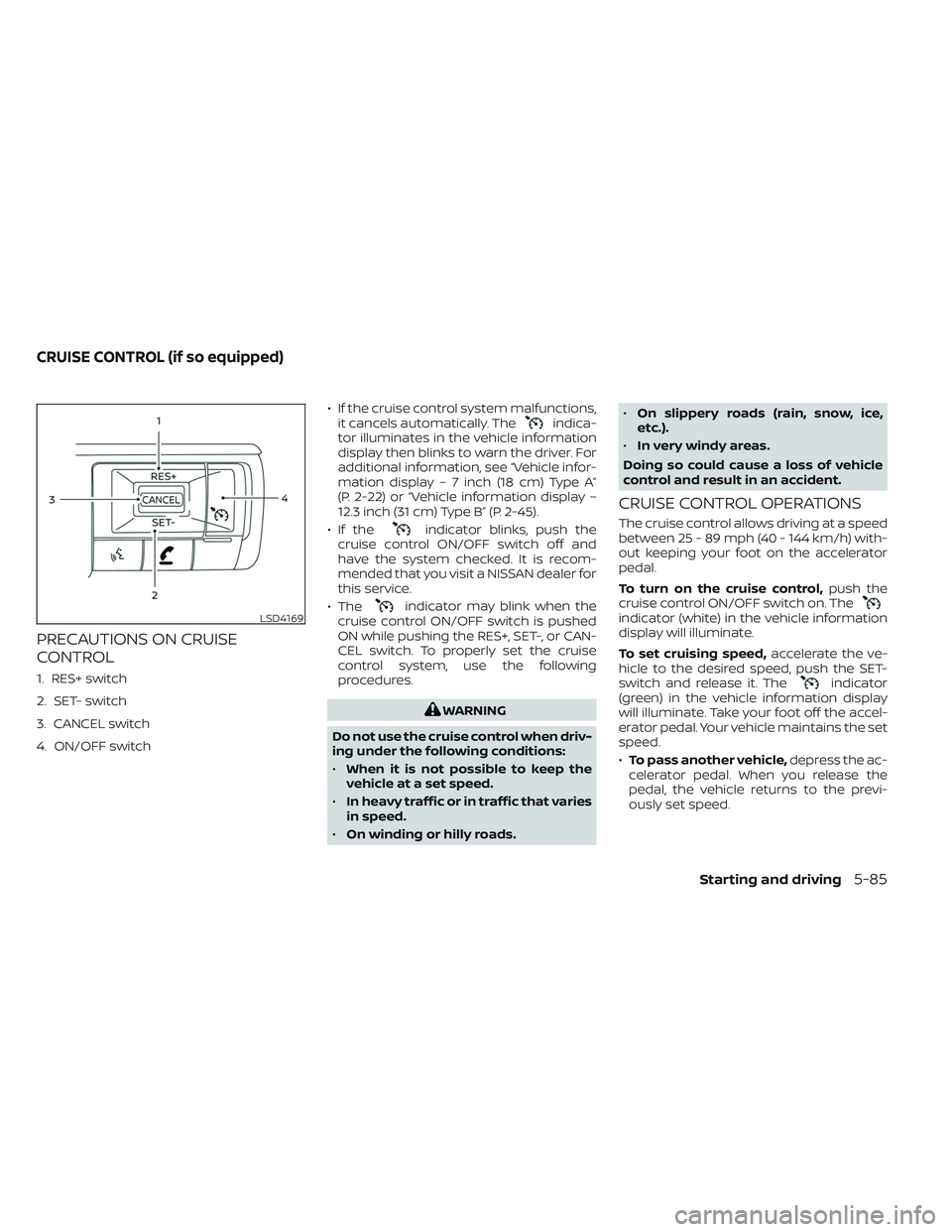
PRECAUTIONS ON CRUISE
CONTROL
1. RES+ switch
2. SET- switch
3. CANCEL switch
4. ON/OFF switch• If the cruise control system malfunctions,
it cancels automatically. The
indica-
tor illuminates in the vehicle information
display then blinks to warn the driver. For
additional information, see “Vehicle infor-
mation display – 7 inch (18 cm) Type A”
(P. 2-22) or “Vehicle information display –
12.3 inch (31 cm) Type B” (P. 2-45).
• If the
indicator blinks, push the
cruise control ON/OFF switch off and
have the system checked. It is recom-
mended that you visit a NISSAN dealer for
this service.
• The
indicator may blink when the
cruise control ON/OFF switch is pushed
ON while pushing the RES+, SET-, or CAN-
CEL switch. To properly set the cruise
control system, use the following
procedures.
WARNING
Do not use the cruise control when driv-
ing under the following conditions:
• When it is not possible to keep the
vehicle at a set speed.
• In heavy traffic or in traffic that varies
in speed.
• On winding or hilly roads. •
On slippery roads (rain, snow, ice,
etc.).
• In very windy areas.
Doing so could cause a loss of vehicle
control and result in an accident.
CRUISE CONTROL OPERATIONS
The cruise control allows driving at a speed
between 25 - 89 mph (40 - 144 km/h) with-
out keeping your foot on the accelerator
pedal.
To turn on the cruise control, push the
cruise control ON/OFF switch on. The
indicator (white) in the vehicle information
display will illuminate.
To set cruising speed, accelerate the ve-
hicle to the desired speed, push the SET-
switch and release it. The
indicator
(green) in the vehicle information display
will illuminate. Take your foot off the accel-
erator pedal. Your vehicle maintains the set
speed.
• To pass another vehicle, depress the ac-
celerator pedal. When you release the
pedal, the vehicle returns to the previ-
ously set speed.
LSD4169
CRUISE CONTROL (if so equipped)
Starting and driving5-85
Page 397 of 647
• The vehicle may not maintain the setspeed when going up or down steep hills.
If this happens, drive without the cruise
control.
To cancel the preset speed, use one of the
following three methods:
• Push the CANCEL switch; the
indica-
tor (green) in the vehicle information dis-
play goes out.
• Tap the brake pedal; the
indicator
(green) goes out.
• Push the cruise control ON/OFF switch off. The
indicator in the vehicle infor-
mation display go out.
The cruise control is automatically can-
celed and the
indicator (green) in the
vehicle information display goes out if:
• You depress the brake pedal while push- ing the RES+ or SET- switch. The preset
speed is deleted from memory.
• The vehicle slows down more than 8 mph (13 km/h) below the set speed.
• You move the shif t lever to N (Neutral). To reset at a faster cruising speed,
use
one of the following three methods:
• Depress the accelerator pedal. When the vehicle attains the desired speed, push
and release the SET- switch.
• Push and hold the RES+ switch. When the vehicle attains the speed you desire, re-
lease the switch.
• Push and release the RES+ switch. Each time you do this, the set speed increases
by about 1 mph (1.6 km/h).
To reset at a slower cruising speed, use
one of the following three methods:
• Lightly tap the brake pedal. When the ve- hicle attains the desired speed, push the
SET- switch and release it.
• Push and hold the SET- switch. Release the switch when the vehicle slows to the
desired speed.
• Push and release the SET- switch. Each time you do this, the set speed decreases
by about 1 mph (1.6 km/h).
To resume the preset speed, push and
release the RES+ switch. The vehicle re-
turns to the last set cruising speed when
the vehicle speed is over 25 mph (40 km/h).
WARNING
Failure to follow the warnings and in-
structions for proper use of the ProPI-
LOT Assist system could result in seri-
ous injury or death.
• ProPILOT Assist is not a self-driving
system. Within the limits of its capa-
bilities, as described in this manual, it
helps the driver with certain driving
activities.
• The ProPILOT Assist system is not a
replacement for proper driving pro-
cedures and is not designed to cor-
rect careless, inattentive or absent-
minded driving. ProPILOT Assist will
not always steer the vehicle to keep it
in the lane. The ProPILOT Assist sys-
tem is not designed to prevent loss of
control. It is the driver’s responsibility
to stay alert, drive safely, keep the
vehicle in the traveling lane, and be in
control of the vehicle at all times.
PROPILOT ASSIST (if so equipped)
5-86Starting and driving