8-25 NISSAN PATHFINDER 2022 Owner´s Manual
[x] Cancel search | Manufacturer: NISSAN, Model Year: 2022, Model line: PATHFINDER, Model: NISSAN PATHFINDER 2022Pages: 647, PDF Size: 8.48 MB
Page 144 of 647
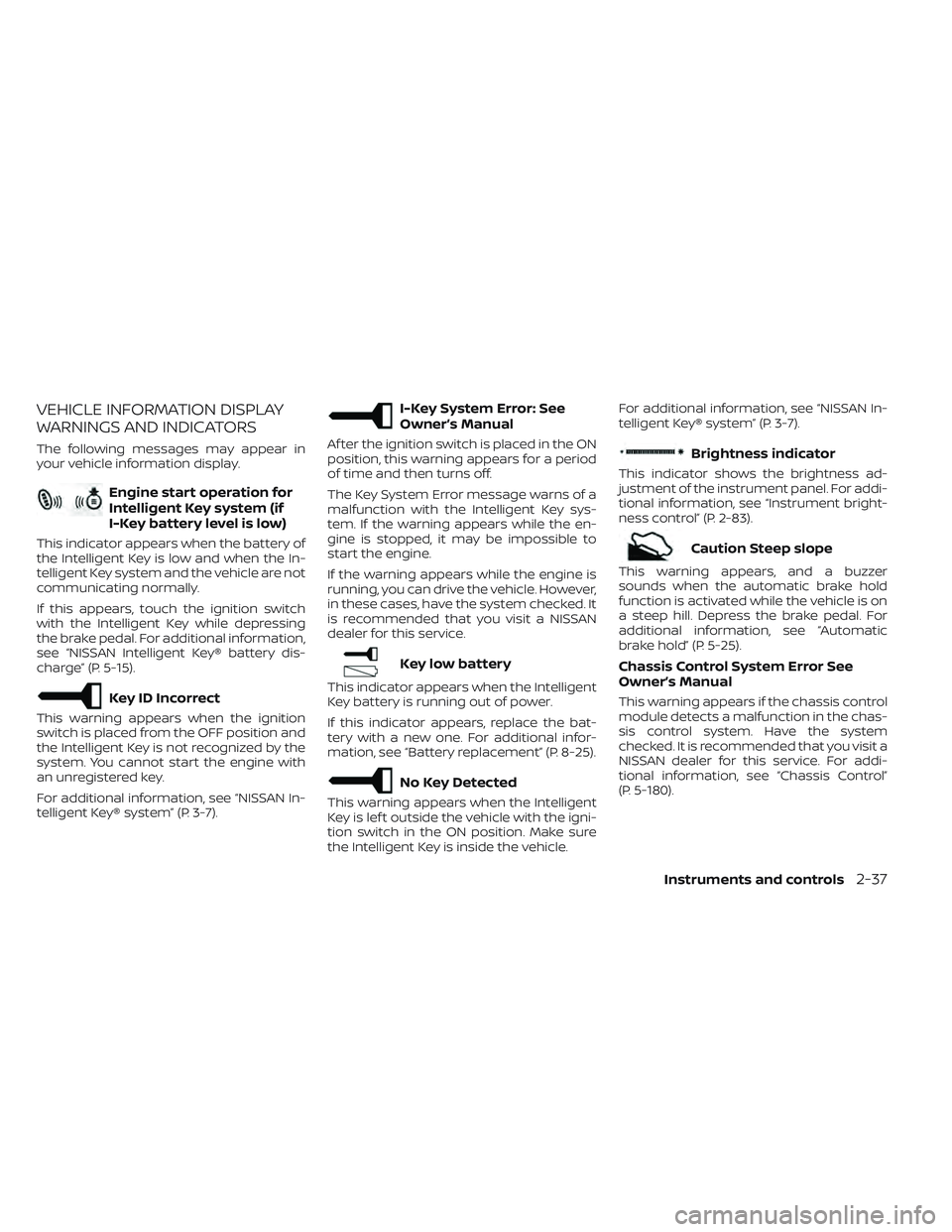
VEHICLE INFORMATION DISPLAY
WARNINGS AND INDICATORS
The following messages may appear in
your vehicle information display.
Engine start operation for
Intelligent Key system (if
I-Key battery level is low)
This indicator appears when the battery of
the Intelligent Key is low and when the In-
telligent Key system and the vehicle are not
communicating normally.
If this appears, touch the ignition switch
with the Intelligent Key while depressing
the brake pedal. For additional information,
see “NISSAN Intelligent Key® battery dis-
charge” (P. 5-15).
Key ID Incorrect
This warning appears when the ignition
switch is placed from the OFF position and
the Intelligent Key is not recognized by the
system. You cannot start the engine with
an unregistered key.
For additional information, see “NISSAN In-
telligent Key® system” (P. 3-7).
I-Key System Error: See
Owner’s Manual
Af ter the ignition switch is placed in the ON
position, this warning appears for a period
of time and then turns off.
The Key System Error message warns of a
malfunction with the Intelligent Key sys-
tem. If the warning appears while the en-
gine is stopped, it may be impossible to
start the engine.
If the warning appears while the engine is
running, you can drive the vehicle. However,
in these cases, have the system checked. It
is recommended that you visit a NISSAN
dealer for this service.
Key low battery
This indicator appears when the Intelligent
Key battery is running out of power.
If this indicator appears, replace the bat-
tery with a new one. For additional infor-
mation, see “Battery replacement” (P. 8-25).
No Key Detected
This warning appears when the Intelligent
Key is lef t outside the vehicle with the igni-
tion switch in the ON position. Make sure
the Intelligent Key is inside the vehicle.For additional information, see “NISSAN In-
telligent Key® system” (P. 3-7).
Brightness indicator
This indicator shows the brightness ad-
justment of the instrument panel. For addi-
tional information, see “Instrument bright-
ness control” (P. 2-83).
Caution Steep slope
This warning appears, and a buzzer
sounds when the automatic brake hold
function is activated while the vehicle is on
a steep hill. Depress the brake pedal. For
additional information, see “Automatic
brake hold” (P. 5-25).
Chassis Control System Error See
Owner’s Manual
This warning appears if the chassis control
module detects a malfunction in the chas-
sis control system. Have the system
checked. It is recommended that you visit a
NISSAN dealer for this service. For addi-
tional information, see “Chassis Control”
(P. 5-180).
Instruments and controls2-37
Page 168 of 647
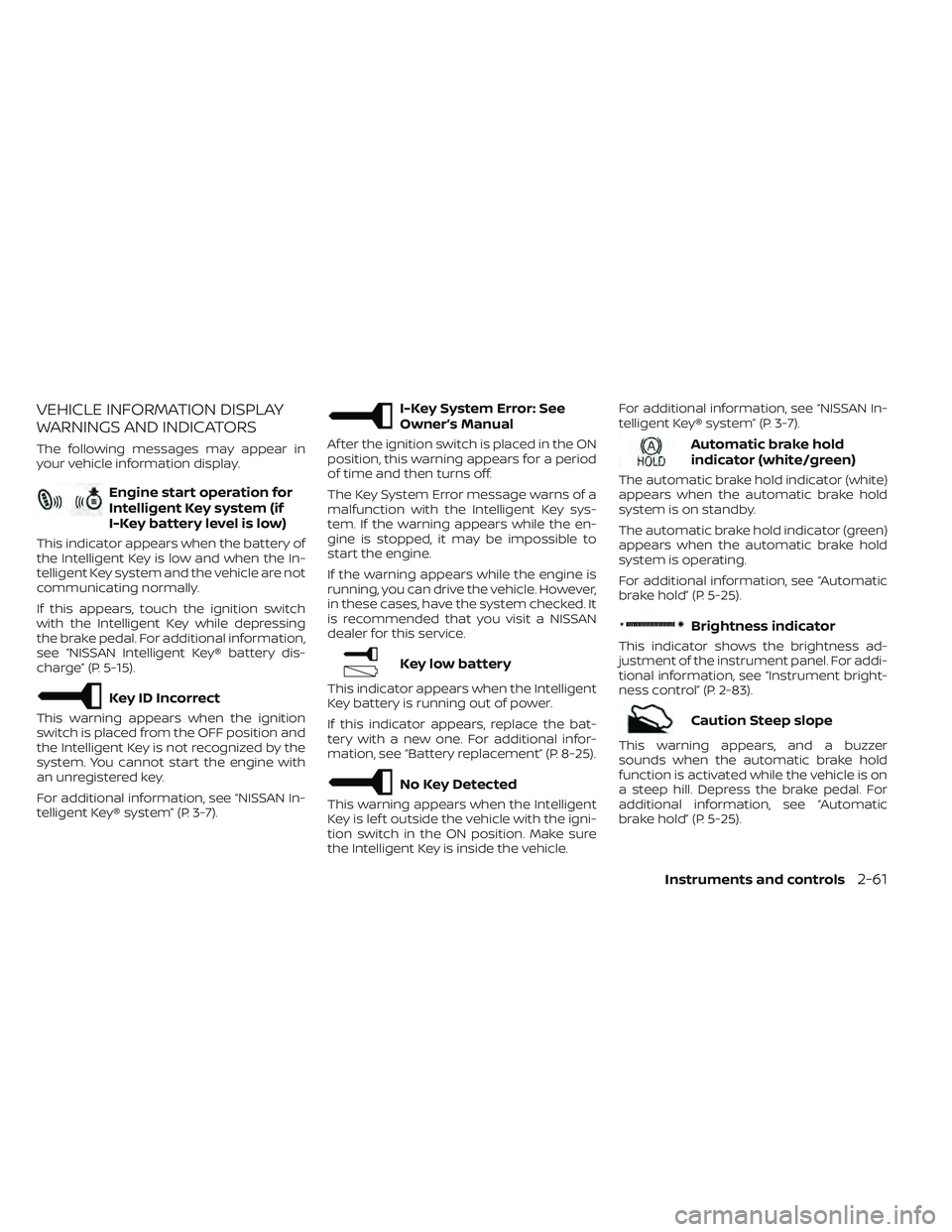
VEHICLE INFORMATION DISPLAY
WARNINGS AND INDICATORS
The following messages may appear in
your vehicle information display.
Engine start operation for
Intelligent Key system (if
I-Key battery level is low)
This indicator appears when the battery of
the Intelligent Key is low and when the In-
telligent Key system and the vehicle are not
communicating normally.
If this appears, touch the ignition switch
with the Intelligent Key while depressing
the brake pedal. For additional information,
see “NISSAN Intelligent Key® battery dis-
charge” (P. 5-15).
Key ID Incorrect
This warning appears when the ignition
switch is placed from the OFF position and
the Intelligent Key is not recognized by the
system. You cannot start the engine with
an unregistered key.
For additional information, see “NISSAN In-
telligent Key® system” (P. 3-7).
I-Key System Error: See
Owner’s Manual
Af ter the ignition switch is placed in the ON
position, this warning appears for a period
of time and then turns off.
The Key System Error message warns of a
malfunction with the Intelligent Key sys-
tem. If the warning appears while the en-
gine is stopped, it may be impossible to
start the engine.
If the warning appears while the engine is
running, you can drive the vehicle. However,
in these cases, have the system checked. It
is recommended that you visit a NISSAN
dealer for this service.
Key low battery
This indicator appears when the Intelligent
Key battery is running out of power.
If this indicator appears, replace the bat-
tery with a new one. For additional infor-
mation, see “Battery replacement” (P. 8-25).
No Key Detected
This warning appears when the Intelligent
Key is lef t outside the vehicle with the igni-
tion switch in the ON position. Make sure
the Intelligent Key is inside the vehicle.For additional information, see “NISSAN In-
telligent Key® system” (P. 3-7).
Automatic brake hold
indicator (white/green)
The automatic brake hold indicator (white)
appears when the automatic brake hold
system is on standby.
The automatic brake hold indicator (green)
appears when the automatic brake hold
system is operating.
For additional information, see “Automatic
brake hold” (P. 5-25).
Brightness indicator
This indicator shows the brightness ad-
justment of the instrument panel. For addi-
tional information, see “Instrument bright-
ness control” (P. 2-83).
Caution Steep slope
This warning appears, and a buzzer
sounds when the automatic brake hold
function is activated while the vehicle is on
a steep hill. Depress the brake pedal. For
additional information, see “Automatic
brake hold” (P. 5-25).
Instruments and controls2-61
Page 239 of 647

In such cases, correct the operating condi-
tions before using the Intelligent Key func-
tion or use the mechanical key.
Although the life of the battery varies de-
pending on the operating conditions, the
battery’s life is approximately two years. If
the battery is discharged, replace it with a
new one.
When the Intelligent Key battery is low, a
yellow indicator illuminates with the mes-
sage “Key Battery Low” in the vehicle infor-
mation display. For additional information,
see “Vehicle information display 7 inch (18
cm) Type A” (P. 2-22) or “Vehicle information
display 12.3 inch (31 cm) Type B” (P. 2-45).
Since the Intelligent Key is capable of re-
ceiving radio waves, if the key is lef t near
equipment which transmits strong radio
waves, such as signals from a TV and per-
sonal computer, the battery life may be-
come shorter.
For additional information, see “Battery re-
placement” (P. 8-25).
As many as four Intelligent Keys can be
registered and used with one vehicle. For
information about the purchase and use of
additional Intelligent Keys, it is recom-
mended that you visit a NISSAN dealer.
OPERATING RANGE
The Intelligent Key functions can only be
used when the Intelligent Key is within the
specified operating range from the lock
sensor
O1.When the Intelligent Key battery is dis-
charged or strong radio waves are present
near the operating location, the Intelligent
Key operating range becomes narrower,
and the Intelligent Key may not function
properly.
The operating range is within 31.5 in (80 cm)
from each lock sensor
O1.
If the Intelligent Key is too close to the door
glass, handle or rear bumper, the lock sen-
sors may not function.
When the Intelligent Key is within the oper-
ating range, it is possible for anyone, even
someone who does not carry the Intelli-
gent Key, to touch the lock sensor and the
capacity sensor to lock/unlock the doors.
LPD2929
3-8Pre-driving checks and adjustments
Page 247 of 647
To deactivate:
Press and hold theandbut-
tons for at least 2 seconds. The hazard
indicator lights will flash three times to con-
firm that the answer back horn feature has
been deactivated.
To activate:
Press and hold the
andbut-
tons for at least 2 seconds once more.
The hazard indicator lights will flash once
and the horn will sound once to confirm
that the horn beep feature has been
reactivated.
Deactivating the horn beep feature does
not silence the horn if the alarm is
triggered.
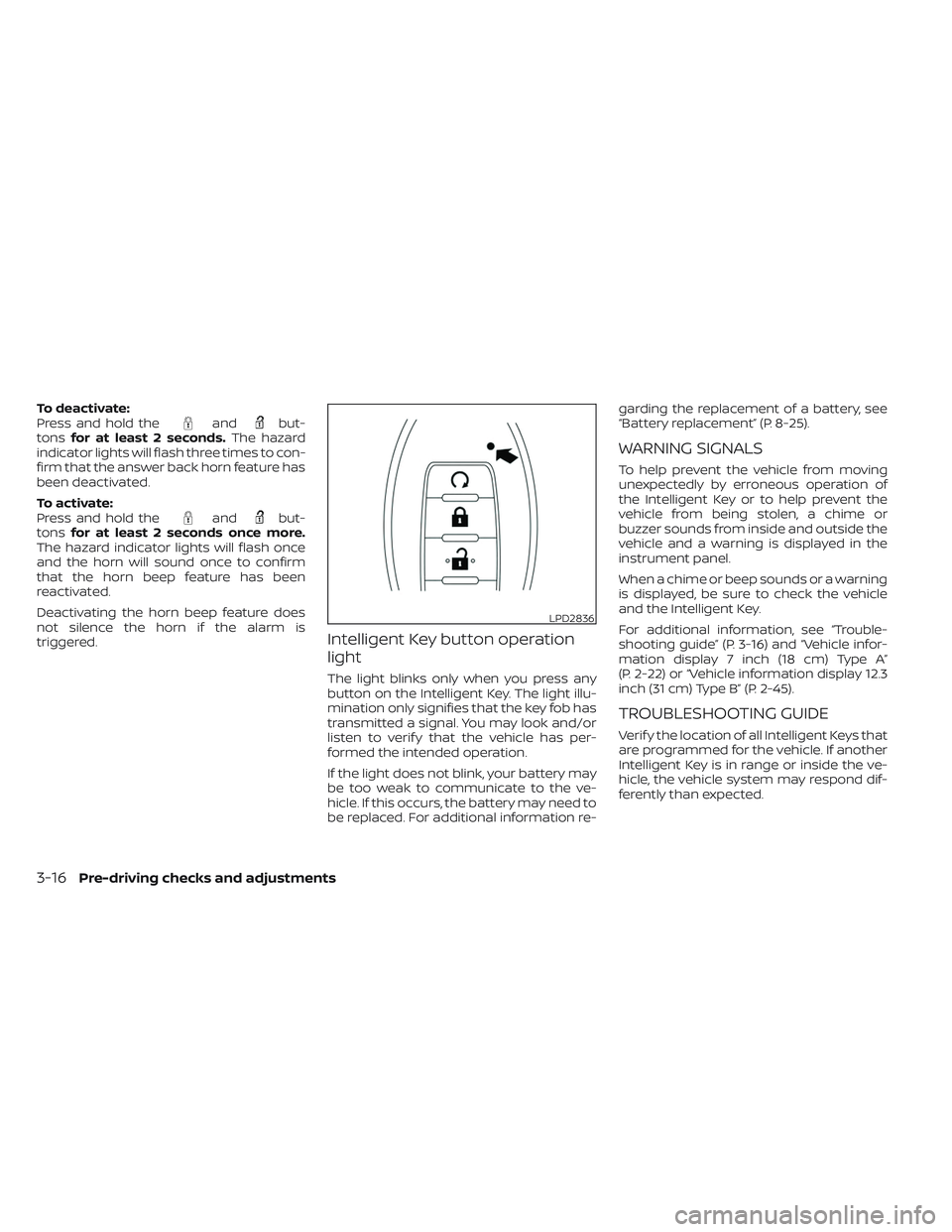
Intelligent Key button operation
light
The light blinks only when you press any
button on the Intelligent Key. The light illu-
mination only signifies that the key fob has
transmitted a signal. You may look and/or
listen to verif y that the vehicle has per-
formed the intended operation.
If the light does not blink, your battery may
be too weak to communicate to the ve-
hicle. If this occurs, the battery may need to
be replaced. For additional information re- garding the replacement of a battery, see
“Battery replacement” (P. 8-25).
WARNING SIGNALS
To help prevent the vehicle from moving
unexpectedly by erroneous operation of
the Intelligent Key or to help prevent the
vehicle from being stolen, a chime or
buzzer sounds from inside and outside the
vehicle and a warning is displayed in the
instrument panel.
When a chime or beep sounds or a warning
is displayed, be sure to check the vehicle
and the Intelligent Key.
For additional information, see “Trouble-
shooting guide” (P. 3-16) and “Vehicle infor-
mation display 7 inch (18 cm) Type A”
(P. 2-22) or “Vehicle information display 12.3
inch (31 cm) Type B” (P. 2-45).
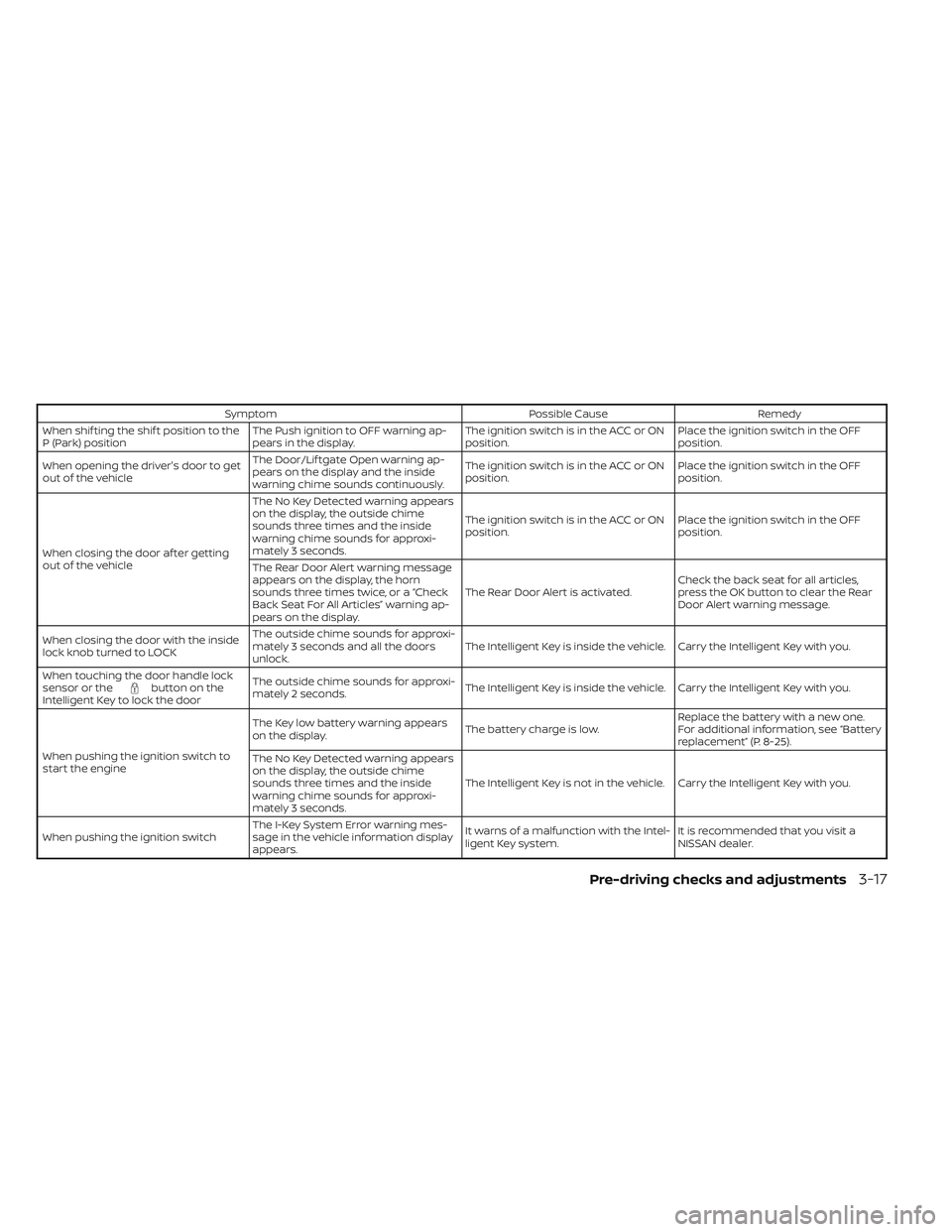
TROUBLESHOOTING GUIDE
Verif y the location of all Intelligent Keys that
are programmed for the vehicle. If another
Intelligent Key is in range or inside the ve-
hicle, the vehicle system may respond dif-
ferently than expected.
LPD2836
3-16Pre-driving checks and adjustments
Page 248 of 647
SymptomPossible CauseRemedy
When shif ting the shif t position to the
P (Park) position The Push ignition to OFF warning ap-
pears in the display. The ignition switch is in the ACC or ON
position.Place the ignition switch in the OFF
position.
When opening the driver's door to get
out of the vehicle The Door/Lif tgate Open warning ap-
pears on the display and the inside
warning chime sounds continuously. The ignition switch is in the ACC or ON
position.
Place the ignition switch in the OFF
position.
When closing the door af ter getting
out of the vehicle The No Key Detected warning appears
on the display, the outside chime
sounds three times and the inside
warning chime sounds for approxi-
mately 3 seconds.
The ignition switch is in the ACC or ON
position.
Place the ignition switch in the OFF
position.
The Rear Door Alert warning message
appears on the display, the horn
sounds three times twice, or a “Check
Back Seat For All Articles” warning ap-
pears on the display. The Rear Door Alert is activated.
Check the back seat for all articles,
press the OK button to clear the Rear
Door Alert warning message.
When closing the door with the inside
lock knob turned to LOCK The outside chime sounds for approxi-
mately 3 seconds and all the doors
unlock.
The Intelligent Key is inside the vehicle. Carry the Intelligent Key with you.
When touching the door handle lock
sensor or the
button on the
Intelligent Key to lock the door The outside chime sounds for approxi-
mately 2 seconds.
The Intelligent Key is inside the vehicle. Carry the Intelligent Key with you.
When pushing the ignition switch to
start the engine The Key low battery warning appears
on the display.
The battery charge is low.Replace the battery with a new one.
For additional information, see “Battery
replacement” (P. 8-25).
The No Key Detected warning appears
on the display, the outside chime
sounds three times and the inside
warning chime sounds for approxi-
mately 3 seconds. The Intelligent Key is not in the vehicle. Carry the Intelligent Key with you.
When pushing the ignition switch The I-Key System Error warning mes-
sage in the vehicle information display
appears. It warns of a malfunction with the Intel-
ligent Key system.
It is recommended that you visit a
NISSAN dealer.
Pre-driving checks and adjustments3-17
Page 326 of 647
Af ter a period of time, functions such as
radio, navigation (if so equipped), and
Bluetooth® Hands-Free Phone System
may be restarted by turning on the audio
system (see separate NissanConnect®
Owner’s Manual), or by pushing the UN-
LOCK button on the Intelligent Key for up to
a total of 30 minutes.
EMERGENCY ENGINE SHUT OFF
To shut off the engine in an emergency
situation while driving, perform the follow-
ing procedure:
• Rapidly push the ignition switch threeconsecutive times in less than 1.5 sec-
onds, or
• Push and hold the ignition switch for more than 2 seconds.
NISSAN INTELLIGENT KEY®
BATTERY DISCHARGE
If the battery of the NISSAN Intelligent Key®
is discharged or environmental conditions
interfere with the Intelligent Key operation,
start the engine according to the following
procedure:
1. Push the park button to shif t to the P (Park) position.
2. Firmly apply the foot brake.
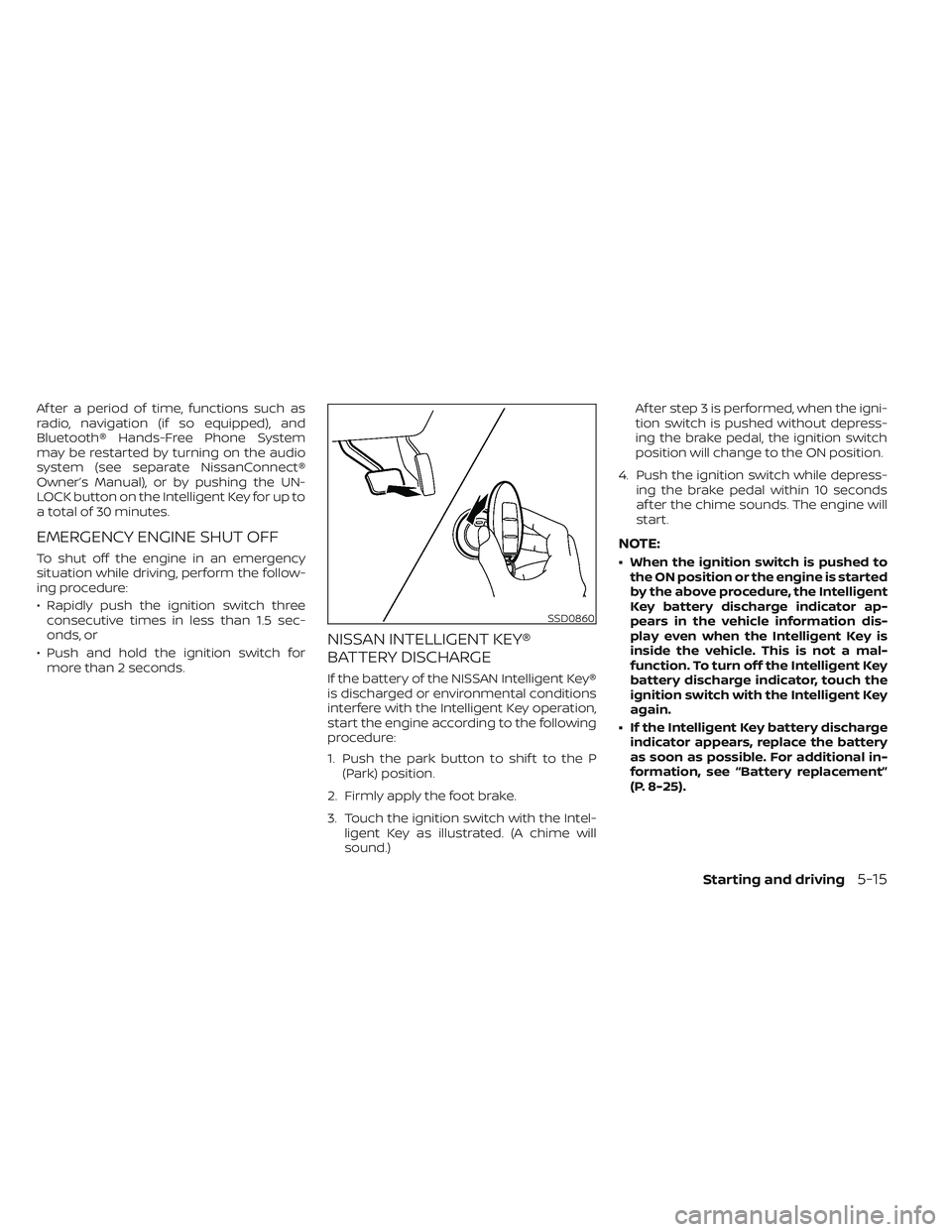
3. Touch the ignition switch with the Intel- ligent Key as illustrated. (A chime will
sound.) Af ter step 3 is performed, when the igni-
tion switch is pushed without depress-
ing the brake pedal, the ignition switch
position will change to the ON position.
4. Push the ignition switch while depress- ing the brake pedal within 10 seconds
af ter the chime sounds. The engine will
start.
NOTE:
• When the ignition switch is pushed tothe ON position or the engine is started
by the above procedure, the Intelligent
Key battery discharge indicator ap-
pears in the vehicle information dis-
play even when the Intelligent Key is
inside the vehicle. This is not a mal-
function. To turn off the Intelligent Key
battery discharge indicator, touch the
ignition switch with the Intelligent Key
again.
• If the Intelligent Key battery discharge indicator appears, replace the battery
as soon as possible. For additional in-
formation, see “Battery replacement”
(P. 8-25).
SSD0860
Starting and driving5-15
Page 534 of 647
8 Do-it-yourself
Maintenance precautions.......................8-2
Engine compartment check locations ...........8-4
Engine cooling system ..........................8-5
Checking engine coolant level ................8-6
Changing engine coolant ....................8-6
Engine oil .......................................8-7
Checking engine oil level .....................8-7
Changing engine oil and oil filter ..............8-7
Automatic Transmission Fluid (ATF) ..............8-11
Brake fluid ...................................... 8-12
Windshield-washer fluid ........................8-12
Windshield-washer fluid reservoir ...........8-12
Battery......................................... 8-14
Jump starting ............................... 8-15
Variable voltage control system
(if so equipped) ................................. 8-16
Drive belt ....................................... 8-16
Spark plugs .................................... 8-17
Replacing spark plugs ....................... 8-17
Air cleaner ..................................... 8-18In-cabin microfilter
.......................... 8-18
Windshield wiper blades ........................8-19
Cleaning .................................... 8-19
Replacing ................................... 8-19
Brakes ......................................... 8-21
Fuses .......................................... 8-21
Engine compartment .......................8-22
Passenger compartment ...................8-23
Battery replacement ........................... 8-25
NISSAN Intelligent Key® ......................8-25
Lights .......................................... 8-27
Headlights .................................. 8-27
Fog lights (if so equipped) ...................8-27
Exterior and interior lights ...................8-27
Wheels and tires ............................... 8-29
Tire pressure ................................ 8-29
Tire labeling ................................. 8-34
Types of tires ................................
8-36
Tir
e chains .................................. 8-37
Changing wheels and tires ..................8-38
Page 558 of 647
CAUTION
Be careful not to allow children to swal-
low the battery or removed parts.
NISSAN INTELLIGENT KEY®
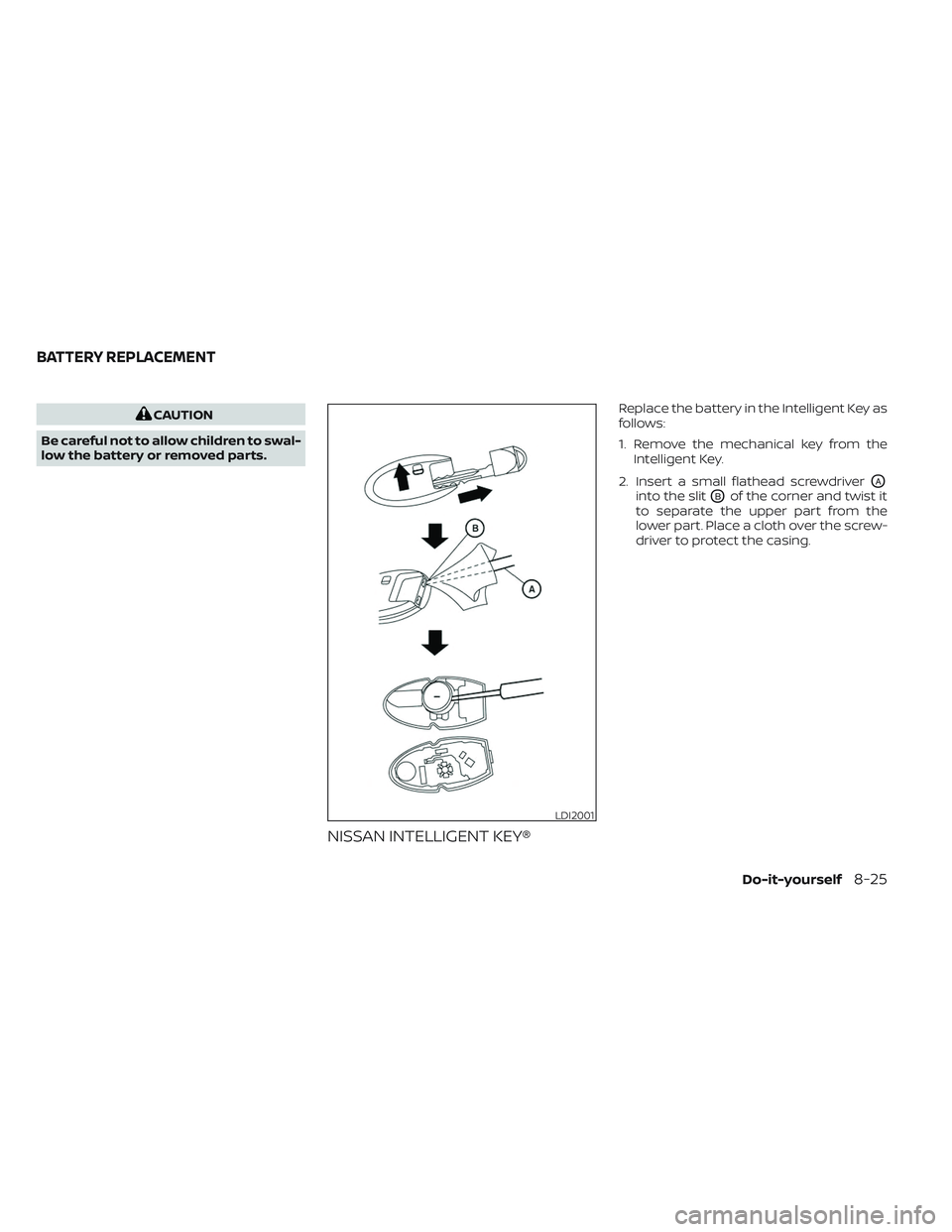
Replace the battery in the Intelligent Key as
follows:
1. Remove the mechanical key from the Intelligent Key.
2. Insert a small flathead screwdriver
OA
into the slitOBof the corner and twist it
to separate the upper part from the
lower part. Place a cloth over the screw-
driver to protect the casing.
LDI2001
BATTERY REPLACEMENT
Do-it-yourself8-25
Page 636 of 647
11 Index
2
2nd row bench seat adjustment......1-9
A
Active Ride Control.............5-181Air bag (See supplemental restraint
system).....................1-61Air bag system
Front (See supplemental front impact
air bag system)
..............1-68Air bag warning labels............1-81Air bag warning light.........1-81, 2-16Air bag warning light,
supplemental..............1-81, 2-16Air cleaner...................8-18Air cleaner housing filter..........8-18Air conditionerAir conditioner operation........4-33Air conditioner specification label. .10-13Air conditioner system refrigerant
recommendations............10-8Air conditioner system refrigerant and
oil recommendations..........10-8Heater and air conditioner controls. .4-33Servicing air conditioner........4-39Alarm system (See vehicle security
system).....................2-71Anchor point locations...........1-42
Antenna................... .4-39Anti-lock Braking System (ABS).....5-175Antifreeze...................5-194Armrests.................... .1-9Autolight switch...............2-78Automatic
Automatic power window switch. .2-112Driving with automatic
transmission................5-18Automatic anti-glare inside mirror. . . .3-33Automatic brake hold............5-25Automatic door locks.............3-6Automatic Emergency Braking
(AEB)...................2-16, 2-67Automatic Emergency Braking (AEB) with
Pedestrian Detection............5-136
B
Battery.................5-194, 8-14Charge warning light...........2-14Battery replacement............8-25Key fob...................8-25NISSAN Intelligent Key®.........8-25Before starting the engine.........5-16Belt (See drive belt)..............8-16Blind Spot Warning (BSW).........5-49Booster seats.................1-57Brake
Anti-lock Braking System (ABS). . . .5-175
Brake fluid.................8-12Brake light (See stop light).......8-27Brake system...............5-175Brake warning light............2-13Brake wear indicators.......2-22,8-21Parking brake operation.........5-23Self-adjusting brakes...........8-21Brake Assist.................5-177Brake fluid...................8-12Brake system................5-175Brakes.....................8-21Break-in schedule.............5-169Brightness controlInstrument panel.............2-83Bulb check/instrument panel.......2-13Bulb replacement..............8-27
C
C.M.V.S.S. certification label........10-12Camera Aiding Sonar
(parking sensor)...............4-22Capacities and recommended
fuel/lubricants................10-2Car phone or CB radio...........4-40Cargo (See vehicle loading
information)................ .10-15Cargo area storage bin..........2-108Cargo light..................2-118Chassis control...............5-180
Page 639 of 647
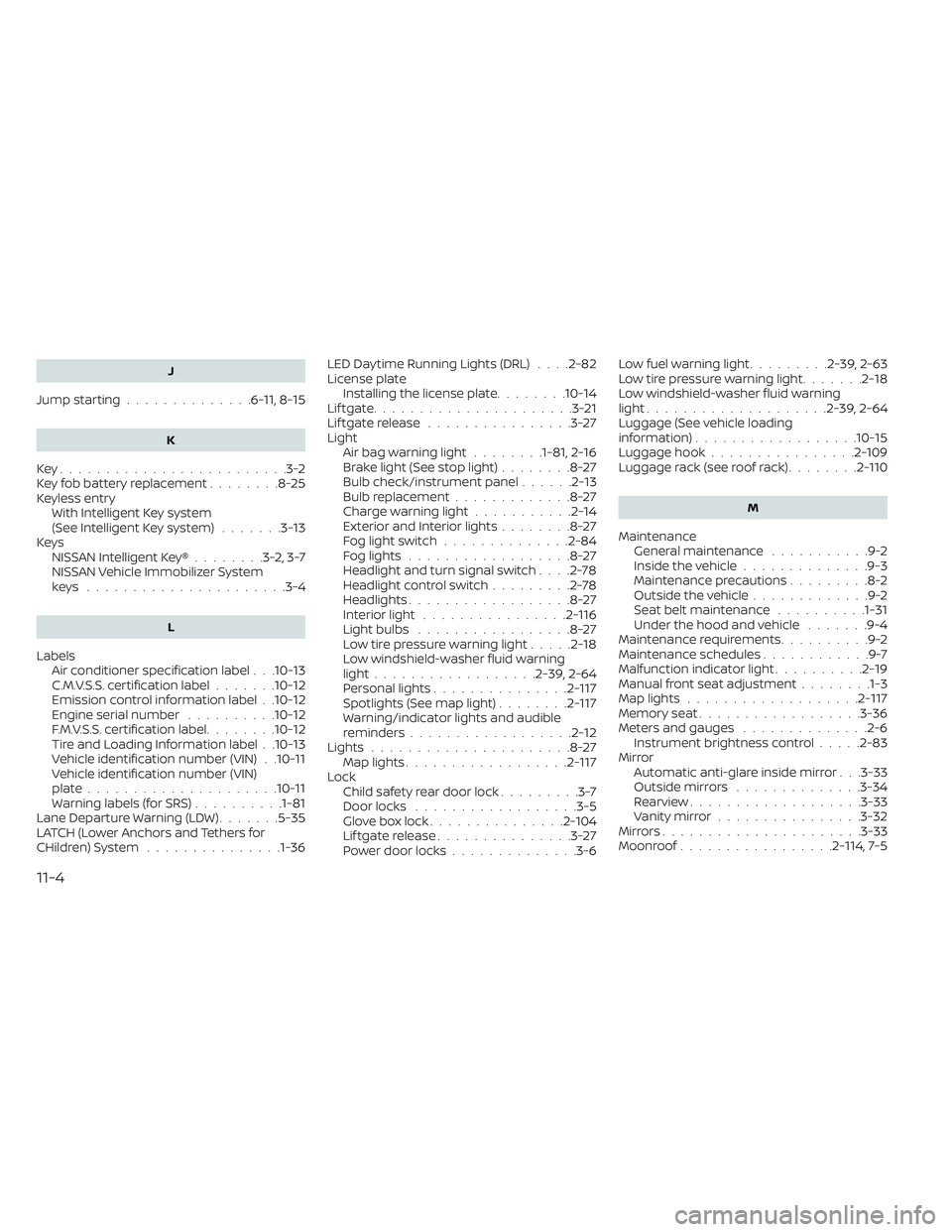
J
Jump starting..............6-11,8-15
K
Key.........................3-2Key fob battery replacement........8-25Keyless entryWith Intelligent Key system
(See Intelligent Key system)
.......3-13KeysNISSAN Intelligent Key®........3-2,3-7NISSAN Vehicle Immobilizer System
keys..................... .3-4
L
Labels
Air conditioner specification label. . .10-13C.M.V.S.S. certification label.......10-12Emission control information label. .10-12Engine serial number..........10-12F.M.V.S.S. certification label........10-12Tire and Loading Information label. .10-13Vehicle identification number (VIN). .10-11Vehicle identification number (VIN)
plate.................... .10-11Warning labels (for SRS)..........1-81Lane Departure Warning (LDW).......5-35LATCH (Lower Anchors and Tethers for
CHildren) System...............1-36
LED Daytime Running Lights (DRL). . . .2-82License plate
Installing the license plate........10-14Lif tgate......................3-21Lif tgate release................3-27LightAir bag warning light........1-81, 2-16Brake light (See stop light)........8-27Bulb check/instrument panel......2-13Bulb replacement.............8-27Charge warning light...........2-14Exterior and Interior lights........8-27Fog light switch..............2-84Fog lights..................8-27Headlight and turn signal switch. . . .2-78Headlight control switch.........2-78Headlights..................8-27Interior light................2-116Light bulbs.................8-27Low tire pressure warning light.....2-18Low windshield-washer fluid warning
light................. .2-39, 2-64Personal lights...............2-117Spotlights (See map light)........2-117Warning/indicator lights and audible
reminders..................2-12Lights......................8-27Map lights..................2-117Lock
Child safety rear door lock.........3-7Door locks................. .3-5Glove box lock...............2-104Lif tgate release...............3-27Power door locks..............3-6
Low fuel warning light.........2-39, 2-63Low tire pressure warning light.......2-18Low windshield-washer fluid warning
light................... .2-39, 2-64Luggage (See vehicle loading
information)..................10-15Luggage hook................2-109Luggage rack (see roof rack)........2-110
M
Maintenance
General maintenance...........9-2Inside the vehicle..............9-3Maintenance precautions.........8-2Outside the vehicle.............9-2Seat belt maintenance..........1-31Under the hood and vehicle.......9-4Maintenance requirements..........9-2Maintenance schedules............9-7Malfunction indicator light..........2-19Manual front seat adjustment........1-3Map lights...................2-117Memory seat................. .3-36Meters and gauges..............2-6Instrument brightness control.....2-83Mirror
Automatic anti-glare inside mirror. . .3-33Outside mirrors..............3-34Rearview.................. .3-33Vanity mirror................3-32Mirrors..................... .3-33Moonroof.................2-114, 7-5
11-4