driver seat adjustment NISSAN PATHFINDER 2022 Owner´s Manual
[x] Cancel search | Manufacturer: NISSAN, Model Year: 2022, Model line: PATHFINDER, Model: NISSAN PATHFINDER 2022Pages: 647, PDF Size: 8.48 MB
Page 25 of 647
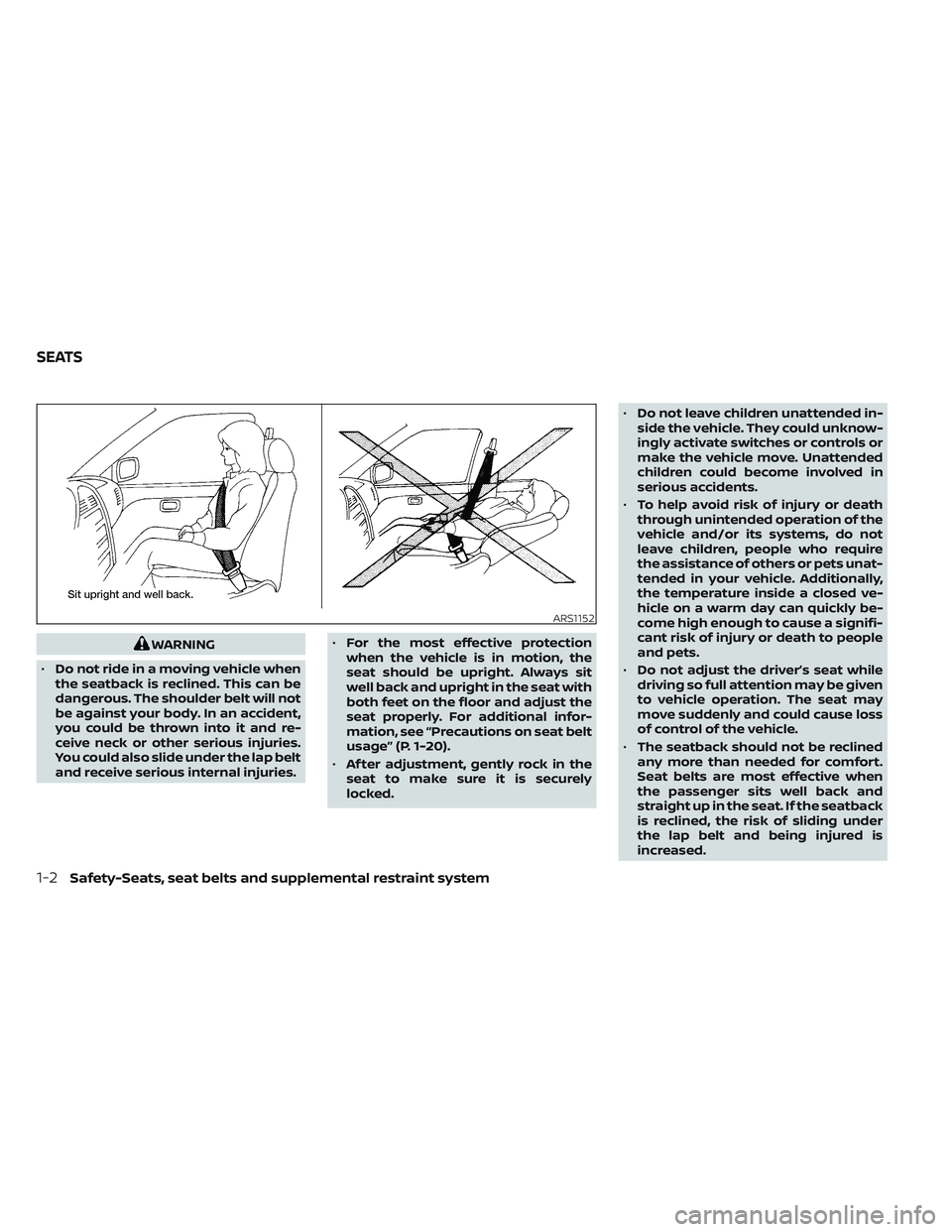
WARNING
• Do not ride in a moving vehicle when
the seatback is reclined. This can be
dangerous. The shoulder belt will not
be against your body. In an accident,
you could be thrown into it and re-
ceive neck or other serious injuries.
You could also slide under the lap belt
and receive serious internal injuries. •
For the most effective protection
when the vehicle is in motion, the
seat should be upright. Always sit
well back and upright in the seat with
both feet on the floor and adjust the
seat properly. For additional infor-
mation, see “Precautions on seat belt
usage” (P. 1-20).
• Af ter adjustment, gently rock in the
seat to make sure it is securely
locked. •
Do not leave children unattended in-
side the vehicle. They could unknow-
ingly activate switches or controls or
make the vehicle move. Unattended
children could become involved in
serious accidents.
• To help avoid risk of injury or death
through unintended operation of the
vehicle and/or its systems, do not
leave children, people who require
the assistance of others or pets unat-
tended in your vehicle. Additionally,
the temperature inside a closed ve-
hicle on a warm day can quickly be-
come high enough to cause a signifi-
cant risk of injury or death to people
and pets.
• Do not adjust the driver’s seat while
driving so full attention may be given
to vehicle operation. The seat may
move suddenly and could cause loss
of control of the vehicle.
• The seatback should not be reclined
any more than needed for comfort.
Seat belts are most effective when
the passenger sits well back and
straight up in the seat. If the seatback
is reclined, the risk of sliding under
the lap belt and being injured is
increased.
ARS1152
SEATS
1-2Safety-Seats, seat belts and supplemental restraint system
Page 27 of 647
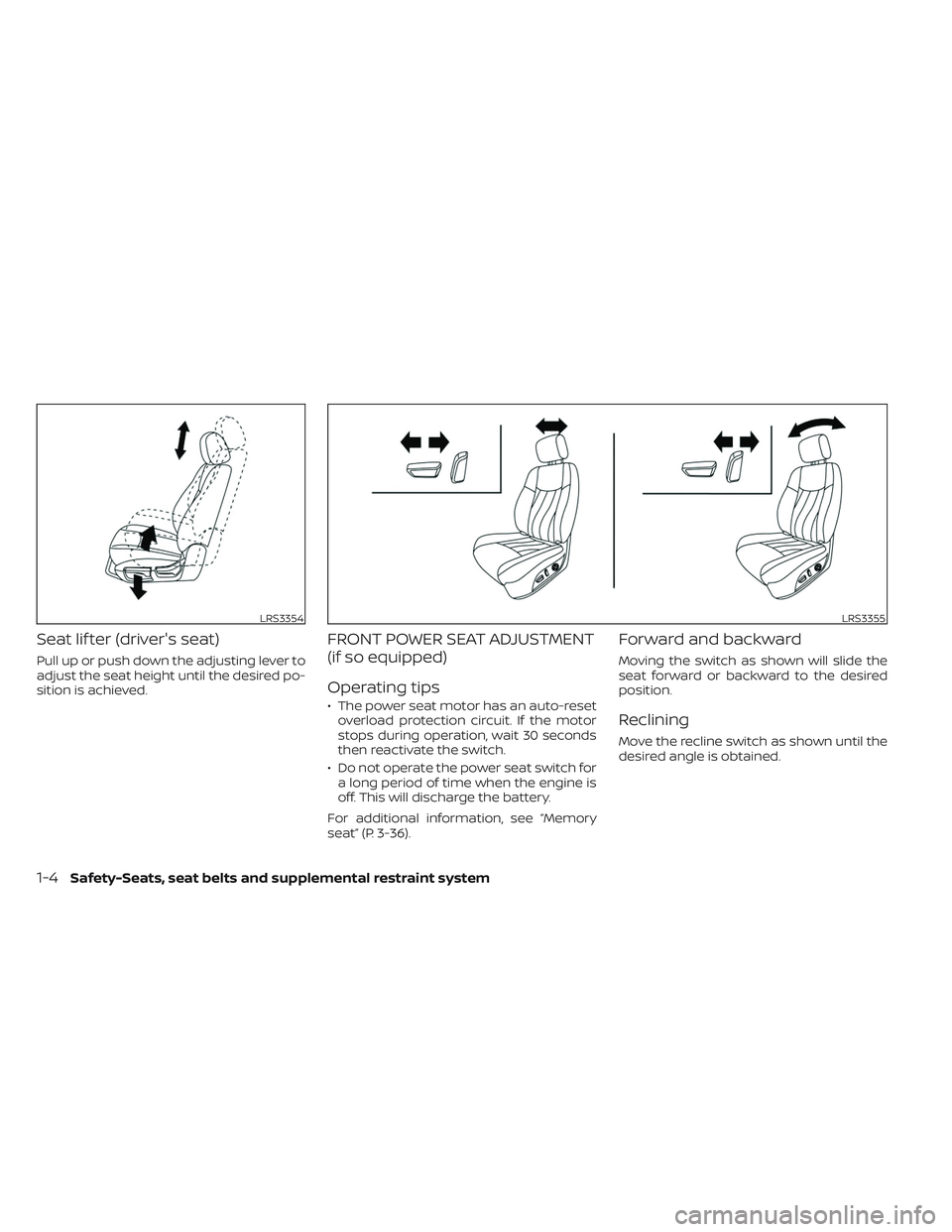
Seat lif ter (driver's seat)
Pull up or push down the adjusting lever to
adjust the seat height until the desired po-
sition is achieved.
FRONT POWER SEAT ADJUSTMENT
(if so equipped)
Operating tips
• The power seat motor has an auto-resetoverload protection circuit. If the motor
stops during operation, wait 30 seconds
then reactivate the switch.
• Do not operate the power seat switch for a long period of time when the engine is
off. This will discharge the battery.
For additional information, see “Memory
seat” (P. 3-36).
Forward and backward
Moving the switch as shown will slide the
seat forward or backward to the desired
position.
Reclining
Move the recline switch as shown until the
desired angle is obtained.
LRS3354LRS3355
1-4Safety-Seats, seat belts and supplemental restraint system
Page 28 of 647
The reclining feature allows adjustment of
the seatback for occupants of different
sizes for added comfort and to help obtain
proper seat belt fit. For additional informa-
tion, see “Precautions on seat belt usage”
(P. 1-20). Also, the seatback can be reclined
to allow occupants to rest when the vehicle
is stopped and the shif t lever is in P (Park).
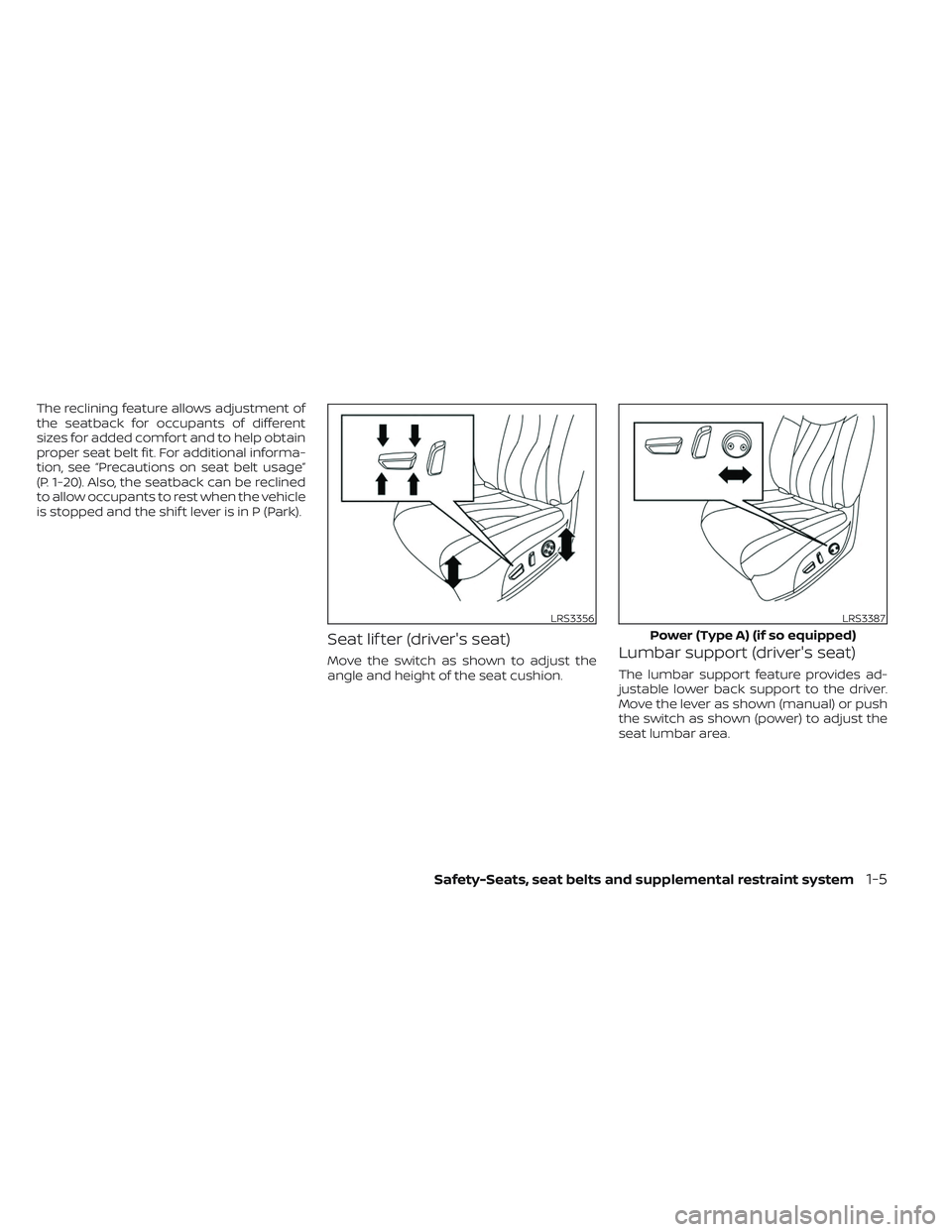
Seat lif ter (driver's seat)
Move the switch as shown to adjust the
angle and height of the seat cushion.Lumbar support (driver's seat)
The lumbar support feature provides ad-
justable lower back support to the driver.
Move the lever as shown (manual) or push
the switch as shown (power) to adjust the
seat lumbar area.
LRS3356LRS3387
Power (Type A) (if so equipped)
Safety-Seats, seat belts and supplemental restraint system1-5
Page 236 of 647
When the doors are locked using one of the
following methods, the doors cannot be
opened using the inside or outside door
handles. The doors must be unlocked to
open the doors.
WARNING
• Always have the doors locked while
driving. Along with the use of seat
belts, this provides greater safety in
the event of an accident by helping to
prevent persons from being thrown
from the vehicle. This also helps keep
children and others from uninten-
tionally opening the doors, and will
help keep out intruders.
• Before opening any door, always look
for and avoid oncoming traffic. •
To help avoid risk of injury or death
through unintended operation of the
vehicle and/or its systems, including
entrapment in windows or inadver-
tent door lock activation, do not
leave children, people who require
the assistance of others or pets unat-
tended in your vehicle. Additionally,
the temperature inside a closed ve-
hicle on a warm day can quickly be-
come high enough to cause a signifi-
cant risk of injury or death to people
and pets.
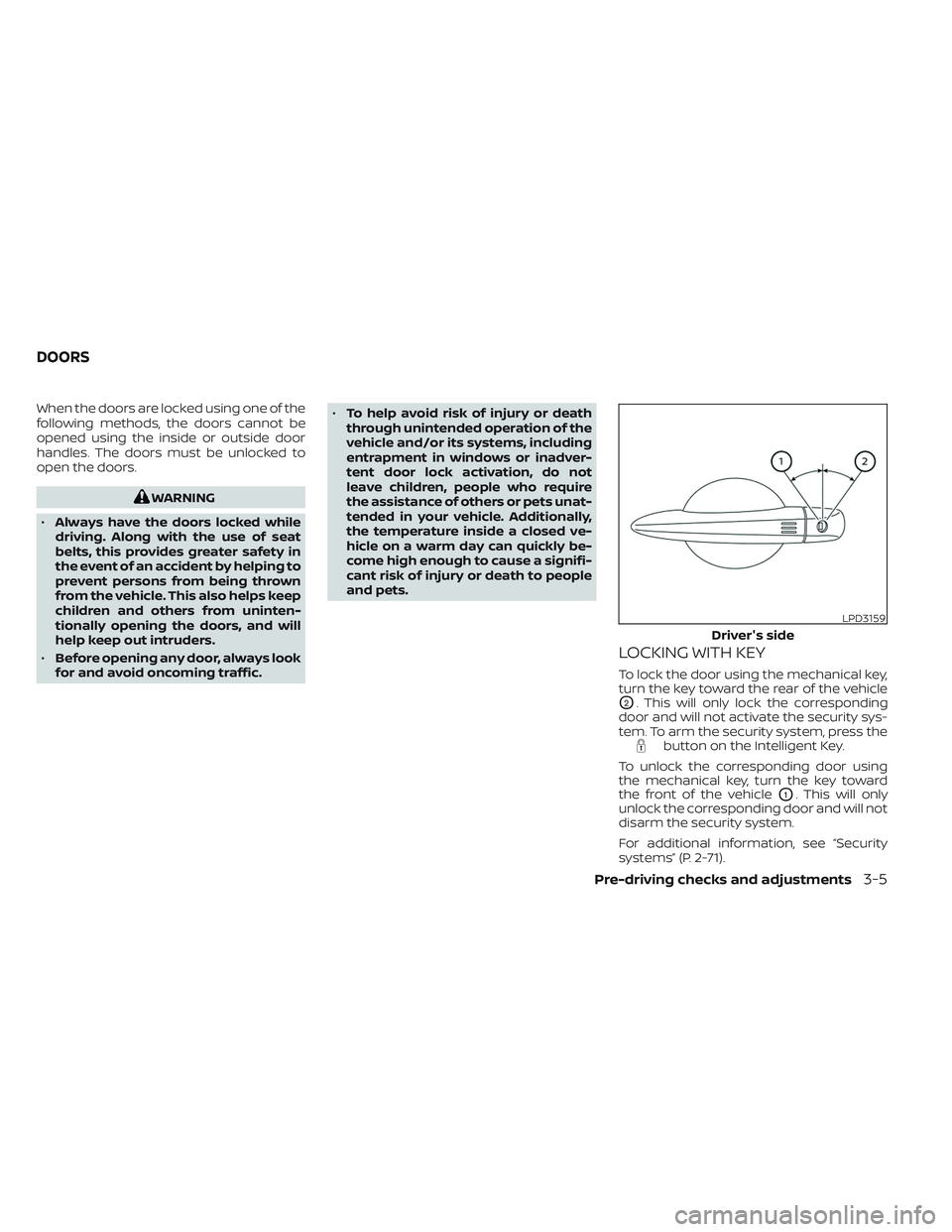
LOCKING WITH KEY
To lock the door using the mechanical key,
turn the key toward the rear of the vehicle
O2. This will only lock the corresponding
door and will not activate the security sys-
tem. To arm the security system, press the
button on the Intelligent Key.
To unlock the corresponding door using
the mechanical key, turn the key toward
the front of the vehicle
O1. This will only
unlock the corresponding door and will not
disarm the security system.
For additional information, see “Security
systems” (P. 2-71).
LPD3159
Driver's side
DOORS
Pre-driving checks and adjustments3-5
Page 248 of 647
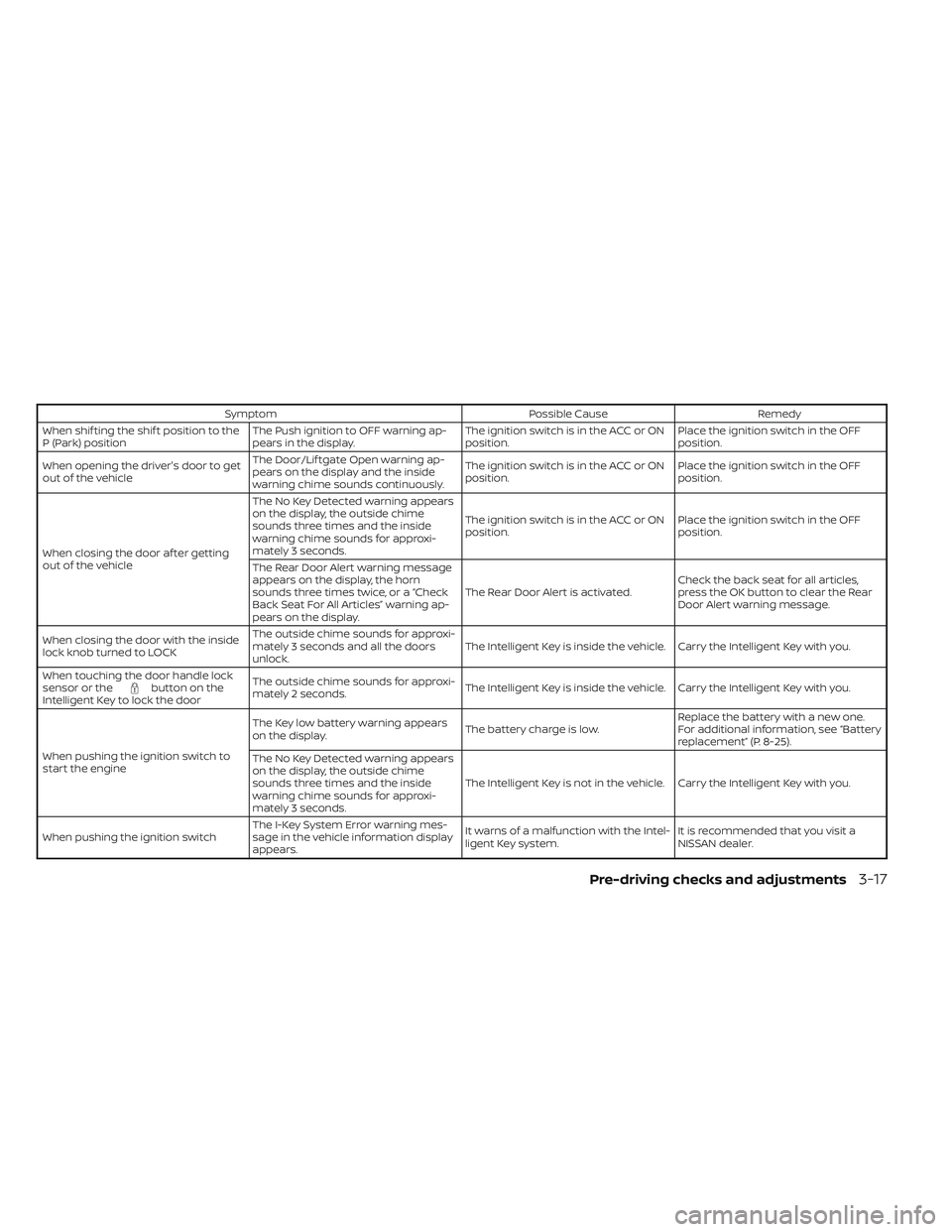
SymptomPossible CauseRemedy
When shif ting the shif t position to the
P (Park) position The Push ignition to OFF warning ap-
pears in the display. The ignition switch is in the ACC or ON
position.Place the ignition switch in the OFF
position.
When opening the driver's door to get
out of the vehicle The Door/Lif tgate Open warning ap-
pears on the display and the inside
warning chime sounds continuously. The ignition switch is in the ACC or ON
position.
Place the ignition switch in the OFF
position.
When closing the door af ter getting
out of the vehicle The No Key Detected warning appears
on the display, the outside chime
sounds three times and the inside
warning chime sounds for approxi-
mately 3 seconds.
The ignition switch is in the ACC or ON
position.
Place the ignition switch in the OFF
position.
The Rear Door Alert warning message
appears on the display, the horn
sounds three times twice, or a “Check
Back Seat For All Articles” warning ap-
pears on the display. The Rear Door Alert is activated.
Check the back seat for all articles,
press the OK button to clear the Rear
Door Alert warning message.
When closing the door with the inside
lock knob turned to LOCK The outside chime sounds for approxi-
mately 3 seconds and all the doors
unlock.
The Intelligent Key is inside the vehicle. Carry the Intelligent Key with you.
When touching the door handle lock
sensor or the
button on the
Intelligent Key to lock the door The outside chime sounds for approxi-
mately 2 seconds.
The Intelligent Key is inside the vehicle. Carry the Intelligent Key with you.
When pushing the ignition switch to
start the engine The Key low battery warning appears
on the display.
The battery charge is low.Replace the battery with a new one.
For additional information, see “Battery
replacement” (P. 8-25).
The No Key Detected warning appears
on the display, the outside chime
sounds three times and the inside
warning chime sounds for approxi-
mately 3 seconds. The Intelligent Key is not in the vehicle. Carry the Intelligent Key with you.
When pushing the ignition switch The I-Key System Error warning mes-
sage in the vehicle information display
appears. It warns of a malfunction with the Intel-
ligent Key system.
It is recommended that you visit a
NISSAN dealer.
Pre-driving checks and adjustments3-17
Page 261 of 647
WARNING
• Do not adjust the steering wheel
while driving. You could lose control
of your vehicle and cause an
accident.
• Do not adjust the steering wheel any
closer to you than is necessary for
proper steering operation and com-
fort. The driver's air bag inflates with
great force. If you are unrestrained,
leaning forward, sitting sideways or
out of position in any way, you are at
greater risk of injury or death in a
crash. You may also receive serious
or fatal injuries from the air bag if you
are up against it when it inflates. Al-
ways sit back against the seatback
and as far away as practical from the
steering wheel. Always use the seat
belts.
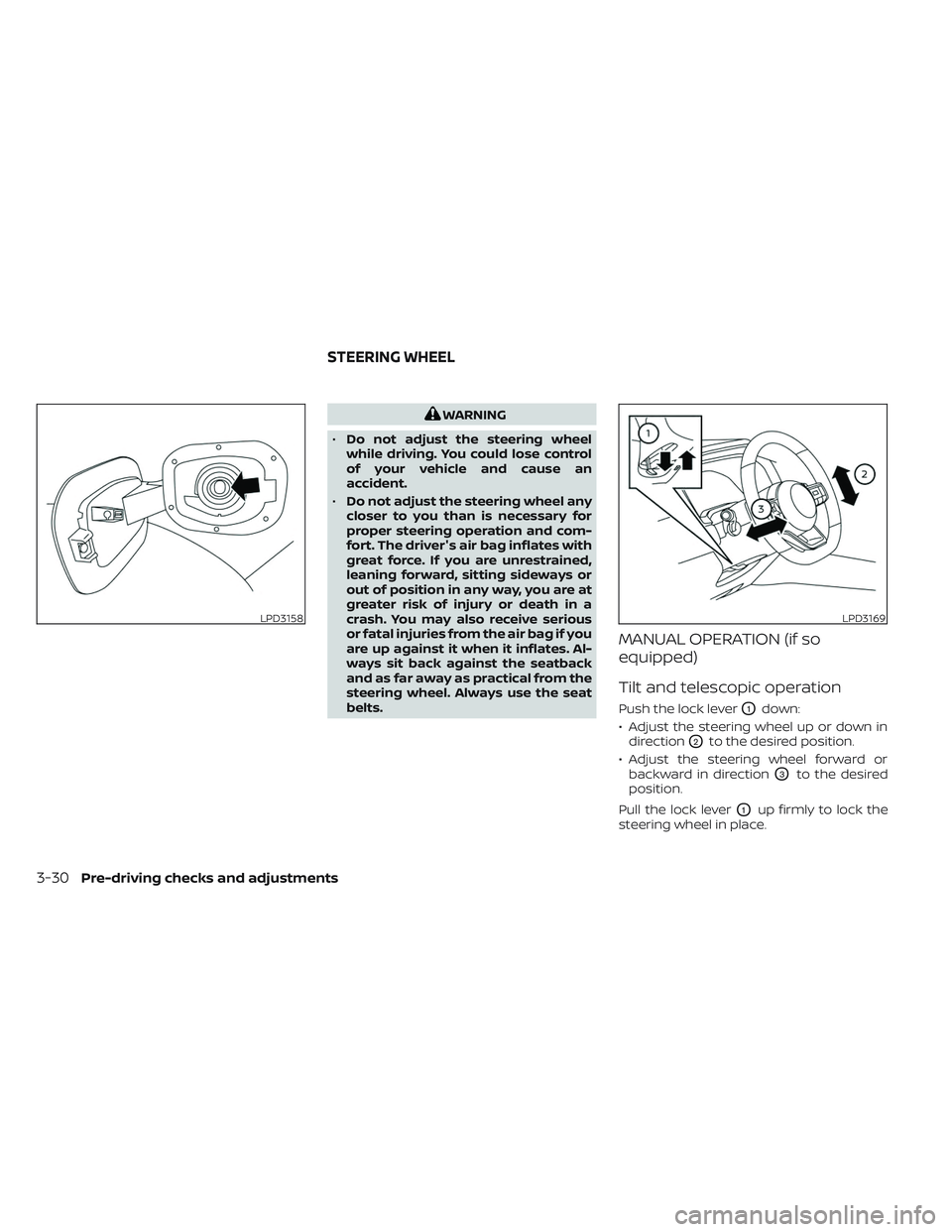
MANUAL OPERATION (if so
equipped)
Tilt and telescopic operation
Push the lock leverO1down:
• Adjust the steering wheel up or down in direction
O2to the desired position.
• Adjust the steering wheel forward or backward in direction
O3to the desired
position.
Pull the lock lever
O1up firmly to lock the
steering wheel in place.
LPD3158LPD3169
STEERING WHEEL
3-30Pre-driving checks and adjustments
Page 262 of 647
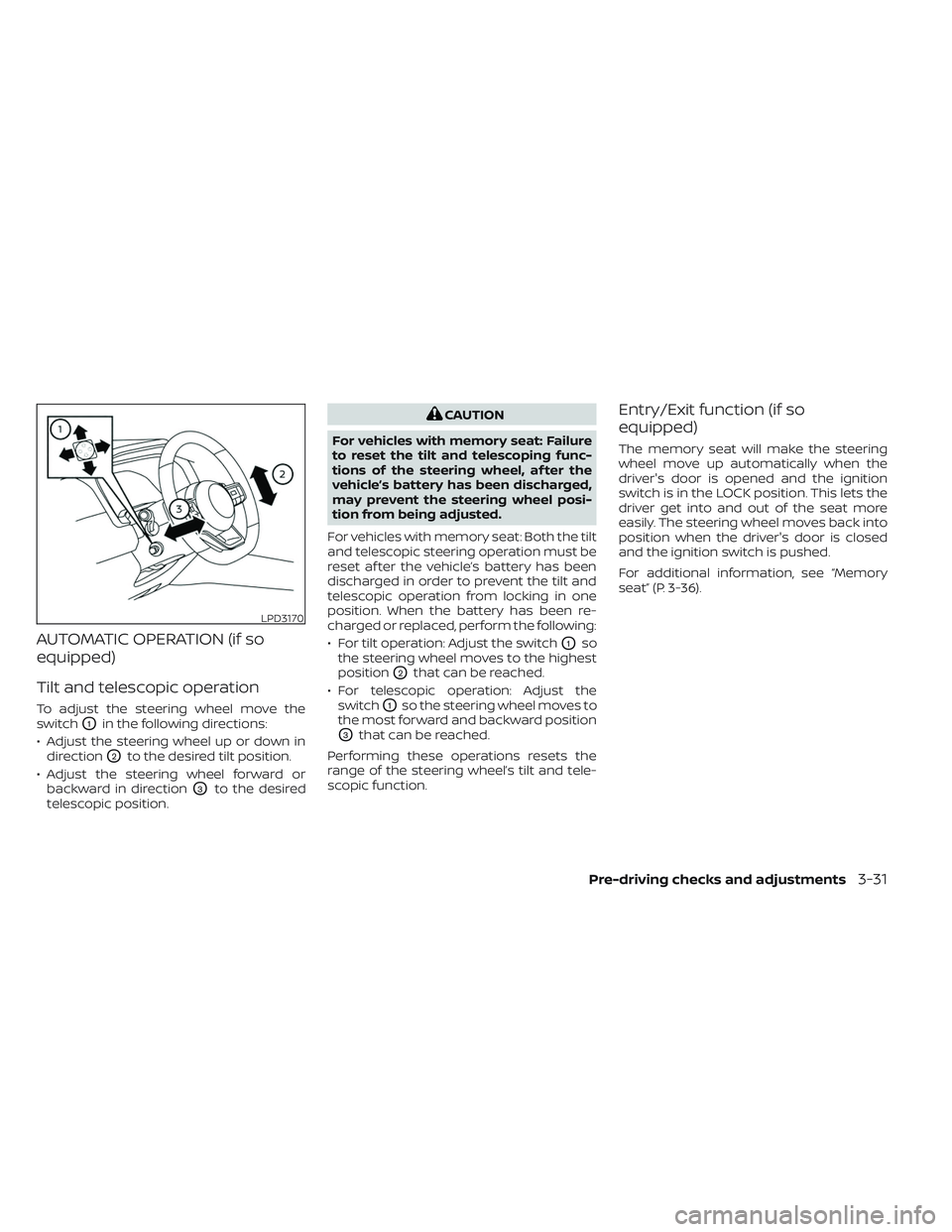
AUTOMATIC OPERATION (if so
equipped)
Tilt and telescopic operation
To adjust the steering wheel move the
switch
O1in the following directions:
• Adjust the steering wheel up or down in direction
O2to the desired tilt position.
• Adjust the steering wheel forward or backward in direction
O3to the desired
telescopic position.
CAUTION
For vehicles with memory seat: Failure
to reset the tilt and telescoping func-
tions of the steering wheel, af ter the
vehicle’s battery has been discharged,
may prevent the steering wheel posi-
tion from being adjusted.
For vehicles with memory seat: Both the tilt
and telescopic steering operation must be
reset af ter the vehicle’s battery has been
discharged in order to prevent the tilt and
telescopic operation from locking in one
position. When the battery has been re-
charged or replaced, perform the following:
• For tilt operation: Adjust the switch
O1so
the steering wheel moves to the highest
position
O2that can be reached.
• For telescopic operation: Adjust the switch
O1so the steering wheel moves to
the most forward and backward position
O3that can be reached.
Performing these operations resets the
range of the steering wheel’s tilt and tele-
scopic function.
Entry/Exit function (if so
equipped)
The memory seat will make the steering
wheel move up automatically when the
driver's door is opened and the ignition
switch is in the LOCK position. This lets the
driver get into and out of the seat more
easily. The steering wheel moves back into
position when the driver's door is closed
and the ignition switch is pushed.
For additional information, see “Memory
seat” (P. 3-36).
LPD3170
Pre-driving checks and adjustments3-31
Page 267 of 647
The outside mirror surfaces will return to
their original position when one of the fol-
lowing conditions has occurred:
• The shif t lever is moved to any positionother than R (Reverse).
• The outside mirror control switch is set to the neutral or center position.
• The ignition switch is placed in the OFF position.
NOTE:
If the outside mirror control switch is in
the center position, the mirror surface
will NOT turn downward when the shif t
lever is moved to R (Reverse).
For additional information, see “Memory
seat” (P. 3-36). The memory seat system has two
features:
• Memory storage function
• Entry/exit function
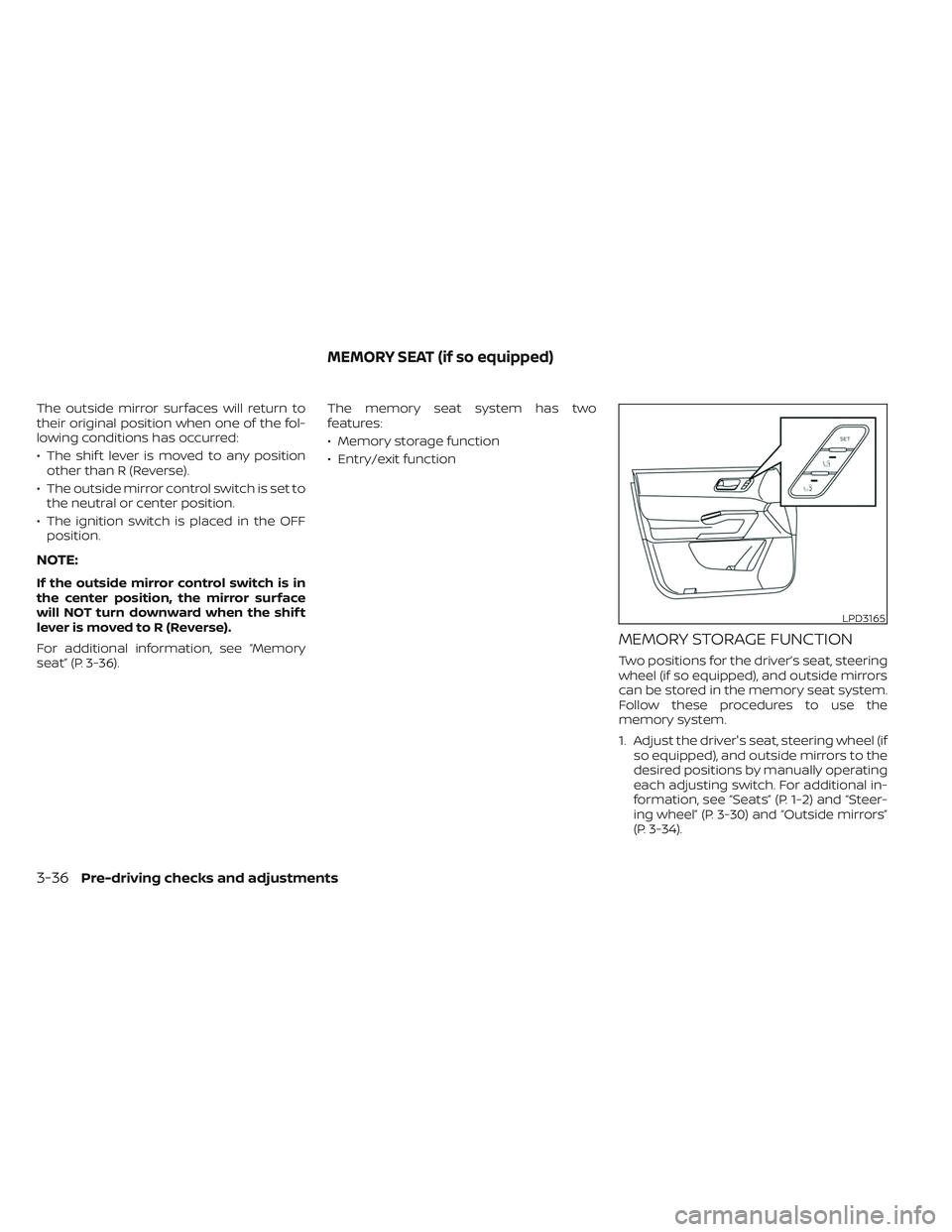
MEMORY STORAGE FUNCTION
Two positions for the driver’s seat, steering
wheel (if so equipped), and outside mirrors
can be stored in the memory seat system.
Follow these procedures to use the
memory system.
1. Adjust the driver's seat, steering wheel (if
so equipped), and outside mirrors to the
desired positions by manually operating
each adjusting switch. For additional in-
formation, see “Seats” (P. 1-2) and “Steer-
ing wheel” (P. 3-30) and “Outside mirrors”
(P. 3-34).
LPD3165
MEMORY SEAT (if so equipped)
3-36Pre-driving checks and adjustments
Page 268 of 647
2. Push the SET switch and, within 5 sec-onds, push the memory switch (1 or 2).
3. The indicator light for the pushed memory switch will come on and stay
on for approximately 5 seconds.
4. The chime will sound when the memory is stored.
NOTE:
If a new memory position is stored in the
same memory switch, the previous
memory position will be overwritten by
the new stored position.
Linking a key fob to a stored
memory position
Each key fob can be linked to a stored
memory position (memory switch 1 or 2)
with the following procedure.
1. Follow steps 1-3 in the “Memory storagefunction” section for storing the memory
position. 2. The indicator light for the pushed
memory switch will come on. While the
indicator light is on for 5 seconds, press
the
button on the key fob. The haz-
ard lights will flash twice. The indicator
light of the linked memory switch will
blink and click twice. Af ter the indicator
light goes off, the key fob is linked to that
memory setting.
Once it is linked, when the ignition switch is
in the OFF position, pressing the
but-
ton on the key fob will move the driver’s
seat, steering wheel and outside mirrors to
the linked memory switch position.
NOTE:
If a new memory position is stored in the
linked memory switch, then the key fob
will link the new position and overwrites
the previous position.
Confirming memory storage
• Push the SET switch.
• If a memory position has been stored in the switch (1 or 2) then the indicator light
for the respective switch will stay on for
approximately 5 seconds.
ENTRY/EXIT FUNCTION
This system is designed so that the driver's
seat and steering wheel will automatically
move when the shif t position is in the P
(Park). This allows the driver to easily get in
and out of the driver’s seat.
The driver’s seat will slide backward and
the steering wheel will move up:
• When the driver’s door is opened with theignition switch in the OFF position.
• When the ignition switch is changed from ACC to OFF with the driver’s door open.
The driver’s seat and steering wheel will
return to the previous position:
• When the ignition switch is changed from ACC or ON while the shif t position is in the
P (Park).
The entry/exit function can be adjusted or
canceled through “Vehicle Settings” in the
vehicle information display by performing
the following:
• Switch the Exit Seat Slide from on to off.
• Switch the Exit Steering UP from on to off.
Pre-driving checks and adjustments3-37
Page 269 of 647
Restarting the entry/exit function
If the battery cable is disconnected or if the
fuse opens, the stored memory positions
may be lost and some of the functions will
be restricted.
1. Drive the vehicle over 25 mph (40 km/h).
OR
2. Open and close the driver's door morethan two times with the ignition switch
in the OFF position.
The entry/exit function should now work
properly.
SETTING MEMORY FUNCTION
The position of the following settings can
be linked to the Intelligent Key and the
memorized settings can be available for
each Intelligent Key.
• Climate control system
• Audio system
To use the memory function, set the cli-
mate and audio systems to the driver's
preferred settings. Lock the doors with the
Intelligent Key. Each Intelligent Key may be
set with the driver's individual preferences.
When a new Intelligent Key is used, “Con-
nection with the key has been done” will be displayed on the vehicle information dis-
play and the memorized settings are
available.
To engage the memorized settings, per-
form the following:
1. Carry the Intelligent Key that is linked to
the memorized settings.
2. Unlock the doors by wrapping hand around the capacitive door handle or
the
button on the Intelligent Key.
3. Place the ignition switch in the ON posi- tion. The settings linked to the Intelligent
Key will start.
For additional information on using the cli-
mate control system, see “Heater and air
conditioner (automatic)” (P. 4-33).
SYSTEM OPERATION
The memory seat system will not work or
will stop operating under the following
conditions:
• When the vehicle speed is above 4 mph (7 km/h).
• When any of the memory switches are pushed while the memory seat is
operating. • When the switch for the driver’s seat and
steering wheel is pushed while the
memory seat is operating.
• When the seat has already been moved to the memorized position.
• When no seat position is stored in the memory switch.
• When the shif t position is moved from P (Park) to any other position.
3-38Pre-driving checks and adjustments