belt NISSAN PATHFINDER 2023 Owners Manual
[x] Cancel search | Manufacturer: NISSAN, Model Year: 2023, Model line: PATHFINDER, Model: NISSAN PATHFINDER 2023Pages: 665, PDF Size: 4.64 MB
Page 121 of 665
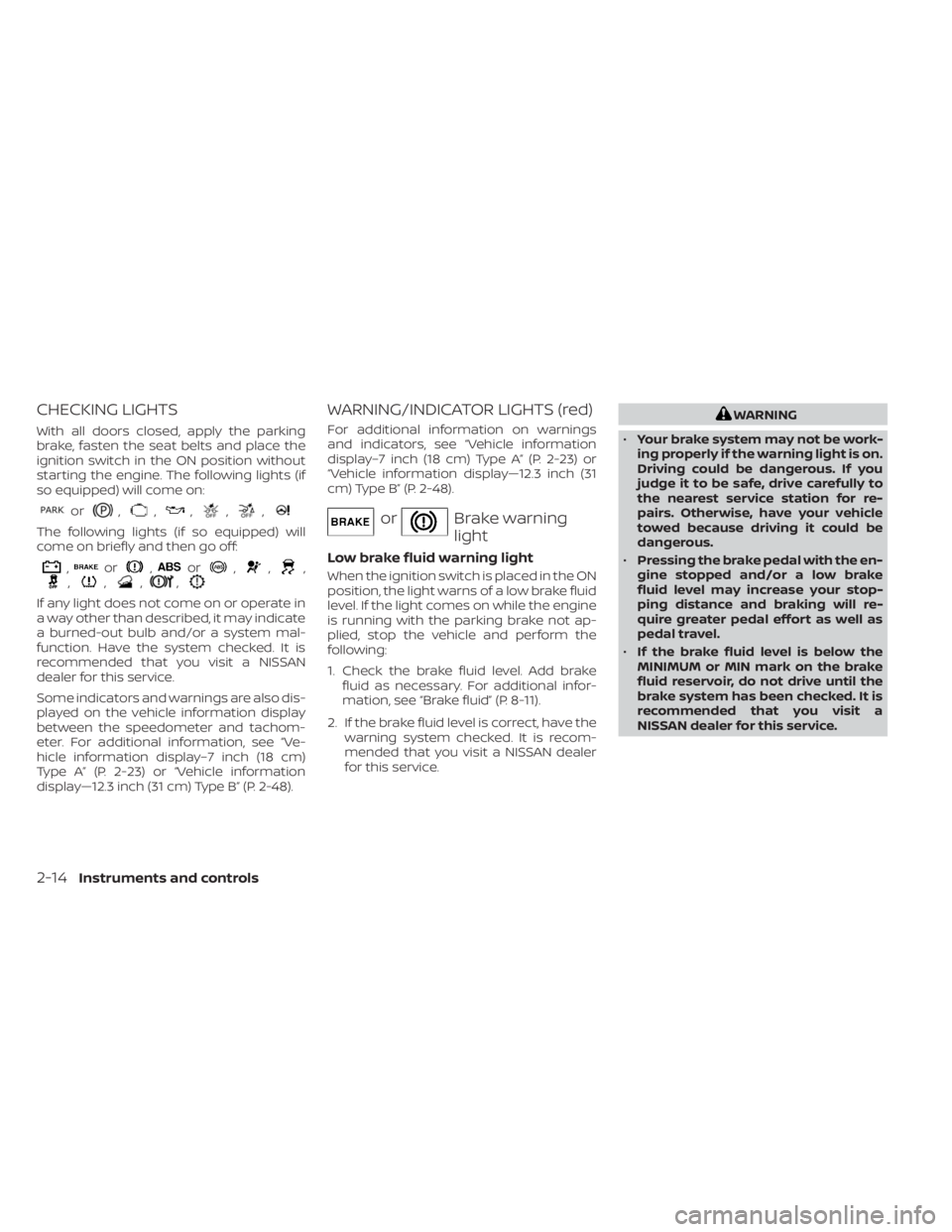
CHECKING LIGHTS
With all doors closed, apply the parking
brake, fasten the seat belts and place the
ignition switch in the ON position without
starting the engine. The following lights (if
so equipped) will come on:
or,,,,,
The following lights (if so equipped) will
come on briefly and then go off:
,or,or,,,,,,,
If any light does not come on or operate in
a way other than described, it may indicate
a burned-out bulb and/or a system mal-
function. Have the system checked. It is
recommended that you visit a NISSAN
dealer for this service.
Some indicators and warnings are also dis-
played on the vehicle information display
between the speedometer and tachom-
eter. For additional information, see “Ve-
hicle information display–7 inch (18 cm)
Type A” (P. 2-23) or “Vehicle information
display—12.3 inch (31 cm) Type B” (P. 2-48).
WARNING/INDICATOR LIGHTS (red)
For additional information on warnings
and indicators, see “Vehicle information
display–7 inch (18 cm) Type A” (P. 2-23) or
“Vehicle information display—12.3 inch (31
cm) Type B” (P. 2-48).
orBrake warning
light
Low brake fluid warning light
When the ignition switch is placed in the ON
position, the light warns of a low brake fluid
level. If the light comes on while the engine
is running with the parking brake not ap-
plied, stop the vehicle and perform the
following:
1. Check the brake fluid level. Add brakefluid as necessary. For additional infor-
mation, see “Brake fluid” (P. 8-11).
2. If the brake fluid level is correct, have the warning system checked. It is recom-
mended that you visit a NISSAN dealer
for this service.
WARNING
• Your brake system may not be work-
ing properly if the warning light is on.
Driving could be dangerous. If you
judge it to be safe, drive carefully to
the nearest service station for re-
pairs. Otherwise, have your vehicle
towed because driving it could be
dangerous.
• Pressing the brake pedal with the en-
gine stopped and/or a low brake
fluid level may increase your stop-
ping distance and braking will re-
quire greater pedal effort as well as
pedal travel.
• If the brake fluid level is below the
MINIMUM or MIN mark on the brake
fluid reservoir, do not drive until the
brake system has been checked. It is
recommended that you visit a
NISSAN dealer for this service.
2-14Instruments and controls
Page 122 of 665
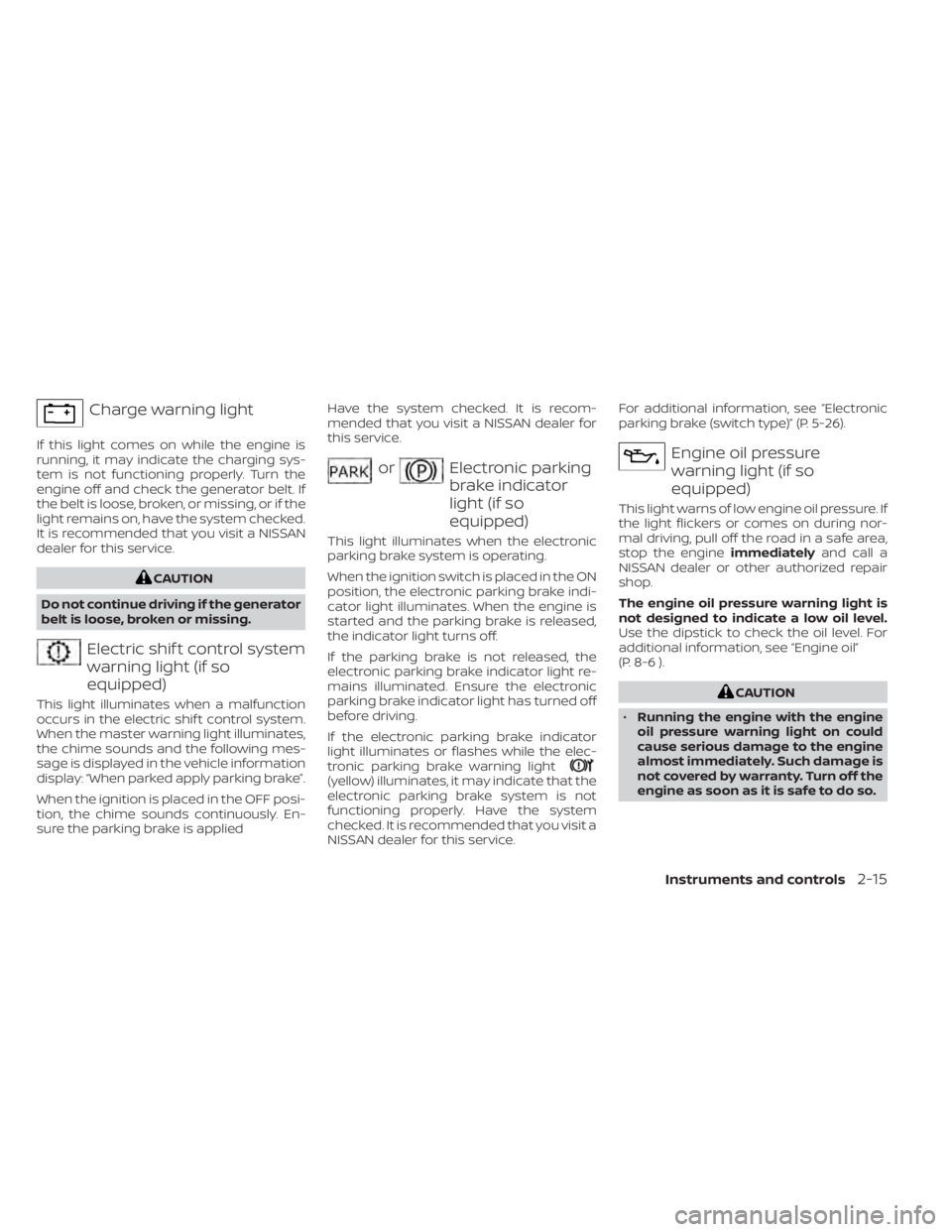
Charge warning light
If this light comes on while the engine is
running, it may indicate the charging sys-
tem is not functioning properly. Turn the
engine off and check the generator belt. If
the belt is loose, broken, or missing, or if the
light remains on, have the system checked.
It is recommended that you visit a NISSAN
dealer for this service.
CAUTION
Do not continue driving if the generator
belt is loose, broken or missing.
Electric shif t control system
warning light (if so
equipped)
This light illuminates when a malfunction
occurs in the electric shif t control system.
When the master warning light illuminates,
the chime sounds and the following mes-
sage is displayed in the vehicle information
display: “When parked apply parking brake”.
When the ignition is placed in the OFF posi-
tion, the chime sounds continuously. En-
sure the parking brake is applied Have the system checked. It is recom-
mended that you visit a NISSAN dealer for
this service.
orElectronic parking
brake indicator
light (if so
equipped)
This light illuminates when the electronic
parking brake system is operating.
When the ignition switch is placed in the ON
position, the electronic parking brake indi-
cator light illuminates. When the engine is
started and the parking brake is released,
the indicator light turns off.
If the parking brake is not released, the
electronic parking brake indicator light re-
mains illuminated. Ensure the electronic
parking brake indicator light has turned off
before driving.
If the electronic parking brake indicator
light illuminates or flashes while the elec-
tronic parking brake warning light
(yellow) illuminates, it may indicate that the
electronic parking brake system is not
functioning properly. Have the system
checked. It is recommended that you visit a
NISSAN dealer for this service.For additional information, see “Electronic
parking brake (switch type)” (P. 5-26).
Engine oil pressure
warning light (if so
equipped)
This light warns of low engine oil pressure. If
the light flickers or comes on during nor-
mal driving, pull off the road in a safe area,
stop the engine
immediatelyand call a
NISSAN dealer or other authorized repair
shop.
The engine oil pressure warning light is
not designed to indicate a low oil level.
Use the dipstick to check the oil level. For
additional information, see “Engine oil”
(P. 8-6 ).
CAUTION
• Running the engine with the engine
oil pressure warning light on could
cause serious damage to the engine
almost immediately. Such damage is
not covered by warranty. Turn off the
engine as soon as it is safe to do so.
Instruments and controls2-15
Page 123 of 665
•The engine oil pressure warning light
is not designed to indicate oil level.
The oil level should be checked using
the dipstick. For additional informa-
tion, see “Engine oil” (P. 8-6 ).
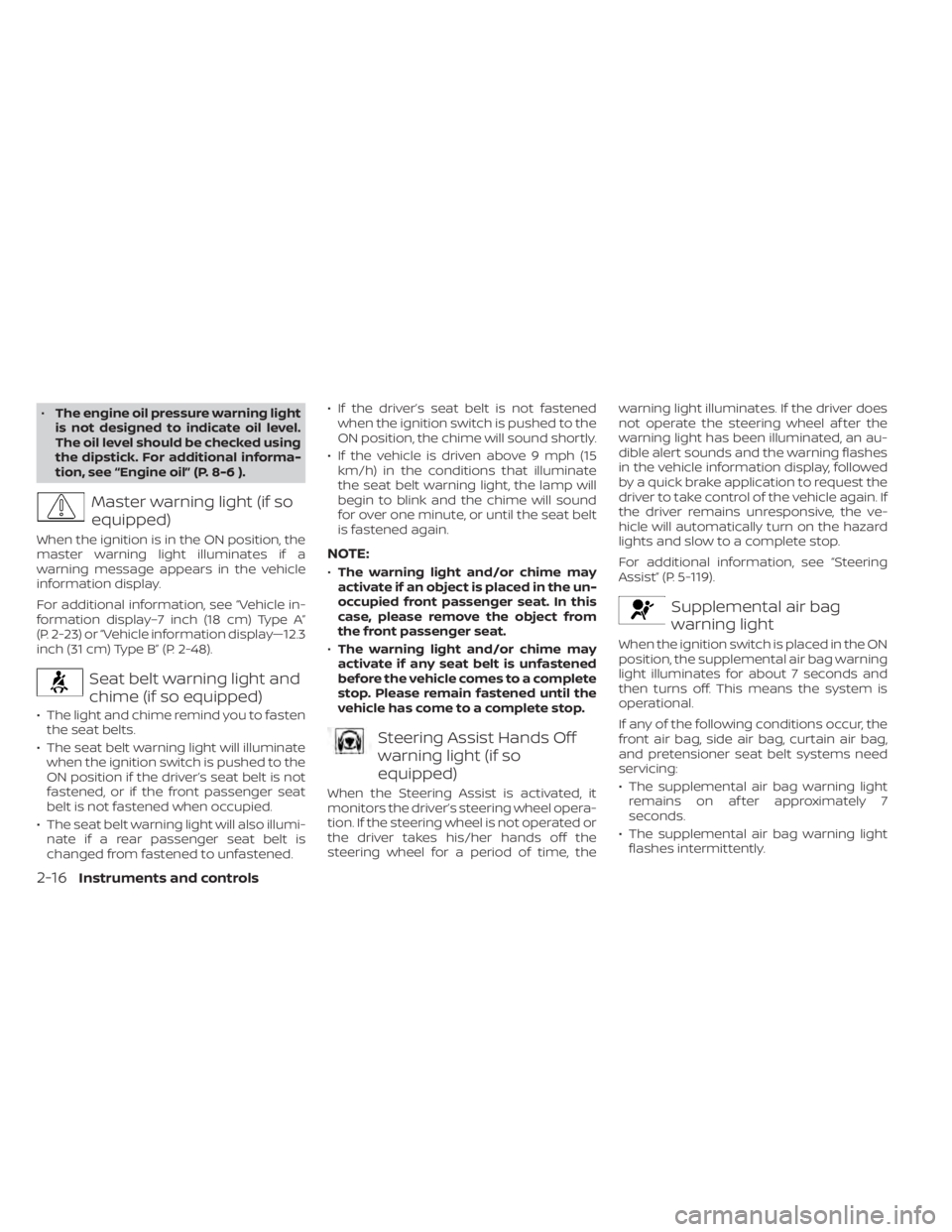
Master warning light (if so
equipped)
When the ignition is in the ON position, the
master warning light illuminates if a
warning message appears in the vehicle
information display.
For additional information, see “Vehicle in-
formation display–7 inch (18 cm) Type A”
(P. 2-23) or “Vehicle information display—12.3
inch (31 cm) Type B” (P. 2-48).
Seat belt warning light and
chime (if so equipped)
• The light and chime remind you to fasten the seat belts.
• The seat belt warning light will illuminate when the ignition switch is pushed to the
ON position if the driver’s seat belt is not
fastened, or if the front passenger seat
belt is not fastened when occupied.
• The seat belt warning light will also illumi- nate if a rear passenger seat belt is
changed from fastened to unfastened. • If the driver’s seat belt is not fastened
when the ignition switch is pushed to the
ON position, the chime will sound shortly.
• If the vehicle is driven above 9 mph (15 km/h) in the conditions that illuminate
the seat belt warning light, the lamp will
begin to blink and the chime will sound
for over one minute, or until the seat belt
is fastened again.
NOTE:
•The warning light and/or chime may
activate if an object is placed in the un-
occupied front passenger seat. In this
case, please remove the object from
the front passenger seat.
• The warning light and/or chime may
activate if any seat belt is unfastened
before the vehicle comes to a complete
stop. Please remain fastened until the
vehicle has come to a complete stop.
Steering Assist Hands Off
warning light (if so
equipped)
When the Steering Assist is activated, it
monitors the driver’s steering wheel opera-
tion. If the steering wheel is not operated or
the driver takes his/her hands off the
steering wheel for a period of time, the warning light illuminates. If the driver does
not operate the steering wheel af ter the
warning light has been illuminated, an au-
dible alert sounds and the warning flashes
in the vehicle information display, followed
by a quick brake application to request the
driver to take control of the vehicle again. If
the driver remains unresponsive, the ve-
hicle will automatically turn on the hazard
lights and slow to a complete stop.
For additional information, see “Steering
Assist” (P. 5-119).
Supplemental air bag
warning light
When the ignition switch is placed in the ON
position, the supplemental air bag warning
light illuminates for about 7 seconds and
then turns off. This means the system is
operational.
If any of the following conditions occur, the
front air bag, side air bag, curtain air bag,
and pretensioner seat belt systems need
servicing:
• The supplemental air bag warning light
remains on af ter approximately 7
seconds.
• The supplemental air bag warning light flashes intermittently.
2-16Instruments and controls
Page 149 of 665
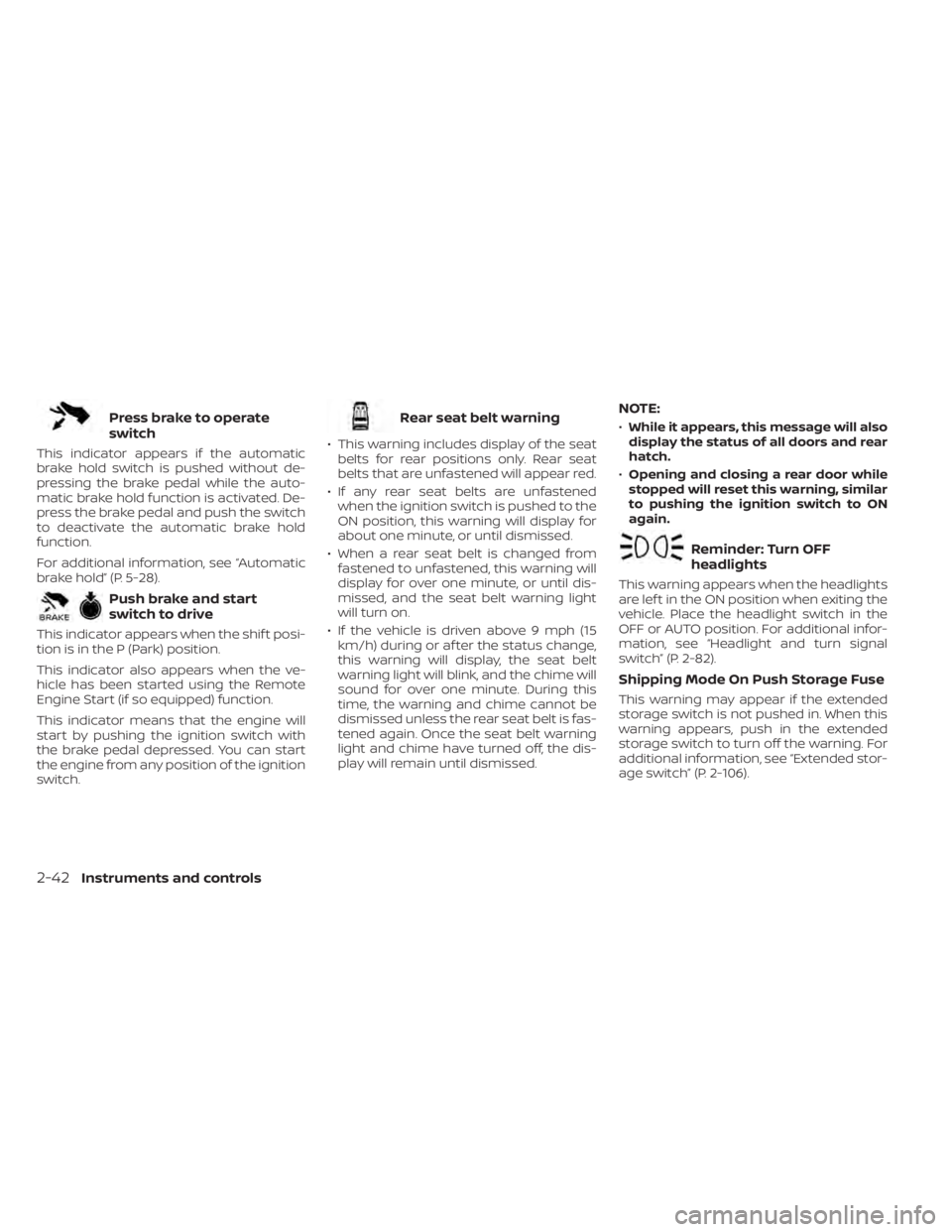
Press brake to operate
switch
This indicator appears if the automatic
brake hold switch is pushed without de-
pressing the brake pedal while the auto-
matic brake hold function is activated. De-
press the brake pedal and push the switch
to deactivate the automatic brake hold
function.
For additional information, see “Automatic
brake hold” (P. 5-28).
Push brake and start
switch to drive
This indicator appears when the shif t posi-
tion is in the P (Park) position.
This indicator also appears when the ve-
hicle has been started using the Remote
Engine Start (if so equipped) function.
This indicator means that the engine will
start by pushing the ignition switch with
the brake pedal depressed. You can start
the engine from any position of the ignition
switch.
Rear seat belt warning
• This warning includes display of the seatbelts for rear positions only. Rear seat
belts that are unfastened will appear red.
• If any rear seat belts are unfastened when the ignition switch is pushed to the
ON position, this warning will display for
about one minute, or until dismissed.
• When a rear seat belt is changed from fastened to unfastened, this warning will
display for over one minute, or until dis-
missed, and the seat belt warning light
will turn on.
• If the vehicle is driven above 9 mph (15 km/h) during or af ter the status change,
this warning will display, the seat belt
warning light will blink, and the chime will
sound for over one minute. During this
time, the warning and chime cannot be
dismissed unless the rear seat belt is fas-
tened again. Once the seat belt warning
light and chime have turned off, the dis-
play will remain until dismissed.
NOTE:
•While it appears, this message will also
display the status of all doors and rear
hatch.
• Opening and closing a rear door while
stopped will reset this warning, similar
to pushing the ignition switch to ON
again.
Reminder: Turn OFF
headlights
This warning appears when the headlights
are lef t in the ON position when exiting the
vehicle. Place the headlight switch in the
OFF or AUTO position. For additional infor-
mation, see “Headlight and turn signal
switch” (P. 2-82).
Shipping Mode On Push Storage Fuse
This warning may appear if the extended
storage switch is not pushed in. When this
warning appears, push in the extended
storage switch to turn off the warning. For
additional information, see “Extended stor-
age switch” (P. 2-106).
2-42Instruments and controls
Page 153 of 665
If you want to use the Steering Assist sys-
tem again, cancel the ProPILOT Assist sys-
tem and set it again when lane markers are
clearly visible.
Not Available Front Camera
Obstructed
This message may appear when the Steer-
ing Assist system is engaged.
Under the following conditions, the Steer-
ing Assist system is automatically
canceled:
• The camera area of the windshield isfogged up or covered with dirt, water
drops, ice, snow, etc.
• Strong light, such as sunlight or high beams from oncoming vehicles, enter
the front camera.
Not Available Parking Brake On
This message may appear when the ProPI-
LOT Assist system is engaged.
Under the following condition, the ProPILOT
Assist system is automatically canceled:
• The electronic parking brake is applied.
The above system cannot be used when
the electronic parking is activated.
For additional information, see "ProPILOT
Assist (P. 5-88) and “Parking brake” (P. 5-26).
Not Available Poor Road Conditions
This message may appear when the ProPI-
LOT Assist system, Intelligent Blind Spot In-
tervention (I-BSI) or the Intelligent Lane In-
tervention (I-LI) system is engaged.
Under the following conditions, the ProPI-
LOT Assist system, Intelligent Blind Spot In-
tervention (I-BSI) or the Intelligent Lane In-
tervention (I-LI) system is automatically
canceled:
• When the VDC system operates
• When a wheel slips
The above system cannot be used in some
situations (VDC operates, wheel slip and
VDC system is off.)
Not Available Seat Belt Not Fastened
This message may appear when the ProPI-
LOT Assist system is engaged.
Under the following condition, the ProPILOT
Assist system is automatically canceled:
• When the driver’s seat belt is not fastened
The above system cannot be used when
the driver’s seat belt is not fastened.
Not Available System Malfunction
This warning appears when one or more of
the following systems (if so equipped) is
not functioning properly.
• ProPILOT Assist
• Blind Spot Warning (BSW)
• Intelligent Blind Spot Intervention (I-BSI)
• Lane Departure Warning (LDW)
• Intelligent Lane Intervention (I-LI)
If one or more of these warnings appear,
have the system checked. It is recom-
mended that you visit a NISSAN dealer for
this service.
For additional information, see ProPILOT
Assist” (P. 5-88), Intelligent Blind Spot Inter-
vention (I-BSI)” (P. 5-65), “Blind Spot Warning
(BSW)” (P. 5-52), “Lane Departure Warning
(LDW)” (P. 5-38) or “Intelligent Lane Interven-
tion (I-LI)” (P. 5-45).
ProPILOT Assist indicators
These indicators show the ProPILOT Assist
system status. The status is shown by
color. For additional information, see “Pro-
PILOT Assist” (P. 5-88).
2-46Instruments and controls
Page 176 of 665
Press Brake Pedal to
prevent rolling
This warning appears in the following situ-
ations:
• The driver tries to release the electronicparking brake manually without depress-
ing the brake pedal.
• The vehicle is stopped on a steep hill and there is a possibility of moving backward,
even if the electronic parking brake is
applied.
• This warning appears and chime sounds if the vehicle moves while the automatic
brake hold function is activated. Apply the
foot brake to stop the vehicle moving.
Press brake to operate
switch
This indicator appears if the automatic
brake hold switch is pushed without de-
pressing the brake pedal while the auto-
matic brake hold function is activated. De-
press the brake pedal and push the switch
to deactivate the automatic brake hold
function.
For additional information, see “Automatic
brake hold” (P. 5-28).
Push brake and start
switch to drive
This indicator appears when the shif t posi-
tion is in the P (Park) position.
This indicator also appears when the ve-
hicle has been started using the Remote
Engine Start (if so equipped) function.
This indicator means that the engine will
start by pushing the ignition switch with
the brake pedal depressed. You can start
the engine from any position of the ignition
switch.
Rear seat belt warning
• This warning includes display of the seatbelts for rear positions only. Rear seat
belts that are unfastened will appear red.
• If any rear seat belts are unfastened when the ignition switch is pushed to the
ON position, this warning will display for
about one minute, or until dismissed.
• When a rear seat belt is changed from fastened to unfastened, this warning will
display for over one minute, or until dis-
missed, and the seat belt warning light
will turn on. • If the vehicle is driven above 9 mph (15
km/h) during or af ter the status change,
this warning will display, the seat belt
warning light will blink, and the chime will
sound for over one minute. During this
time, the warning and chime cannot be
dismissed unless the rear seat belt is fas-
tened again. Once the seat belt warning
light and chime have turned off, the dis-
play will remain until dismissed.
NOTE:
•While it appears, this message will also
display the status of all doors and rear
hatch.
• Opening and closing a rear door while
stopped will reset this warning, similar
to pushing the ignition switch to ON
again.
Reminder: Turn OFF
headlights
This warning appears when the headlights
are lef t in the ON position when exiting the
vehicle. Place the headlight switch in the
OFF or AUTO position. For additional infor-
mation, see “Headlight and turn signal
switch” (P. 2-82).
Instruments and controls2-69
Page 177 of 665
Seat belt indicator and
chime
• The indicator and chime remind you tofasten the seat belts.
• The seat belt indicator appears when the ignition switch is pushed to the ON posi-
tion if the driver’s seat belt is not fastened,
or if the front passenger seat belt is not
fastened when occupied.
• The seat belt indicator also appears if a rear passenger seat belt is changed from
fastened to unfastened.
• If the driver’s seat belt is not fastened when the ignition switch is pushed to the
ON position, the chime will sound shortly.
• If the vehicle is driven above 9 mph (15 km/h) in the conditions that illuminate
the seat belt indicator, the indicator will
begin to blink and the chime will sound
for over one minute, or until the seat belt
is fastened again.
NOTE:
•The indicator and/or chime may acti-
vate if an object is placed in the unoc-
cupied front passenger seat. In this
case, please remove the object from
the front passenger seat. •
The indicator and/or chime may acti-
vate if any seat belt is unfastened be-
fore the vehicle comes to a complete
stop. Please remain fastened until the
vehicle has come to a complete stop.
Shipping Mode On Push Storage Fuse
This warning may appear if the extended
storage switch is not pushed in. When this
warning appears, push in the extended
storage switch to turn off the warning. For
additional information, see “Extended stor-
age switch” (P. 2-106).
Side light and headlight
indicator (green)
The side indicator and headlight indicator
appears when the side light or headlights
are on (not including the Daytime Running
Lights (DRL) system or signature lights). If
the headlight switch is in the AUTO posi-
tion, the side indicator and headlight indi-
cator will appear when the headlights turn
on. For additional information, see “Head-
light and turn signal switch” (P. 2-82).
Steep Slope Apply foot
brake
This indicator appears, and chime sounds
if the “Caution Steep slope” indicator has
appeared over about 3 minutes. Then the parking brake will automatically be applied
and the brake force of the automatic brake
hold will be released, and the vehicle may
move or roll away unexpectedly. Apply the
foot brake to stop the vehicle moving.
For additional information, see “Automatic
brake hold” (P. 5-28).
Time for a break?
This indicator appears when the set time is
reached. The time can be set up to six
hours. For additional information, see “Set-
tings” (P. 2-55).
Tire Pressure Low - Add Air
This warning appears when the low tire
pressure warning light in the meter illumi-
nates and low tire pressure is detected. The
warning appears each time the ignition
switch is placed in the ON position as long
as the low tire pressure warning light re-
mains illuminated. If this warning appears,
stop the vehicle and adjust the tire pres-
sures of all four tires to the recommended
COLD tire pressure shown on the Tire and
Loading Information label. For additional
information, see “Low tire pressure warning
light” (P. 2-18) and “Tire Pressure Monitoring
System (TPMS)” (P. 5-5).
2-70Instruments and controls
Page 181 of 665
If you want to use the Steering Assist sys-
tem again, cancel the ProPILOT Assist sys-
tem and set it again when lane markers are
clearly visible.
Not Available Front Camera
Obstructed
This message may appear when the Steer-
ing Assist system is engaged.
Under the following conditions, the Steer-
ing Assist system is automatically
canceled:
• The camera area of the windshield isfogged up or covered with dirt, water
drops, ice, snow, etc.
• Strong light, such as sunlight or high beams from oncoming vehicles, enter
the front camera.
Not Available Parking Brake On
This message may appear when the ProPI-
LOT Assist system is engaged.
Under the following condition, the ProPILOT
Assist system is automatically canceled:
• The electronic parking brake is applied.
The above system cannot be used when
the electronic parking is activated.
For additional information, see "ProPILOT
Assist (P. 5-88) and “Parking brake” (P. 5-26).
Not Available Poor Road Conditions
This message may appear when the ProPI-
LOT Assist system, Intelligent Blind Spot In-
tervention (I-BSI) or the Intelligent Lane In-
tervention (I-LI) system is engaged.
Under the following conditions, the ProPI-
LOT Assist system, Intelligent Blind Spot In-
tervention (I-BSI) or the Intelligent Lane In-
tervention (I-LI) system is automatically
canceled:
• When the VDC system operates
• When a wheel slips
The above system cannot be used in some
situations (VDC operates, wheel slip and
VDC system is off.)
Not Available Seat Belt Not Fastened
This message may appear when the ProPI-
LOT Assist system is engaged.
Under the following condition, the ProPILOT
Assist system is automatically canceled:
• When the driver’s seat belt is not fastened
The above system cannot be used when
the driver’s seat belt is not fastened.
Not Available System Malfunction
This warning appears when one or more of
the following systems (if so equipped) is
not functioning properly.
• ProPILOT Assist
• Blind Spot Warning (BSW)
• Intelligent Blind Spot Intervention (I-BSI)
• Lane Departure Warning (LDW)
• Intelligent Lane Intervention (I-LI)
If one or more of these warnings appear,
have the system checked. It is recom-
mended that you visit a NISSAN dealer for
this service.
For additional information, see ProPILOT
Assist” (P. 5-88), Intelligent Blind Spot Inter-
vention (I-BSI)” (P. 5-65), “Blind Spot Warning
(BSW)” (P. 5-52), “Lane Departure Warning
(LDW)” (P. 5-38) or “Intelligent Lane Interven-
tion (I-LI)” (P. 5-45).
ProPILOT Assist indicators
These indicators show the ProPILOT Assist
system status. The status is shown by
color. For additional information, see “Pro-
PILOT Assist” (P. 5-88).
2-74Instruments and controls
Page 222 of 665
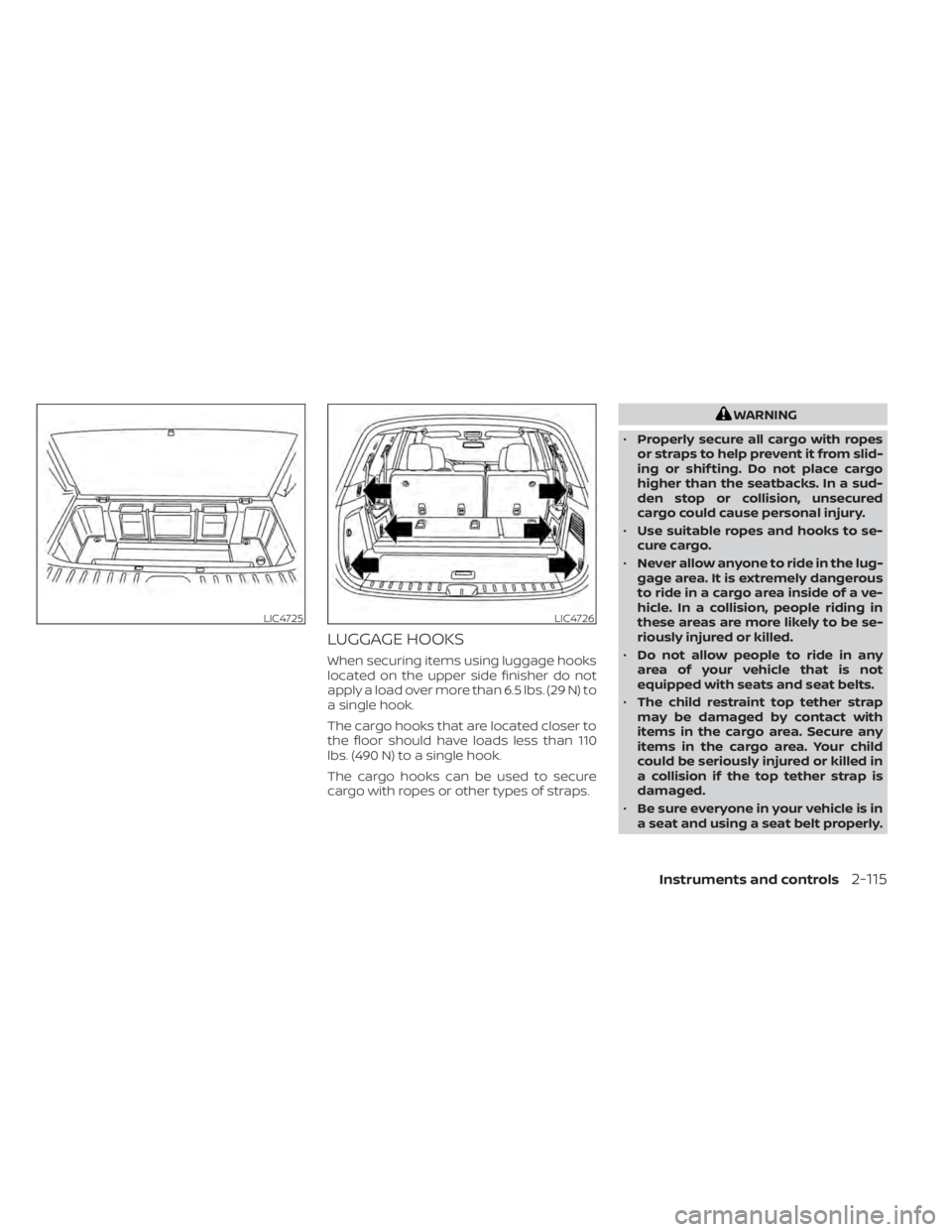
LUGGAGE HOOKS
When securing items using luggage hooks
located on the upper side finisher do not
apply a load over more than 6.5 lbs. (29 N) to
a single hook.
The cargo hooks that are located closer to
the floor should have loads less than 110
lbs. (490 N) to a single hook.
The cargo hooks can be used to secure
cargo with ropes or other types of straps.
WARNING
• Properly secure all cargo with ropes
or straps to help prevent it from slid-
ing or shif ting. Do not place cargo
higher than the seatbacks. In a sud-
den stop or collision, unsecured
cargo could cause personal injury.
• Use suitable ropes and hooks to se-
cure cargo.
• Never allow anyone to ride in the lug-
gage area. It is extremely dangerous
to ride in a cargo area inside of a ve-
hicle. In a collision, people riding in
these areas are more likely to be se-
riously injured or killed.
• Do not allow people to ride in any
area of your vehicle that is not
equipped with seats and seat belts.
• The child restraint top tether strap
may be damaged by contact with
items in the cargo area. Secure any
items in the cargo area. Your child
could be seriously injured or killed in
a collision if the top tether strap is
damaged.
• Be sure everyone in your vehicle is in
a seat and using a seat belt properly.
LIC4725LIC4726
Instruments and controls2-115
Page 227 of 665
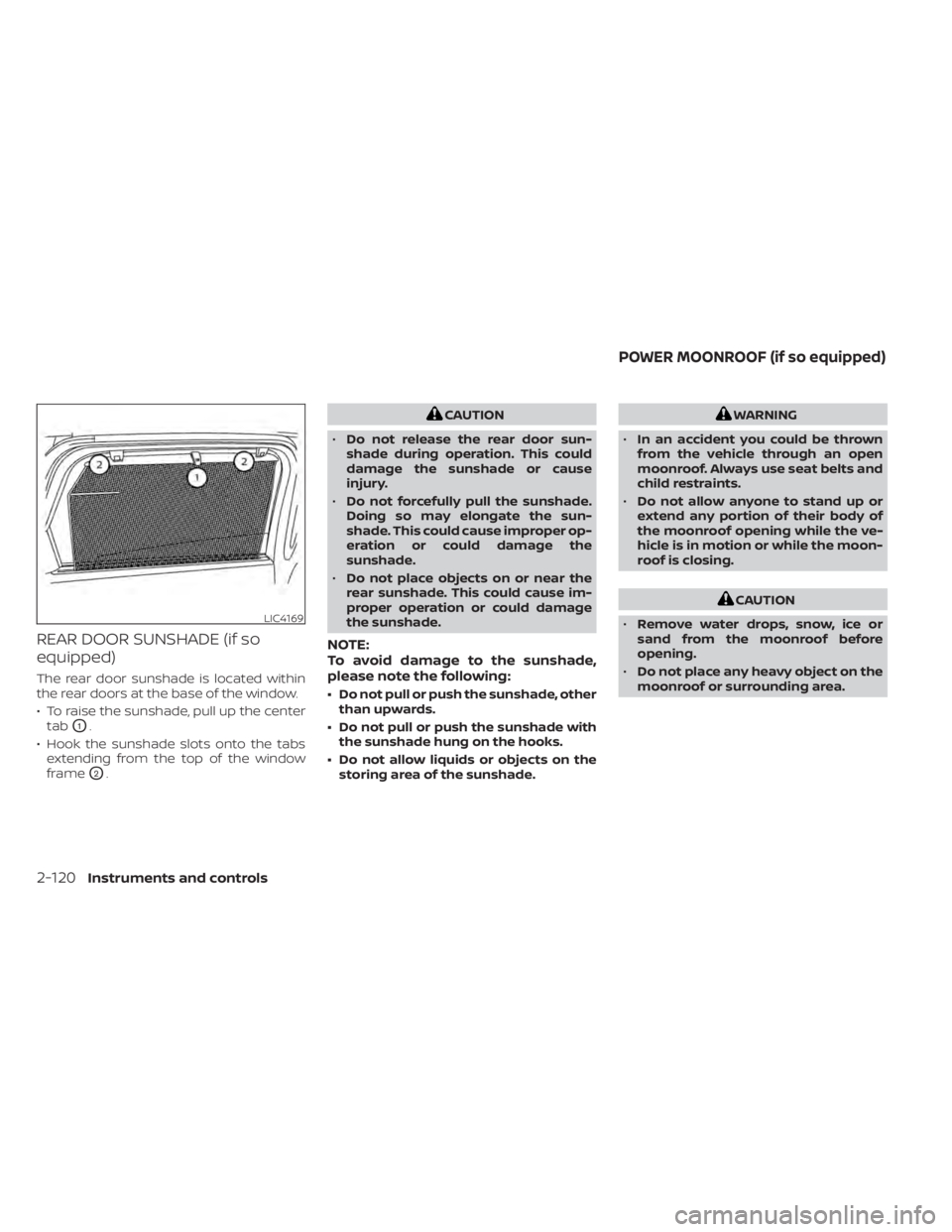
REAR DOOR SUNSHADE (if so
equipped)
The rear door sunshade is located within
the rear doors at the base of the window.
• To raise the sunshade, pull up the centertab
O1.
• Hook the sunshade slots onto the tabs extending from the top of the window
frame
O2.
CAUTION
• Do not release the rear door sun-
shade during operation. This could
damage the sunshade or cause
injury.
• Do not forcefully pull the sunshade.
Doing so may elongate the sun-
shade. This could cause improper op-
eration or could damage the
sunshade.
• Do not place objects on or near the
rear sunshade. This could cause im-
proper operation or could damage
the sunshade.
NOTE:
To avoid damage to the sunshade,
please note the following:
• Do not pull or push the sunshade, other than upwards.
• Do not pull or push the sunshade with the sunshade hung on the hooks.
• Do not allow liquids or objects on the storing area of the sunshade.
WARNING
• In an accident you could be thrown
from the vehicle through an open
moonroof. Always use seat belts and
child restraints.
• Do not allow anyone to stand up or
extend any portion of their body of
the moonroof opening while the ve-
hicle is in motion or while the moon-
roof is closing.
CAUTION
• Remove water drops, snow, ice or
sand from the moonroof before
opening.
• Do not place any heavy object on the
moonroof or surrounding area.
LIC4169
POWER MOONROOF (if so equipped)
2-120Instruments and controls