hood open NISSAN PATHFINDER 2023 Owners Manual
[x] Cancel search | Manufacturer: NISSAN, Model Year: 2023, Model line: PATHFINDER, Model: NISSAN PATHFINDER 2023Pages: 665, PDF Size: 4.64 MB
Page 127 of 665
•If the light illuminates while driving,
avoid sudden steering maneuvers or
abrupt braking, reduce vehicle
speed, pull off the road to a safe loca-
tion and stop the vehicle as soon as
possible. Driving with under-inflated
tires may permanently damage the
tires and increase the likelihood of
tire failure. Serious vehicle damage
could occur and may lead to an acci-
dent and could result in serious per-
sonal injury or death. Check the tire
pressure for all four tires. Adjust the
tire pressure to the recommended
COLD tire pressure shown on the Tire
and Loading Information label lo-
cated in the driver’s door opening to
turn the low tire pressure warning
light off. If the light still illuminates
while driving af ter adjusting the tire
pressure, a tire may be flat or the
TPMS may be malfunctioning. If you
have a flat tire, replace it with a spare
tire as soon as possible. If no tire is
flat and all tires are properly inflated,
have the vehicle checked. It is recom-
mended that you visit a NISSAN
dealer for this service. •
When using a wheel without the
TPMS such as the spare tire, the TPMS
will not function and the low tire
pressure warning light will flash for
approximately 1 minute. The light will
remain on af ter 1 minute. Have your
tires replaced and/or TPMS system
reset as soon as possible. It is recom-
mended that you visit a NISSAN
dealer for these services.
• Replacing tires with those not origi-
nally specified by NISSAN could af-
fect the proper operation of the
TPMS.
CAUTION
• The TPMS is not a substitute for the
regular tire pressure check. Be sure
to check the tire pressure regularly.
• If the vehicle is being driven at
speeds of less than 16 mph (25 km/h),
the TPMS may not operate correctly.
• Be sure to install the specified size of
tires to the four wheels correctly.
Malfunction Indicator Light
(MIL) (if so equipped)
If this indicator light comes on steady or
blinks while the engine is running, it may
indicate a potential emission control
malfunction.
The MIL may also come on steady if the
vehicle runs out of fuel. Check to make sure
that the vehicle has at least 3 gallons (11.4
liters) of fuel in the fuel tank.
Operation
The MIL will come on in one of two ways:
• MIL on steady — An emission control sys- tem malfunction has been detected.
Have the vehicle inspected. It is recom-
mended that you visit a NISSAN dealer for
this service. You do not need to have your
vehicle towed to the dealer.
• MIL blinking — An engine misfire has been detected which may damage the emis-
sion control system. To reduce or avoid
emission control system damage:
do not drive at speeds above 45 mph (72
km/h).
avoid hard acceleration or deceleration.
avoid steep uphill grades.
if possible, reduce the amount of cargo be-
ing hauled or towed.
2-20Instruments and controls
Page 183 of 665
Your vehicle has two types of security
systems:
• Vehicle security system
• NISSAN Vehicle Immobilizer System
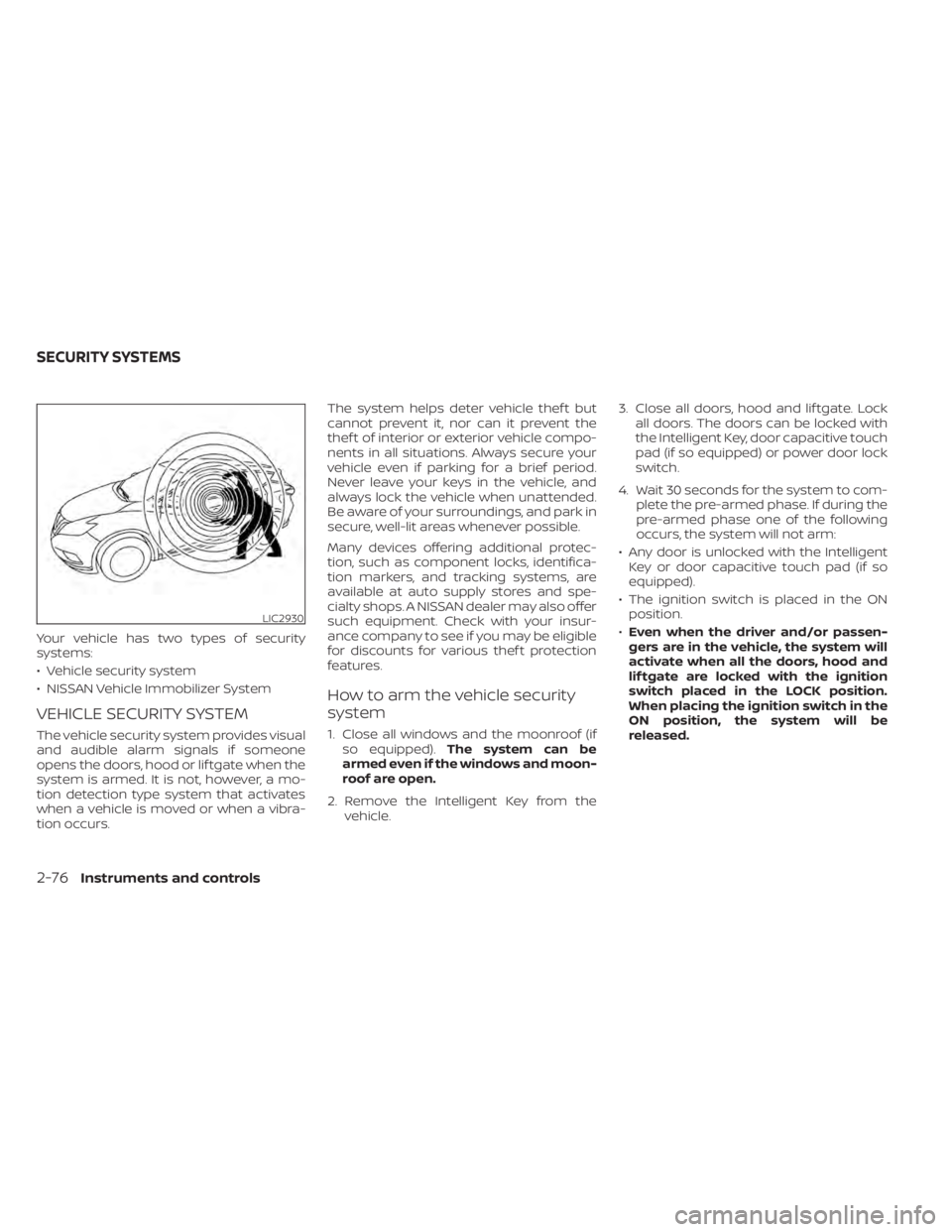
VEHICLE SECURITY SYSTEM
The vehicle security system provides visual
and audible alarm signals if someone
opens the doors, hood or lif tgate when the
system is armed. It is not, however, a mo-
tion detection type system that activates
when a vehicle is moved or when a vibra-
tion occurs.The system helps deter vehicle thef t but
cannot prevent it, nor can it prevent the
thef t of interior or exterior vehicle compo-
nents in all situations. Always secure your
vehicle even if parking for a brief period.
Never leave your keys in the vehicle, and
always lock the vehicle when unattended.
Be aware of your surroundings, and park in
secure, well-lit areas whenever possible.
Many devices offering additional protec-
tion, such as component locks, identifica-
tion markers, and tracking systems, are
available at auto supply stores and spe-
cialty shops. A NISSAN dealer may also offer
such equipment. Check with your insur-
ance company to see if you may be eligible
for discounts for various thef t protection
features.
How to arm the vehicle security
system
1. Close all windows and the moonroof (if
so equipped). The system can be
armed even if the windows and moon-
roof are open.
2. Remove the Intelligent Key from the vehicle. 3. Close all doors, hood and lif tgate. Lock
all doors. The doors can be locked with
the Intelligent Key, door capacitive touch
pad (if so equipped) or power door lock
switch.
4. Wait 30 seconds for the system to com- plete the pre-armed phase. If during the
pre-armed phase one of the following
occurs, the system will not arm:
• Any door is unlocked with the Intelligent Key or door capacitive touch pad (if so
equipped).
• The ignition switch is placed in the ON position.
• Even when the driver and/or passen-
gers are in the vehicle, the system will
activate when all the doors, hood and
lif tgate are locked with the ignition
switch placed in the LOCK position.
When placing the ignition switch in the
ON position, the system will be
released.
LIC2930
SECURITY SYSTEMS
2-76Instruments and controls
Page 237 of 665
3 Pre-driving checks and adjustments
Keys.............................................3-2NISSAN Intelligent Key® .......................3-2
NISSAN Vehicle Immobilizer System
keys..........................................3-4
Doors ...........................................3-5
Locking with key .............................3-5
Locking with inside lock knob ................3-6
Locking with power door lock switch .........3-6
Automatic door locks ........................3-6
Child safety rear door lock .................... 3-7
NISSAN Intelligent Key® system .................. 3-7
Operating range .............................3-8
Door locks/unlocks precaution ...............3-9
NISSAN Intelligent Key® Operation ............3-9
How to use the remote keyless entry
function ..................................... 3-13
Approach unlock function ...................3-17
Walk away lock function .....................3-17
Warning signals ............................. 3-17
Troubleshooting guide ......................3-18
Remote Engine Start (if so equipped) ...........3-20
Remote Engine Start operating range .......3-20
Remote starting the vehicle .................3-21
Extending engine run time ..................3-21
Canceling a Remote Engine Start ...........3-21
Conditions the Remote Engine Start will
notwork .................................... 3-22Hood
........................................... 3-23
Lif tgate ........................................ 3-23
Operating the manual lif tgate
(if so equipped) .............................. 3-24
Operating the power lif tgate
(if so equipped) .............................. 3-24
Motion-Activated Lif tgate
(if so equipped) .............................. 3-27
Lif tgate release ............................. 3-29
Lif tgate position setting
(if so equipped) .............................. 3-30
Fuel-filler door .................................. 3-31
Opening the fuel-filler door ..................3-31
How to refuel ................................ 3-32
When refueling from a portable fuel
container ................................... 3-33
Steering wheel ................................. 3-34
Manual operation (if so equipped) ...........3-34
Automatic operation (if so equipped) ........3-35
Sun visors ...................................... 3-36
Vanity mirrors ............................... 3-36
C
ard holder ................................. 3-37
Mirrors ......................................... 3-37
Manual anti-glare rearview mirror
(if so equipped) .............................. 3-37
Page 258 of 665
REMOTE STARTING THE VEHICLE
To use the Remote Engine Start feature
perform the following:
1. Aim the Intelligent Key at the vehicle.
2. Press the
button to lock all doors.
3. Within 5 seconds press and hold the
button until the turn signal lights
flash and the tail lamps turn on. If the
vehicle is not within view press and hold
the
button for at least 2 seconds.
The following events will occur when the
engine starts:
• The parking lights will turn on and remain on as long as the engine is running.
• The doors will be locked and the climate control system may come on.
• The engine will continue to run for 10 min- utes. Repeat the steps to extend the time
for an additional 10 minutes. For addi-
tional information, see “Extending engine
run time” (P. 3-21).
Press and hold the brake pedal while
switching the ignition to the ON position
before driving. For additional information,
see “Driving the vehicle” (P. 5-18).
EXTENDING ENGINE RUN TIME
The Remote Engine Start feature can be
extended one time by performing the
steps listed in “Remote starting the vehicle”
(P. 3-21). Run time will be calculated as
follows:
• The first 10–minute run time will start when the Remote Engine Start function is
performed.
• The second 10 minutes will start immedi- ately when the Remote Engine Start
function is performed again. For example,
if the engine has been running for 5 min-
utes, and 10 minutes are added, the en-
gine will run for a total of 15 minutes.
• Extending engine run time will bring you to the two Remote Engine Start limit.
A maximum of two Remote Engine Starts,
or a single start with an extension, are al-
lowed between ignition cycles.
The vehicle must be driven at speeds of 4
mph (7 km/h) before the remote engine
start procedure can be used again.
CANCELING A REMOTE ENGINE
START
To cancel a Remote Engine Start, perform
one of the following:
• Aim the Intelligent Key at the vehicle and press
until the parking lights turn off.
• Turn on the hazard indicator flashers.
• Cycle the ignition switch on and then off.
• The extended engine run time has expired.
• The first 10–minute timer has expired.
• The engine hood has been opened.
• The vehicle is shif ted out of P (Park) position.
• The alarm sounds due to illegal entry into the vehicle.
• The ignition switch is pushed without an Intelligent Key in the vehicle.
• The ignition switch is pushed with an In- telligent Key in the vehicle but the brake
pedal is not depressed.
Pre-driving checks and adjustments3-21
Page 259 of 665
CONDITIONS THE REMOTE ENGINE
START WILL NOT WORK
The Remote Engine Start will not operate if
any of the following conditions are present:
• The ignition switch is placed in the ONposition.
• The hood is not securely closed.
• The hazard indicator lights are on.
• The engine is still running. The engine must be completely stopped. Wait at
least 6 seconds if the engine goes from
running to off. This is not applicable when
extending engine run time.
• The
button is not pressed and held
for at least 2 seconds.
• The
button is not pressed and held
within 5 seconds of pressing the lock
button.
• The brake is pressed.
• The doors are not closed and locked.
• The lif tgate is open.
• The Key System Error warning message appears in the vehicle information
display.
• The alarm sounds due to illegal entry into the vehicle. • Two Remote Engine Starts, or a single
Remote Engine Start with an extension,
have already been used.
• The vehicle is not in P (Park) position.
• There is a detected registered key already inside of the vehicle.
• The Remote Engine Start feature has been switched to the OFF position using
the “Vehicle Settings” menu on the vehicle
information display. For additional infor-
mation, see “Vehicle information display 7
inch (18 cm) Type A” (P. 2-23) or “Vehicle
information display 12.3 inch (31 cm) Type
B” (P. 2-48).
The Remote Engine Start may display a
warning or indicator in the vehicle informa-
tion display. For additional information, see
“Vehicle information display 7 inch (18 cm)
Type A” (P. 2-23) or “Vehicle information dis-
play 12.3 inch (31 cm) Type B” (P. 2-48).
3-22Pre-driving checks and adjustments
Page 260 of 665
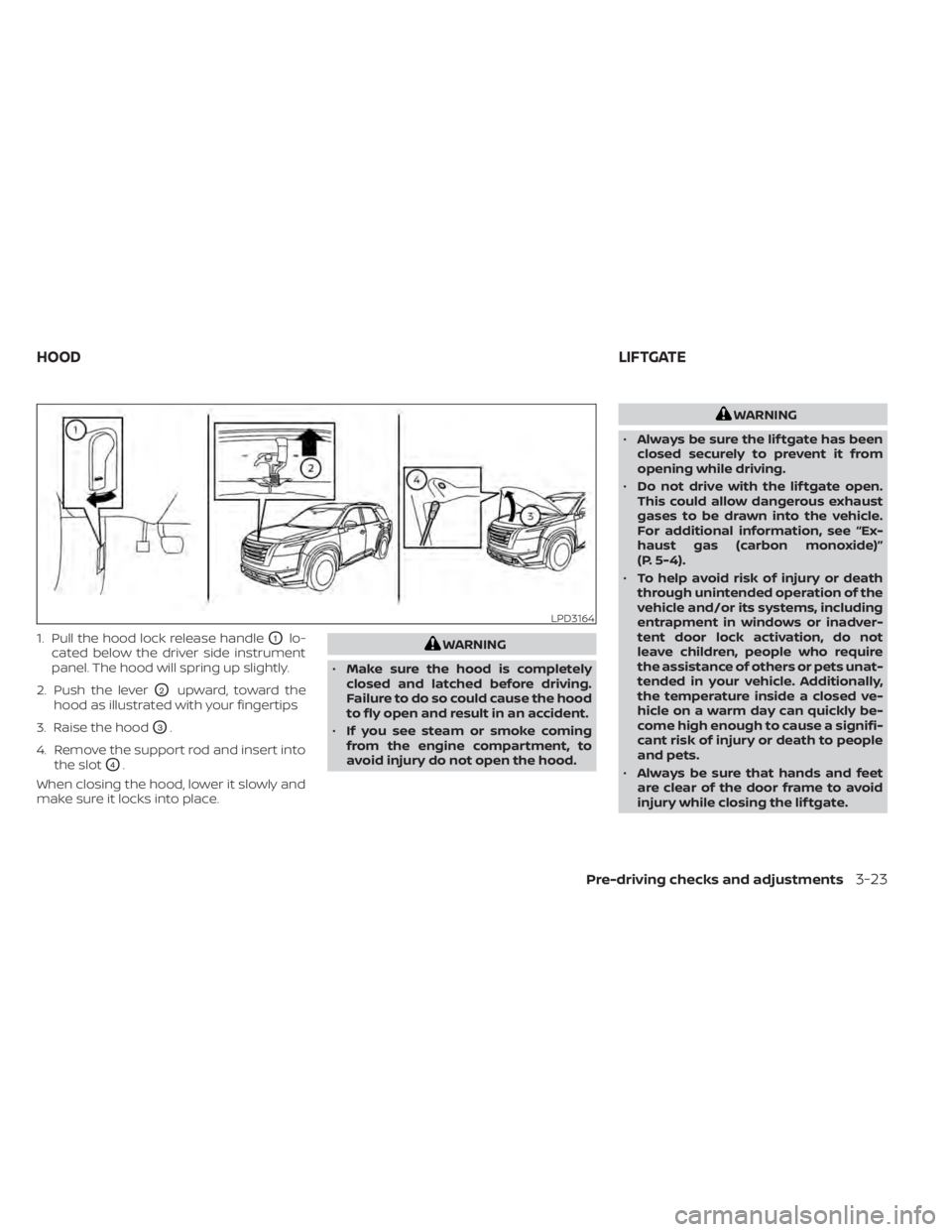
1. Pull the hood lock release handleO1lo-
cated below the driver side instrument
panel. The hood will spring up slightly.
2. Push the lever
O2upward, toward the
hood as illustrated with your fingertips
3. Raise the hood
O3.
4. Remove the support rod and insert into the slot
O4.
When closing the hood, lower it slowly and
make sure it locks into place.
WARNING
• Make sure the hood is completely
closed and latched before driving.
Failure to do so could cause the hood
to fly open and result in an accident.
• If you see steam or smoke coming
from the engine compartment, to
avoid injury do not open the hood.
WARNING
• Always be sure the lif tgate has been
closed securely to prevent it from
opening while driving.
• Do not drive with the lif tgate open.
This could allow dangerous exhaust
gases to be drawn into the vehicle.
For additional information, see “Ex-
haust gas (carbon monoxide)”
(P. 5-4).
• To help avoid risk of injury or death
through unintended operation of the
vehicle and/or its systems, including
entrapment in windows or inadver-
tent door lock activation, do not
leave children, people who require
the assistance of others or pets unat-
tended in your vehicle. Additionally,
the temperature inside a closed ve-
hicle on a warm day can quickly be-
come high enough to cause a signifi-
cant risk of injury or death to people
and pets.
• Always be sure that hands and feet
are clear of the door frame to avoid
injury while closing the lif tgate.
LPD3164
HOOD LIFTGATE
Pre-driving checks and adjustments3-23
Page 329 of 665
Additional information:
• When using a wheel without the TPMSsuch as the spare tire, the TPMS does not
monitor the tire pressure of the spare tire.
• The TPMS will activate only when the ve- hicle is driven at speeds above 16 mph (25
km/h). Also, this system may not detect a
sudden drop in tire pressure (for example,
a flat tire while driving).
• The low tire pressure warning light does not automatically turn off when the tire
pressure is adjusted. Af ter the tire is in-
flated to the recommended pressure, the
vehicle must be driven at speeds above
16 mph (25 km/h) to activate the TPMS
and turn off the low tire pressure warning
light. Use a tire pressure gauge to check
the tire pressure.
• The “Tire Pressure Low - Add Air” warning appears in the vehicle information dis-
play when the low tire pressure warning
light is illuminated and low tire pressure is
detected. The “Tire Pressure Low - Add
Air” warning turns off when the low tire
pressure warning light turns off.
• The “Tire Pressure Low - Add Air” warning appears each time the ignition switch is
placed in the ON position as long as the
low tire pressure warning light remains
illuminated. • The “Tire Pressure Low - Add Air” warning
does not appear if the low tire pressure
warning light illuminates to indicate a
TPMS malfunction.
• Tire pressure rises and falls depending on the heat caused by the vehicle’s opera-
tion and the outside temperature. Do not
reduce the tire pressure af ter driving be-
cause the tire pressure rises af ter driving.
Low outside temperature can lower the
temperature of the air inside the tire
which can cause a lower tire inflation
pressure. This may cause the low tire
pressure warning light to illuminate. If the
warning light illuminates, check the tire
pressure for all four tires.
• The Tire and Loading Information label is located in the driver's door opening.
• You can also check the pressure of all tires (except the spare tire) on the vehicle
information display screen. The order of
the tire pressure figures displayed on the
screen corresponds with the actual order
of the tire position.
For additional information, see “Low tire
pressure warning light” (P. 2-18) and “Tire
Pressure Monitoring System (TPMS)” (P. 6-3).WARNING
• Radio waves could adversely affect
electric medical equipment. Those
who use a pacemaker should contact
the electric medical equipment
manufacturer for the possible influ-
ences before use.
• If the low tire pressure warning light
illuminates while driving, avoid sud-
den steering maneuvers or abrupt
braking, reduce vehicle speed, pull
off the road to a safe location and
stop the vehicle as soon as possible.
Driving with under-inflated tires may
permanently damage the tires and
increase the likelihood of tire failure.
Serious vehicle damage could occur
and may lead to an accident and
could result in serious personal in-
jury. Check the tire pressure for all
four tires. Adjust the tire pressure to
the recommended COLD tire pres-
sure shown on the Tire and Loading
Information label to turn the low tire
pressure warning light off. If you have
a flat tire, replace it with a spare tire
as soon as possible. For additional
information, see “Flat tire” (P. 6-3).
5-6Starting and driving
Page 512 of 665
• If the sonar sensors are dirty, wipe themoff with a sof t cloth while being careful to
not damage them.
• The sonar sensors may be blocked by temporary ambient conditions such as
splashing water, mist or fog. The blocked
condition may also be caused by objects
such as ice, frost or dirt obstructing the
sonar sensors. Check for and remove ob-
jects obstructing the area around the so-
nar sensors.
• Do not subject the area around the sonar sensors to strong impact. Also, do not
remove or disassemble the sonar sen-
sors. If the sonar sensors and peripheral
areas are deformed in an accident, etc.,
have the sonar sensors checked by a
NISSAN dealer.
• Do not attach stickers (including trans- parent material), install accessories or
apply additional paint on the sonar sen-
sors and their surrounding areas. This
may cause a malfunction or improper
operation.
• When washing the vehicle using a high- pressure washer, do not apply direct
washer pressure on the sonar sensors.
This may cause a malfunction of the so-
nar sensors. The Idling Stop System activates to prevent
unnecessary fuel consumption, exhaust
emissions and noise.
• When you stop the vehicle, the engine is
turned off automatically.
• When you release the brake pedal to be- gin moving again, the engine is turned on
automatically.
WARNING
The engine restarts if the vehicle
moves at approximately 1 mph (2
km/h) or more (on a downhill grade,
etc.) while the engine is turned off by
the Idling Stop System. Depress the
brake pedal immediately to stop the
vehicle to prevent an accident.
CAUTION
At the end of the journey the engine
must be stopped and ignition switch be
pushed off. Lock the vehicle as normal.
Pushing the ignition switch off will shut
down all electrical systems. Failure to
do this may result in a discharged
battery.
NOTE:
The Idling Stop System will not activate
under the following conditions:
• When the vehicle is in TOW mode.
• When the engine is kept idling without
the vehicle being driven af ter the en-
gine is turned on.
• When the engine coolant temperature
is low.
• When the battery capacity is low.
• When the battery temperature is low.
• When the vehicle is moving.
• When a negative pressure booster
decreases.
• When the engine hood is opened with
the engine running.
• When the engine is turned on with the
engine hood open.
• When the driver’s seat belt is not
fastened.
• When the driver’s door is open.
• When the steering wheel is operated.
• When the Idling Stop System indicator
blinks at a low speed.
• When the fan speed control is in any
position other than “OFF,” (0) while the
air flow control is in the front defroster
position.
IDLING STOP SYSTEM
Starting and driving5-189
Page 513 of 665
•When the front defroster switch is on.
• When the rear window defroster switch
is on.
• When the temperature inside the ve-
hicle is lower than approximately 20°C
(68°F), unless the Air Conditioning ECO
customize option is selected, and the
ECO driving mode is on.
• When the temperature inside the ve-
hicle is higher than approximately 30°C
(86°F), unless the Air Conditioning ECO
customize option is selected, and the
ECO driving mode is on. (When the air
conditioner is off, the Idling Stop Sys-
tem will operate.)
• When the fan speed of the air condi-
tioner is set to the maximum speed,
unless the Air Conditioning ECO cus-
tomize option is selected, and the ECO
driving mode is on.
• When the Idling Stop OFF switch is
turned on.
• When the power consumption is large.
• When the altitude is high.
• When the accelerator pedal is
depressed.
• When the shif t lever is in any range
other than D (Drive). •
When the brake pedal is not firmly
depressed.
• When stopping the vehicle on steep
sloping roads.
NOTE:
The Idling Stop System may not activate
when the Intelligent Key is not in the ve-
hicle and you open/close any door.
The engine will not restart even if the
brake pedal is released while the Idling
Stop System is activated under the fol-
lowing conditions: (The engine may re-
start under other conditions.)
• When the automatic brake hold system
is activated.
• When the engine hood is opened.
NOTE:
It may take some time until the Idling
Stop System activates under the follow-
ing conditions:
•When the battery is discharged.
• When the outside temperature is low or
high.
• When the battery is replaced or the
battery terminal is disconnected for
extended periods and then
reconnected.
NOTE:
When the Idling Stop System indicator
light illuminates, the engine starts run-
ning automatically under at least one of
the following conditions:
• The vacuum pressure for the brake sys-
tem is not enough as the brake pedal is
repeatedly depressed.
• The driver’s seat belt is unfastened, or
the driver’s door is open.
• The battery voltage becomes low (due
to electrical load from other vehicle
systems like headlights, heaters, etc.,
or auxiliary devices connected to the 12
volt socket inside the vehicle).
• The vehicle speed is above about 1 mph
(2 km/h).
• When the rear window defroster is
operated.
• When the temperature inside the ve-
hicle is lower than approximately 68°F
(20°C), unless the Air Conditioning ECO
customize option is selected, and the
ECO driving mode is on.
5-190Starting and driving
Page 514 of 665
•When the temperature inside the ve-
hicle is higher than approximately 86°F
(30°C), unless the Air Conditioning ECO
customize option is selected, and the
ECO driving mode is on. (When the air
conditioner is off, the Idling Stop Sys-
tem will operate.)
• When the front defroster is turned on.
• When more than 3 minutes have
elapsed since the Idling Stop System
was active.
• When the accelerator pedal is
depressed.
• When the steering wheel is operated.
(The steering wheel operation may be-
come heavy, but this is not a
malfunction.)
• When the battery capacity is low.
• When the power consumption is high.
• When the shif t lever is in any range
other than D (Drive).
• When the Idling Stop OFF switch is
pushed.
• When the negative pressure of the
brake system is not sufficiently applied
by depressing the brake pedal several
times.NOTE:
The Idling Stop System may not activate
when the Intelligent Key is not in the ve-
hicle and you open/close any door.
NOTE:
The following condition will prevent the
Idling Stop System from automatically
restarting the engine. Starting the en-
gine with the ignition switch operation is
then necessary:
• The hood is open.
Use this system while waiting at a stop
light, etc. When the vehicle is stopped for
long periods of time, turn off the engine.
When the engine is stopped by the Idling
Stop System, heating, cooling and dehu-
midif ying functions will be deactivated. To
avoid the air conditioning functions from
being deactivated, turn off the Idling Stop
System by pushing the Idling Stop OFF
switch.
RETROGRADE MOVEMENT
CONTROL FUNCTION
This system is designed to reduce the ret-
rograde movement that occurs while the
driver’s foot changes from depressing the
brake pedal to the accelerator pedal when
moving the vehicle while the Idling Stop
System is active on a hilly road.
IDLING STOP SYSTEM DISPLAY
The status of the Idling Stop System can be
checked in the vehicle information display.
Starting and driving5-191