warning NISSAN PATROL 2000 Electronic User Guide
[x] Cancel search | Manufacturer: NISSAN, Model Year: 2000, Model line: PATROL, Model: NISSAN PATROL 2000Pages: 1033, PDF Size: 30.71 MB
Page 269 of 1033
Diagnostic test mode I Ð Bulb check
In this mode, the MI on the instrument panel should stay ON. If it remains OFF, check the bulb. Refer to EL
section, ªWARNING LAMPS AND CHIMEº or see EC-1276.
Diagnostic test mode I Ð Malfunction warning
MI Condition
ON When the malfunction is detected or the ECM's CPU is malfunctioning.
OFF No malfunction.
Diagnostic test mode II Ð Self-diagnostic results
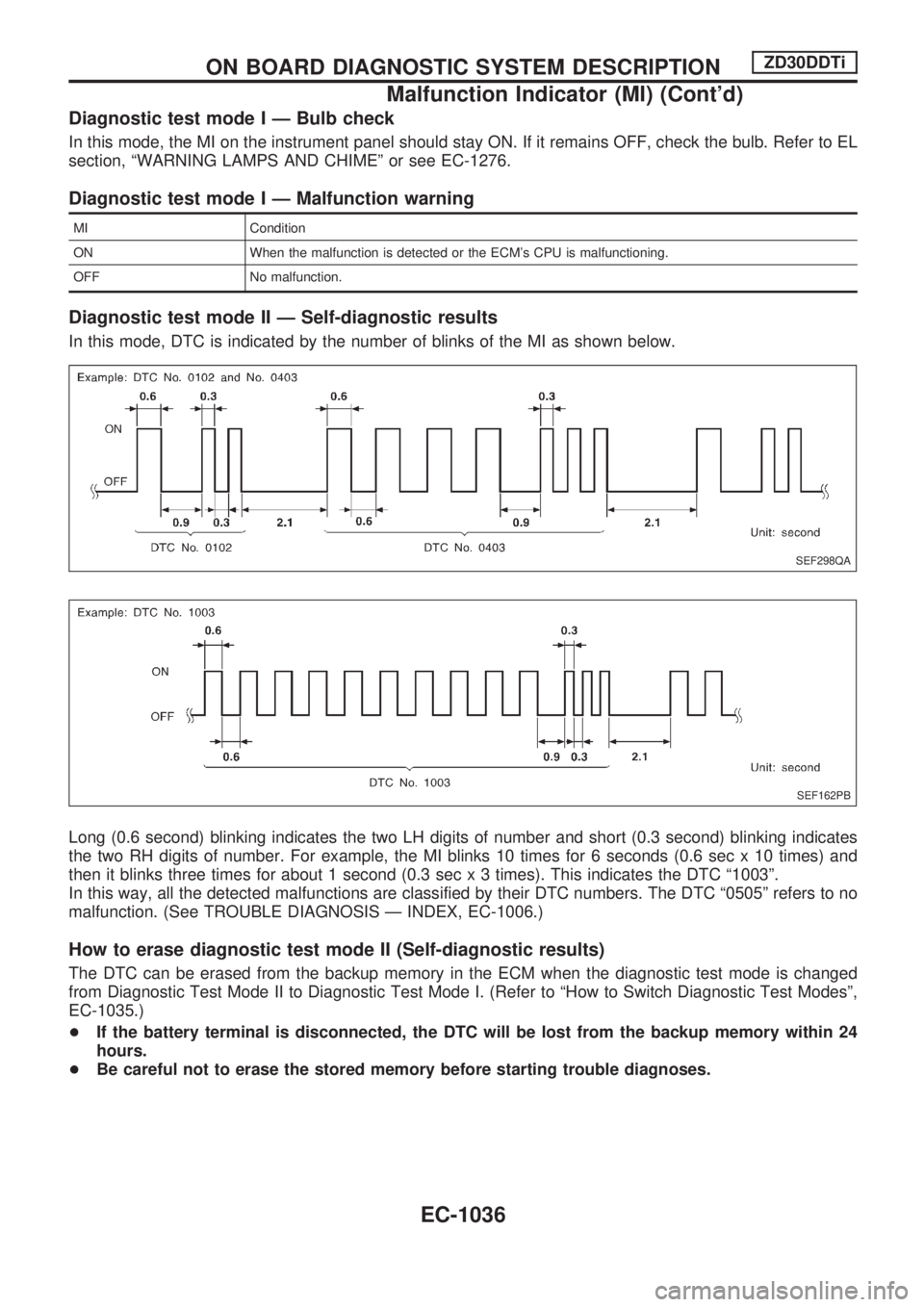
In this mode, DTC is indicated by the number of blinks of the MI as shown below.
Long (0.6 second) blinking indicates the two LH digits of number and short (0.3 second) blinking indicates
the two RH digits of number. For example, the MI blinks 10 times for 6 seconds (0.6 sec x 10 times) and
then it blinks three times for about 1 second (0.3 sec x 3 times). This indicates the DTC ª1003º.
In this way, all the detected malfunctions are classified by their DTC numbers. The DTC ª0505º refers to no
malfunction. (See TROUBLE DIAGNOSIS Ð INDEX, EC-1006.)
How to erase diagnostic test mode II (Self-diagnostic results)
The DTC can be erased from the backup memory in the ECM when the diagnostic test mode is changed
from Diagnostic Test Mode II to Diagnostic Test Mode I. (Refer to ªHow to Switch Diagnostic Test Modesº,
EC-1035.)
+If the battery terminal is disconnected, the DTC will be lost from the backup memory within 24
hours.
+Be careful not to erase the stored memory before starting trouble diagnoses.
SEF298QA
SEF162PB
ON BOARD DIAGNOSTIC SYSTEM DESCRIPTIONZD30DDTi
Malfunction Indicator (MI) (Cont'd)
EC-1036
Page 340 of 1033
Overall Function Check
Use this procedure to check the overall function of the cooling
fan. During this check, a DTC might not be confirmed.
WARNING:
Never remove the radiator cap when the engine is hot. Seri-
ous burns could be caused by high pressure fluid escaping
from the radiator.
Wrap a thick cloth around the cap. Carefully remove the cap
by turning it a quarter turn to allow built-up pressure to
escape. Then turn the cap all the way off.
WITH CONSULT-II
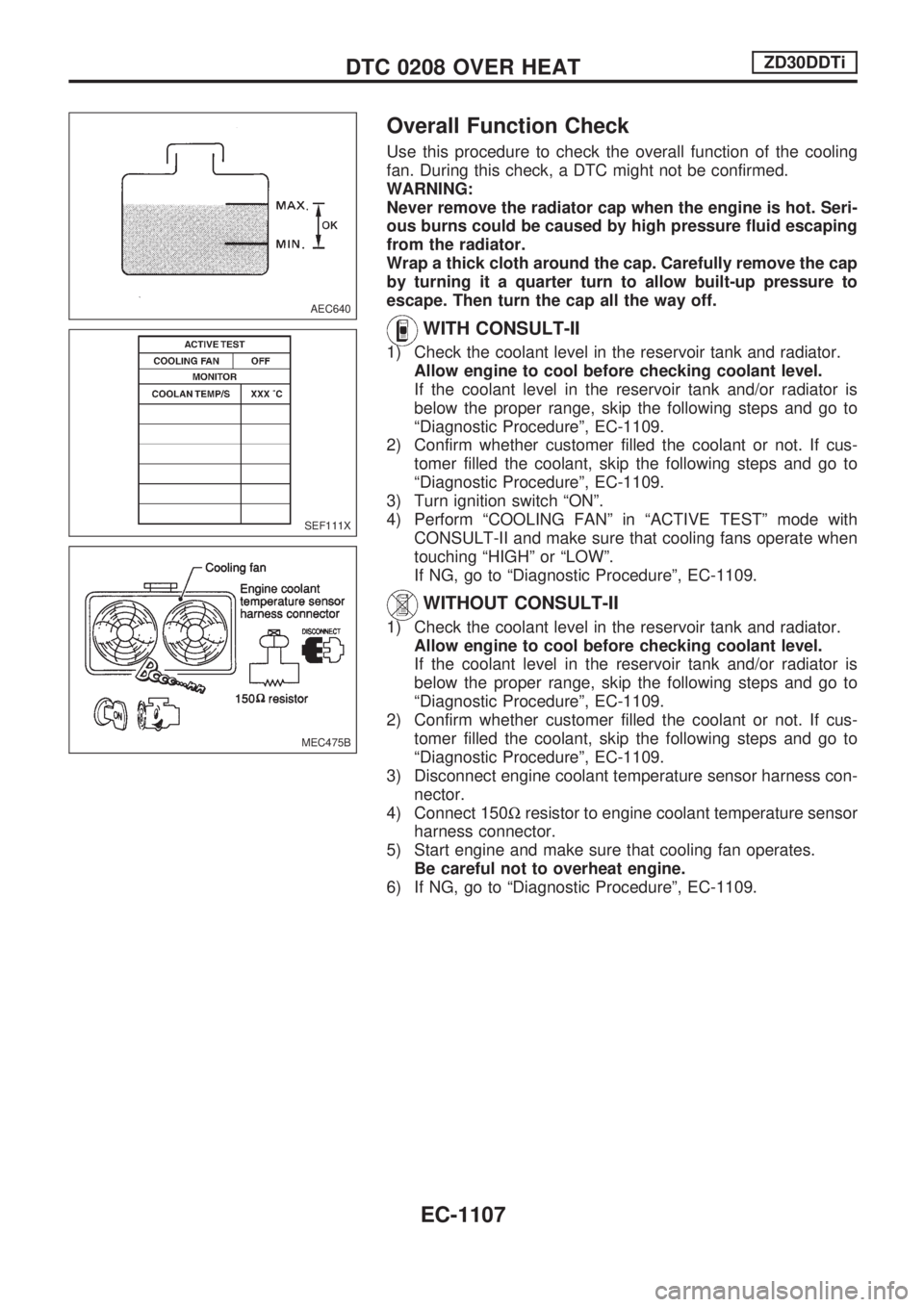
1) Check the coolant level in the reservoir tank and radiator.
Allow engine to cool before checking coolant level.
If the coolant level in the reservoir tank and/or radiator is
below the proper range, skip the following steps and go to
ªDiagnostic Procedureº, EC-1109.
2) Confirm whether customer filled the coolant or not. If cus-
tomer filled the coolant, skip the following steps and go to
ªDiagnostic Procedureº, EC-1109.
3) Turn ignition switch ªONº.
4) Perform ªCOOLING FANº in ªACTIVE TESTº mode with
CONSULT-II and make sure that cooling fans operate when
touching ªHIGHº or ªLOWº.
If NG, go to ªDiagnostic Procedureº, EC-1109.
WITHOUT CONSULT-II
1) Check the coolant level in the reservoir tank and radiator.
Allow engine to cool before checking coolant level.
If the coolant level in the reservoir tank and/or radiator is
below the proper range, skip the following steps and go to
ªDiagnostic Procedureº, EC-1109.
2) Confirm whether customer filled the coolant or not. If cus-
tomer filled the coolant, skip the following steps and go to
ªDiagnostic Procedureº, EC-1109.
3) Disconnect engine coolant temperature sensor harness con-
nector.
4) Connect 150Wresistor to engine coolant temperature sensor
harness connector.
5) Start engine and make sure that cooling fan operates.
Be careful not to overheat engine.
6) If NG, go to ªDiagnostic Procedureº, EC-1109.
AEC640
SEF111X
MEC475B
DTC 0208 OVER HEATZD30DDTi
EC-1107
Page 454 of 1033
Description
SYSTEM DESCRIPTION
Sensor Input Signal to ECMECM
FunctionActuator
Crankshaft position
sensor (TDC)Engine speed
Glow
controlGlow lamp,
Glow relay
¯
Glow plugs Engine coolant tem-
perature sensorEngine coolant tem-
perature
When engine coolant temperature is more than approximately
75ÉC (167ÉF), the glow relay turns off, inactivating the quick-glow
control until coolant temperature drops below approximately
55ÉC (131ÉF).
When coolant temperature is lower than approximately 75ÉC
(167ÉF):
+Ignition switch ON
After ignition switch has turned to ON, the glow relay turns
ON for a certain period of time in relation to engine coolant
temperature, allowing current to flow through glow plug.
+Cranking
The glow relay turns ON, allowing current to flow through
glow plug.
+Starting
After engine has started, current continues to flow through
glow plug (after-glow mode) for a certain period in relation to
engine coolant temperature.
When engine speed exceeds approximately 4,800 rpm, cur-
rent flow through glow plug is interrupted.
The glow indicator lamp turns ON for a certain period of time in
relation to engine coolant temperature at the time glow relay is
turned ON.
COMPONENT DESCRIPTION
Glow plug
+The glow plug is provided with a ceramic heating element to
obtain a high-temperature resistance. It glows in response to
a signal sent from the ECM, allowing current to flow through
the glow plug via the glow relay.
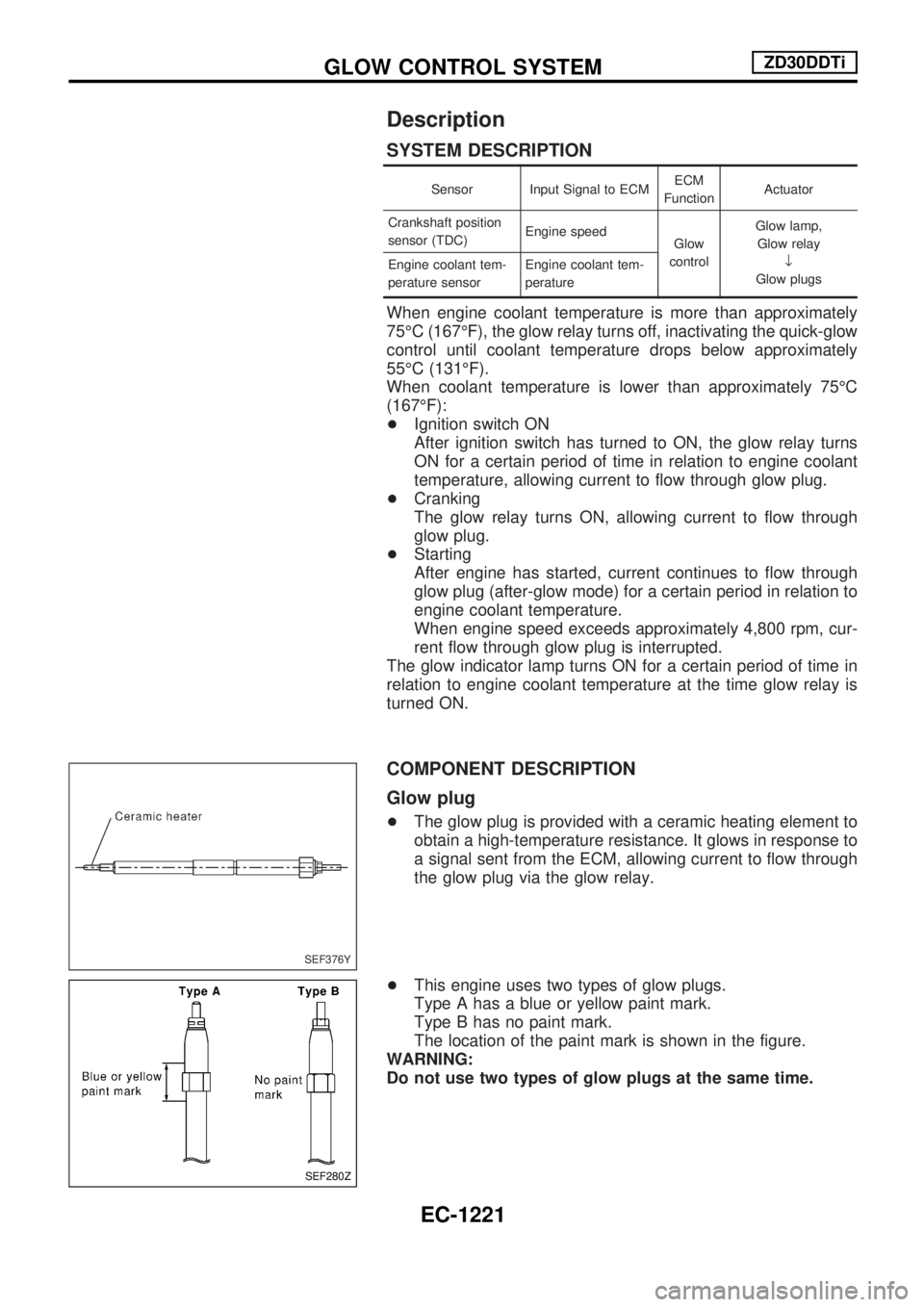
+This engine uses two types of glow plugs.
Type A has a blue or yellow paint mark.
Type B has no paint mark.
The location of the paint mark is shown in the figure.
WARNING:
Do not use two types of glow plugs at the same time.
SEF376Y
SEF280Z
GLOW CONTROL SYSTEMZD30DDTi
EC-1221
Page 512 of 1033
TURN SIGNAL AND HAZARD WARNING
LAMPS................................................................. 1058
Wiring Diagram Ð TURN Ð ........................... 1058
ILLUMINATION .................................................... 1060
Schematic ........................................................ 1060
Wiring Diagram Ð ILL Ð ................................ 1061
INTERIOR ROOM LAMP ..................................... 1067
System Description .......................................... 1067
Wiring Diagram Ð ROOM/L Ð/LHD Models .. 1068
Wiring Diagram Ð ROOM/L Ð/RHD Models.. 1070
Trouble Diagnoses ........................................... 1072
METER AND GAUGES ....................................... 1073
Wiring Diagram Ð METER Ð/LHD Models .... 1073
Wiring Diagram Ð METER Ð/RHD Models ... 1075
WARNING LAMPS .............................................. 1078
Schematic ........................................................ 1078
Wiring Diagram Ð WARN Ð .......................... 1080
WARNING CHIME ............................................... 1091
System Description .......................................... 1091
Wiring Diagram Ð CHIME Ð/LHD Models ..... 1092
Wiring Diagram Ð CHIME Ð/RHD Models .... 1093
Trouble Diagnoses ........................................... 1094
Electrical Components Inspection ................... 1097
FRONT WIPER AND WASHER .......................... 1098
Wiring Diagram Ð WIPER Ð.......................... 1098
HEADLAMP WIPER AND WASHER .................. 1099
Wiring Diagram Ð HLC Ð .............................. 1099
HORN ................................................................... 1100
Wiring Diagram Ð HORN Ð ........................... 1100
REAR WINDOW DEFOGGER ............................. 1101
System Description .......................................... 1101
Wiring Diagram Ð DEF Ð/LHD Models ......... 1102
Wiring Diagram Ð DEF Ð/RHD Models......... 1104
Trouble Diagnoses ........................................... 1106
Electrical Components Inspection ................... 1107
AUDIO .................................................................. 1108
Wiring Diagram Ð REMOTE Ð ...................... 1108
AUDIO ANTENNA ............................................... 1109
Wiring Diagram Ð P/ANT Ð/RHD Models ..... 1109
AUTOMATIC SPEED CONTROL DEVICE
(ASCD) ................................................................. 1110
Schematic ........................................................ 1110
Wiring Diagram Ð ASCD Ð ........................... 1111
POWER WINDOW ............................................... 1115
System Description .......................................... 1115
Schematic ........................................................ 1116
Wiring Diagram Ð WINDOW Ð...................... 1117
Trouble Diagnoses ........................................... 1122
POWER DOOR LOCK Ð Super Lock Ð .......... 1124
Component Parts and Harness Connector
Location............................................................ 1124
System Description .......................................... 1125
Schematic ........................................................ 1127
Wiring Diagram Ð S/LOCK Ð/LHD Models ... 1128 Wiring Diagram Ð S/LOCK Ð/RHD Models... 1133
Trouble Diagnoses ........................................... 1138
MULTI-REMOTE CONTROL SYSTEM ............... 1149
System Description .......................................... 1149
Wiring Diagram Ð MULTI Ð/LHD Models...... 1150
Wiring Diagram Ð MULTI Ð/RHD Models ..... 1152
Trouble Diagnoses ........................................... 1154
ID Code Entry Procedure ................................ 1156
Remote Controller Battery Replacement ......... 1157
SUPER LOCK CONTROL UNIT ......................... 1159
Description ....................................................... 1159
Schematic ........................................................ 1160
Input/Output Operation Signal ......................... 1162
NATS (Nissan Anti-Theft System) .................... 1163
Component Parts and Harness Connector
Location............................................................ 1163
System Description .......................................... 1164
System Composition ........................................ 1165
Wiring Diagram Ð NATS Ð ............................ 1166
Wiring Diagram Ð NATS Ð/LHD Models ....... 1167
Wiring Diagram Ð NATS Ð/RHD Models ...... 1168
CONSULT-II ..................................................... 1169
Trouble Diagnoses ........................................... 1172
How to Replace NATS IMMU .......................... 1183
LOCATION OF ELECTRICAL UNITS ................. 1185
Engine Compartment ....................................... 1185
Passenger Compartment Ð LHD Models ....... 1186
Passenger Compartment Ð RHD Models ...... 1188
HARNESS LAYOUT ............................................ 1191
How to Read Harness Layout ......................... 1191
Main Harness/LHD Models .............................. 1192
Main Harness/RHD Models ............................. 1196
Engine Room Harness/LHD Models................ 1200
Engine Room Harness/RHD Models ............... 1204
Engine Harness ............................................... 1208
Engine Control Harness................................... 1209
Body Harness/LHD Models ............................. 1210
Body Harness/RHD Models ............................. 1214
Body No. 2 Harness/LHD Models ................... 1218
Body No. 2 Harness/RHD Models ................... 1220
Chassis Harness .............................................. 1222
Room Lamp Harness ....................................... 1223
Front Door Harness (Driver side) .................... 1224
Front Door Harness (Passenger side)............. 1225
Back Door Harness and Rear Window
Defogger Harness ............................................ 1226
WIRING DIAGRAM CODES (CELL CODES) ..... 1227
Wiring Diagram Codes (Cell Codes) ............... 1227
ELECTRICAL SYSTEM
Page 513 of 1033
Supplemental Restraint System (SRS) ªAIR
BAGº and ªSEAT BELT PRE-TENSIONERº
The Supplemental Restraint System such as ªAIR BAGº and ªSEAT BELT PRE-TENSIONERº used along
with a seat belt, helps to reduce the risk or severity of injury to the driver and front passenger for certain
types of collision. The SRS system composition which is available to NISSAN MODEL Y61 is as follows (The
composition varies according to the destination and optional equipment.):
+For a frontal collision
The Supplemental Restraint System consists of driver air bag module (located in the center of the
steering wheel), front passenger air bag module (located on the instrument panel on passenger side),
seat belt pre-tensioners, a diagnosis sensor unit, warning lamp, wiring harness and spiral cable.
+For a side collision
The Supplemental Restraint System consists of front side air bag module (located in the outer side of
front seat), satellite sensor, diagnosis sensor unit (one of components of air bags for a frontal collision),
wiring harness, warning lamp (one of components of air bags for a frontal collision).
Information necessary to service the system safely is included in theRS sectionof this Service Manual.
WARNING:
+To avoid rendering the SRS inoperative, which could increase the risk of personal injury or death
in the event of a collision which would result in air bag inflation, all maintenance should be per-
formed by an authorized NISSAN dealer.
+Improper maintenance, including incorrect removal and installation of the SRS, can lead to per-
sonal injury caused by unintentional activation of the system. For removal of Spiral Cable and
Air Bag Module, see the RS section.
+Do not use electrical test equipment on any circuit related to the SRS unless instructed to in this
Service Manual. Spiral cable and wiring harnesses covered with yellow insulation tape either just
before the harness connectors or for the complete harness are related to the SRS.
PRECAUTIONS AND PREPARATION
EL-1003
Page 568 of 1033
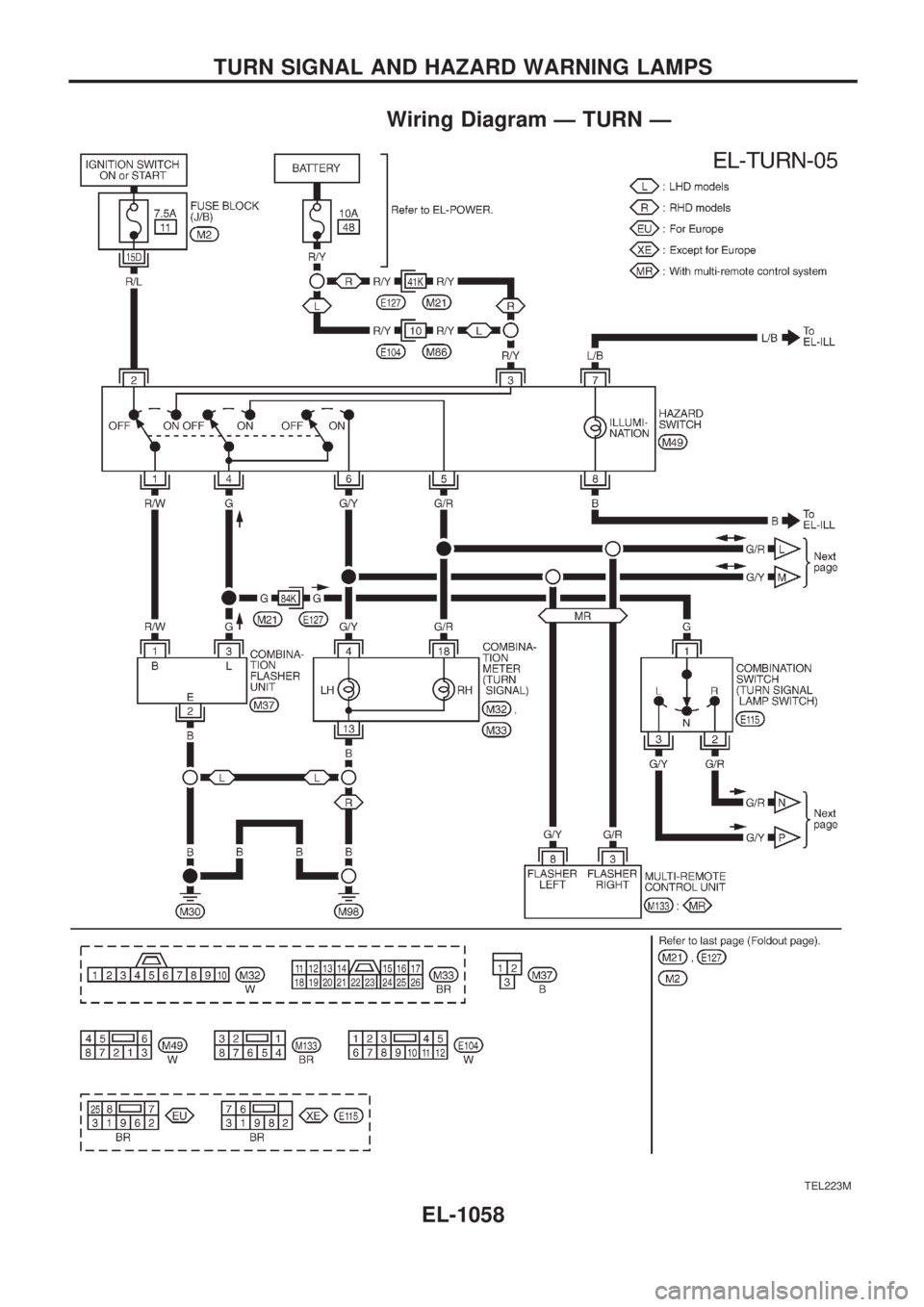
Wiring Diagram Ð TURN Ð
TEL223M
TURN SIGNAL AND HAZARD WARNING LAMPS
EL-1058
Page 569 of 1033
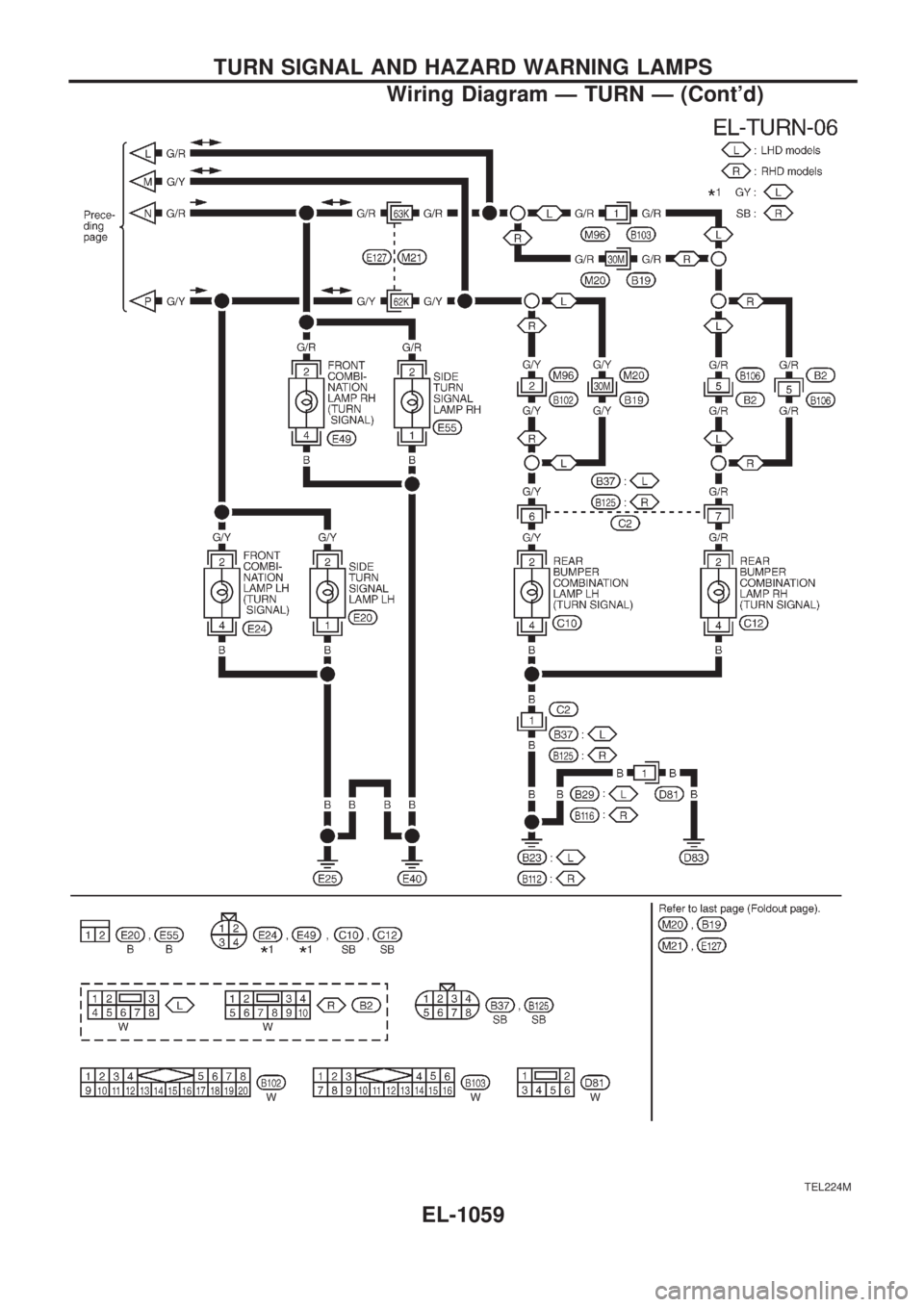
TEL224M
TURN SIGNAL AND HAZARD WARNING LAMPS
Wiring Diagram Ð TURN Ð (Cont'd)
EL-1059
Page 582 of 1033
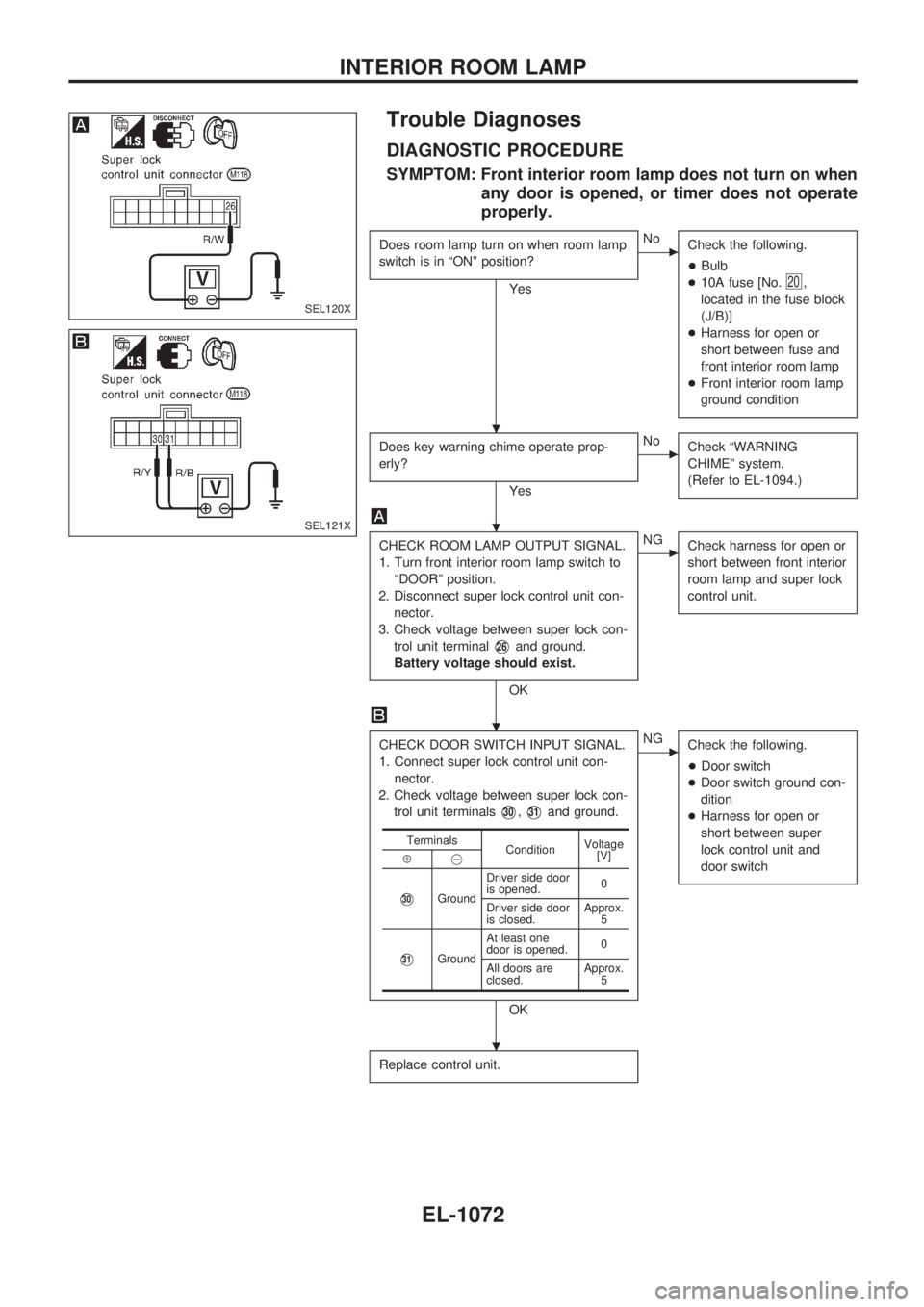
Trouble Diagnoses
DIAGNOSTIC PROCEDURE
SYMPTOM: Front interior room lamp does not turn on when
any door is opened, or timer does not operate
properly.
Does room lamp turn on when room lamp
switch is in ªONº position?
Yes
cNo
Check the following.
+Bulb
+10A fuse [No.
20,
located in the fuse block
(J/B)]
+Harness for open or
short between fuse and
front interior room lamp
+Front interior room lamp
ground condition
Does key warning chime operate prop-
erly?
Yes
cNo
Check ªWARNING
CHIMEº system.
(Refer to EL-1094.)
CHECK ROOM LAMP OUTPUT SIGNAL.
1. Turn front interior room lamp switch to
ªDOORº position.
2. Disconnect super lock control unit con-
nector.
3. Check voltage between super lock con-
trol unit terminal
V26and ground.
Battery voltage should exist.
OK
cNG
Check harness for open or
short between front interior
room lamp and super lock
control unit.
CHECK DOOR SWITCH INPUT SIGNAL.
1. Connect super lock control unit con-
nector.
2. Check voltage between super lock con-
trol unit terminals
V30,V31and ground.
OK
cNG
Check the following.
+Door switch
+Door switch ground con-
dition
+Harness for open or
short between super
lock control unit and
door switch
Replace control unit.
Terminals
ConditionVoltage
[V]
Å@
V30GroundDriver side door
is opened.0
Driver side door
is closed.Approx.
5
V31GroundAt least one
door is opened.0
All doors are
closed.Approx.
5
SEL120X
SEL121X
.
.
.
.
INTERIOR ROOM LAMP
EL-1072
Page 588 of 1033
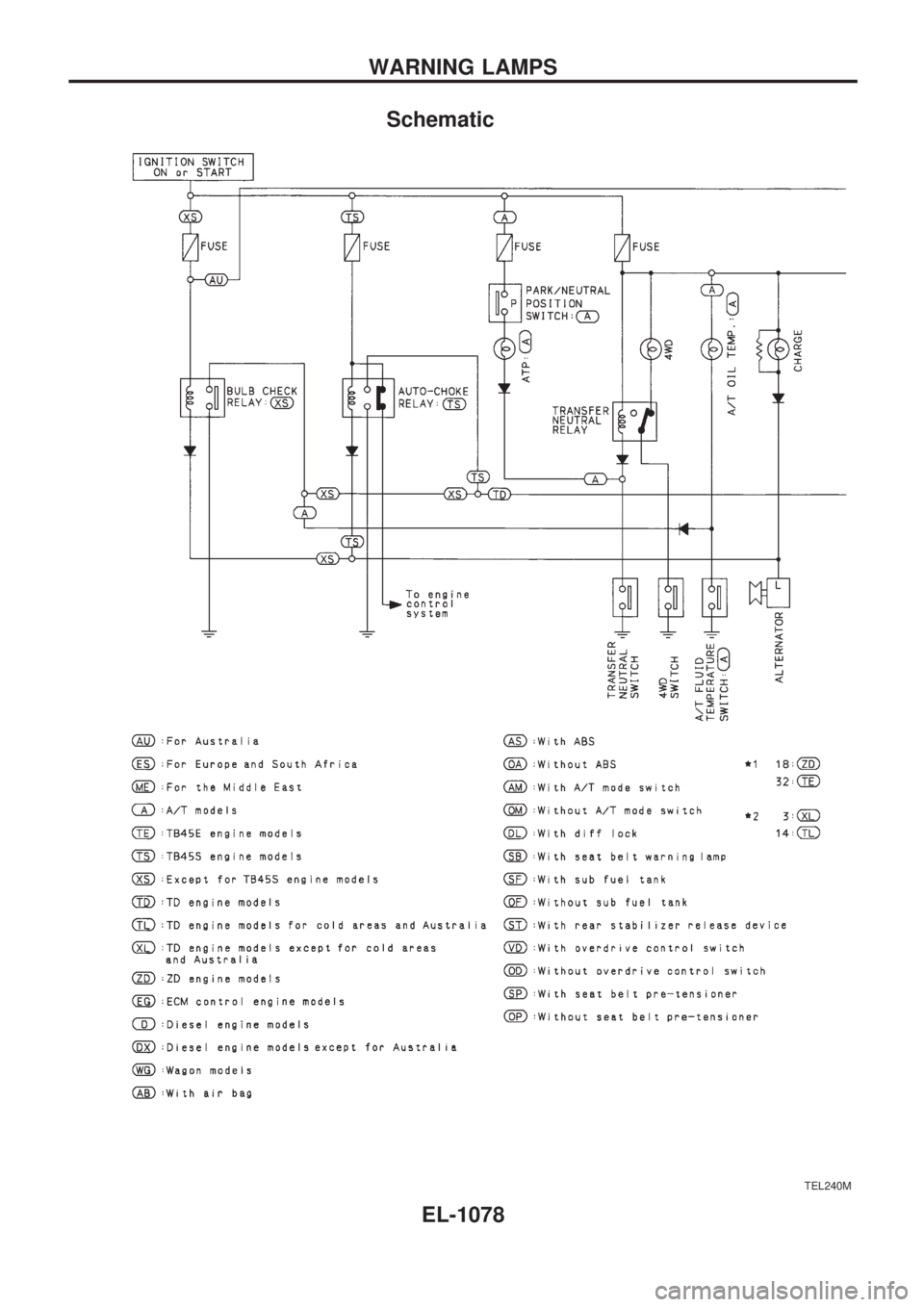
Schematic
TEL240M
WARNING LAMPS
EL-1078
Page 589 of 1033
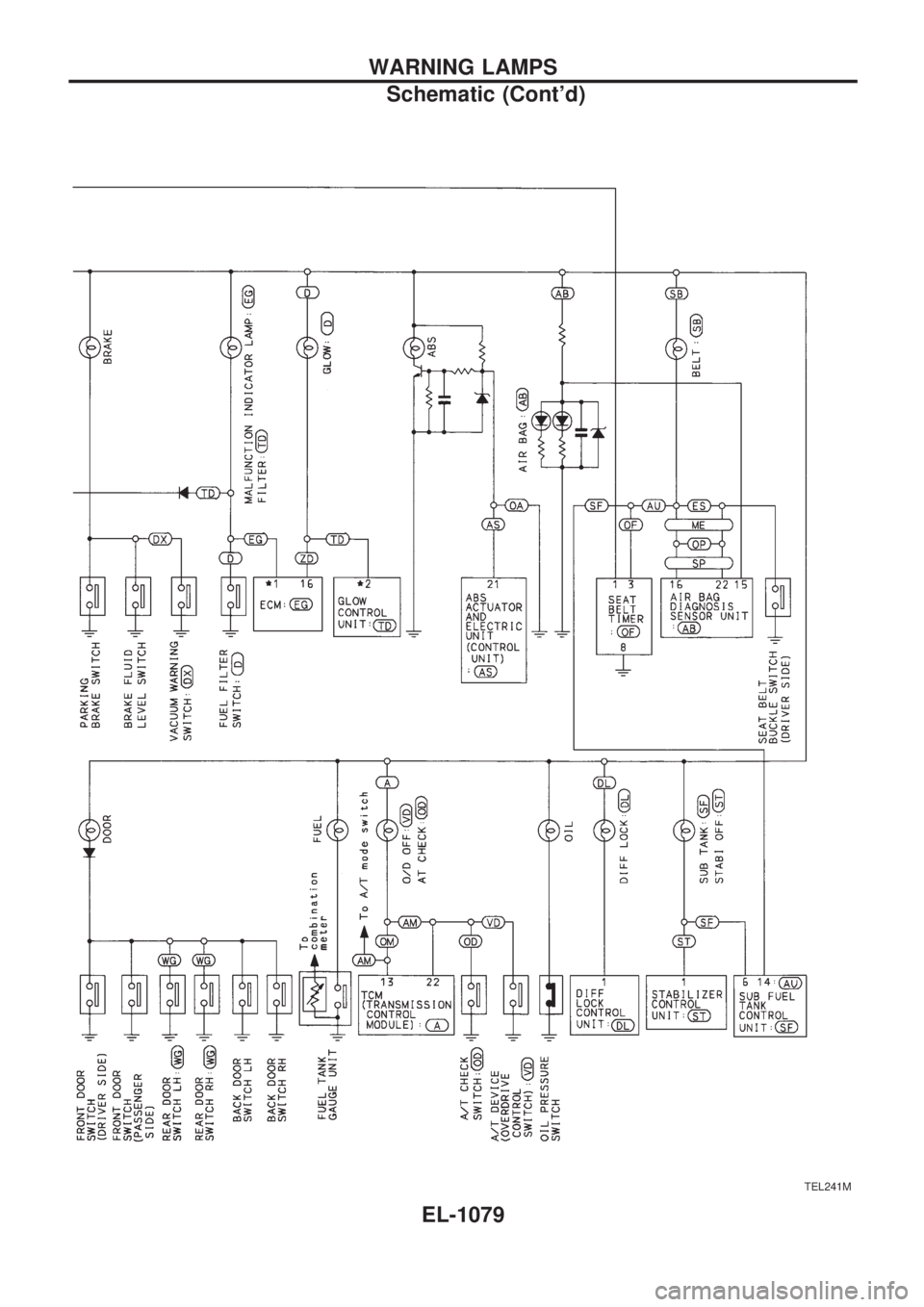
TEL241M
WARNING LAMPS
Schematic (Cont'd)
EL-1079