check engine NISSAN PATROL 2004 Electronic User Guide
[x] Cancel search | Manufacturer: NISSAN, Model Year: 2004, Model line: PATROL, Model: NISSAN PATROL 2004Pages: 579, PDF Size: 26.61 MB
Page 87 of 579
7 CHECK SHIELD CIRCUIT
1. Disconnect harness connectors E230, F12.
2. Check harness continuity between harness connector F12 terminal 5 and ground.
Refer to Wiring Diagram.
Continuity should exist.
3. Also check harness for short to power.
OK or NG
OKcGO TO 9.
NGcGO TO 8.
8 DETECT MALFUNCTIONING PART
Check the following.
+Joint connector-4
+Harness for open or short between harness connector F12 and ground
cRepair open circuit or short to power in harness or connectors.
9 CHECK MASS AIR FLOW SENSOR
1. Reconnect harness connectors disconnected.
2. Start engine and warm it up to normal operating temperature.
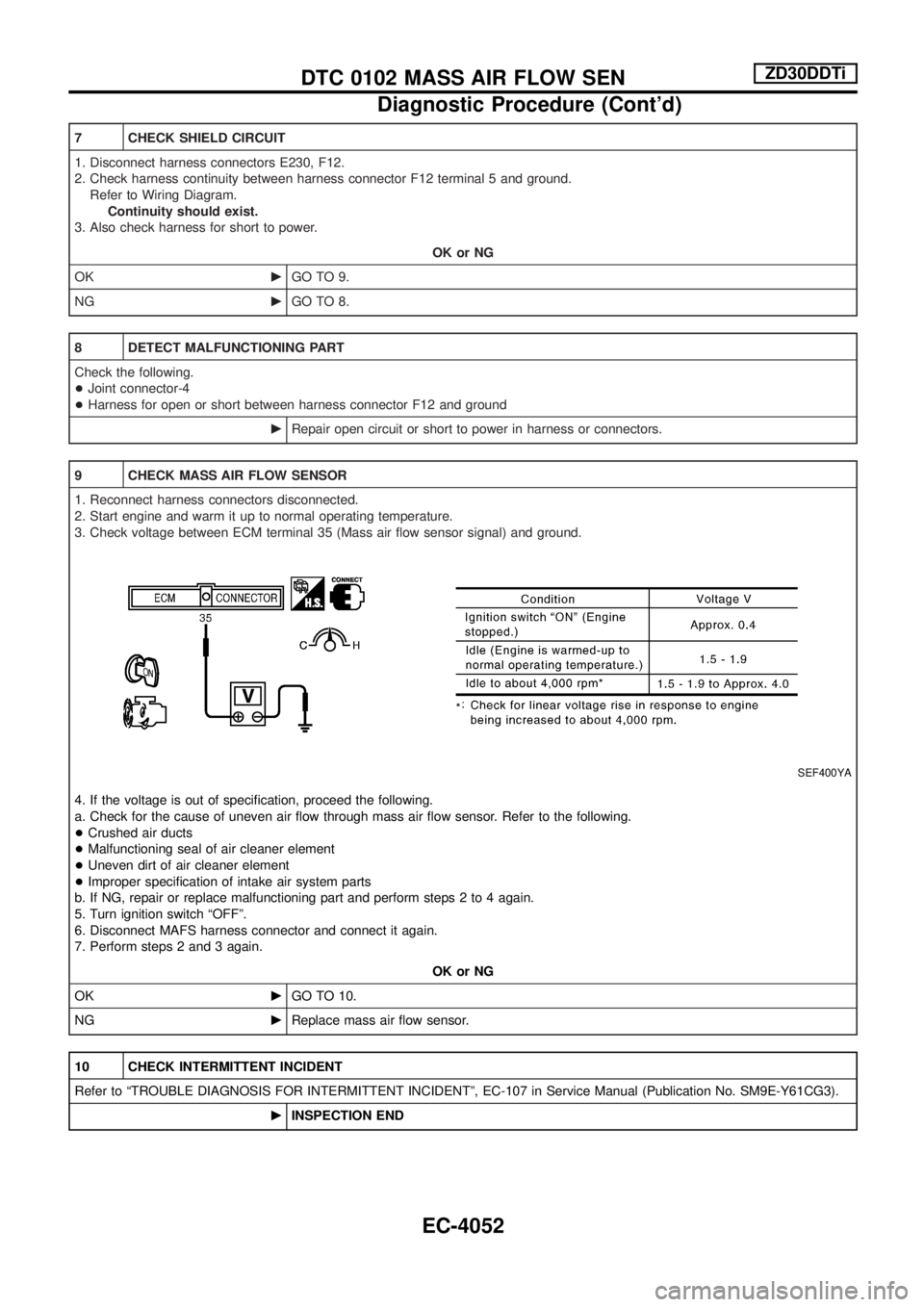
3. Check voltage between ECM terminal 35 (Mass air ¯ow sensor signal) and ground.
SEF400YA
4. If the voltage is out of speci®cation, proceed the following.
a. Check for the cause of uneven air ¯ow through mass air ¯ow sensor. Refer to the following.
+Crushed air ducts
+Malfunctioning seal of air cleaner element
+Uneven dirt of air cleaner element
+Improper speci®cation of intake air system parts
b. If NG, repair or replace malfunctioning part and perform steps 2 to 4 again.
5. Turn ignition switch ªOFFº.
6. Disconnect MAFS harness connector and connect it again.
7. Perform steps 2 and 3 again.
OK or NG
OKcGO TO 10.
NGcReplace mass air ¯ow sensor.
10 CHECK INTERMITTENT INCIDENT
Refer to ªTROUBLE DIAGNOSIS FOR INTERMITTENT INCIDENTº, EC-107 in Service Manual (Publication No. SM9E-Y61CG3).
cINSPECTION END
DTC 0102 MASS AIR FLOW SENZD30DDTi
Diagnostic Procedure (Cont'd)
EC-4052
Page 96 of 579
SECTION
EL
When you read wiring diagrams:
+ Read GI section, ªHOW TO READ WIRING DIAGRAMSº.
When you perform trouble diagnoses, read GI section, ªHOW TO FOLLOW FLOW
CHART IN TROUBLE DIAGNOSESº and ªHOW TO PERFORM EFFICIENT DIAGNOSIS
FOR AN ELECTRICAL INCIDENTº.
+ Check for any service bulletins before servicing the vehicle.
MODIFICATION NOTICE:
+ Wiring Diagrams have been changed.
CONTENTS
POWER SUPPLY ROUTING/WAGON AND
HARDTOP MODELS .................................................4005
Schematic ..............................................................4005
Wiring Diagram Ð POWER Ð..............................4006
GROUND DISTRIBUTION/WAGON AND
HARDTOP MODELS .................................................4016
Main Harness/LHD Models....................................4016
Main Harness/RHD Models ...................................4019
Engine Room Harness/LHD Models .....................4022
Engine Room Harness/RHD Models .....................4024
Body Harness/LHD Models ...................................4026
Body Harness/RHD Models...................................4028
Body No. 2 Harness/LHD Models .........................4030
Body No. 2 Harness/RHD Models.........................4031
Back Door and Rear Window Defogger Harness/
LHD Models ...........................................................4032
Back Door and Rear Window Defogger Harness/
RHD Models ..........................................................4033
COMBINATION SWITCH ...........................................4034
Check .....................................................................4034
STEERING SWITCH ..................................................4036
Check/RHD Models for Europe and LHD Models.4036
Check/RHD Models Except for Europe .................4038
HEADLAMP/WAGON AND HARDTOP MODELS
Ð Conventional Type Ð ..........................................4040
Wiring Diagram Ð H/LAMP Ð ..............................4040
HEADLAMP/WAGON AND HARDTOP MODELS
Ð Xenon Type Ð ......................................................4041
Bulb Replacement .................................................4041
Wiring Diagram Ð H/LAMP Ð ..............................4042 HEADLAMP/WAGON AND HARDTOP MODELS
Ð Headlamp Aiming Control Ð
.............................4044
Wiring Diagram Ð H/AIM Ð/Except for the
Middle East ............................................................4044
HEADLAMP/WAGON AND HARDTOP MODELS
Ð Daytime Light System Ð ....................................4047
Wiring Diagram Ð DTRL Ð ..................................4047
PARKING, LICENSE AND TAIL LAMPS/WAGON
AND HARDTOP MODELS ........................................4049
Wiring Diagram Ð TAIL/L Ð/Type A .....................4049
Wiring Diagram Ð TAIL/L Ð/Type B.....................4051
Wiring Diagram Ð TAIL/L Ð/Type C ....................4053
BACK-UP LAMP/WAGON AND HARDTOP
MODELS ....................................................................4055
Wiring Diagram Ð BACK/L Ð/LHD Models
Except TB48 Engine with A/T................................4055
Wiring Diagram Ð BACK/L Ð/LHD Models for
TB48 Engine with A/T ............................................4056
Wiring Diagram Ð BACK/L Ð/RHD Models
Except TB48 Engine with A/T................................4057
Wiring Diagram Ð BACK/L Ð/RHD Models
for TB48 Engine with A/T ......................................4058
STOP LAMP/WAGON AND HARDTOP MODELS ...4059
Wiring Diagram Ð STOP/L Ð/Type A ..................4059
Wiring Diagram Ð STOP/L Ð/Type B ..................4060
FRONT FOG LAMP/WAGON AND HARDTOP
MODELS ....................................................................4061
Wiring Diagram Ð F/FOG Ð/Except for Europe
and China ..............................................................4061
EL-4001
Page 284 of 579
Self-Diagnosis Function
DESCRIPTION
+Diagnosis function consists of the self-diagnosis mode performed automatically and the CONFIRMATION/
ADJUSTMENT mode operated manually.
+ Self-diagnosis mode checks for connections between the units constituting this system, analyzes each
individual unit at the same time, and displays the results on the LCD screen.
+ CONFIRMATION/ADJUSTMENT mode is used to perform trouble diagnosis that require operation and
judgment by an operator (malfunction that cannot be automatically judged by the system), to check/change
the set value, and to display the History of Errors of the navigation system.
DIAGNOSIS ITEM
Mode Description
Self-diagnosis +
NAVI Control unit diagnosis (DVD-ROM drive will not be diagnosed when no
map DVD-ROM is in it.).
+ Performs diagnosis of each unit and connections between control unit and
GPS antenna, as well as between control unit and each unit.
Con®rmation/
Adjustment Display
Color tone and shading of the screen can be checked by the display of a color
bar and a gray scale.
Vehicle signals Analyzes the following vehicle signals: Vehicle speed signal, light signal, ignition
switch signal, and reverse signal.
Navigation Display Longi-
tude & Lati-
tude
Display the map. Use the joystick to adjust position. Longitude and latitude will be
displayed.
Speed Calibra-
tion Under ordinary conditions, the navigation system distance measuring function will
automatically compensate for minute decreases in wheel and tire diameter
caused by tire wear or low-pressure. Speed calibration immediately restores sys-
tem accuracy in cases such as when distance calibration is needed because of
the use of tire chains in inclement weather.
Angle Adjust-
ment Corrects difference between actual turning angle of a vehicle and turning angle of
the car mark on the display.
Initialize Loca-
tion This mode is for initializing the current location. Use when the vehicle is trans-
ported a long distance on a trailer, etc.
History of Errors Diagnosis results previously stored in the memory (before turning ignition switch
ON) are displayed in this mode. Time and location when/where the errors
occurred are also displayed.
Self-Diagnosis Mode
OPERATION PROCEDURE
1. Start the engine.
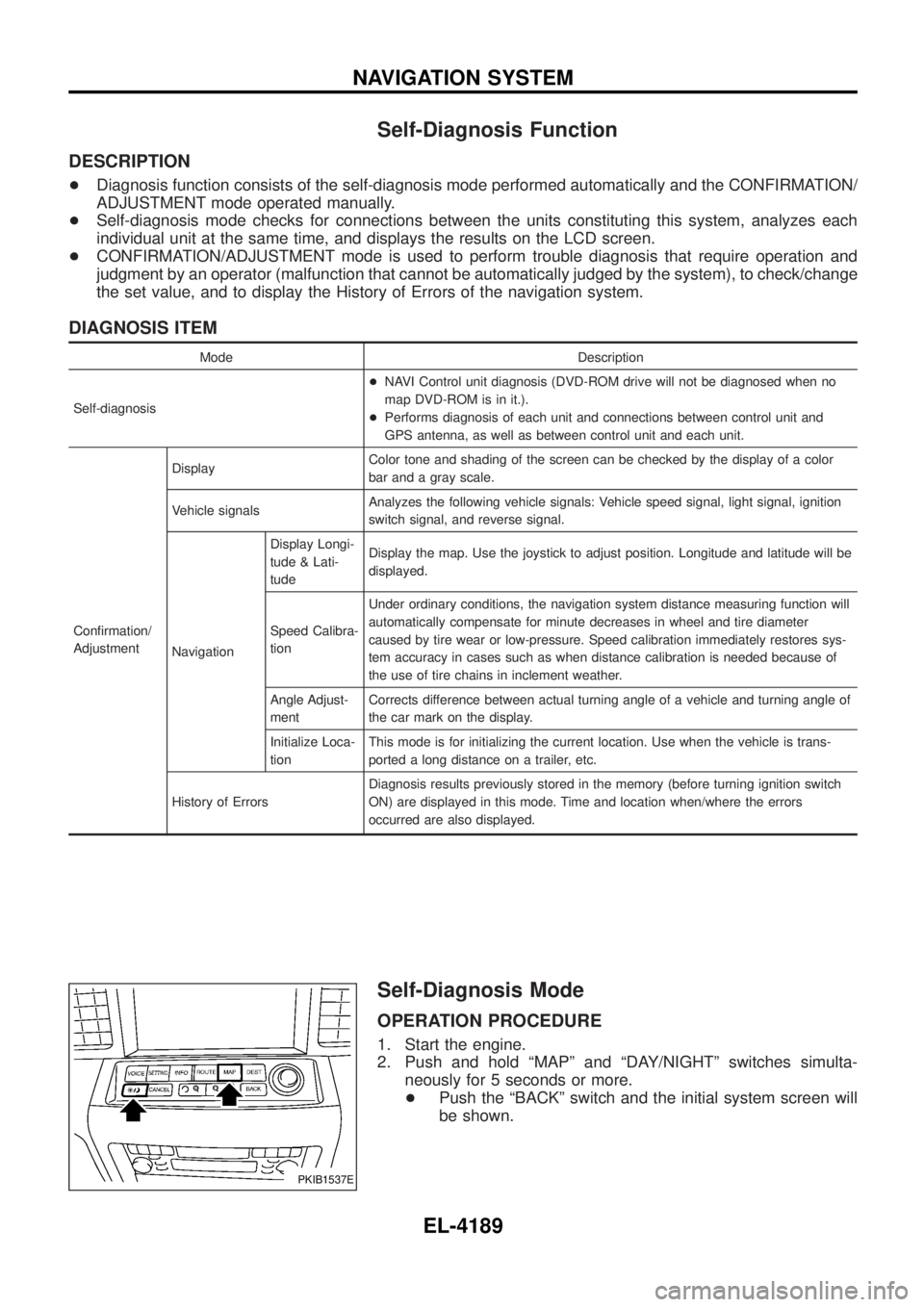
2. Push and hold ªMAPº and ªDAY/NIGHTº switches simulta-
neously for 5 seconds or more.
+ Push the ªBACKº switch and the initial system screen will
be shown.
PKIB1537E
NAVIGATION SYSTEM
EL-4189
Page 287 of 579
Self-diagnosis codes
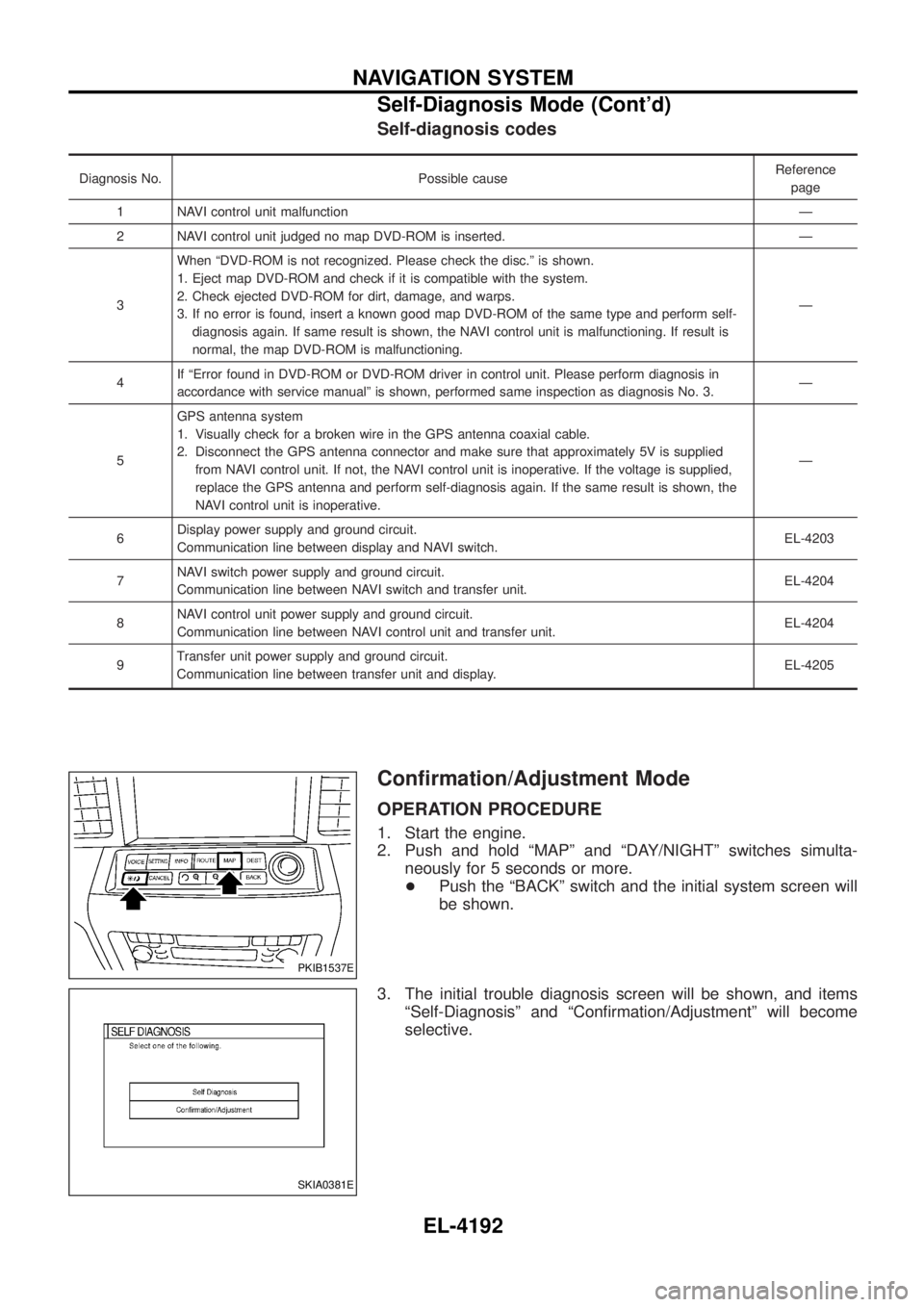
Diagnosis No. Possible causeReference
page
1 NAVI control unit malfunction Ð
2 NAVI control unit judged no map DVD-ROM is inserted. Ð
3 When ªDVD-ROM is not recognized. Please check the disc.º is shown.
1. Eject map DVD-ROM and check if it is compatible with the system.
2. Check ejected DVD-ROM for dirt, damage, and warps.
3. If no error is found, insert a known good map DVD-ROM of the same type and perform self-
diagnosis again. If same result is shown, the NAVI control unit is malfunctioning. If result is
normal, the map DVD-ROM is malfunctioning. Ð
4 If ªError found in DVD-ROM or DVD-ROM driver in control unit. Please perform diagnosis in
accordance with service manualº is shown, performed same inspection as diagnosis No. 3. Ð
5 GPS antenna system
1. Visually check for a broken wire in the GPS antenna coaxial cable.
2. Disconnect the GPS antenna connector and make sure that approximately 5V is supplied
from NAVI control unit. If not, the NAVI control unit is inoperative. If the voltage is supplied,
replace the GPS antenna and perform self-diagnosis again. If the same result is shown, the
NAVI control unit is inoperative. Ð
6 Display power supply and ground circuit.
Communication line between display and NAVI switch. EL-4203
7 NAVI switch power supply and ground circuit.
Communication line between NAVI switch and transfer unit. EL-4204
8 NAVI control unit power supply and ground circuit.
Communication line between NAVI control unit and transfer unit. EL-4204
9 Transfer unit power supply and ground circuit.
Communication line between transfer unit and display. EL-4205
Con®rmation/Adjustment Mode
OPERATION PROCEDURE
1. Start the engine.
2. Push and hold ªMAPº and ªDAY/NIGHTº switches simulta-
neously for 5 seconds or more.
+ Push the ªBACKº switch and the initial system screen will
be shown.
3. The initial trouble diagnosis screen will be shown, and items ªSelf-Diagnosisº and ªCon®rmation/Adjustmentº will become
selective.
PKIB1537E
SKIA0381E
NAVIGATION SYSTEM
Self-Diagnosis Mode (Cont'd)
EL-4192
Page 302 of 579
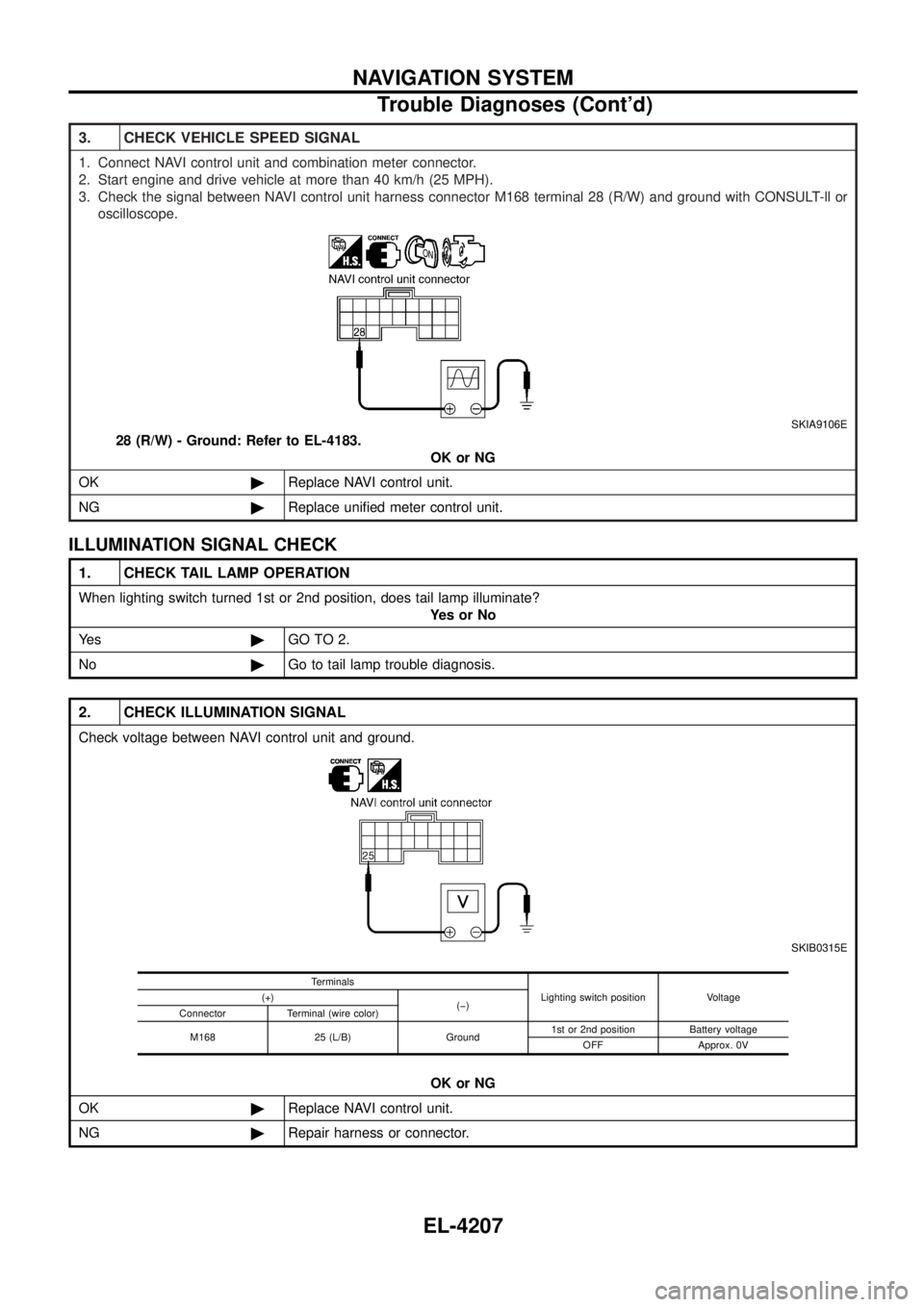
3. CHECK VEHICLE SPEED SIGNAL
1. Connect NAVI control unit and combination meter connector.
2. Start engine and drive vehicle at more than 40 km/h (25 MPH).
3. Check the signal between NAVI control unit harness connector M168 terminal 28 (R/W) and ground with CONSULT-ll oroscilloscope.
SKIA9106E
28 (R/W) - Ground: Refer to EL-4183. OK or NG
OK ©Replace NAVI control unit.
NG ©Replace uni®ed meter control unit.
ILLUMINATION SIGNAL CHECK
1. CHECK TAIL LAMP OPERATION
When lighting switch turned 1st or 2nd position, does tail lamp illuminate?
YesorNo
Ye s ©GO TO 2.
No ©Go to tail lamp trouble diagnosis.
2. CHECK ILLUMINATION SIGNAL
Check voltage between NAVI control unit and ground.
SKIB0315E
OK or NG
OK ©Replace NAVI control unit.
NG ©Repair harness or connector.
Terminals
Lighting switch position Voltage
(+)
(þ)
Connector Terminal (wire color)
M168 25 (L/B) Ground 1st or 2nd position Battery voltage
OFF Approx. 0V
NAVIGATION SYSTEM
Trouble Diagnoses (Cont'd)
EL-4207
Page 471 of 579
GI
OUTLINE OF MODIFICATIONS:
+Manual transmission gear ratio has been modi®ed corresponding to the increase of ZD30DDTi engine
horsepower for Europe.
+ Navigation system has been adopted for Europe.
APPLIED FROM:
Wagon and Hardtop models
For the Middle East:
JN8BY15Y*5X507001
JN6BY11Y*5X507001
JN8CY15Y*5X470001
JN6CY11Y*5X470001
JN8BY14Y*5X520001
JN8FY15Y*5X540001
For Europe:
JN1TESY61U0140001
JN1KESY61U0140001
JN1TFSY61U0010001
For Israel:
JN1TESY61*5X806001
JN1KESY61*5X806001
CONTENTS
CONSULT-II CHECKING SYSTEM ...........................4002
Function and System Application ..........................4002
Nickel Metal Hydride Battery Replacement...........4002
Checking Equipment..............................................4003
CONSULT-II Data Link Connector (DLC) Circuit ..4003 IDENTIFICATION INFORMATION
.............................4005
Model Variation ......................................................4005
Identi®cation Number .............................................4007
Dimensions ............................................................4008
Wheels & Tires ......................................................4009
GI-4001
Page 472 of 579
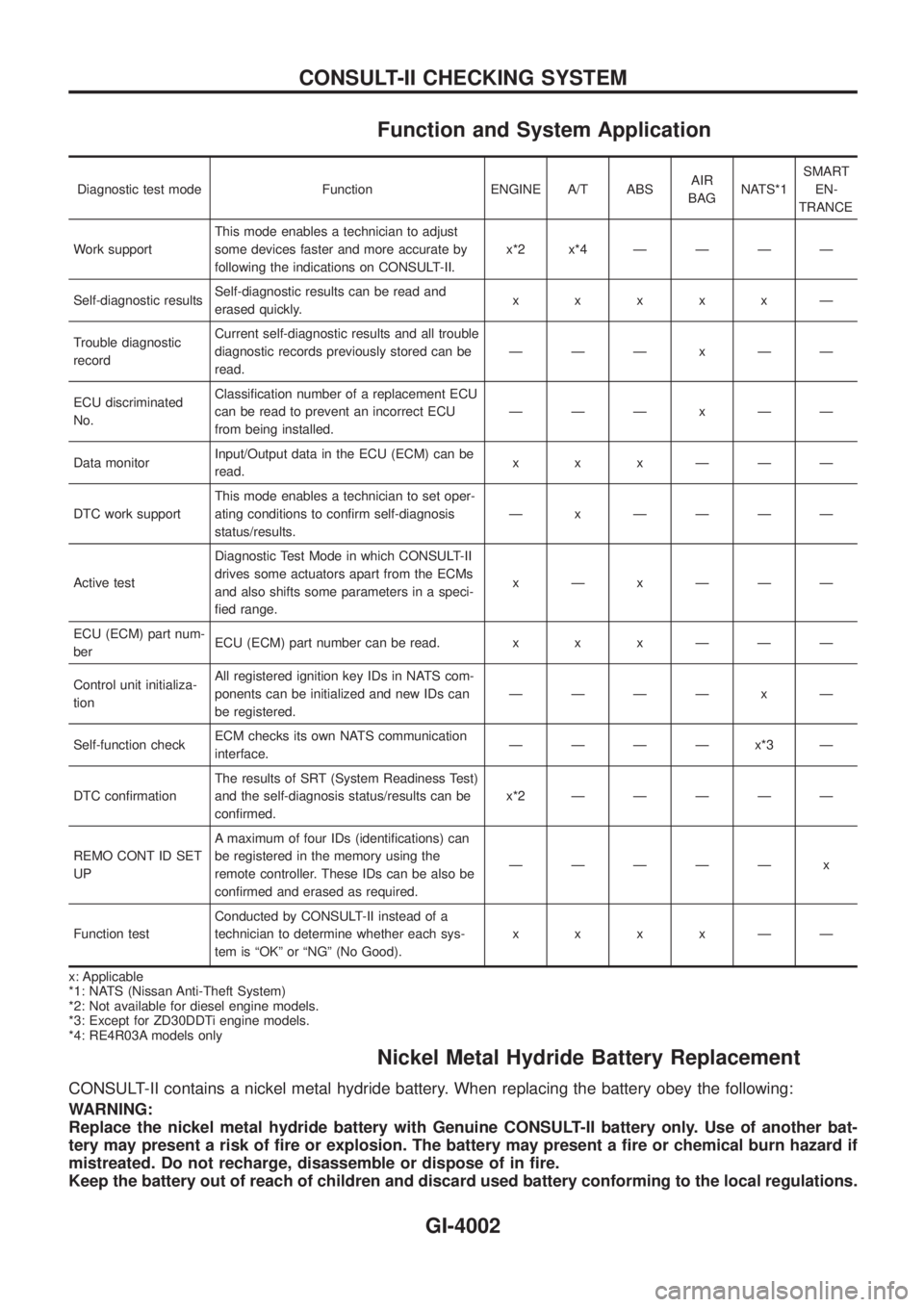
Function and System Application
Diagnostic test mode Function ENGINE A/T ABSAIR
BAGNATS*1SMART
EN-
TRANCE
Work supportThis mode enables a technician to adjust
some devices faster and more accurate by
following the indications on CONSULT-II.x*2x*4ÐÐÐÐ
Self-diagnostic resultsSelf-diagnostic results can be read and
erased quickly.xxxxxÐ
Trouble diagnostic
recordCurrent self-diagnostic results and all trouble
diagnostic records previously stored can be
read.ÐÐÐxÐÐ
ECU discriminated
No.Classi®cation number of a replacement ECU
can be read to prevent an incorrect ECU
from being installed.ÐÐÐxÐÐ
Data monitorInput/Output data in the ECU (ECM) can be
read.xxxÐÐÐ
DTC work supportThis mode enables a technician to set oper-
ating conditions to con®rm self-diagnosis
status/results.Ð x ÐÐÐÐ
Active testDiagnostic Test Mode in which CONSULT-II
drives some actuators apart from the ECMs
and also shifts some parameters in a speci-
®ed range.xÐxÐÐÐ
ECU (ECM) part num-
berECU (ECM) part number can be read. x x x Ð Ð Ð
Control unit initializa-
tionAll registered ignition key IDs in NATS com-
ponents can be initialized and new IDs can
be registered.ÐÐÐÐ x Ð
Self-function checkECM checks its own NATS communication
interface.ÐÐÐÐx*3Ð
DTC con®rmationThe results of SRT (System Readiness Test)
and the self-diagnosis status/results can be
con®rmed.x*2ÐÐÐÐÐ
REMO CONT ID SET
UPA maximum of four IDs (identi®cations) can
be registered in the memory using the
remote controller. These IDs can be also be
con®rmed and erased as required.ÐÐÐÐÐ x
Function testConducted by CONSULT-II instead of a
technician to determine whether each sys-
tem is ªOKº or ªNGº (No Good).xxxxÐÐ
x: Applicable
*1: NATS (Nissan Anti-Theft System)
*2: Not available for diesel engine models.
*3: Except for ZD30DDTi engine models.
*4: RE4R03A models only
Nickel Metal Hydride Battery Replacement
CONSULT-II contains a nickel metal hydride battery. When replacing the battery obey the following:
WARNING:
Replace the nickel metal hydride battery with Genuine CONSULT-II battery only. Use of another bat-
tery may present a risk of ®re or explosion. The battery may present a ®re or chemical burn hazard if
mistreated. Do not recharge, disassemble or dispose of in ®re.
Keep the battery out of reach of children and discard used battery conforming to the local regulations.
CONSULT-II CHECKING SYSTEM
GI-4002
Page 473 of 579
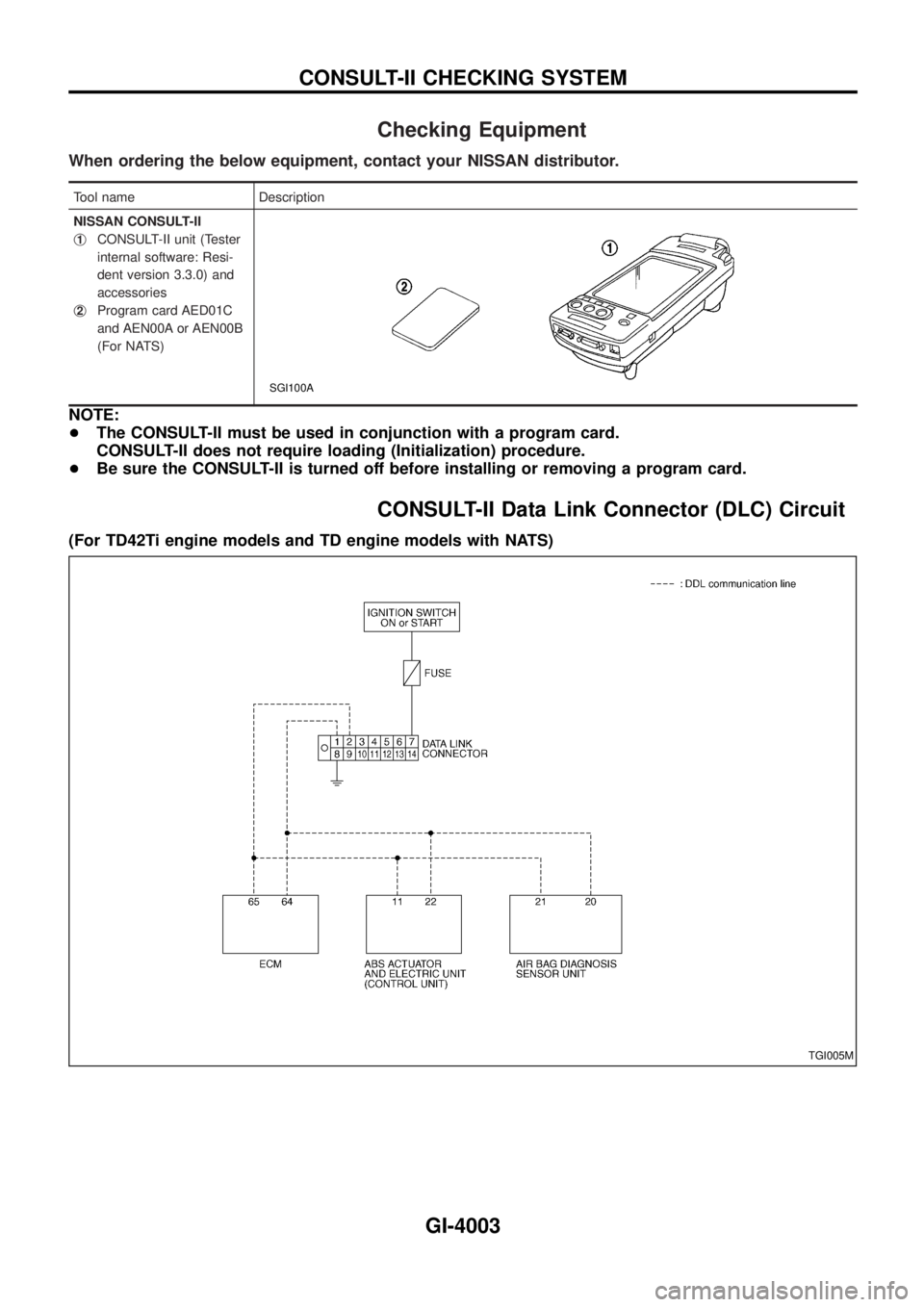
Checking Equipment
When ordering the below equipment, contact your NISSAN distributor.
Tool name Description
NISSAN CONSULT-II
j
1CONSULT-II unit (Tester
internal software: Resi-
dent version 3.3.0) and
accessories
j
2Program card AED01C
and AEN00A or AEN00B
(For NATS)
SGI100A
NOTE:
+The CONSULT-II must be used in conjunction with a program card.
CONSULT-II does not require loading (Initialization) procedure.
+Be sure the CONSULT-II is turned off before installing or removing a program card.
CONSULT-II Data Link Connector (DLC) Circuit
(For TD42Ti engine models and TD engine models with NATS)
TGI005M
CONSULT-II CHECKING SYSTEM
GI-4003
Page 474 of 579
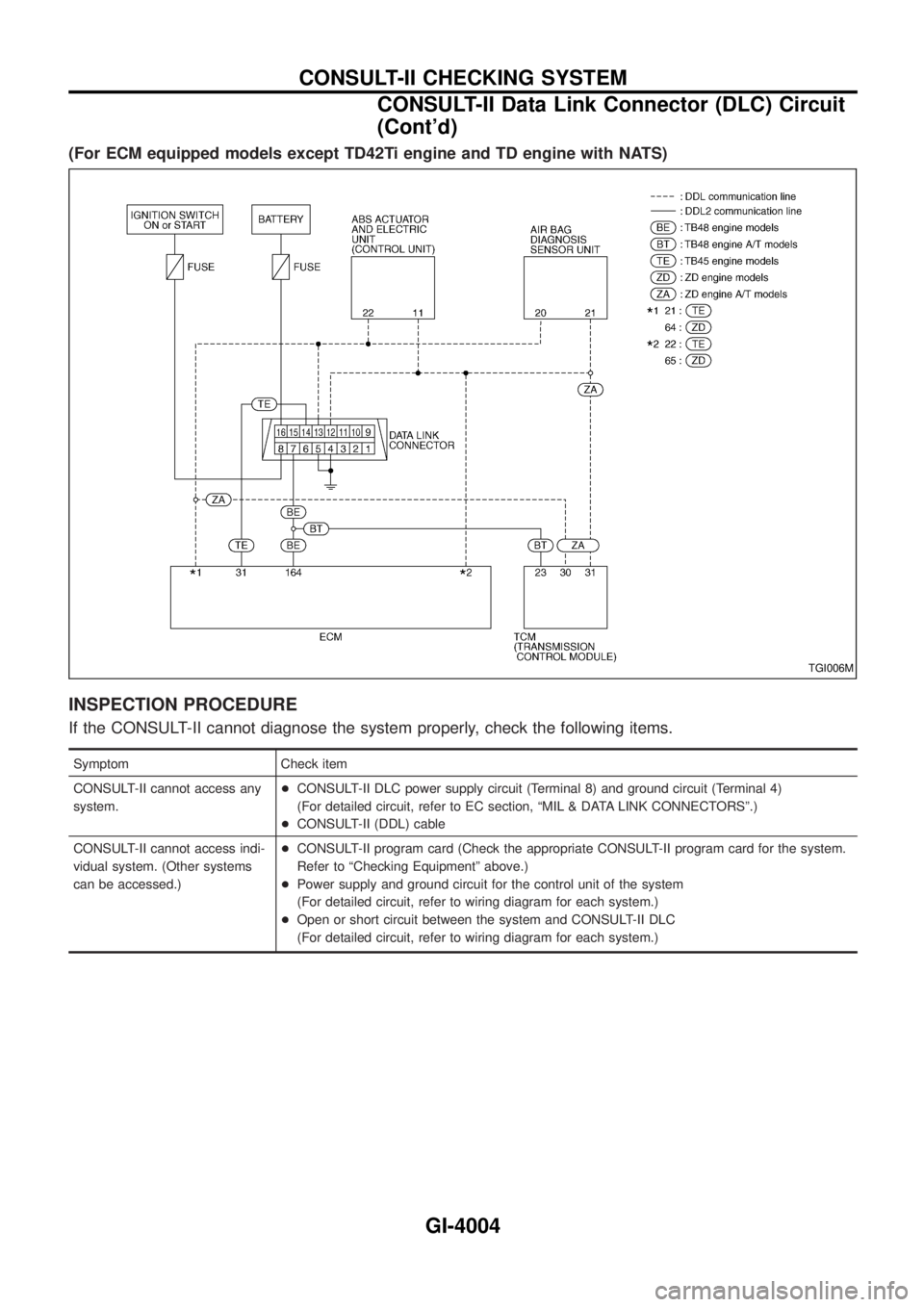
(For ECM equipped models except TD42Ti engine and TD engine with NATS)
INSPECTION PROCEDURE
If the CONSULT-II cannot diagnose the system properly, check the following items.
Symptom Check item
CONSULT-II cannot access any
system.+CONSULT-II DLC power supply circuit (Terminal 8) and ground circuit (Terminal 4)
(For detailed circuit, refer to EC section, ªMIL & DATA LINK CONNECTORSº.)
+CONSULT-II (DDL) cable
CONSULT-II cannot access indi-
vidual system. (Other systems
can be accessed.)+CONSULT-II program card (Check the appropriate CONSULT-II program card for the system.
Refer to ªChecking Equipmentº above.)
+Power supply and ground circuit for the control unit of the system
(For detailed circuit, refer to wiring diagram for each system.)
+Open or short circuit between the system and CONSULT-II DLC
(For detailed circuit, refer to wiring diagram for each system.)
TGI006M
CONSULT-II CHECKING SYSTEM
CONSULT-II Data Link Connector (DLC) Circuit
(Cont'd)
GI-4004
Page 480 of 579

HEATER&
AIR CONDITIONER
SECTION
HA
MODIFICATION NOTICE:
+ Wiring diagram has been changed.
+ Automatic A/C controller has been changed.
+ Front thermo amp. for auto A/C has been eliminated.
CONTENTS
AUTO
DESCRIPTION ...........................................................4002
Features (TB48 Engine Models) ...........................4002
REAR HEATER
TROUBLE DIAGNOSES ...........................................4003
Wiring Diagram Ð R/HEAT Ð/LHD Models .........4003
Wiring Diagram Ð R/HEAT Ð/RHD Models .........4004
MANUAL
TROUBLE DIAGNOSES ...........................................4005
Wiring Diagram Ð A/C, M Ð/Wagon and
Hardtop Models with ZD Engine ...........................4005
AUTO
DESCRIPTION...........................................................4007
Control Operation ..................................................4007
TROUBLE DIAGNOSES ...........................................4008
Circuit Diagram Ð A/C, A Ð/TB48 Engine ...........4008
Wiring Diagram Ð A/C, A Ð/TB48 Engine ...........4009
Circuit Diagram Ð A/C, A Ð/TB45 Engine ...........4013
Wiring Diagram Ð A/C, A Ð/TB45 Engine ...........4014
Circuit Diagram Ð A/C, A Ð/TD Engine ...............4017
Wiring Diagram Ð A/C, A Ð/TD Engine ...............4018
Circuit Diagram Ð A/C, A Ð/ZD Engine ...............4021
Wiring Diagram Ð A/C, A Ð/ZD Engine ...............4022
Self-diagnosis ........................................................4025
Operational Check .................................................4032
A/C System ............................................................4034 Mode Door Motor...................................................4035
Air Mix Door Motor ................................................4036
Intake Door Motor ..................................................4037
Blower Motor..........................................................4038
Magnet Clutch........................................................4039
Insufficient Cooling ................................................4052
Insufficient Heating ................................................4053
Self-diagnosis ........................................................4054
REAR COOLER
TROUBLE DIAGNOSES ...........................................4055
Wiring Diagram Ð R/COOL Ð/LHD Models with
Front Auto A/C .......................................................4055
Wiring Diagram Ð R/COOL Ð/LHD Models with
Front Manual A/C Except for TB45E Engine ........4057
Wiring Diagram Ð R/COOL Ð/LHD Models with
Front Manual A/C for TB45E Engine.....................4059
Wiring Diagram Ð R/COOL Ð/RHD Models with
Front Auto A/C .......................................................4061
Wiring Diagram Ð R/COOL Ð/RHD Models with
Front Manual A/C...................................................4063
COOL BOX
TROUBLE DIAGNOSES ...........................................4065
Wiring Diagram Ð COOL/B Ð/All Engines
Except TB48 and TB45E Wagon Models for the
Middle East ............................................................4065
Wiring Diagram Ð COOL/B Ð/TB48 and TB45E
Engine Wagon Models for the Middle East...........4066
HA-4001