ignition NISSAN PATROL 2004 Electronic Owner's Manual
[x] Cancel search | Manufacturer: NISSAN, Model Year: 2004, Model line: PATROL, Model: NISSAN PATROL 2004Pages: 579, PDF Size: 26.61 MB
Page 101 of 579

Wiring Diagram Ð POWER Ð
BATTERY POWER SUPPLY Ð IGNITION SW. IN ANY POSITION
TEL962M
POWER SUPPLY ROUTING/WAGON AND HARDTOP MODELS
EL-4006
Page 106 of 579

ACCESSORY POWER SUPPLY Ð IGNITION SW. IN ªACCº OR ªONº
TEL967M
POWER SUPPLY ROUTING/WAGON AND HARDTOP MODELS
Wiring Diagram Ð POWER Ð (Cont'd)EL-4011
Page 107 of 579

IGNITION POWER SUPPLY Ð IGNITION SW. IN ªONº AND/OR ªSTARTº
TEL968M
POWER SUPPLY ROUTING/WAGON AND HARDTOP MODELS
Wiring Diagram Ð POWER Ð (Cont'd)EL-4012
Page 278 of 579
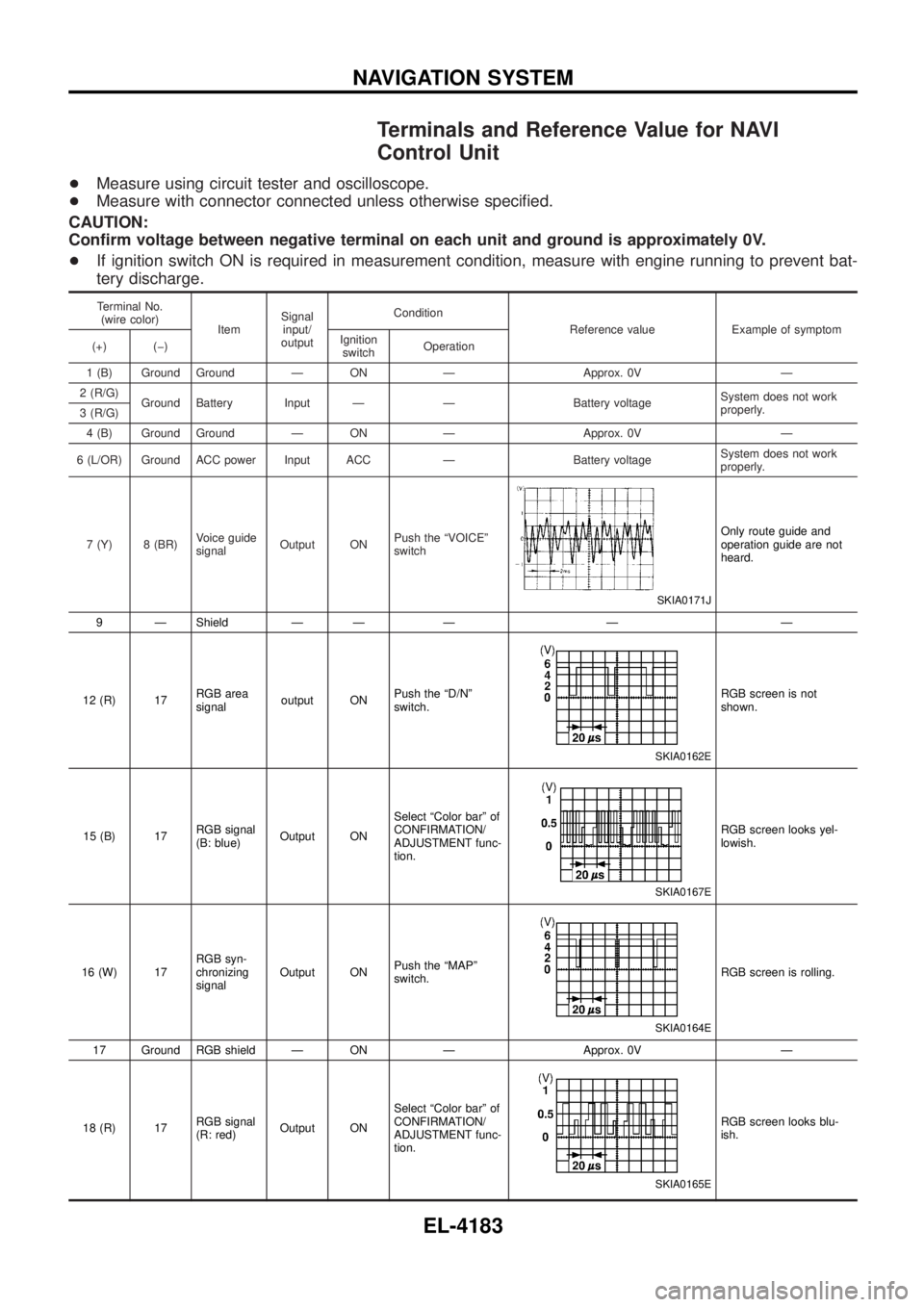
Terminals and Reference Value for NAVI
Control Unit
+Measure using circuit tester and oscilloscope.
+ Measure with connector connected unless otherwise speci®ed.
CAUTION:
Con®rm voltage between negative terminal on each unit and ground is approximately 0V.
+ If ignition switch ON is required in measurement condition, measure with engine running to prevent bat-
tery discharge.
Terminal No.
(wire color) ItemSignal
input/
output Condition
Reference value Example of symptom
(+) (þ) Ignition
switch Operation
1 (B) Ground Ground Ð ON Ð Approx. 0V Ð
2 (R/G) Ground Battery Input Ð Ð Battery voltage System does not work
properly.
3 (R/G)
4 (B) Ground Ground Ð ON Ð Approx. 0V Ð
6 (L/OR) Ground ACC power Input ACC Ð Battery voltage System does not work
properly.
7 (Y) 8 (BR) Voice guide
signalOutput ON Push the ªVOICEº
switch
SKIA0171J
Only route guide and
operation guide are not
heard.
9 Ð Shield Ð Ð Ð Ð Ð
12 (R) 17 RGB area
signaloutput ON Push the ªD/Nº
switch.
SKIA0162E
RGB screen is not
shown.
15 (B) 17 RGB signal
(B: blue)Output ON Select ªColor barº of
CONFIRMATION/
ADJUSTMENT func-
tion.
SKIA0167E
RGB screen looks yel-
lowish.
16 (W) 17 RGB syn-
chronizing
signalOutput ON
Push the ªMAPº
switch.
SKIA0164E
RGB screen is rolling.
17 Ground RGB shield Ð ON Ð Approx. 0V Ð
18 (R) 17 RGB signal
(R: red)Output ON Select ªColor barº of
CONFIRMATION/
ADJUSTMENT func-
tion.
SKIA0165E
RGB screen looks blu-
ish.
NAVIGATION SYSTEM
EL-4183
Page 279 of 579
Terminal No.(wire color) ItemSignal
input/
output Condition
Reference value Example of symptom
(+) (þ) Ignition
switch Operation
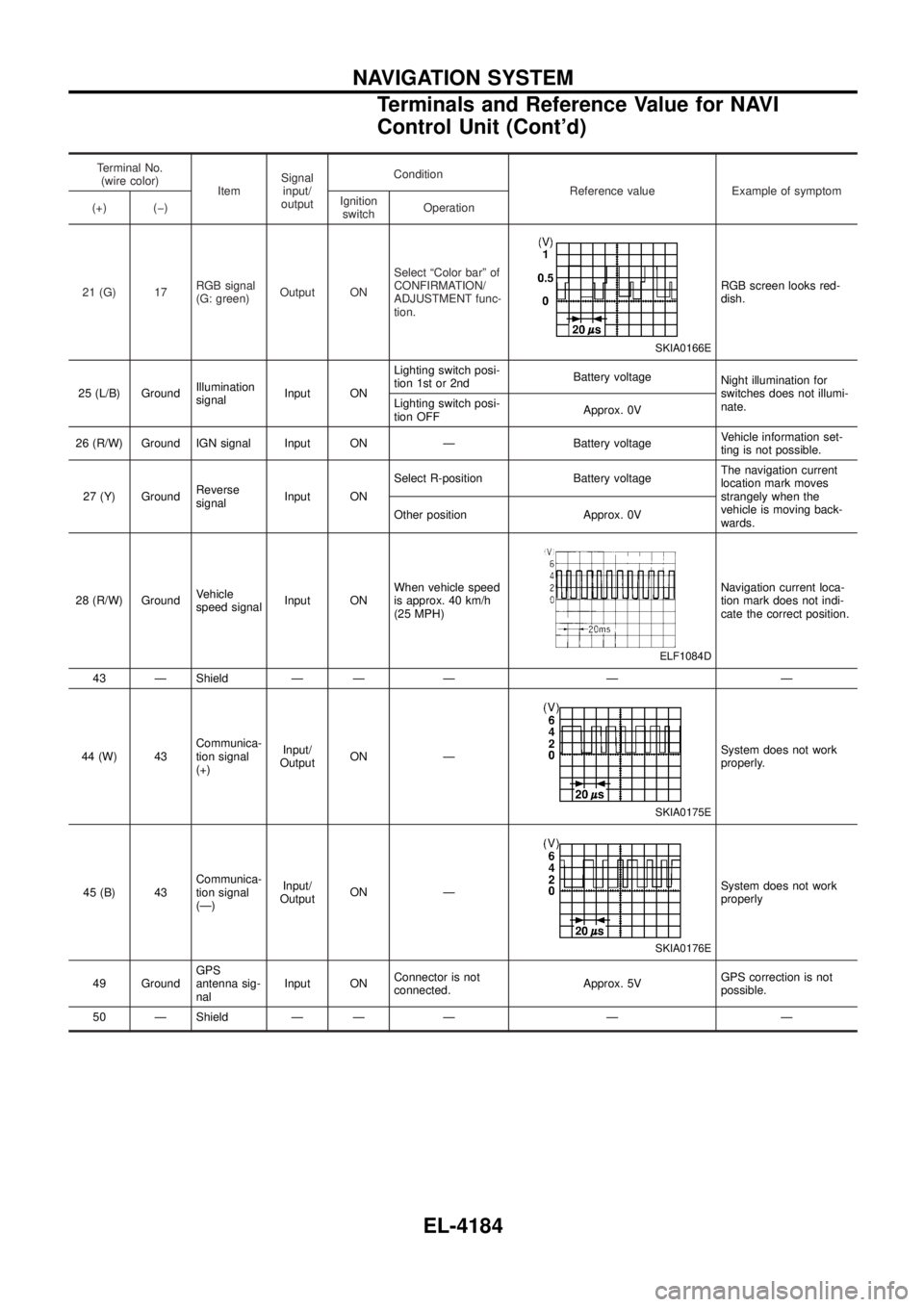
21 (G) 17 RGB signal
(G: green)Output ON Select ªColor barº of
CONFIRMATION/
ADJUSTMENT func-
tion.
SKIA0166E
RGB screen looks red-
dish.
25 (L/B) Ground Illumination
signalInput ON Lighting switch posi-
tion 1st or 2nd
Battery voltage
Night illumination for
switches does not illumi-
nate.
Lighting switch posi-
tion OFF Approx. 0V
26 (R/W) Ground IGN signal Input ON Ð Battery voltage Vehicle information set-
ting is not possible.
27 (Y) Ground Reverse
signalInput ON Select R-position Battery voltage
The navigation current
location mark moves
strangely when the
vehicle is moving back-
wards.
Other position Approx. 0V
28 (R/W) Ground Vehicle
speed signalInput ON When vehicle speed
is approx. 40 km/h
(25 MPH)
ELF1084D
Navigation current loca-
tion mark does not indi-
cate the correct position.
43 Ð Shield Ð Ð Ð Ð Ð
44 (W) 43 Communica-
tion signal
(+)Input/
Output ON Ð
SKIA0175E
System does not work
properly.
45 (B) 43 Communica-
tion signal
(Ð)Input/
Output ON Ð
SKIA0176E
System does not work
properly
49 Ground GPS
antenna sig-
nalInput ON
Connector is not
connected. Approx. 5VGPS correction is not
possible.
50 Ð Shield Ð Ð Ð Ð Ð
NAVIGATION SYSTEM
Terminals and Reference Value for NAVI
Control Unit (Cont'd)
EL-4184
Page 280 of 579
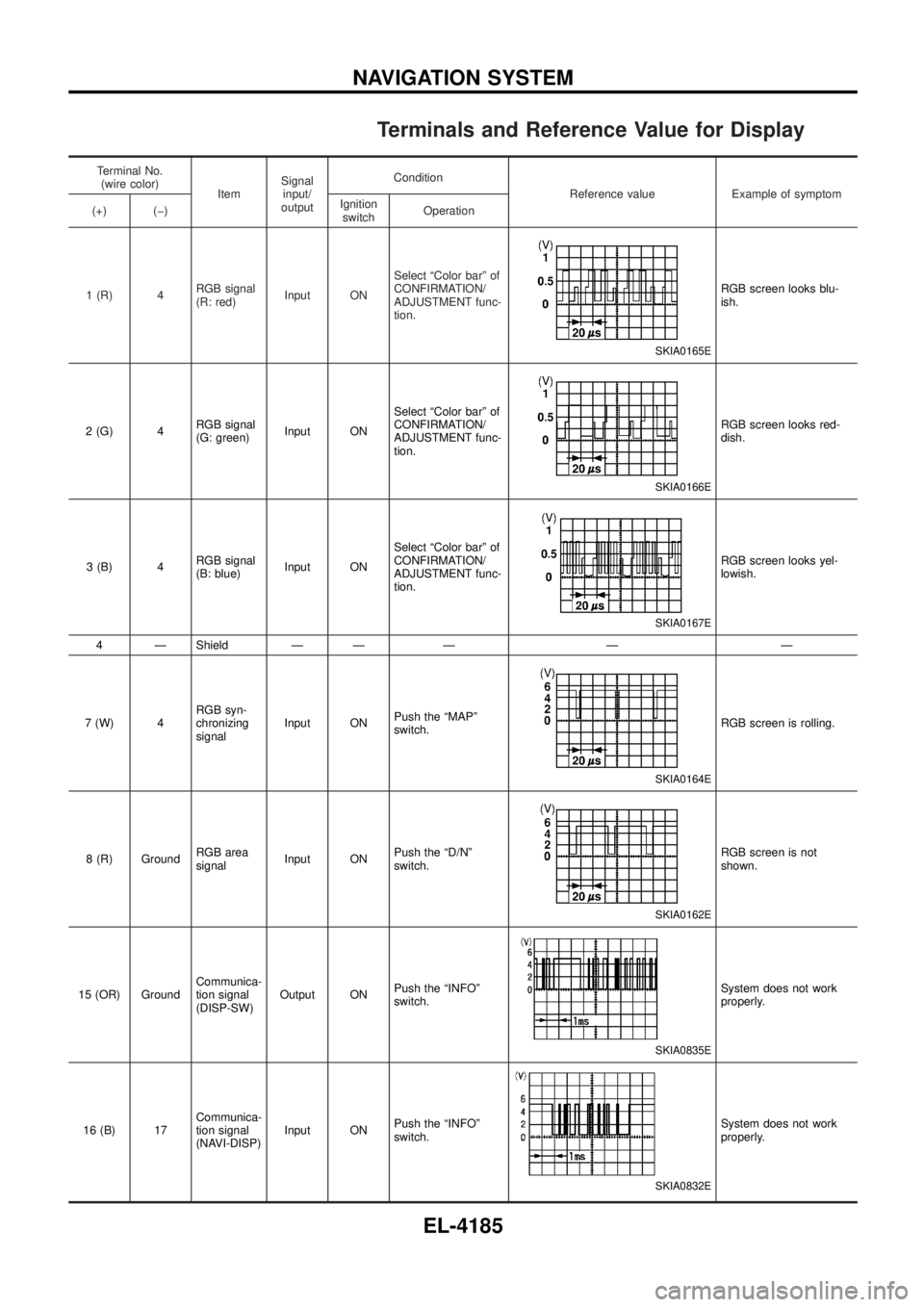
Terminals and Reference Value for Display
Terminal No.(wire color) ItemSignal
input/
output Condition
Reference value Example of symptom
(+) (þ) Ignition
switch Operation
1 (R) 4 RGB signal
(R: red)Input ON Select ªColor barº of
CONFIRMATION/
ADJUSTMENT func-
tion.
SKIA0165E
RGB screen looks blu-
ish.
2 (G) 4 RGB signal
(G: green)Input ON Select ªColor barº of
CONFIRMATION/
ADJUSTMENT func-
tion.
SKIA0166E
RGB screen looks red-
dish.
3 (B) 4 RGB signal
(B: blue)Input ON Select ªColor barº of
CONFIRMATION/
ADJUSTMENT func-
tion.
SKIA0167E
RGB screen looks yel-
lowish.
4 Ð Shield Ð Ð Ð Ð Ð
7 (W) 4 RGB syn-
chronizing
signalInput ON
Push the ªMAPº
switch.
SKIA0164E
RGB screen is rolling.
8 (R) Ground RGB area
signalInput ON Push the ªD/Nº
switch.
SKIA0162E
RGB screen is not
shown.
15 (OR) Ground Communica-
tion signal
(DISP-SW)Output ON
Push the ªINFOº
switch.
SKIA0835E
System does not work
properly.
16 (B) 17 Communica-
tion signal
(NAVI-DISP)Input ON
Push the ªINFOº
switch.
SKIA0832E
System does not work
properly.
NAVIGATION SYSTEM
EL-4185
Page 281 of 579
Terminal No.(wire color) ItemSignal
input/
output Condition
Reference value Example of symptom
(+) (þ) Ignition
switch Operation
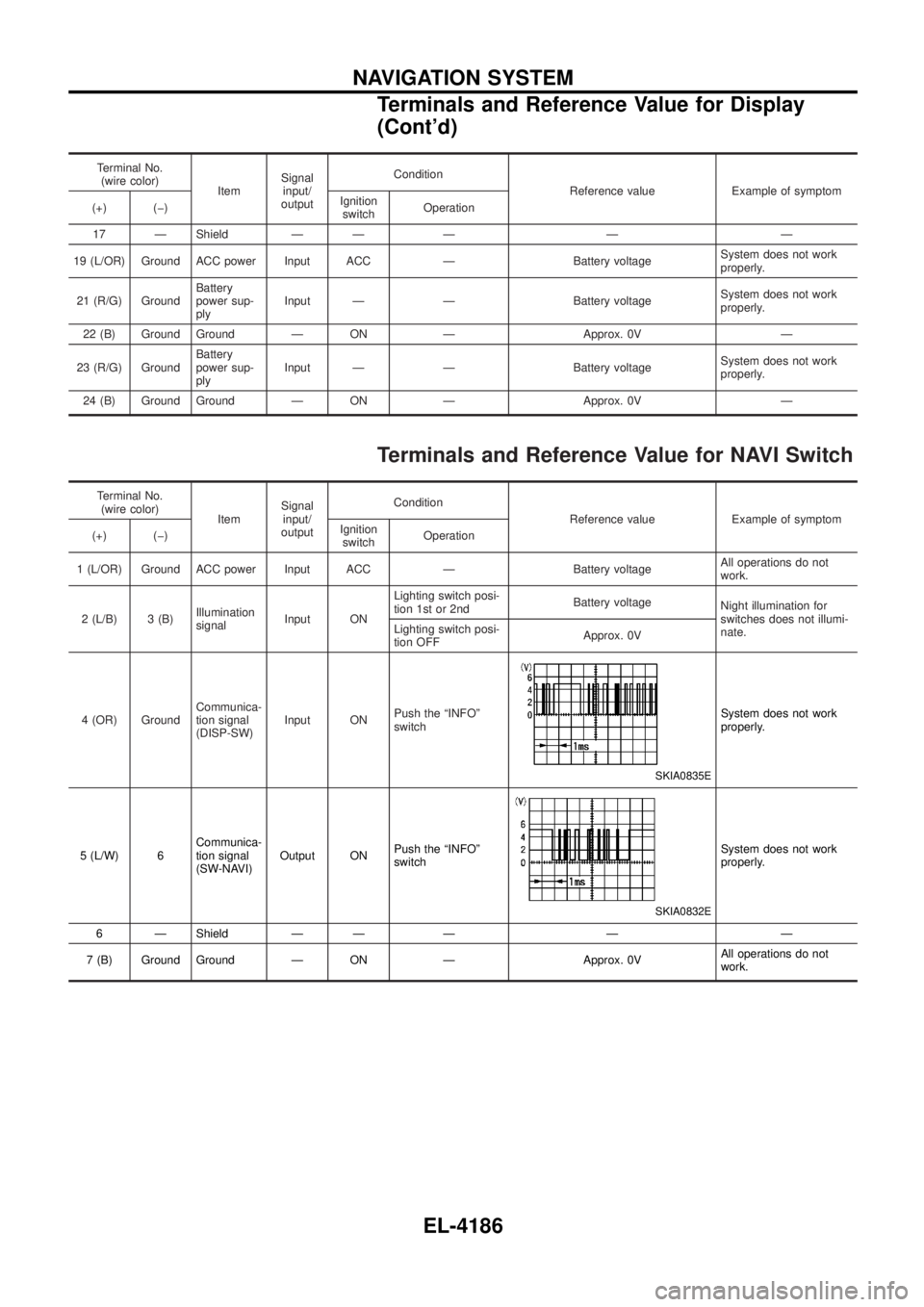
17 Ð Shield Ð Ð Ð Ð Ð
19 (L/OR) Ground ACC power Input ACC Ð Battery voltage System does not work
properly.
21 (R/G) Ground Battery
power sup-
plyInput Ð Ð Battery voltage
System does not work
properly.
22 (B) Ground Ground Ð ON Ð Approx. 0V Ð
23 (R/G) Ground Battery
power sup-
plyInput Ð Ð Battery voltage
System does not work
properly.
24 (B) Ground Ground Ð ON Ð Approx. 0V Ð
Terminals and Reference Value for NAVI Switch
Terminal No. (wire color) ItemSignal
input/
output Condition
Reference value Example of symptom
(+) (þ) Ignition
switch Operation
1 (L/OR) Ground ACC power Input ACC Ð Battery voltage All operations do not
work.
2 (L/B) 3 (B) Illumination
signalInput ON Lighting switch posi-
tion 1st or 2nd
Battery voltage
Night illumination for
switches does not illumi-
nate.
Lighting switch posi-
tion OFF Approx. 0V
4 (OR) Ground Communica-
tion signal
(DISP-SW)Input ON
Push the ªINFOº
switch
SKIA0835E
System does not work
properly.
5 (L/W) 6 Communica-
tion signal
(SW-NAVI)Output ON
Push the ªINFOº
switch
SKIA0832E
System does not work
properly.
6 Ð Shield Ð Ð Ð Ð Ð
7 (B) Ground Ground Ð ON Ð Approx. 0V All operations do not
work.
NAVIGATION SYSTEM
Terminals and Reference Value for Display
(Cont'd)
EL-4186
Page 282 of 579
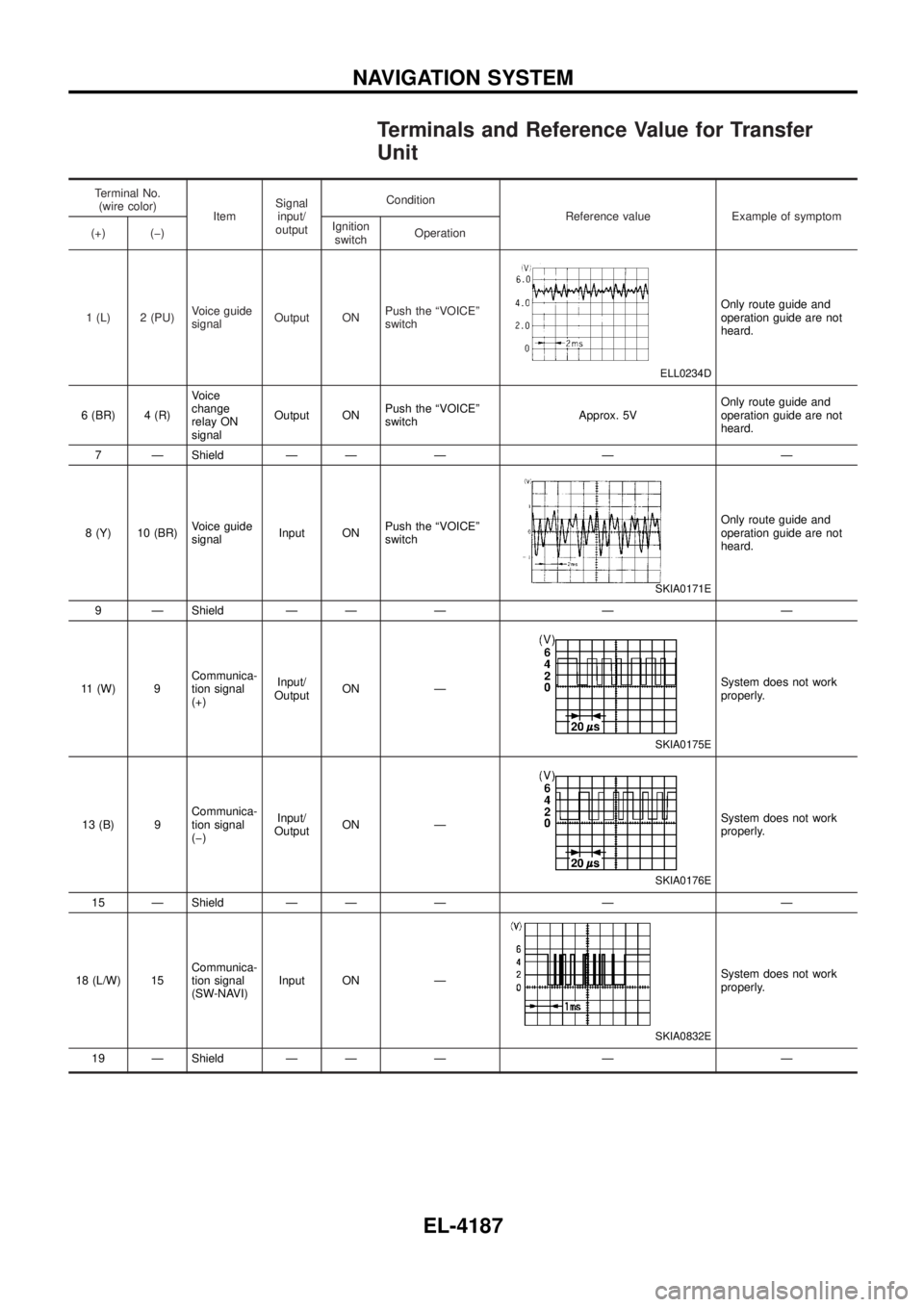
Terminals and Reference Value for Transfer
Unit
Terminal No.(wire color) ItemSignal
input/
output Condition
Reference value Example of symptom
(+) (þ) Ignition
switch Operation
1 (L) 2 (PU) Voice guide
signalOutput ON Push the ªVOICEº
switch
ELL0234D
Only route guide and
operation guide are not
heard.
6 (BR) 4 (R) Voice
change
relay ON
signalOutput ON
Push the ªVOICEº
switch Approx. 5VOnly route guide and
operation guide are not
heard.
7 Ð Shield Ð Ð Ð Ð Ð
8 (Y) 10 (BR) Voice guide
signalInput ON Push the ªVOICEº
switch
SKIA0171E
Only route guide and
operation guide are not
heard.
9 Ð Shield Ð Ð Ð Ð Ð
11 (W) 9 Communica-
tion signal
(+)Input/
Output ON Ð
SKIA0175E
System does not work
properly.
13 (B) 9 Communica-
tion signal
(þ)Input/
Output ON Ð
SKIA0176E
System does not work
properly.
15 Ð Shield Ð Ð Ð Ð Ð
18 (L/W) 15 Communica-
tion signal
(SW-NAVI)Input ON Ð
SKIA0832E
System does not work
properly.
19 Ð Shield Ð Ð Ð Ð Ð
NAVIGATION SYSTEM
EL-4187
Page 283 of 579
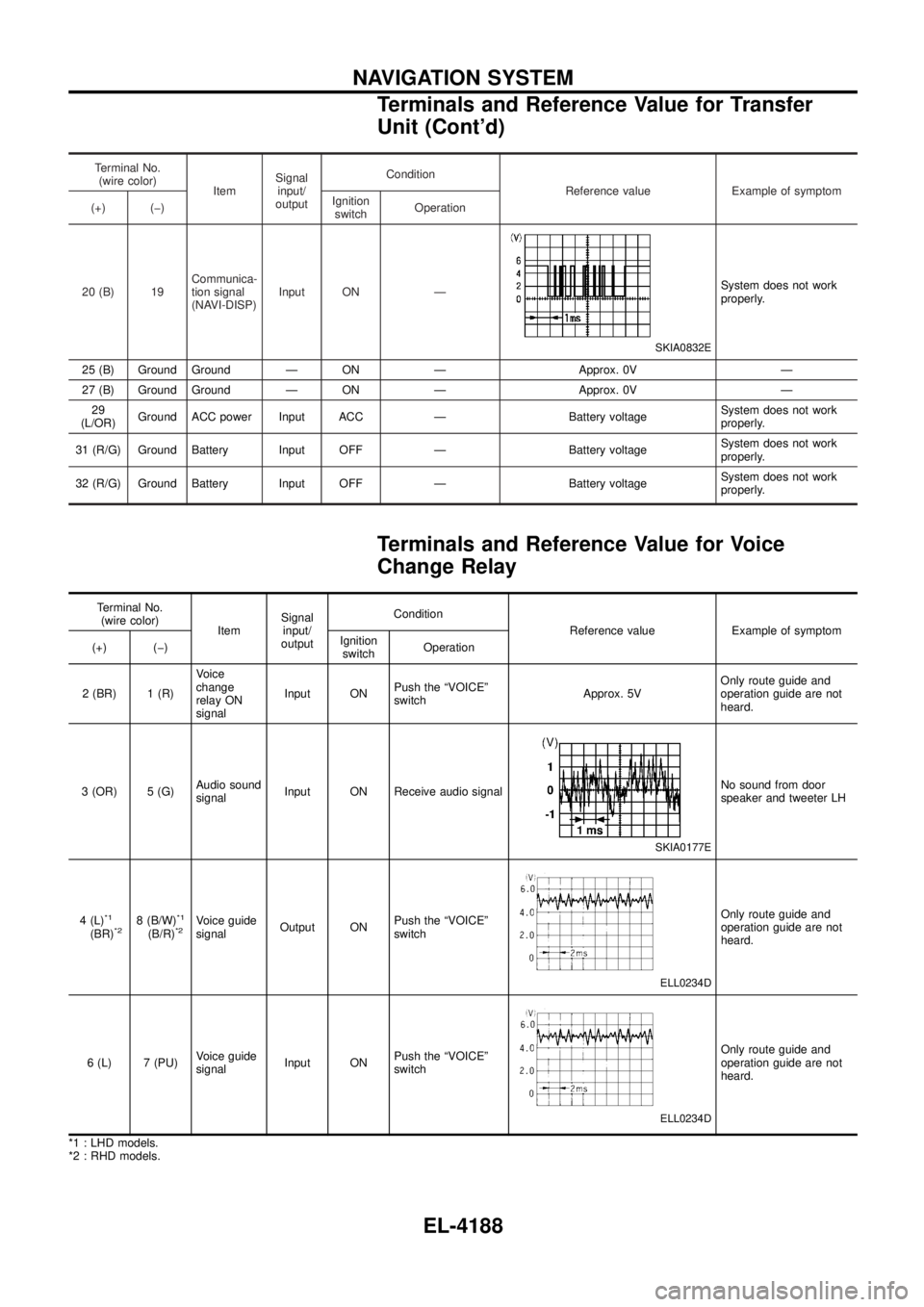
Terminal No.(wire color) ItemSignal
input/
output Condition
Reference value Example of symptom
(+) (þ) Ignition
switch Operation
20 (B) 19 Communica-
tion signal
(NAVI-DISP)Input ON Ð
SKIA0832E
System does not work
properly.
25 (B) Ground Ground Ð ON Ð Approx. 0V Ð
27 (B) Ground Ground Ð ON Ð Approx. 0V Ð 29
(L/OR) Ground ACC power Input ACC Ð Battery voltage System does not work
properly.
31 (R/G) Ground Battery Input OFF Ð Battery voltage System does not work
properly.
32 (R/G) Ground Battery Input OFF Ð Battery voltage System does not work
properly.
Terminals and Reference Value for Voice
Change Relay
Terminal No.
(wire color) ItemSignal
input/
output Condition
Reference value Example of symptom
(+) (þ) Ignition
switch Operation
2 (BR) 1 (R) Voice
change
relay ON
signalInput ON
Push the ªVOICEº
switch Approx. 5VOnly route guide and
operation guide are not
heard.
3 (OR) 5 (G) Audio sound
signalInput ON Receive audio signal
SKIA0177E
No sound from door
speaker and tweeter LH
4 (L)
*1
(BR)*28 (B/W)*1
(B/R)*2Voice guide
signal Output ON Push the ªVOICEº
switch
ELL0234D
Only route guide and
operation guide are not
heard.
6 (L) 7 (PU) Voice guide
signalInput ON Push the ªVOICEº
switch
ELL0234D
Only route guide and
operation guide are not
heard.
*1 : LHD models.
*2 : RHD models.
NAVIGATION SYSTEM
Terminals and Reference Value for Transfer
Unit (Cont'd)
EL-4188
Page 284 of 579
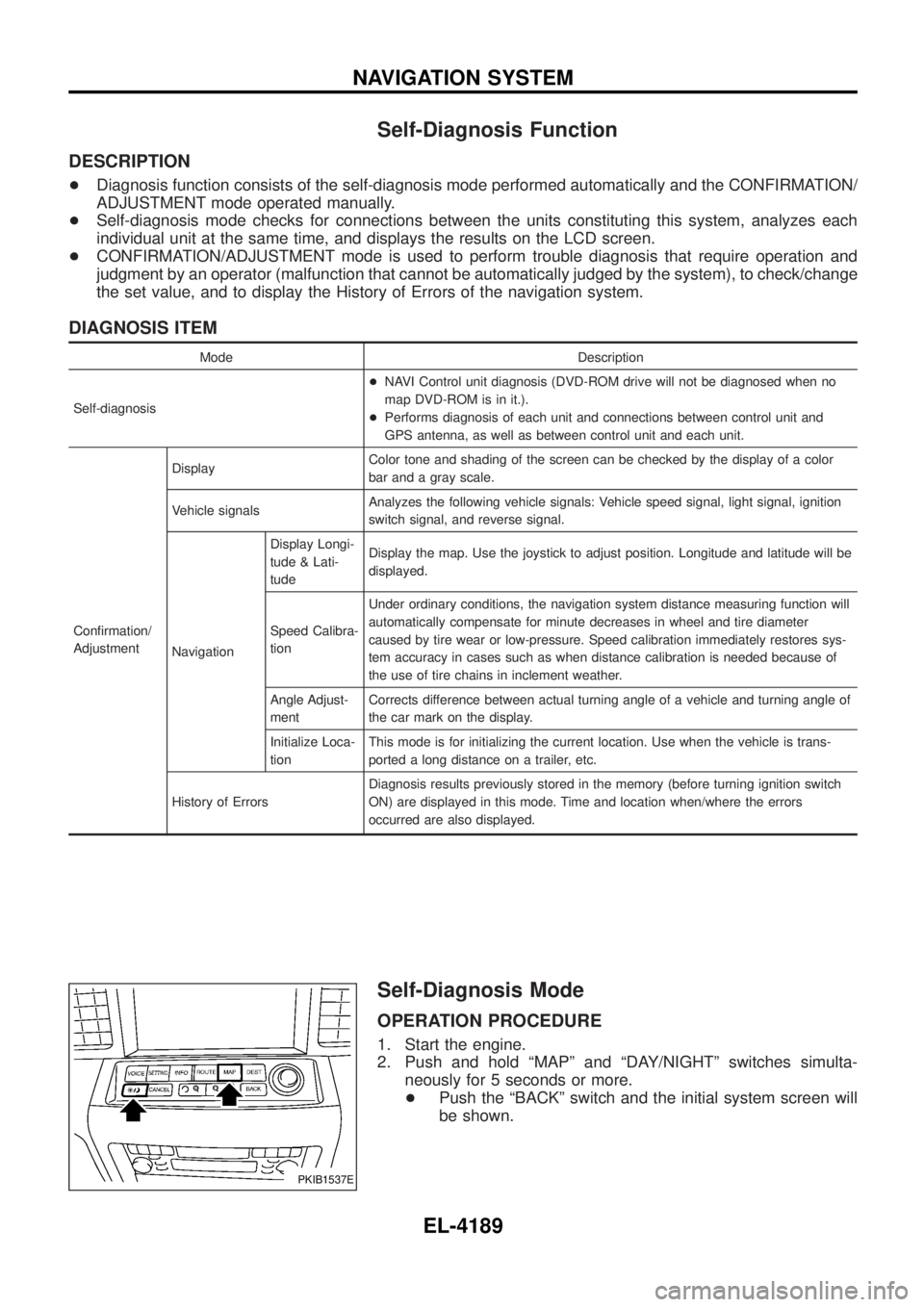
Self-Diagnosis Function
DESCRIPTION
+Diagnosis function consists of the self-diagnosis mode performed automatically and the CONFIRMATION/
ADJUSTMENT mode operated manually.
+ Self-diagnosis mode checks for connections between the units constituting this system, analyzes each
individual unit at the same time, and displays the results on the LCD screen.
+ CONFIRMATION/ADJUSTMENT mode is used to perform trouble diagnosis that require operation and
judgment by an operator (malfunction that cannot be automatically judged by the system), to check/change
the set value, and to display the History of Errors of the navigation system.
DIAGNOSIS ITEM
Mode Description
Self-diagnosis +
NAVI Control unit diagnosis (DVD-ROM drive will not be diagnosed when no
map DVD-ROM is in it.).
+ Performs diagnosis of each unit and connections between control unit and
GPS antenna, as well as between control unit and each unit.
Con®rmation/
Adjustment Display
Color tone and shading of the screen can be checked by the display of a color
bar and a gray scale.
Vehicle signals Analyzes the following vehicle signals: Vehicle speed signal, light signal, ignition
switch signal, and reverse signal.
Navigation Display Longi-
tude & Lati-
tude
Display the map. Use the joystick to adjust position. Longitude and latitude will be
displayed.
Speed Calibra-
tion Under ordinary conditions, the navigation system distance measuring function will
automatically compensate for minute decreases in wheel and tire diameter
caused by tire wear or low-pressure. Speed calibration immediately restores sys-
tem accuracy in cases such as when distance calibration is needed because of
the use of tire chains in inclement weather.
Angle Adjust-
ment Corrects difference between actual turning angle of a vehicle and turning angle of
the car mark on the display.
Initialize Loca-
tion This mode is for initializing the current location. Use when the vehicle is trans-
ported a long distance on a trailer, etc.
History of Errors Diagnosis results previously stored in the memory (before turning ignition switch
ON) are displayed in this mode. Time and location when/where the errors
occurred are also displayed.
Self-Diagnosis Mode
OPERATION PROCEDURE
1. Start the engine.
2. Push and hold ªMAPº and ªDAY/NIGHTº switches simulta-
neously for 5 seconds or more.
+ Push the ªBACKº switch and the initial system screen will
be shown.
PKIB1537E
NAVIGATION SYSTEM
EL-4189