ignition NISSAN PATROL 2004 Electronic Owner's Guide
[x] Cancel search | Manufacturer: NISSAN, Model Year: 2004, Model line: PATROL, Model: NISSAN PATROL 2004Pages: 579, PDF Size: 26.61 MB
Page 286 of 579
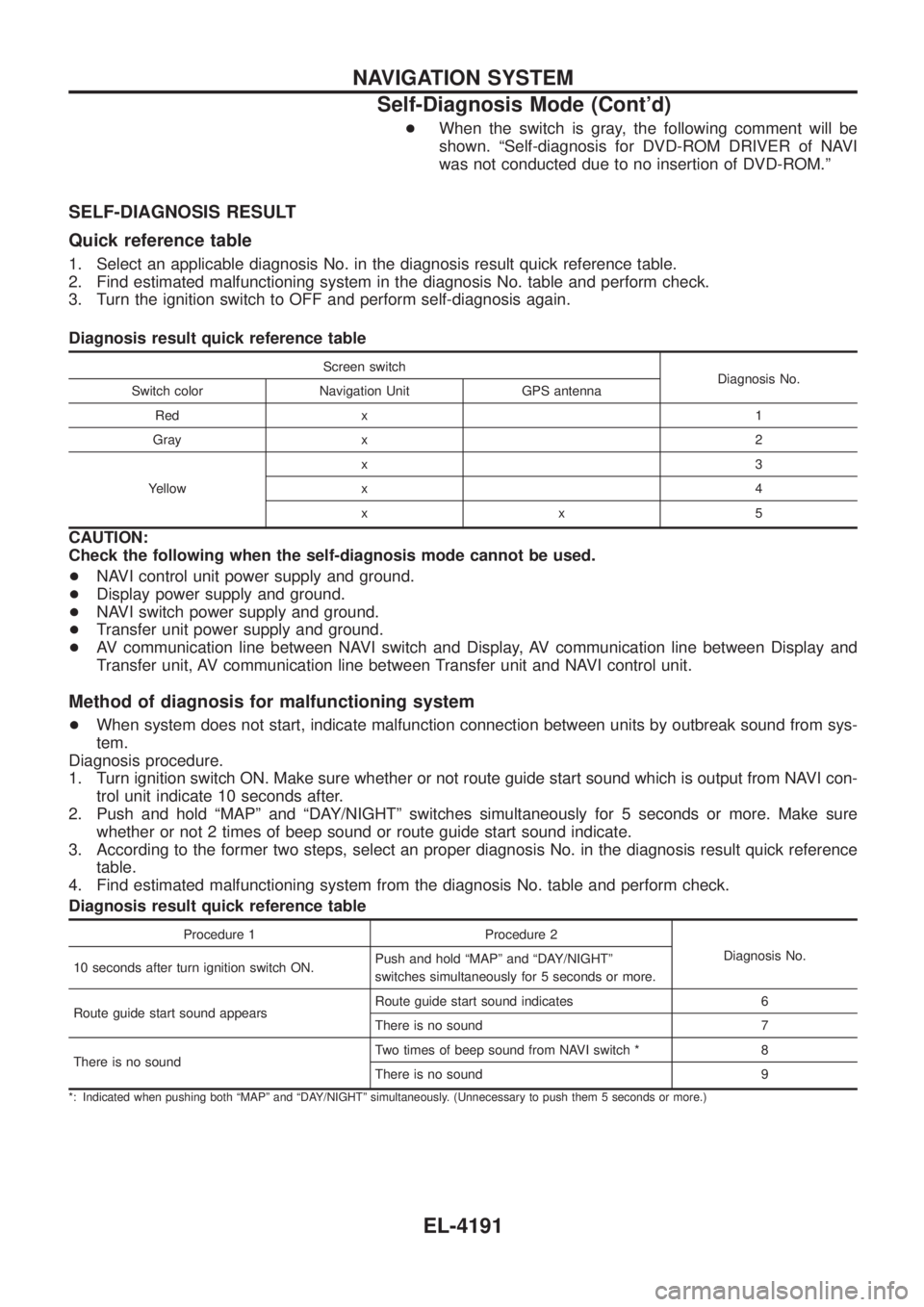
+When the switch is gray, the following comment will be
shown. ªSelf-diagnosis for DVD-ROM DRIVER of NAVI
was not conducted due to no insertion of DVD-ROM.º
SELF-DIAGNOSIS RESULT
Quick reference table
1. Select an applicable diagnosis No. in the diagnosis result quick reference table.
2. Find estimated malfunctioning system in the diagnosis No. table and perform check.
3. Turn the ignition switch to OFF and perform self-diagnosis again.
Diagnosis result quick reference table
Screen switch
Diagnosis No.
Switch color Navigation Unit GPS antenna
Red x 1
Gray x 2
Yellow x3
x4
xx5
CAUTION:
Check the following when the self-diagnosis mode cannot be used.
+
NAVI control unit power supply and ground.
+ Display power supply and ground.
+ NAVI switch power supply and ground.
+ Transfer unit power supply and ground.
+ AV communication line between NAVI switch and Display, AV communication line between Display and
Transfer unit, AV communication line between Transfer unit and NAVI control unit.
Method of diagnosis for malfunctioning system
+When system does not start, indicate malfunction connection between units by outbreak sound from sys-
tem.
Diagnosis procedure.
1. Turn ignition switch ON. Make sure whether or not route guide start sound which is output from NAVI con- trol unit indicate 10 seconds after.
2. Push and hold ªMAPº and ªDAY/NIGHTº switches simultaneously for 5 seconds or more. Make sure whether or not 2 times of beep sound or route guide start sound indicate.
3. According to the former two steps, select an proper diagnosis No. in the diagnosis result quick reference table.
4. Find estimated malfunctioning system from the diagnosis No. table and perform check.
Diagnosis result quick reference table
Procedure 1 Procedure 2
Diagnosis No.
10 seconds after turn ignition switch ON. Push and hold ªMAPº and ªDAY/NIGHTº
switches simultaneously for 5 seconds or more.
Route guide start sound appears Route guide start sound indicates 6
There is no sound 7
There is no sound Two times of beep sound from NAVI switch * 8
There is no sound 9
*: Indicated when pushing both ªMAPº and ªDAY/NIGHTº simultaneously. (Unnecessary to push them 5 seconds or more.)
NAVIGATION SYSTEM
Self-Diagnosis Mode (Cont'd)
EL-4191
Page 289 of 579
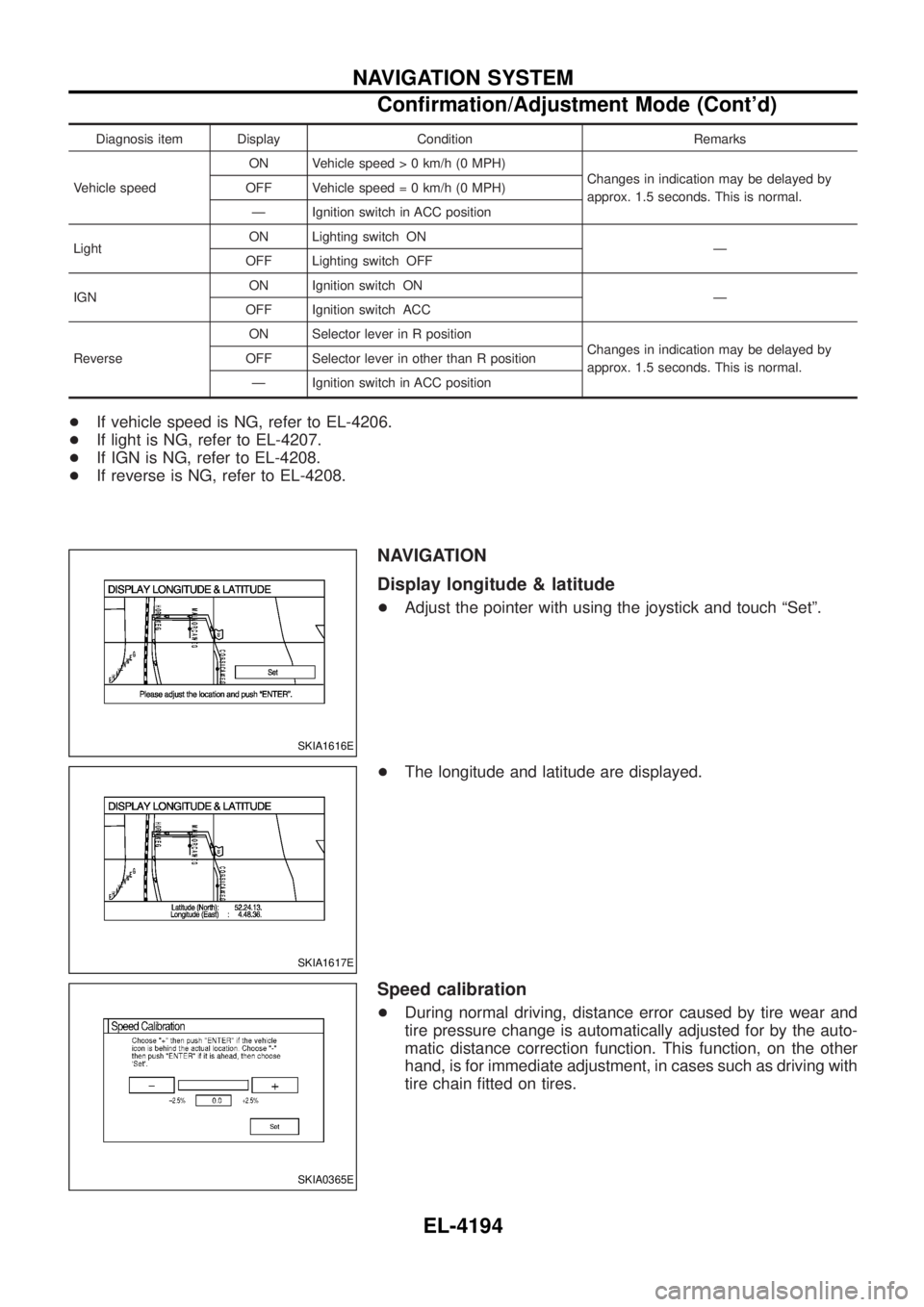
Diagnosis item Display Condition Remarks
Vehicle speed ON Vehicle spee
d > 0 km/h (0 MPH)
Changes in indication may be delayed by
approx. 1.5 seconds. This is normal.
OFF Vehicle spee
d = 0 km/h (0 MPH)
Ð Ignition switch in ACC position
Light ON Lighting switch ON
Ð
OFF Lighting switch OFF
IGN ON Ignition switch ON
Ð
OFF Ignition switch ACC
Reverse ON Selector lever in R position
Changes in indication may be delayed by
approx. 1.5 seconds. This is normal.
OFF Selector lever in other than R position
Ð Ignition switch in ACC position
+ If vehicle speed is NG, refer to EL-4206.
+ If light is NG, refer to EL-4207.
+ If IGN is NG, refer to EL-4208.
+ If reverse is NG, refer to EL-4208.
NAVIGATION
Display longitude & latitude
+Adjust the pointer with using the joystick and touch ªSetº.
+ The longitude and latitude are displayed.
Speed calibration
+During normal driving, distance error caused by tire wear and
tire pressure change is automatically adjusted for by the auto-
matic distance correction function. This function, on the other
hand, is for immediate adjustment, in cases such as driving with
tire chain ®tted on tires.
SKIA1616E
SKIA1617E
SKIA0365E
NAVIGATION SYSTEM
Con®rmation/Adjustment Mode (Cont'd)
EL-4194
Page 291 of 579
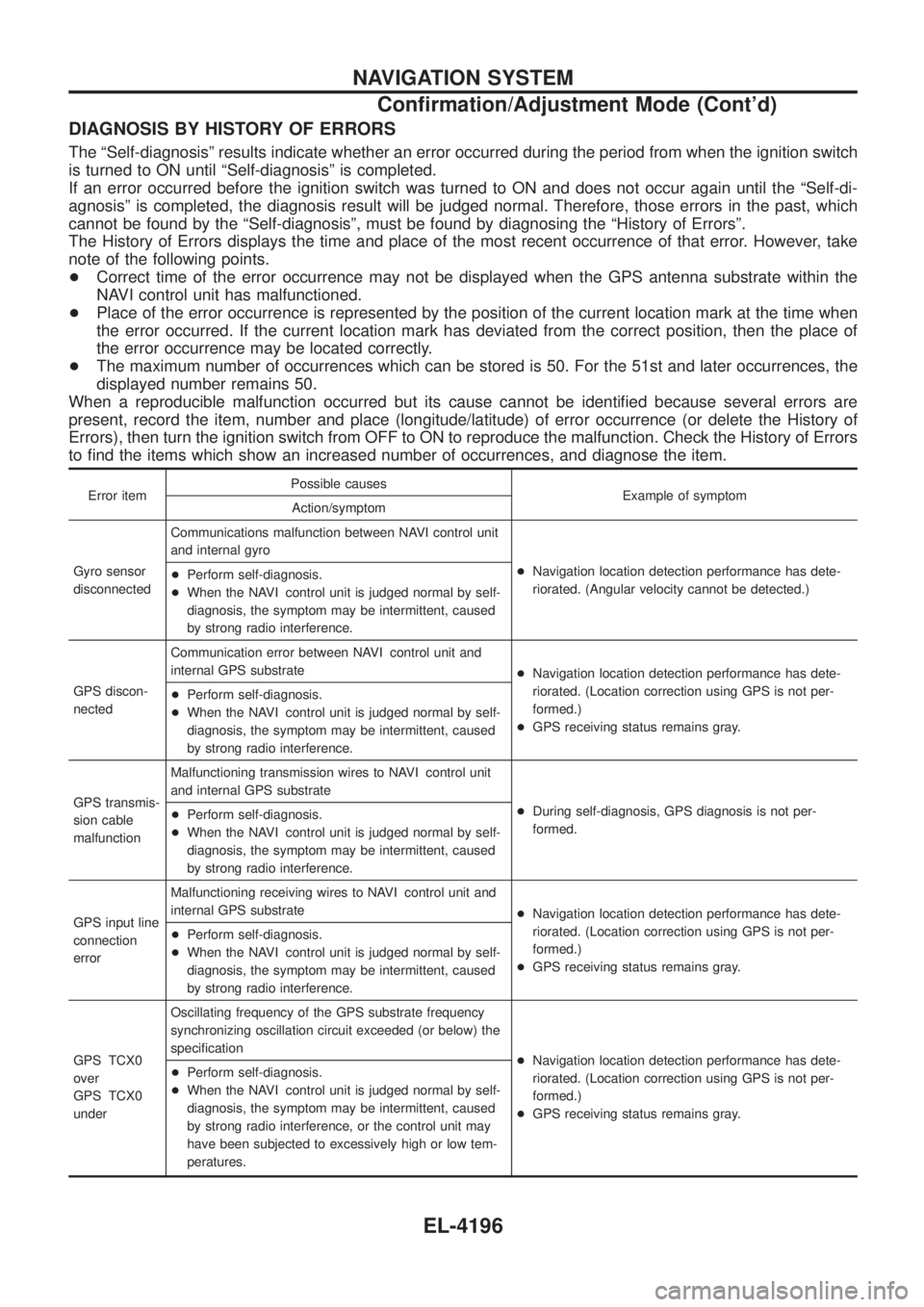
DIAGNOSIS BY HISTORY OF ERRORS
The ªSelf-diagnosisº results indicate whether an error occurred during the period from when the ignition switch
is turned to ON until ªSelf-diagnosisº is completed.
If an error occurred before the ignition switch was turned to ON and does not occur again until the ªSelf-di-
agnosisº is completed, the diagnosis result will be judged normal. Therefore, those errors in the past, which
cannot be found by the ªSelf-diagnosisº, must be found by diagnosing the ªHistory of Errorsº.
The History of Errors displays the time and place of the most recent occurrence of that error. However, take
note of the following points.
+Correct time of the error occurrence may not be displayed when the GPS antenna substrate within the
NAVI control unit has malfunctioned.
+ Place of the error occurrence is represented by the position of the current location mark at the time when
the error occurred. If the current location mark has deviated from the correct position, then the place of
the error occurrence may be located correctly.
+ The maximum number of occurrences which can be stored is 50. For the 51st and later occurrences, the
displayed number remains 50.
When a reproducible malfunction occurred but its cause cannot be identi®ed because several errors are
present, record the item, number and place (longitude/latitude) of error occurrence (or delete the History of
Errors), then turn the ignition switch from OFF to ON to reproduce the malfunction. Check the History of Errors
to ®nd the items which show an increased number of occurrences, and diagnose the item.
Error item Possible causes
Example of symptom
Action/symptom
Gyro sensor
disconnected Communications malfunction between NAVI control unit
and internal gyro
+Navigation location detection performance has dete-
riorated. (Angular velocity cannot be detected.)
+
Perform self-diagnosis.
+ When the NAVI control unit is judged normal by self-
diagnosis, the symptom may be intermittent, caused
by strong radio interference.
GPS discon-
nected Communication error between NAVI control unit and
internal GPS substrate
+Navigation location detection performance has dete-
riorated. (Location correction using GPS is not per-
formed.)
+ GPS receiving status remains gray.
+
Perform self-diagnosis.
+ When the NAVI control unit is judged normal by self-
diagnosis, the symptom may be intermittent, caused
by strong radio interference.
GPS transmis-
sion cable
malfunction Malfunctioning transmission wires to NAVI control unit
and internal GPS substrate
+During self-diagnosis, GPS diagnosis is not per-
formed.
+
Perform self-diagnosis.
+ When the NAVI control unit is judged normal by self-
diagnosis, the symptom may be intermittent, caused
by strong radio interference.
GPS input line
connection
error Malfunctioning receiving wires to NAVI control unit and
internal GPS substrate
+Navigation location detection performance has dete-
riorated. (Location correction using GPS is not per-
formed.)
+ GPS receiving status remains gray.
+
Perform self-diagnosis.
+ When the NAVI control unit is judged normal by self-
diagnosis, the symptom may be intermittent, caused
by strong radio interference.
GPS TCX0
over
GPS TCX0
under Oscillating frequency of the GPS substrate frequency
synchronizing oscillation circuit exceeded (or below) the
speci®cation
+Navigation location detection performance has dete-
riorated. (Location correction using GPS is not per-
formed.)
+ GPS receiving status remains gray.
+
Perform self-diagnosis.
+ When the NAVI control unit is judged normal by self-
diagnosis, the symptom may be intermittent, caused
by strong radio interference, or the control unit may
have been subjected to excessively high or low tem-
peratures.
NAVIGATION SYSTEM
Con®rmation/Adjustment Mode (Cont'd)
EL-4196
Page 293 of 579
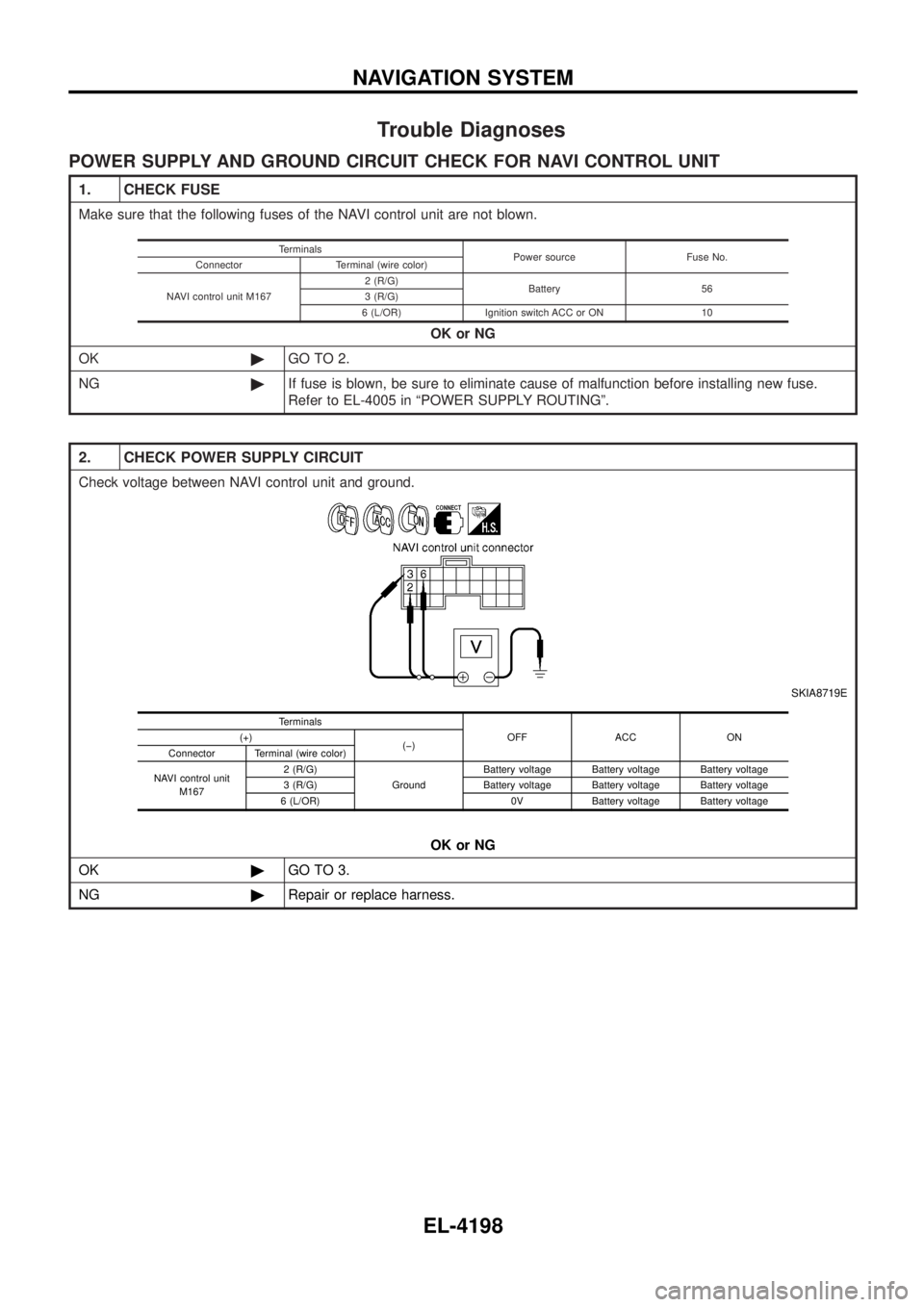
Trouble Diagnoses
POWER SUPPLY AND GROUND CIRCUIT CHECK FOR NAVI CONTROL UNIT
1. CHECK FUSE
Make sure that the following fuses of the NAVI control unit are not blown.OK or NG
OK ©GO TO 2.
NG ©If fuse is blown, be sure to eliminate cause of malfunction before installing new fuse.
Refer to EL-4005 in ªPOWER SUPPLY ROUTINGº.
Terminals
Power source Fuse No.
Connector Terminal (wire color)
NAVI control unit M167 2 (R/G)
Battery 56
3 (R/G)
6 (L/OR) Ignition switch ACC or ON 10
2. CHECK POWER SUPPLY CIRCUIT
Check voltage between NAVI control unit and ground.
SKIA8719E
OK or NG
OK ©GO TO 3.
NG ©Repair or replace harness.
Terminals
OFF ACC ON
(+)
(þ)
Connector Terminal (wire color)
NAVI control unit M167 2 (R/G)
GroundBattery voltage Battery voltage Battery voltage
3 (R/G) Battery voltage Battery voltage Battery voltage
6 (L/OR) 0V Battery voltage Battery voltage
NAVIGATION SYSTEM
EL-4198
Page 294 of 579
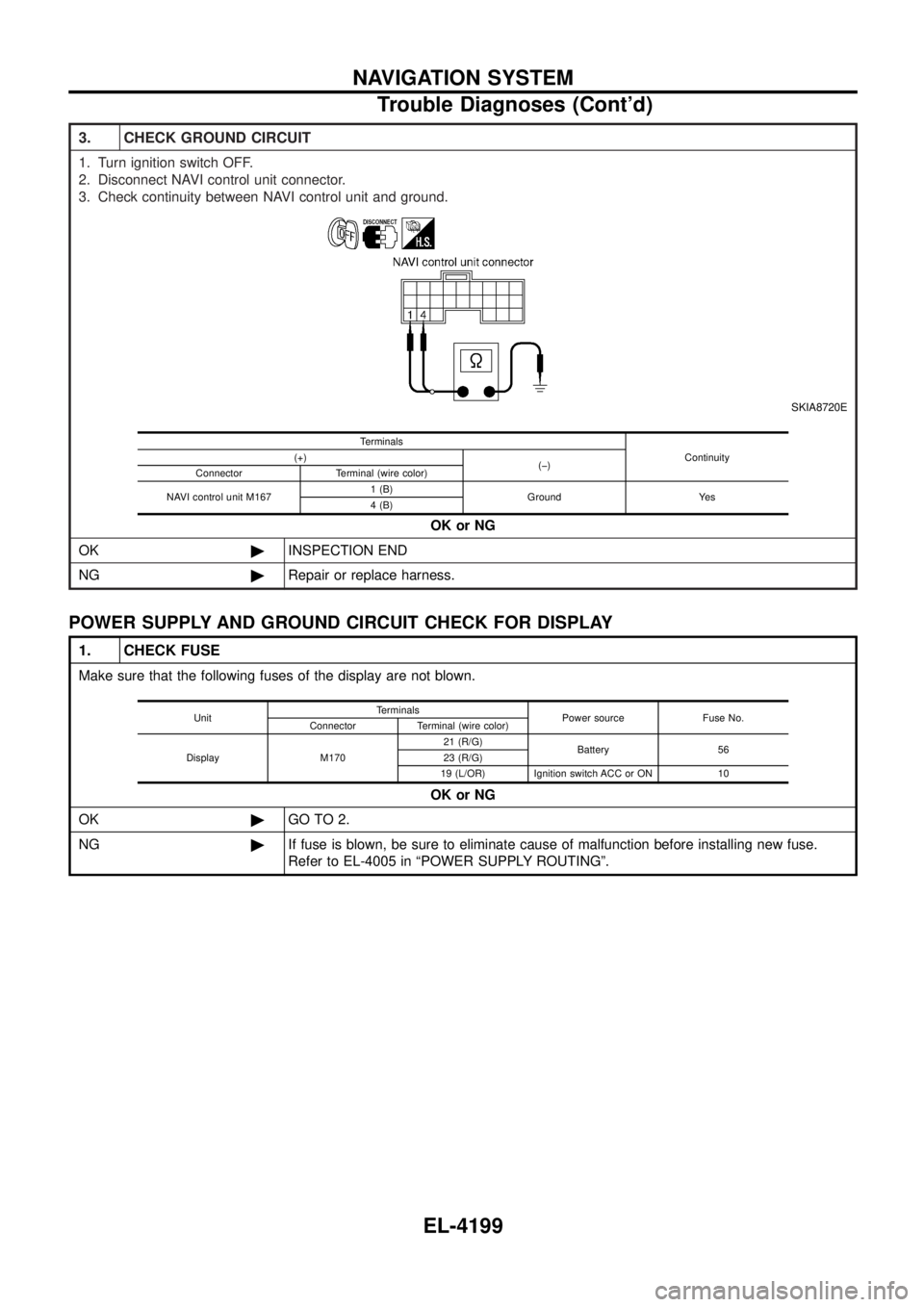
3. CHECK GROUND CIRCUIT
1. Turn ignition switch OFF.
2. Disconnect NAVI control unit connector.
3. Check continuity between NAVI control unit and ground.
SKIA8720E
OK or NG
OK ©INSPECTION END
NG ©Repair or replace harness.
Terminals
Continuity
(+)
(þ)
Connector Terminal (wire color)
NAVI control unit M167 1 (B)
Ground Yes
4 (B)
POWER SUPPLY AND GROUND CIRCUIT CHECK FOR DISPLAY
1. CHECK FUSE
Make sure that the following fuses of the display are not blown.
OK or NG
OK ©GO TO 2.
NG ©If fuse is blown, be sure to eliminate cause of malfunction before installing new fuse.
Refer to EL-4005 in ªPOWER SUPPLY ROUTINGº.
Unit Terminals
Power source Fuse No.
Connector Terminal (wire color)
Display M170 21 (R/G)
Battery 56
23 (R/G)
19 (L/OR) Ignition switch ACC or ON 10
NAVIGATION SYSTEM
Trouble Diagnoses (Cont'd)
EL-4199
Page 295 of 579
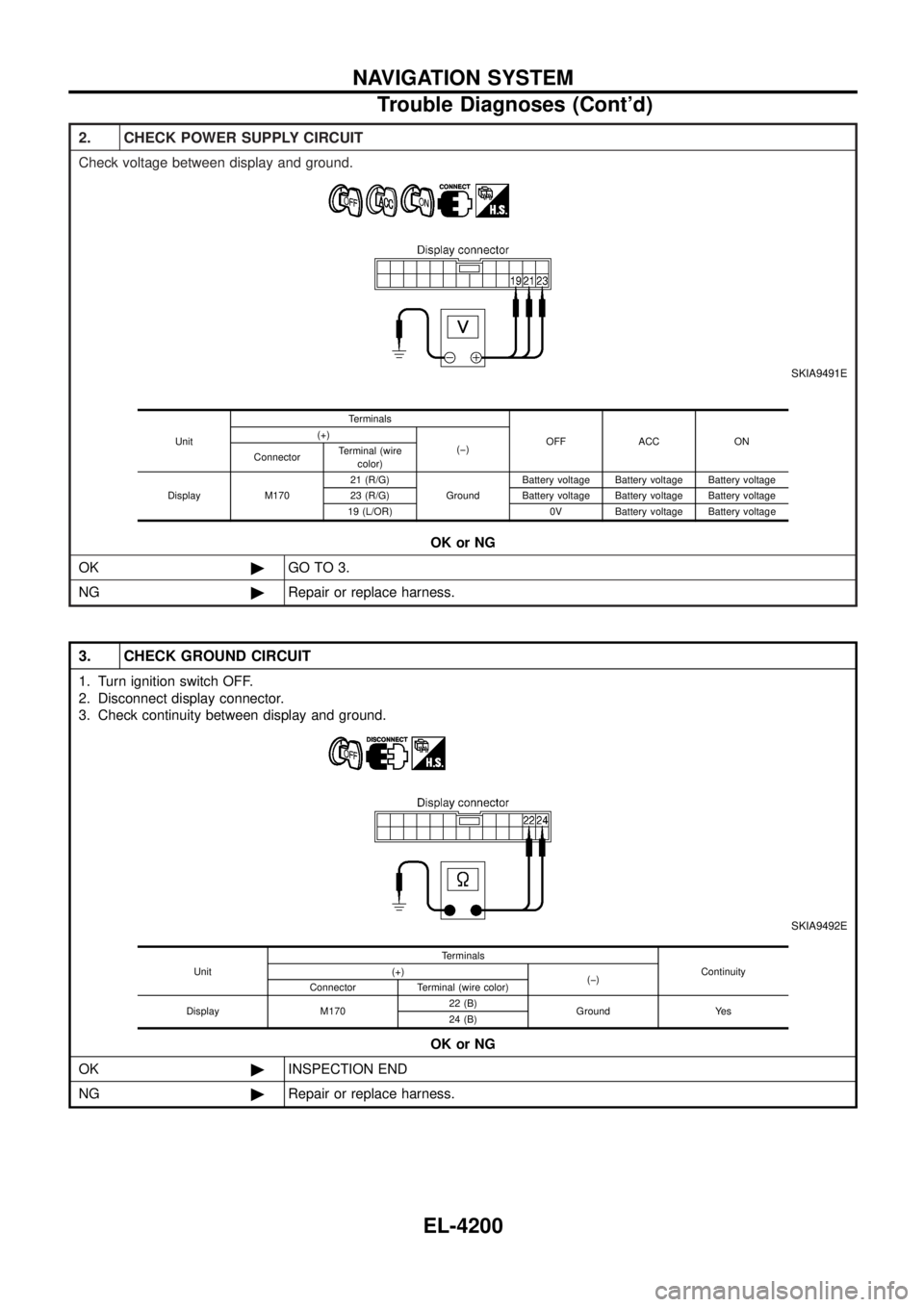
2. CHECK POWER SUPPLY CIRCUIT
Check voltage between display and ground.
SKIA9491E
OK or NG
OK ©GO TO 3.
NG ©Repair or replace harness.
Unit Terminals
OFF ACC ON
(+)
(þ)
Connector Terminal (wire
color)
Display M170 21 (R/G)
GroundBattery voltage Battery voltage Battery voltage
23 (R/G) Battery voltage Battery voltage Battery voltage
19 (L/OR) 0V Battery voltage Battery voltage
3. CHECK GROUND CIRCUIT
1. Turn ignition switch OFF.
2. Disconnect display connector.
3. Check continuity between display and ground.
SKIA9492E
OK or NG
OK ©INSPECTION END
NG ©Repair or replace harness.
Unit Terminals
Continuity
(+)
(þ)
Connector Terminal (wire color)
Display M170 22 (B)
Ground Yes
24 (B)
NAVIGATION SYSTEM
Trouble Diagnoses (Cont'd)
EL-4200
Page 296 of 579
![NISSAN PATROL 2004 Electronic Owners Guide POWER SUPPLY AND GROUND CIRCUIT CHECK FOR NAVI SWITCH
1. CHECK FUSE
Check 10A fuse [No. 10, located in fuse block (J/B)].OK or NG
OK ©GO TO 2.
NG ©If fuse is blown, be sure to eliminate cause of mal](/img/5/57364/w960_57364-295.png "NISSAN PATROL 2004 Electronic Owners Guide POWER SUPPLY AND GROUND CIRCUIT CHECK FOR NAVI SWITCH
1. CHECK FUSE
Check 10A fuse [No. 10, located in fuse block (J/B)].OK or NG
OK ©GO TO 2.
NG ©If fuse is blown, be sure to eliminate cause of mal")
POWER SUPPLY AND GROUND CIRCUIT CHECK FOR NAVI SWITCH
1. CHECK FUSE
Check 10A fuse [No. 10, located in fuse block (J/B)].OK or NG
OK ©GO TO 2.
NG ©If fuse is blown, be sure to eliminate cause of malfunction before installing new fuse.
Refer to EL-4005 in ªPOWER SUPPLY ROUTINGº.
2. CHECK POWER SUPPLY CIRCUIT
Check voltage between NAVI switch and ground.
SKIA8724E
OK or NG
OK ©GO TO 3.
NG ©Repair or replace harness.
Unit Terminals
OFF ACC ON
(+)
(þ)
Connector Terminal (wire
color)
NAVI switch M169 1 (L/OR) Ground 0V Battery voltage Battery voltage
3. CHECK GROUND CIRCUIT
1. Turn ignition switch OFF.
2. Disconnect NAVI switch connector.
3. Check continuity between NAVI switch harness connector M169 terminal 7 (B) and ground.
SKIA8725E
Continuity should exist. OK or NG
OK ©INSPECTION END
NG ©Repair or replace harness.
NAVIGATION SYSTEM
Trouble Diagnoses (Cont'd)
EL-4201
Page 297 of 579
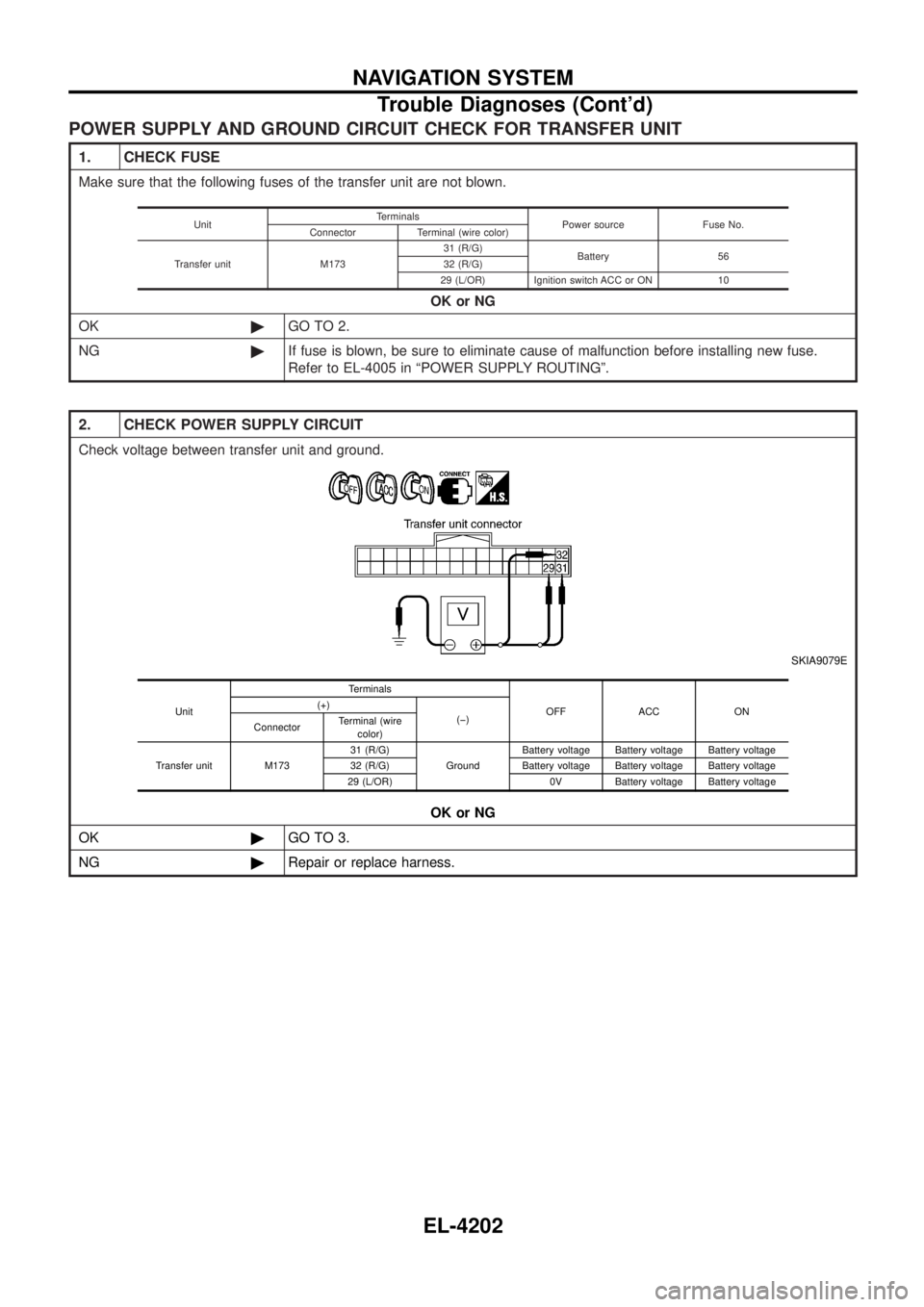
POWER SUPPLY AND GROUND CIRCUIT CHECK FOR TRANSFER UNIT
1. CHECK FUSE
Make sure that the following fuses of the transfer unit are not blown.OK or NG
OK ©GO TO 2.
NG ©If fuse is blown, be sure to eliminate cause of malfunction before installing new fuse.
Refer to EL-4005 in ªPOWER SUPPLY ROUTINGº.
Unit Terminals
Power source Fuse No.
Connector Terminal (wire color)
Transfer unit M173 31 (R/G)
Battery 56
32 (R/G)
29 (L/OR) Ignition switch ACC or ON 10
2. CHECK POWER SUPPLY CIRCUIT
Check voltage between transfer unit and ground.
SKIA9079E
OK or NG
OK ©GO TO 3.
NG ©Repair or replace harness.
Unit Terminals
OFF ACC ON
(+)
(þ)
Connector Terminal (wire
color)
Transfer unit M173 31 (R/G)
GroundBattery voltage Battery voltage Battery voltage
32 (R/G) Battery voltage Battery voltage Battery voltage
29 (L/OR) 0V Battery voltage Battery voltage
NAVIGATION SYSTEM
Trouble Diagnoses (Cont'd)
EL-4202
Page 298 of 579
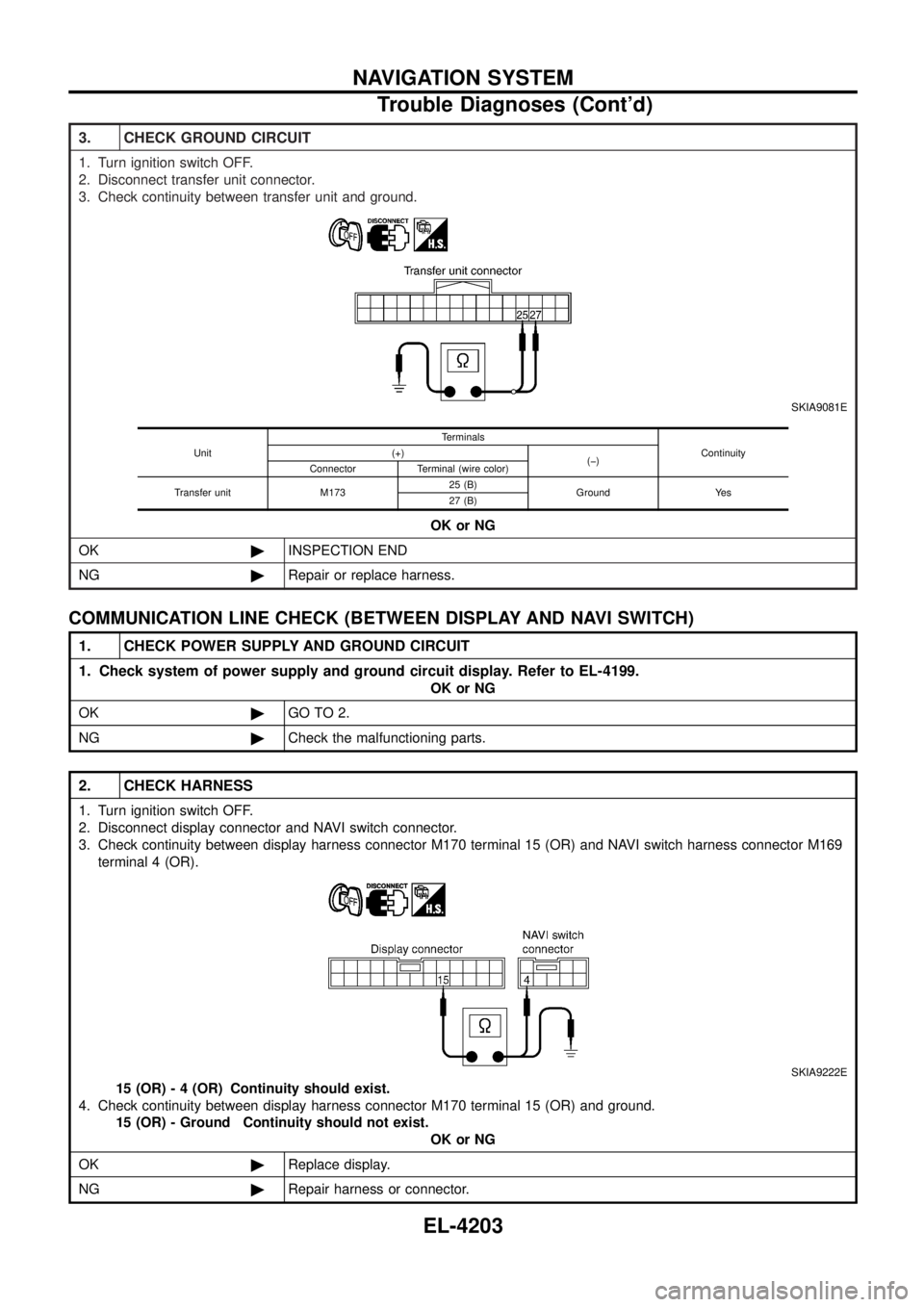
3. CHECK GROUND CIRCUIT
1. Turn ignition switch OFF.
2. Disconnect transfer unit connector.
3. Check continuity between transfer unit and ground.
SKIA9081E
OK or NG
OK ©INSPECTION END
NG ©Repair or replace harness.
Unit Terminals
Continuity
(+)
(þ)
Connector Terminal (wire color)
Transfer unit M173 25 (B)
Ground Yes
27 (B)
COMMUNICATION LINE CHECK (BETWEEN DISPLAY AND NAVI SWITCH)
1. CHECK POWER SUPPLY AND GROUND CIRCUIT
1. Check system of power supply and ground circuit display. Refer to EL-4199.
OK or NG
OK ©GO TO 2.
NG ©Check the malfunctioning parts.
2. CHECK HARNESS
1. Turn ignition switch OFF.
2. Disconnect display connector and NAVI switch connector.
3. Check continuity between display harness connector M170 terminal 15 (OR) and NAVI switch harness connector M169
terminal 4 (OR).
SKIA9222E
15 (OR) - 4 (OR) Continuity should exist.
4. Check continuity between display harness connector M170 terminal 15 (OR) and ground. 15 (OR) - Ground Continuity should not exist. OK or NG
OK ©Replace display.
NG ©Repair harness or connector.
NAVIGATION SYSTEM
Trouble Diagnoses (Cont'd)
EL-4203
Page 299 of 579
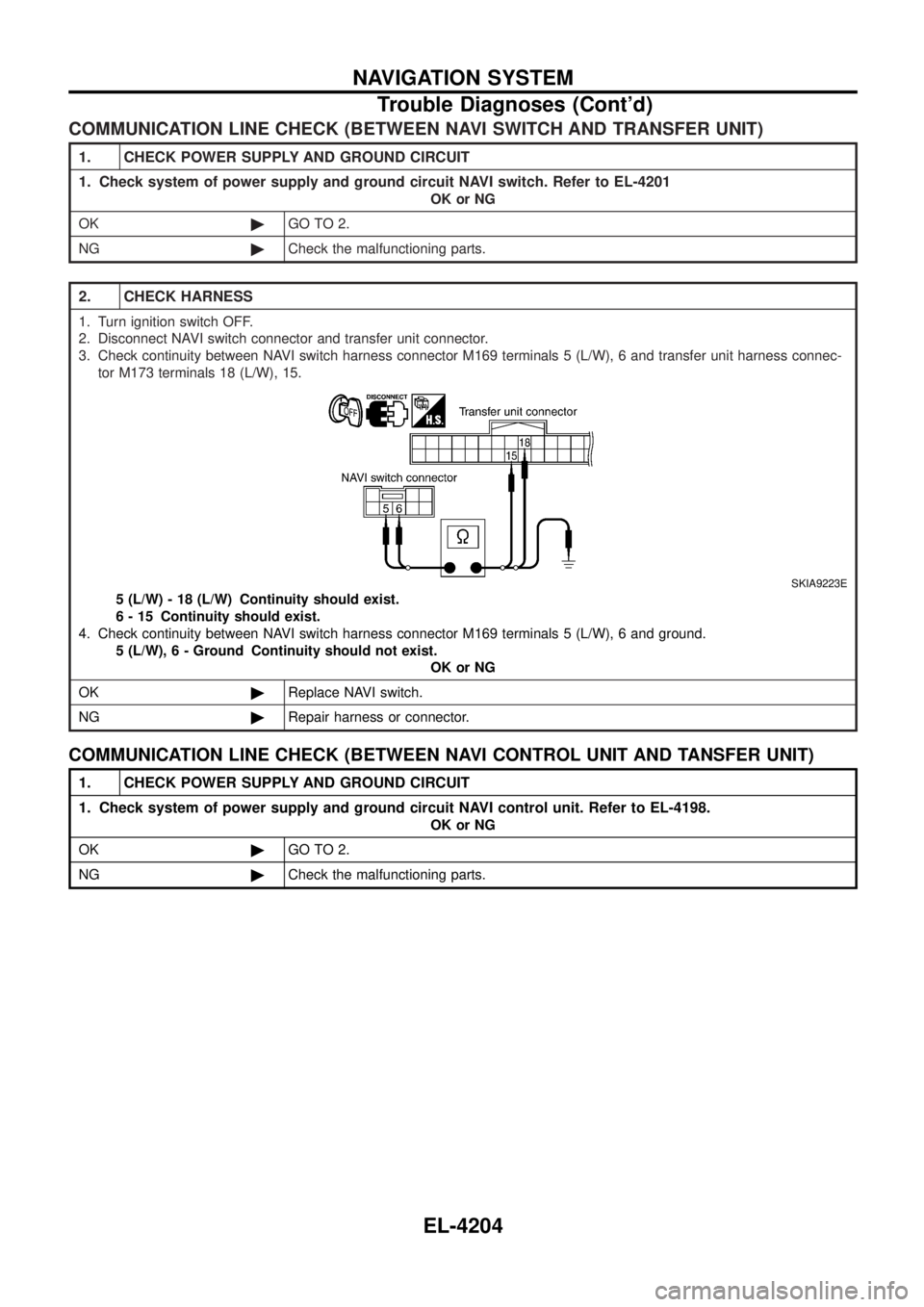
COMMUNICATION LINE CHECK (BETWEEN NAVI SWITCH AND TRANSFER UNIT)
1. CHECK POWER SUPPLY AND GROUND CIRCUIT
1. Check system of power supply and ground circuit NAVI switch. Refer to EL-4201
OK or NG
OK ©GO TO 2.
NG ©Check the malfunctioning parts.
2. CHECK HARNESS
1. Turn ignition switch OFF.
2. Disconnect NAVI switch connector and transfer unit connector.
3. Check continuity between NAVI switch harness connector M169 terminals 5 (L/W), 6 and transfer unit harness connec-
tor M173 terminals 18 (L/W), 15.
SKIA9223E
5 (L/W) - 18 (L/W) Continuity should exist.
6 - 15 Continuity should exist.
4. Check continuity between NAVI switch harness connector M169 terminals 5 (L/W), 6 and ground. 5 (L/W) , 6 - Ground Continuity should not exist.
OK or NG
OK ©Replace NAVI switch.
NG ©Repair harness or connector.
COMMUNICATION LINE CHECK (BETWEEN NAVI CONTROL UNIT AND TANSFER UNIT)
1. CHECK POWER SUPPLY AND GROUND CIRCUIT
1. Check system of power supply and ground circuit NAVI control unit. Refer to EL-4198.
OK or NG
OK ©GO TO 2.
NG ©Check the malfunctioning parts.
NAVIGATION SYSTEM
Trouble Diagnoses (Cont'd)
EL-4204