display NISSAN PATROL 2004 Electronic Owner's Guide
[x] Cancel search | Manufacturer: NISSAN, Model Year: 2004, Model line: PATROL, Model: NISSAN PATROL 2004Pages: 579, PDF Size: 26.61 MB
Page 307 of 579

2. CHECK RGB AREA SIGNAL
1. Connect NAVI control unit connector and display connector.
2. Turn ignition switch ON.
3. Push ªINFOº switch.
4. Check the signal between NAVI control unit connector M167 terminals 12 (R) and 17 with CONSULT-ll or oscilloscope.
PKIB0555E
12 (R) - 17: Refer to EL-4183.OK or NG
OK ©Replace display.
NG ©Replace NAVI control unit.
RGB SCREEN IS ROLLING
1. CHECK RGB SYNCHRONIZING CIRCUIT
1. Turn ignition switch OFF.
2. Disconnect NAVI control unit connector and display connector.
3. Check continuity between NAVI control unit harness connector M167 terminals 16 (W), 17 and display harness connec-
tor M170 terminals 7 (W), 4.
PKIB0556E
16 (W) - 7 (W) Continuity should exist.
17 - 4 Continuity should exist.
4. Check continuity between NAVI control unit harness connector M167 terminals 16 (W), 17 and ground. 16 (W), 17 - Ground Continuity should not exist. OK or NG
OK ©GO TO 2.
NG ©Repair harness or connector.
NAVIGATION SYSTEM
Trouble Diagnoses (Cont'd)
EL-4212
Page 308 of 579

2. CHECK RGB SYNCHRONIZING SIGNAL
1. Connect NAVI control unit connector and display connector.
2. Turn ignition switch ON.
3. Push the ªMAPº switch.
4. Check the signal between NAVI control unit harness connector M167 terminals 16 (W) and 17 with CONSULT-ll oroscilloscope.
PKIB0557E
16 (W) - 19: Refer to EL-4183. OK or NG
OK ©Replace display.
NG ©Replace NAVI control unit.
GUIDE SOUND IS NOT HEARD
1. CHECK VOICE GUIDE SETTING
+While driving in the dark pink route, voice guide does not operate.
NOTE:
Voice guide is only available at intersections that satisfy certain conditions (indicated by +on the map).
Therefore, guidance may not be given even when the route on the map changes direction.
+ Is volume setting not switched ON?
YesorNo
Ye s ©GO TO 2.
No ©Switch the setting ON and turn the volume up.
NAVIGATION SYSTEM
Trouble Diagnoses (Cont'd)
EL-4213
Page 311 of 579

6. CHECK VOICE CHANGE RELAY CIRCUIT: (2)
1. Turn ignition switch OFF.
2. Disconnect transfer unit connector and voice change relay connector.
3. Check continuity between transfer unit harness connector M173 terminals 6 (BR), 4 (R) and voice change relay har-ness connector terminals 2 (BR), 1 (R).
SKIA9121E
6 (BR) - 2 (BR) Continuity should exist.
4 (R) - 1 (R) Continuity should exist.
4. Check continuity between transfer unit harness connector M173 terminals 6 (BR), 4 (R) and ground. 6 (BR), 4 (R) - Ground Continuity should not exist. OK or NG
OK ©GO TO 7.
NG ©Repair harness or connector.
7. CHECK VOICE CHANGE RELAY ON SIGNAL
1. Connect voice transfer unit connector.
2. Turn ignition switch ON.
3. Push ªVOICEº switch.
4. Check voltage between transfer unit harness connector M173 terminal 6 (BR) and 4 (R).
SKIA9119E
6 (BR) - 4 (R): Approx. 5V
OK or NG
OK ©Replace voice change relay.
NG ©Replace transfer unit.
DISPLAY QUALITY CONTROL CANNOT CHANGE SCREEN
1. CHECK SYMPTOM
Do other systems operate normally?
YesorNo
Ye s ©Replace display.
No ©Check symptom again.
NAVIGATION SYSTEM
Trouble Diagnoses (Cont'd)
EL-4216
Page 312 of 579
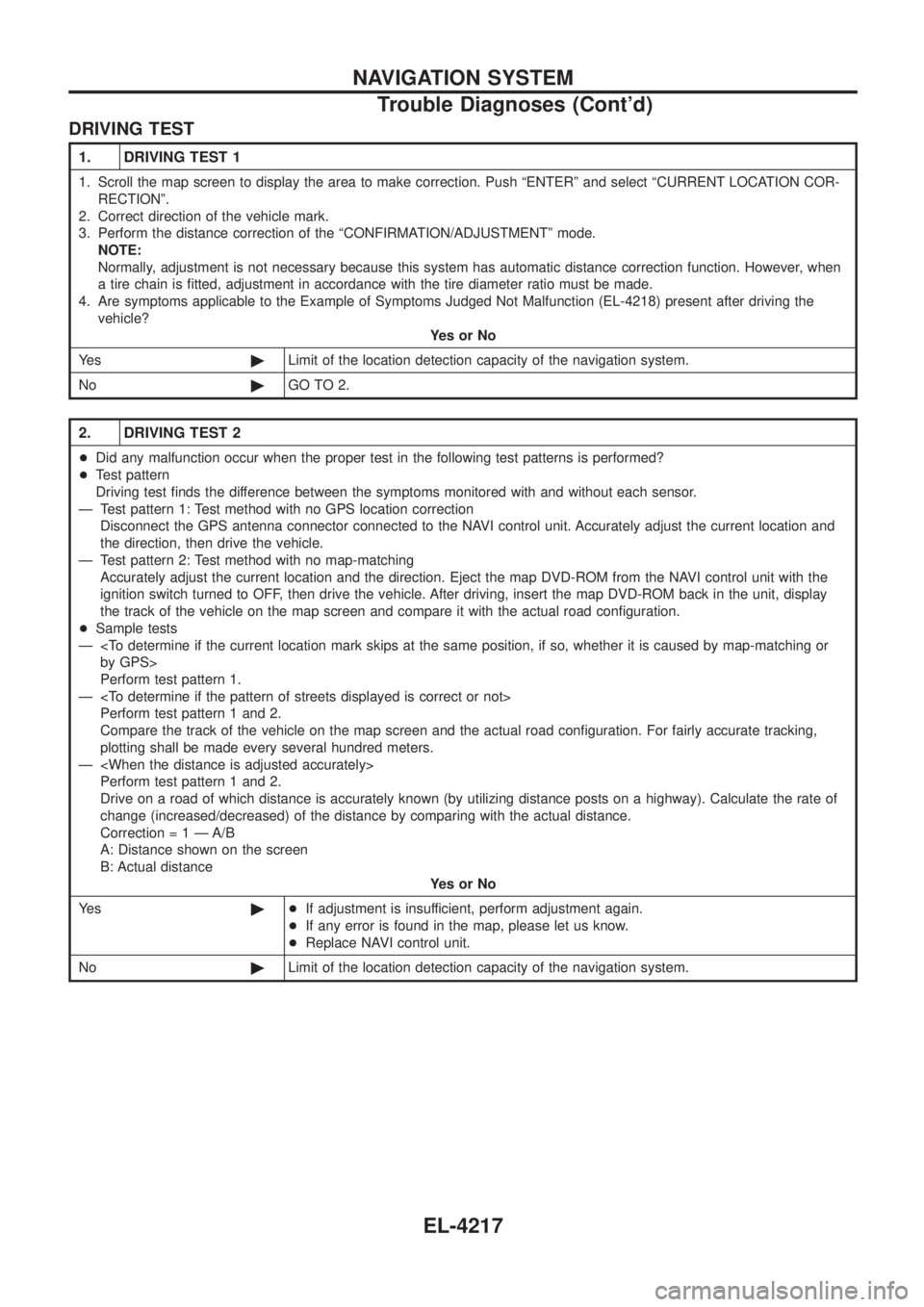
DRIVING TEST
1. DRIVING TEST 1
1. Scroll the map screen to display the area to make correction. Push ªENTERº and select ªCURRENT LOCATION COR-RECTIONº.
2. Correct direction of the vehicle mark.
3. Perform the distance correction of the ªCONFIRMATION/ADJUSTMENTº mode. NOTE:
Normally, adjustment is not necessary because this system has automatic distance correction function. However, when
a tire chain is ®tted, adjustment in accordance with the tire diameter ratio must be made.
4. Are symptoms applicable to the Example of Symptoms Judged Not Malfunction (EL-4218) present after driving the vehicle? YesorNo
Ye s ©Limit of the location detection capacity of the navigation system.
No ©GO TO 2.
2. DRIVING TEST 2
+Did any malfunction occur when the proper test in the following test patterns is performed?
+ Test pattern
Driving test ®nds the difference between the symptoms monitored with and without each sensor.
Ð Test pattern 1: Test method with no GPS location correction Disconnect the GPS antenna connector connected to the NAVI control unit. Accurately adjust the current location and
the direction, then drive the vehicle.
Ð Test pattern 2: Test method with no map-matching Accurately adjust the current location and the direction. Eject the map DVD-ROM from the NAVI control unit with the
ignition switch turned to OFF, then drive the vehicle. After driving, insert the map DVD-ROM back in the unit, display
the track of the vehicle on the map screen and compare it with the actual road con®guration.
+ Sample tests
Ð
Perform test pattern 1.
Ð
Compare the track of the vehicle on the map screen and the actual road con®guration. For fairly accurate tracking,
plotting shall be made every several hundred meters.
Ð
Drive on a road of which distance is accurately known (by utilizing distance posts on a highway). Calculate the rate of
change (increased/decreased) of the distance by comparing with the actual distance.
Correctio n=1ÐA/B
A: Distance shown on the screen
B: Actual distance YesorNo
Ye s ©+If adjustment is insufficient, perform adjustment again.
+ If any error is found in the map, please let us know.
+ Replace NAVI control unit.
No ©Limit of the location detection capacity of the navigation system.
NAVIGATION SYSTEM
Trouble Diagnoses (Cont'd)
EL-4217
Page 313 of 579
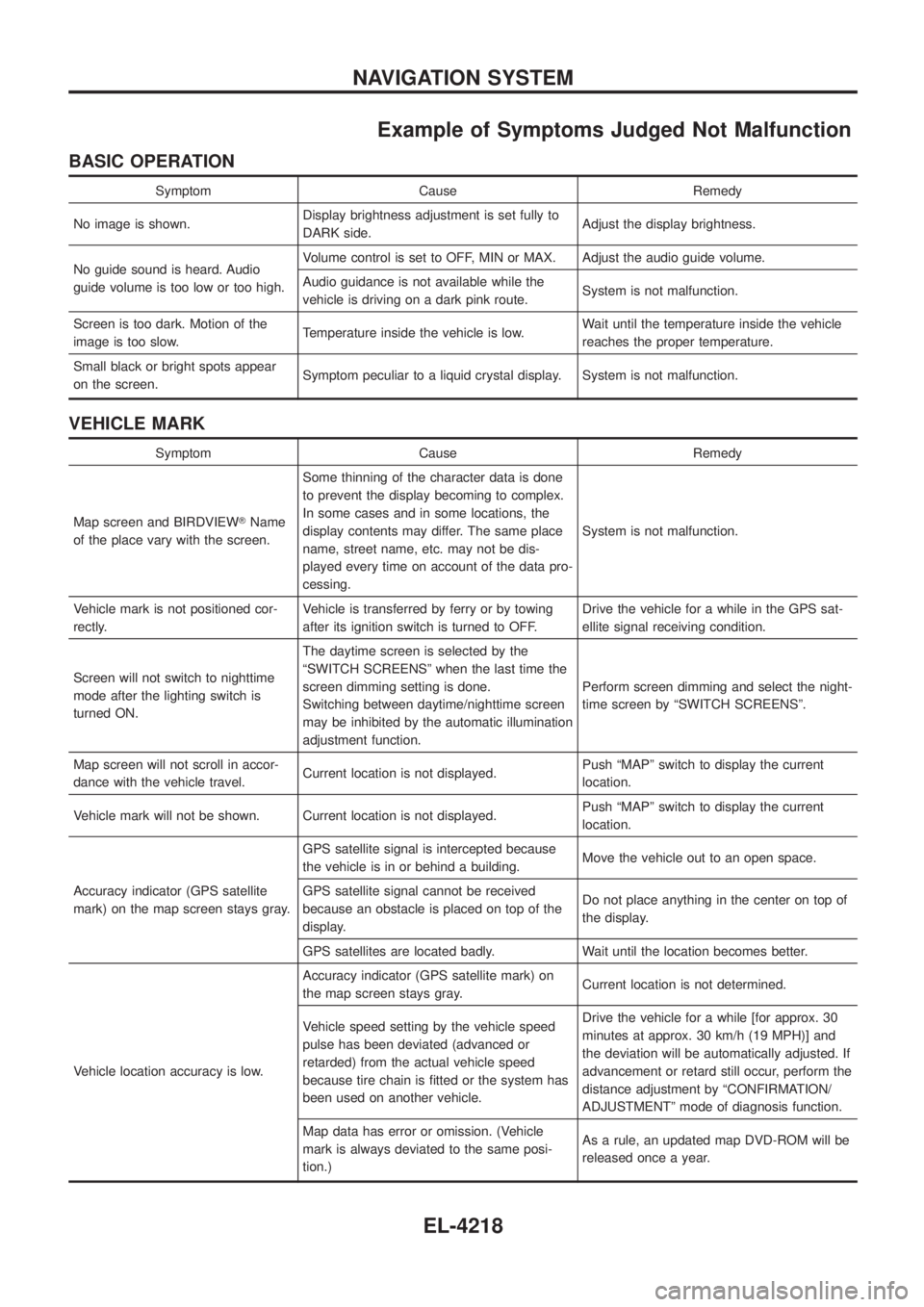
Example of Symptoms Judged Not Malfunction
BASIC OPERATION
Symptom Cause Remedy
No image is shown. Display brightness adjustment is set fully to
DARK side. Adjust the display brightness.
No guide sound is heard. Audio
guide volume is too low or too high. Volume control is set to OFF, MIN or MAX. Adjust the audio guide volume.
Audio guidance is not available while the
vehicle is driving on a dark pink route.
System is not malfunction.
Screen is too dark. Motion of the
image is too slow. Temperature inside the vehicle is low. Wait until the temperature inside the vehicle
reaches the proper temperature.
Small black or bright spots appear
on the screen. Symptom peculiar to a liquid crystal display. System is not malfunction.
VEHICLE MARK
Symptom Cause Remedy
Map screen and BIRDVIEW TName
of the place vary with the screen. Some thinning of the character data is done
to prevent the display becoming to complex.
In some cases and in some locations, the
display contents may differ. The same place
name, street name, etc. may not be dis-
played every time on account of the data pro-
cessing.
System is not malfunction.
Vehicle mark is not positioned cor-
rectly. Vehicle is transferred by ferry or by towing
after its ignition switch is turned to OFF. Drive the vehicle for a while in the GPS sat-
ellite signal receiving condition.
Screen will not switch to nighttime
mode after the lighting switch is
turned ON. The daytime screen is selected by the
ªSWITCH SCREENSº when the last time the
screen dimming setting is done.
Switching between daytime/nighttime screen
may be inhibited by the automatic illumination
adjustment function.
Perform screen dimming and select the night-
time screen by ªSWITCH SCREENSº.
Map screen will not scroll in accor-
dance with the vehicle travel. Current location is not displayed. Push ªMAPº switch to display the current
location.
Vehicle mark will not be shown. Current location is not displayed. Push ªMAPº switch to display the current
location.
Accuracy indicator (GPS satellite
mark) on the map screen stays gray. GPS satellite signal is intercepted because
the vehicle is in or behind a building.
Move the vehicle out to an open space.
GPS satellite signal cannot be received
because an obstacle is placed on top of the
display. Do not place anything in the center on top of
the display.
GPS satellites are located badly. Wait until the location becomes better.
Vehicle location accuracy is low. Accuracy indicator (GPS satellite mark) on
the map screen stays gray.
Current location is not determined.
Vehicle speed setting by the vehicle speed
pulse has been deviated (advanced or
retarded) from the actual vehicle speed
because tire chain is ®tted or the system has
been used on another vehicle. Drive the vehicle for a while [for approx. 30
minutes at approx. 30 km/h (19 MPH)] and
the deviation will be automatically adjusted. If
advancement or retard still occur, perform the
distance adjustment by ªCONFIRMATION/
ADJUSTMENTº mode of diagnosis function.
Map data has error or omission. (Vehicle
mark is always deviated to the same posi-
tion.) As a rule, an updated map DVD-ROM will be
released once a year.
NAVIGATION SYSTEM
EL-4218
Page 314 of 579
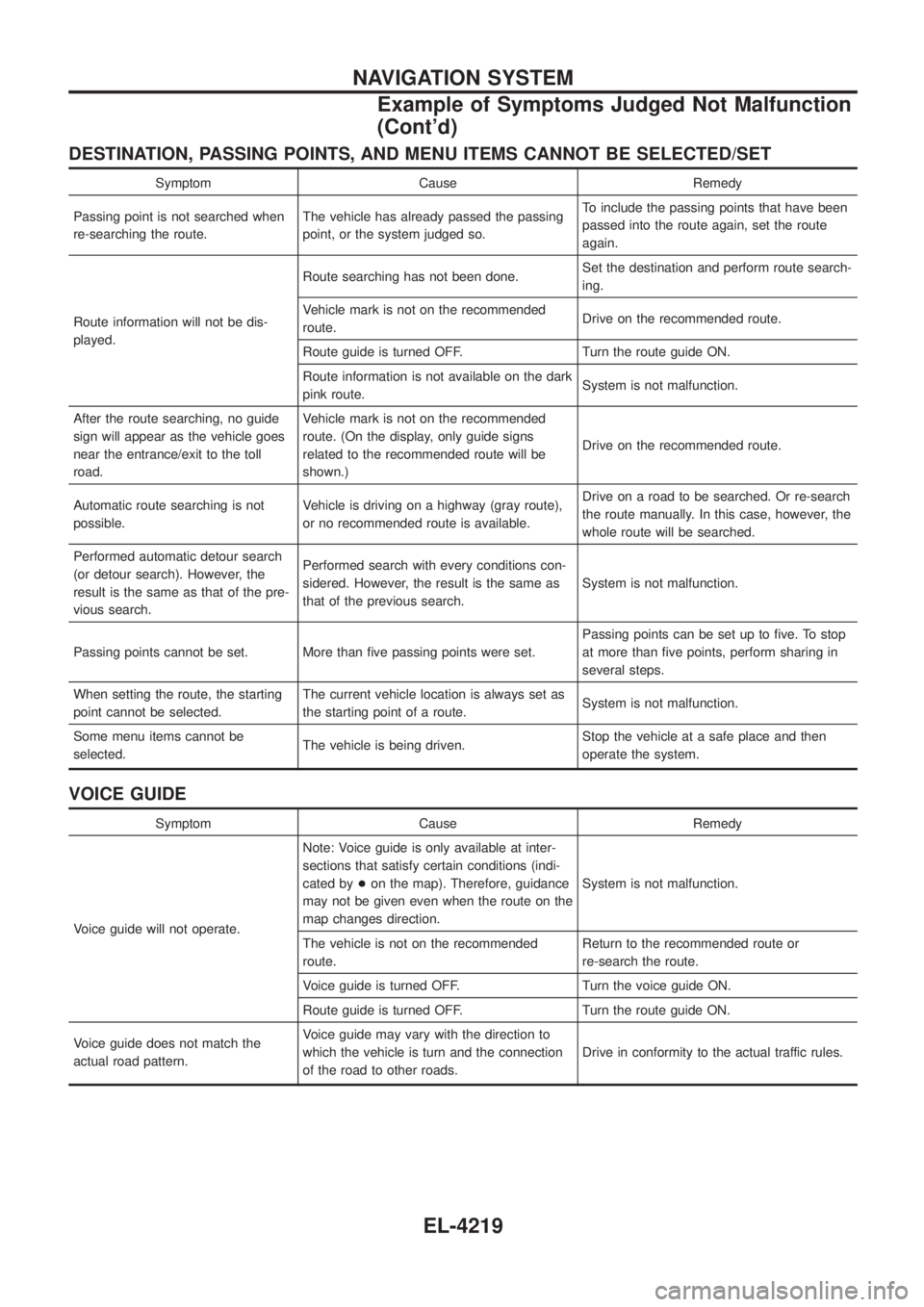
DESTINATION, PASSING POINTS, AND MENU ITEMS CANNOT BE SELECTED/SET
Symptom Cause Remedy
Passing point is not searched when
re-searching the route. The vehicle has already passed the passing
point, or the system judged so. To include the passing points that have been
passed into the route again, set the route
again.
Route information will not be dis-
played. Route searching has not been done.
Set the destination and perform route search-
ing.
Vehicle mark is not on the recommended
route. Drive on the recommended route.
Route guide is turned OFF. Turn the route guide ON.
Route information is not available on the dark
pink route. System is not malfunction.
After the route searching, no guide
sign will appear as the vehicle goes
near the entrance/exit to the toll
road. Vehicle mark is not on the recommended
route. (On the display, only guide signs
related to the recommended route will be
shown.)
Drive on the recommended route.
Automatic route searching is not
possible. Vehicle is driving on a highway (gray route),
or no recommended route is available. Drive on a road to be searched. Or re-search
the route manually. In this case, however, the
whole route will be searched.
Performed automatic detour search
(or detour search). However, the
result is the same as that of the pre-
vious search. Performed search with every conditions con-
sidered. However, the result is the same as
that of the previous search.
System is not malfunction.
Passing points cannot be set. More than ®ve passing points were set. Passing points can be set up to ®ve. To stop
at more than ®ve points, perform sharing in
several steps.
When setting the route, the starting
point cannot be selected. The current vehicle location is always set as
the starting point of a route.
System is not malfunction.
Some menu items cannot be
selected. The vehicle is being driven. Stop the vehicle at a safe place and then
operate the system.
VOICE GUIDE
Symptom Cause Remedy
Voice guide will not operate. Note: Voice guide is only available at inter-
sections that satisfy certain conditions (indi-
cated by
+on the map). Therefore, guidance
may not be given even when the route on the
map changes direction. System is not malfunction.
The vehicle is not on the recommended
route. Return to the recommended route or
re-search the route.
Voice guide is turned OFF. Turn the voice guide ON.
Route guide is turned OFF. Turn the route guide ON.
Voice guide does not match the
actual road pattern. Voice guide may vary with the direction to
which the vehicle is turn and the connection
of the road to other roads.
Drive in conformity to the actual traffic rules.
NAVIGATION SYSTEM
Example of Symptoms Judged Not Malfunction
(Cont'd)
EL-4219
Page 316 of 579
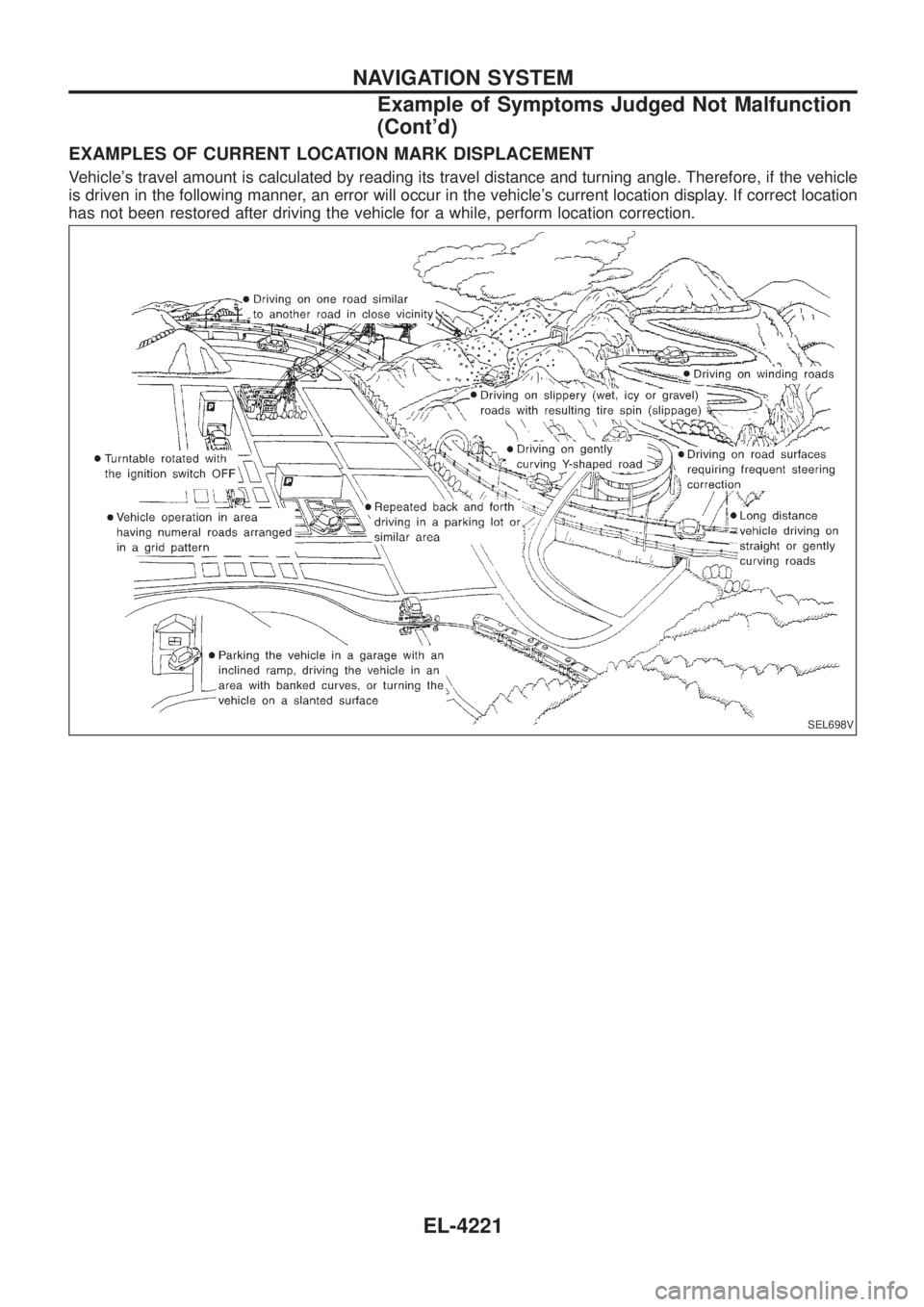
EXAMPLES OF CURRENT LOCATION MARK DISPLACEMENT
Vehicle's travel amount is calculated by reading its travel distance and turning angle. Therefore, if the vehicle
is driven in the following manner, an error will occur in the vehicle's current location display. If correct location
has not been restored after driving the vehicle for a while, perform location correction.
SEL698V
NAVIGATION SYSTEM
Example of Symptoms Judged Not Malfunction
(Cont'd)EL-4221
Page 318 of 579
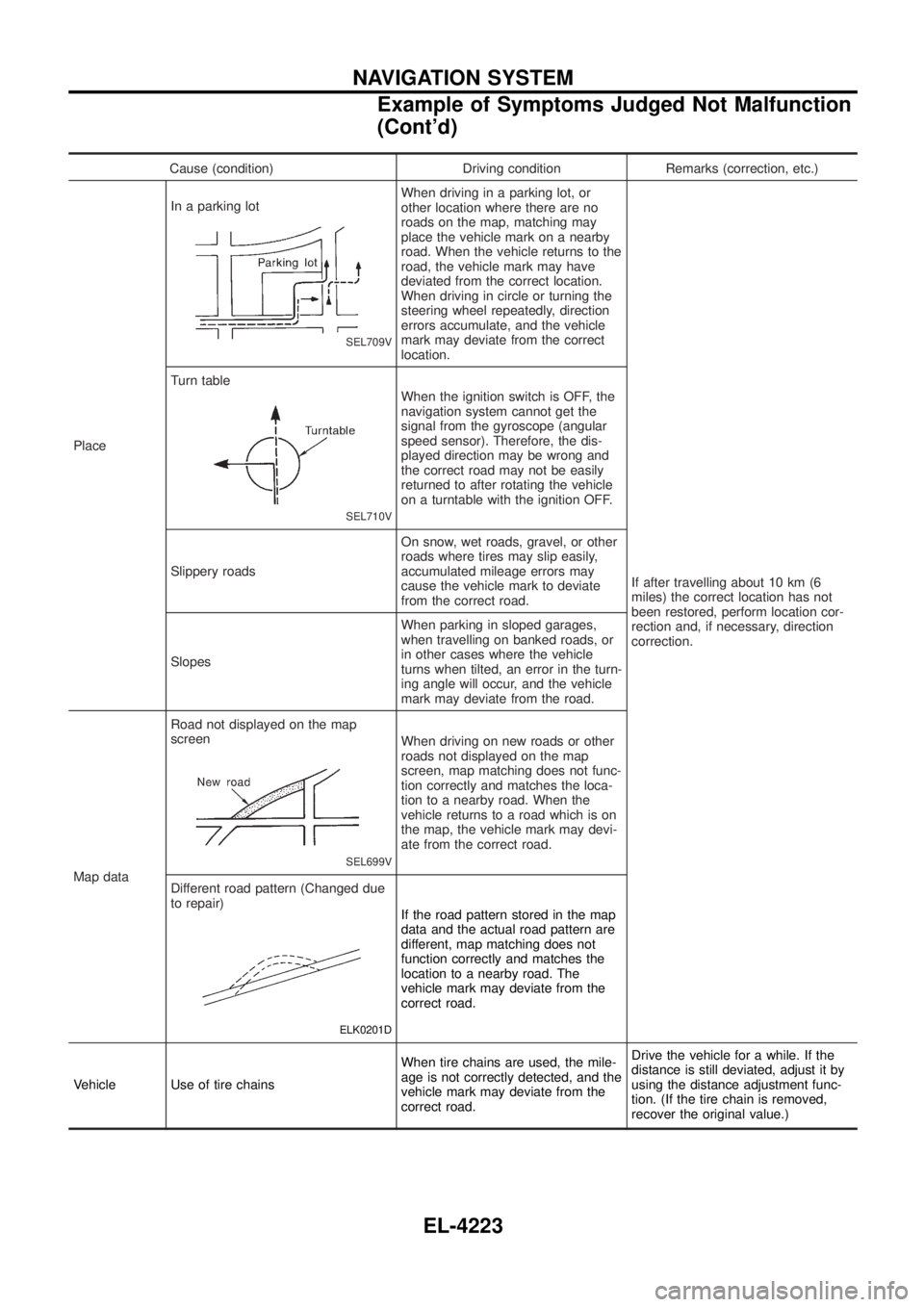
Cause (condition) Driving condition Remarks (correction, etc.)
Place In a parking lot
SEL709V
When driving in a parking lot, or
other location where there are no
roads on the map, matching may
place the vehicle mark on a nearby
road. When the vehicle returns to the
road, the vehicle mark may have
deviated from the correct location.
When driving in circle or turning the
steering wheel repeatedly, direction
errors accumulate, and the vehicle
mark may deviate from the correct
location.
If after travelling about 10 km (6
miles) the correct location has not
been restored, perform location cor-
rection and, if necessary, direction
correction.
Turn table
SEL710V
When the ignition switch is OFF, the
navigation system cannot get the
signal from the gyroscope (angular
speed sensor). Therefore, the dis-
played direction may be wrong and
the correct road may not be easily
returned to after rotating the vehicle
on a turntable with the ignition OFF.
Slippery roads On snow, wet roads, gravel, or other
roads where tires may slip easily,
accumulated mileage errors may
cause the vehicle mark to deviate
from the correct road.
Slopes When parking in sloped garages,
when travelling on banked roads, or
in other cases where the vehicle
turns when tilted, an error in the turn-
ing angle will occur, and the vehicle
mark may deviate from the road.
Map data Road not displayed on the map
screen
SEL699V
When driving on new roads or other
roads not displayed on the map
screen, map matching does not func-
tion correctly and matches the loca-
tion to a nearby road. When the
vehicle returns to a road which is on
the map, the vehicle mark may devi-
ate from the correct road.
Different road pattern (Changed due
to repair)
ELK0201D
If the road pattern stored in the map
data and the actual road pattern are
different, map matching does not
function correctly and matches the
location to a nearby road. The
vehicle mark may deviate from the
correct road.
Vehicle Use of tire chains When tire chains are used, the mile-
age is not correctly detected, and the
vehicle mark may deviate from the
correct road.Drive the vehicle for a while. If the
distance is still deviated, adjust it by
using the distance adjustment func-
tion. (If the tire chain is removed,
recover the original value.)
NAVIGATION SYSTEM
Example of Symptoms Judged Not Malfunction
(Cont'd)
EL-4223
Page 319 of 579
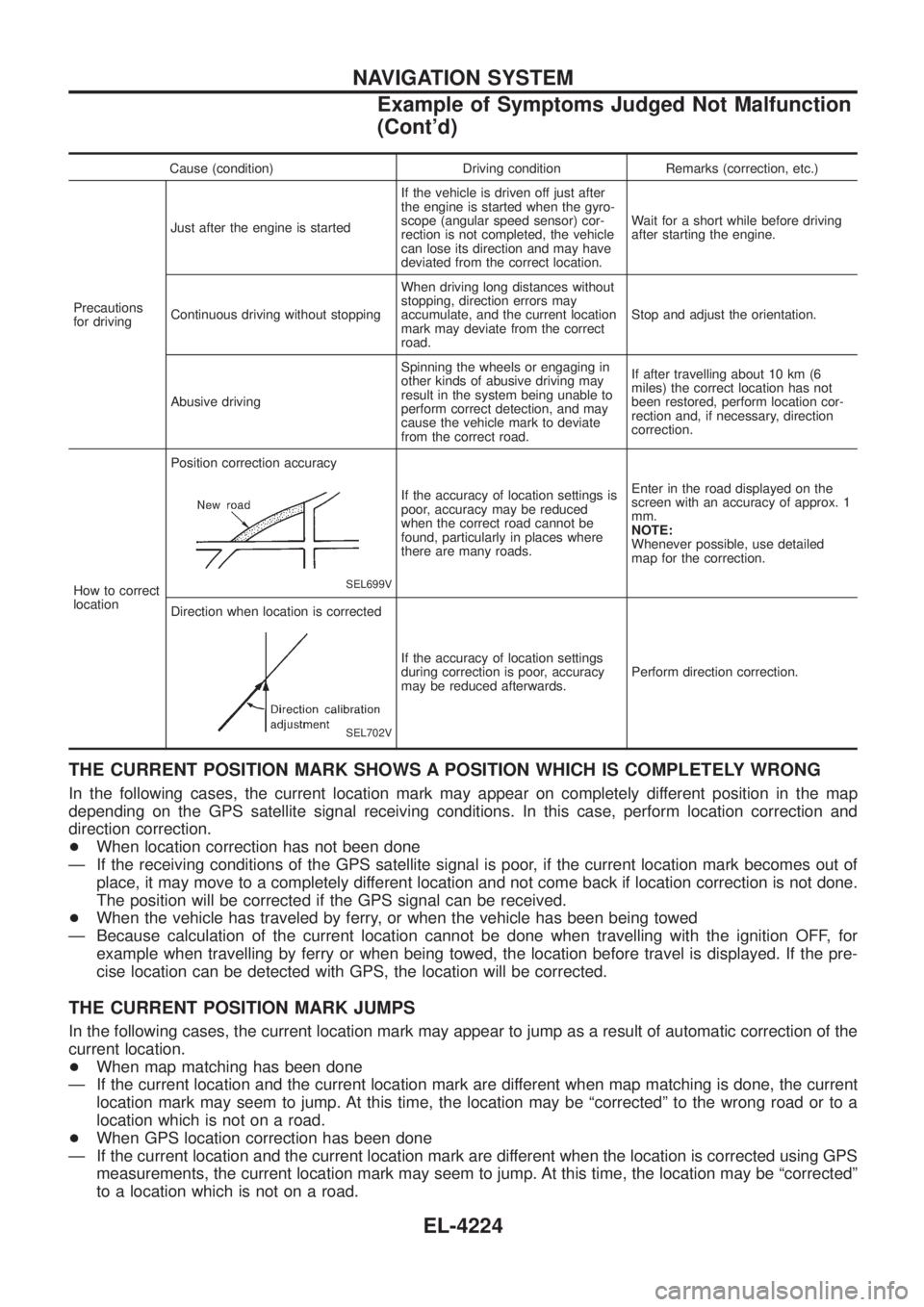
Cause (condition) Driving condition Remarks (correction, etc.)
Precautions
for driving Just after the engine is started
If the vehicle is driven off just after
the engine is started when the gyro-
scope (angular speed sensor) cor-
rection is not completed, the vehicle
can lose its direction and may have
deviated from the correct location.Wait for a short while before driving
after starting the engine.
Continuous driving without stopping When driving long distances without
stopping, direction errors may
accumulate, and the current location
mark may deviate from the correct
road.Stop and adjust the orientation.
Abusive driving Spinning the wheels or engaging in
other kinds of abusive driving may
result in the system being unable to
perform correct detection, and may
cause the vehicle mark to deviate
from the correct road.If after travelling about 10 km (6
miles) the correct location has not
been restored, perform location cor-
rection and, if necessary, direction
correction.
How to correct
location Position correction accuracy
SEL699V
If the accuracy of location settings is
poor, accuracy may be reduced
when the correct road cannot be
found, particularly in places where
there are many roads.
Enter in the road displayed on the
screen with an accuracy of approx. 1
mm.
NOTE:
Whenever possible, use detailed
map for the correction.
Direction when location is corrected
SEL702V
If the accuracy of location settings
during correction is poor, accuracy
may be reduced afterwards. Perform direction correction.
THE CURRENT POSITION MARK SHOWS A POSITION WHICH IS COMPLETELY WRONG
In the following cases, the current location mark may appear on completely different position in the map
depending on the GPS satellite signal receiving conditions. In this case, perform location correction and
direction correction.
+
When location correction has not been done
Ð If the receiving conditions of the GPS satellite signal is poor, if the current location mark becomes out of place, it may move to a completely different location and not come back if location correction is not done.
The position will be corrected if the GPS signal can be received.
+ When the vehicle has traveled by ferry, or when the vehicle has been being towed
Ð Because calculation of the current location cannot be done when travelling with the ignition OFF, for example when travelling by ferry or when being towed, the location before travel is displayed. If the pre-
cise location can be detected with GPS, the location will be corrected.
THE CURRENT POSITION MARK JUMPS
In the following cases, the current location mark may appear to jump as a result of automatic correction of the
current location.
+When map matching has been done
Ð If the current location and the current location mark are different when map matching is done, the current location mark may seem to jump. At this time, the location may be ªcorrectedº to the wrong road or to a
location which is not on a road.
+ When GPS location correction has been done
Ð If the current location and the current location mark are different when the location is corrected using GPS measurements, the current location mark may seem to jump. At this time, the location may be ªcorrectedº
to a location which is not on a road.
NAVIGATION SYSTEM
Example of Symptoms Judged Not Malfunction
(Cont'd)
EL-4224
Page 320 of 579
THE CURRENT LOCATION MARK IS IN A RIVER OR THE SEA
The navigation system moves the current location mark with no distinction between land and rivers or sea. If
the location mark is somehow out of place, it may appear that the vehicle is driving in a river or the sea.
WHEN DRIVING ON THE SAME ROAD, SOMETIMES THE CURRENT LOCATION MARK IS IN
THE RIGHT PLACE AND SOMETIMES IT IS THE WRONG PLACE
The conditions of the GPS antenna (GPS data) and gyroscope (angular speed sensor) change gradually.
Depending on the road traveled and the operation of the steering wheel, the location detection results will be
different. Therefore, even on a road on which the location has never been wrong, conditions may cause the
vehicle mark to deviate.
LOCATION CORRECTION BY MAP MATCHING IS SLOW
+The map matching function needs to refer to the data of the surrounding area. It is necessary to drive some
distance for the function to work.
+ Because map matching operates on this principle, when there are many roads running in similar direc-
tions in the surrounding area, no matching determination may be made. The location may not be corrected
until some special feature is found.
ALTHOUGH THE GPS RECEIVING DISPLAY IS GREEN, THE VEHICLE MARK DOES NOT
RETURN TO THE CORRECT LOCATION
+The GPS accuracy has an error of about 10 m (30 ft). In some cases the current location mark may not
be on the correct street, even when GPS location correction is done.
+ The navigation system compares the results of GPS location detection with the results from map-match-
ing location detection. The one which is determined to have higher accuracy is used.
+ GPS location correction may not be performed when the vehicle is stopped.
THE NAME OF THE CURRENT PLACE IS NOT DISPLAYED
The current place name may not be displayed if there are no place names displayed on the map screen.
CONTENTS OF THE DISPLAY DIFFER FOR THE BIRDVIEW TAND THE (FLAT) MAP SCREEN
Difference of the BIRDVIEW Tscreen from the ¯at map screen are as follows.
+ The current place name displays names which are primarily in the direction of vehicle travel.
+ The amount of time before the vehicle travel or turn angle is updated on the screen is longer than for the
(¯at) map display.
+ The conditions for display of place names, roads, and other data are different for nearby areas and for
more distant areas.
+ Some thinning of the character data is done to prevent the display becoming to complex. In some cases
and in some locations, the display contents may differ.
+ The same place name, street name, etc. may be displayed multiple times.
NAVIGATION SYSTEM
Example of Symptoms Judged Not Malfunction
(Cont'd)
EL-4225