engine NISSAN PATROL 2004 Electronic Service Manual
[x] Cancel search | Manufacturer: NISSAN, Model Year: 2004, Model line: PATROL, Model: NISSAN PATROL 2004Pages: 579, PDF Size: 26.61 MB
Page 151 of 579

Wiring Diagram Ð BACK/L Ð/LHD Models for
TB48 Engine with A/T
TEL986M
BACK-UP LAMP/WAGON AND HARDTOP MODELS
EL-4056
Page 152 of 579

Wiring Diagram Ð BACK/L Ð/RHD Models
Except TB48 Engine with A/T
TEL987M
BACK-UP LAMP/WAGON AND HARDTOP MODELS
EL-4057
Page 153 of 579

Wiring Diagram Ð BACK/L Ð/RHD Models
for TB48 Engine with A/T
TEL988M
BACK-UP LAMP/WAGON AND HARDTOP MODELS
EL-4058
Page 264 of 579
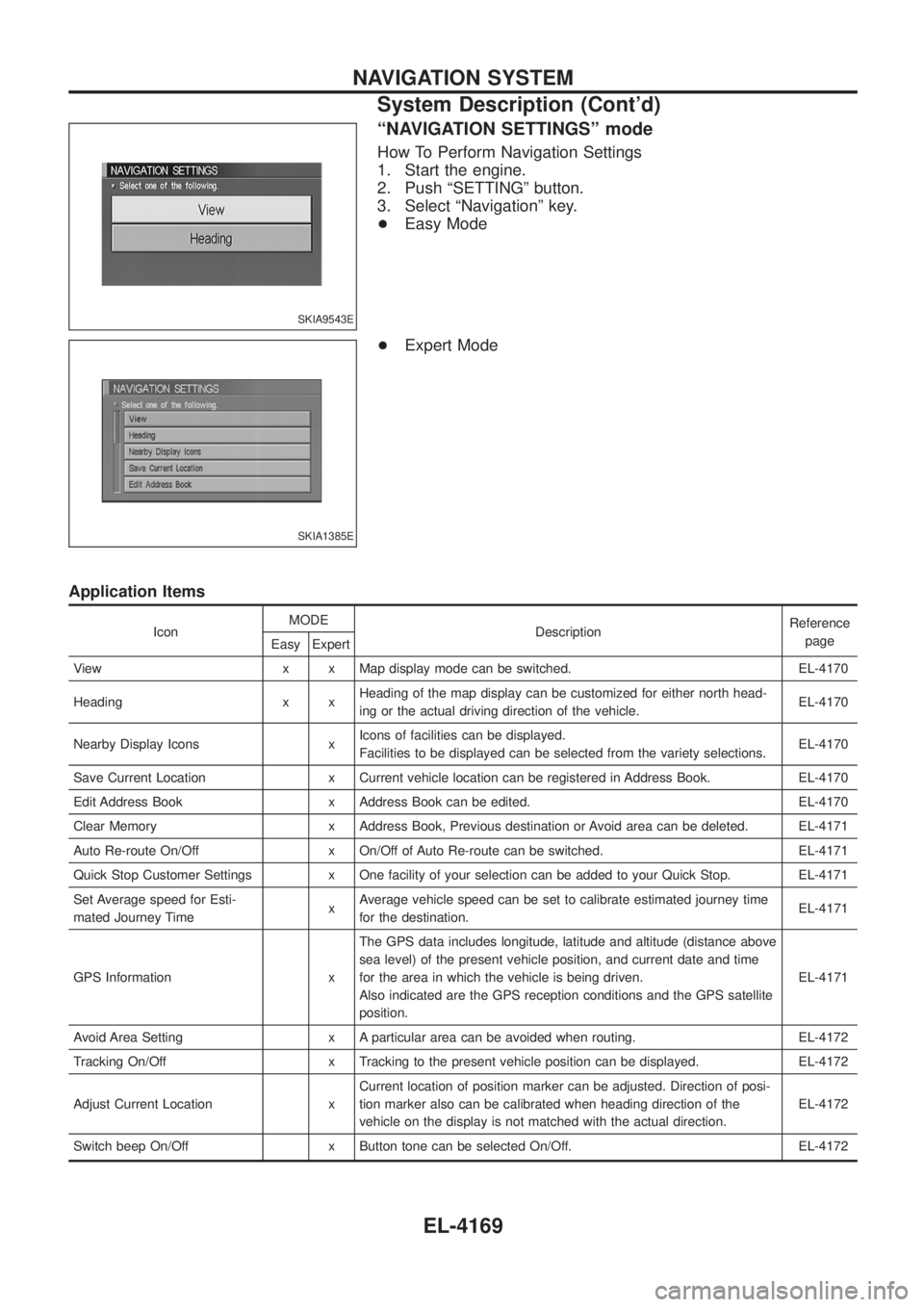
ªNAVIGATION SETTINGSº mode
How To Perform Navigation Settings
1. Start the engine.
2. Push ªSETTINGº button.
3. Select ªNavigationº key.
+Easy Mode
+ Expert Mode
Application Items
Icon MODE
Description Reference
page
Easy Expert
View x x Map display mode can be switched. EL-4170
Heading x x Heading of the map display can be customized for either north head-
ing or the actual driving direction of the vehicle. EL-4170
Nearby Display Icons x Icons of facilities can be displayed.
Facilities to be displayed can be selected from the variety selections. EL-4170
Save Current Location x Current vehicle location can be registered in Address Book. EL-4170
Edit Address Book x Address Book can be edited. EL-4170
Clear Memory x Address Book, Previous destination or Avoid area can be deleted. EL-4171
Auto Re-route On/Off x On/Off of Auto Re-route can be switched. EL-4171
Quick Stop Customer Settings x One facility of your selection can be added to your Quick Stop. EL-4171
Set Average speed for Esti-
mated Journey Time xAverage vehicle speed can be set to calibrate estimated journey time
for the destination. EL-4171
GPS Information x The GPS data includes longitude, latitude and altitude (distance above
sea level) of the present vehicle position, and current date and time
for the area in which the vehicle is being driven.
Also indicated are the GPS reception conditions and the GPS satellite
position. EL-4171
Avoid Area Setting x A particular area can be avoided when routing. EL-4172
Tracking On/Off x Tracking to the present vehicle position can be displayed. EL-4172
Adjust Current Location x Current location of position marker can be adjusted. Direction of posi-
tion marker also can be calibrated when heading direction of the
vehicle on the display is not matched with the actual direction. EL-4172
Switch beep On/Off x Button tone can be selected On/Off. EL-4172
SKIA9543E
SKIA1385E
NAVIGATION SYSTEM
System Description (Cont'd)
EL-4169
Page 278 of 579
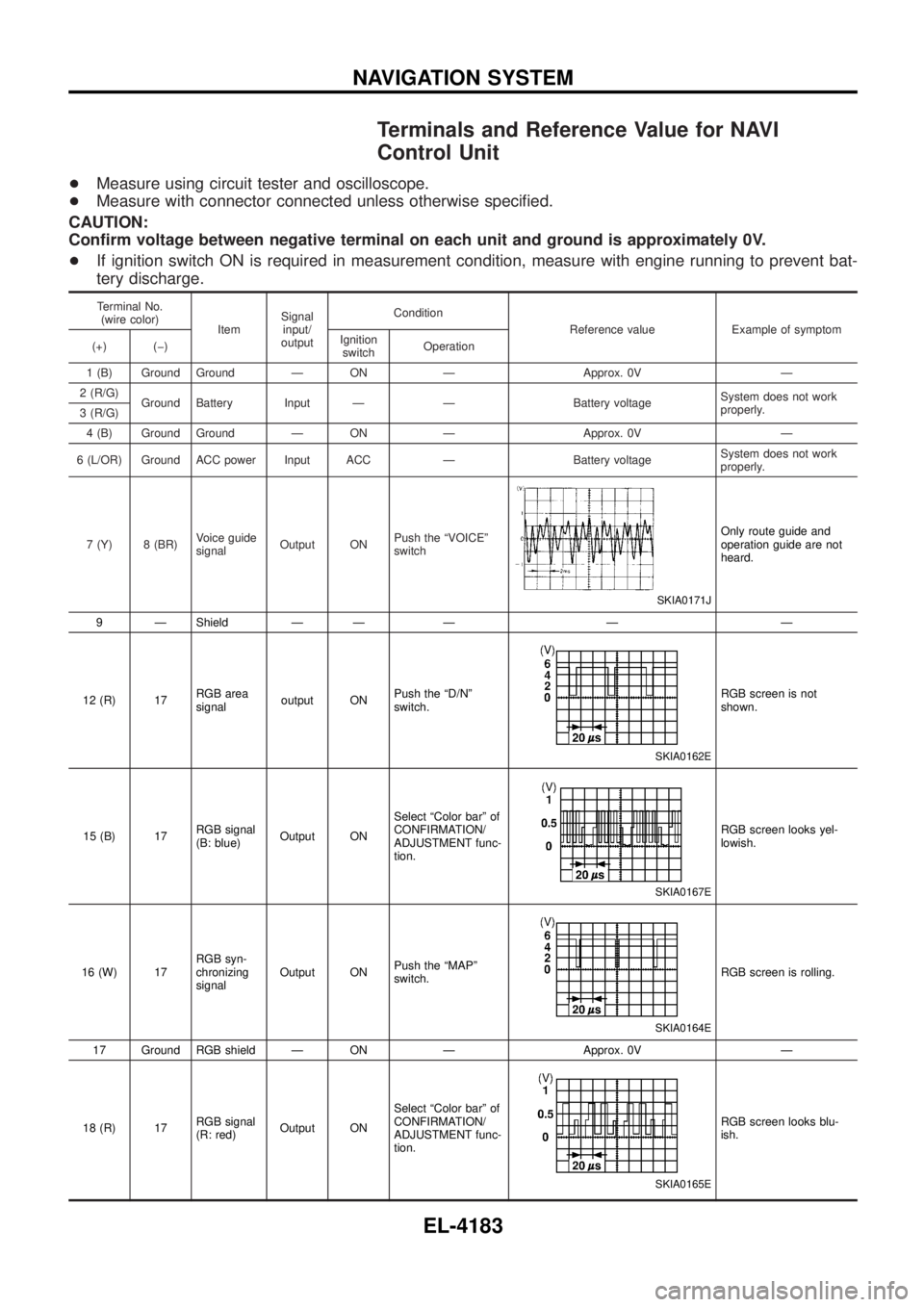
Terminals and Reference Value for NAVI
Control Unit
+Measure using circuit tester and oscilloscope.
+ Measure with connector connected unless otherwise speci®ed.
CAUTION:
Con®rm voltage between negative terminal on each unit and ground is approximately 0V.
+ If ignition switch ON is required in measurement condition, measure with engine running to prevent bat-
tery discharge.
Terminal No.
(wire color) ItemSignal
input/
output Condition
Reference value Example of symptom
(+) (þ) Ignition
switch Operation
1 (B) Ground Ground Ð ON Ð Approx. 0V Ð
2 (R/G) Ground Battery Input Ð Ð Battery voltage System does not work
properly.
3 (R/G)
4 (B) Ground Ground Ð ON Ð Approx. 0V Ð
6 (L/OR) Ground ACC power Input ACC Ð Battery voltage System does not work
properly.
7 (Y) 8 (BR) Voice guide
signalOutput ON Push the ªVOICEº
switch
SKIA0171J
Only route guide and
operation guide are not
heard.
9 Ð Shield Ð Ð Ð Ð Ð
12 (R) 17 RGB area
signaloutput ON Push the ªD/Nº
switch.
SKIA0162E
RGB screen is not
shown.
15 (B) 17 RGB signal
(B: blue)Output ON Select ªColor barº of
CONFIRMATION/
ADJUSTMENT func-
tion.
SKIA0167E
RGB screen looks yel-
lowish.
16 (W) 17 RGB syn-
chronizing
signalOutput ON
Push the ªMAPº
switch.
SKIA0164E
RGB screen is rolling.
17 Ground RGB shield Ð ON Ð Approx. 0V Ð
18 (R) 17 RGB signal
(R: red)Output ON Select ªColor barº of
CONFIRMATION/
ADJUSTMENT func-
tion.
SKIA0165E
RGB screen looks blu-
ish.
NAVIGATION SYSTEM
EL-4183
Page 284 of 579
Self-Diagnosis Function
DESCRIPTION
+Diagnosis function consists of the self-diagnosis mode performed automatically and the CONFIRMATION/
ADJUSTMENT mode operated manually.
+ Self-diagnosis mode checks for connections between the units constituting this system, analyzes each
individual unit at the same time, and displays the results on the LCD screen.
+ CONFIRMATION/ADJUSTMENT mode is used to perform trouble diagnosis that require operation and
judgment by an operator (malfunction that cannot be automatically judged by the system), to check/change
the set value, and to display the History of Errors of the navigation system.
DIAGNOSIS ITEM
Mode Description
Self-diagnosis +
NAVI Control unit diagnosis (DVD-ROM drive will not be diagnosed when no
map DVD-ROM is in it.).
+ Performs diagnosis of each unit and connections between control unit and
GPS antenna, as well as between control unit and each unit.
Con®rmation/
Adjustment Display
Color tone and shading of the screen can be checked by the display of a color
bar and a gray scale.
Vehicle signals Analyzes the following vehicle signals: Vehicle speed signal, light signal, ignition
switch signal, and reverse signal.
Navigation Display Longi-
tude & Lati-
tude
Display the map. Use the joystick to adjust position. Longitude and latitude will be
displayed.
Speed Calibra-
tion Under ordinary conditions, the navigation system distance measuring function will
automatically compensate for minute decreases in wheel and tire diameter
caused by tire wear or low-pressure. Speed calibration immediately restores sys-
tem accuracy in cases such as when distance calibration is needed because of
the use of tire chains in inclement weather.
Angle Adjust-
ment Corrects difference between actual turning angle of a vehicle and turning angle of
the car mark on the display.
Initialize Loca-
tion This mode is for initializing the current location. Use when the vehicle is trans-
ported a long distance on a trailer, etc.
History of Errors Diagnosis results previously stored in the memory (before turning ignition switch
ON) are displayed in this mode. Time and location when/where the errors
occurred are also displayed.
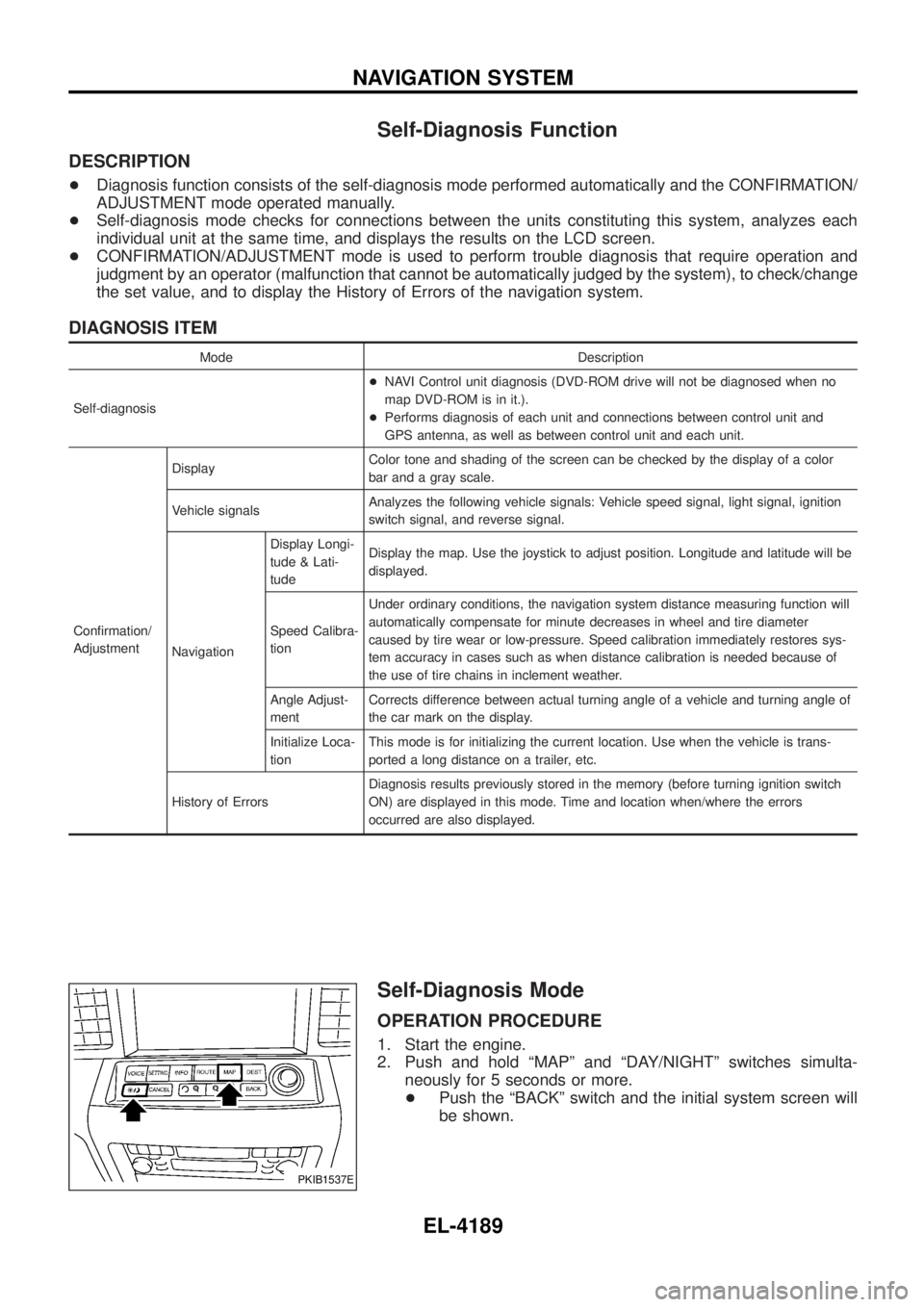
Self-Diagnosis Mode
OPERATION PROCEDURE
1. Start the engine.
2. Push and hold ªMAPº and ªDAY/NIGHTº switches simulta-
neously for 5 seconds or more.
+ Push the ªBACKº switch and the initial system screen will
be shown.
PKIB1537E
NAVIGATION SYSTEM
EL-4189
Page 287 of 579
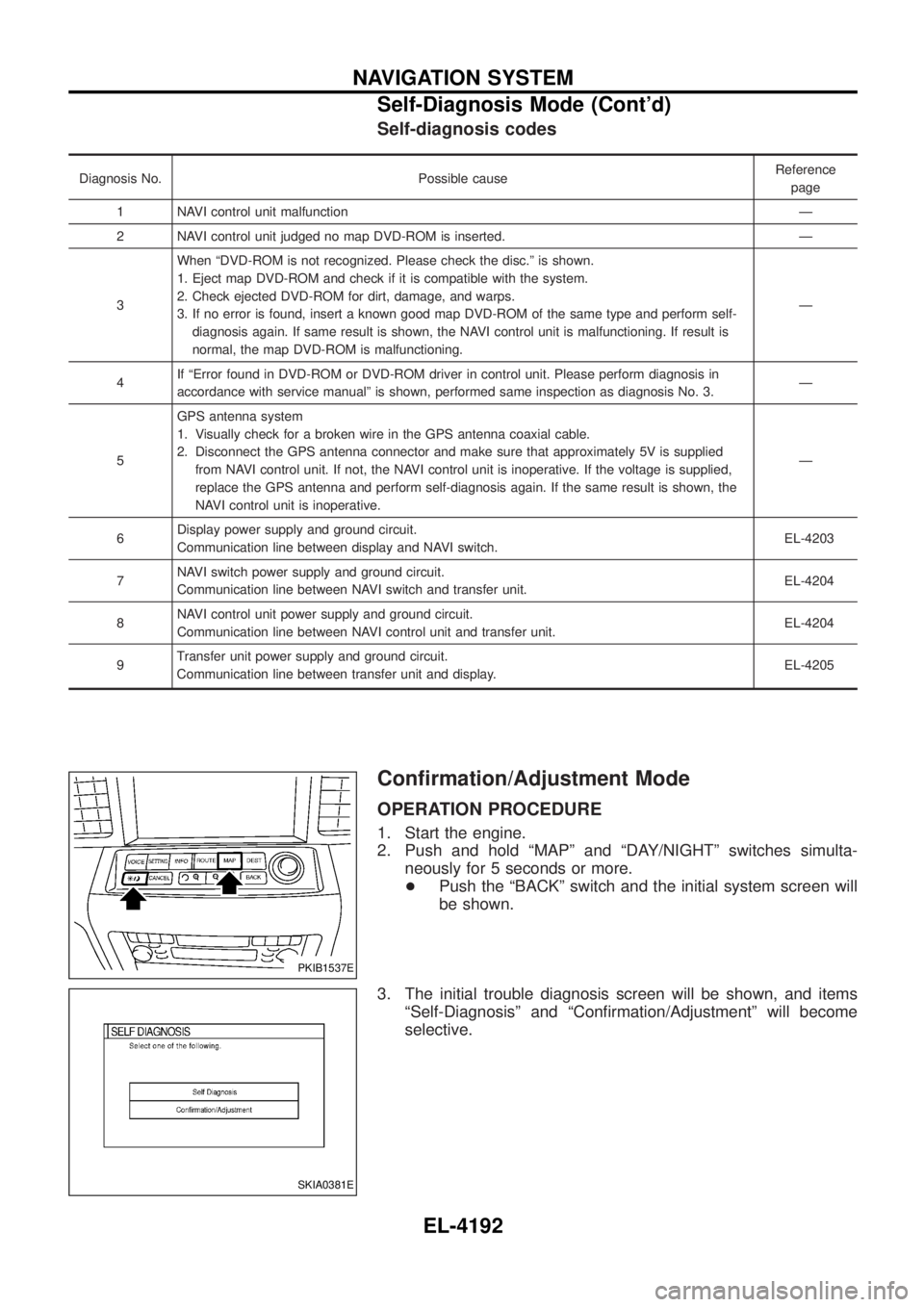
Self-diagnosis codes
Diagnosis No. Possible causeReference
page
1 NAVI control unit malfunction Ð
2 NAVI control unit judged no map DVD-ROM is inserted. Ð
3 When ªDVD-ROM is not recognized. Please check the disc.º is shown.
1. Eject map DVD-ROM and check if it is compatible with the system.
2. Check ejected DVD-ROM for dirt, damage, and warps.
3. If no error is found, insert a known good map DVD-ROM of the same type and perform self-
diagnosis again. If same result is shown, the NAVI control unit is malfunctioning. If result is
normal, the map DVD-ROM is malfunctioning. Ð
4 If ªError found in DVD-ROM or DVD-ROM driver in control unit. Please perform diagnosis in
accordance with service manualº is shown, performed same inspection as diagnosis No. 3. Ð
5 GPS antenna system
1. Visually check for a broken wire in the GPS antenna coaxial cable.
2. Disconnect the GPS antenna connector and make sure that approximately 5V is supplied
from NAVI control unit. If not, the NAVI control unit is inoperative. If the voltage is supplied,
replace the GPS antenna and perform self-diagnosis again. If the same result is shown, the
NAVI control unit is inoperative. Ð
6 Display power supply and ground circuit.
Communication line between display and NAVI switch. EL-4203
7 NAVI switch power supply and ground circuit.
Communication line between NAVI switch and transfer unit. EL-4204
8 NAVI control unit power supply and ground circuit.
Communication line between NAVI control unit and transfer unit. EL-4204
9 Transfer unit power supply and ground circuit.
Communication line between transfer unit and display. EL-4205
Con®rmation/Adjustment Mode
OPERATION PROCEDURE
1. Start the engine.
2. Push and hold ªMAPº and ªDAY/NIGHTº switches simulta-
neously for 5 seconds or more.
+ Push the ªBACKº switch and the initial system screen will
be shown.
3. The initial trouble diagnosis screen will be shown, and items ªSelf-Diagnosisº and ªCon®rmation/Adjustmentº will become
selective.
PKIB1537E
SKIA0381E
NAVIGATION SYSTEM
Self-Diagnosis Mode (Cont'd)
EL-4192
Page 302 of 579

3. CHECK VEHICLE SPEED SIGNAL
1. Connect NAVI control unit and combination meter connector.
2. Start engine and drive vehicle at more than 40 km/h (25 MPH).
3. Check the signal between NAVI control unit harness connector M168 terminal 28 (R/W) and ground with CONSULT-ll oroscilloscope.
SKIA9106E
28 (R/W) - Ground: Refer to EL-4183. OK or NG
OK ©Replace NAVI control unit.
NG ©Replace uni®ed meter control unit.
ILLUMINATION SIGNAL CHECK
1. CHECK TAIL LAMP OPERATION
When lighting switch turned 1st or 2nd position, does tail lamp illuminate?
YesorNo
Ye s ©GO TO 2.
No ©Go to tail lamp trouble diagnosis.
2. CHECK ILLUMINATION SIGNAL
Check voltage between NAVI control unit and ground.
SKIB0315E
OK or NG
OK ©Replace NAVI control unit.
NG ©Repair harness or connector.
Terminals
Lighting switch position Voltage
(+)
(þ)
Connector Terminal (wire color)
M168 25 (L/B) Ground 1st or 2nd position Battery voltage
OFF Approx. 0V
NAVIGATION SYSTEM
Trouble Diagnoses (Cont'd)
EL-4207
Page 319 of 579
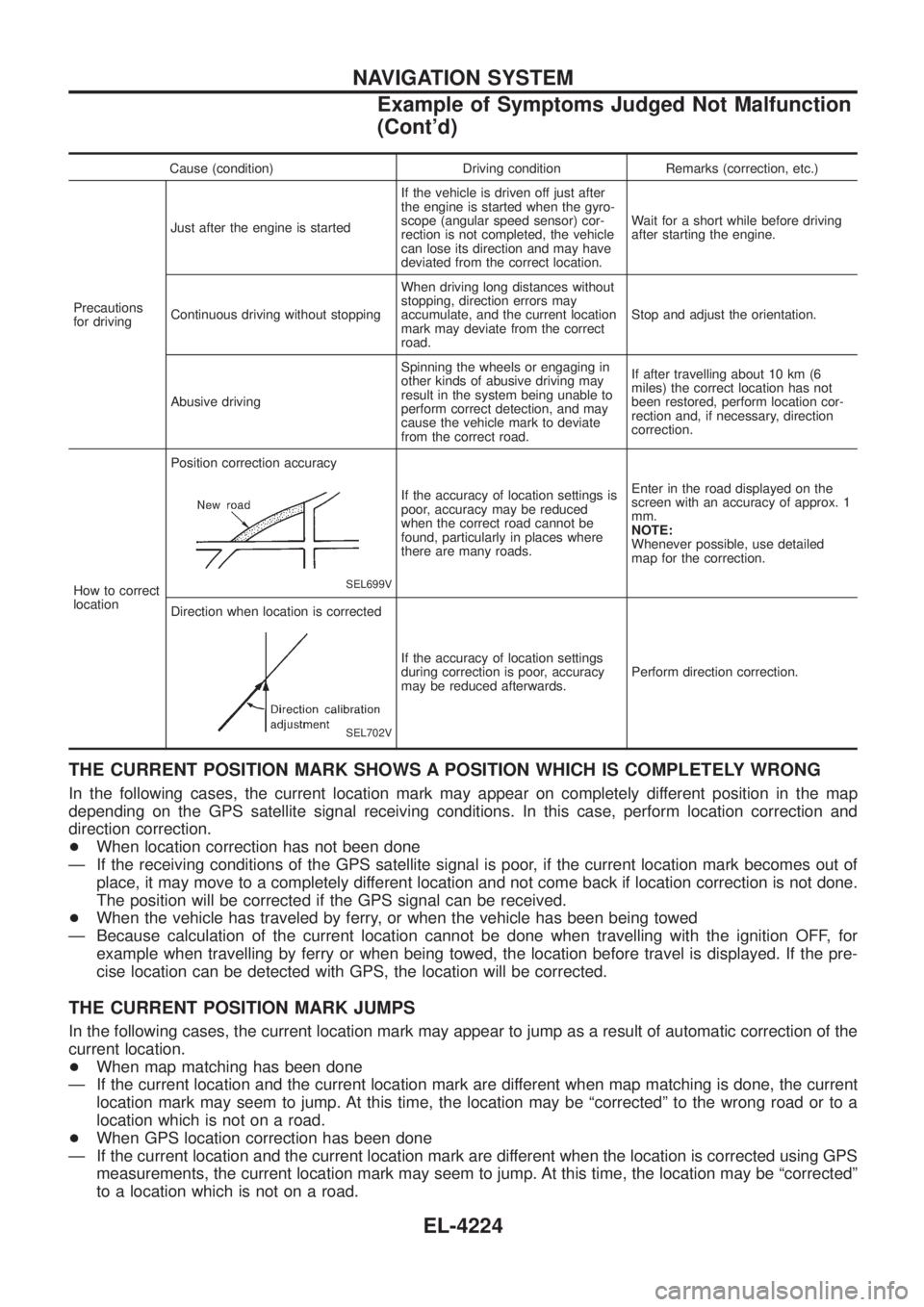
Cause (condition) Driving condition Remarks (correction, etc.)
Precautions
for driving Just after the engine is started
If the vehicle is driven off just after
the engine is started when the gyro-
scope (angular speed sensor) cor-
rection is not completed, the vehicle
can lose its direction and may have
deviated from the correct location.Wait for a short while before driving
after starting the engine.
Continuous driving without stopping When driving long distances without
stopping, direction errors may
accumulate, and the current location
mark may deviate from the correct
road.Stop and adjust the orientation.
Abusive driving Spinning the wheels or engaging in
other kinds of abusive driving may
result in the system being unable to
perform correct detection, and may
cause the vehicle mark to deviate
from the correct road.If after travelling about 10 km (6
miles) the correct location has not
been restored, perform location cor-
rection and, if necessary, direction
correction.
How to correct
location Position correction accuracy
SEL699V
If the accuracy of location settings is
poor, accuracy may be reduced
when the correct road cannot be
found, particularly in places where
there are many roads.
Enter in the road displayed on the
screen with an accuracy of approx. 1
mm.
NOTE:
Whenever possible, use detailed
map for the correction.
Direction when location is corrected
SEL702V
If the accuracy of location settings
during correction is poor, accuracy
may be reduced afterwards. Perform direction correction.
THE CURRENT POSITION MARK SHOWS A POSITION WHICH IS COMPLETELY WRONG
In the following cases, the current location mark may appear on completely different position in the map
depending on the GPS satellite signal receiving conditions. In this case, perform location correction and
direction correction.
+
When location correction has not been done
Ð If the receiving conditions of the GPS satellite signal is poor, if the current location mark becomes out of place, it may move to a completely different location and not come back if location correction is not done.
The position will be corrected if the GPS signal can be received.
+ When the vehicle has traveled by ferry, or when the vehicle has been being towed
Ð Because calculation of the current location cannot be done when travelling with the ignition OFF, for example when travelling by ferry or when being towed, the location before travel is displayed. If the pre-
cise location can be detected with GPS, the location will be corrected.
THE CURRENT POSITION MARK JUMPS
In the following cases, the current location mark may appear to jump as a result of automatic correction of the
current location.
+When map matching has been done
Ð If the current location and the current location mark are different when map matching is done, the current location mark may seem to jump. At this time, the location may be ªcorrectedº to the wrong road or to a
location which is not on a road.
+ When GPS location correction has been done
Ð If the current location and the current location mark are different when the location is corrected using GPS measurements, the current location mark may seem to jump. At this time, the location may be ªcorrectedº
to a location which is not on a road.
NAVIGATION SYSTEM
Example of Symptoms Judged Not Malfunction
(Cont'd)
EL-4224
Page 328 of 579

Schematic/TB48 and TD42Ti Engine Models
TEL088N
AUTOMATIC SPEED CONTROL DEVICE (ASCD)/WAGON AND HARDTOPMODELS
EL-4233