engine NISSAN PATROL 2004 Electronic Manual Online
[x] Cancel search | Manufacturer: NISSAN, Model Year: 2004, Model line: PATROL, Model: NISSAN PATROL 2004Pages: 579, PDF Size: 26.61 MB
Page 448 of 579
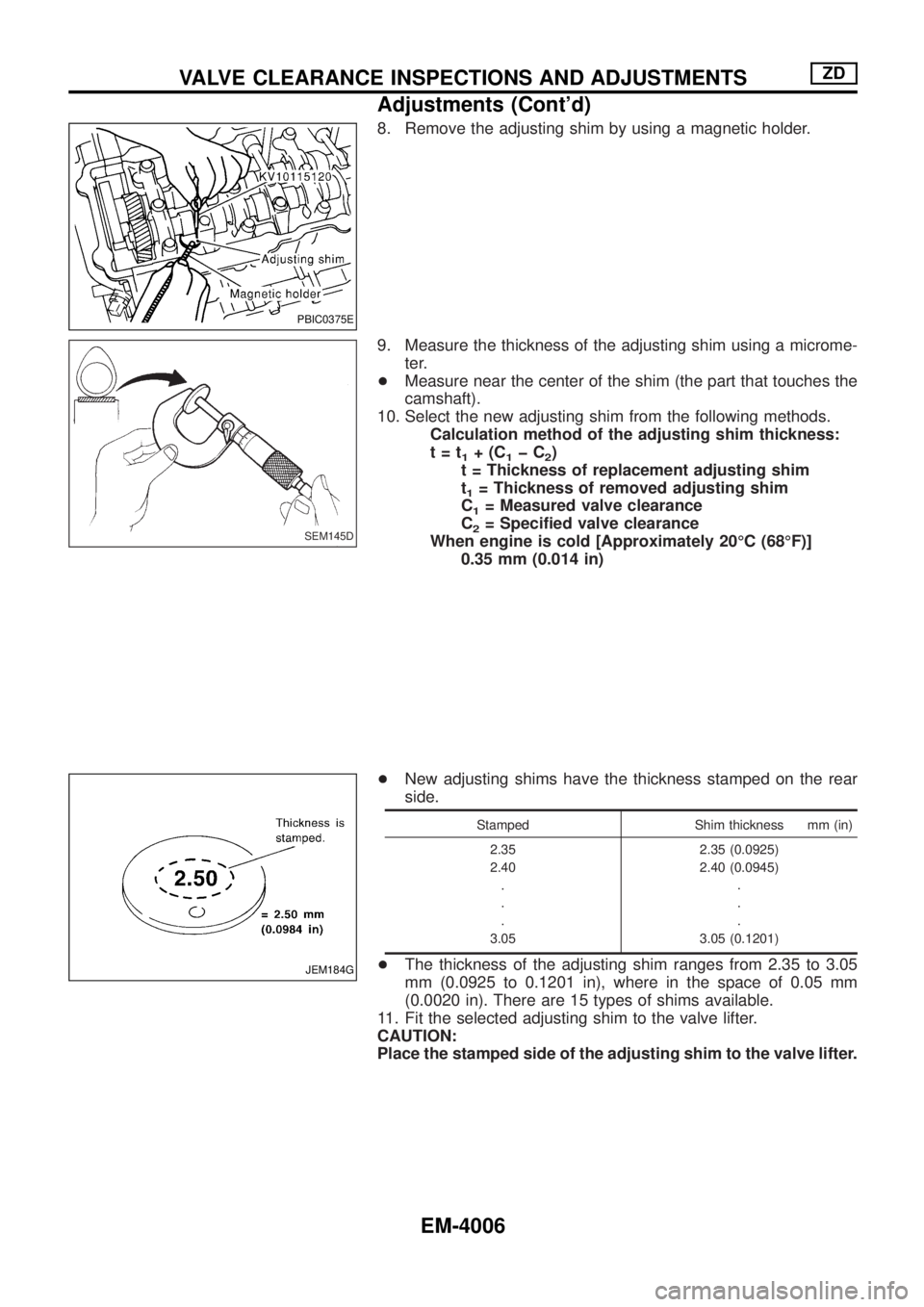
8. Remove the adjusting shim by using a magnetic holder.
9. Measure the thickness of the adjusting shim using a microme-
ter.
+Measure near the center of the shim (the part that touches the
camshaft).
10. Select the new adjusting shim from the following methods.
Calculation method of the adjusting shim thickness:
t=t
1+(C1þC2)
t = Thickness of replacement adjusting shim
t
1= Thickness of removed adjusting shim
C
1= Measured valve clearance
C
2= Speci®ed valve clearance
When engine is cold [Approximately 20ÉC (68ÉF)]
0.35 mm (0.014 in)
+New adjusting shims have the thickness stamped on the rear
side.
Stamped Shim thickness mm (in)
2.35
2.40
.
.
.
3.052.35 (0.0925)
2.40 (0.0945)
.
.
.
3.05 (0.1201)
+The thickness of the adjusting shim ranges from 2.35 to 3.05
mm (0.0925 to 0.1201 in), where in the space of 0.05 mm
(0.0020 in). There are 15 types of shims available.
11. Fit the selected adjusting shim to the valve lifter.
CAUTION:
Place the stamped side of the adjusting shim to the valve lifter.
PBIC0375E
SEM145D
JEM184G
VALVE CLEARANCE INSPECTIONS AND ADJUSTMENTSZD
Adjustments (Cont'd)
EM-4006
Page 449 of 579
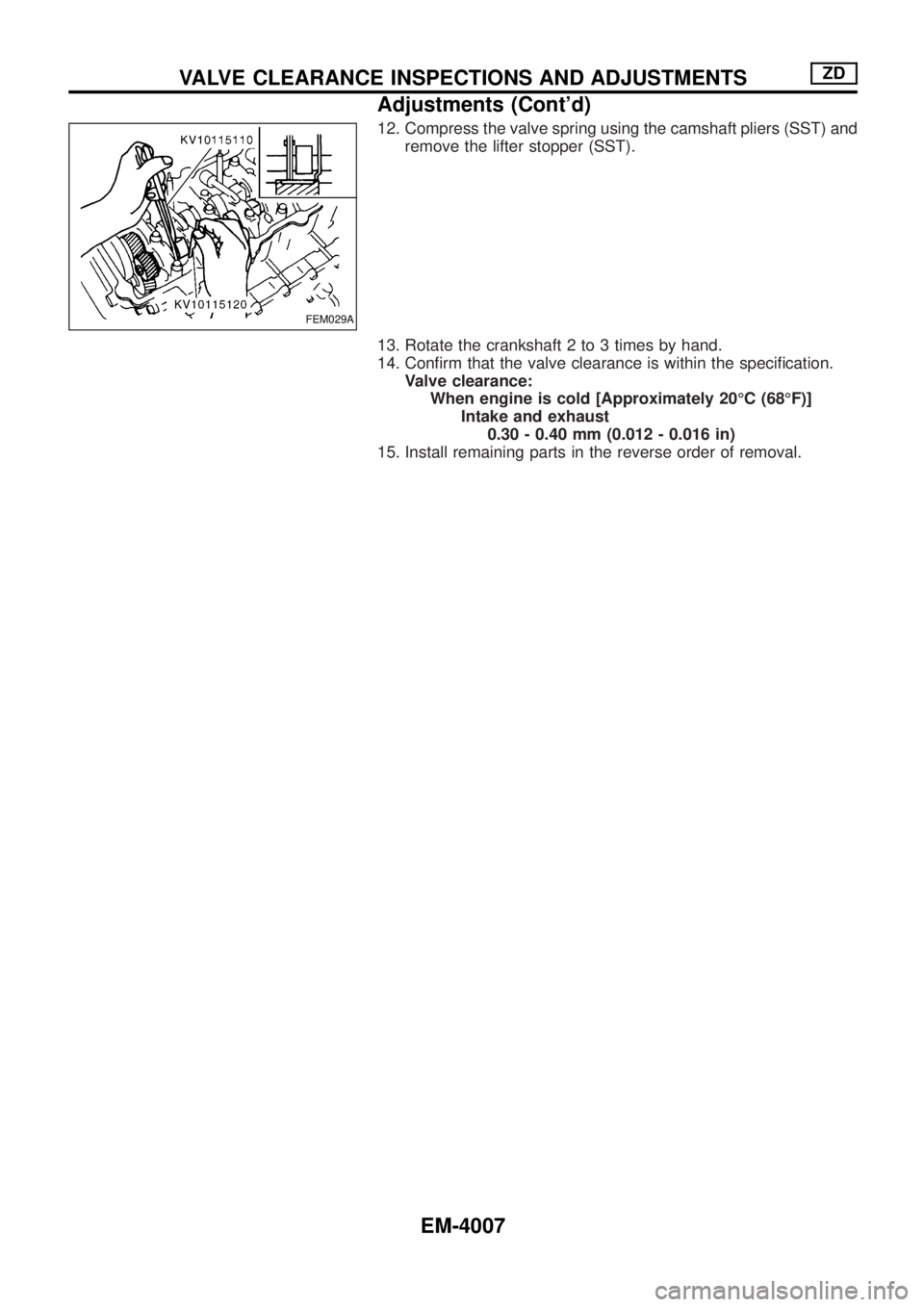
12. Compress the valve spring using the camshaft pliers (SST) and
remove the lifter stopper (SST).
13. Rotate the crankshaft 2 to 3 times by hand.
14. Con®rm that the valve clearance is within the speci®cation.
Valve clearance:
When engine is cold [Approximately 20ÉC (68ÉF)]
Intake and exhaust
0.30 - 0.40 mm (0.012 - 0.016 in)
15. Install remaining parts in the reverse order of removal.
FEM029A
VALVE CLEARANCE INSPECTIONS AND ADJUSTMENTSZD
Adjustments (Cont'd)
EM-4007
Page 451 of 579
Removal
1. Remove the following parts.
+Undercover
+Engine oil (Drain)
+Engine coolant (Drain)
+Engine cover
+Intercooler
+Air inlet pipe
+Air cleaner case
+Throttle body
+Swirl and intake air control valve control solenoid valve and
bracket
+Vacuum tank
+Glow plate
+Rocker cover
+Spill tube
+Radiator shrouds (Rear and Lower)
+Cooling fan
+Radiator hose (Upper and Lower)
+Auxiliary belt and auto tensioner.
2. Remove the alternator.
3. Remove the A/C compressor and bracket with piping con-
nected. Move and support it at the LH side of engine bay with
a rope to avoid putting load on piping.
Refer to HA section in NISSAN Service Manual (Publication No.
SM9E-Y61CG2 or SM9E-Y61CG3).
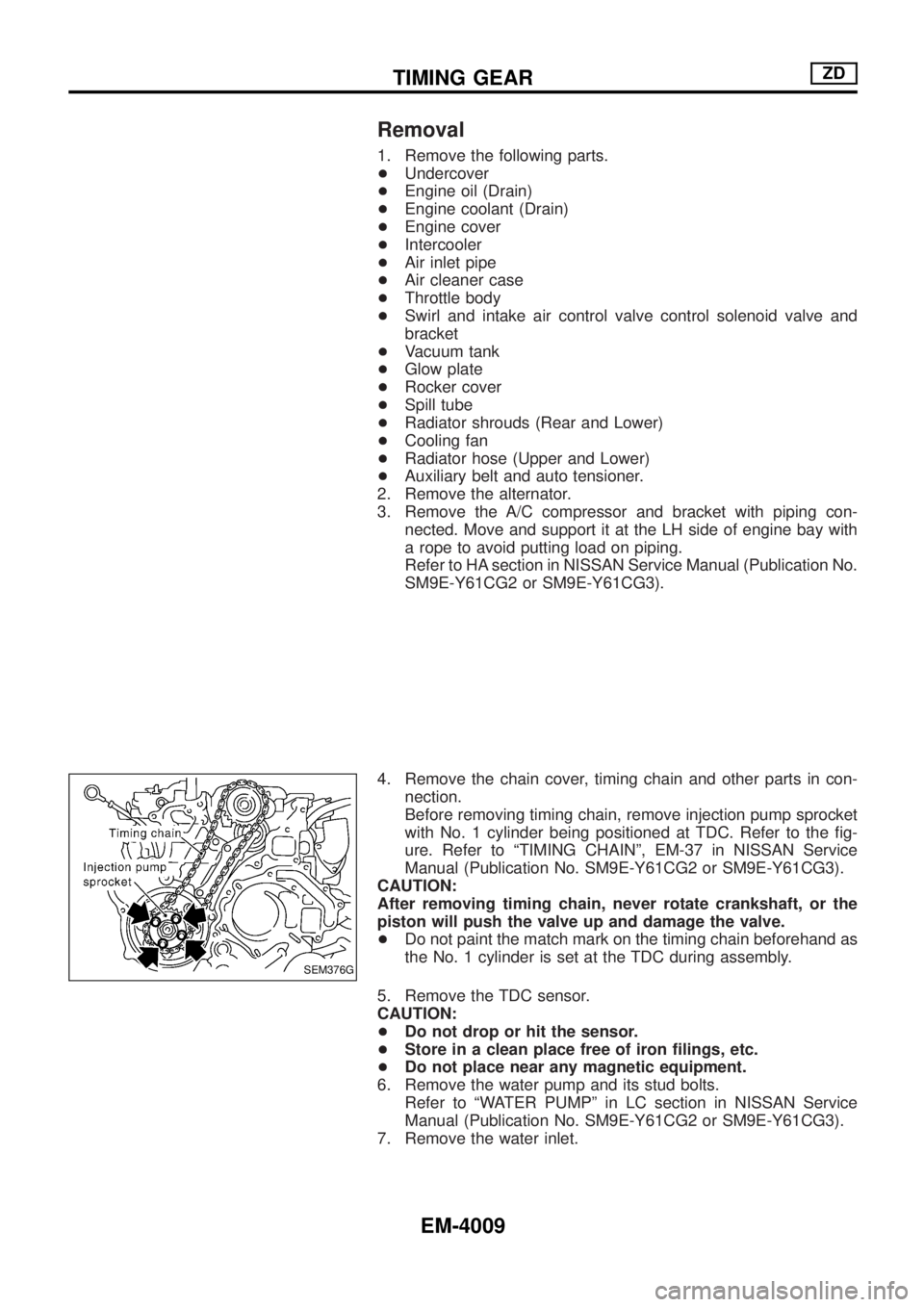
4. Remove the chain cover, timing chain and other parts in con-
nection.
Before removing timing chain, remove injection pump sprocket
with No. 1 cylinder being positioned at TDC. Refer to the ®g-
ure. Refer to ªTIMING CHAINº, EM-37 in NISSAN Service
Manual (Publication No. SM9E-Y61CG2 or SM9E-Y61CG3).
CAUTION:
After removing timing chain, never rotate crankshaft, or the
piston will push the valve up and damage the valve.
+Do not paint the match mark on the timing chain beforehand as
the No. 1 cylinder is set at the TDC during assembly.
5. Remove the TDC sensor.
CAUTION:
+Do not drop or hit the sensor.
+Store in a clean place free of iron ®lings, etc.
+Do not place near any magnetic equipment.
6. Remove the water pump and its stud bolts.
Refer to ªWATER PUMPº in LC section in NISSAN Service
Manual (Publication No. SM9E-Y61CG2 or SM9E-Y61CG3).
7. Remove the water inlet.
SEM376G
TIMING GEARZD
EM-4009
Page 455 of 579
![NISSAN PATROL 2004 Electronic Manual Online 4. Install the front oil seal to the gear case.
+Apply engine oil to the ®tting side.
+Evenly insert the front oil seal using a drift [outer dia.: approx.
64 mm (2.52 in)] completely.
CAUTION:
Make s](/img/5/57364/w960_57364-454.png "NISSAN PATROL 2004 Electronic Manual Online 4. Install the front oil seal to the gear case.
+Apply engine oil to the ®tting side.
+Evenly insert the front oil seal using a drift [outer dia.: approx.
64 mm (2.52 in)] completely.
CAUTION:
Make s")
4. Install the front oil seal to the gear case.
+Apply engine oil to the ®tting side.
+Evenly insert the front oil seal using a drift [outer dia.: approx.
64 mm (2.52 in)] completely.
CAUTION:
Make sure the oil seal does not spill off the end side of the gear
case.
5. Install the gear case.
1) Before installing gear case, remove all traces of liquid gasket
from mating surface using a scraper.
2) Align gasket with dowel and install.
FEM043
FEM044
SEM353G
TIMING GEARZD
Installation (Cont'd)
EM-4013
Page 456 of 579
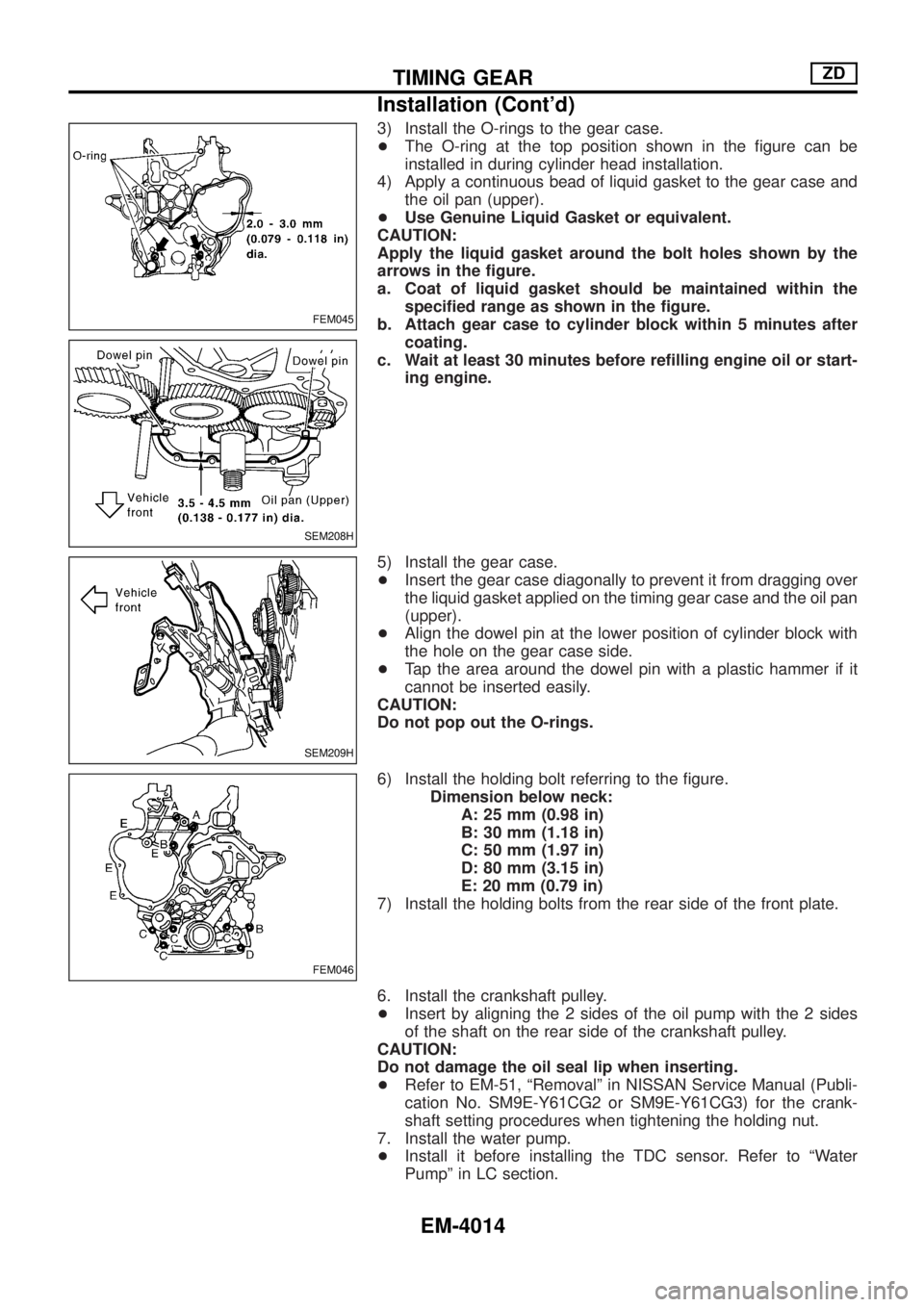
3) Install the O-rings to the gear case.
+The O-ring at the top position shown in the ®gure can be
installed in during cylinder head installation.
4) Apply a continuous bead of liquid gasket to the gear case and
the oil pan (upper).
+Use Genuine Liquid Gasket or equivalent.
CAUTION:
Apply the liquid gasket around the bolt holes shown by the
arrows in the ®gure.
a. Coat of liquid gasket should be maintained within the
speci®ed range as shown in the ®gure.
b. Attach gear case to cylinder block within 5 minutes after
coating.
c. Wait at least 30 minutes before re®lling engine oil or start-
ing engine.
5) Install the gear case.
+Insert the gear case diagonally to prevent it from dragging over
the liquid gasket applied on the timing gear case and the oil pan
(upper).
+Align the dowel pin at the lower position of cylinder block with
the hole on the gear case side.
+Tap the area around the dowel pin with a plastic hammer if it
cannot be inserted easily.
CAUTION:
Do not pop out the O-rings.
6) Install the holding bolt referring to the ®gure.
Dimension below neck:
A: 25 mm (0.98 in)
B: 30 mm (1.18 in)
C: 50 mm (1.97 in)
D: 80 mm (3.15 in)
E: 20 mm (0.79 in)
7) Install the holding bolts from the rear side of the front plate.
6. Install the crankshaft pulley.
+Insert by aligning the 2 sides of the oil pump with the 2 sides
of the shaft on the rear side of the crankshaft pulley.
CAUTION:
Do not damage the oil seal lip when inserting.
+Refer to EM-51, ªRemovalº in NISSAN Service Manual (Publi-
cation No. SM9E-Y61CG2 or SM9E-Y61CG3) for the crank-
shaft setting procedures when tightening the holding nut.
7. Install the water pump.
+Install it before installing the TDC sensor. Refer to ªWater
Pumpº in LC section.
FEM045
SEM208H
SEM209H
FEM046
TIMING GEARZD
Installation (Cont'd)
EM-4014
Page 461 of 579
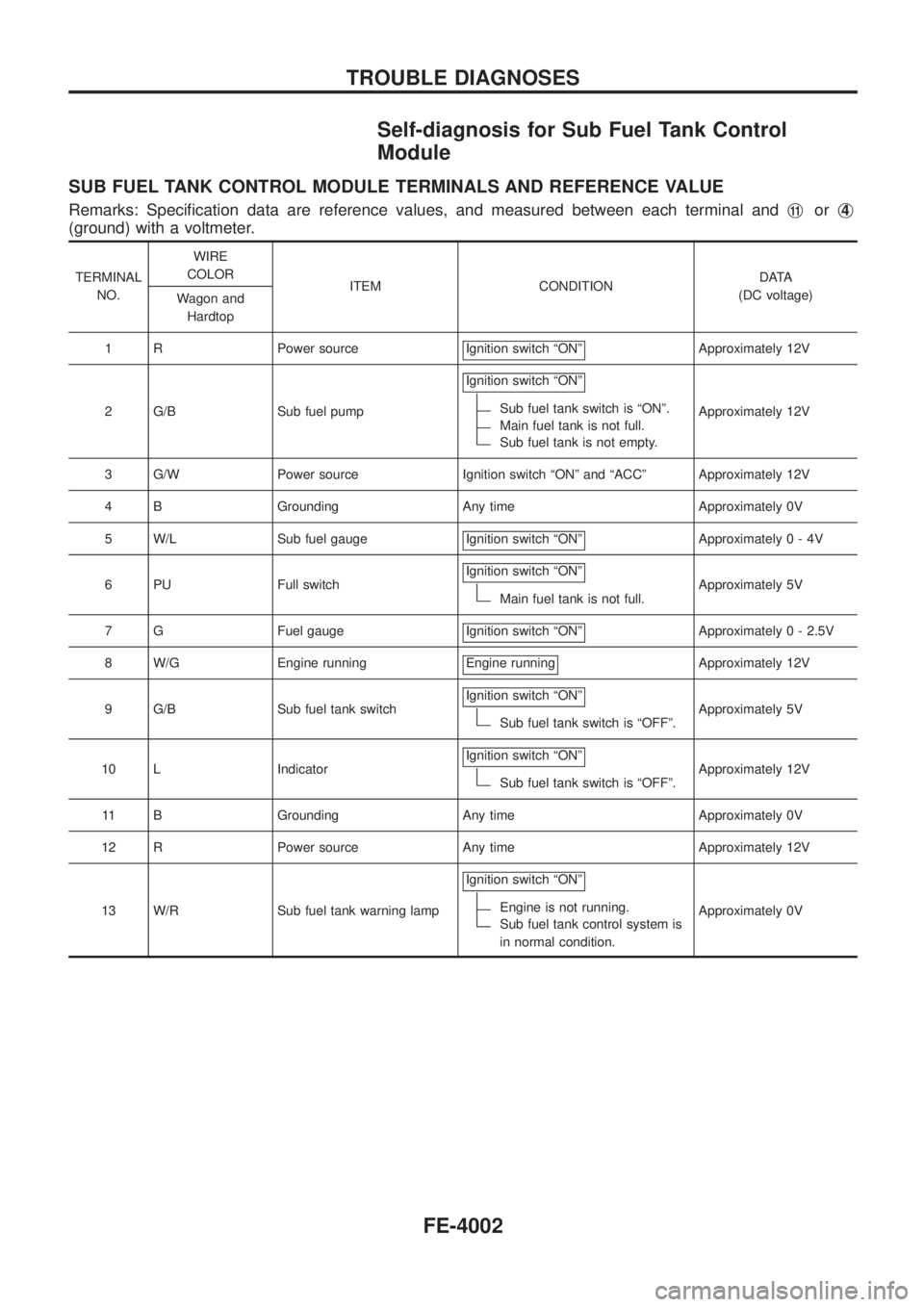
Self-diagnosis for Sub Fuel Tank Control
Module
SUB FUEL TANK CONTROL MODULE TERMINALS AND REFERENCE VALUE
Remarks: Speci®cation data are reference values, and measured between each terminal andj11orj4
(ground) with a voltmeter.
TERMINAL
NO.WIRE
COLOR
ITEM CONDITIONDATA
(DC voltage)
Wagon and
Hardtop
1 R Power source Ignition switch ªONº
Approximately 12V
2 G/B Sub fuel pumpIgnition switch ªONº
Sub fuel tank switch is ªONº.
Main fuel tank is not full.
Sub fuel tank is not empty.Approximately 12V
3 G/W Power source Ignition switch ªONº and ªACCº Approximately 12V
4 B Grounding Any time Approximately 0V
5 W/L Sub fuel gauge Ignition switch ªONº
Approximately0-4V
6 PU Full switchIgnition switch ªONº
Main fuel tank is not full.Approximately 5V
7 G Fuel gauge Ignition switch ªONº
Approximately 0 - 2.5V
8 W/G Engine running Engine running
Approximately 12V
9 G/B Sub fuel tank switchIgnition switch ªONº
Sub fuel tank switch is ªOFFº.Approximately 5V
10 L IndicatorIgnition switch ªONº
Sub fuel tank switch is ªOFFº.Approximately 12V
11 B Grounding Any time Approximately 0V
12 R Power source Any time Approximately 12V
13 W/R Sub fuel tank warning lampIgnition switch ªONº
Engine is not running.
Sub fuel tank control system is
in normal condition.Approximately 0V
TROUBLE DIAGNOSES
FE-4002
Page 471 of 579
GI
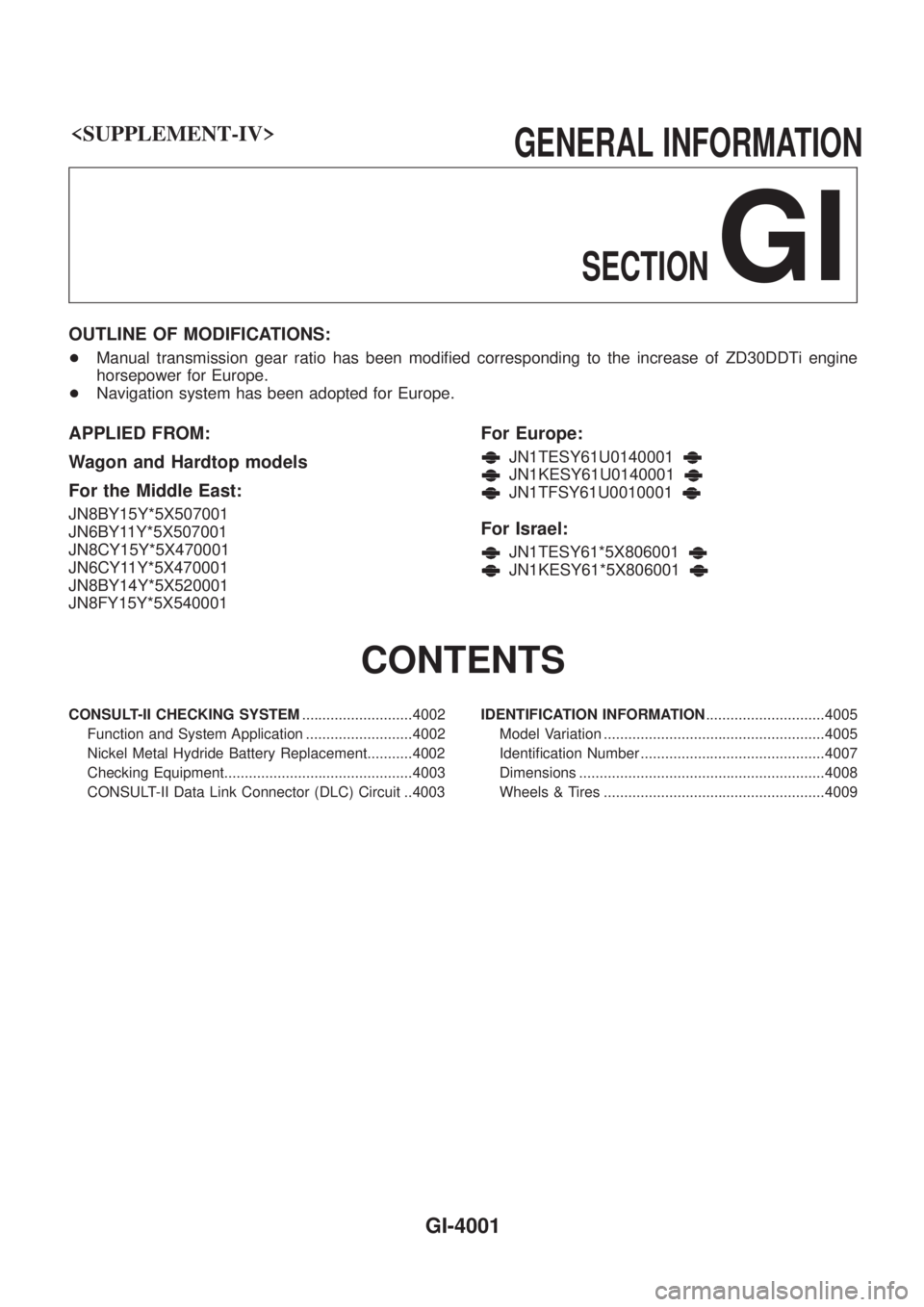
OUTLINE OF MODIFICATIONS:
+Manual transmission gear ratio has been modi®ed corresponding to the increase of ZD30DDTi engine
horsepower for Europe.
+ Navigation system has been adopted for Europe.
APPLIED FROM:
Wagon and Hardtop models
For the Middle East:
JN8BY15Y*5X507001
JN6BY11Y*5X507001
JN8CY15Y*5X470001
JN6CY11Y*5X470001
JN8BY14Y*5X520001
JN8FY15Y*5X540001
For Europe:
JN1TESY61U0140001
JN1KESY61U0140001
JN1TFSY61U0010001
For Israel:
JN1TESY61*5X806001
JN1KESY61*5X806001
CONTENTS
CONSULT-II CHECKING SYSTEM ...........................4002
Function and System Application ..........................4002
Nickel Metal Hydride Battery Replacement...........4002
Checking Equipment..............................................4003
CONSULT-II Data Link Connector (DLC) Circuit ..4003 IDENTIFICATION INFORMATION
.............................4005
Model Variation ......................................................4005
Identi®cation Number .............................................4007
Dimensions ............................................................4008
Wheels & Tires ......................................................4009
GI-4001
Page 472 of 579
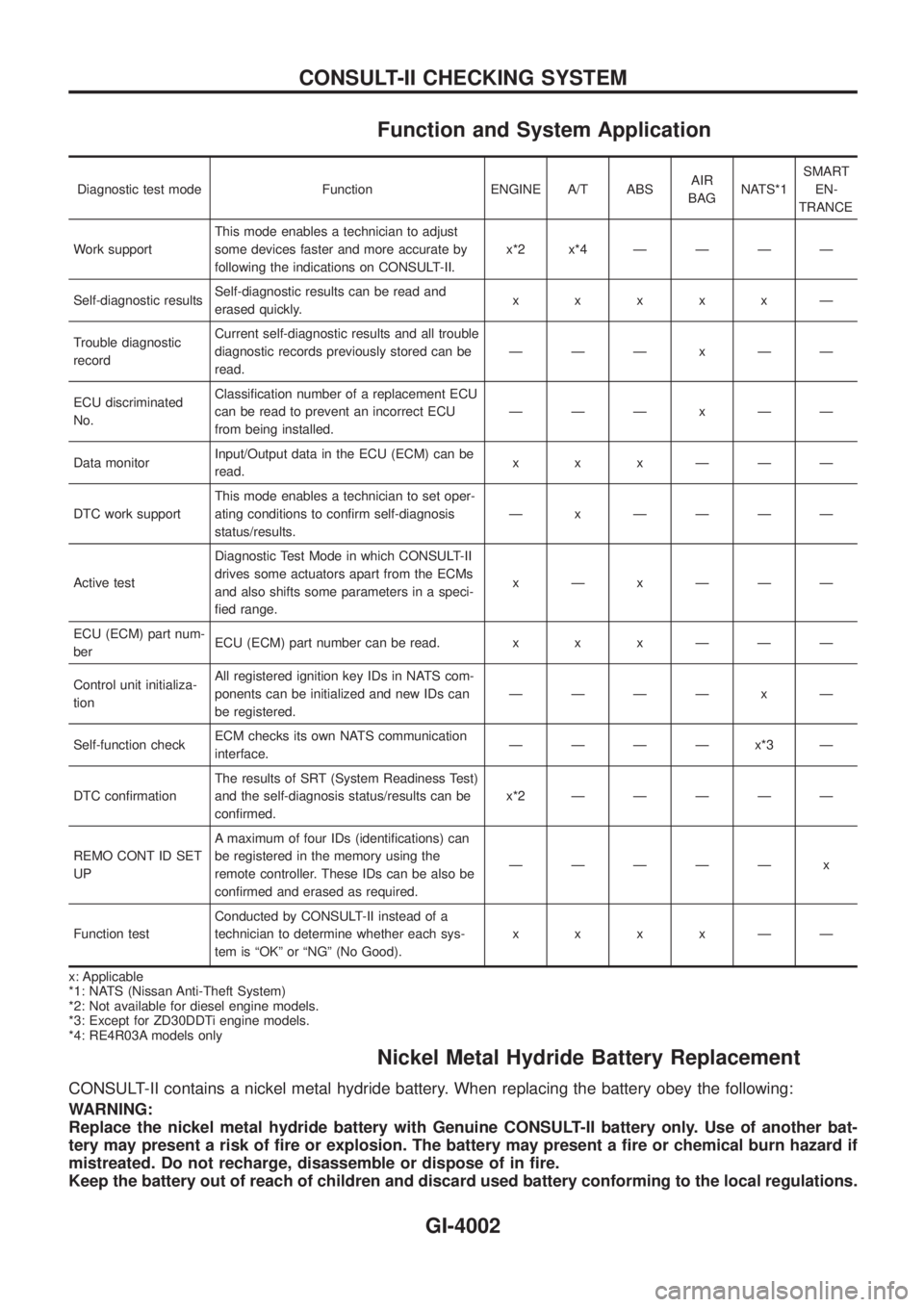
Function and System Application
Diagnostic test mode Function ENGINE A/T ABSAIR
BAGNATS*1SMART
EN-
TRANCE
Work supportThis mode enables a technician to adjust
some devices faster and more accurate by
following the indications on CONSULT-II.x*2x*4ÐÐÐÐ
Self-diagnostic resultsSelf-diagnostic results can be read and
erased quickly.xxxxxÐ
Trouble diagnostic
recordCurrent self-diagnostic results and all trouble
diagnostic records previously stored can be
read.ÐÐÐxÐÐ
ECU discriminated
No.Classi®cation number of a replacement ECU
can be read to prevent an incorrect ECU
from being installed.ÐÐÐxÐÐ
Data monitorInput/Output data in the ECU (ECM) can be
read.xxxÐÐÐ
DTC work supportThis mode enables a technician to set oper-
ating conditions to con®rm self-diagnosis
status/results.Ð x ÐÐÐÐ
Active testDiagnostic Test Mode in which CONSULT-II
drives some actuators apart from the ECMs
and also shifts some parameters in a speci-
®ed range.xÐxÐÐÐ
ECU (ECM) part num-
berECU (ECM) part number can be read. x x x Ð Ð Ð
Control unit initializa-
tionAll registered ignition key IDs in NATS com-
ponents can be initialized and new IDs can
be registered.ÐÐÐÐ x Ð
Self-function checkECM checks its own NATS communication
interface.ÐÐÐÐx*3Ð
DTC con®rmationThe results of SRT (System Readiness Test)
and the self-diagnosis status/results can be
con®rmed.x*2ÐÐÐÐÐ
REMO CONT ID SET
UPA maximum of four IDs (identi®cations) can
be registered in the memory using the
remote controller. These IDs can be also be
con®rmed and erased as required.ÐÐÐÐÐ x
Function testConducted by CONSULT-II instead of a
technician to determine whether each sys-
tem is ªOKº or ªNGº (No Good).xxxxÐÐ
x: Applicable
*1: NATS (Nissan Anti-Theft System)
*2: Not available for diesel engine models.
*3: Except for ZD30DDTi engine models.
*4: RE4R03A models only
Nickel Metal Hydride Battery Replacement
CONSULT-II contains a nickel metal hydride battery. When replacing the battery obey the following:
WARNING:
Replace the nickel metal hydride battery with Genuine CONSULT-II battery only. Use of another bat-
tery may present a risk of ®re or explosion. The battery may present a ®re or chemical burn hazard if
mistreated. Do not recharge, disassemble or dispose of in ®re.
Keep the battery out of reach of children and discard used battery conforming to the local regulations.
CONSULT-II CHECKING SYSTEM
GI-4002
Page 473 of 579
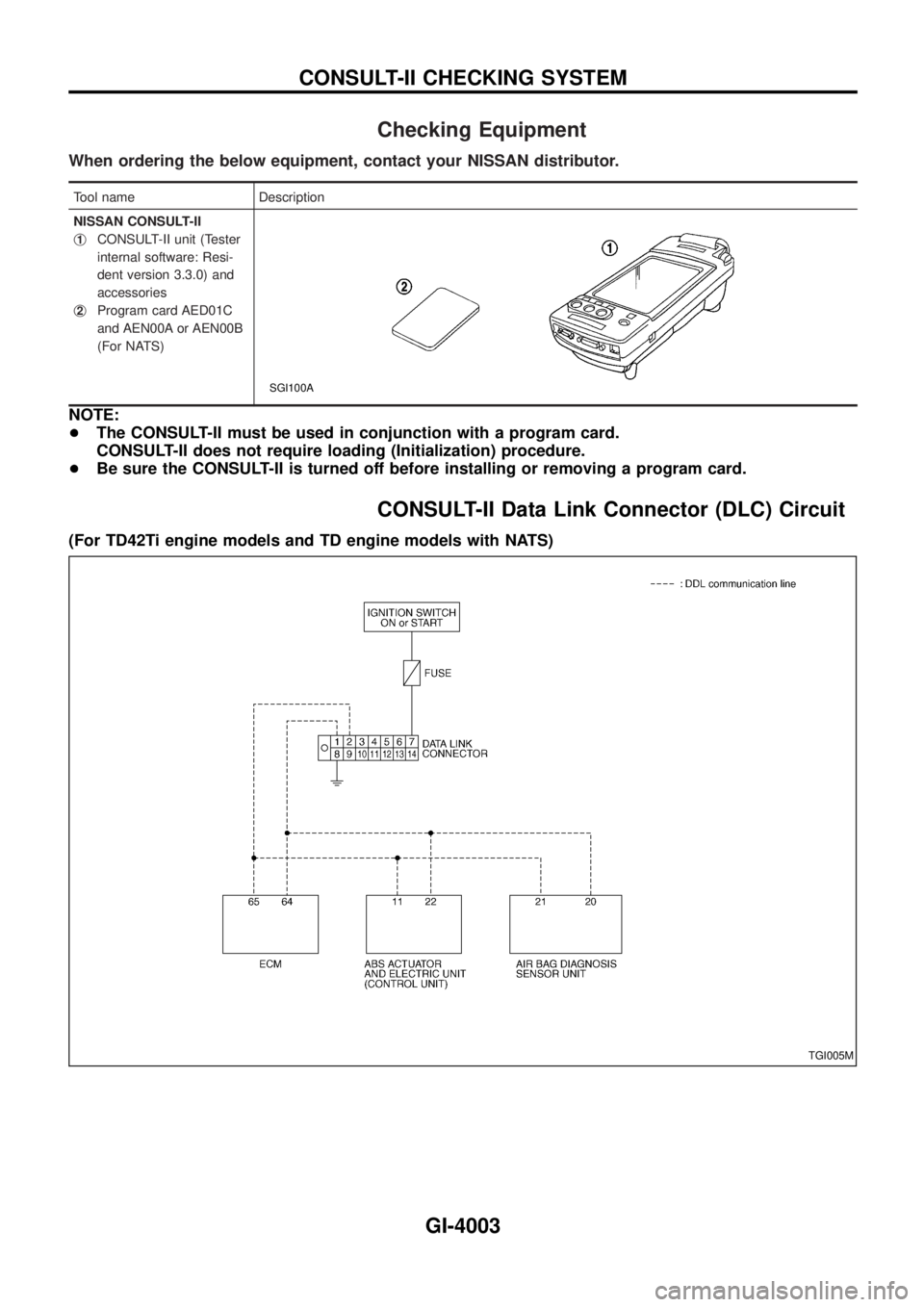
Checking Equipment
When ordering the below equipment, contact your NISSAN distributor.
Tool name Description
NISSAN CONSULT-II
j
1CONSULT-II unit (Tester
internal software: Resi-
dent version 3.3.0) and
accessories
j
2Program card AED01C
and AEN00A or AEN00B
(For NATS)
SGI100A
NOTE:
+The CONSULT-II must be used in conjunction with a program card.
CONSULT-II does not require loading (Initialization) procedure.
+Be sure the CONSULT-II is turned off before installing or removing a program card.
CONSULT-II Data Link Connector (DLC) Circuit
(For TD42Ti engine models and TD engine models with NATS)
TGI005M
CONSULT-II CHECKING SYSTEM
GI-4003
Page 474 of 579
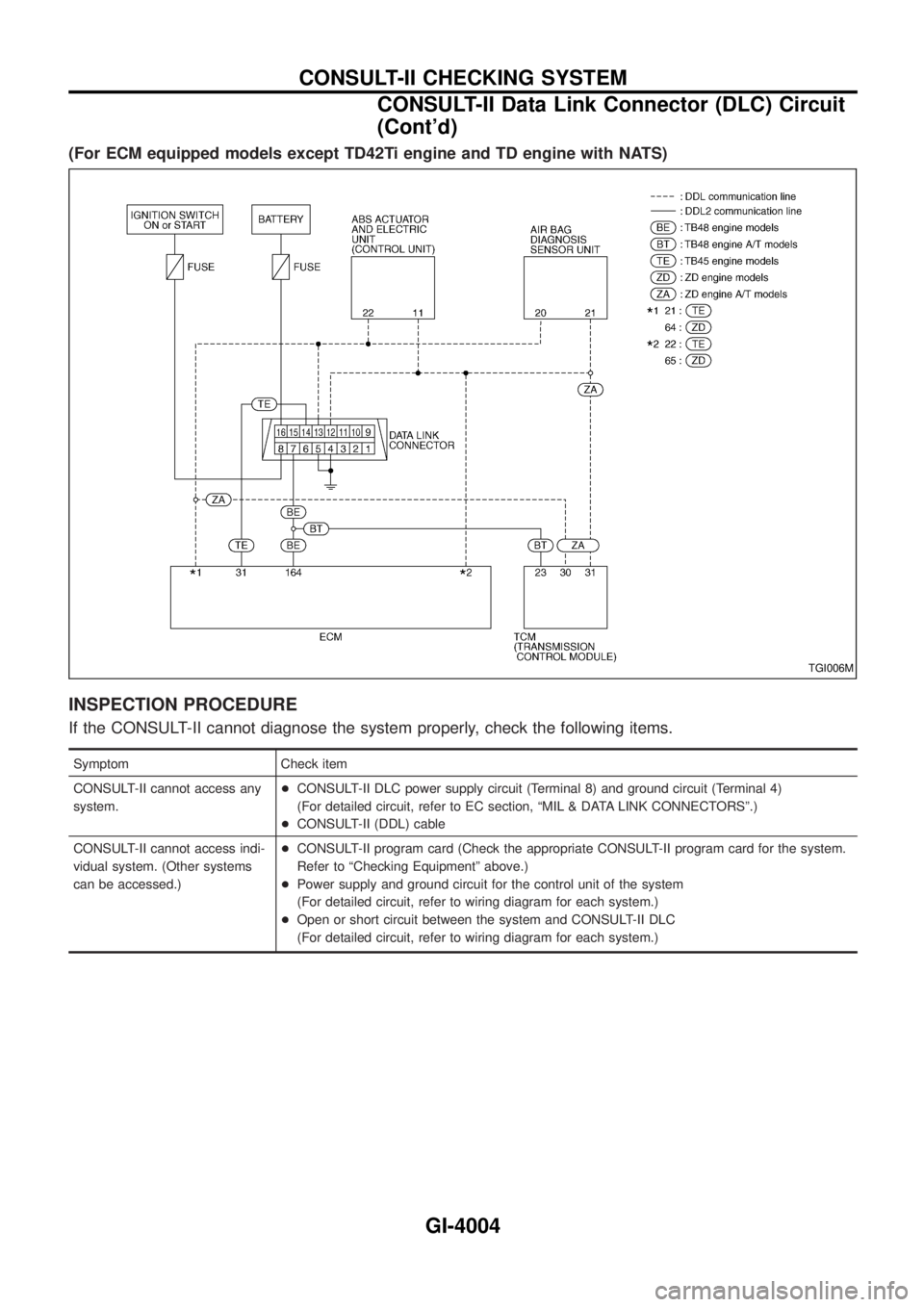
(For ECM equipped models except TD42Ti engine and TD engine with NATS)
INSPECTION PROCEDURE
If the CONSULT-II cannot diagnose the system properly, check the following items.
Symptom Check item
CONSULT-II cannot access any
system.+CONSULT-II DLC power supply circuit (Terminal 8) and ground circuit (Terminal 4)
(For detailed circuit, refer to EC section, ªMIL & DATA LINK CONNECTORSº.)
+CONSULT-II (DDL) cable
CONSULT-II cannot access indi-
vidual system. (Other systems
can be accessed.)+CONSULT-II program card (Check the appropriate CONSULT-II program card for the system.
Refer to ªChecking Equipmentº above.)
+Power supply and ground circuit for the control unit of the system
(For detailed circuit, refer to wiring diagram for each system.)
+Open or short circuit between the system and CONSULT-II DLC
(For detailed circuit, refer to wiring diagram for each system.)
TGI006M
CONSULT-II CHECKING SYSTEM
CONSULT-II Data Link Connector (DLC) Circuit
(Cont'd)
GI-4004