ECU NISSAN PICK-UP 1998 Owner's Guide
[x] Cancel search | Manufacturer: NISSAN, Model Year: 1998, Model line: PICK-UP, Model: NISSAN PICK-UP 1998Pages: 1659, PDF Size: 53.39 MB
Page 587 of 1659
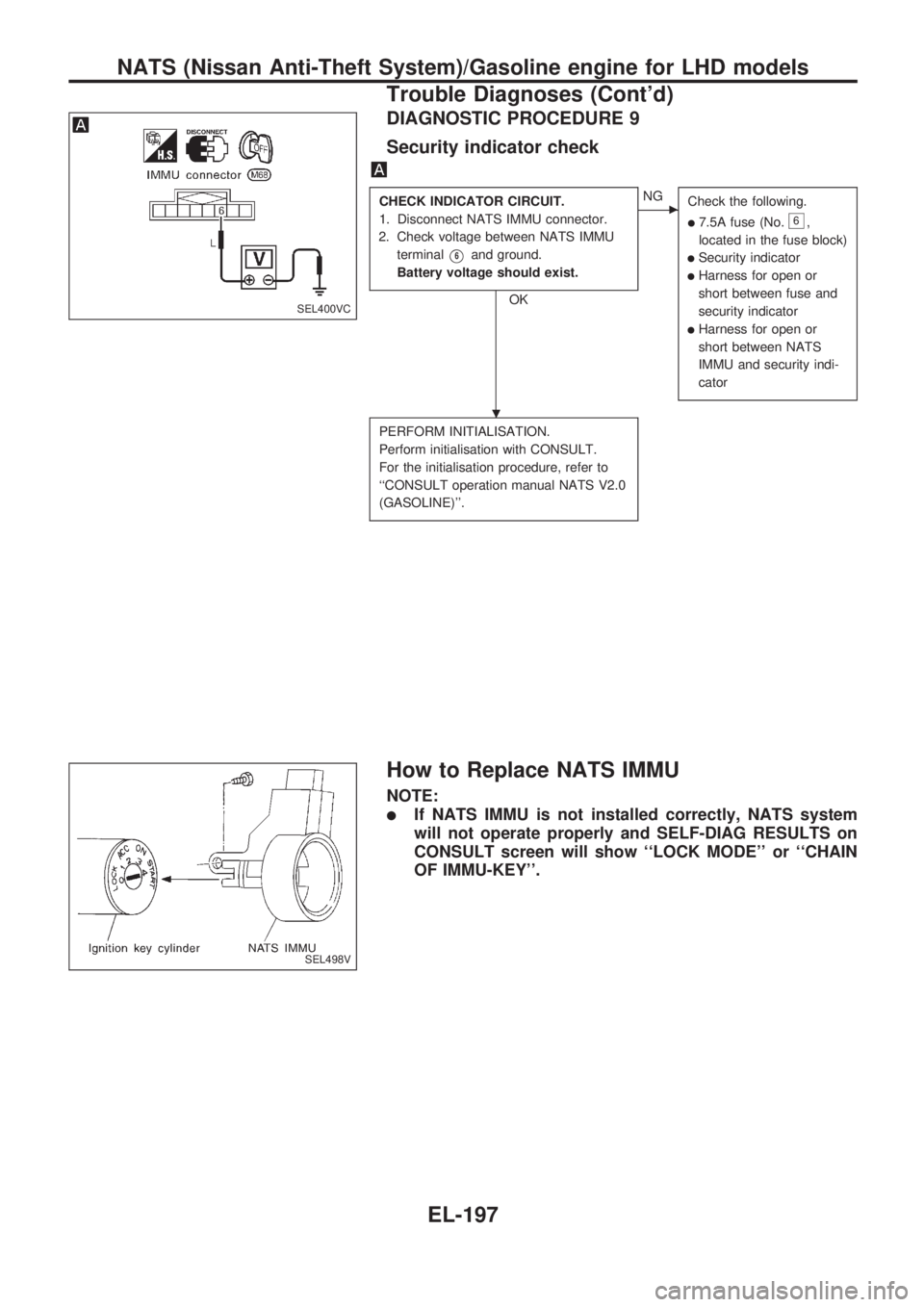
DIAGNOSTIC PROCEDURE 9
Security indicator check
CHECK INDICATOR CIRCUIT.
1. Disconnect NATS IMMU connector.
2. Check voltage between NATS IMMU
terminal
V6and ground.
Battery voltage should exist.
OK
cNG
Check the following.
l7.5A fuse (No.6,
located in the fuse block)
lSecurity indicator
lHarness for open or
short between fuse and
security indicator
lHarness for open or
short between NATS
IMMU and security indi-
cator
PERFORM INITIALISATION.
Perform initialisation with CONSULT.
For the initialisation procedure, refer to
``CONSULT operation manual NATS V2.0
(GASOLINE)''.
How to Replace NATS IMMU
NOTE:
lIf NATS IMMU is not installed correctly, NATS system
will not operate properly and SELF-DIAG RESULTS on
CONSULT screen will show ``LOCK MODE'' or ``CHAIN
OF IMMU-KEY''.
SEL400VC
SEL498V
.
NATS (Nissan Anti-Theft System)/Gasoline engine for LHD models
Trouble Diagnoses (Cont'd)
EL-197
Page 589 of 1659
System Description
NATS has the following immobiliser functions:
lSince only NATS ignition keys, whose IDs. have been registered into the NATS immobiliser control unit
(NATS IMMU), allow the engine to run, operation of a stolen vehicle without a NATS registered key is
prevented by NATS.
lBoth of the originally supplied ignition key IDs have been NATS registered.
If requested by the vehicle owner, a maximum of four key IDs can be registered into the NATS compo-
nents.
lThe NATS security indicator (NATS security ind.) blinks when the ignition switch is in ``OFF'' or ``ACC''
position. Therefore, NATS warns outsiders that the vehicle is equipped with the anti-theft system.
lIf NATS detects trouble, the NATS security indicator comes on while engine is running or ignition switch
is in ``ON'' position.
lWhen servicing NATS (trouble diagnoses, NATS initialisation and additional registration of other NATS
ignition key IDs), CONSULT hardware and CONSULT NATS software is necessary.
lThere are two types of NATS initialisation, one is ``SYSTEM INITIALISATION'' and another is ``IMMU
INITIALISATION''.
When NATS initialisation has been completed, the ID of the inserted ignition key is automatically NATS
registered. Then, if necessary, additional registration of other NATS ignition key IDs can be carried out.
Regarding the procedures of NATS initialisation and NATS ignition key ID registration, refer to CONSULT
operation manual, NATS V2.0 (Diesel).
lWhen servicing a malfunction of the NATS (indicated by lighting of NATS security ind.) or reg-
istering another NATS ignition key ID no., it may be necessary to re-register original key identi-
fication. Therefore, be sure to receive all keys from vehicle owner.
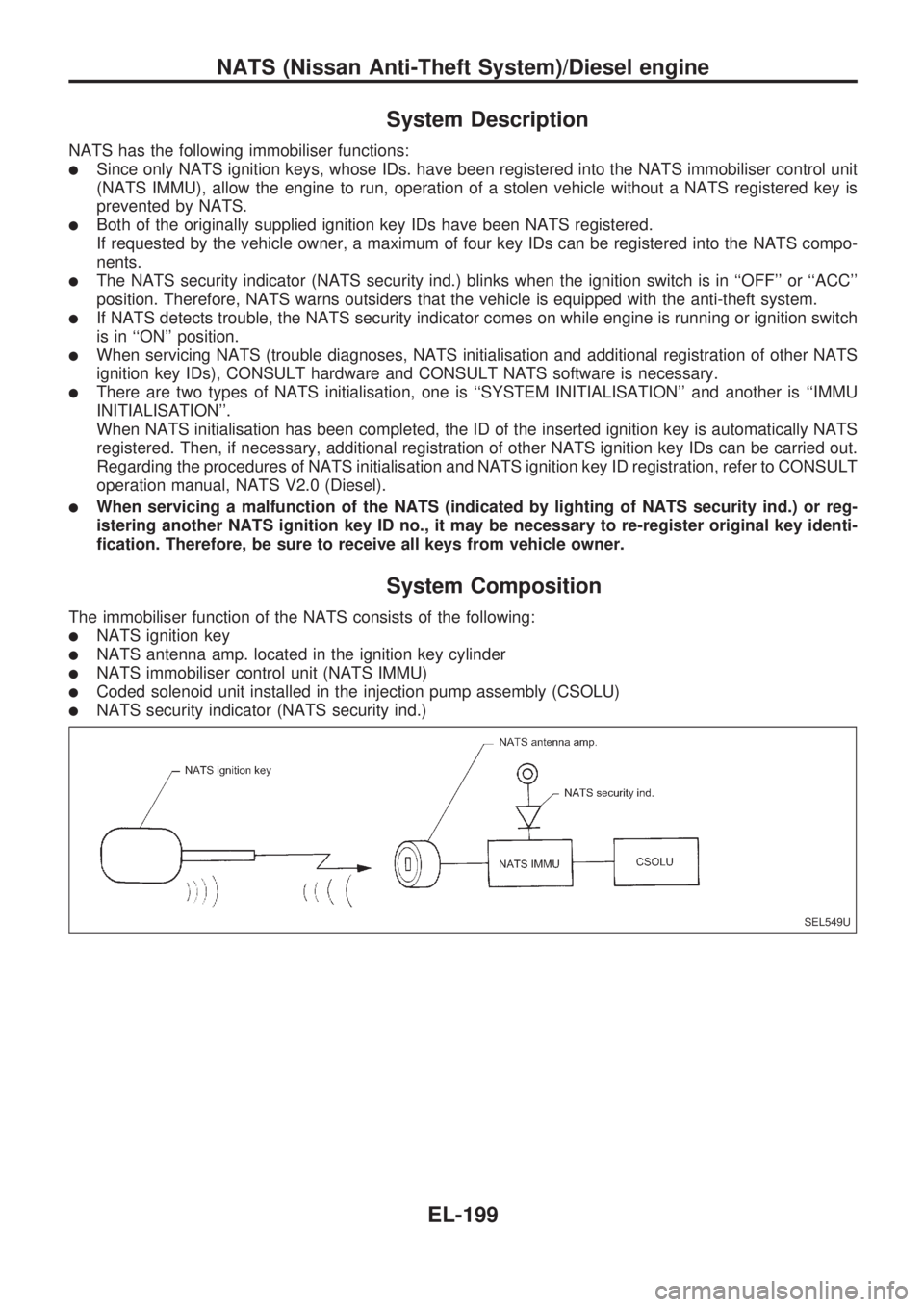
System Composition
The immobiliser function of the NATS consists of the following:
lNATS ignition key
lNATS antenna amp. located in the ignition key cylinder
lNATS immobiliser control unit (NATS IMMU)
lCoded solenoid unit installed in the injection pump assembly (CSOLU)
lNATS security indicator (NATS security ind.)
SEL549U
NATS (Nissan Anti-Theft System)/Diesel engine
EL-199
Page 595 of 1659
Trouble Diagnoses
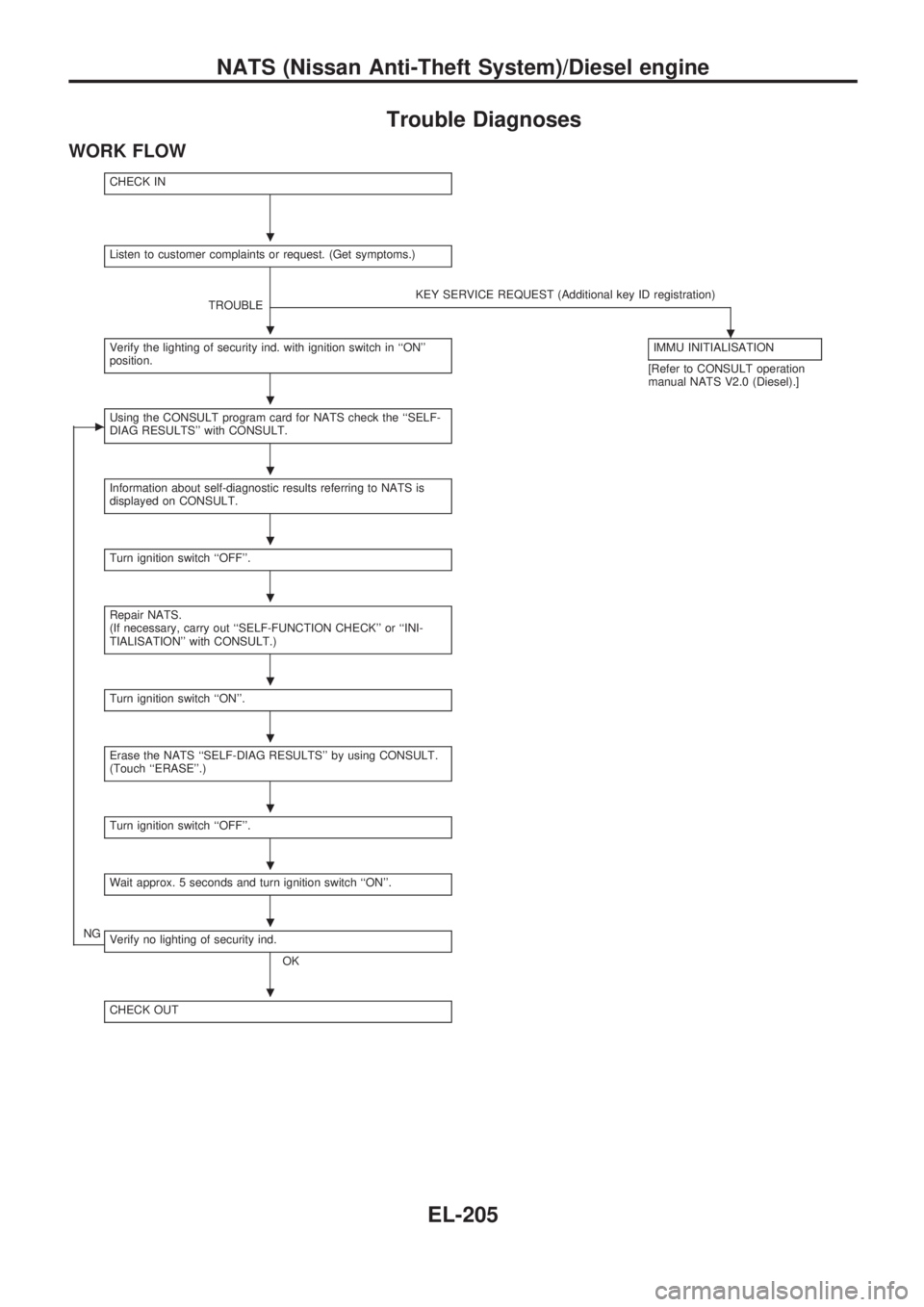
WORK FLOW
CHECK IN
Listen to customer complaints or request. (Get symptoms.)
TROUBLEKEY SERVICE REQUEST (Additional key ID registration)
.Verify the lighting of security ind. with ignition switch in ``ON''
position.IMMU INITIALISATION
[Refer to CONSULT operation
manual NATS V2.0 (Diesel).]
cUsing the CONSULT program card for NATS check the ``SELF-
DIAG RESULTS'' with CONSULT.
Information about self-diagnostic results referring to NATS is
displayed on CONSULT.
Turn ignition switch ``OFF''.
Repair NATS.
(If necessary, carry out ``SELF-FUNCTION CHECK'' or ``INI-
TIALISATION'' with CONSULT.)
Turn ignition switch ``ON''.
Erase the NATS ``SELF-DIAG RESULTS'' by using CONSULT.
(Touch ``ERASE''.)
Turn ignition switch ``OFF''.
Wait approx. 5 seconds and turn ignition switch ``ON''.
NGVerify no lighting of security ind.
OK
CHECK OUT
.
.
.
.
.
.
.
.
.
.
.
.
NATS (Nissan Anti-Theft System)/Diesel engine
EL-205
Page 596 of 1659
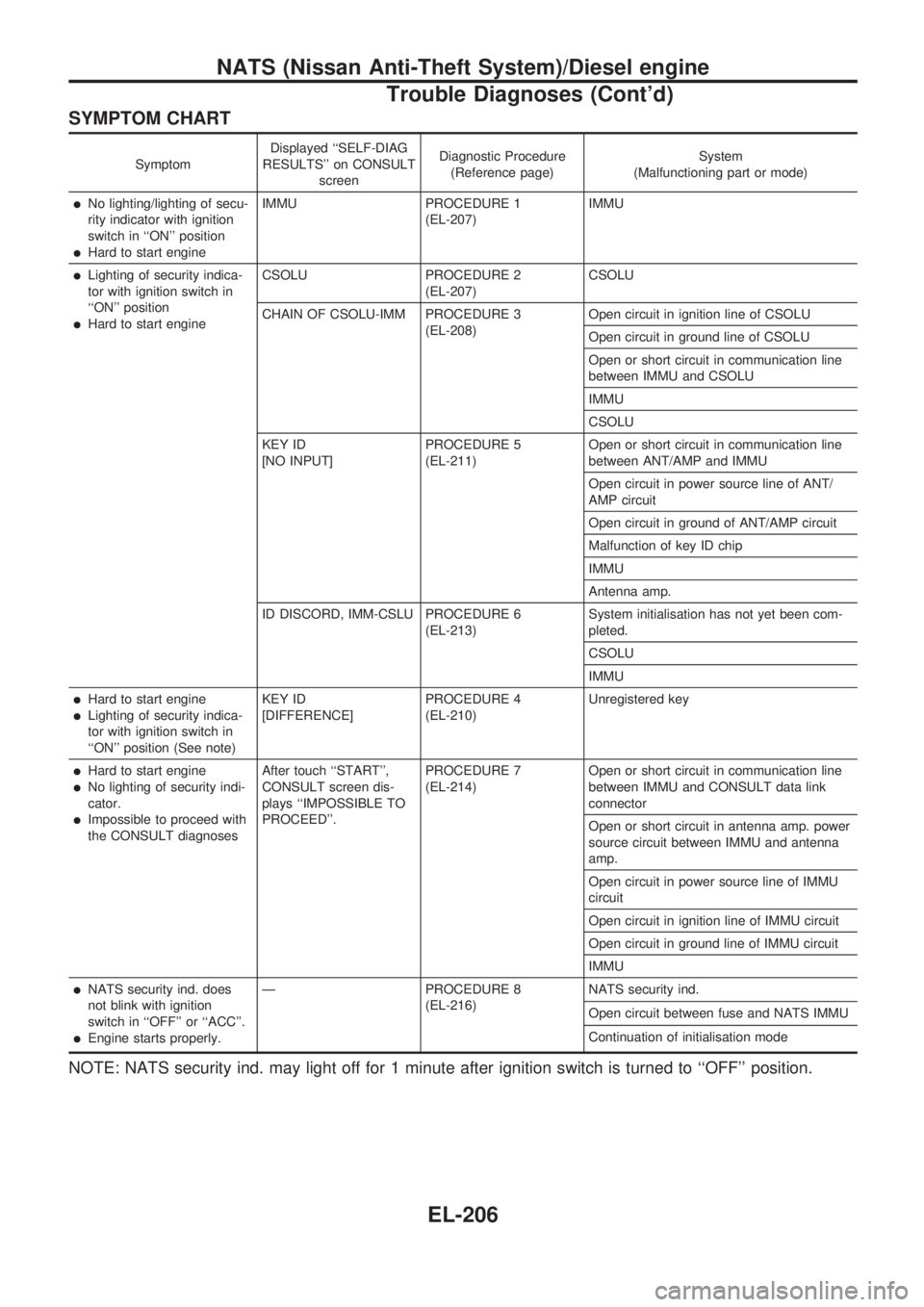
SYMPTOM CHART
SymptomDisplayed ``SELF-DIAG
RESULTS'' on CONSULT
screenDiagnostic Procedure
(Reference page)System
(Malfunctioning part or mode)
lNo lighting/lighting of secu-
rity indicator with ignition
switch in ``ON'' position
lHard to start engineIMMU PROCEDURE 1
(EL-207)IMMU
lLighting of security indica-
tor with ignition switch in
``ON'' position
lHard to start engineCSOLU PROCEDURE 2
(EL-207)CSOLU
CHAIN OF CSOLU-IMM PROCEDURE 3
(EL-208)Open circuit in ignition line of CSOLU
Open circuit in ground line of CSOLU
Open or short circuit in communication line
between IMMU and CSOLU
IMMU
CSOLU
KEY ID
[NO INPUT]PROCEDURE 5
(EL-211)Open or short circuit in communication line
between ANT/AMP and IMMU
Open circuit in power source line of ANT/
AMP circuit
Open circuit in ground of ANT/AMP circuit
Malfunction of key ID chip
IMMU
Antenna amp.
ID DISCORD, IMM-CSLU PROCEDURE 6
(EL-213)System initialisation has not yet been com-
pleted.
CSOLU
IMMU
lHard to start engine
lLighting of security indica-
tor with ignition switch in
``ON'' position (See note)KEY ID
[DIFFERENCE]PROCEDURE 4
(EL-210)Unregistered key
lHard to start engine
lNo lighting of security indi-
cator.
lImpossible to proceed with
the CONSULT diagnosesAfter touch ``START'',
CONSULT screen dis-
plays ``IMPOSSIBLE TO
PROCEED''.PROCEDURE 7
(EL-214)Open or short circuit in communication line
between IMMU and CONSULT data link
connector
Open or short circuit in antenna amp. power
source circuit between IMMU and antenna
amp.
Open circuit in power source line of IMMU
circuit
Open circuit in ignition line of IMMU circuit
Open circuit in ground line of IMMU circuit
IMMU
lNATS security ind. does
not blink with ignition
switch in ``OFF'' or ``ACC''.
lEngine starts properly.Ð PROCEDURE 8
(EL-216)NATS security ind.
Open circuit between fuse and NATS IMMU
Continuation of initialisation mode
NOTE: NATS security ind. may light off for 1 minute after ignition switch is turned to ``OFF'' position.
NATS (Nissan Anti-Theft System)/Diesel engine
Trouble Diagnoses (Cont'd)
EL-206
Page 600 of 1659
![NISSAN PICK-UP 1998 Owners Guide DIAGNOSTIC PROCEDURE 4
Self-diagnostic results:
``KEY ID [DIFFERENCE] displayed on CONSULT
screen
Confirm SELF-DIAGNOSTIC RESULTS
``KEY ID [DIFFERENCE] is displayed on
CONSULT screen.
1. Turn the](/img/5/57374/w960_57374-599.png "NISSAN PICK-UP 1998 Owners Guide DIAGNOSTIC PROCEDURE 4
Self-diagnostic results:
``KEY ID [DIFFERENCE] displayed on CONSULT
screen
Confirm SELF-DIAGNOSTIC RESULTS
``KEY ID [DIFFERENCE] is displayed on
CONSULT screen.
1. Turn the")
DIAGNOSTIC PROCEDURE 4
Self-diagnostic results:
``KEY ID [DIFFERENCE]'' displayed on CONSULT
screen
Confirm SELF-DIAGNOSTIC RESULTS
``KEY ID [DIFFERENCE]'' is displayed on
CONSULT screen.
1. Turn the ignition switch to OFF posi-
tion and wait 1 minute.
(After 1 minute, security indicator will
blink.)
2. Turn the ignition key switch to ON
position with a registered key.
(Do not start engine.) Wait 5 seconds.
3. Return the key to the OFF position.
4. Repeat steps 2 and 3 twice (total of
three cycles).
5. Start the engine.
Can the engine start?
No
cYes
System is OK.
PERFORM IMMU INITIALISATION.
Perform IMMU initialisation with CON-
SULT.
For the initialisation procedure, refer to
``CONSULT operation manual NATS V2.0
(Diesel)''.
Can the system be initialised?
Note: If the initialisation is incompleted or
failed, CONSULT shows
mes-
sage on the screen.
No
cYes
System is OK.
Go to DIAGNOSTIC PROCEDURE 5,
EL-211 to check ``KEY ID [NO INPUT]''.
SEL692U
SEL693U
SEL694U
.
.
.
NATS (Nissan Anti-Theft System)/Diesel engine
Trouble Diagnoses (Cont'd)
EL-210
Page 606 of 1659
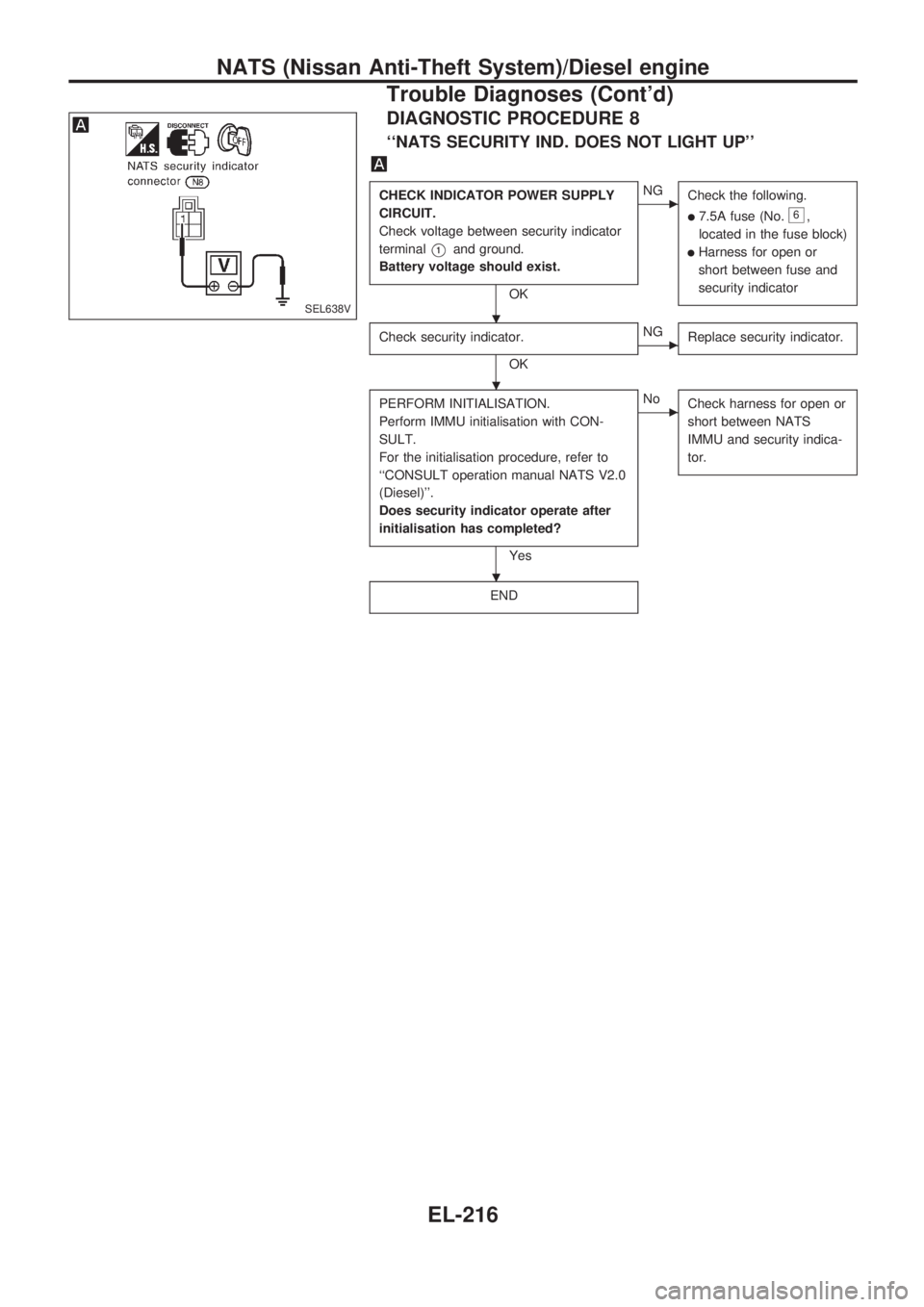
DIAGNOSTIC PROCEDURE 8
``NATS SECURITY IND. DOES NOT LIGHT UP''
CHECK INDICATOR POWER SUPPLY
CIRCUIT.
Check voltage between security indicator
terminal
V1and ground.
Battery voltage should exist.
OK
cNG
Check the following.
l7.5A fuse (No.6,
located in the fuse block)
lHarness for open or
short between fuse and
security indicator
Check security indicator.
OK
cNG
Replace security indicator.
PERFORM INITIALISATION.
Perform IMMU initialisation with CON-
SULT.
For the initialisation procedure, refer to
``CONSULT operation manual NATS V2.0
(Diesel)''.
Does security indicator operate after
initialisation has completed?
Yes
cNo
Check harness for open or
short between NATS
IMMU and security indica-
tor.
END
SEL638V.
.
.
NATS (Nissan Anti-Theft System)/Diesel engine
Trouble Diagnoses (Cont'd)
EL-216
Page 661 of 1659
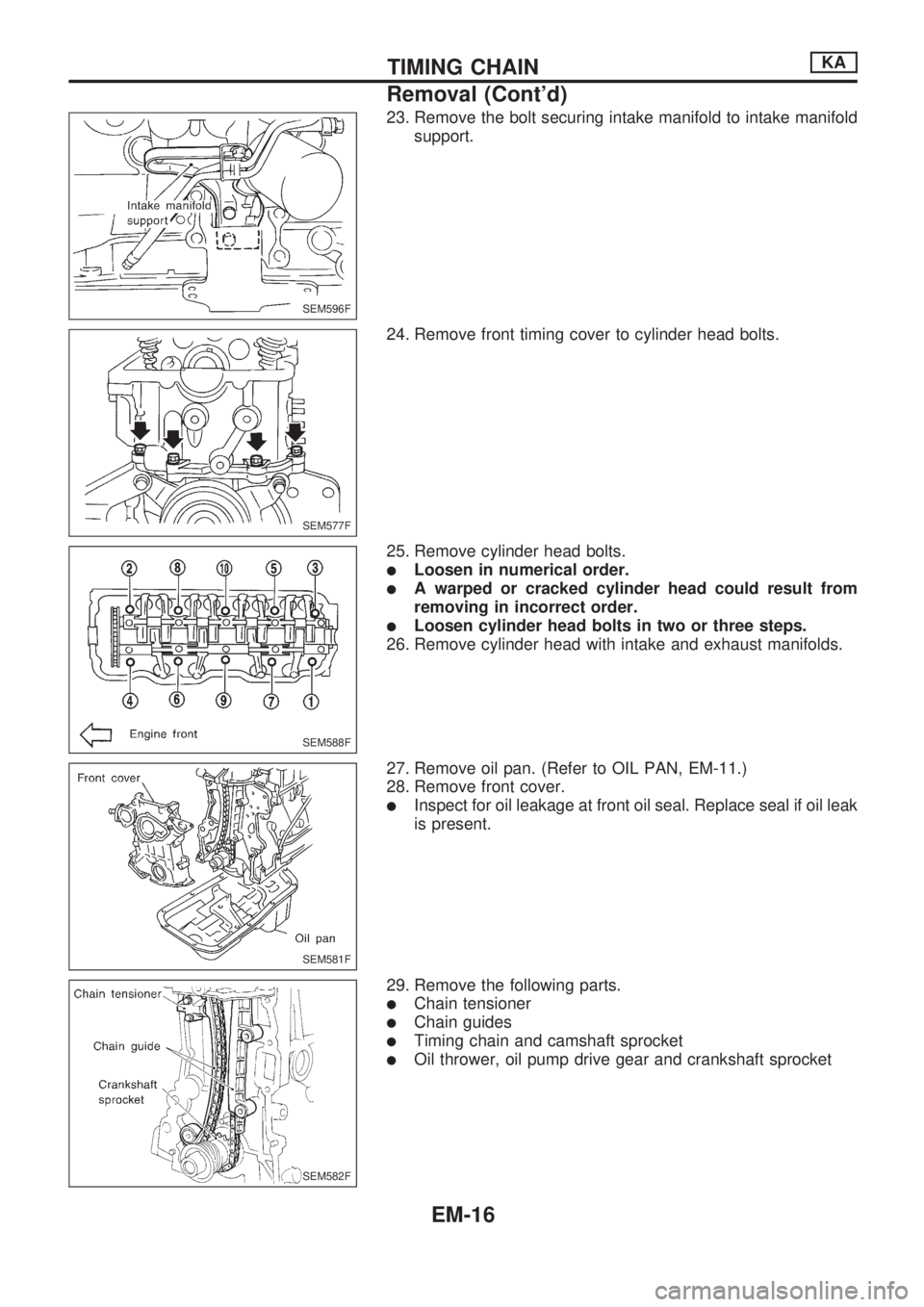
23. Remove the bolt securing intake manifold to intake manifold
support.
24. Remove front timing cover to cylinder head bolts.
25. Remove cylinder head bolts.
lLoosen in numerical order.
lA warped or cracked cylinder head could result from
removing in incorrect order.
lLoosen cylinder head bolts in two or three steps.
26. Remove cylinder head with intake and exhaust manifolds.
27. Remove oil pan. (Refer to OIL PAN, EM-11.)
28. Remove front cover.
lInspect for oil leakage at front oil seal. Replace seal if oil leak
is present.
29. Remove the following parts.
lChain tensioner
lChain guides
lTiming chain and camshaft sprocket
lOil thrower, oil pump drive gear and crankshaft sprocket
SEM596F
SEM577F
SEM588F
SEM581F
SEM582F
TIMING CHAINKA
Removal (Cont'd)
EM-16
Page 691 of 1659
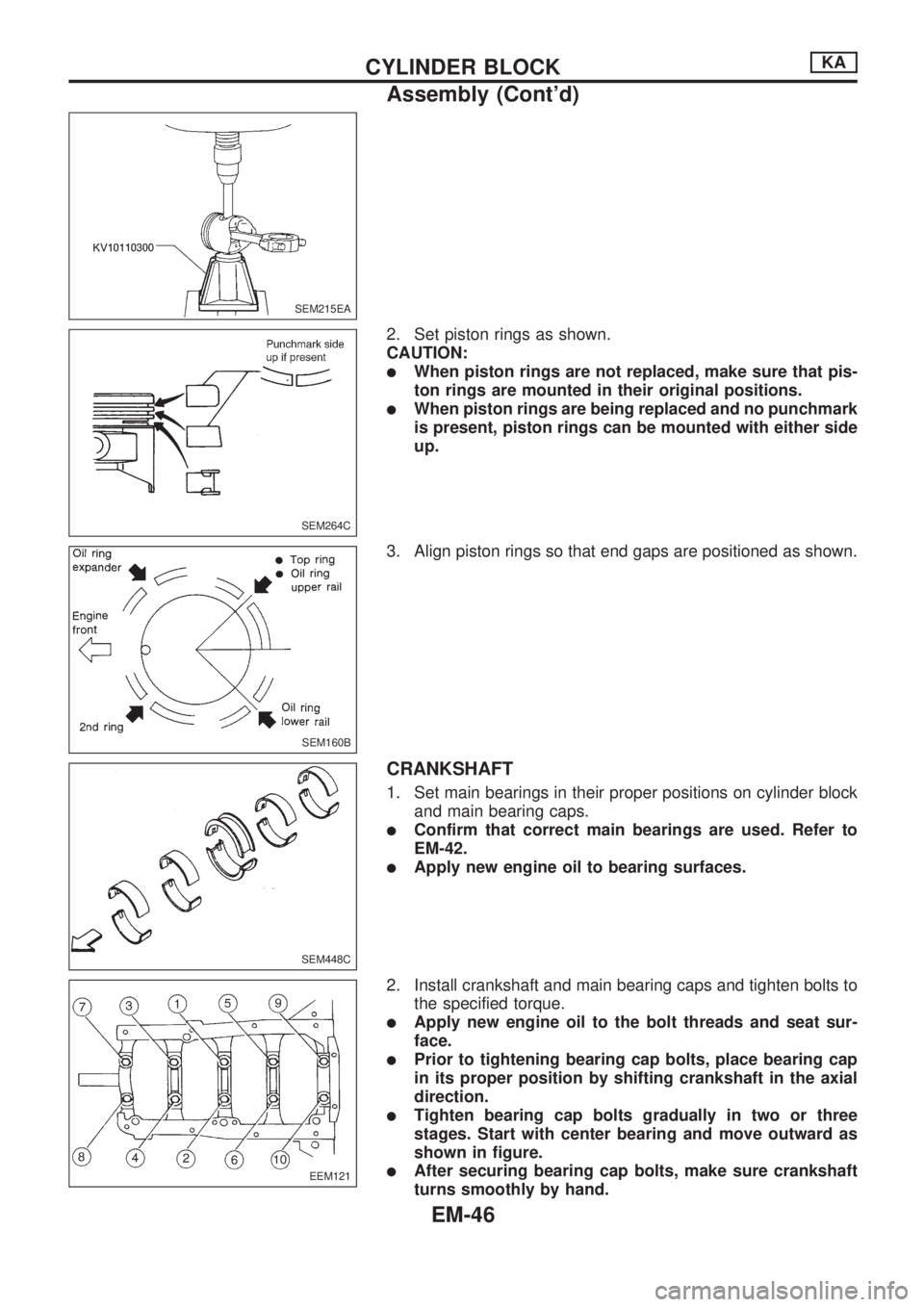
2. Set piston rings as shown.
CAUTION:
lWhen piston rings are not replaced, make sure that pis-
ton rings are mounted in their original positions.
lWhen piston rings are being replaced and no punchmark
is present, piston rings can be mounted with either side
up.
3. Align piston rings so that end gaps are positioned as shown.
CRANKSHAFT
1. Set main bearings in their proper positions on cylinder block
and main bearing caps.
lConfirm that correct main bearings are used. Refer to
EM-42.
lApply new engine oil to bearing surfaces.
2. Install crankshaft and main bearing caps and tighten bolts to
the specified torque.
lApply new engine oil to the bolt threads and seat sur-
face.
lPrior to tightening bearing cap bolts, place bearing cap
in its proper position by shifting crankshaft in the axial
direction.
lTighten bearing cap bolts gradually in two or three
stages. Start with center bearing and move outward as
shown in figure.
lAfter securing bearing cap bolts, make sure crankshaft
turns smoothly by hand.
SEM215EA
SEM264C
SEM160B
SEM448C
EEM121
CYLINDER BLOCKKA
Assembly (Cont'd)
EM-46
Page 759 of 1659
WARNING:
When replacing fuel line parts, be sure to observe the following:
lPut a ``CAUTION: INFLAMMABLE'' sign in workshop.
lDo not smoke while servicing fuel system. Keep open flames and sparks away from work area.
lBe sure to disconnect battery ground cable before conducting operations.
lBe sure to furnish workshop with a CO2fire extinguisher.
lDrain fuel from fuel tank and put drained fuel in an explosion-proof container and put lid on
securely.
CAUTION:
lBefore disconnecting fuel hose of ECCS engine model, release fuel pressure from fuel line. Refer
to ``Changing Fuel Filter'' in MA section.
lDo not disconnect any fuel line unless absolutely necessary.
lPlug hose and pipe openings to prevent entry of dust or dirt.
lAlways replace O-ring and clamps with new ones.
lDo not kink or twist hose and tube when they are installed.
lDo not tighten hose clamps excessively to avoid damaging hoses.
lWhen installing fuel check valve, be careful of its designated direction. (Refer to ``EVAPORATIVE
EMISSION SYSTEM'' in EC section.)
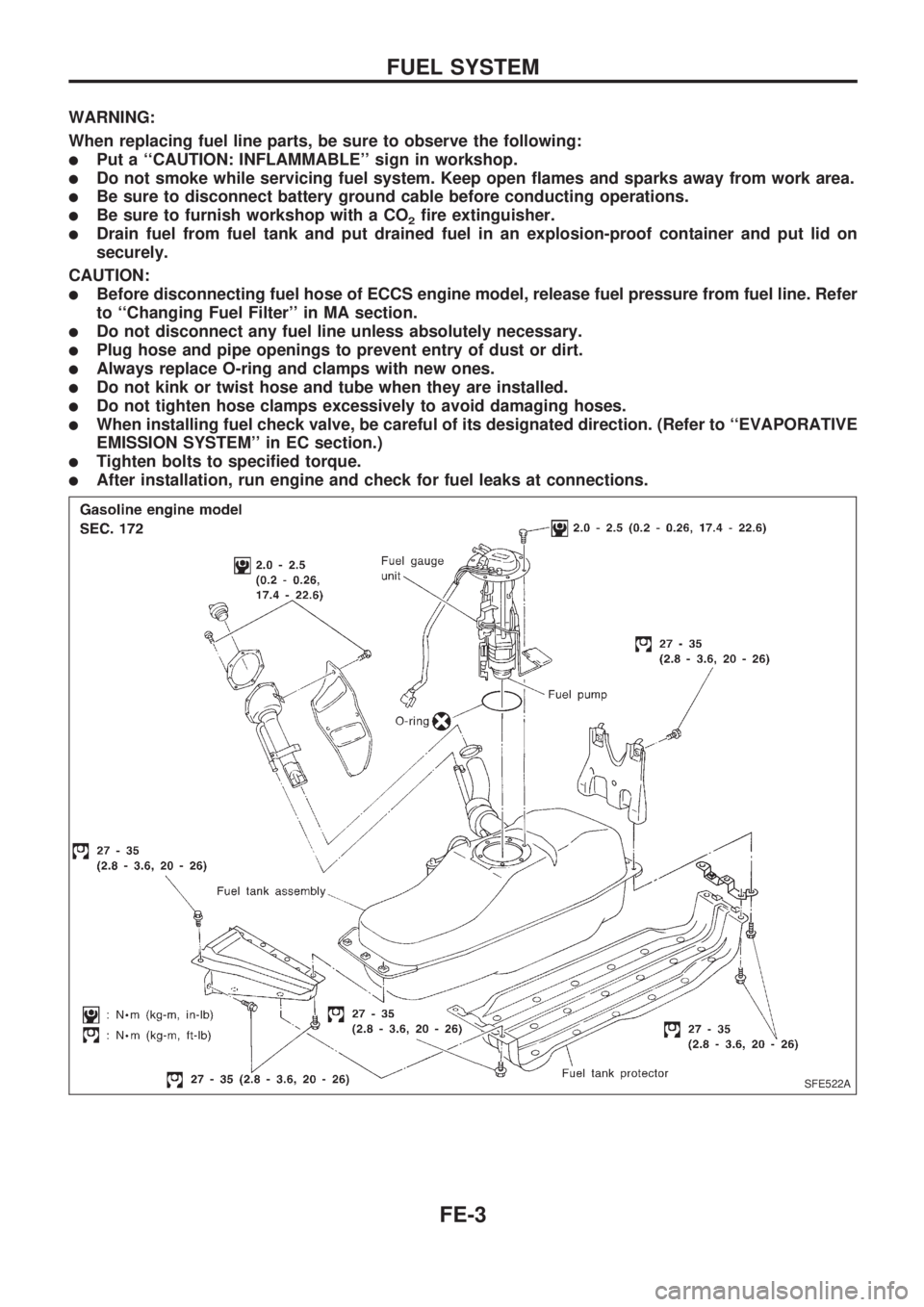
lTighten bolts to specified torque.
lAfter installation, run engine and check for fuel leaks at connections.
SFE522A
FUEL SYSTEM
FE-3
Page 789 of 1659
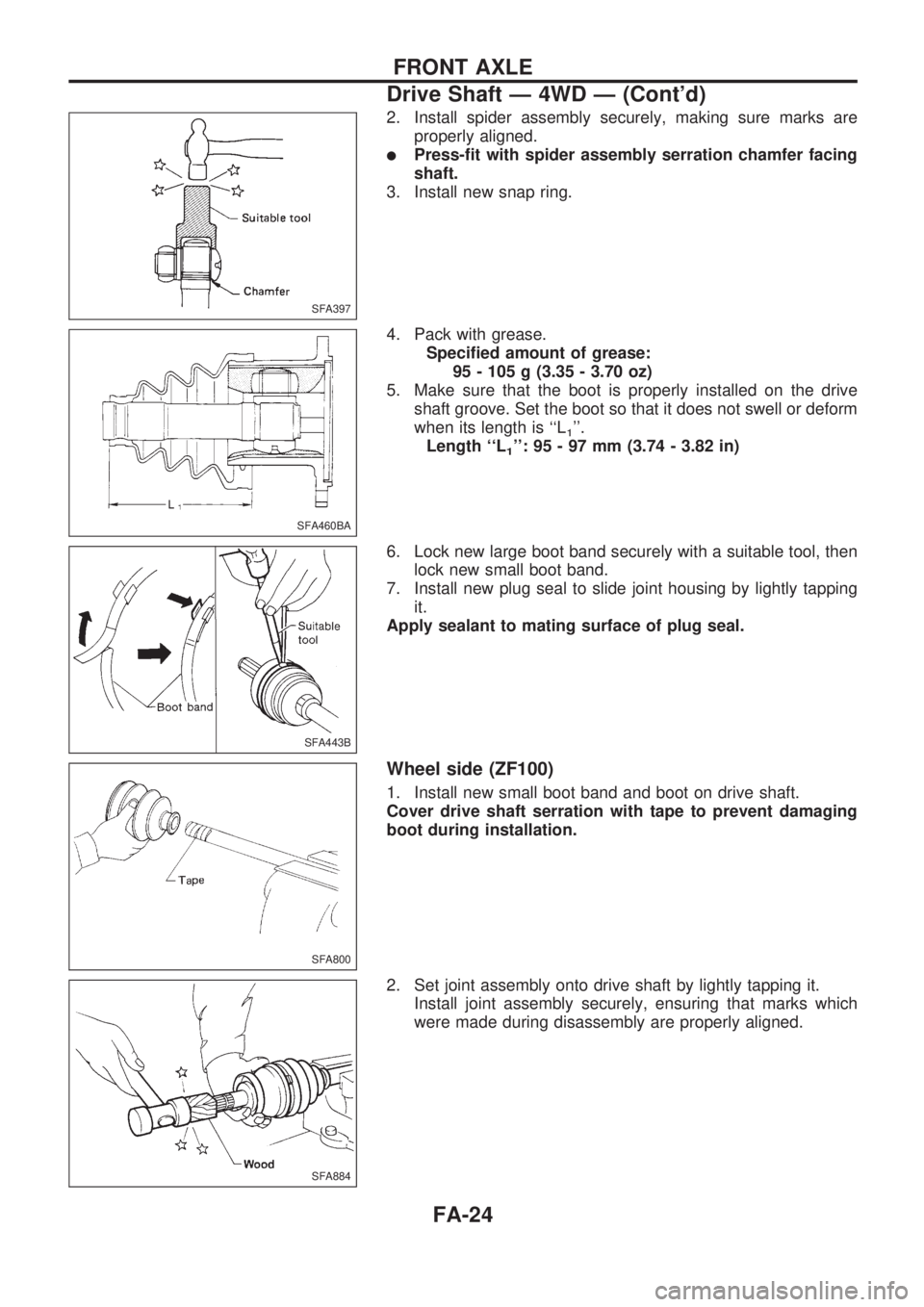
2. Install spider assembly securely, making sure marks are
properly aligned.
lPress-fit with spider assembly serration chamfer facing
shaft.
3. Install new snap ring.
4. Pack with grease.
Specified amount of grease:
95 - 105 g (3.35 - 3.70 oz)
5. Make sure that the boot is properly installed on the drive
shaft groove. Set the boot so that it does not swell or deform
when its length is ``L
1''.
Length ``L
1'': 95 - 97 mm (3.74 - 3.82 in)
6. Lock new large boot band securely with a suitable tool, then
lock new small boot band.
7. Install new plug seal to slide joint housing by lightly tapping
it.
Apply sealant to mating surface of plug seal.
Wheel side (ZF100)
1. Install new small boot band and boot on drive shaft.
Cover drive shaft serration with tape to prevent damaging
boot during installation.
2. Set joint assembly onto drive shaft by lightly tapping it.
Install joint assembly securely, ensuring that marks which
were made during disassembly are properly aligned.
SFA397
SFA460BA
SFA443B
SFA800
SFA884
FRONT AXLE
Drive Shaft Ð 4WD Ð (Cont'd)
FA-24