ECU NISSAN QASHQAI 2015 Owner´s Manual
[x] Cancel search | Manufacturer: NISSAN, Model Year: 2015, Model line: QASHQAI, Model: NISSAN QASHQAI 2015Pages: 338, PDF Size: 4.88 MB
Page 44 of 338
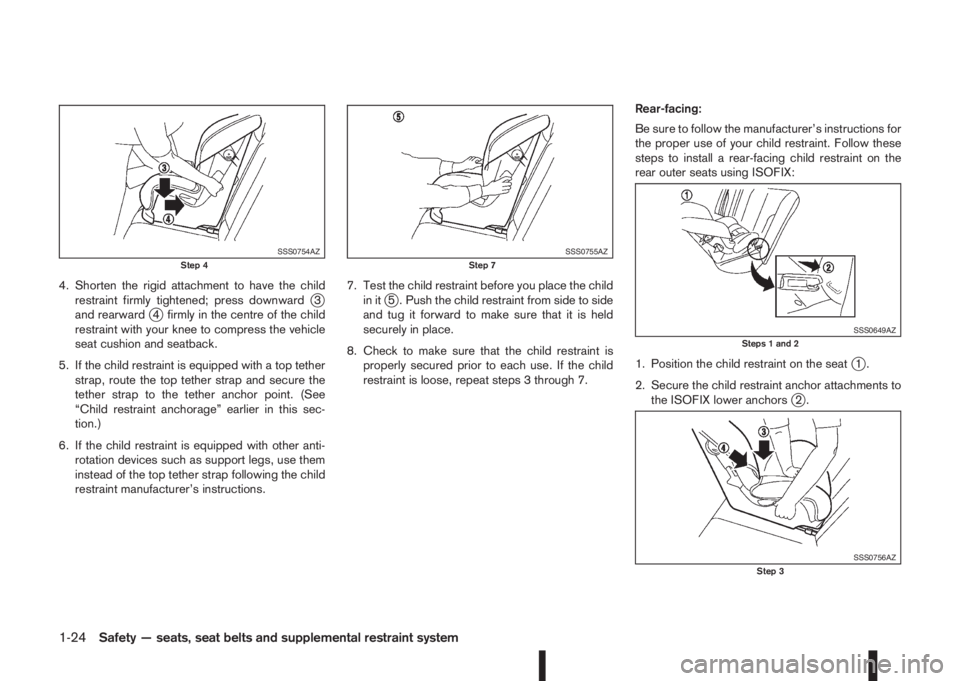
4. Shorten the rigid attachment to have the child
restraint firmly tightened; press downwardj3
and rearwardj4 firmly in the centre of the child
restraint with your knee to compress the vehicle
seat cushion and seatback.
5. If the child restraint is equipped with a top tether
strap, route the top tether strap and secure the
tether strap to the tether anchor point. (See
“Child restraint anchorage” earlier in this sec-
tion.)
6. If the child restraint is equipped with other anti-
rotation devices such as support legs, use them
instead of the top tether strap following the child
restraint manufacturer’s instructions.7. Test the child restraint before you place the child
in itj5 . Push the child restraint from side to side
and tug it forward to make sure that it is held
securely in place.
8. Check to make sure that the child restraint is
properly secured prior to each use. If the child
restraint is loose, repeat steps 3 through 7.Rear-facing:
Be sure to follow the manufacturer’s instructions for
the proper use of your child restraint. Follow these
steps to install a rear-facing child restraint on the
rear outer seats using ISOFIX:
1. Position the child restraint on the seat
j1.
2. Secure the child restraint anchor attachments to
the ISOFIX lower anchors
j2.
SSS0754AZStep 4SSS0755AZStep 7
SSS0649AZSteps 1 and 2
SSS0756AZStep 3
1-24Safety — seats, seat belts and supplemental restraint system
Page 45 of 338
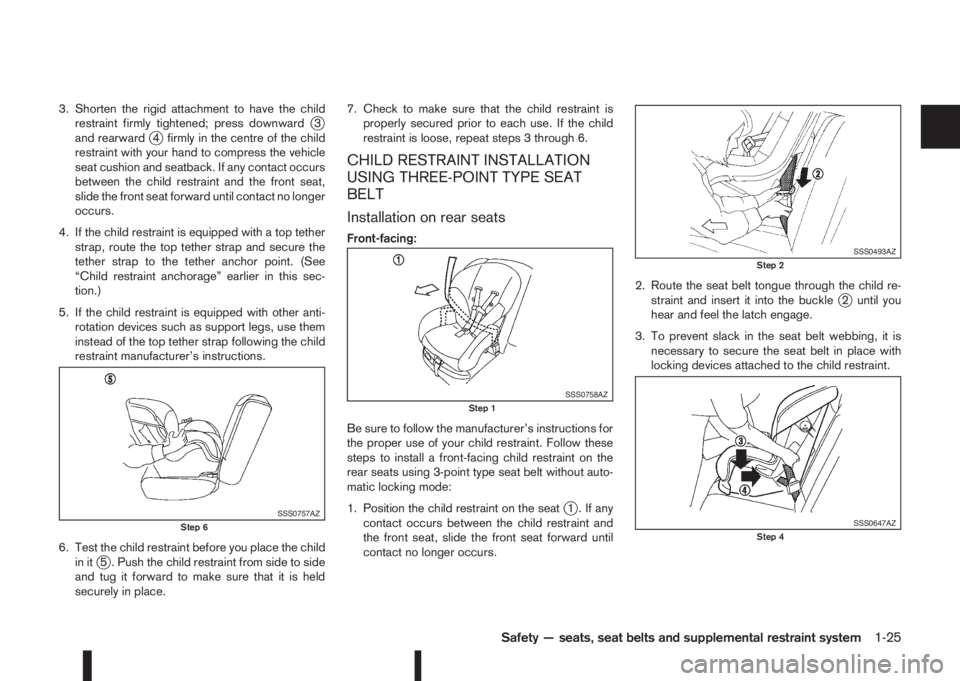
3. Shorten the rigid attachment to have the child
restraint firmly tightened; press downwardj3
and rearwardj4 firmly in the centre of the child
restraint with your hand to compress the vehicle
seat cushion and seatback. If any contact occurs
between the child restraint and the front seat,
slide the front seat forward until contact no longer
occurs.
4. If the child restraint is equipped with a top tether
strap, route the top tether strap and secure the
tether strap to the tether anchor point. (See
“Child restraint anchorage” earlier in this sec-
tion.)
5. If the child restraint is equipped with other anti-
rotation devices such as support legs, use them
instead of the top tether strap following the child
restraint manufacturer’s instructions.
6. Test the child restraint before you place the child
in it
j5 . Push the child restraint from side to side
and tug it forward to make sure that it is held
securely in place.7. Check to make sure that the child restraint is
properly secured prior to each use. If the child
restraint is loose, repeat steps 3 through 6.
CHILD RESTRAINT INSTALLATION
USING THREE-POINT TYPE SEAT
BELT
Installation on rear seats
Front-facing:
Be sure to follow the manufacturer’s instructions for
the proper use of your child restraint. Follow these
steps to install a front-facing child restraint on the
rear seats using 3-point type seat belt without auto-
matic locking mode:
1. Position the child restraint on the seat
j1 . If any
contact occurs between the child restraint and
the front seat, slide the front seat forward until
contact no longer occurs.2. Route the seat belt tongue through the child re-
straint and insert it into the buckle
j2 until you
hear and feel the latch engage.
3. To prevent slack in the seat belt webbing, it is
necessary to secure the seat belt in place with
locking devices attached to the child restraint.
SSS0757AZStep 6
SSS0758AZStep 1
SSS0493AZStep 2
SSS0647AZStep 4
Safety — seats, seat belts and supplemental restraint system1-25
Page 46 of 338
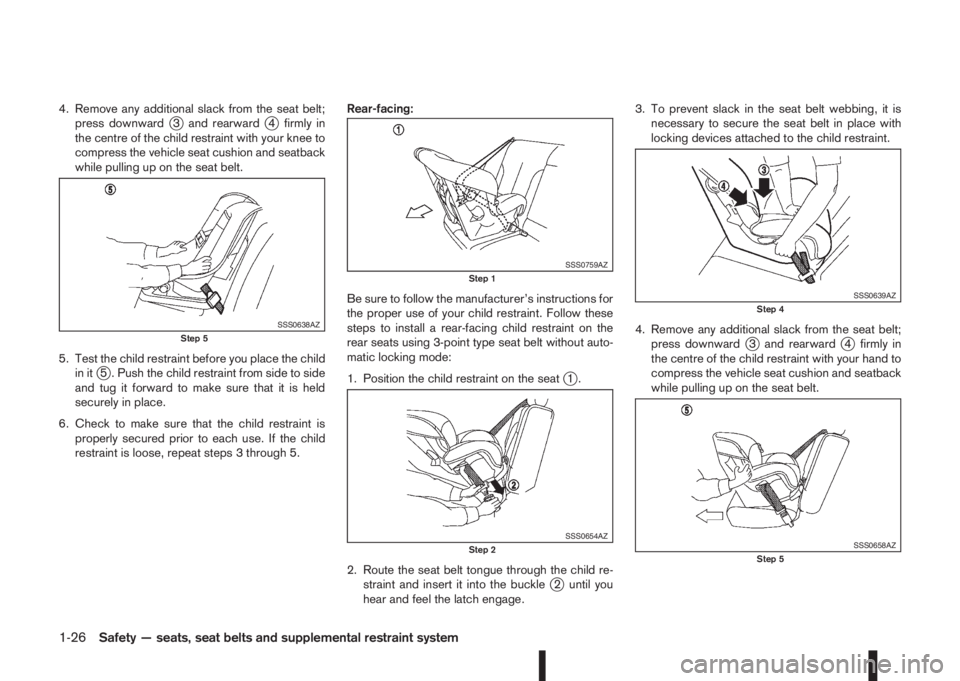
4. Remove any additional slack from the seat belt;
press downwardj3 and rearwardj4 firmly in
the centre of the child restraint with your knee to
compress the vehicle seat cushion and seatback
while pulling up on the seat belt.
5. Test the child restraint before you place the child
in it
j5 . Push the child restraint from side to side
and tug it forward to make sure that it is held
securely in place.
6. Check to make sure that the child restraint is
properly secured prior to each use. If the child
restraint is loose, repeat steps 3 through 5.Rear-facing:
Be sure to follow the manufacturer’s instructions for
the proper use of your child restraint. Follow these
steps to install a rear-facing child restraint on the
rear seats using 3-point type seat belt without auto-
matic locking mode:
1. Position the child restraint on the seatj1.
2. Route the seat belt tongue through the child re-
straint and insert it into the buckle
j2 until you
hear and feel the latch engage.3. To prevent slack in the seat belt webbing, it is
necessary to secure the seat belt in place with
locking devices attached to the child restraint.
4. Remove any additional slack from the seat belt;
press downward
j3 and rearwardj4 firmly in
the centre of the child restraint with your hand to
compress the vehicle seat cushion and seatback
while pulling up on the seat belt.
SSS0638AZStep 5
SSS0759AZStep 1
SSS0654AZStep 2
SSS0639AZStep 4
SSS0658AZStep 5
1-26Safety — seats, seat belts and supplemental restraint system
Page 47 of 338
5. Test the child restraint before you place the child
in itj5 . Push the child restraint from side to side
and tug it forward to make sure that it is held
securely in place.
6. Check to make sure that the child restraint is
properly secured prior to each use. If the child
restraint is loose, repeat steps 3 through 5.
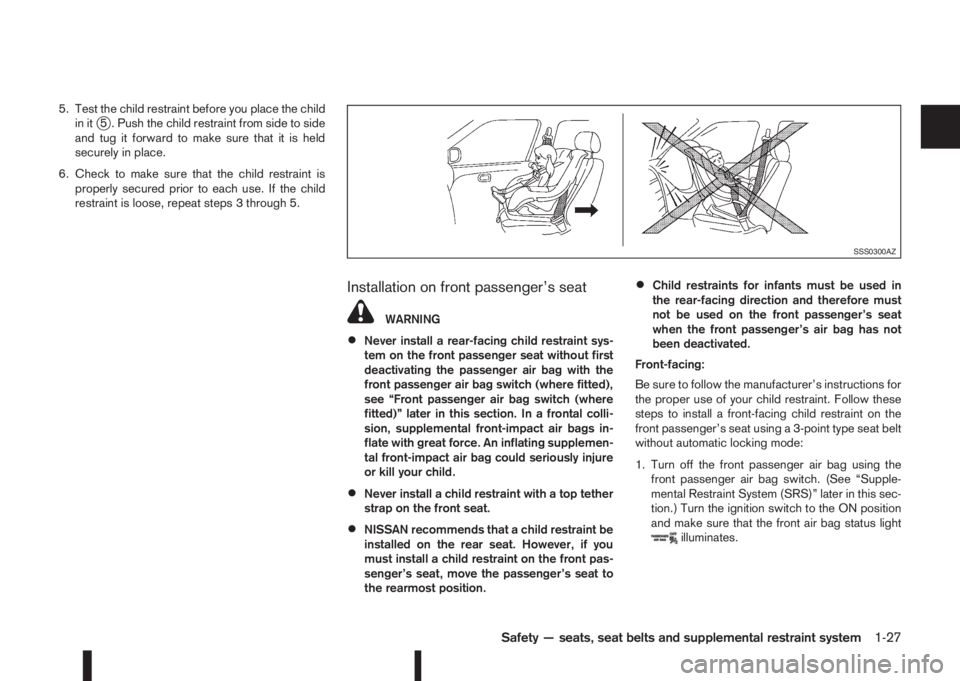
Installation on front passenger’s seat
WARNING
•Never install a rear-facing child restraint sys-
tem on the front passenger seat without first
deactivating the passenger air bag with the
front passenger air bag switch (where fitted),
see “Front passenger air bag switch (where
fitted)” later in this section. In a frontal colli-
sion, supplemental front-impact air bags in-
flate with great force. An inflating supplemen-
tal front-impact air bag could seriously injure
or kill your child.
•Never install a child restraint with a top tether
strap on the front seat.
•NISSAN recommends that a child restraint be
installed on the rear seat. However, if you
must install a child restraint on the front pas-
senger’s seat, move the passenger’s seat to
the rearmost position.
•Child restraints for infants must be used in
the rear-facing direction and therefore must
not be used on the front passenger’s seat
when the front passenger’s air bag has not
been deactivated.
Front-facing:
Be sure to follow the manufacturer’s instructions for
the proper use of your child restraint. Follow these
steps to install a front-facing child restraint on the
front passenger’s seat using a 3-point type seat belt
without automatic locking mode:
1. Turn off the front passenger air bag using the
front passenger air bag switch. (See “Supple-
mental Restraint System (SRS)” later in this sec-
tion.) Turn the ignition switch to the ON position
and make sure that the front air bag status light
illuminates.
SSS0300AZ
Safety — seats, seat belts and supplemental restraint system1-27
Page 48 of 338
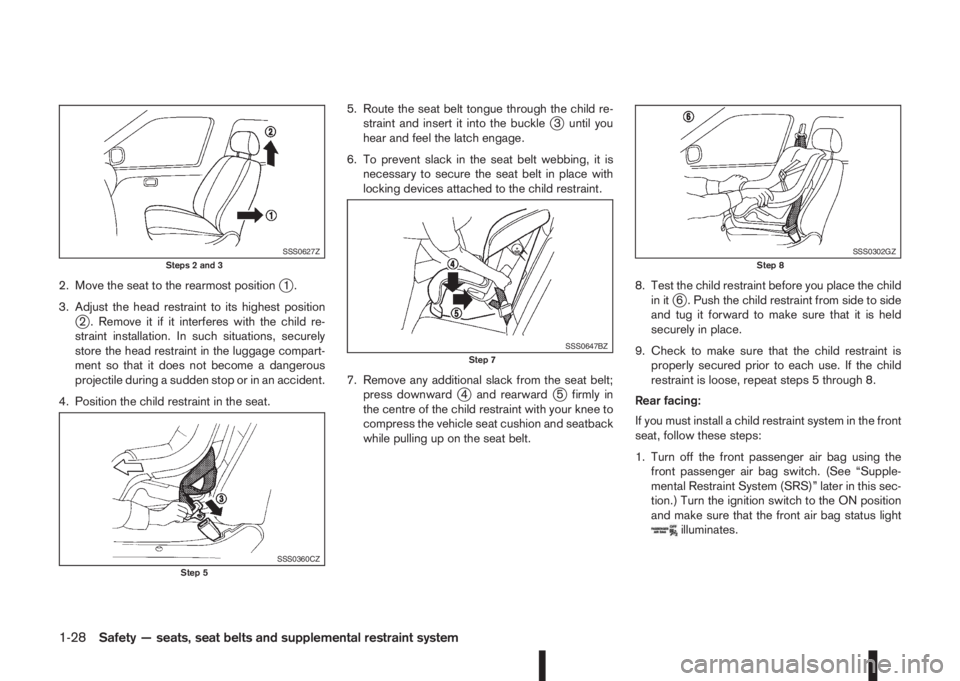
2. Move the seat to the rearmost positionj1.
3. Adjust the head restraint to its highest position
j2 . Remove it if it interferes with the child re-
straint installation. In such situations, securely
store the head restraint in the luggage compart-
ment so that it does not become a dangerous
projectile during a sudden stop or in an accident.
4. Position the child restraint in the seat.5. Route the seat belt tongue through the child re-
straint and insert it into the buckle
j3 until you
hear and feel the latch engage.
6. To prevent slack in the seat belt webbing, it is
necessary to secure the seat belt in place with
locking devices attached to the child restraint.
7. Remove any additional slack from the seat belt;
press downward
j4 and rearwardj5 firmly in
the centre of the child restraint with your knee to
compress the vehicle seat cushion and seatback
while pulling up on the seat belt.8. Test the child restraint before you place the child
in it
j6 . Push the child restraint from side to side
and tug it forward to make sure that it is held
securely in place.
9. Check to make sure that the child restraint is
properly secured prior to each use. If the child
restraint is loose, repeat steps 5 through 8.
Rear facing:
If you must install a child restraint system in the front
seat, follow these steps:
1. Turn off the front passenger air bag using the
front passenger air bag switch. (See “Supple-
mental Restraint System (SRS)” later in this sec-
tion.) Turn the ignition switch to the ON position
and make sure that the front air bag status light
illuminates.
SSS0627ZSteps 2 and 3
SSS0360CZStep 5
SSS0647BZStep 7
SSS0302GZStep 8
1-28Safety — seats, seat belts and supplemental restraint system
Page 49 of 338
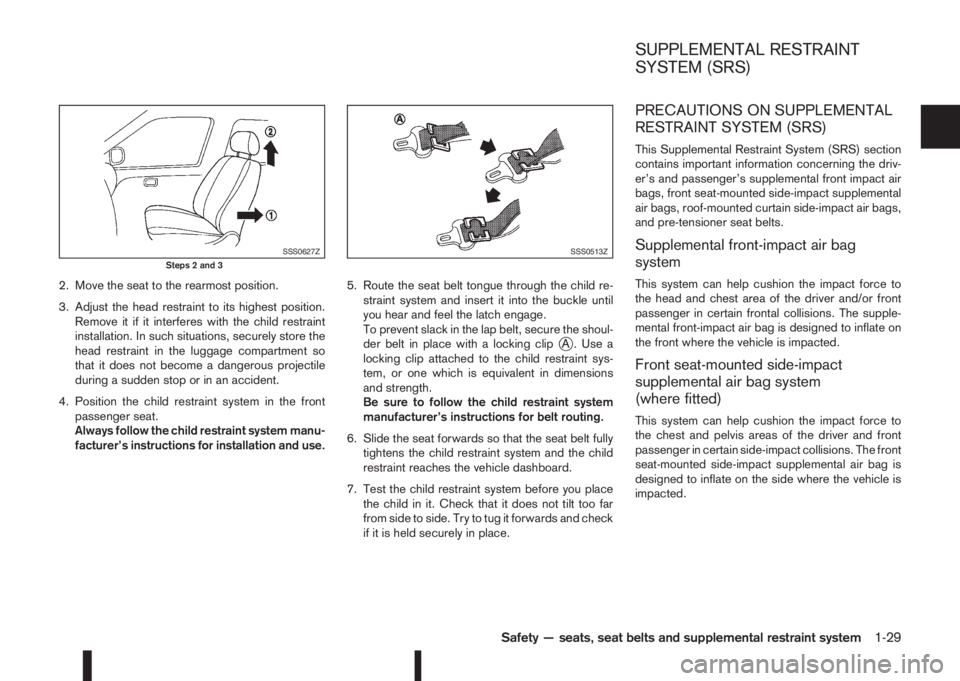
2. Move the seat to the rearmost position.
3. Adjust the head restraint to its highest position.
Remove it if it interferes with the child restraint
installation. In such situations, securely store the
head restraint in the luggage compartment so
that it does not become a dangerous projectile
during a sudden stop or in an accident.
4. Position the child restraint system in the front
passenger seat.
Always follow the child restraint system manu-
facturer’s instructions for installation and use.5. Route the seat belt tongue through the child re-
straint system and insert it into the buckle until
you hear and feel the latch engage.
To prevent slack in the lap belt, secure the shoul-
der belt in place with a locking clip
jA . Use a
locking clip attached to the child restraint sys-
tem, or one which is equivalent in dimensions
and strength.
Be sure to follow the child restraint system
manufacturer’s instructions for belt routing.
6. Slide the seat forwards so that the seat belt fully
tightens the child restraint system and the child
restraint reaches the vehicle dashboard.
7. Test the child restraint system before you place
the child in it. Check that it does not tilt too far
from side to side. Try to tug it forwards and check
if it is held securely in place.
PRECAUTIONS ON SUPPLEMENTAL
RESTRAINT SYSTEM (SRS)
This Supplemental Restraint System (SRS) section
contains important information concerning the driv-
er’s and passenger’s supplemental front impact air
bags, front seat-mounted side-impact supplemental
air bags, roof-mounted curtain side-impact air bags,
and pre-tensioner seat belts.
Supplemental front-impact air bag
system
This system can help cushion the impact force to
the head and chest area of the driver and/or front
passenger in certain frontal collisions. The supple-
mental front-impact air bag is designed to inflate on
the front where the vehicle is impacted.
Front seat-mounted side-impact
supplemental air bag system
(where fitted)
This system can help cushion the impact force to
the chest and pelvis areas of the driver and front
passenger in certain side-impact collisions. The front
seat-mounted side-impact supplemental air bag is
designed to inflate on the side where the vehicle is
impacted.
SSS0627ZSteps 2 and 3SSS0513Z
SUPPLEMENTAL RESTRAINT
SYSTEM (SRS)
Safety — seats, seat belts and supplemental restraint system1-29
Page 62 of 338
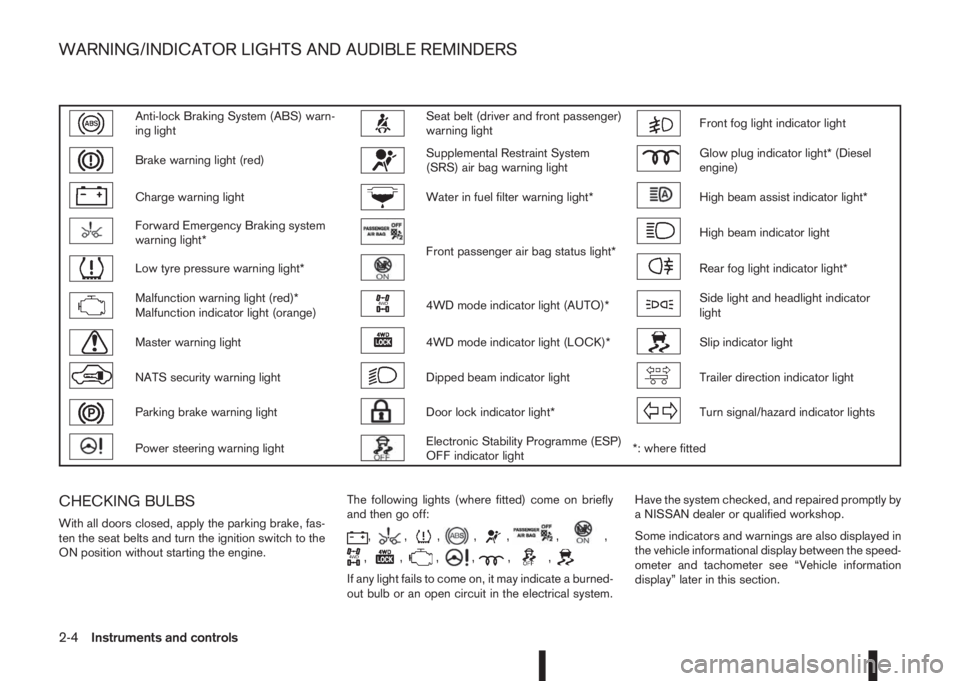
Anti-lock Braking System (ABS) warn-
ing lightSeat belt (driver and front passenger)
warning lightFront fog light indicator light
Brake warning light (red)Supplemental Restraint System
(SRS) air bag warning lightGlow plug indicator light* (Diesel
engine)
Charge warning lightWater in fuel filter warning light*High beam assist indicator light*
Forward Emergency Braking system
warning light*
Front passenger air bag status light*
High beam indicator light
Low tyre pressure warning light*Rear fog light indicator light*
Malfunction warning light (red)*
Malfunction indicator light (orange)4WD mode indicator light (AUTO)*Side light and headlight indicator
light
Master warning light4WD mode indicator light (LOCK)*Slip indicator light
NATS security warning lightDipped beam indicator lightTrailer direction indicator light
Parking brake warning lightDoor lock indicator light*Turn signal/hazard indicator lights
Power steering warning lightElectronic Stability Programme (ESP)
OFF indicator light*: where fitted
CHECKING BULBS
With all doors closed, apply the parking brake, fas-
ten the seat belts and turn the ignition switch to the
ON position without starting the engine.The following lights (where fitted) come on briefly
and then go off:,,,,,,,
,,,,,,
If any light fails to come on, it may indicate a burned-
out bulb or an open circuit in the electrical system.Have the system checked, and repaired promptly by
a NISSAN dealer or qualified workshop.
Some indicators and warnings are also displayed in
the vehicle informational display between the speed-
ometer and tachometer see “Vehicle information
display” later in this section.
WARNING/INDICATOR LIGHTS AND AUDIBLE REMINDERS
2-4Instruments and controls
Page 66 of 338

NATS security warning light
This light blinks when the ignition switch is in the
LOCK, “OFF” or Acc position. This function indi-
cates that your vehicle is equipped with the NISSAN
Anti-Theft System (NATS)*.
If NATS is malfunctioning, this light will remain on
while the ignition switch is in the ON position.
For additional information, see “Security system”
later in this section.
* Immobilizer
Parking brake warning light
When the ignition switch is placed in the ON position, the indicator light in the meter comes on (red)
when the parking brake is applied.
When the parking brake warning, light in the meter, and the LED (Light Emitting Diode), on the switch,
flash this may indicate a malfunction.
Meter Switch
Indicator Warning lightMaster warn-
ing lightDisplay text Buzzer LED
Parking brake
applied
m— — — — LED
Dynamic parking
brake
m
Warning light
ON—Release park-
ing brakeBeep LED
System failureDepends on
status—
m—— —
Parking brake
switch pressed
without brake pedal
pressed
m——Press brake
pedal— LED
Parking brake can-
not be released
automatically
m——Release park-
ing brake— LED
Parking brake
malfunction
mFlashing—m——LED
Flashing
2-8Instruments and controls
Page 67 of 338
Low brake fluid warning light:
When the ignition switch is in the ON position, the
light warns of a low brake fluid level. If this warning
light illuminates, the Electronic Stability Programme
(ESP) warning light and the brake system warning
light (yellow) also illuminate. If the light illuminates
while the ignition switch is in the ON position with
the parking brake not applied, stop the vehicle and
perform the following steps:
1. Check the brake fluid level. If brake fluid level is
low, add fluid and have the system checked by a
NISSAN dealer or qualified workshop. See
“Brake and clutch fluid” in the “8. Maintenance
and do-it-yourself” section.
2. If the brake fluid level is correct, have the warn-
ing system checked by a NISSAN dealer or quali-
fied workshop.
WARNING
•Your brake system may not be working prop-
erly if the warning light is on. Driving could be
dangerous. If you judge the brake system to
be safe, drive carefully to the nearest service
station for repairs. Otherwise, have your ve-
hicle towed because driving it could be dan-
gerous.
•Pressing the brake pedal when the ignition
switch is not in the ON position and/or when
the brake fluid level is low may increase the
stopping distance and braking will require
greater pedal effort as well as pedal travel.
•If the brake fluid level is below the minimum
or MIN mark on the brake fluid reservoir, do
not drive until the brake system has been
checked at a NISSAN dealer or qualified work-
shop.
For further parking brake operation information see
“Parking brake switch” in the “8. Pre-driving checks
and adjustments” section.
Power steering warning light
WARNING
•If the engine is not running or is turned off
while driving, the power assist for the steer-
ing will not work. Steering will be harder to
operate.
•When the power steering warning light illumi-
nates with the engine running, there will be
no power assist for the steering. You will still
have control of the vehicle but the steering
will be harder to operate. Have the power
steering system checked by a NISSAN dealer
or qualified workshop.
When the ignition switch is placed in the ON posi-
tion, the power steering warning light illuminates.
After starting the engine, the power steering warn-
ing light turns off. This indicates that the electric
power steering system is operational.
If the power steering warning light illuminates while
the engine is running, it may indicate the power
steering system is not functioning properly and mayneed servicing. Have the electric power steering
system checked by a NISSAN dealer or qualified
workshop. See “Electric power steering system” in
the “5. Starting and driving” section.
Seat belt (driver and front
passenger) warning light
The seat belt warning light reminds you to fasten
your seat belts. The light illuminates whenever the
ignition switch is placed in the ON or START posi-
tion and remains illuminated until the driver’s and/or
front passenger’s seat belt is fastened. At the same
time, the chime sounds for about 6 seconds unless
the driver’s and/or front passenger’s seat belt is
securely fastened see “Seat belt reminder chime”
later in this section. The seat belt warning light may
also illuminate if the front passenger’s seat belt is
not fastened when the front passenger’s seat is oc-
cupied. For 7 seconds after the ignition switch is
placed in the ON position, the system does not acti-
vate the warning light for the front passenger. See
“Seat belts” in the “1. Safety — Seats, Seat belts
and Supplemental Restraint System” section for
precautions on seat belt usage.
Supplemental Restraint System
(SRS) air bag warning light
WARNING
If the supplemental air bag warning light is on, it
could mean that the front air bag, side air bag
(where fitted), curtain air bag (where fitted) and/
or pre-tensioner systems will not operate in an
Instruments and controls2-9
Page 71 of 338
Seat belt reminder chime
A chime will sound for approximately 90 seconds if
the vehicle’s speed exceeds 15 km/h (9 MPH) and
the driver’s seat belt or front passenger’s seat belt,
if occupied (where fitted) is not securely fastened.
See “Seat belt warnings” in the “1. Safety — Seats,
Seat belts and Supplemental Restraint System” sec-
tion.
Key reminder buzzer (Intelligent Key
models)
The external buzzer will beep 3 times if:
•The Intelligent Key is removed from the vehicle
while the ignition is not in the LOCK position.
•The vehicle is being locked remotely or using an
outside door lock switch and the Intelligent Key
has been left inside the vehicle.
Park reminder chime (where fitted)
A chime will sound if the ignition switch is placed in
the LOCK position and the shift lever is not in the P
(Park) position.
Stop/Start System reminder buzzer
(where fitted)
The engine will shift to the normal stopped state if
any of the following operations is made during Stop/
Start System activation, and the Stop/Start System
buzzer will sound if:
– The driver’s seat belt is unfastened and the driv-
er’s door is open (MT models)– The vehicle engine bonnet is open.
When any of the above conditions continues for
over 3 minutes the Stop/Start System buzzer will
sound in 5-minute intervals as a reminder to prevent
the possibility of a dead battery. Use the ignition
switch to turn off the engine.
Close the bonnet or the driver’s door, or fasten the
seat belt then restart the engine using the ignition
switch.
For more information, see “[Stop/Start]” in the “5. In-
struments and controls” section and “Stop/Start
System (where fitted)” in the “5. Starting and driving”
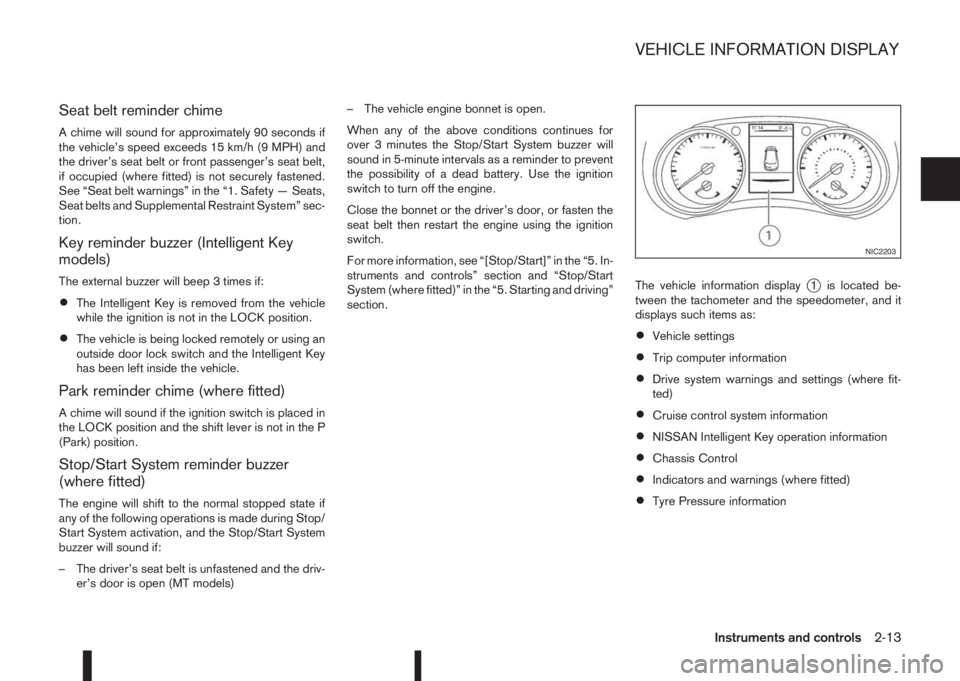
section.The vehicle information display
j1 is located be-
tween the tachometer and the speedometer, and it
displays such items as:
•Vehicle settings
•Trip computer information
•Drive system warnings and settings (where fit-
ted)
•Cruise control system information
•NISSAN Intelligent Key operation information
•Chassis Control
•Indicators and warnings (where fitted)
•Tyre Pressure information
NIC2203
VEHICLE INFORMATION DISPLAY
Instruments and controls2-13