battery NISSAN QASHQAI 2015 Owner´s Manual
[x] Cancel search | Manufacturer: NISSAN, Model Year: 2015, Model line: QASHQAI, Model: NISSAN QASHQAI 2015Pages: 338, PDF Size: 4.88 MB
Page 116 of 338
•The locking/unlocking system has been used
continuously.
An anti lock-abuse system prevents the lock mo-
tors from overheating and disables the keyfob
locking operation for a short period of time if the
system is used continuously.
•The door handle is being pulled while the
keyfob is being operated.
•The vehicle’s battery is dead.
NOTE
See [NO KEY Detected] warning, [Key battery
low] indicator, [Key ID Incorrect] warning or In-
telligent Key system warning in “Vehicle informa-
tion display” in the “2. Instruments and controls”
section for more information.The Intelligent Key system is a convenient keyless
entry system that allows you to operate your vehicle
without using an actual key.
WARNING
Radio waves could adversely affect electric medi-
cal equipment. Those who use a pacemaker
should contact the electric medical equipment
manufacturer for the possible influences before
use.
INTELLIGENT KEY OPERATING
RANGE
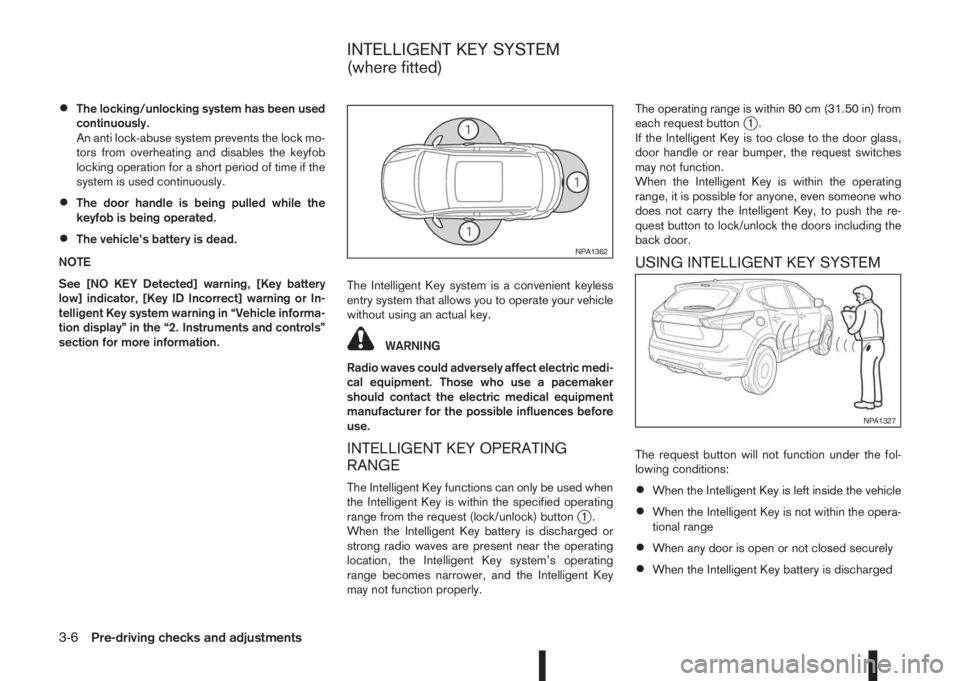
The Intelligent Key functions can only be used when
the Intelligent Key is within the specified operating
range from the request (lock/unlock) button
j1.
When the Intelligent Key battery is discharged or
strong radio waves are present near the operating
location, the Intelligent Key system’s operating
range becomes narrower, and the Intelligent Key
may not function properly.The operating range is within 80 cm (31.50 in) from
each request button
j1.
If the Intelligent Key is too close to the door glass,
door handle or rear bumper, the request switches
may not function.
When the Intelligent Key is within the operating
range, it is possible for anyone, even someone who
does not carry the Intelligent Key, to push the re-
quest button to lock/unlock the doors including the
back door.
USING INTELLIGENT KEY SYSTEM
The request button will not function under the fol-
lowing conditions:
•When the Intelligent Key is left inside the vehicle
•When the Intelligent Key is not within the opera-
tional range
•When any door is open or not closed securely
•When the Intelligent Key battery is discharged
NPA1362
NPA1327
INTELLIGENT KEY SYSTEM
(where fitted)
3-6Pre-driving checks and adjustments
Page 118 of 338
![NISSAN QASHQAI 2015 Owner´s Manual Convenience mode:
Push the door/back door request button.
– All doors and the back door will be unlocked.
– The direction indicators flash twice.
– The message [All door unlock] appears in the
v](/img/5/40325/w960_40325-117.png "NISSAN QASHQAI 2015 Owner´s Manual Convenience mode:
Push the door/back door request button.
– All doors and the back door will be unlocked.
– The direction indicators flash twice.
– The message [All door unlock] appears in the
v")
Convenience mode:
Push the door/back door request button.
– All doors and the back door will be unlocked.
– The direction indicators flash twice.
– The message [All door unlock] appears in the
vehicle information display.
Anti-hijack mode (where fitted):
1. Push the door/back door request button.
– The corresponding door unlocks.
– The direction indicators flash twice quickly.
2. Push the request button again within 5 seconds.
– All the doors and the back door will be unlocked.
– The direction indicators flash twice.
NOTE
•External interference may impair the Intelli-
gent Key’s operation. In this case, use the
emergency key located in the Intelligent Key
integrated keyfob. See “Door locks” later in
this section for further details.
•If the vehicle is unlocked and no doors are
opened for 2 minutes the doors will automati-
cally be locked.
CAUTION
•Make sure the Intelligent Key battery is in good
condition. Note that battery life may vary de-
pending on condition, amount of use, ambi-
ent temperature, etc.
•The Intelligent Key contains a miniature radio
transmitter that may be affected when placed
near metal objects.
•Keep the Intelligent Key away from mobile
phones, laptop computers and other metal
objects or electronics.
STARTING THE ENGINE WITH THE
INTELLIGENT KEY
See “Push-button ignition switch (where fitted)” in
the “5. Starting and driving” section.
CAUTION
•Make sure you carry the Intelligent Key with
you when starting and driving the vehicle.
•If the Intelligent Key is too far away from the
passenger compartment, the vehicle may not
start. See “Intelligent Key operating range” in
the “3. Pre-driving checks and adjustments”
section
SUPER LOCK SYSTEM (RHD models)
WARNING
Super Lock system equipped models:
Failure to follow the precautions below may lead
to hazardous situations. Make sure the Super
Lock system activation is always conducted
safely.
•When the vehicle is occupied, never lock the
doors with the integrated keyfob. Doing so
will trap the occupants, since the Super Lock
system prevents the doors from being opened
from the inside of the vehicle.
•Only operate the integrated keyfob “LOCK”
button when there is a clear view of the ve-
hicle. This is to prevent anybody from being
trapped inside the vehicle through the Super
Lock system activation.
Pressing the “LOCK” button (
) on the integrated
keyfob or locking the doors using one of the request
buttons (Intelligent Key models) will activate the Su-
per Lock system.
When the Super Lock system is active, none of the
doors can be opened from inside the vehicle. This
provides additional security in case of theft or break-
in.
The Super Lock system will be released when all
the doors are unlocked using the integrated keyfob
or a request button (Intelligent Key models).
DOOR LOCKS
3-8Pre-driving checks and adjustments
Page 119 of 338
Emergency situations
If the Super Lock system is activated while you are
inside the vehicle, for example by a traffic accident
or other unexpected circumstances, follow the in-
structions below.
To release the Super Lock system:
– Insert the key into the ignition switch and turn it
to the ON position.
All doors can now be unlocked and opened from
inside the vehicle.
– Remove the key from the ignition switch and un-
lock the doors using the integrated keyfob “UN-
LOCK” button (
).
All doors can now be opened from inside the
vehicle.
To unlock and open the driver’s door from
inside the vehicle while the Super Lock system
is active:
1. Open or break the driver’s door window.
2. Insert the key into the outside door key cylinder
and turn it towards the rear of the vehicle.
3. The driver’s door will unlock and can now be
opened from inside the vehicle.
Locking without activating the Super
Lock system
WARNING
Do not leave the key inside the vehicle when leav-
ing the vehicle.
Locking the doors using the door key cylinder or
power door lock switch will not activate the Super
Lock system. See “Locking/unlocking with the key
(vehicle dead battery)” later in this section for fur-
ther information.
LOCKING/UNLOCKING WITH THE
KEY (vehicle dead battery)
WARNING
•When leaving the vehicle, do not leave the key
inside the vehicle.
•Never leave children unattended in a vehicle
and always be sure you have your keys withyou when leaving. If an emergency occurs it
may be more difficult to help them otherwise.
The driver’s door can be locked/unlocked from out-
side using the key/emergency key if the vehicle’s
battery is dead.
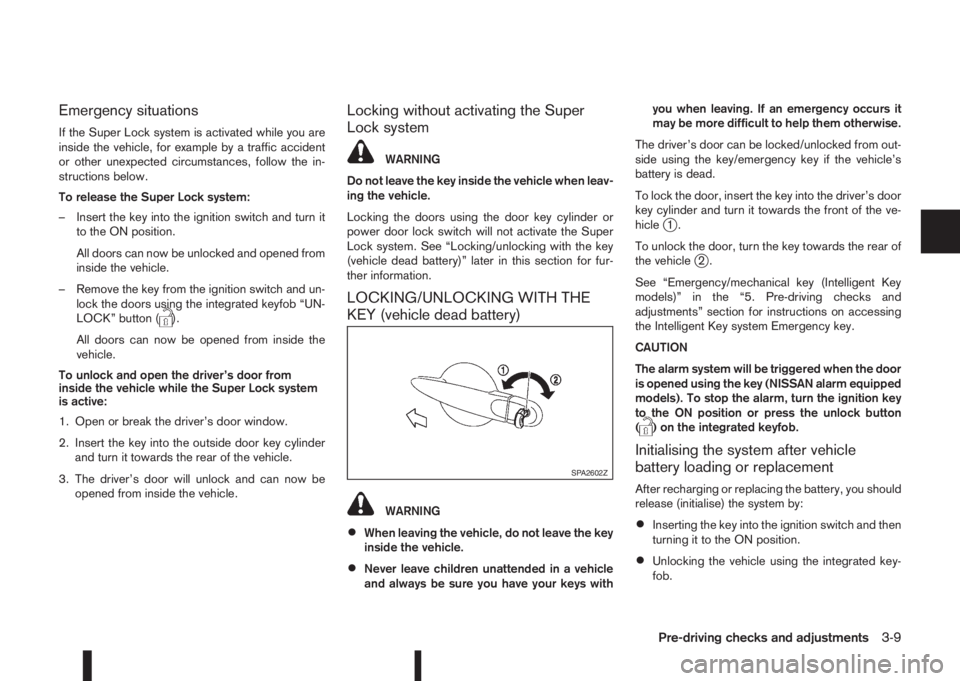
To lock the door, insert the key into the driver’s door
key cylinder and turn it towards the front of the ve-
hicle
j1.
To unlock the door, turn the key towards the rear of
the vehicle
j2.
See “Emergency/mechanical key (Intelligent Key
models)” in the “5. Pre-driving checks and
adjustments” section for instructions on accessing
the Intelligent Key system Emergency key.
CAUTION
The alarm system will be triggered when the door
is opened using the key (NISSAN alarm equipped
models). To stop the alarm, turn the ignition key
to the ON position or press the unlock button
(
) on the integrated keyfob.
Initialising the system after vehicle
battery loading or replacement
After recharging or replacing the battery, you should
release (initialise) the system by:
•Inserting the key into the ignition switch and then
turning it to the ON position.
•Unlocking the vehicle using the integrated key-
fob.
SPA2602Z
Pre-driving checks and adjustments3-9
Page 122 of 338
Vehicle dead battery – Back door lock
release lever (where fitted)
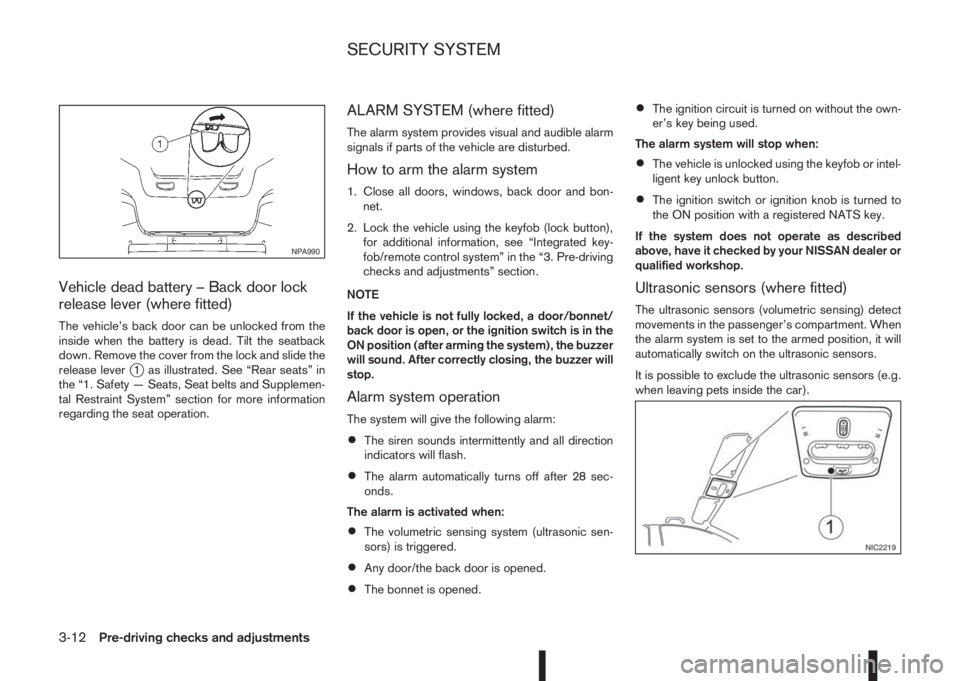
The vehicle’s back door can be unlocked from the
inside when the battery is dead. Tilt the seatback
down. Remove the cover from the lock and slide the
release lever
j1 as illustrated. See “Rear seats” in
the “1. Safety — Seats, Seat belts and Supplemen-
tal Restraint System” section for more information
regarding the seat operation.
ALARM SYSTEM (where fitted)
The alarm system provides visual and audible alarm
signals if parts of the vehicle are disturbed.
How to arm the alarm system
1. Close all doors, windows, back door and bon-
net.
2. Lock the vehicle using the keyfob (lock button),
for additional information, see “Integrated key-
fob/remote control system” in the “3. Pre-driving
checks and adjustments” section.
NOTE
If the vehicle is not fully locked, a door/bonnet/
back door is open, or the ignition switch is in the
ON position (after arming the system), the buzzer
will sound. After correctly closing, the buzzer will
stop.
Alarm system operation
The system will give the following alarm:
•The siren sounds intermittently and all direction
indicators will flash.
•The alarm automatically turns off after 28 sec-
onds.
The alarm is activated when:
•The volumetric sensing system (ultrasonic sen-
sors) is triggered.
•Any door/the back door is opened.
•The bonnet is opened.
•The ignition circuit is turned on without the own-
er’s key being used.
The alarm system will stop when:
•The vehicle is unlocked using the keyfob or intel-
ligent key unlock button.
•The ignition switch or ignition knob is turned to
the ON position with a registered NATS key.
If the system does not operate as described
above, have it checked by your NISSAN dealer or
qualified workshop.
Ultrasonic sensors (where fitted)
The ultrasonic sensors (volumetric sensing) detect
movements in the passenger’s compartment. When
the alarm system is set to the armed position, it will
automatically switch on the ultrasonic sensors.
It is possible to exclude the ultrasonic sensors (e.g.
when leaving pets inside the car).
NPA990
NIC2219
SECURITY SYSTEM
3-12Pre-driving checks and adjustments
Page 132 of 338
WARNING
•Do not adjust the heater and air conditioner
controls or audio controls while driving so that
full attention may be given to vehicle opera-
tion.
•If you noticed any foreign objects entering the
system hardware, spilled liquid on the sys-
tem, or noticed smoke or fumes coming out
from the system, or any other unusual opera-
tion is observed, stop using the system imme-
diately and contact the nearest NISSAN dealer
or qualified workshop. Ignoring such condi-
tions may lead to an accident, fire or electric
shock.
•Do not disassemble or modify this system. If
you do, it may lead to an accident, fire, or
electric shock.
CAUTION
Do not use the system when the engine is not
running for extended periods of time to prevent
battery discharge.
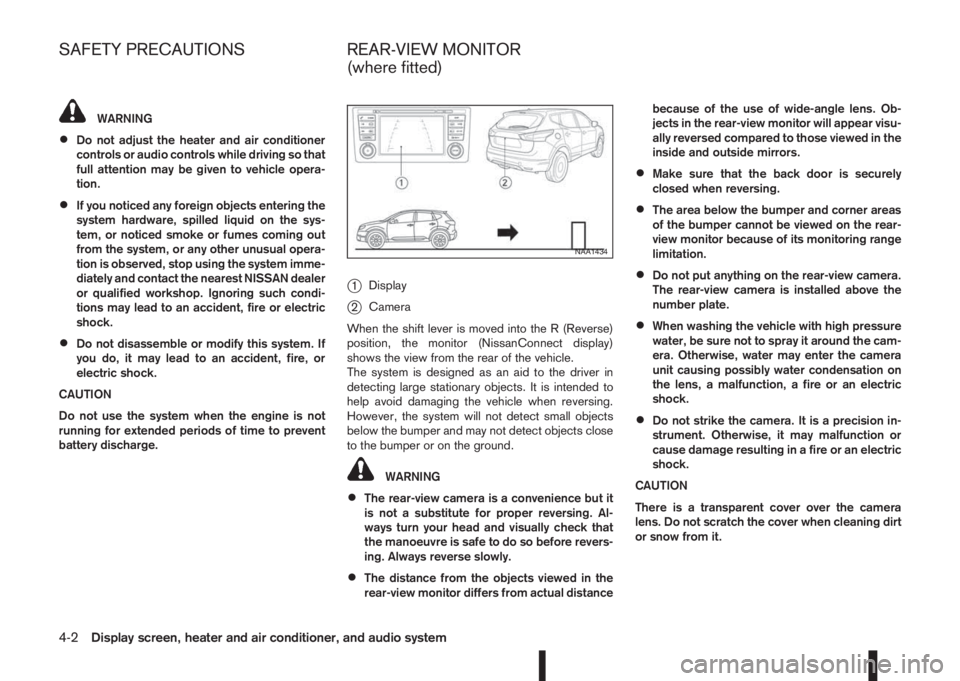
j1Display
j2Camera
When the shift lever is moved into the R (Reverse)
position, the monitor (NissanConnect display)
shows the view from the rear of the vehicle.
The system is designed as an aid to the driver in
detecting large stationary objects. It is intended to
help avoid damaging the vehicle when reversing.
However, the system will not detect small objects
below the bumper and may not detect objects close
to the bumper or on the ground.
WARNING
•The rear-view camera is a convenience but it
is not a substitute for proper reversing. Al-
ways turn your head and visually check that
the manoeuvre is safe to do so before revers-
ing. Always reverse slowly.
•The distance from the objects viewed in the
rear-view monitor differs from actual distancebecause of the use of wide-angle lens. Ob-
jects in the rear-view monitor will appear visu-
ally reversed compared to those viewed in the
inside and outside mirrors.
•Make sure that the back door is securely
closed when reversing.
•The area below the bumper and corner areas
of the bumper cannot be viewed on the rear-
view monitor because of its monitoring range
limitation.
•Do not put anything on the rear-view camera.
The rear-view camera is installed above the
number plate.
•When washing the vehicle with high pressure
water, be sure not to spray it around the cam-
era. Otherwise, water may enter the camera
unit causing possibly water condensation on
the lens, a malfunction, a fire or an electric
shock.
•Do not strike the camera. It is a precision in-
strument. Otherwise, it may malfunction or
cause damage resulting in a fire or an electric
shock.
CAUTION
There is a transparent cover over the camera
lens. Do not scratch the cover when cleaning dirt
or snow from it.
NAA1434
SAFETY PRECAUTIONS REAR-VIEW MONITOR
(where fitted)
4-2Display screen, heater and air conditioner, and audio system
Page 156 of 338
![NISSAN QASHQAI 2015 Owner´s Manual Pressing a preset button for more than 2 seconds
while in the [FM list] or radio main screen will cause
the station currently being received to be stored
against that preset button.
•Twelve stations](/img/5/40325/w960_40325-155.png "NISSAN QASHQAI 2015 Owner´s Manual Pressing a preset button for more than 2 seconds
while in the [FM list] or radio main screen will cause
the station currently being received to be stored
against that preset button.
•Twelve stations")
Pressing a preset button for more than 2 seconds
while in the [FM list] or radio main screen will cause
the station currently being received to be stored
against that preset button.
•Twelve stations (if available) can be stored in the
FM bands. (Six each for FM1 and FM2)
•Six stations (if available) can be set for the AM
band.
If the battery is disconnected, or if the fuse blows,
the radio memory will be erased. In that case, reset
the desired stations after battery connection or fuse
replacement.
Radio Data System (RDS) operation
(where fitted)
The RDS is a system through which encoded digital
information is transmitted by FM radio stations in
addition to the normal FM radio broadcasting. The
RDS provides information services such as station
name, traffic information, or news.
NOTE
•In some countries or regions, some of these
services may not be available.
Alternative Frequency (AF) mode:
The AF mode operates in the FM (radio) mode.
•The AF mode operates in the FM (radio), AUX or
CD mode (if FM was previously selected in the
radio mode).
•The AF function compares signal strengths and
selects the station with the optimum reception
conditions for the currently tuned-in station.
RDS functions
Programme Service (PS) function (station name
display function):
– FM:
When an RDS station is tuned in with seek or
manual tuning, the RDS data is received and the
PS name is displayed.
TA Traffic announcement
This function operates in FM (Radio) mode. This
function will still operate in the background if any
media source is selected (CD, USB or MEDIA
mode).
•Pressing the
The TA indicator is displayed while TA mode is
on.
•When
switched off and the TA indicator will disappear
from the display.
Traffic announcement interrupt function:
When a traffic announcement is received, the an-
nouncement is tuned in and the display shows a
notification message with the radio station name e.g.
[TA: Radio 1].
Once the traffic announcement has finished, the unit
returns to the source that was active before the traf-
fic announcement started.If
the traffic announcement interrupt mode is can-
celled. The TA mode returns to the standby mode
and the audio unit returns to the previous source.
SETUP BUTTON
To configure [Audio], [Clock], [Radio], and [Lan-
guage] settings, perform the following procedure:
1. Press the
2. Turn the
Page 161 of 338
![NISSAN QASHQAI 2015 Owner´s Manual is no match (the display shows [No match] the next
item will be shown. Select, and press<ENTER>to
play the preferred track.
buttonj5
While a track with recorded music information tags
(ID3–tags) is](/img/5/40325/w960_40325-160.png "NISSAN QASHQAI 2015 Owner´s Manual is no match (the display shows [No match] the next
item will be shown. Select, and press<ENTER>to
play the preferred track.
buttonj5
While a track with recorded music information tags
(ID3–tags) is")
is no match (the display shows [No match] the next
item will be shown. Select, and press
play the preferred track.
buttonj5
While a track with recorded music information tags
(ID3–tags) is being played, the title of the played
track is displayed. If the tags are not provided then
a notification message is displayed.
When the
j5 button is pressed repeatedly,
further information about the track can be displayed
along with the track title as follows:
Track time→Artist name→Album title→Track
time
Track details:
A long press on the
j5 button will turn the
display into a detailed overview and after a few sec-
onds it returns to the main display, or press
j5 briefly.
iPod® PLAYER OPERATION
(where fitted)
Connecting iPod®
Open the console lid and connect the iPod cable to
the USB connector. The battery of the iPod® will be
charged during the connection to the vehicle. The
display will show the notification message [iPod
reading the data.
If the audio system has been turned off while the
iPod® was playing, pressing
will start the iPod®operation. During the connection, the iPod® can
only be operated with the audio controls.
* iPod® and iPhone® are trademarks of Apple Inc.,
registered in the U.S. and other countries.
CAUTION
•Do not force the iPod cable into the USB
port. Inserting the iPod cable tilted or up-
side- down into the port may damage the
iPod cable and the port. Make sure that the
iPod cable is connected correctly into the
USB port. (Some iPod cables come with a
mark as a guide. Make sure that the
mark is facing the correct direction before
inserting the iPod cable.)
•Do not locate objects near the iPod cable to
prevent the objects from leaning on the iPod
cable and the port. Pressure from the ob-
jects may damage the iPod cable and the
port.
Compatibility:
NOTE
•At the time of publication, this audio system
was tested with the latest iPod® players/iP-
hone® available. Due to the frequent update
of consumer devices like MP3 players,
NISSAN cannot guarantee that all new iPod®
players/iPhone® launched will be compatible
with this audio system.
•Some iPod® operations may not be available
with this system.
•Make sure that the iPod®/iPhone® is updated
with the latest firmware.
•iPod® Shuffle and iPod® mini cannot be used
with this system.
•Full functionality of iPhone USB and Bluetooth
Audio may not be available to the user if the
same device is connected by USB and Blue-
tooth simultaneously.
MEDIAbutton
To operate the iPod press
peatedly until [iPod
Audio main operation
Interface:
The interface for iPod® operation shown on the
audio system display is similar to the iPod® inter-
face. Use the
Page 162 of 338
![NISSAN QASHQAI 2015 Owner´s Manual •[Composers]
•[Genre]
•[Podcasts]
For further information about each item, see the
iPod® owner’s manual.
The following operations are identical to the audio
main operation of the Compact Disc](/img/5/40325/w960_40325-161.png "NISSAN QASHQAI 2015 Owner´s Manual •[Composers]
•[Genre]
•[Podcasts]
For further information about each item, see the
iPod® owner’s manual.
The following operations are identical to the audio
main operation of the Compact Disc")
•[Composers]
•[Genre]
•[Podcasts]
For further information about each item, see the
iPod® owner’s manual.
The following operations are identical to the audio
main operation of the Compact Disc (CD) opera-
tion. For details, see “Audio main operation” earlier
in this section.
•List view
•,
•MIX (Random play)
•RPT (Repeat track)
•Folder browsing
mbuttonj5
While a track with recorded music information tags
(ID3–tags) is being played, the title of the played
track is displayed. If the tags are not provided then
a notification message is displayed.
When the
j5 button is pressed repeatedly,
further information about the track can be displayed
along with the track title as follows:
Track time→Artist name→Album title→Track
timeTrack details:
A long press on the
j5 button, the screen
displays the song title, artist name, and album title.
After a few seconds it returns to the main display or
press
j5 briefly.
BLUETOOTH® OPERATION
Regulatory information
m
Bluetooth® is a trademark
owned by Bluetooth SIG, Inc.
CE statement
Hereby Yanfeng Visteon Automotive Electronics
Co., Ltd. declares that this system is in compliance
with the essential requirements and other relevant
provisions of Directive 1999/5/EC.
m
NOTE
The audio system only supports Bluetooth® de-
vices with AVRCP (Audio Video Remote Control
Profile) version 1.4 or earlier.
BLUETOOTH® settings
To pair a device, make sure the Bluetooth is
switched on and use the [Scan device] key or the
[Pair device] key For details, see “[Scan devices]”
later in this section.
Up to 5 different Bluetooth devices can be con-
nected. However, only one device can be used at a
time. If 5 different Bluetooth registered devices are
registered, a new device can only replace one of the
5 existing paired devices. Use [Del. device] key to
delete one of the existing paired devices. For de-
tails, see “[Del. device]” later in this section.
When successfully paired a notification message
will be displayed, then the audio system display will
return to the current audio source display. During
connection the following status icons will be dis-
played (top left of the display): Signal strength
(
), Battery status* () and Bluetooth “ON”
().
*: If the low battery message comes on, the Blue-
tooth® device must be recharged soon.
NAA1392*: a device with bluetooth capabilities
4-32Display screen, heater and air conditioner, and audio system
Page 170 of 338
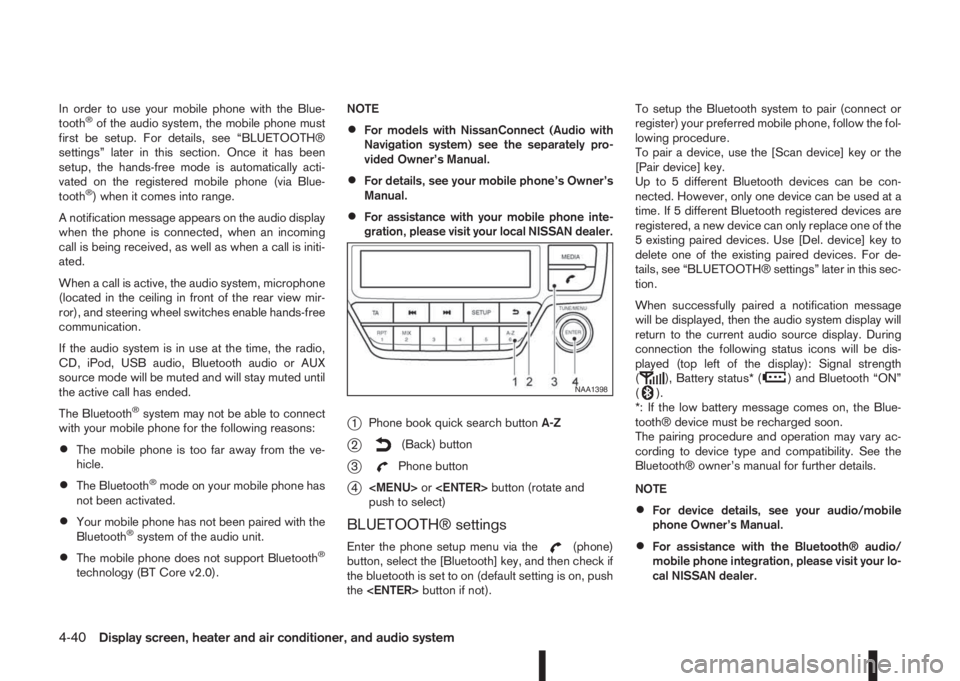
In order to use your mobile phone with the Blue-
tooth®of the audio system, the mobile phone must
first be setup. For details, see “BLUETOOTH®
settings” later in this section. Once it has been
setup, the hands-free mode is automatically acti-
vated on the registered mobile phone (via Blue-
tooth
®) when it comes into range.
A notification message appears on the audio display
when the phone is connected, when an incoming
call is being received, as well as when a call is initi-
ated.
When a call is active, the audio system, microphone
(located in the ceiling in front of the rear view mir-
ror), and steering wheel switches enable hands-free
communication.
If the audio system is in use at the time, the radio,
CD, iPod, USB audio, Bluetooth audio or AUX
source mode will be muted and will stay muted until
the active call has ended.
The Bluetooth
®system may not be able to connect
with your mobile phone for the following reasons:
•The mobile phone is too far away from the ve-
hicle.
•The Bluetooth®mode on your mobile phone has
not been activated.
•Your mobile phone has not been paired with the
Bluetooth®system of the audio unit.
•The mobile phone does not support Bluetooth®
technology (BT Core v2.0).NOTE
•For models with NissanConnect (Audio with
Navigation system) see the separately pro-
vided Owner’s Manual.
•For details, see your mobile phone’s Owner’s
Manual.
•For assistance with your mobile phone inte-
gration, please visit your local NISSAN dealer.
j1Phone book quick search buttonA-Z
j2(Back) button
j3Phone button
j4
Page 176 of 338
5Starting and drivingStarting and driving
Running-in schedule ................................................ 5-2
Before starting the engine ........................................ 5-2
Precautions when starting and driving ...................... 5-3
Exhaust gas (Carbon Monoxide) ......................... 5-3
Tyre Pressure Monitoring System (TPMS)................ 5-4
Meter information................................................ 5-7
Activation............................................................ 5-7
TPMS sensor ID and position recognition ........... 5-7
Adjusting TPMS target pressure ......................... 5-8
Tyre pressure units ............................................. 5-8
[Check cold tyre] message ................................. 5-8
TPMS temperature calibration............................. 5-8
On-pavement and off-road driving precautions ......... 5-9
Three-way catalyst (Petrol engine models)................ 5-9
To help prevent damage ..................................... 5-9
Turbocharger system (Diesel engine models) ........... 5-10
Care when driving ................................................... 5-10
Engine cold start period ...................................... 5-10
Loading luggage ................................................. 5-10
Driving on wet roads ........................................... 5-10
Driving under winter conditions ........................... 5-10
Ignition switch (where fitted) .................................... 5-11
Manual transmission ........................................... 5-11
XTRONIC transmission (CVT) ............................ 5-11
Steering lock ...................................................... 5-11
Key positions ...................................................... 5-11
NISSAN Anti-Theft System (NATS) (where
fitted).................................................................. 5-12
Push-button ignition switch (where fitted) ................. 5-12Precautions on push-button ignition switch
operation ............................................................ 5-12
Intelligent Key system ......................................... 5-12
Ignition switch positions ...................................... 5-13
Emergency engine shut off.................................. 5-14
Steering lock ...................................................... 5-14
Intelligent Key battery discharge.......................... 5-14
Starting engine ........................................................ 5-15
Models with Intelligent Key system ...................... 5-15
Models without Intelligent Key system ................. 5-16
Driving the vehicle.................................................... 5-17
Driving with manual transmission......................... 5-17
Driving with XTRONIC Transmission (CVT) ........ 5-18
Stop/Start System (where fitted) .............................. 5-22
Normal operation ................................................ 5-22
Precautions ........................................................ 5-24
Stop/Start System OFF switch ........................... 5-25
Environmental savings ........................................ 5-25
Four-wheel Drive (4WD) (where fitted)..................... 5-26
4WD mode operations........................................ 5-27
4WD shift tips .................................................... 5-27
4WD Mode indicator lights ................................. 5-28
Driving four-wheel drive (4WD) safely ................. 5-28
Blind Spot Warning (BSW) system (where fitted)..... 5-30
BSW system operation ....................................... 5-30
BSW driving situations ....................................... 5-32
BSW temporary disabled status.......................... 5-32
BSW automatic deactivation ............................... 5-33
BSW malfunction ............................................... 5-33
BSW camera unit maintenance ........................... 5-33