check engine NISSAN QASHQAI 2015 Owner´s Manual
[x] Cancel search | Manufacturer: NISSAN, Model Year: 2015, Model line: QASHQAI, Model: NISSAN QASHQAI 2015Pages: 338, PDF Size: 4.88 MB
Page 111 of 338
3Pre-driving checks and adjustmentsPre-driving checks and adjustments
Keys ........................................................................ 3-2
NISSAN Anti-Theft System (NATS)* key ............. 3-2
Intelligent Key (where fitted)................................ 3-2
Key number ........................................................ 3-3
New keys ........................................................... 3-3
Emergency/mechanical key (Intelligent Key
models) .............................................................. 3-3
Integrated keyfob/remote control system .................. 3-4
Switching from Convenience mode to
Anti-hijack mode (where fitted) ............................ 3-5
Using the remote keyless entry system ................ 3-5
Locking the doors ............................................... 3-5
Unlocking the doors ............................................ 3-5
Keyfob operation failure ...................................... 3-5
Intelligent Key system (where fitted) ......................... 3-6
Intelligent Key operating range ............................ 3-6
Using Intelligent Key system................................ 3-6
Locking/unlocking .............................................. 3-7
Starting the engine with the Intelligent Key .......... 3-8
Door locks ............................................................... 3-8
Super Lock system (RHD models) ...................... 3-8
Locking/unlocking with the key (vehicle dead
battery) ............................................................... 3-9Inside door handle .............................................. 3-10
Power door lock switch ...................................... 3-10
Child safety lock — rear doors............................ 3-11
Back door lock ................................................... 3-11
Security system ....................................................... 3-12
Alarm system (where fitted) ................................ 3-12
NISSAN Anti-Theft System (NATS)..................... 3-13
Bonnet release ........................................................ 3-14
Fuel filler lid ............................................................. 3-15
Fuel filler lid opener lever .................................... 3-15
Fuel filler cap ...................................................... 3-15
Parking brake switch ............................................... 3-16
Driving away when towing a trailer ...................... 3-17
Steering wheel......................................................... 3-18
Sun visors ............................................................... 3-18
Mirrors..................................................................... 3-18
Inside rear-view mirror ........................................ 3-18
Automatic anti-dazzling inside mirror (where
fitted).................................................................. 3-19
Outside rear-view mirrors.................................... 3-19
Vanity mirror ....................................................... 3-20
Page 113 of 338
KEY NUMBER
A key number platej3 is supplied with your key
Record the key number on the “Security Informa-
tion” page at the end of this manual and keep it in a
safe place, butnot in the vehicle. The key can only
be duplicated using an original key or the original
key number. The key number is required when you
have lost all of the keys and do not have the original
key to duplicate from. If the key is lost, or you need
extra keys, provide an original key or the key number
to a NISSAN dealer or qualified workshop.
NISSAN does not record key numbers, so it is very
important that you keep a record of your key num-
ber.
NEW KEYS
As many as four NATS keys can be registered to
one vehicle at any one time. New keys must be reg-
istered to the NATS components of your vehicle by
a NISSAN dealer.
When registering a new key at a NISSAN dealer,
you are requested to bring all of your NATS keys
with you. This is necessary because the registration
process will erase and reprogram the memory of
your vehicle’s NATS components.
NOTE
A key number is only required if you have lost all
of your keys and do not have one to duplicate
from. If you still have a key, this key can be dupli-
cated by a NISSAN dealer.
EMERGENCY/MECHANICAL KEY
(Intelligent Key models)
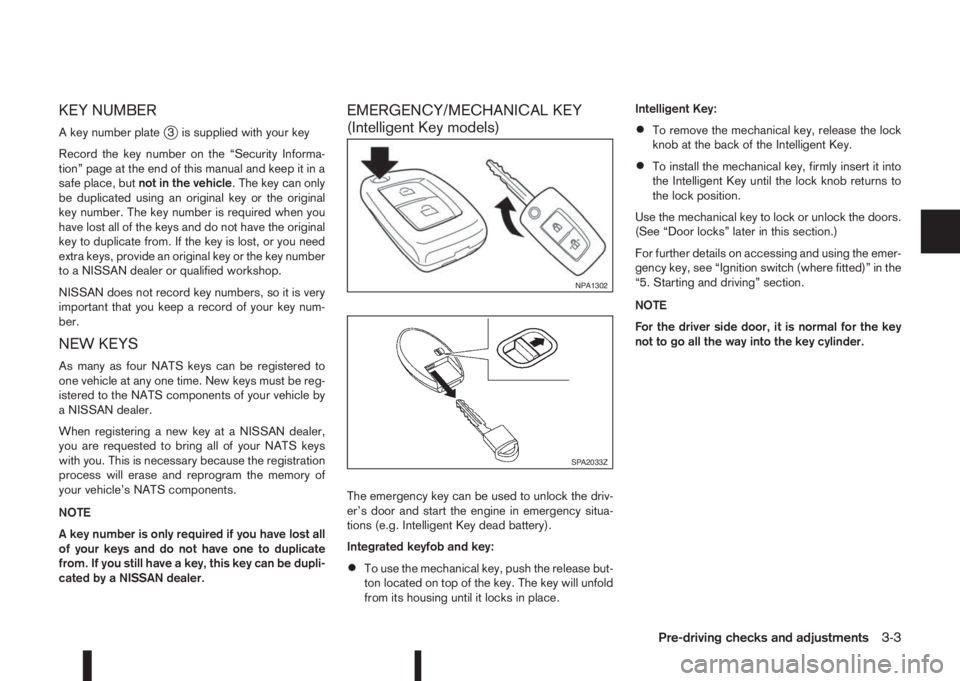
The emergency key can be used to unlock the driv-
er’s door and start the engine in emergency situa-
tions (e.g. Intelligent Key dead battery).
Integrated keyfob and key:
•To use the mechanical key, push the release but-
ton located on top of the key. The key will unfold
from its housing until it locks in place.Intelligent Key:
•To remove the mechanical key, release the lock
knob at the back of the Intelligent Key.
•To install the mechanical key, firmly insert it into
the Intelligent Key until the lock knob returns to
the lock position.
Use the mechanical key to lock or unlock the doors.
(See “Door locks” later in this section.)
For further details on accessing and using the emer-
gency key, see “Ignition switch (where fitted)” in the
“5. Starting and driving” section.
NOTE
For the driver side door, it is normal for the key
not to go all the way into the key cylinder.
NPA1302
SPA2033Z
Pre-driving checks and adjustments3-3
Page 118 of 338
![NISSAN QASHQAI 2015 Owner´s Manual Convenience mode:
Push the door/back door request button.
– All doors and the back door will be unlocked.
– The direction indicators flash twice.
– The message [All door unlock] appears in the
v](/img/5/40325/w960_40325-117.png "NISSAN QASHQAI 2015 Owner´s Manual Convenience mode:
Push the door/back door request button.
– All doors and the back door will be unlocked.
– The direction indicators flash twice.
– The message [All door unlock] appears in the
v")
Convenience mode:
Push the door/back door request button.
– All doors and the back door will be unlocked.
– The direction indicators flash twice.
– The message [All door unlock] appears in the
vehicle information display.
Anti-hijack mode (where fitted):
1. Push the door/back door request button.
– The corresponding door unlocks.
– The direction indicators flash twice quickly.
2. Push the request button again within 5 seconds.
– All the doors and the back door will be unlocked.
– The direction indicators flash twice.
NOTE
•External interference may impair the Intelli-
gent Key’s operation. In this case, use the
emergency key located in the Intelligent Key
integrated keyfob. See “Door locks” later in
this section for further details.
•If the vehicle is unlocked and no doors are
opened for 2 minutes the doors will automati-
cally be locked.
CAUTION
•Make sure the Intelligent Key battery is in good
condition. Note that battery life may vary de-
pending on condition, amount of use, ambi-
ent temperature, etc.
•The Intelligent Key contains a miniature radio
transmitter that may be affected when placed
near metal objects.
•Keep the Intelligent Key away from mobile
phones, laptop computers and other metal
objects or electronics.
STARTING THE ENGINE WITH THE
INTELLIGENT KEY
See “Push-button ignition switch (where fitted)” in
the “5. Starting and driving” section.
CAUTION
•Make sure you carry the Intelligent Key with
you when starting and driving the vehicle.
•If the Intelligent Key is too far away from the
passenger compartment, the vehicle may not
start. See “Intelligent Key operating range” in
the “3. Pre-driving checks and adjustments”
section
SUPER LOCK SYSTEM (RHD models)
WARNING
Super Lock system equipped models:
Failure to follow the precautions below may lead
to hazardous situations. Make sure the Super
Lock system activation is always conducted
safely.
•When the vehicle is occupied, never lock the
doors with the integrated keyfob. Doing so
will trap the occupants, since the Super Lock
system prevents the doors from being opened
from the inside of the vehicle.
•Only operate the integrated keyfob “LOCK”
button when there is a clear view of the ve-
hicle. This is to prevent anybody from being
trapped inside the vehicle through the Super
Lock system activation.
Pressing the “LOCK” button (
) on the integrated
keyfob or locking the doors using one of the request
buttons (Intelligent Key models) will activate the Su-
per Lock system.
When the Super Lock system is active, none of the
doors can be opened from inside the vehicle. This
provides additional security in case of theft or break-
in.
The Super Lock system will be released when all
the doors are unlocked using the integrated keyfob
or a request button (Intelligent Key models).
DOOR LOCKS
3-8Pre-driving checks and adjustments
Page 123 of 338
To exclude the ultrasonic sensors:
1. Press the ultrasonic sensor deactivation button
j1.
2. Close the door(s)/bonnet/back door and press
the lock button
on the keyfob to lock all doors/
back door.
The ultrasonic sensors are now excluded from the
alarm system. All other functions of the system re-
main activated until the alarm system is disarmed
again.
NOTE
One or any further number of presses of the ul-
trasonic sensor deactivation button
j1 excludes
the ultrasonic sensors for the next time the alarm
system is armed and only that instance. Pressing
the button twice does not reactivate the system.
NISSAN ANTI-THEFT SYSTEM (NATS)
The NISSAN Anti-Theft System (NATS)* will not
allow the engine to start without the use of the reg-
istered NATS key.
* Immobilizer
If the engine fails to start using the registered NATS
key, it may be due to interference from another
NATS key, an automated toll road device or an auto-
mated payment device on the key ring. Restart the
engine using the following procedure:
1. Leave the ignition switch in the ON position for
approximately 5 seconds.2. Turn the ignition switch to the “OFF” or LOCK
position and wait approximately 5 seconds.
3. Repeat steps 1 and 2.
4. Restart the engine while holding the device
(which may have caused the interference) sepa-
rated from the registered NATS key or NATS
Intelligent Key (where fitted).
If this procedure allows the engine to start,
NISSAN recommends placing the registered
NATS key or NATS Intelligent Key (where fitted)
on a separate key-ring to avoid interference from
other devices.
NATS security warning/indicator light
(where fitted)
One of the following functions (depending on the
vehicle specifications) indicates that the vehicle is
equipped with NATS:
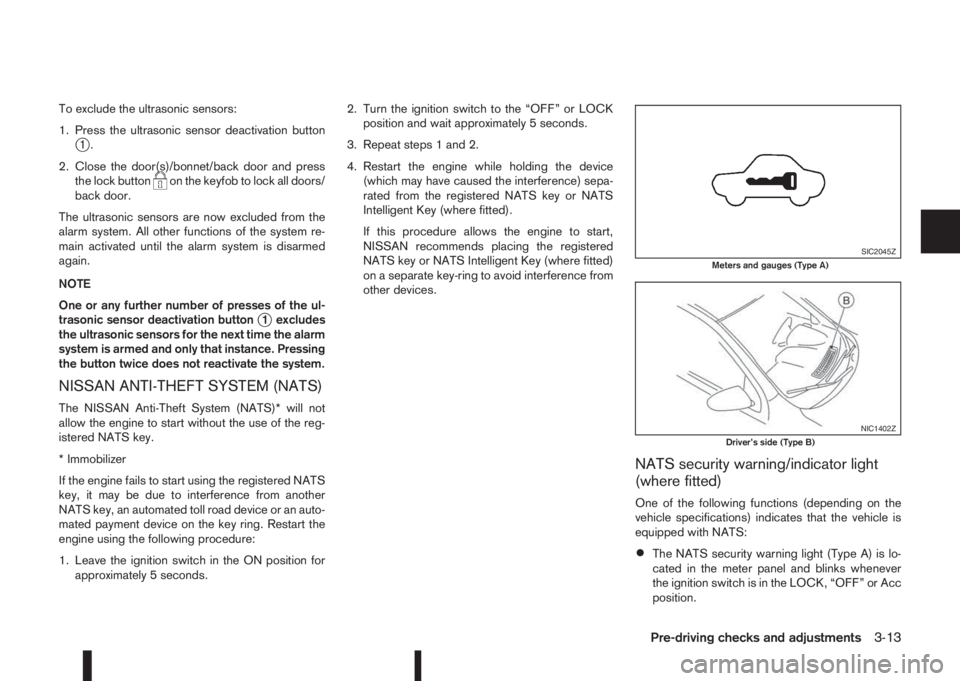
•The NATS security warning light (Type A) is lo-
cated in the meter panel and blinks whenever
the ignition switch is in the LOCK, “OFF” or Acc
position.
SIC2045ZMeters and gauges (Type A)
NIC1402ZDriver’s side (Type B)
Pre-driving checks and adjustments3-13
Page 124 of 338
•The NATS security indicator light (TypejB) is
located on the Driver’s side of the dashboard
and blinks whenever the ignition switch is in the
LOCK, “OFF” or Acc position.
If the NISSAN Anti-Theft System (NATS) is mal-
functioning, this light will remain on while the ignition
switch is in the ON position.
If the light remains on and/or the engine will not
start, see your NISSAN dealer for NATS service
as soon as possible. Please bring all NATS keys
or NATS Intelligent Keys when visiting your
NISSAN dealer for service.
Additional information for RHD models
If the NATS is malfunctioning, this light will turn on
after flashing six times while the ignition switch is in
the ON position.
However, if the NATS security warning light turns
off after the light has remained on for 15 minutes,
there is a 10 second time slot to start the engine
after the ignition is turned off. See your NISSAN
dealer for NATS service as soon as possible.
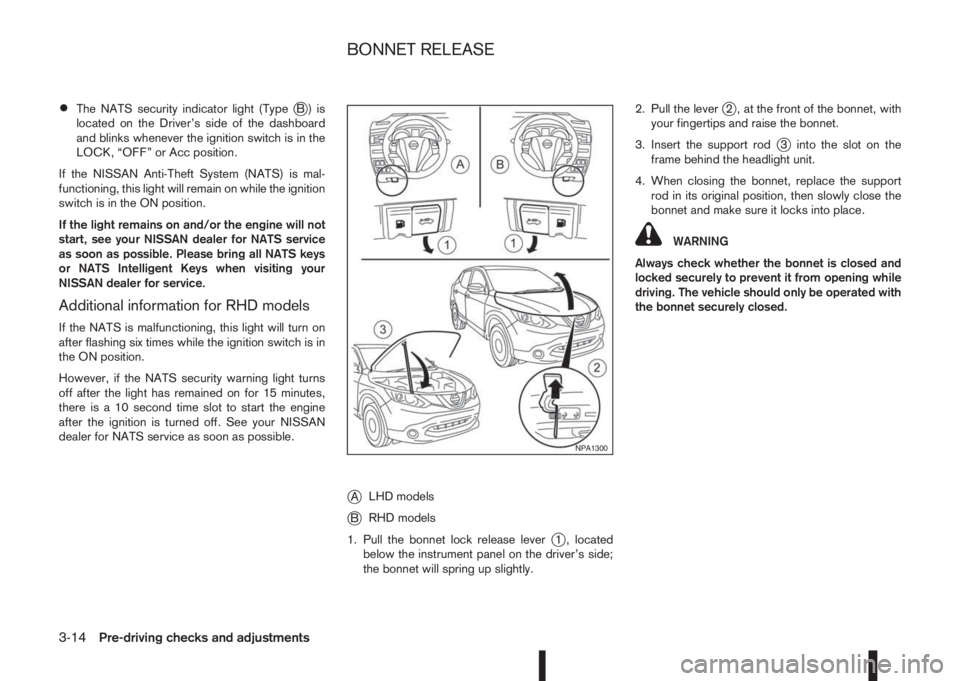
jALHD models
jBRHD models
1. Pull the bonnet lock release lever
j1 , located
below the instrument panel on the driver’s side;
the bonnet will spring up slightly.2. Pull the lever
j2 , at the front of the bonnet, with
your fingertips and raise the bonnet.
3. Insert the support rod
j3 into the slot on the
frame behind the headlight unit.
4. When closing the bonnet, replace the support
rod in its original position, then slowly close the
bonnet and make sure it locks into place.
WARNING
Always check whether the bonnet is closed and
locked securely to prevent it from opening while
driving. The vehicle should only be operated with
the bonnet securely closed.
NPA1300
BONNET RELEASE
3-14Pre-driving checks and adjustments
Page 125 of 338
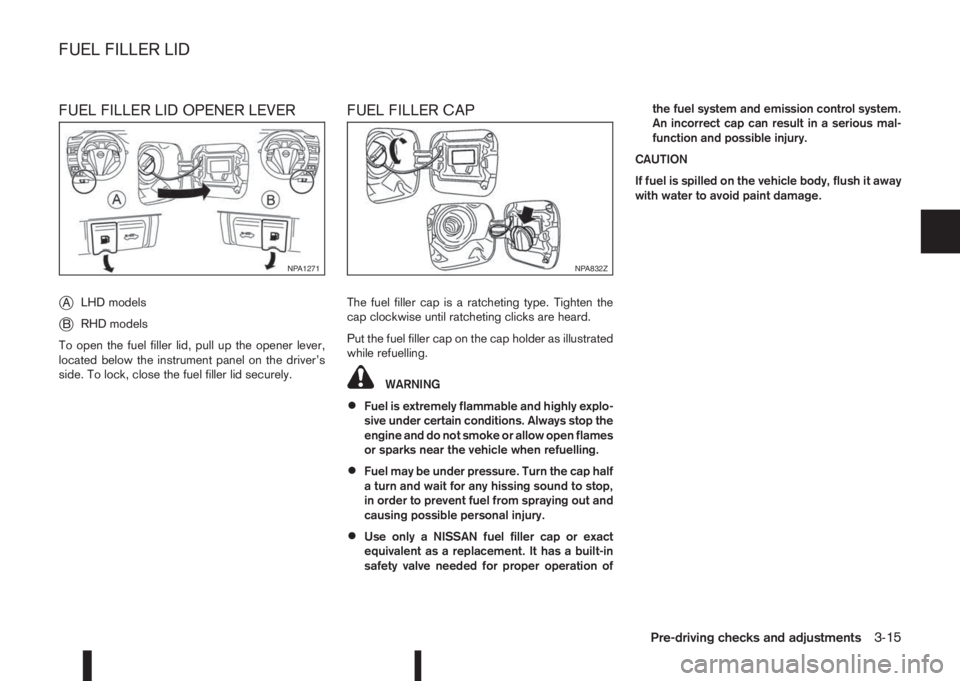
FUEL FILLER LID OPENER LEVER
j
ALHD models
jBRHD models
To open the fuel filler lid, pull up the opener lever,
located below the instrument panel on the driver’s
side. To lock, close the fuel filler lid securely.
FUEL FILLER CAP
The fuel filler cap is a ratcheting type. Tighten the
cap clockwise until ratcheting clicks are heard.
Put the fuel filler cap on the cap holder as illustrated
while refuelling.
WARNING
•Fuel is extremely flammable and highly explo-
sive under certain conditions. Always stop the
engine and do not smoke or allow open flames
or sparks near the vehicle when refuelling.
•Fuel may be under pressure. Turn the cap half
a turn and wait for any hissing sound to stop,
in order to prevent fuel from spraying out and
causing possible personal injury.
•Use only a NISSAN fuel filler cap or exact
equivalent as a replacement. It has a built-in
safety valve needed for proper operation ofthe fuel system and emission control system.
An incorrect cap can result in a serious mal-
function and possible injury.
CAUTION
If fuel is spilled on the vehicle body, flush it away
with water to avoid paint damage.
NPA1271NPA832Z
FUEL FILLER LID
Pre-driving checks and adjustments3-15
Page 126 of 338
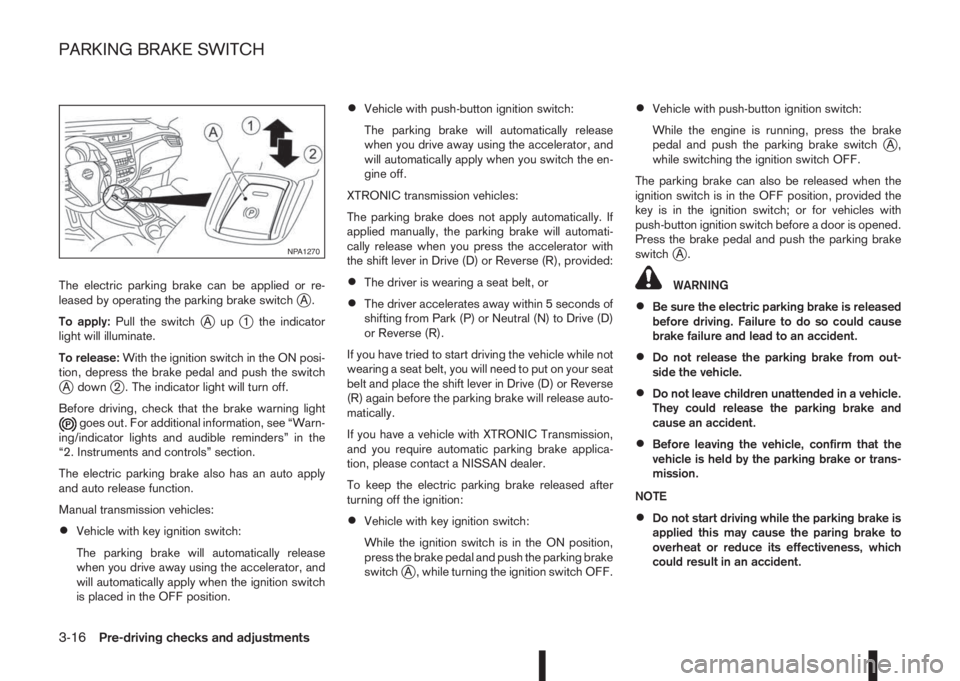
The electric parking brake can be applied or re-
leased by operating the parking brake switchjA.
To apply:Pull the switch
jAupj1 the indicator
light will illuminate.
To release:With the ignition switch in the ON posi-
tion, depress the brake pedal and push the switch
jA downj2 . The indicator light will turn off.
Before driving, check that the brake warning light
goes out. For additional information, see “Warn-
ing/indicator lights and audible reminders” in the
“2. Instruments and controls” section.
The electric parking brake also has an auto apply
and auto release function.
Manual transmission vehicles:
•Vehicle with key ignition switch:
The parking brake will automatically release
when you drive away using the accelerator, and
will automatically apply when the ignition switch
is placed in the OFF position.
•Vehicle with push-button ignition switch:
The parking brake will automatically release
when you drive away using the accelerator, and
will automatically apply when you switch the en-
gine off.
XTRONIC transmission vehicles:
The parking brake does not apply automatically. If
applied manually, the parking brake will automati-
cally release when you press the accelerator with
the shift lever in Drive (D) or Reverse (R), provided:
•The driver is wearing a seat belt, or
•The driver accelerates away within 5 seconds of
shifting from Park (P) or Neutral (N) to Drive (D)
or Reverse (R).
If you have tried to start driving the vehicle while not
wearing a seat belt, you will need to put on your seat
belt and place the shift lever in Drive (D) or Reverse
(R) again before the parking brake will release auto-
matically.
If you have a vehicle with XTRONIC Transmission,
and you require automatic parking brake applica-
tion, please contact a NISSAN dealer.
To keep the electric parking brake released after
turning off the ignition:
•Vehicle with key ignition switch:
While the ignition switch is in the ON position,
press the brake pedal and push the parking brake
switch
jA , while turning the ignition switch OFF.
•Vehicle with push-button ignition switch:
While the engine is running, press the brake
pedal and push the parking brake switch
jA,
while switching the ignition switch OFF.
The parking brake can also be released when the
ignition switch is in the OFF position, provided the
key is in the ignition switch; or for vehicles with
push-button ignition switch before a door is opened.
Press the brake pedal and push the parking brake
switch
jA.
WARNING
•Be sure the electric parking brake is released
before driving. Failure to do so could cause
brake failure and lead to an accident.
•Do not release the parking brake from out-
side the vehicle.
•Do not leave children unattended in a vehicle.
They could release the parking brake and
cause an accident.
•Before leaving the vehicle, confirm that the
vehicle is held by the parking brake or trans-
mission.
NOTE
•Do not start driving while the parking brake is
applied this may cause the paring brake to
overheat or reduce its effectiveness, which
could result in an accident.
NPA1270
PARKING BRAKE SWITCH
3-16Pre-driving checks and adjustments
Page 127 of 338
•A buzzer will sound if the vehicle is driven
without releasing the parking brake. See “Au-
dible reminders” in the “2. Instruments and
controls” section.
•While the electric parking brake is applied or
released, an operating sound is heard from
the lower side of the rear seat. This is normal
and does not indicate a malfunction.
•When the electric parking brake is frequently
applied and released in a short period of time,
the parking brake may not operate in order to
prevent the parking brake system from over-
heating. If this occurs, operate the electric
parking brake switch again after waiting ap-
proximately 1 minute.
•The electric parking brake can only be re-
leased with the ignition switch in the ON posi-
tion.
•If the electric parking brake must be applied
while driving in an emergency, pull up and
hold the parking brake switch. When you re-
lease the parking brake switch, the parking
brake will be released.
•While pulling up the electric parking brake
switch while driving, the parking brake is ap-
plied and a chime sounds. The parking brake
indicator light in the meter and in the parking
brake switch illuminate. This does not indi-
cate a malfunction. The electric parking brake
indicator lights in the meter and in the parking
brake switch turn off when the parking brake
is released.
•Pull up the electric parking brake switch twice
so that the maximum electric parking brake
force is applied to the vehicle.
•When pulling the electric parking brake switch
up with the ignition switch in the OFF or ACC
position, the parking brake switch indicator
light will continue to illuminate for a short pe-
riod of time.
CAUTION
To park the vehicle in cold climates place the
shift lever in 1st (1) or Reverse (R) (or in Park (P)
for automatic (AT) vehicles), and place suitable
chocks at both the front and back of a wheel with
the electric parking brake released. If the electric
parking brake is applied in cold climates, the
brake may become frozen and cannot be re-
leased.
DRIVING AWAY WHEN TOWING A
TRAILER
Please note the following points to prevent the ve-
hicle from rolling back unintentionally on a gradient.
•Pull and hold the parking brake switch and press
the accelerator. The parking brake will remain
engaged and prevent any tendency to roll back
down the slope.
•You can release the parking brake switch as
soon as the engine is delivering enough power
to the wheels.
Depending on the weight of the vehicle and trailer
and the steepness of the slope, there may be a ten-dency to roll back downhill when driving away from
a standstill. You can prevent this by pulling up the
parking brake switch as you press the accelerator
(in the same way as with a conventional handbrake).
Pre-driving checks and adjustments3-17
Page 132 of 338
WARNING
•Do not adjust the heater and air conditioner
controls or audio controls while driving so that
full attention may be given to vehicle opera-
tion.
•If you noticed any foreign objects entering the
system hardware, spilled liquid on the sys-
tem, or noticed smoke or fumes coming out
from the system, or any other unusual opera-
tion is observed, stop using the system imme-
diately and contact the nearest NISSAN dealer
or qualified workshop. Ignoring such condi-
tions may lead to an accident, fire or electric
shock.
•Do not disassemble or modify this system. If
you do, it may lead to an accident, fire, or
electric shock.
CAUTION
Do not use the system when the engine is not
running for extended periods of time to prevent
battery discharge.
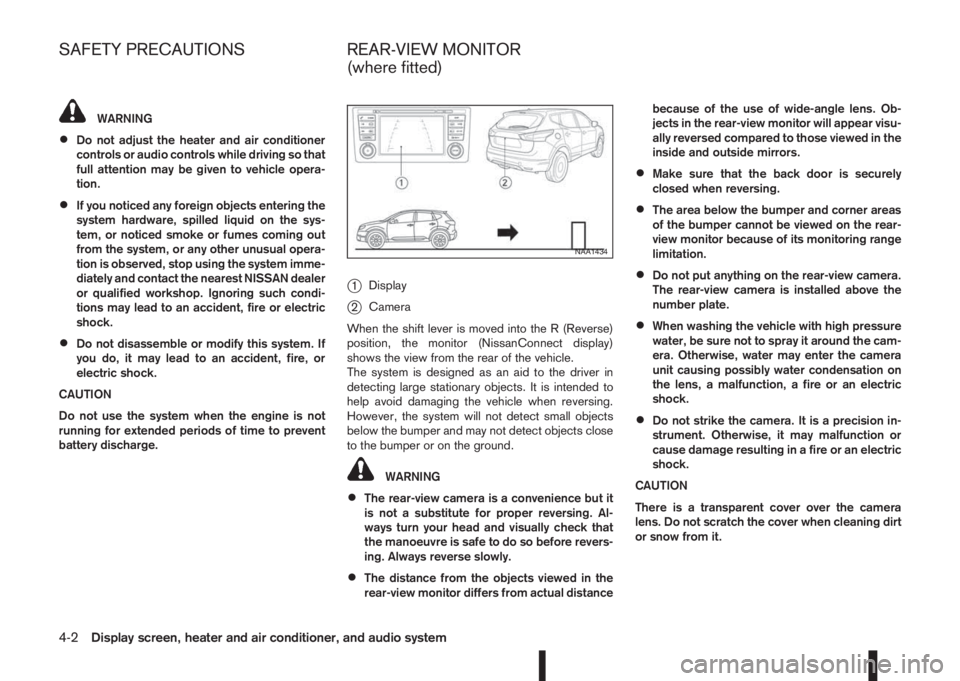
j1Display
j2Camera
When the shift lever is moved into the R (Reverse)
position, the monitor (NissanConnect display)
shows the view from the rear of the vehicle.
The system is designed as an aid to the driver in
detecting large stationary objects. It is intended to
help avoid damaging the vehicle when reversing.
However, the system will not detect small objects
below the bumper and may not detect objects close
to the bumper or on the ground.
WARNING
•The rear-view camera is a convenience but it
is not a substitute for proper reversing. Al-
ways turn your head and visually check that
the manoeuvre is safe to do so before revers-
ing. Always reverse slowly.
•The distance from the objects viewed in the
rear-view monitor differs from actual distancebecause of the use of wide-angle lens. Ob-
jects in the rear-view monitor will appear visu-
ally reversed compared to those viewed in the
inside and outside mirrors.
•Make sure that the back door is securely
closed when reversing.
•The area below the bumper and corner areas
of the bumper cannot be viewed on the rear-
view monitor because of its monitoring range
limitation.
•Do not put anything on the rear-view camera.
The rear-view camera is installed above the
number plate.
•When washing the vehicle with high pressure
water, be sure not to spray it around the cam-
era. Otherwise, water may enter the camera
unit causing possibly water condensation on
the lens, a malfunction, a fire or an electric
shock.
•Do not strike the camera. It is a precision in-
strument. Otherwise, it may malfunction or
cause damage resulting in a fire or an electric
shock.
CAUTION
There is a transparent cover over the camera
lens. Do not scratch the cover when cleaning dirt
or snow from it.
NAA1434
SAFETY PRECAUTIONS REAR-VIEW MONITOR
(where fitted)
4-2Display screen, heater and air conditioner, and audio system
Page 176 of 338
5Starting and drivingStarting and driving
Running-in schedule ................................................ 5-2
Before starting the engine ........................................ 5-2
Precautions when starting and driving ...................... 5-3
Exhaust gas (Carbon Monoxide) ......................... 5-3
Tyre Pressure Monitoring System (TPMS)................ 5-4
Meter information................................................ 5-7
Activation............................................................ 5-7
TPMS sensor ID and position recognition ........... 5-7
Adjusting TPMS target pressure ......................... 5-8
Tyre pressure units ............................................. 5-8
[Check cold tyre] message ................................. 5-8
TPMS temperature calibration............................. 5-8
On-pavement and off-road driving precautions ......... 5-9
Three-way catalyst (Petrol engine models)................ 5-9
To help prevent damage ..................................... 5-9
Turbocharger system (Diesel engine models) ........... 5-10
Care when driving ................................................... 5-10
Engine cold start period ...................................... 5-10
Loading luggage ................................................. 5-10
Driving on wet roads ........................................... 5-10
Driving under winter conditions ........................... 5-10
Ignition switch (where fitted) .................................... 5-11
Manual transmission ........................................... 5-11
XTRONIC transmission (CVT) ............................ 5-11
Steering lock ...................................................... 5-11
Key positions ...................................................... 5-11
NISSAN Anti-Theft System (NATS) (where
fitted).................................................................. 5-12
Push-button ignition switch (where fitted) ................. 5-12Precautions on push-button ignition switch
operation ............................................................ 5-12
Intelligent Key system ......................................... 5-12
Ignition switch positions ...................................... 5-13
Emergency engine shut off.................................. 5-14
Steering lock ...................................................... 5-14
Intelligent Key battery discharge.......................... 5-14
Starting engine ........................................................ 5-15
Models with Intelligent Key system ...................... 5-15
Models without Intelligent Key system ................. 5-16
Driving the vehicle.................................................... 5-17
Driving with manual transmission......................... 5-17
Driving with XTRONIC Transmission (CVT) ........ 5-18
Stop/Start System (where fitted) .............................. 5-22
Normal operation ................................................ 5-22
Precautions ........................................................ 5-24
Stop/Start System OFF switch ........................... 5-25
Environmental savings ........................................ 5-25
Four-wheel Drive (4WD) (where fitted)..................... 5-26
4WD mode operations........................................ 5-27
4WD shift tips .................................................... 5-27
4WD Mode indicator lights ................................. 5-28
Driving four-wheel drive (4WD) safely ................. 5-28
Blind Spot Warning (BSW) system (where fitted)..... 5-30
BSW system operation ....................................... 5-30
BSW driving situations ....................................... 5-32
BSW temporary disabled status.......................... 5-32
BSW automatic deactivation ............................... 5-33
BSW malfunction ............................................... 5-33
BSW camera unit maintenance ........................... 5-33