maintenance NISSAN QASHQAI 2015 Owner´s Manual
[x] Cancel search | Manufacturer: NISSAN, Model Year: 2015, Model line: QASHQAI, Model: NISSAN QASHQAI 2015Pages: 338, PDF Size: 4.88 MB
Page 191 of 338
After step 4 is performed, when the ignition switch
is pushed without depressing the brake pedal, the
ignition switch position will change to “ACC”.
NOTE
•When the ignition switch is pushed to the
“ACC” or “ON” position or the engine is started
by the above procedures, the Intelligent Key
system warning light may blink in yellow (on
the meter) even if the Intelligent Key is inside
the vehicle. This is not a malfunction. To stop
the warning light from blinking, touch the ig-
nition switch with the Intelligent Key again.
•If the Intelligent Key system warning light in
the meter is blinking in green, replace the bat-
tery as soon as possible. (See “Integrated
keyfob/Intelligent Key battery replacement” in
the “8. Maintenance and do-it-yourself” sec-
tion.)
MODELS WITH INTELLIGENT KEY
SYSTEM
1. Apply the parking brake. For additional informa-
tion, see “Parking brake switch” in the “3. Pre-
driving checks and adjustments” section.
2.Manual transmission models:
Move the shift lever to the N (Neutral) position,
and depress the clutch pedal to the floor while
starting the engine.
XTRONIC transmission (CVT) models:
Move the shift lever to the P (Park) or N (Neutral)
position. (P position is preferred).
The starter is designed to operate only when
the shift lever is in the proper position.
The Intelligent Key (where fitted) must be car-
ried while inside the vehicle when operating
the ignition switch.
3. To start the engine:
•MT models – keep the clutch pedal
depressed and/or depress the brake pedal
then push the ignition switch to the “ON” po-
sition.
•XTRONIC transmission models – depress the
brake pedal then push the ignition switch to
the “ON” position.
NOTE
•To start the engine immediately, push and
release the ignition switch while depress-ing the brake pedal or clutch pedal with
the ignition switch in any position.
•For diesel engine models: In cold condi-
tions there may be a delay for a few sec-
onds before the engine cranks. This is due
to the glow plugs heating to ensure ad-
equate engine starting conditions. The
glow indicator light (
) will illuminate
during this delay, then the engine will start.
4. Immediately release the ignition switch when the
engine starts. If the engine starts, but fails to run,
repeat the above procedures.
NOTE
Petrol engine models:
•If the engine is very hard to start in ex-
tremely cold weather or when restarting,
depress the accelerator pedal a little (ap-
proximately 1/3 of the way to the floor)
and hold it and then crank the engine. Re-
lease the ignition switch and the accelera-
tor pedal when the engine starts.
•If the engine is very hard to start because
it is flooded, depress the accelerator pedal
all the way to the floor and hold it. Crank
the engine for 5-6 seconds. After cranking
the engine, release the accelerator pedal.
Crank the engine with your foot off the ac-
celerator pedal by turning the ignition
switch to START. Release the switch when
the engine starts. If the engine starts, but
fails to run, repeat the above procedure.
STARTING ENGINE
Starting and driving5-15
Page 205 of 338
•If the engine of the vehicle stalls or you cannot
make it to the top of a steep grade, never at-
tempt to turn around. Your vehicle could tip or
roll over. Always drive backwards and straight
down in R (reverse) gear.
Never drive backwards with the shift lever in N
(Neutral) and/or with the clutch depressed and
using the brake as this could result in loss of
control.
•Heavy braking down a hill could cause your
brakes to overheat and fade, resulting in loss of
control and an accident. Apply the brakes lightly
and use a low gear to control your vehicle speed.
•Unsecured cargo can be thrown around when
driving over rough terrain. Properly secure it so
that it will not be thrown forwards and cause
injury to you or your passengers.
•To avoid raising the centre of gravity excessively,
do not exceed the rated capacity of the roof rack/
gear bin (where fitted) and evenly distribute the
load. Secure heavy loads in the luggage area as
far forwards and as low as possible. Do not equip
the vehicle with tyres larger than specified. This
could cause your vehicle to roll over.
•Accelerating quickly, sharp steering manoeuvres
or sudden braking may cause loss of control.
•Do not drive beyond the performance of the
tyres, even with 4WD. Sudden acceleration,
steering or braking may result in loss of control
and could cause the vehicle to become stuck.
•If at all possible, avoid sharp turning manoeuvres,
particularly at high speeds. Your 4WD vehicle
has a higher centre of gravity than a 2WD ve-
hicle and can tip over more easily. The vehicle is
not designed for cornering at the same speeds
as conventional 2WD models any more than low
sports cars are designed to perform satisfacto-
rily under off-road conditions. Failure to operate
this vehicle correctly could result in loss of con-
trol and/or a rollover accident.
•Do not grip the inside or spokes of the steering
wheel when driving off-road. The steering wheel
could jerk and injure your hands. Instead, drive
with your fingers and thumbs on the outside of
the rim.
•Before operating the vehicle, ensure that the
driver and all passengers have their seat belts
fastened.
•Always drive with the floor mats in place as the
floor may become very hot. Particular care
should be taken if you are barefoot.
•Lower your speed when encountering strong
crosswinds. With its higher centre of gravity your
NISSAN is more affected by gusty side winds.
Slower speeds ensure better vehicle control.
•Be sure to check the brakes immediately after
driving in mud or water as specified in “Wet
brakes” later in this section.
•Whenever you drive off-road through sand, mud
or water as deep as the wheel hub, more fre-quent maintenance may be required. For details,
refer to the separately provided Warranty Infor-
mation and Maintenance Booklet.
•Rinse the underside of the vehicle with fresh
water after driving through mud or sand. Re-
move any brush or sticks that are trapped.
•Install the same size of winter tyres on all four (4)
wheels (such as studless tyres) or install snow
chains to the front wheels when driving on slip-
pery roads (e.g. after a snowfall) and drive care-
fully using 4WD.
•Avoid parking your vehicle on steep hills. If you
get out of the vehicle and it rolls forwards, back-
wards or sideways, you could be injured.
Starting and driving5-29
Page 209 of 338
When the above conditions are corrected, the BSW
system will resume automatically.
BSW AUTOMATIC DEACTIVATION
When dirt, rain or snow accumulates on the rear
camera, or the windscreen in front of the multi-sens-
ing camera, the BSW system will be turned off auto-
matically. The BSW light will blink.
Action to take:
If the message appears, park the vehicle in a safe
place, clean the camera unit and/or windscreen with
a soft cloth. Then turn off and restart the engine.
BSW MALFUNCTION
If the BSW system malfunctions, it will be turned off
automatically and the BSW light (orange) will illumi-
nate.
Action to take:
Stop the vehicle in a safe location, turn off and re-
start the engine. If the BSW light (orange) continues
to illuminate, have the BSW system checked by a
NISSAN dealer or qualified workshop.
BSW CAMERA UNIT MAINTENANCE
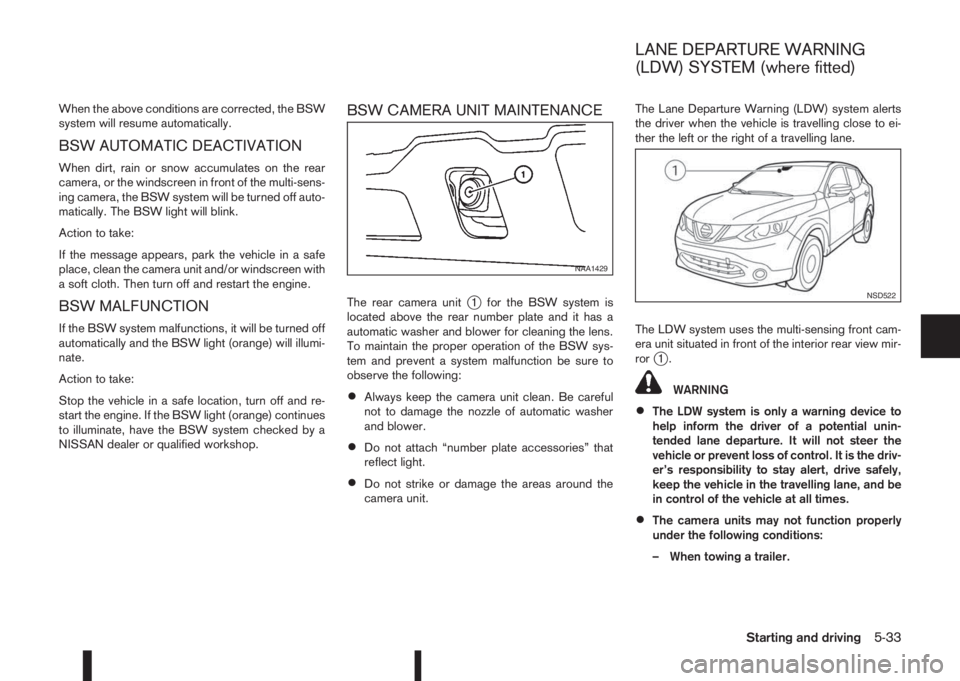
The rear camera unitj1 for the BSW system is
located above the rear number plate and it has a
automatic washer and blower for cleaning the lens.
To maintain the proper operation of the BSW sys-
tem and prevent a system malfunction be sure to
observe the following:
•Always keep the camera unit clean. Be careful
not to damage the nozzle of automatic washer
and blower.
•Do not attach “number plate accessories” that
reflect light.
•Do not strike or damage the areas around the
camera unit.The Lane Departure Warning (LDW) system alerts
the driver when the vehicle is travelling close to ei-
ther the left or the right of a travelling lane.
The LDW system uses the multi-sensing front cam-
era unit situated in front of the interior rear view mir-
ror
j1.
WARNING
•The LDW system is only a warning device to
help inform the driver of a potential unin-
tended lane departure. It will not steer the
vehicle or prevent loss of control. It is the driv-
er’s responsibility to stay alert, drive safely,
keep the vehicle in the travelling lane, and be
in control of the vehicle at all times.
•The camera units may not function properly
under the following conditions:
– When towing a trailer.
NAA1429
NSD522
LANE DEPARTURE WARNING
(LDW) SYSTEM (where fitted)
Starting and driving5-33
Page 211 of 338
or not painted clearly; yellow painted lane
markers; non-standard lane markers; or
lane markers covered with water, dirt,
snow, etc.
– On roads where the discontinued lane
markers are still detectable.
– On roads where there are sharp curves.
– On roads where there are sharply contrast-
ing objects, such as shadows, snow, wa-
ter, wheel ruts, seams or lines remaining
after road repairs. (The LDW system could
detect these items as lane markers.)
– On roads where the travelling lane merges
or separates.
– When the vehicle’s travelling direction
does not align with the lane marker.
– When the road surface is very dark due to
weak ambient light or impaired lamps.
– When rain, snow or dirt adheres to the
windscreen in front of the LDW camera
unit.
•When driving on a curved road, warning will
be late on the outside of the curve.
LDW TEMPORARY DISABLED
STATUS
The LDW system is turned off temporarily, and the
LDW light will blink when rain, snow, or dirt has
adhered to the windscreen in front of the multi-sens-ing camera unit. When this condition is corrected,
the LDW system will resume automatically.
LDW AUTOMATIC DEACTIVATION
When dirt, rain, or snow accumulates on the wind-
screen in front of the multi-sensing camera unit, the
LDW system will be turned off automatically. The
LDW light will blink.
Action to take:
If the message appears, park the vehicle in a safe
place, clean the camera unit and/or windscreen with
a soft cloth. Then turn off and restart the engine.
LDW MALFUNCTION
When the LDW system malfunctions, it will be
turned off automatically and the LDW light (orange)
will illuminate.
Action to take:
Stop the vehicle in a safe location, turn off and re-
start the engine. If the LDW light (orange) continues
to illuminate, have the LDW system checked by a
NISSAN dealer or qualified workshop.
MULTI-SENSING CAMERA UNIT
MAINTENANCE
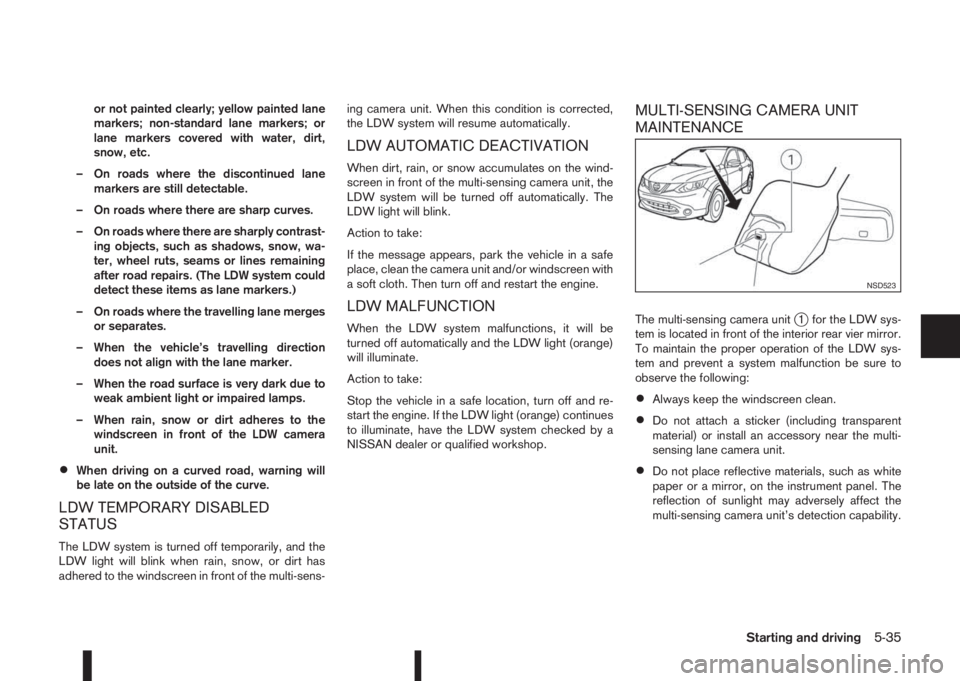
The multi-sensing camera unitj1 for the LDW sys-
tem is located in front of the interior rear vier mirror.
To maintain the proper operation of the LDW sys-
tem and prevent a system malfunction be sure to
observe the following:
•Always keep the windscreen clean.
•Do not attach a sticker (including transparent
material) or install an accessory near the multi-
sensing lane camera unit.
•Do not place reflective materials, such as white
paper or a mirror, on the instrument panel. The
reflection of sunlight may adversely affect the
multi-sensing camera unit’s detection capability.
NSD523
Starting and driving5-35
Page 230 of 338
Your new vehicle was designed to be used primarily
to carry passengers and luggage.
Remember that towing a trailer will place additional
loads on your vehicle’s engine, drive-train, steering,
braking and other systems. Towing a trailer will also
exaggerate other conditions, such as sway caused
by crosswinds, rough road surfaces or passing
trucks. Driving style and speed must be adjusted
according to the circumstances. Before towing a
trailer, see a NISSAN dealer or qualified workshop
for an explanation of towing equipment and its
proper use.
OPERATING PRECAUTIONS
•Avoid towing a trailer during the running-in
schedule.
•Choose proper coupling devices (trailer hitch,
safety chain, roof carrier, etc.) for your vehicle
and trailer. These devices are available from a
NISSAN dealer or qualified workshop where you
can also obtain more detailed information about
trailer towing.
Heavy-duty kits are available at a NISSAN dealer
or qualified workshop.
•It is advisable to contact a NISSAN dealer or
qualified workshop for towing details, before
towing a trailer up steep slopes for long dis-
tances.
•Never allow the total trailer load (trailer weight
plus its cargo weight) to exceed the maximum
set for the coupling device.Contact a NISSAN dealer or qualified workshop
for more information on this matter.
•The trailer must be loaded so that heavy goods
are distributed over the axle and as low in the
trailer as possible. Poor load distribution can se-
riously affect the stability of the trailer and tow
vehicle.
•Do not exceed the maximum permitted vertical
load on the trailer hitch.
•Before driving, make sure that the lighting sys-
tem of the trailer works properly.
•When towing with 4WD models, the 4WD mode
switch should be in the AUTO position. Using
the vehicle in AUTO mode gives better traction,
particularly when moving off from stationary and/
or on an incline, as the vehicle is less likely to
wheel spin.
•Avoid abrupt starts, accelerations and stops.
•Avoid sharp turns and lane changes.
•Always drive your vehicle at a moderate speed.
•Always block the wheels on both vehicle and
trailer when parking. Apply the handbrake (where
fitted) on the trailer. Parking on a steep slope is
not recommended.
If parking on a steep slope is unavoidable it is
also advisable to put the vehicle into gear, or
select P (Park (XTRONIC models)), and turn the
front wheels into the kerb (in addition to the other
precautions described). Before parking on asteep slope consider the incline (the towing
weights quoted are for a 12% slope).
•Follow the trailer manufacturer’s instructions.
•Have your vehicle serviced more often than at
the intervals specified in the separately provided
Warranty Information and Maintenance booklet.
•Trailer towing requires more fuel than under nor-
mal circumstances because of a considerable
increase in traction power required and resis-
tance.
•When towing a trailer, observe the following re-
stricted towing speed:
Speed: below 100 km/h (62 MPH)
•Observe the legal maximum speeds for trailer
operation.
CAUTION
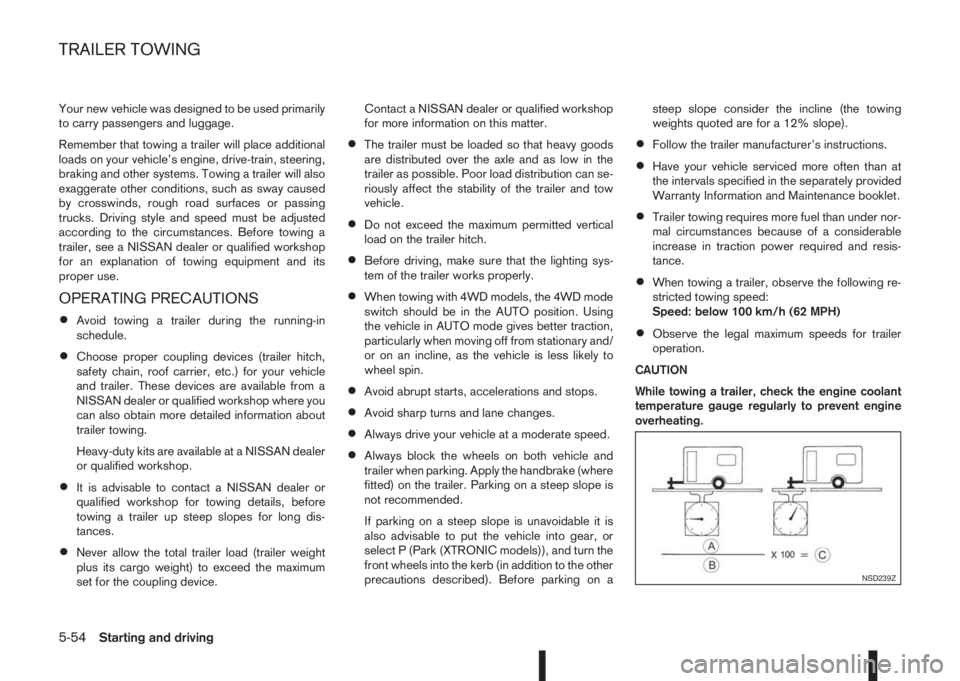
While towing a trailer, check the engine coolant
temperature gauge regularly to prevent engine
overheating.
NSD239Z
TRAILER TOWING
5-54Starting and driving
Page 235 of 338
Driving downhill
The engine braking action is effective for controlling
the vehicle while descending hills.
The shift lever (MT models) should be placed in a
gear position low enough to obtain sufficient engine
braking.
For XTRONIC transmission models, a low gear po-
sition in the manual shift mode, low enough to obtain
sufficient engine braking, should be selected.WARNING
•The Anti-lock Braking System (ABS) is a so-
phisticated device, but it cannot prevent acci-
dents resulting from careless or dangerous
driving techniques. It can help maintain ve-
hicle control during braking on slippery sur-
faces. Remember that stopping distances on
slippery surfaces will be longer than on nor-
mal surfaces even with ABS. Stopping dis-
tances may also be longer on rough, gravel or
snow covered roads, or if you are using snow
chains. Always maintain a safe distance from
the vehicle in front of you. Ultimately, the
driver is responsible for safety.
•Tyre type and condition may also affect brak-
ing effectiveness.
– When replacing tyres, install the specified
size of tyres on all four wheels.
– When installing a spare tyre, make sure
that it is the proper size and type as speci-
fied on the tyre placard. (See “Vehicle
identification” in the “9. Technical
information” section.)
– For detailed information, see “Wheels and
tyres” in the “8. Maintenance and
do-it-yourself” section.
The Anti-lock Braking System (ABS) controls the
brakes so the wheels do not lock during hard brak-
ing or when braking on slippery surfaces. The sys-
tem detects the rotation speed at each wheel and
varies the brake fluid pressure to prevent each wheelfrom locking and sliding. By preventing each wheel
from locking, the system helps the driver maintain
steering control and helps to minimise swerving and
spinning on slippery surfaces.
USING SYSTEM
Depress the brake pedal and hold it down. Depress
the brake pedal with firm steady pressure, but do
not pump the brakes. The ABS will operate to pre-
vent the wheels from locking up. Steer the vehicle to
avoid obstacles.
WARNING
Do not pump the brake pedal. Doing so may re-
sult in increased stopping distances.
SELF-TEST FEATURE
The ABS includes electronic sensors, electric
pumps, hydraulic solenoids and a computer. The
computer has a built-in diagnostic feature that tests
the system each time you start the engine and move
the vehicle at a low speed in forward or reverse.
When the self-test occurs, you may hear a “clunk”
noise and/or feel a pulsation in the brake pedal. This
is normal and does not indicate a malfunction. If the
computer senses a malfunction, it switches the ABS
off and illuminates the ABS warning light on the
instrument panel. The brake system then operates
normally, but without anti-lock assistance.
If the ABS warning light illuminates during the self-
test or while driving, have the vehicle checked by a
NISSAN dealer or qualified workshop.
ANTI-LOCK BRAKING SYSTEM
(ABS)
Starting and driving5-59
Page 242 of 338
•Turn off the ECO mode system when accelera-
tion is required, such as when:
– driving with a heavy load of passengers or
cargo in the vehicle
– driving on a steep uphill slopeWARNING
•Whatever the conditions, drive with caution.
Accelerate and decelerate with great care. If
accelerating or decelerating too fast, the drive
wheels will lose even more traction.
•Allow more stopping distance in cold weather
driving. Braking should be started sooner than
on dry surfaces.
•Keep at a greater distance from the vehicle in
front of you on slippery roads.
•Wet ice (0°C, 32°F and freezing rain), very cold
snow and ice can be slick and very difficult to
drive on. The vehicle will have a lot less trac-
tion or grip under these conditions. Try to
avoid driving on wet ice until the road is salted
or sanded.
•Watch for slippery spots (black ice). These
may appear on an otherwise clear road in
shaded areas. If a patch of ice is seen ahead,
brake before driving on it. Try not to brake
while actually on the ice and avoid any sud-
den steering manoeuvres.
•Do not use cruise control (where fitted) on
slippery roads.
•Snow can trap dangerous exhaust gas under
your vehicle. Keep snow clear of the exhaust
pipe and from around your vehicle.
BATTERY
If the battery is not fully charged during extremely
cold weather conditions, the battery fluid may freeze
and damage the battery. To maintain maximum effi-
ciency, the battery should be checked regularly. For
details, see “Battery” in the “8. Maintenance and
do-it-yourself” section.
ENGINE COOLANT
If the vehicle is to be left outside without anti-freeze,
drain the cooling system. Refill before operating the
vehicle. For details, see “Engine cooling system” in
the “8. Maintenance and do-it-yourself” section.
TYRE EQUIPMENT
1) The SUMMER tyres are of a tread design to pro-
vide superior performance on dry surfaces. How-
ever, the performance of these tyres will be sub-
stantially reduced in snowy and icy conditions. If
you operate your vehicle on snowy or icy roads,
NISSAN recommends the use of MUD & SNOW
or ALL SEASON tyres on all four wheels. Please
consult a NISSAN dealer or qualified workshop
for tyre type, size, speed rating and availability
information.
2) For additional traction on icy roads, studded
tyres may be used. However, some countries,
provinces and states prohibit their use. Check
applicable laws before installing studded tyres.
COLD WEATHER DRIVING
5-66Starting and driving
Page 261 of 338
7Appearance and careAppearance and care
Cleaning exterior...................................................... 7-2
Washing ............................................................. 7-2
Removing spots .................................................. 7-2
Waxing ............................................................... 7-2
Cleaning glass .................................................... 7-3
Cleaning rear-view camera (where fitted) ............ 7-3
Underbody ......................................................... 7-3
Care of wheels ................................................... 7-3
Cleaning alloy wheels ......................................... 7-3
Chrome parts ..................................................... 7-3
Cleaning interior ...................................................... 7-4
Monitor display’s maintenance (where fitted) ....... 7-4Air fresheners ..................................................... 7-4
Floor mats .......................................................... 7-4
Cleaning Glass ................................................... 7-5
Plastic parts........................................................ 7-5
Seat belts ........................................................... 7-5
Corrosion protection ................................................ 7-5
Most common factors contributing to vehicle
corrosion ............................................................ 7-5
Environmental factors influence the rate of
corrosion ............................................................ 7-5
To protect your vehicle from corrosion ................ 7-6
Page 264 of 338
Occasionally remove loose dust from the interior
trim, plastic parts and seats using a vacuum cleaner
or soft bristled brush. Wipe the vinyl and leather sur-
faces with a clean, soft cloth dampened in mild soap
solution, then wipe clean with a dry, soft cloth.
Regular care and cleaning is required in order to
maintain the appearance of the leather.
Before using any fabric protector, read the manu-
facturer’s recommendations. Some fabric protec-
tors contain chemicals that may stain or bleach the
seat material.
Use a soft cloth dampened only with water to clean
the meter and gauge lens covers.
CAUTION
•Never use benzine, thinner or any similar ma-
terial.
•Small dirt particles can be abrasive and dam-
aging to leather surfaces and should be re-
moved promptly. Do not use saddle soap, car
waxes, polishes, oils cleaning fluids, solvents,
detergents or ammonia based cleaners as
they may damage the leather’s natural finish.
•Never use fabric protectors unless recom-
mended by the manufacturer.
•Do not use glass or plastic cleaner on meter
or gauge lens covers. It may damage the lens
covers.
MONITOR DISPLAY’S MAINTENANCE
(where fitted)
•To clean the display screen, first turn the ignition
off and wipe it with a dry soft cloth.
•Never use a rough cloth, alcohol, benzine, thin-
ner, any kind of solvent, or paper tissues with
chemical cleaning agent. They would scratch or
deteriorate the panel.
•Do not splash any liquid such as water or car fra-
grance on the display. Contact with liquid will
cause the system to malfunction and damage
the hardware.
•In case of extreme stain, use a small amount of
neutral detergent with a soft cloth. Never soak
the screen display with water detergent.
AIR FRESHENERS
Most air fresheners use a solvent that could affect
the vehicle interior. If you use an air freshener, take
the following precautions:
•Hanging-type air fresheners can cause perma-
nent discoloration when they contact vehicle in-
terior surfaces. Place the air freshener in a loca-
tion that allows it to hang free and not contact an
interior surface.
•Liquid-type air fresheners typically clip on the
vents. These products can cause immediate
damage and discoloration when spilled on inte-
rior surfaces.
Carefully read and follow the manufacturer’s instruc-
tions before using air fresheners.
FLOOR MATS
The use of NISSAN floor mats can extend the life of
your vehicle carpet and make it easier to clean the
interior. Regardless of what mats are used, be sure
they are fitted for your vehicle and are properly posi-
tioned in the foot well to prevent interference with
pedal operation. Mats should be maintained with
regular cleaning and replaced if they become exces-
sively worn.
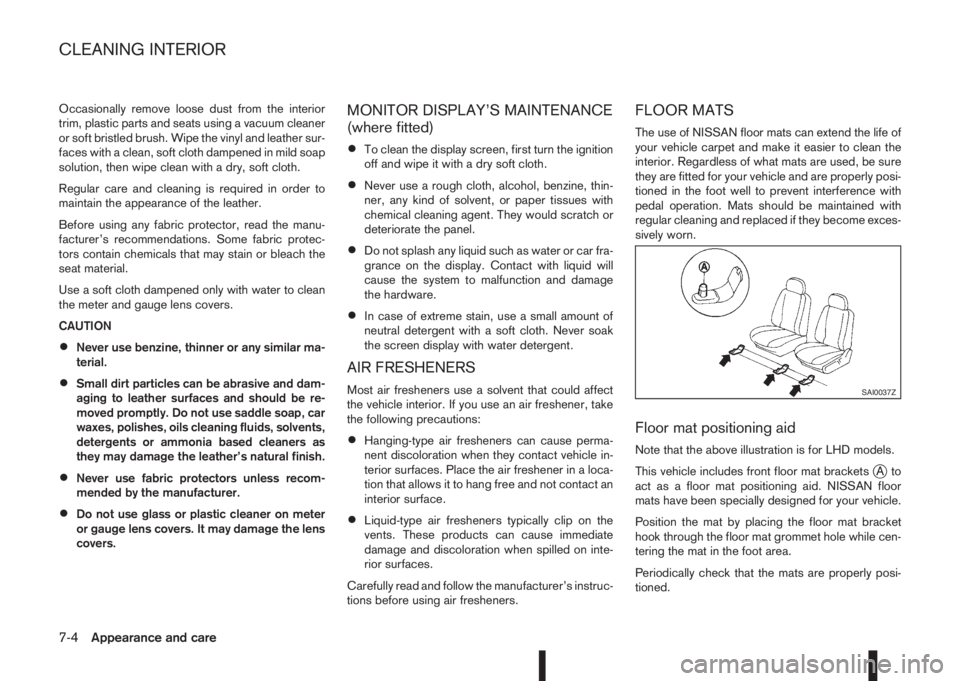
Floor mat positioning aid
Note that the above illustration is for LHD models.
This vehicle includes front floor mat brackets
jAto
act as a floor mat positioning aid. NISSAN floor
mats have been specially designed for your vehicle.
Position the mat by placing the floor mat bracket
hook through the floor mat grommet hole while cen-
tering the mat in the foot area.
Periodically check that the mats are properly posi-
tioned.
SAI0037Z
CLEANING INTERIOR
7-4Appearance and care
Page 268 of 338
8Maintenance and do-it-yourselfMaintenance and do-it-yourself
Maintenance requirements ....................................... 8-2
Scheduled maintenance...................................... 8-2
General maintenance .......................................... 8-2
Where to go for service ...................................... 8-2
General maintenance ............................................... 8-2
Explanation of general maintenance items ........... 8-2
Maintenance precautions ......................................... 8-4
Engine compartment ................................................ 8-5
Engine cooling system ............................................. 8-6
Checking engine coolant level............................. 8-6
Changing engine coolant .................................... 8-6
Engine oil................................................................. 8-8
Checking engine oil level .................................... 8-8
Changing engine oil ............................................ 8-9
Changing engine oil filter .................................... 8-10
Protect the environment ...................................... 8-12
Fuel filter (Diesel engine models) ............................. 8-13
Draining water .................................................... 8-13
Bleeding the fuel system ..................................... 8-13
XTRONIC Continuously variable transmission
(CVT) fluid ............................................................... 8-13
Brakes ..................................................................... 8-13
Checking parking brake ...................................... 8-13
Checking brake pedal......................................... 8-13
Brake booster ..................................................... 8-14
Brake and clutch fluid .............................................. 8-14
Window washer fluid/headlight cleaner fluid
(where fitted) ........................................................... 8-15
Battery..................................................................... 8-16
Vehicle battery .................................................... 8-16Jump-starting ...................................................... 8-18
Integrated keyfob/Intelligent Key battery
replacement........................................................ 8-18
Drive belts ............................................................... 8-20
Spark plugs (Petrol engine models).......................... 8-21
Air duct removal....................................................... 8-21
Air cleaner filter........................................................ 8-23
Viscous paper type ............................................. 8-23
Dry paper type (where fitted) .............................. 8-23
Wiper blades ........................................................... 8-24
Cleaning ............................................................. 8-24
Front window wiper replacement ........................ 8-24
Back door window wiper replacement ................ 8-24
Windscreen washer nozzle ................................. 8-25
Fuses ...................................................................... 8-25
Passenger compartment ..................................... 8-25
Engine compartment ........................................... 8-26
Lights ...................................................................... 8-27
Headlights .......................................................... 8-28
Exterior lights ...................................................... 8-29
Interior lights....................................................... 8-29
Light locations .................................................... 8-30
Wheels and tyres ..................................................... 8-33
Tyre inflation pressure......................................... 8-33
Types of tyres ..................................................... 8-33
Snow chains....................................................... 8-34
Tyre rotation ....................................................... 8-34
Tyre wear and damage ....................................... 8-35
Tyre age ............................................................. 8-35
Changing tyres and wheels................................. 8-35