change time NISSAN QASHQAI 2016 Owner´s Manual
[x] Cancel search | Manufacturer: NISSAN, Model Year: 2016, Model line: QASHQAI, Model: NISSAN QASHQAI 2016Pages: 338, PDF Size: 4.87 MB
Page 96 of 338
NOTE
The next time the engine is started the external
lights, map lamps or room lamp will come on
again
Battery save function for external lights:
If the ignition switch is turned to the “OFF” position
after driving but the external lights are accidentally
left on, the external lights will automatically be
switched off as soon as the driver’s door is opened.
It is possible to leave the external lights on perma-
nently by switching them back on using the head-
light switch while the ignition switch is still in the
LOCK or “OFF” position. In this case, the light re-
minder chime will sound when the driver’s door is
opened.
Battery save function for interior light:
The interior light will automatically be switched off
after a period of time if it has been accidentally left
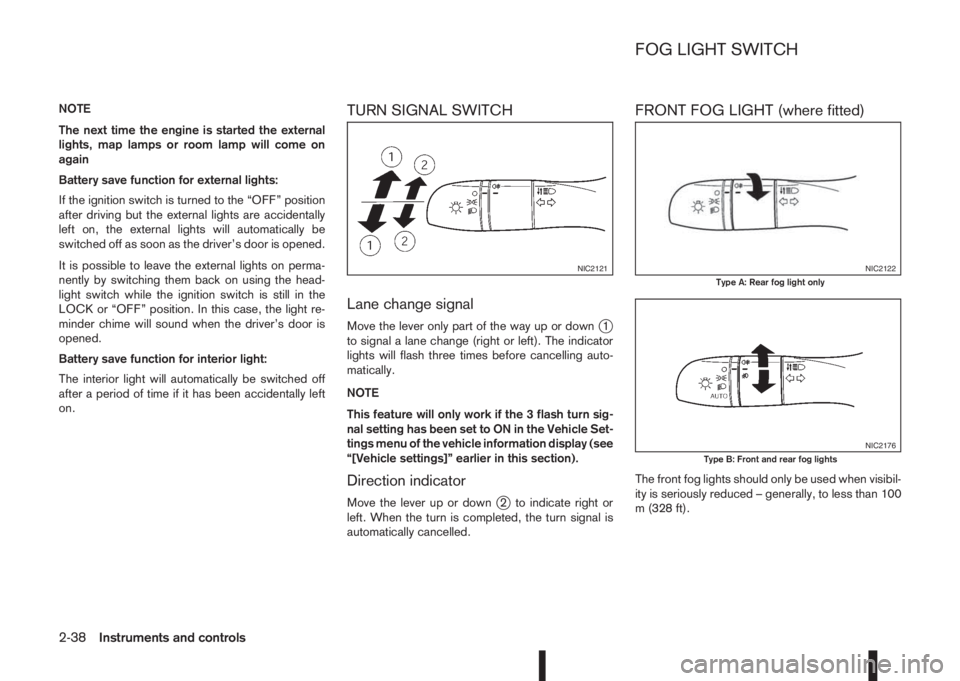
on.TURN SIGNAL SWITCH
Lane change signal
Move the lever only part of the way up or downj1
to signal a lane change (right or left). The indicator
lights will flash three times before cancelling auto-
matically.
NOTE
This feature will only work if the 3 flash turn sig-
nal setting has been set to ON in the Vehicle Set-
tings menu of the vehicle information display (see
“[Vehicle settings]” earlier in this section).
Direction indicator
Move the lever up or downj2 to indicate right or
left. When the turn is completed, the turn signal is
automatically cancelled.
FRONT FOG LIGHT (where fitted)
The front fog lights should only be used when visibil-
ity is seriously reduced – generally, to less than 100
m (328 ft).
NIC2121NIC2122Type A: Rear fog light only
NIC2176Type B: Front and rear fog lights
FOG LIGHT SWITCH
2-38Instruments and controls
Page 133 of 338
HOW TO READ THE DISPLAYED
LINES
WARNING
•Use the displayed lines as a reference. The
lines are highly affected by the number of oc-
cupants, fuel level, vehicle position, road con-
dition and road grade. Always check with your
eyes directly around the vehicle while revers-
ing.
•The distance guide line and the vehicle width
line should be used as a reference only when
the vehicle is on a level paved surface. The
distance viewed on the monitor is for refer-
ence only and may be different than the ac-
tual distance between the vehicle and dis-
played objects.
•When reversing the vehicle up a hill, objects
viewed in the monitor are further than they
appear. When reversing the vehicle down a
hill, objects viewed in the monitor are closerthan they appear. Use the inside mirror or
glance over your shoulder to properly judge
distances to other objects.
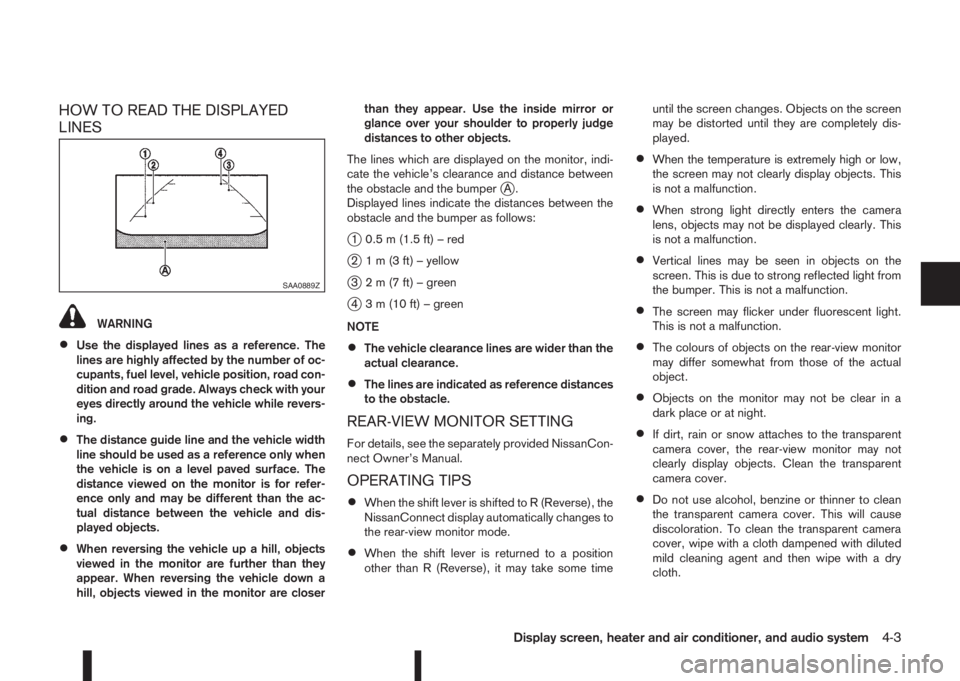
The lines which are displayed on the monitor, indi-
cate the vehicle’s clearance and distance between
the obstacle and the bumper
jA.
Displayed lines indicate the distances between the
obstacle and the bumper as follows:
j1 0.5 m (1.5 ft) – red
j2 1 m (3 ft) – yellow
j3 2 m (7 ft) – green
j4 3 m (10 ft) – green
NOTE
•The vehicle clearance lines are wider than the
actual clearance.
•The lines are indicated as reference distances
to the obstacle.
REAR-VIEW MONITOR SETTING
For details, see the separately provided NissanCon-
nect Owner’s Manual.
OPERATING TIPS
•When the shift lever is shifted to R (Reverse), the
NissanConnect display automatically changes to
the rear-view monitor mode.
•When the shift lever is returned to a position
other than R (Reverse), it may take some timeuntil the screen changes. Objects on the screen
may be distorted until they are completely dis-
played.
•When the temperature is extremely high or low,
the screen may not clearly display objects. This
is not a malfunction.
•When strong light directly enters the camera
lens, objects may not be displayed clearly. This
is not a malfunction.
•Vertical lines may be seen in objects on the
screen. This is due to strong reflected light from
the bumper. This is not a malfunction.
•The screen may flicker under fluorescent light.
This is not a malfunction.
•The colours of objects on the rear-view monitor
may differ somewhat from those of the actual
object.
•Objects on the monitor may not be clear in a
dark place or at night.
•If dirt, rain or snow attaches to the transparent
camera cover, the rear-view monitor may not
clearly display objects. Clean the transparent
camera cover.
•Do not use alcohol, benzine or thinner to clean
the transparent camera cover. This will cause
discoloration. To clean the transparent camera
cover, wipe with a cloth dampened with diluted
mild cleaning agent and then wipe with a dry
cloth.
SAA0889Z
Display screen, heater and air conditioner, and audio system4-3
Page 152 of 338
Heating and defogging (Manual mode):
This mode heats the interior and defogs the wind-
screen.
Use the airflow control buttons to select the
button is pressed. Switch on the air-conditioning to
improve the defogging and adjust the preferred fan
speed and temperature.
Fan speed control
m(Manual mode):
Press the fan speed control buttons to adjust the fan
speed.
Press the AUTO button to change the fan speed to
automatic mode.
Air recirculation:
Use this mode to recirculate interior air inside the
passenger compartment in situations such as driv-
ing on a dust raised road, avoiding traffic fumes or
having maximum cooling from the air conditioner.
Press the<
>button to recirculate interior air.
The indicator light illuminates and the air conditioner
will automatically come on.
When the air recirculation mode is switched off, out-
side air is drawn into the passenger compartment.
Outside air circulation :
Use this mode to draw outside air into the passen-
ger compartment for normal heating, ventilation or
air conditioner operation.
Press the<
>button to change the air intake
from the air recirculation to the outside air mode.
The indicator light (
) turns off.To turn the system on/off:
Press the “ON/OFF” button to turn the system on or
off.
Operating tips
•In order to improve the heater operation, clear
the snow and ice from the wiper blade and air
inlet in front of the windscreen.
•When the engine coolant temperature and out-
side air temperature are low, the airflow from the
floor outlets may not operate for a maximum of
150 seconds. However, this is not a malfunction.
After the coolant temperature has warmed up,
the airflow from the floor outlets will operate nor-
mally.
•After parking in the sun, drive for two or three
minutes with the windows open to vent hot air
from the passenger compartment. Then, close
the windows. This will allow the acceleration of
the air conditioner’s cooling operation.
•Keep windows closed while the air conditioner is
operating.
•The air conditioning system should be operated
for about 10 minutes, at least once a month. This
helps prevent damage to the system due to lack
of lubrication.
•If the coolant temperature gauge exceeds the
“HOT” position, turn the air conditioner off. For
additional information, see “Engine overheat” in
the “6. In case of emergency” section.
•If the engine coolant reaches an extremely high
temperature, the air conditioning system will au-
tomatically turn off. This may happen for example
if the engine runs at idle speed for a long time on
a hot day.
Air conditioner filter
The air conditioning system is equipped with a filter
which collects dirt, pollen, dust, etc. To make sure
the air conditioner heats, defogs, and ventilates effi-
ciently, replace the filter regularly. To replace the fil-
ter, contact a NISSAN dealer or qualified workshop.
The filter should be replaced if the airflow is ex-
tremely reduced or when the windows fog up
easily while operating the heater or air condition-
ing system.
Servicing air conditioner
The air conditioning system in your NISSAN vehicle
is charged with an environmentally friendly refriger-
ant.
NISSAN Blue Citizenship
This refrigerant will not harm the earth’s ozone
layer.
Special charging equipment and lubricant are re-
quired when servicing the NISSAN air conditioner.
Using improper refrigerants or lubricants will cause
severe damage to the air conditioning system. See
“Capacities and recommended fuel/lubricants” in
the “9. Technical information” section.
A NISSAN dealer or qualified workshop will be able
to service the air conditioning system.
4-22Display screen, heater and air conditioner, and audio system
Page 153 of 338
WARNING
Do not adjust the audio system while driving.
The audio system operates when the ignition switch
is in the Acc or ON position. If you want to listen to
the radio or CD while the engine is not running, turn
the ignition switch to the Acc position.Do not use
for an extended period of time with the engine
stopped.
AUDIO OPERATION PRECAUTIONS
NOTE
Models with NissanConnect system, see the au-
dio operation precautions in the separately pro-
vided NissanConnect Owner’s Manual.
Radio
•Radio reception is affected by station signal
strength, distance from radio transmitter, build-
ings, bridges, mountains and other external influ-
ences. Intermittent changes in reception quality
are normally caused by these external influences.
•Using a mobile phone in or near the vehicle may
influence radio reception quality.
•Use the antenna for the best reception.
Compact Disc (CD) player
•During cold weather or rainy days, the player
may malfunction due to the humidity. If this
occurs, remove the CD and dehumidify or
ventilate the player completely.
•The player may skip while driving on rough
roads.
•Occasionally, the CD player may not function
when the compartment temperature is ex-
tremely high. Decrease the temperature be-
fore use.
•Do not expose the CD to direct sunlight.
•CDs that are of poor quality, dirty, scratched,
covered with finger prints, or that have pin
holes may not work properly.
•The following CDs may not work properly.
•Copy control compact discs (CCCD)
•Recordable compact discs (CD-R)
•Rewritable compact discs (CD-RW)
•Do not use the following CDs as they may
cause the CD player to malfunction.
•8 cm (3.1 in) discs with an adaptor
•CDs that are not round
•CDs with a paper label
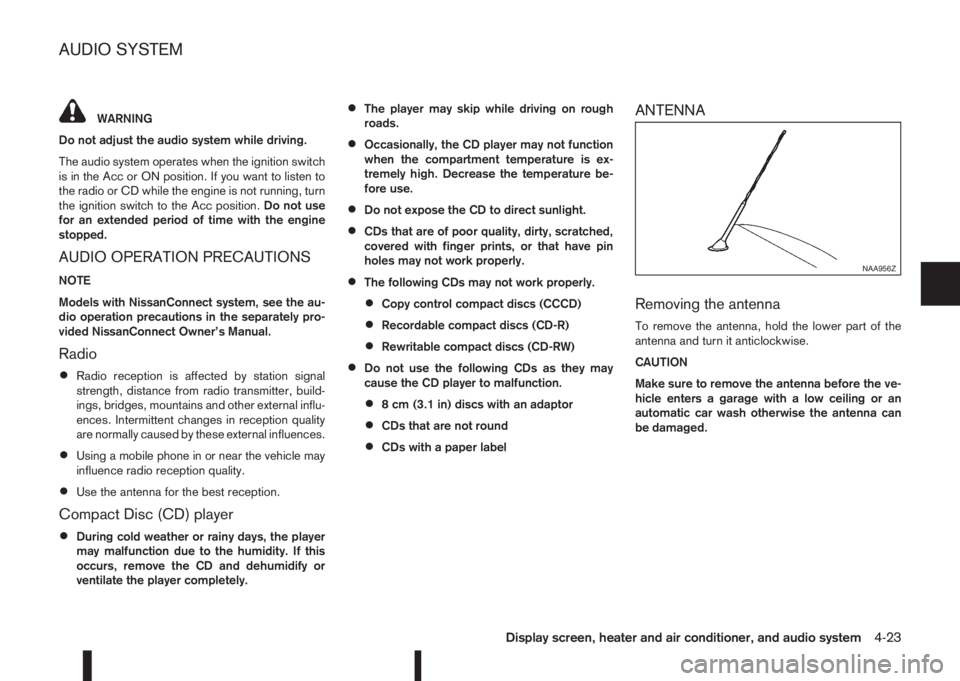
ANTENNA
Removing the antenna
To remove the antenna, hold the lower part of the
antenna and turn it anticlockwise.
CAUTION
Make sure to remove the antenna before the ve-
hicle enters a garage with a low ceiling or an
automatic car wash otherwise the antenna can
be damaged.
NAA956Z
AUDIO SYSTEM
Display screen, heater and air conditioner, and audio system4-23
Page 157 of 338
![NISSAN QASHQAI 2016 Owner´s Manual [Sound] menu:
Submenus in the sound menu:
[Bass] Use this control to enhance or
attenuate bass response sound.
Turn the<MENU>dial clockwise
or anticlockwise to adjust the bass
settings then press<ENTE](/img/5/40324/w960_40324-156.png "NISSAN QASHQAI 2016 Owner´s Manual [Sound] menu:
Submenus in the sound menu:
[Bass] Use this control to enhance or
attenuate bass response sound.
Turn the<MENU>dial clockwise
or anticlockwise to adjust the bass
settings then press<ENTE")
[Sound] menu:
Submenus in the sound menu:
[Bass] Use this control to enhance or
attenuate bass response sound.
Turn the
Page 168 of 338
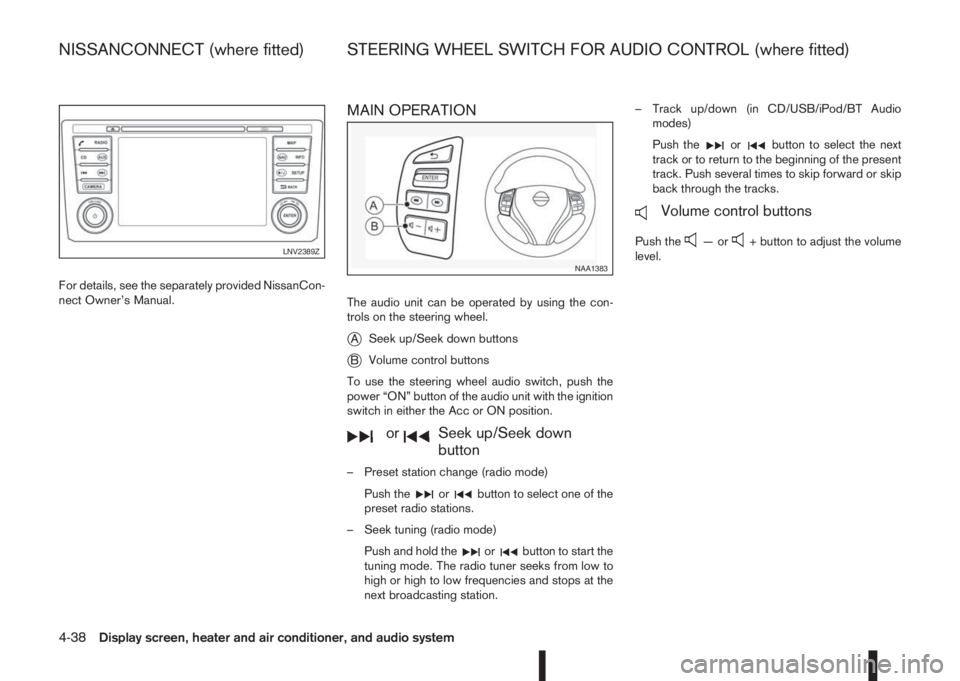
For details, see the separately provided NissanCon-
nect Owner’s Manual.
MAIN OPERATION
The audio unit can be operated by using the con-
trols on the steering wheel.
jASeek up/Seek down buttons
jBVolume control buttons
To use the steering wheel audio switch, push the
power “ON” button of the audio unit with the ignition
switch in either the Acc or ON position.
mormSeek up/Seek down
button
– Preset station change (radio mode)
Push the
orbutton to select one of the
preset radio stations.
– Seek tuning (radio mode)
Push and hold the
orbutton to start the
tuning mode. The radio tuner seeks from low to
high or high to low frequencies and stops at the
next broadcasting station.– Track up/down (in CD/USB/iPod/BT Audio
modes)
Push the
orbutton to select the next
track or to return to the beginning of the present
track. Push several times to skip forward or skip
back through the tracks.
mVolume control buttons
Push the—or+ button to adjust the volume
level.LNV2389Z
NAA1383
NISSANCONNECT (where fitted) STEERING WHEEL SWITCH FOR AUDIO CONTROL (where fitted)
4-38Display screen, heater and air conditioner, and audio system
Page 179 of 338
WARNING
•Do not leave children or adults who would
normally require the support of others alone
in your vehicle. Pets should also not be left
alone. They could accidentally injure them-
selves or others through inadvertent opera-
tion of the vehicle. Also, on hot, sunny days,
temperatures in a closed vehicle could quickly
become high enough to cause severe or pos-
sibly fatal injuries to people or animals.
•To prevent luggage or packages from sliding
forward during braking, do not stack anything
in the cargo area higher than the seatbacks.
•Secure all cargo with ropes or straps to pre-
vent it from sliding or shifting.
•Failure to follow proper seating instructions
see “Seats” in the “1. Safety — Seats, Seat
belts and Supplemental Restraint System”
section, could result in serious personal injury
in an accident or sudden stop.
EXHAUST GAS (Carbon Monoxide)
WARNING
•Do not breathe exhaust gases; they contain
colourless and odourless carbon monoxide.
Carbon monoxide is a dangerous gas and can
cause unconsciousness or death.
•If you suspect that exhaust fumes are enter-
ing the vehicle, drive with all windows fully
open and have the vehicle inspected immedi-
ately.
•Do not run the engine in closed spaces, such
as a garage, for any longer than is absolutely
necessary.
•Do not park the vehicle with the engine run-
ning for any extended length of time.
•Keep the back door closed while driving, oth-
erwise exhaust gases could be drawn into the
passenger compartment. If you must drive in
this way for some reason, take the following
steps:
1) Open all the windows.
2) Set the air recirculation mode (
)tothe
“OFF” position.
3) Set the fan speed control to the maximum
position to circulate the air.
•If electrical wiring or other cable connections
must pass to a trailer through the seal of the
body, follow the manufacturer’s recommen-
dations to prevent carbon monoxide entry into
the vehicle.
•When a vehicle has been stopped in an open
area with its engine running for any significant
length of time, turn the fan on to force outside
air into the vehicle.
•The exhaust system and body should be in-
spected by a NISSAN dealer or qualified work-
shop whenever:
– the vehicle is raised for service.
– you suspect that exhaust fumes are enter-
ing into the passenger compartment.
– you notice a change in the sound of the
exhaust system.
– you have had an accident involving dam-
age to the exhaust system, underbody, or
rear of the vehicle.
PRECAUTIONS WHEN STARTING
AND DRIVING
Starting and driving5-3
Page 186 of 338
The turbocharger system uses engine oil for lubrica-
tion and cooling of its rotating components. The tur-
bocharger turbine turns at extremely high speeds
and it can reach an extremely high temperature. It is
essential to maintain a flow of clean oil through the
turbocharger system. A sudden interruption to the
oil supply may cause a malfunction in the turbo-
charger.
To ensure prolonged life and performance of the
turbocharger, it is essential to comply with the fol-
lowing maintenance procedure:
CAUTION
•Change the engine oil of the turbo-charged
diesel engine as prescribed. See the sepa-
rately provided Warranty Information & Main-
tenance Booklet for additional information.
•Use only the recommended engine oil. See
“Capacities and recommended fuel/
lubricants” in the “9. Technical information”
section.
•If the engine has been operating at high rpm
for an extended period of time, let it idle for a
few minutes prior to shutdown.
•Do not accelerate the engine to high rpm im-
mediately after starting it.Driving your vehicle to fit the circumstances is es-
sential for your safety and comfort. As a driver, you
should be the one who knows best how to drive in
the given circumstances.
ENGINE COLD START PERIOD
Due to the higher engine speeds when the engine is
cold, extra caution must be exercised when select-
ing a gear during the engine warm-up period after
starting the engine.
LOADING LUGGAGE
Loads, their distribution and the attachment of equip-
ment (coupling devices, roof luggage carriers, etc.)
will change the driving characteristics of the vehicle
considerably. Driving style and speed must be ad-
justed accordingly.
DRIVING ON WET ROADS
•Avoid starting off, accelerating and stopping sud-
denly.
•Avoid sharp turns or lane changes.
•Extra distance should be kept from the vehicle in
front.
•When water covers the road surface in puddles,
small streams, etc, REDUCE SPEED to prevent
aquaplaning which will cause skidding and loss
of control. Worn tyres increase this risk.
DRIVING UNDER WINTER
CONDITIONS
•Drive safely.
•Avoid starting off, accelerating or stopping sud-
denly.
•Avoid sharp turns or lane changes.
•Avoid sudden steering actions.
•Extra distance should be kept from the vehicle in
front.
TURBOCHARGER SYSTEM
(Diesel engine models)CARE WHEN DRIVING
5-10Starting and driving
Page 189 of 338
is possible for anyone, even someone who does not
carry the Intelligent Key, to push the ignition switch
to start the engine.
•The luggage room area is not included in the
operating range, but the Intelligent Key may func-
tion.
•If the Intelligent Key is placed on the instrument
panel, inside the glove box, door pocket or the
corner of the interior compartment, the Intelli-
gent Key may not function.
•If the Intelligent Key is placed near the door or
window outside the vehicle, the Intelligent Key
may function.
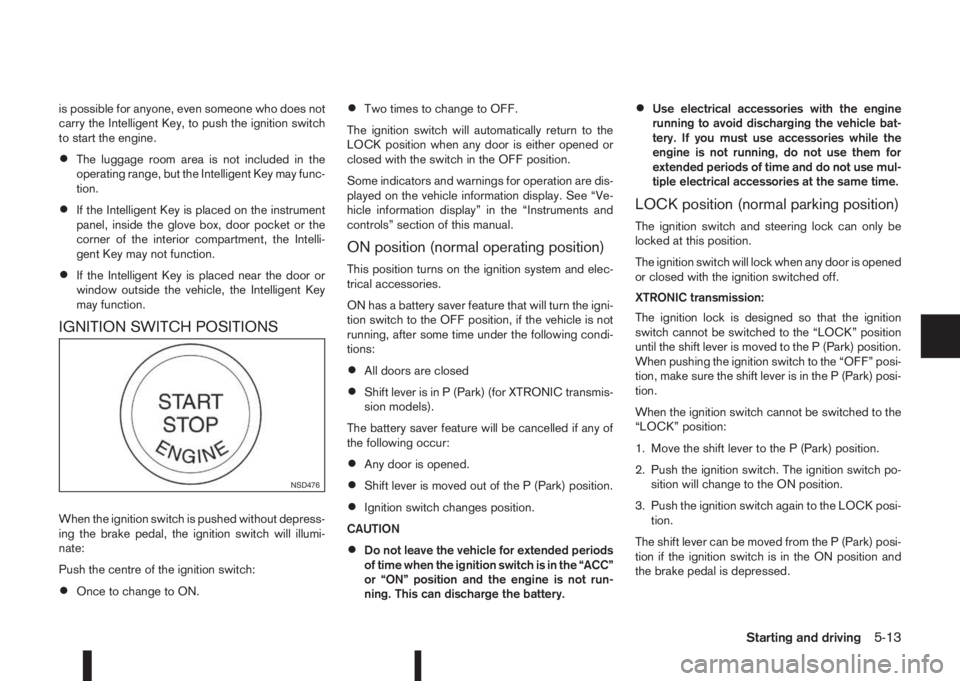
IGNITION SWITCH POSITIONS
When the ignition switch is pushed without depress-
ing the brake pedal, the ignition switch will illumi-
nate:
Push the centre of the ignition switch:
•Once to change to ON.
•Two times to change to OFF.
The ignition switch will automatically return to the
LOCK position when any door is either opened or
closed with the switch in the OFF position.
Some indicators and warnings for operation are dis-
played on the vehicle information display. See “Ve-
hicle information display” in the “Instruments and
controls” section of this manual.
ON position (normal operating position)
This position turns on the ignition system and elec-
trical accessories.
ON has a battery saver feature that will turn the igni-
tion switch to the OFF position, if the vehicle is not
running, after some time under the following condi-
tions:
•All doors are closed
•Shift lever is in P (Park) (for XTRONIC transmis-
sion models).
The battery saver feature will be cancelled if any of
the following occur:
•Any door is opened.
•Shift lever is moved out of the P (Park) position.
•Ignition switch changes position.
CAUTION
•Do not leave the vehicle for extended periods
of time when the ignition switch is in the “ACC”
or “ON” position and the engine is not run-
ning. This can discharge the battery.
•Use electrical accessories with the engine
running to avoid discharging the vehicle bat-
tery. If you must use accessories while the
engine is not running, do not use them for
extended periods of time and do not use mul-
tiple electrical accessories at the same time.
LOCK position (normal parking position)
The ignition switch and steering lock can only be
locked at this position.
The ignition switch will lock when any door is opened
or closed with the ignition switched off.
XTRONIC transmission:
The ignition lock is designed so that the ignition
switch cannot be switched to the “LOCK” position
until the shift lever is moved to the P (Park) position.
When pushing the ignition switch to the “OFF” posi-
tion, make sure the shift lever is in the P (Park) posi-
tion.
When the ignition switch cannot be switched to the
“LOCK” position:
1. Move the shift lever to the P (Park) position.
2. Push the ignition switch. The ignition switch po-
sition will change to the ON position.
3. Push the ignition switch again to the LOCK posi-
tion.
The shift lever can be moved from the P (Park) posi-
tion if the ignition switch is in the ON position and
the brake pedal is depressed.
NSD476
Starting and driving5-13
Page 190 of 338
If the battery of the vehicle is discharged, the push-
button ignition switch cannot be moved from the
LOCK position.
OFF position
The ignition switch is in the OFF position when the
engine is turned off using the ignition switch. No
lights will illuminate on the ignition switch.
ACC position
With the vehicle in the P (Park) position, the Intelli-
gent key with you and the ignition placed from ON
to OFF, the radio can still be used for a period of
time, or until the driver’s door is opened.
After a period of time, functions such as radio, navi-
gation, and Bluetooth® Hands-Free Phone System
may be restarted by pressing the “POWER button/
VOLUME control knob” (See “Monitor, climate, au-
dio, phone and voice recognition systems” in this
manual) or the keyfob unlock button up to a total of
30 minutes.
EMERGENCY ENGINE SHUT OFF
To shut off the engine in an emergency situation
while driving, perform the following procedure:
•Rapidly push the push-button ignition switch 3
consecutive times in less than 1.5 seconds, or
•Push and hold the push-button ignition switch
for more than 2 seconds.
STEERING LOCK
The ignition switch is equipped with an anti-theft
steering lock device.
To lock steering wheel
1. Push the ignition switch to the “OFF” position
where the ignition switch position indicator will
not illuminate.
2. Open or close the door. The ignition switch turns
to the “LOCK” position.
3. Turn the steering wheel 1/6 of a turn to the right
or left from the straight up position.
To unlock steering wheel
Push the ignition switch to “ACC”, and the steering
wheel will be automatically unlocked.
CAUTION
•If the battery of the vehicle is discharged, the
push-button ignition switch cannot be
switched from the “LOCK” position.
•If the ignition switch position does not change
from the “LOCK” position, push the ignition
switch again while rotating the steering wheel
slightly to the right and left.
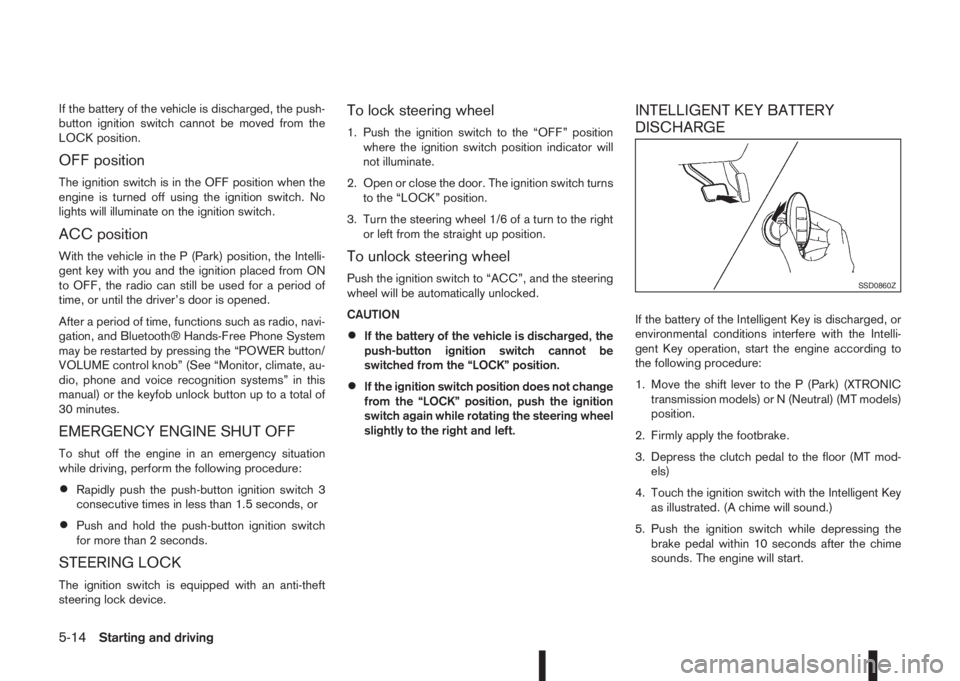
INTELLIGENT KEY BATTERY
DISCHARGE
If the battery of the Intelligent Key is discharged, or
environmental conditions interfere with the Intelli-
gent Key operation, start the engine according to
the following procedure:
1. Move the shift lever to the P (Park) (XTRONIC
transmission models) or N (Neutral) (MT models)
position.
2. Firmly apply the footbrake.
3. Depress the clutch pedal to the floor (MT mod-
els)
4. Touch the ignition switch with the Intelligent Key
as illustrated. (A chime will sound.)
5. Push the ignition switch while depressing the
brake pedal within 10 seconds after the chime
sounds. The engine will start.
SSD0860Z
5-14Starting and driving