change time NISSAN QASHQAI 2016 Owner´s Manual
[x] Cancel search | Manufacturer: NISSAN, Model Year: 2016, Model line: QASHQAI, Model: NISSAN QASHQAI 2016Pages: 338, PDF Size: 4.87 MB
Page 215 of 338
•When additional floor mats are used, be sure
that they are correctly secured and that they
cannot interfere with the accelerator pedal.
Mats not adapted to the vehicle may prevent
proper operation of the speed limiter.
The speed limiter operation switches are located on
the steering wheel (right hand side).
The speed limiter operating condition is shown on
the top of vehicle information display. For details,
see “Vehicle information display” in the “2. Instru-
ments and controls” section.
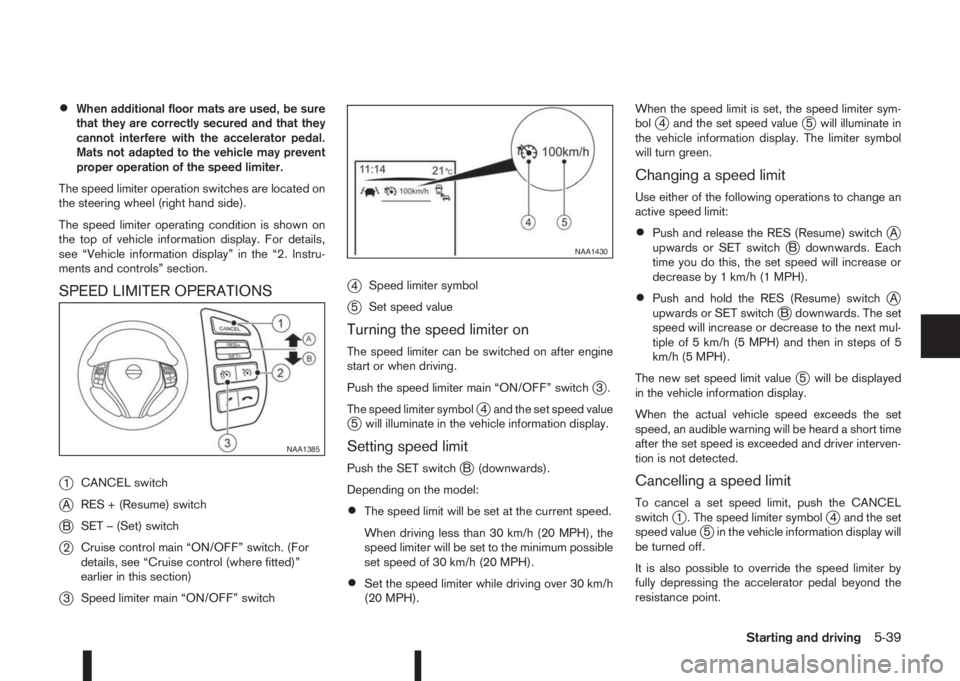
SPEED LIMITER OPERATIONS
j
1CANCEL switch
jARES + (Resume) switch
jBSET – (Set) switch
j2Cruise control main “ON/OFF” switch. (For
details, see “Cruise control (where fitted)”
earlier in this section)
j3Speed limiter main “ON/OFF” switch
j4Speed limiter symbol
j5Set speed value
Turning the speed limiter on
The speed limiter can be switched on after engine
start or when driving.
Push the speed limiter main “ON/OFF” switch
j3.
The speed limiter symbol
j4 and the set speed valuej5 will illuminate in the vehicle information display.
Setting speed limit
Push the SET switchjB (downwards).
Depending on the model:
•The speed limit will be set at the current speed.
When driving less than 30 km/h (20 MPH), the
speed limiter will be set to the minimum possible
set speed of 30 km/h (20 MPH).
•Set the speed limiter while driving over 30 km/h
(20 MPH).When the speed limit is set, the speed limiter sym-
bol
j4 and the set speed valuej5 will illuminate in
the vehicle information display. The limiter symbol
will turn green.
Changing a speed limit
Use either of the following operations to change an
active speed limit:
•Push and release the RES (Resume) switchjA
upwards or SET switchjB downwards. Each
time you do this, the set speed will increase or
decrease by 1 km/h (1 MPH).
•Push and hold the RES (Resume) switchjA
upwards or SET switchjB downwards. The set
speed will increase or decrease to the next mul-
tiple of 5 km/h (5 MPH) and then in steps of 5
km/h (5 MPH).
The new set speed limit value
j5 will be displayed
in the vehicle information display.
When the actual vehicle speed exceeds the set
speed, an audible warning will be heard a short time
after the set speed is exceeded and driver interven-
tion is not detected.
Cancelling a speed limit
To cancel a set speed limit, push the CANCEL
switchj1 . The speed limiter symbolj4 and the set
speed valuej5 in the vehicle information display will
be turned off.
It is also possible to override the speed limiter by
fully depressing the accelerator pedal beyond the
resistance point.
NAA1385
NAA1430
Starting and driving5-39
Page 278 of 338
1. Park the vehicle on a level surface and apply the
parking brake.
2. Start the engine. If the engine is cold, start and
let the engine idle until the engine temperature
reaches the operational temperature.
3. Turn the engine off and wait at least 10 minutes
to let the engine oil drain back into the oil pan.4. Open the bonnet. For details, see “Bonnet
release” in the “3. Pre-driving checks and
adjustments” section.
5. Remove the engine oil filler cap.
6. Raise and support the vehicle using a suitable
floor jack and safety jack stands.
Place the safety jack stands under the vehicle
jack-up points.
For details, see “Flat tyre” in the “6. In case of
emergency” section.
7. Remove the engine compartment under cover.
8. Place a large drain pan under the drain plug.
9. Remove the drain plug with a wrench and com-
pletely drain the oil.
If the engine oil filter needs to be changed, re-
move and replace it at this time. See “Changing
engine oil filter” later in this section.
10. Clean and re-install the drain plug along with a
new washer. Securely tighten the drain plug
with a wrench.Do not use excessive force.
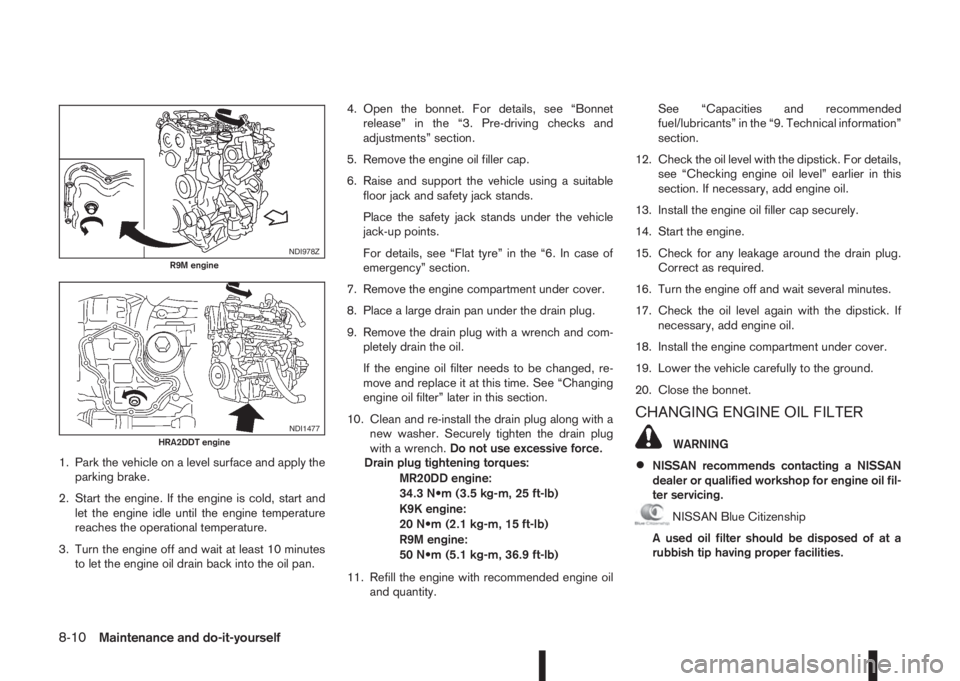
Drain plug tightening torques:
MR20DD engine:
34.3 N•m (3.5 kg-m, 25 ft-lb)
K9K engine:
20 N•m (2.1 kg-m, 15 ft-lb)
R9M engine:
50 N•m (5.1 kg-m, 36.9 ft-lb)
11. Refill the engine with recommended engine oil
and quantity.See “Capacities and recommended
fuel/lubricants” in the “9. Technical information”
section.
12. Check the oil level with the dipstick. For details,
see “Checking engine oil level” earlier in this
section. If necessary, add engine oil.
13. Install the engine oil filler cap securely.
14. Start the engine.
15. Check for any leakage around the drain plug.
Correct as required.
16. Turn the engine off and wait several minutes.
17. Check the oil level again with the dipstick. If
necessary, add engine oil.
18. Install the engine compartment under cover.
19. Lower the vehicle carefully to the ground.
20. Close the bonnet.
CHANGING ENGINE OIL FILTER
WARNING
•NISSAN recommends contacting a NISSAN
dealer or qualified workshop for engine oil fil-
ter servicing.
NISSAN Blue Citizenship
A used oil filter should be disposed of at a
rubbish tip having proper facilities.
NDI978ZR9M engine
NDI1477HRA2DDT engine
8-10Maintenance and do-it-yourself
Page 282 of 338
With the engine running, check the distance be-
tween the upper surface of the pedal and the metal
floor. If it is out the range listed, see a NISSAN
dealer or qualified workshop.
Depressing force of 490 N (50 kg, 110 lb)
183.7 – 193.7 mm (7.23 – 7.63 in.)
Self-adjusting brakes
Your vehicle is equipped with self-adjusting brakes.
The disc-type brakes self-adjust every time the brake
pedal is applied.
BRAKE BOOSTER
Check the brake booster function as follows:
1. With the engine off, depress and release the
footbrake pedal several times. When the foot-
brake pedal movement (distance of travel) re-
mains the same from one pedal application to the
next, continue on to the next step.
2. While depressing the footbrake pedal, start the
engine. The pedal height should drop a little.
3. With the footbrake pedal depressed, stop the
engine. Keep the pedal depressed for about 30
seconds. The pedal height should not change.
4. Run the engine for 1 minute without depressing
the footbrake pedal, then turn it off. Depress the
footbrake pedal several times. The pedal travel
distance will decrease gradually with each de-
pression as the vacuum is released from the
booster.If the brakes do not operate properly, have the
brakes checked by a NISSAN dealer or qualified
workshop.
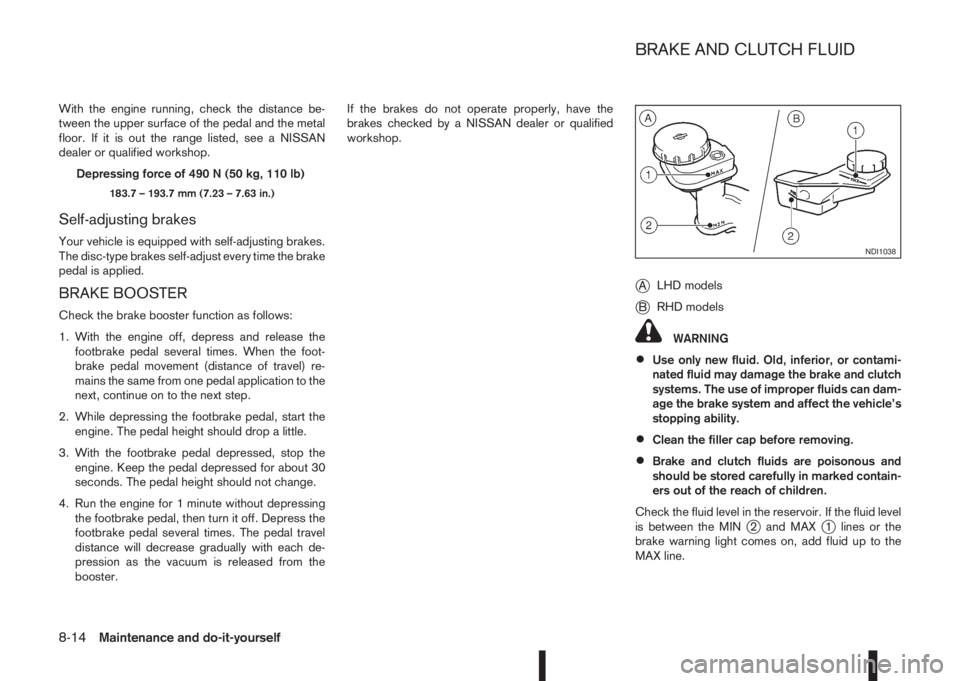
jALHD models
jBRHD models
WARNING
•Use only new fluid. Old, inferior, or contami-
nated fluid may damage the brake and clutch
systems. The use of improper fluids can dam-
age the brake system and affect the vehicle’s
stopping ability.
•Clean the filler cap before removing.
•Brake and clutch fluids are poisonous and
should be stored carefully in marked contain-
ers out of the reach of children.
Check the fluid level in the reservoir. If the fluid level
is between the MIN
j2 and MAXj1 lines or the
brake warning light comes on, add fluid up to the
MAX line.
NDI1038
BRAKE AND CLUTCH FLUID
8-14Maintenance and do-it-yourself