tow NISSAN QASHQAI 2016 Owner´s Manual
[x] Cancel search | Manufacturer: NISSAN, Model Year: 2016, Model line: QASHQAI, Model: NISSAN QASHQAI 2016Pages: 338, PDF Size: 4.87 MB
Page 142 of 338
MOVING OBJECT DETECTION (MOD)
The Moving Object Detection (MOD) system can
inform the driver of the moving objects surrounding
the vehicle.
The MOD system detects moving objects by using
image processing technology on the image shown
on the Around View Monitor display.
The MOD system operates in the following condi-
tions when the camera view is displayed:
•When the shift lever is in the N (Neutral) position
(XTRONIC and MT models) or P (Park) position
(XTRONIC models) and the vehicle is stopped,
the MOD system detects the moving objects in
the bird-eye view.
•When the shift lever is in the any position other
than R (Reverse) position and the vehicle speed
is above 0 km/h and below approximately 8 km/h
(5 MPH), the MOD system detects moving ob-
jects in the front view.
•When the shift lever is in the R (Reverse) posi-
tion and the vehicle speed is below approximately
8 km/h (5 MPH), the MOD system detects mov-
ing objects in the rear view. The MOD system
will not operate correctly if the back door is open.
The MOD icon will change to blue to show which
view is currently active.
The MOD system does not detect moving objects in
the front-side view. The MOD icon is not displayed
on the screen when in this view.
WARNING
•The MOD system is not a substitute for proper
vehicle operation and is not designed to pre-
vent contact with the objects surrounding the
vehicle. When manoeuvring, always use the
outside mirror and rear view mirror and turn
and check the surroundings to ensure it is
safe to manoeuvre.
•The MOD system does not have the function
to detect the surrounding stationary objects.
*: For the Right-Hand Drive (RHD) model, the screen
layout will be opposite.
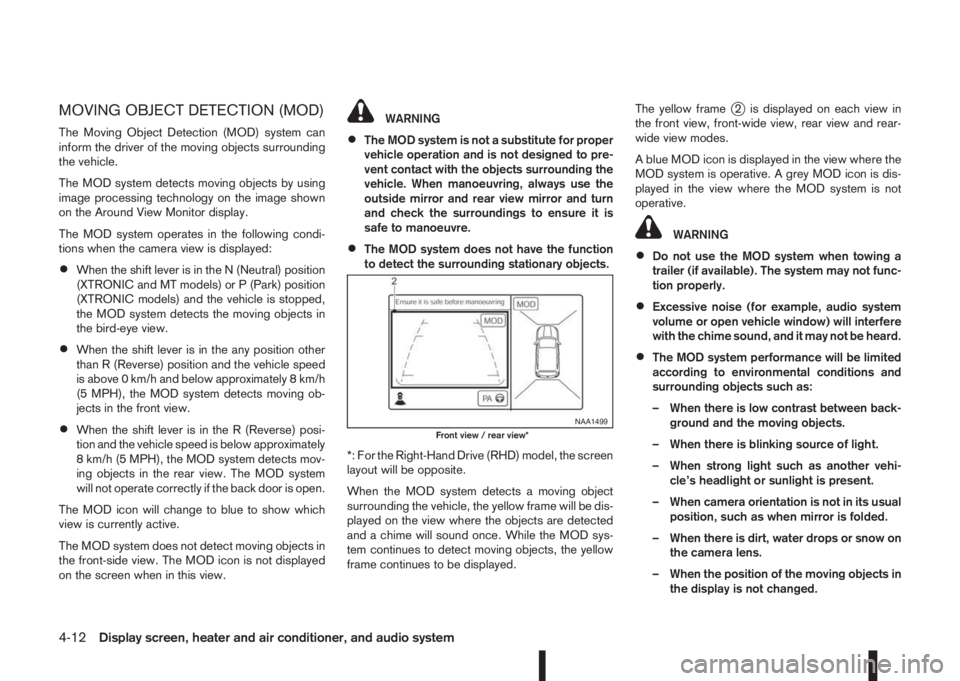
When the MOD system detects a moving object
surrounding the vehicle, the yellow frame will be dis-
played on the view where the objects are detected
and a chime will sound once. While the MOD sys-
tem continues to detect moving objects, the yellow
frame continues to be displayed.The yellow frame
j2 is displayed on each view in
the front view, front-wide view, rear view and rear-
wide view modes.
A blue MOD icon is displayed in the view where the
MOD system is operative. A grey MOD icon is dis-
played in the view where the MOD system is not
operative.
WARNING
•Do not use the MOD system when towing a
trailer (if available). The system may not func-
tion properly.
•Excessive noise (for example, audio system
volume or open vehicle window) will interfere
with the chime sound, and it may not be heard.
•The MOD system performance will be limited
according to environmental conditions and
surrounding objects such as:
– When there is low contrast between back-
ground and the moving objects.
– When there is blinking source of light.
– When strong light such as another vehi-
cle’s headlight or sunlight is present.
– When camera orientation is not in its usual
position, such as when mirror is folded.
– When there is dirt, water drops or snow on
the camera lens.
– When the position of the moving objects in
the display is not changed.
NAA1499Front view / rear view*
4-12Display screen, heater and air conditioner, and audio system
Page 177 of 338
Lane Departure Warning (LDW) system (where
fitted) ....................................................................... 5-33
LDW system operation ....................................... 5-34
LDW temporary disabled status .......................... 5-35
LDW automatic deactivation ............................... 5-35
LDW malfunction ................................................ 5-35
Multi-sensing camera unit maintenance ............... 5-35
Cruise control (where fitted) .................................... 5-36
Precautions on cruise control .............................. 5-36
Cruise control system operations ........................ 5-37
Speed limiter (where fitted) ...................................... 5-38
Speed limiter operations ..................................... 5-39
Forward emergency braking system (where fitted) ... 5-40
System operation ................................................ 5-41
Parking .................................................................... 5-43
Ultrasonic Parking Sensors (where fitted)................. 5-45
Operation ........................................................... 5-45
Intelligent Parking Assist (IPA) (where fitted) ............ 5-46
Deactivation of the IPA system ............................ 5-47
Parking procedure using the IPA system ............. 5-48
Operating tips..................................................... 5-52
Trailer towing ........................................................... 5-54
Operating precautions ........................................ 5-54
Maximum load limits (for Australia) ...................... 5-55
Tyre pressure ..................................................... 5-55
Safety chains ...................................................... 5-55
Trailer brakes...................................................... 5-55
Trailer detection (where fitted) ............................ 5-56Installation of coupling device (except for
Australia) ............................................................ 5-56
Vehicle security........................................................ 5-57
Electric power steering system ................................ 5-57
Brake system ........................................................... 5-58
Brake precautions .............................................. 5-58
Anti-lock Braking System (ABS)............................... 5-59
Using system ...................................................... 5-59
Self-test feature .................................................. 5-59
Normal operation ................................................ 5-60
Electronic Stability Programme (ESP) system
(where fitted) ........................................................... 5-60
Electronic Stability Programme (ESP) OFF
switch................................................................. 5-61
Chassis control........................................................ 5-62
Active trace control ............................................. 5-62
Active engine brake (for XTRONIC (CVT)
models only) ....................................................... 5-63
Active ride control ............................................... 5-64
Hill Start Assist (HSA) system .................................. 5-64
ECO mode system (where fitted) ............................. 5-65
Cold weather driving................................................ 5-66
Battery ............................................................... 5-66
Engine coolant .................................................... 5-66
Tyre equipment ................................................... 5-66
Special winter equipment.................................... 5-67
Corrosion protection ........................................... 5-67
Page 178 of 338
During the first 1,600 km (1,000 miles), follow these
recommendations for the future reliability and
economy of your new vehicle. Failure to follow the
recommendations may result in shortened engine
life and reduced engine performance.
•Avoid driving for long periods at a constant
speed, either fast or slow.
•Do not accelerate at full throttle in any gear.
•Avoid quick starts.
•Avoid hard braking as much as possible.
•Do not tow a trailer during the first 800 km (500
miles).
NOTE
Models with K9K diesel engine will achieve top
performance only after approximately 5,000 km
(3,000 miles).
WARNING
The driving characteristics of your vehicle can be
changed remarkably by any additional load and
its distribution as well as by adding optional
equipment (trailer couplings, roof racks, etc.).
Your driving style and speed have to be adjusted
accordingly. Especially when carrying heavy
loads, your speed must be reduced adequately.
•Make sure the area around the vehicle is free of
obstacles.
•Check fluid levels such as engine oil, coolant,
brake and clutch fluid, and window washer fluid
as frequently as possible, at least whenever you
refuel.
•Visually inspect tyres for their appearance and
condition. Also check the tyre pressure for
proper inflation.
•Maintenance items in the “8. Maintenance and
do-it-yourself” section should be checked peri-
odically.
•Check that all windows and light lenses are
clean.
•Check that all doors are closed.
•Position the seat and adjust the head restraints.
•Adjust the inside and outside mirrors.
•Fasten your seat belt and ask all passengers to
do likewise.
•Check the operation of the warning/indicator
lights when the ignition switch is turned to the
ON position.
•Do not place hard or heavy objects on the dash-
board or rear parcel shelf in order to prevent
injury in the event of a sudden stop.
RUNNING-IN SCHEDULE BEFORE STARTING THE ENGINE
5-2Starting and driving
Page 185 of 338
Utility vehicles have a significantly higher rollover
rate than other types of vehicles.
They have higher ground clearance than passenger
cars to make them capable of performing in a wide
variety of on-pavement and off-road applications.
This gives them a higher centre of gravity than ordi-
nary cars. An advantage of higher ground clearance
is a better view of the road, allowing you to antici-
pate problems. However, they are not designed for
cornering at the same speeds as conventional two-
wheel drive (2WD) vehicles any more than low-slung
sports cars are designed to perform satisfactorily
under off-road conditions. If possible, avoid sharp
turns or abrupt manoeuvres, particularly at high
speeds. As with other vehicles of this type, failure to
operate this vehicle correctly may result in loss of
control or vehicle rollover. In a rollover accident an
unbelted person is significantly more likely to be
injured than a person who is wearing a seat belt.NISSAN Blue Citizenship
The three-way catalyst is an emission control device
installed in the exhaust system. In the converter,
exhaust gases are burned at high temperatures to
help reduce pollutants.
CAUTION
•The exhaust gas and the exhaust system are
very hot. While the engine is running, keep
people or flammable materials away from the
exhaust pipe.
•Do not stop or park the vehicle over flam-
mable materials such as dry grass, waste pa-
per or rags, as they may burn easily.
•When parking, ensure that people or flam-
mable materials are kept away from the ex-
haust pipe.
TO HELP PREVENT DAMAGE
CAUTION
•Use UNLEADED PETROL ONLY, specifically
the recommended type. For details, see “Ca-
pacities and recommended fuel/lubricants” in
the “9. Technical information” section.
•Do not use leaded petrol. Leaded petrol will
seriously damage three-way catalyst.
Deposits from leaded petrol will seriously re-
duce the three-way catalyst’s ability to help
reduce exhaust pollutants.
•Keep your engine tuned up. Malfunctions in
the ignition, fuel injection, or electrical sys-
tems can cause over-rich fuel flow into the
converter, causing it to overheat.
•Avoid driving with an extremely low fuel level.
Running out of fuel could cause the engine to
misfire, damaging the three-way catalyst.
•Do not keep driving if the engine misfires, or
if noticeable loss of performance or other un-
usual operating conditions are detected. Have
the vehicle inspected promptly by a NISSAN
dealer or qualified workshop.
•Do not race the engine while warming it up.
•Do not push or tow your vehicle to start the
engine.
ON-PAVEMENT AND OFF-ROAD
DRIVING PRECAUTIONSTHREE-WAY CATALYST (Petrol
engine models)
Starting and driving5-9
Page 187 of 338
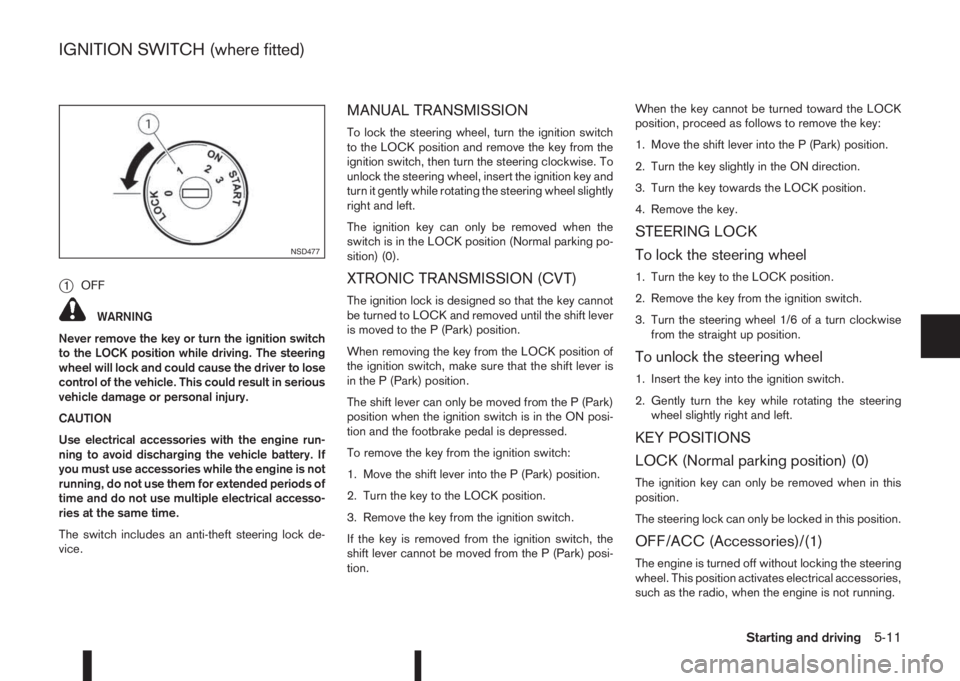
j1OFF
WARNING
Never remove the key or turn the ignition switch
to the LOCK position while driving. The steering
wheel will lock and could cause the driver to lose
control of the vehicle. This could result in serious
vehicle damage or personal injury.
CAUTION
Use electrical accessories with the engine run-
ning to avoid discharging the vehicle battery. If
you must use accessories while the engine is not
running, do not use them for extended periods of
time and do not use multiple electrical accesso-
ries at the same time.
The switch includes an anti-theft steering lock de-
vice.
MANUAL TRANSMISSION
To lock the steering wheel, turn the ignition switch
to the LOCK position and remove the key from the
ignition switch, then turn the steering clockwise. To
unlock the steering wheel, insert the ignition key and
turn it gently while rotating the steering wheel slightly
right and left.
The ignition key can only be removed when the
switch is in the LOCK position (Normal parking po-
sition) (0).
XTRONIC TRANSMISSION (CVT)
The ignition lock is designed so that the key cannot
be turned to LOCK and removed until the shift lever
is moved to the P (Park) position.
When removing the key from the LOCK position of
the ignition switch, make sure that the shift lever is
in the P (Park) position.
The shift lever can only be moved from the P (Park)
position when the ignition switch is in the ON posi-
tion and the footbrake pedal is depressed.
To remove the key from the ignition switch:
1. Move the shift lever into the P (Park) position.
2. Turn the key to the LOCK position.
3. Remove the key from the ignition switch.
If the key is removed from the ignition switch, the
shift lever cannot be moved from the P (Park) posi-
tion.When the key cannot be turned toward the LOCK
position, proceed as follows to remove the key:
1. Move the shift lever into the P (Park) position.
2. Turn the key slightly in the ON direction.
3. Turn the key towards the LOCK position.
4. Remove the key.
STEERING LOCK
To lock the steering wheel
1. Turn the key to the LOCK position.
2. Remove the key from the ignition switch.
3. Turn the steering wheel 1/6 of a turn clockwise
from the straight up position.
To unlock the steering wheel
1. Insert the key into the ignition switch.
2. Gently turn the key while rotating the steering
wheel slightly right and left.
KEY POSITIONS
LOCK (Normal parking position) (0)
The ignition key can only be removed when in this
position.
The steering lock can only be locked in this position.
OFF/ACC (Accessories)/(1)
The engine is turned off without locking the steering
wheel. This position activates electrical accessories,
such as the radio, when the engine is not running.
NSD477
IGNITION SWITCH (where fitted)
Starting and driving5-11
Page 197 of 338
•If the engine is revving up to a hazardous
speed in manual shift mode, the transmission
may shift up automatically. When the vehicle
speed decreases, the transmission automati-
cally shifts down and shifts to 1st gear before
the vehicle comes to a stop.
Accelerator downshift – In the D (Drive)
and Ds (Drive Sport) position
For rapid passing or driving uphill, fully depress the
accelerator pedal to the floor. This shifts the trans-
mission down into a lower gear, depending on the
vehicle speed.
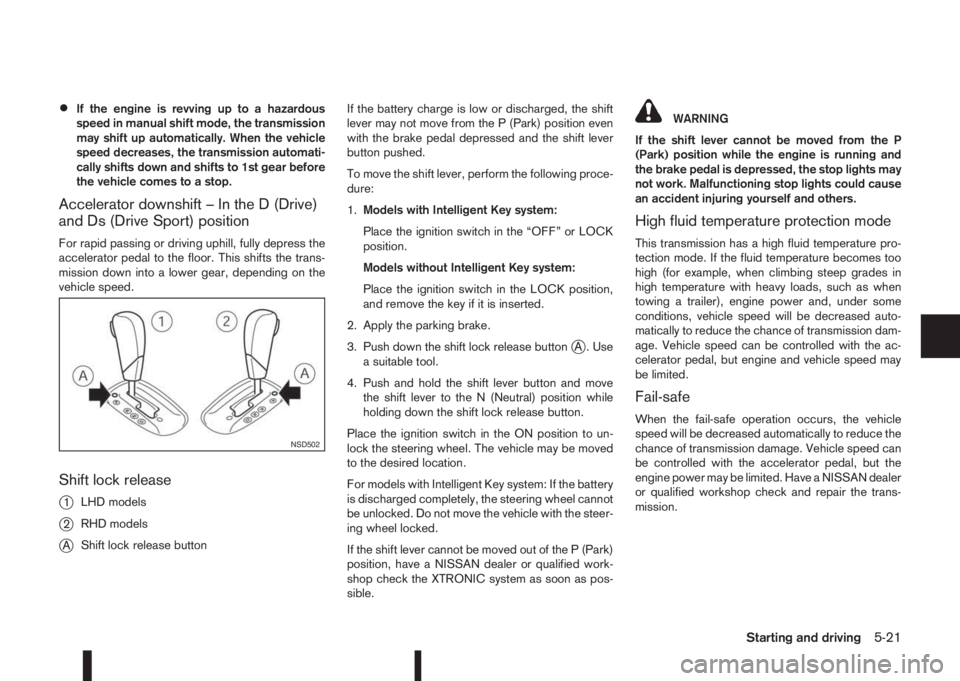
Shift lock release
j
1LHD models
j2RHD models
jAShift lock release buttonIf the battery charge is low or discharged, the shift
lever may not move from the P (Park) position even
with the brake pedal depressed and the shift lever
button pushed.
To move the shift lever, perform the following proce-
dure:
1.Models with Intelligent Key system:
Place the ignition switch in the “OFF” or LOCK
position.
Models without Intelligent Key system:
Place the ignition switch in the LOCK position,
and remove the key if it is inserted.
2. Apply the parking brake.
3. Push down the shift lock release button
jA . Use
a suitable tool.
4. Push and hold the shift lever button and move
the shift lever to the N (Neutral) position while
holding down the shift lock release button.
Place the ignition switch in the ON position to un-
lock the steering wheel. The vehicle may be moved
to the desired location.
For models with Intelligent Key system: If the battery
is discharged completely, the steering wheel cannot
be unlocked. Do not move the vehicle with the steer-
ing wheel locked.
If the shift lever cannot be moved out of the P (Park)
position, have a NISSAN dealer or qualified work-
shop check the XTRONIC system as soon as pos-
sible.
WARNING
If the shift lever cannot be moved from the P
(Park) position while the engine is running and
the brake pedal is depressed, the stop lights may
not work. Malfunctioning stop lights could cause
an accident injuring yourself and others.
High fluid temperature protection mode
This transmission has a high fluid temperature pro-
tection mode. If the fluid temperature becomes too
high (for example, when climbing steep grades in
high temperature with heavy loads, such as when
towing a trailer), engine power and, under some
conditions, vehicle speed will be decreased auto-
matically to reduce the chance of transmission dam-
age. Vehicle speed can be controlled with the ac-
celerator pedal, but engine and vehicle speed may
be limited.
Fail-safe
When the fail-safe operation occurs, the vehicle
speed will be decreased automatically to reduce the
chance of transmission damage. Vehicle speed can
be controlled with the accelerator pedal, but the
engine power may be limited. Have a NISSAN dealer
or qualified workshop check and repair the trans-
mission.
NSD502
Starting and driving5-21
Page 203 of 338
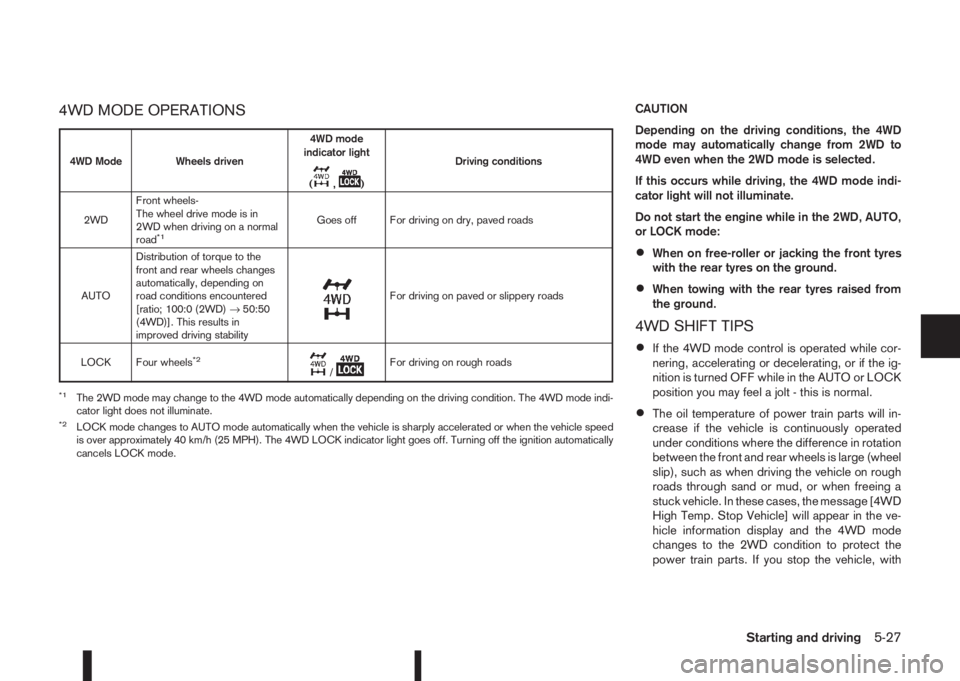
4WD MODE OPERATIONSCAUTION
Depending on the driving conditions, the 4WD
mode may automatically change from 2WD to
4WD even when the 2WD mode is selected.
If this occurs while driving, the 4WD mode indi-
cator light will not illuminate.
Do not start the engine while in the 2WD, AUTO,
or LOCK mode:
•When on free-roller or jacking the front tyres
with the rear tyres on the ground.
•When towing with the rear tyres raised from
the ground.
4WD SHIFT TIPS
•If the 4WD mode control is operated while cor-
nering, accelerating or decelerating, or if the ig-
nition is turned OFF while in the AUTO or LOCK
position you may feel a jolt - this is normal.
•The oil temperature of power train parts will in-
crease if the vehicle is continuously operated
under conditions where the difference in rotation
between the front and rear wheels is large (wheel
slip), such as when driving the vehicle on rough
roads through sand or mud, or when freeing a
stuck vehicle. In these cases, the message [4WD
High Temp. Stop Vehicle] will appear in the ve-
hicle information display and the 4WD mode
changes to the 2WD condition to protect the
power train parts. If you stop the vehicle, with
4WD Mode Wheels driven4WD mode
indicator light
(
m,m)Driving conditions
2WDFront wheels-
The wheel drive mode is in
2WD when driving on a normal
road
*1Goes off For driving on dry, paved roads
AUTODistribution of torque to the
front and rear wheels changes
automatically, depending on
road conditions encountered
[ratio; 100:0 (2WD)→50:50
(4WD)]. This results in
improved driving stability
m
For driving on paved or slippery roads
LOCK Four wheels
*2m/mFor driving on rough roads
*1The 2WD mode may change to the 4WD mode automatically depending on the driving condition. The 4WD mode indi-
cator light does not illuminate.
*2LOCK mode changes to AUTO mode automatically when the vehicle is sharply accelerated or when the vehicle speed
is over approximately 40 km/h (25 MPH). The 4WD LOCK indicator light goes off. Turning off the ignition automatically
cancels LOCK mode.
Starting and driving5-27
Page 206 of 338
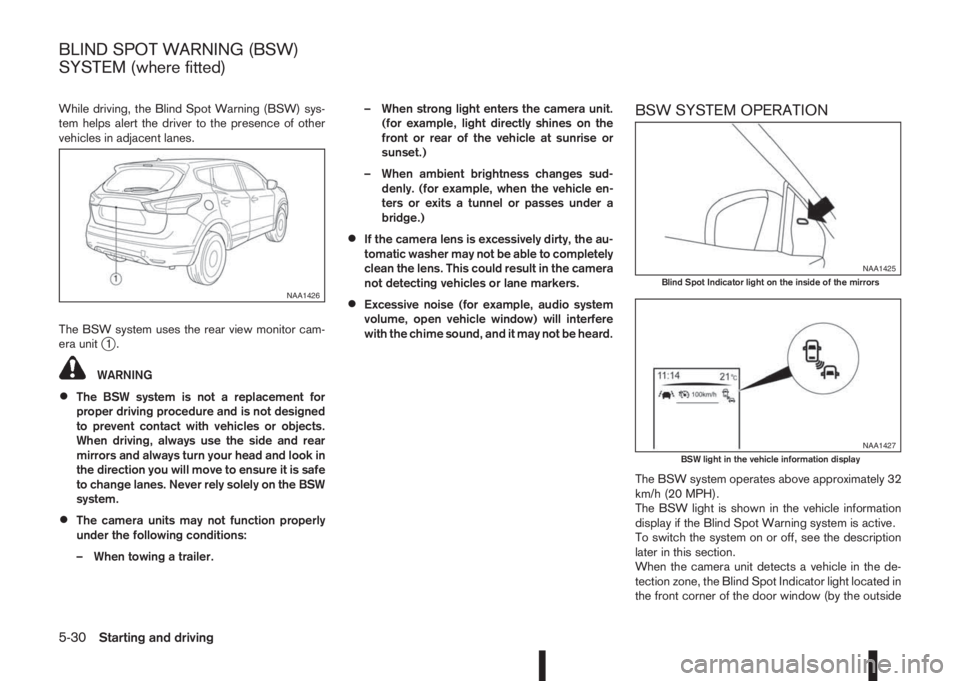
While driving, the Blind Spot Warning (BSW) sys-
tem helps alert the driver to the presence of other
vehicles in adjacent lanes.
The BSW system uses the rear view monitor cam-
era unit
j1.
WARNING
•The BSW system is not a replacement for
proper driving procedure and is not designed
to prevent contact with vehicles or objects.
When driving, always use the side and rear
mirrors and always turn your head and look in
the direction you will move to ensure it is safe
to change lanes. Never rely solely on the BSW
system.
•The camera units may not function properly
under the following conditions:
– When towing a trailer.– When strong light enters the camera unit.
(for example, light directly shines on the
front or rear of the vehicle at sunrise or
sunset.)
– When ambient brightness changes sud-
denly. (for example, when the vehicle en-
ters or exits a tunnel or passes under a
bridge.)
•If the camera lens is excessively dirty, the au-
tomatic washer may not be able to completely
clean the lens. This could result in the camera
not detecting vehicles or lane markers.
•Excessive noise (for example, audio system
volume, open vehicle window) will interfere
with the chime sound, and it may not be heard.
BSW SYSTEM OPERATION
The BSW system operates above approximately 32
km/h (20 MPH).
The BSW light is shown in the vehicle information
display if the Blind Spot Warning system is active.
To switch the system on or off, see the description
later in this section.
When the camera unit detects a vehicle in the de-
tection zone, the Blind Spot Indicator light located in
the front corner of the door window (by the outside
NAA1426
NAA1425Blind Spot Indicator light on the inside of the mirrors
NAA1427BSW light in the vehicle information display
BLIND SPOT WARNING (BSW)
SYSTEM (where fitted)
5-30Starting and driving
Page 209 of 338
When the above conditions are corrected, the BSW
system will resume automatically.
BSW AUTOMATIC DEACTIVATION
When dirt, rain or snow accumulates on the rear
camera, or the windscreen in front of the multi-sens-
ing camera, the BSW system will be turned off auto-
matically. The BSW light will blink.
Action to take:
If the message appears, park the vehicle in a safe
place, clean the camera unit and/or windscreen with
a soft cloth. Then turn off and restart the engine.
BSW MALFUNCTION
If the BSW system malfunctions, it will be turned off
automatically and the BSW light (orange) will illumi-
nate.
Action to take:
Stop the vehicle in a safe location, turn off and re-
start the engine. If the BSW light (orange) continues
to illuminate, have the BSW system checked by a
NISSAN dealer or qualified workshop.
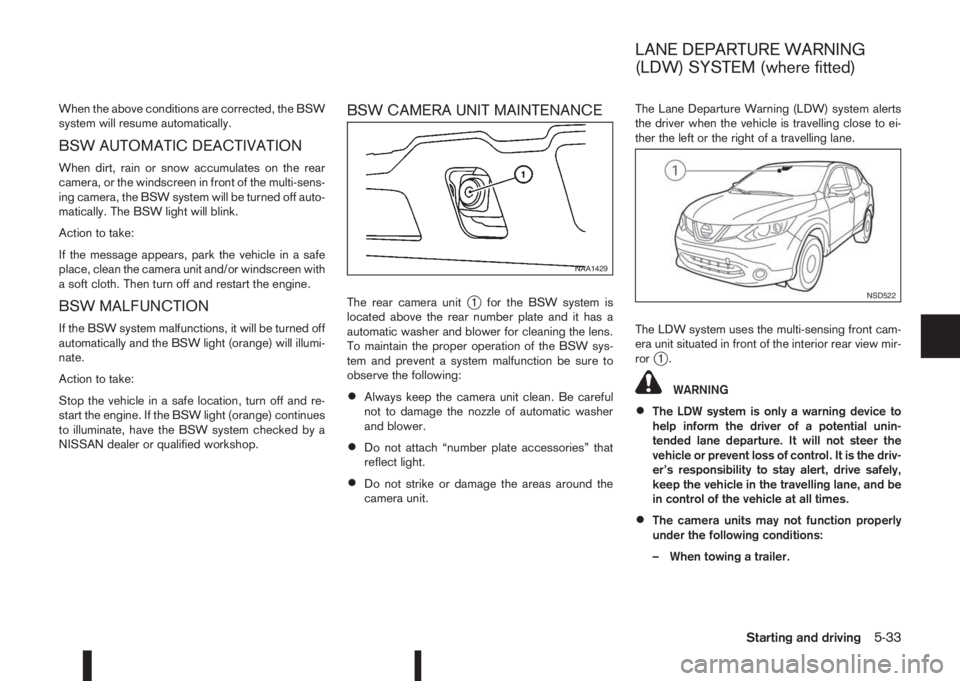
BSW CAMERA UNIT MAINTENANCE
The rear camera unitj1 for the BSW system is
located above the rear number plate and it has a
automatic washer and blower for cleaning the lens.
To maintain the proper operation of the BSW sys-
tem and prevent a system malfunction be sure to
observe the following:
•Always keep the camera unit clean. Be careful
not to damage the nozzle of automatic washer
and blower.
•Do not attach “number plate accessories” that
reflect light.
•Do not strike or damage the areas around the
camera unit.The Lane Departure Warning (LDW) system alerts
the driver when the vehicle is travelling close to ei-
ther the left or the right of a travelling lane.
The LDW system uses the multi-sensing front cam-
era unit situated in front of the interior rear view mir-
ror
j1.
WARNING
•The LDW system is only a warning device to
help inform the driver of a potential unin-
tended lane departure. It will not steer the
vehicle or prevent loss of control. It is the driv-
er’s responsibility to stay alert, drive safely,
keep the vehicle in the travelling lane, and be
in control of the vehicle at all times.
•The camera units may not function properly
under the following conditions:
– When towing a trailer.
NAA1429
NSD522
LANE DEPARTURE WARNING
(LDW) SYSTEM (where fitted)
Starting and driving5-33
Page 217 of 338
SYSTEM OPERATION
The forward emergency braking system will func-
tion when your vehicle is driven at speeds above
approximately 5 km/h (3 MPH).
If a risk of a forward collision is detected, the for-
ward emergency braking system will provide the
first warning to the driver by flashing the forward
collision warning light (orange) and providing an au-
dible warning.
If the driver applies the brakes quickly and forcefully
after the warning, and the forward emergency brak-
ing system detects that there is still the possibility of
a forward collision, the system will automatically in-
crease the braking force.
If the driver does not take action, the forward emer-
gency braking system issues the second visual
warning (red) and audible warning. If the driver re-
leases the accelerator pedal, then the system ap-
plies partial braking
If the risk of a collision becomes imminent, the for-
ward emergency braking system applies harder
braking automatically.
NOTE
The vehicle’s brake lights come on when braking
is performed by the forward emergency braking
system.
Depending on vehicle speed and distance to the
vehicle ahead, as well as driving and roadway con-
ditions, the system may help the driver avoid a for-ward collision or may help mitigate the
consequences if a collision should one be unavoid-
able.
If the driver is handling the steering wheel, acceler-
ating or braking, the forward emergency braking
system will function later or will not function.
The automatic braking will cease under the follow-
ing conditions:
•When the steering wheel is turned as far as nec-
essary to avoid a collision.
•When the accelerator pedal is depressed.
•When there is no longer a vehicle detected
ahead.
If the forward emergency braking system has
stopped the vehicle, the vehicle will remain at a
standstill for approximately 2 seconds before the
brakes are released.
WARNING
•The radar sensor does not detect the follow-
ing objects:
– Pedestrians, animals or obstacles in the
roadway
– Oncoming vehicles
– Crossing vehicles
•The radar sensor has some performance limi-
tations. If a stationary vehicle is in the vehi-
cle’s path, the forward emergency brakingsystem will not function when the vehicle is
driven at speeds over approximately 45 MPH
(70 km/h).
•The radar sensor may not detect a vehicle
ahead in the following conditions:
– Dirt, ice, snow or other material covering
the radar sensor.
– Interference by other radar sources.
– Snow or road spray from travelling
vehicles.
– If the vehicle ahead is narrow (e.g. motor-
cycle).
– When driving on a steep downhill slope or
roads with sharp curves.
– When towing a trailer.
•In some road or traffic conditions, the forward
emergency braking system may unexpectedly
apply partial braking. When acceleration is
necessary, continue to depress the accelera-
tor pedal to override the system.
•Braking distances increase on slippery sur-
faces.
•Excessive noise will interfere with the warn-
ing chime sound, and the chime may not be
heard.
•The system is designed to automatically
check the sensor’s functionality, within cer-
tain limitations. The system may not detect
some forms of obstruction of the sensor area
Starting and driving5-41