AIR CONDITIONER NISSAN QASHQAI 2016 Owner´s Manual
[x] Cancel search | Manufacturer: NISSAN, Model Year: 2016, Model line: QASHQAI, Model: NISSAN QASHQAI 2016Pages: 338, PDF Size: 4.87 MB
Page 5 of 338
ContentsIllustrated table of contents0
Safety — Seats, Seat belts and Supplemental
Restraint System1
Instruments and controls2
Pre-driving checks and adjustments3
Display screen, heater and air conditioner, and
audio system4
Starting and driving5
In case of emergency6
Appearance and care7
Maintenance and do-it-yourself8
Technical information9
Index10
Page 14 of 338
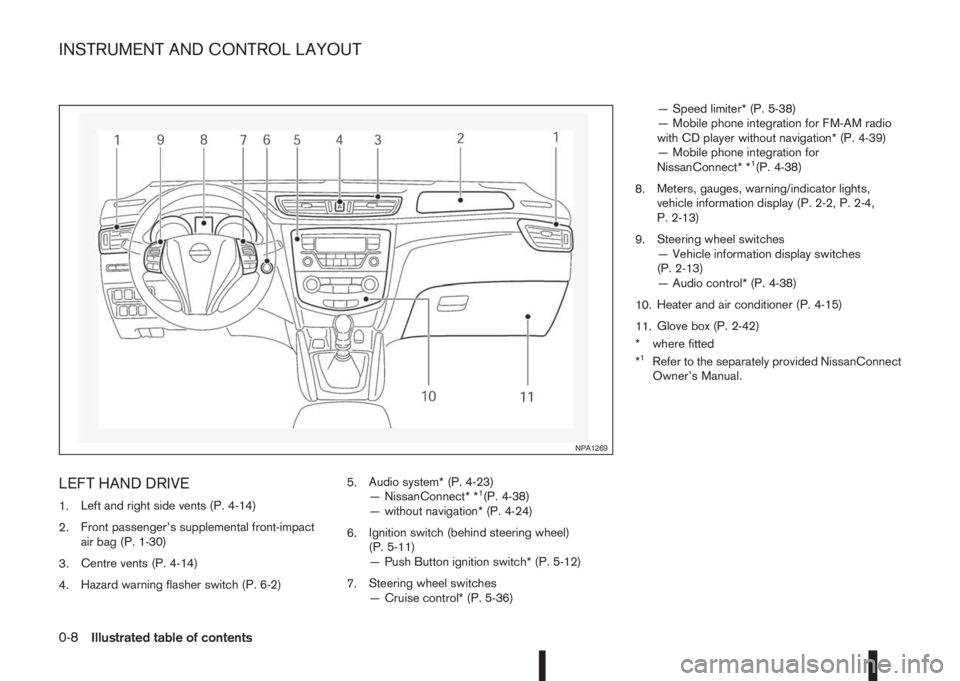
LEFT HAND DRIVE
1.Left and right side vents (P. 4-14)
2.Front passenger’s supplemental front-impact
air bag (P. 1-30)
3.Centre vents (P. 4-14)
4.Hazard warning flasher switch (P. 6-2)5.Audio system* (P. 4-23)
— NissanConnect* *1(P. 4-38)
— without navigation* (P. 4-24)
6.Ignition switch (behind steering wheel)
(P. 5-11)
— Push Button ignition switch* (P. 5-12)
7.Steering wheel switches
— Cruise control* (P. 5-36)— Speed limiter* (P. 5-38)
— Mobile phone integration for FM-AM radio
with CD player without navigation* (P. 4-39)
— Mobile phone integration for
NissanConnect* *
1(P. 4-38)
8.Meters, gauges, warning/indicator lights,
vehicle information display (P. 2-2, P. 2-4,
P. 2-13)
9.Steering wheel switches
— Vehicle information display switches
(P. 2-13)
— Audio control* (P. 4-38)
10.Heater and air conditioner (P. 4-15)
11.Glove box (P. 2-42)
* where fitted
*
1Refer to the separately provided NissanConnect
Owner’s Manual.
NPA1269
INSTRUMENT AND CONTROL LAYOUT
0-8Illustrated table of contents
Page 15 of 338
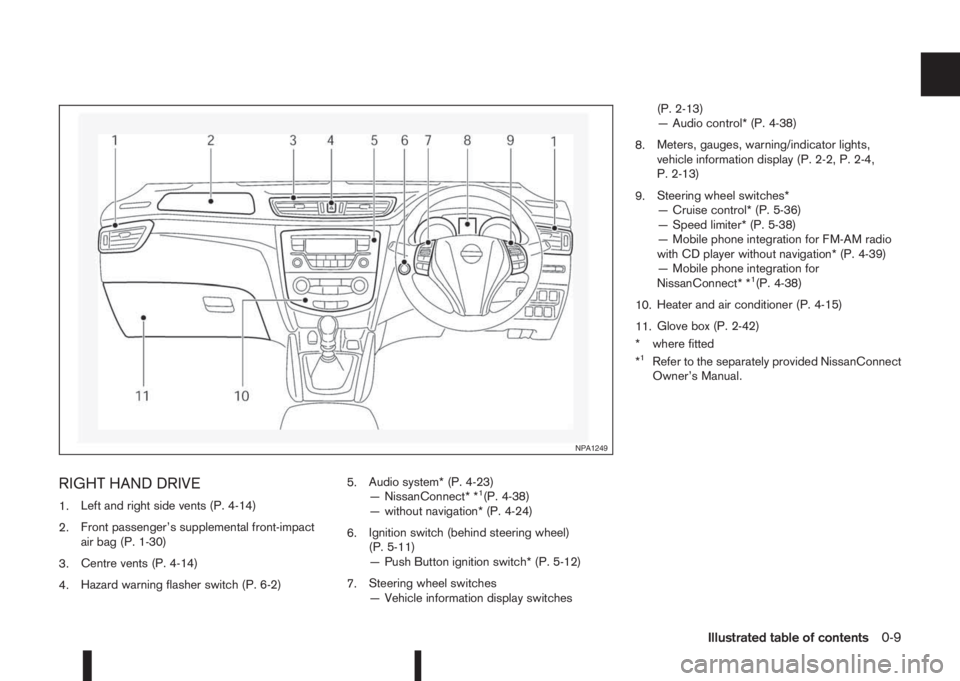
RIGHT HAND DRIVE
1.Left and right side vents (P. 4-14)
2.Front passenger’s supplemental front-impact
air bag (P. 1-30)
3.Centre vents (P. 4-14)
4.Hazard warning flasher switch (P. 6-2)5.Audio system* (P. 4-23)
— NissanConnect* *1(P. 4-38)
— without navigation* (P. 4-24)
6.Ignition switch (behind steering wheel)
(P. 5-11)
— Push Button ignition switch* (P. 5-12)
7.Steering wheel switches
— Vehicle information display switches(P. 2-13)
— Audio control* (P. 4-38)
8.Meters, gauges, warning/indicator lights,
vehicle information display (P. 2-2, P. 2-4,
P. 2-13)
9.Steering wheel switches*
— Cruise control* (P. 5-36)
— Speed limiter* (P. 5-38)
— Mobile phone integration for FM-AM radio
with CD player without navigation* (P. 4-39)
— Mobile phone integration for
NissanConnect* *
1(P. 4-38)
10.Heater and air conditioner (P. 4-15)
11.Glove box (P. 2-42)
* where fitted
*
1Refer to the separately provided NissanConnect
Owner’s Manual.
NPA1249
Illustrated table of contents0-9
Page 86 of 338
![NISSAN QASHQAI 2016 Owner´s Manual 1. [Fuel economy] (l (litre)/100 km,
km/l(litre) or MPG)
Current fuel consumption:
The current fuel consumption mode shows the cur-
rent fuel consumption.
Average fuel consumption:
The average fuel co](/img/5/40324/w960_40324-85.png "NISSAN QASHQAI 2016 Owner´s Manual 1. [Fuel economy] (l (litre)/100 km,
km/l(litre) or MPG)
Current fuel consumption:
The current fuel consumption mode shows the cur-
rent fuel consumption.
Average fuel consumption:
The average fuel co")
1. [Fuel economy] (l (litre)/100 km,
km/l(litre) or MPG)
Current fuel consumption:
The current fuel consumption mode shows the cur-
rent fuel consumption.
Average fuel consumption:
The average fuel consumption mode shows the av-
erage fuel consumption since the last reset. Push
the ENTER switch for longer than 1 second to enter
the Reset menu.
The display is updated every 30 seconds. For about
the first 500 m (1/3 mile) after a reset, the display
shows “——”.
Push ENTER briefly to show the second Fuel
Economy page.
2. [Speed] and [Average speed] (km/h
or MPH)
The (digital) speed shows the current speed at
which the vehicle is travelling.
The average speed mode shows the average ve-
hicle speed since the last reset. Push the ENTER
switch for longer than 1 second to enter the Reset
menu.
The display is updated every 30 seconds. The first
30 seconds after a reset, the display shows “——”.
3. [Range] (dte — km or mile)
The distance to empty (dte) mode provides you with
an estimation of the distance that can be driven
before refuelling. The dte is constantly being calcu-
lated, based on the amount of fuel in the fuel tank
and the actual fuel consumption.
The display is updated every 30 seconds.
The dte mode includes a low range warning feature.
If the fuel level is low, the warning is displayed on
the screen.
When the fuel level drops even lower, the dte dis-
play will change to “——”.
•If the amount of fuel added is small, the display
just before the ignition switch is placed in the
“OFF” position may continue to be displayed.
•When driving uphill or rounding curves, the fuel
in the tank shifts, which may momentarily change
the display.
4. Elapsed [time] and [trip distance] (km
or mile)
Elapsed [time]:
The elapsed time mode shows the time since the
last reset. Push the ENTER switch for longer than 1
second to enter the Reset menu. (The trip odometer
is also reset at the same time.)[Trip distance]:
The trip odometer mode shows the total distance
the vehicle has been driven since the last reset.
Push the ENTER switch for longer than 1 second to
enter the Reset menu. (The elapsed time is also
reset at the same time.)
5. Navigation (where fitted)
When the route guidance is set in the navigation
system, this item shows the navigation route infor-
mation.
For more details, see the separately provided Nis-
sanConnect Owner’s manual.
6. Audio
The audio mode shows the status of audio informa-
tion.
For more details, see “FM AM radio with CD player
(where fitted)” in the “4. Display screen, heater and
air conditioner, and audio system” section or the
separately provided NissanConnect Owner’s
manual.
7. [Driving aids] (where fitted)
The driving aids mode shows the operating condi-
tion for the following systems.
•Lane Departure Warning (LDW)
•Blind Spot Warning (BSW)
•Forward Emergency Braking
Push ENTER to access the driving aids setting
menu.
2-28Instruments and controls
Page 92 of 338
NOTE
In the AUTO position (where fitted), the rear wiper
will not begin to sweep when the shift lever is
placed in the R position. It waits until the front
wipers have made the first sweep.THERMACLEAR HEATED
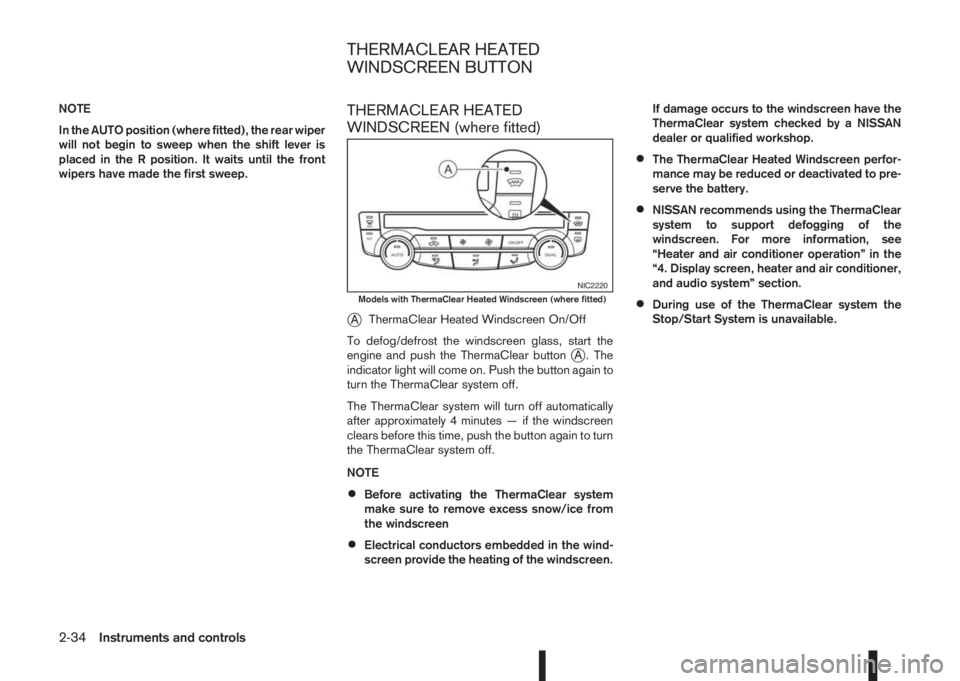
WINDSCREEN (where fitted)
j
AThermaClear Heated Windscreen On/Off
To defog/defrost the windscreen glass, start the
engine and push the ThermaClear button
jA . The
indicator light will come on. Push the button again to
turn the ThermaClear system off.
The ThermaClear system will turn off automatically
after approximately 4 minutes — if the windscreen
clears before this time, push the button again to turn
the ThermaClear system off.
NOTE
•Before activating the ThermaClear system
make sure to remove excess snow/ice from
the windscreen
•Electrical conductors embedded in the wind-
screen provide the heating of the windscreen.If damage occurs to the windscreen have the
ThermaClear system checked by a NISSAN
dealer or qualified workshop.
•The ThermaClear Heated Windscreen perfor-
mance may be reduced or deactivated to pre-
serve the battery.
•NISSAN recommends using the ThermaClear
system to support defogging of the
windscreen. For more information, see
“Heater and air conditioner operation” in the
“4. Display screen, heater and air conditioner,
and audio system” section.
•During use of the ThermaClear system the
Stop/Start System is unavailable.
NIC2220Models with ThermaClear Heated Windscreen (where fitted)
THERMACLEAR HEATED
WINDSCREEN BUTTON
2-34Instruments and controls
Page 93 of 338
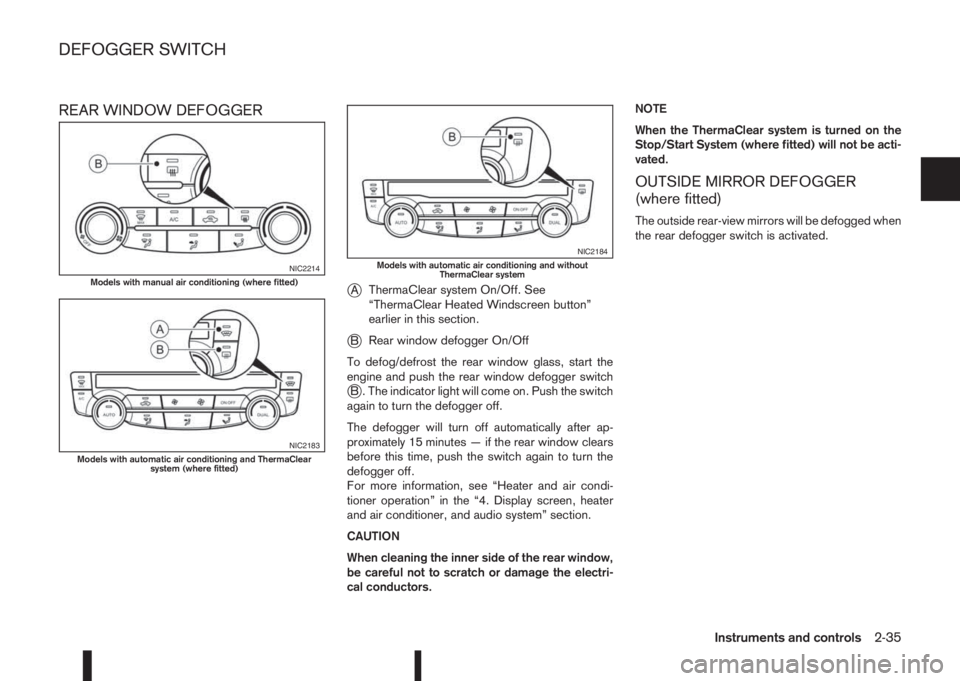
REAR WINDOW DEFOGGER
j
AThermaClear system On/Off. See
“ThermaClear Heated Windscreen button”
earlier in this section.
jBRear window defogger On/Off
To defog/defrost the rear window glass, start the
engine and push the rear window defogger switch
jB . The indicator light will come on. Push the switch
again to turn the defogger off.
The defogger will turn off automatically after ap-
proximately 15 minutes — if the rear window clears
before this time, push the switch again to turn the
defogger off.
For more information, see “Heater and air condi-
tioner operation” in the “4. Display screen, heater
and air conditioner, and audio system” section.
CAUTION
When cleaning the inner side of the rear window,
be careful not to scratch or damage the electri-
cal conductors.NOTE
When the ThermaClear system is turned on the
Stop/Start System (where fitted) will not be acti-
vated.
OUTSIDE MIRROR DEFOGGER
(where fitted)
The outside rear-view mirrors will be defogged when
the rear defogger switch is activated.
NIC2214Models with manual air conditioning (where fitted)
NIC2183Models with automatic air conditioning and ThermaClear
system (where fitted)
NIC2184Models with automatic air conditioning and without
ThermaClear system
DEFOGGER SWITCH
Instruments and controls2-35
Page 100 of 338
WARNING
Take care as the power outlet and plug may be
hot during or immediately after use.
CAUTION
•This power outlet is not designed for use with
a cigarette lighter unit.
•Do not use with accessories that exceed a 12
volt, 120 W (10 A) power draw. Do not use
double adaptors or more than one electrical
accessory.
•Use this power outlet with the engine running
(do not use for extended periods of time with
the engine stopped or idling).
•Avoid using when the air conditioner, head-
lights or rear window defogger are on.
•When not in use, be sure that the cap is
closed. Do not allow water to come into con-
tact with the outlet.
•Before inserting or disconnecting a plug, be
sure to turn off the power switch of the elec-
trical accessory being used or remove the key
from the ignition to turn the Acc power of the
vehicle off.
•Fully push the plug in sufficiently. If sufficient
contact is not made, the plug may overheat or
the internal temperature fuse may blow.
STORAGE TRAYS
WARNING
To help prevent injury in an accident or sudden
stop, do not place sharp objects in the trays.
GLOVE BOX
WARNING
Keep the glove box lid closed while driving to
help prevent injury in an accident or a sudden
stop.
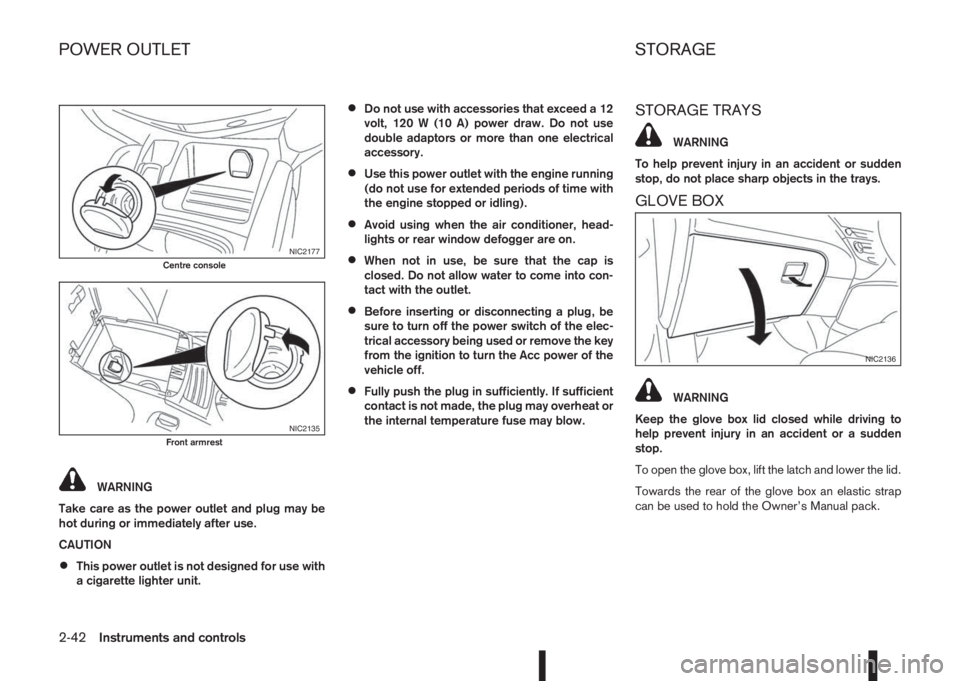
To open the glove box, lift the latch and lower the lid.
Towards the rear of the glove box an elastic strap
can be used to hold the Owner’s Manual pack.
NIC2177Centre console
NIC2135Front armrest
NIC2136
POWER OUTLET STORAGE
2-42Instruments and controls
Page 131 of 338
4Display screen, heater and air conditioner,
and audio systemDisplay screen, heater and air conditioner,
and audio system
Safety precautions ................................................... 4-2
Rear-view monitor (where fitted)............................... 4-2
How to read the displayed lines .......................... 4-3
Rear-view monitor setting.................................... 4-3
Operating tips..................................................... 4-3
Around View Monitor (where fitted) .......................... 4-4
Operation ........................................................... 4-7
Guide lines ......................................................... 4-7
Difference between predictive and actual
distances ............................................................ 4-9
Moving object detection (MOD) .......................... 4-12
How to adjust the screen view ............................ 4-13
Around View Monitor settings ............................. 4-13
Operating tips..................................................... 4-13
Vents ....................................................................... 4-14
Side and centre vents ......................................... 4-14
Heater and air conditioner operation ........................ 4-15
Manual air conditioner......................................... 4-16
Automatic dual zone air conditioner (where
fitted).................................................................. 4-20
Audio system ........................................................... 4-23Audio operation precautions ............................... 4-23
Antenna .............................................................. 4-23
FM AM radio with CD player (where fitted) .............. 4-24
Audio main operation .......................................... 4-25
Radio operation .................................................. 4-25
SETUP button .................................................... 4-26
Compact Disc (CD) operation ............................ 4-28
AUX socket ........................................................ 4-30
USB Memory operation (where fitted) ................. 4-30
iPod® player operation (where fitted) .................. 4-31
Bluetooth® operation.......................................... 4-32
NissanConnect (where fitted)................................... 4-38
Steering wheel switch for audio control (where
fitted) ....................................................................... 4-38
Main operation .................................................... 4-38
Mobile phone integration for FM AM radio with
CD player (where fitted)........................................... 4-39
Bluetooth® mobile phone feature ........................ 4-39
Hands-free telephone control .............................. 4-42
Steering wheel switches (where fitted)................ 4-44
Car phone or CB radio ............................................ 4-45
Page 132 of 338
WARNING
•Do not adjust the heater and air conditioner
controls or audio controls while driving so that
full attention may be given to vehicle opera-
tion.
•If you noticed any foreign objects entering the
system hardware, spilled liquid on the sys-
tem, or noticed smoke or fumes coming out
from the system, or any other unusual opera-
tion is observed, stop using the system imme-
diately and contact the nearest NISSAN dealer
or qualified workshop. Ignoring such condi-
tions may lead to an accident, fire or electric
shock.
•Do not disassemble or modify this system. If
you do, it may lead to an accident, fire, or
electric shock.
CAUTION
Do not use the system when the engine is not
running for extended periods of time to prevent
battery discharge.
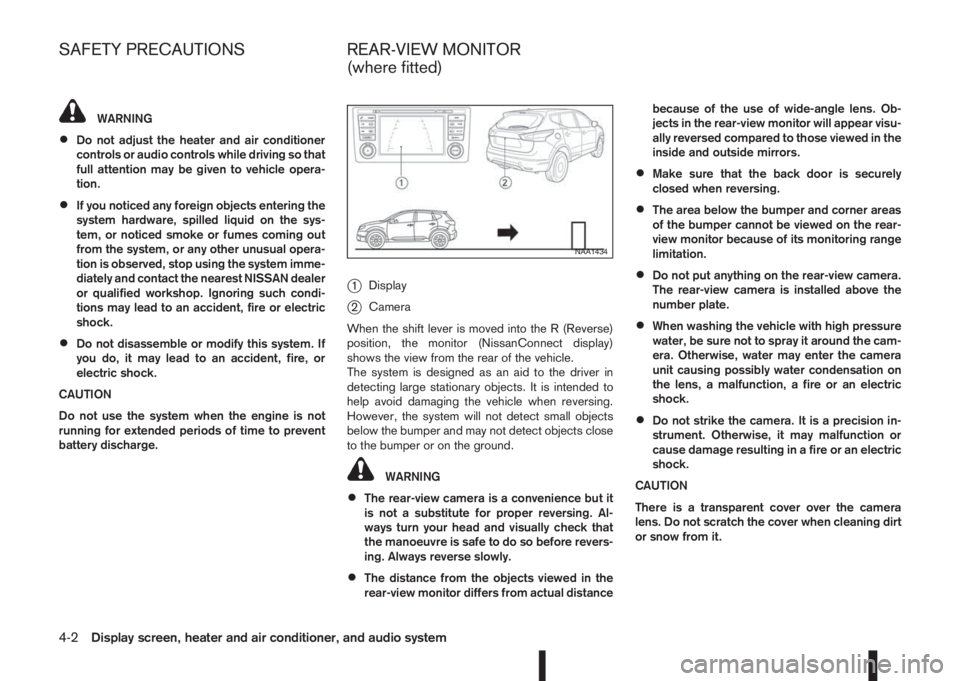
j1Display
j2Camera
When the shift lever is moved into the R (Reverse)
position, the monitor (NissanConnect display)
shows the view from the rear of the vehicle.
The system is designed as an aid to the driver in
detecting large stationary objects. It is intended to
help avoid damaging the vehicle when reversing.
However, the system will not detect small objects
below the bumper and may not detect objects close
to the bumper or on the ground.
WARNING
•The rear-view camera is a convenience but it
is not a substitute for proper reversing. Al-
ways turn your head and visually check that
the manoeuvre is safe to do so before revers-
ing. Always reverse slowly.
•The distance from the objects viewed in the
rear-view monitor differs from actual distancebecause of the use of wide-angle lens. Ob-
jects in the rear-view monitor will appear visu-
ally reversed compared to those viewed in the
inside and outside mirrors.
•Make sure that the back door is securely
closed when reversing.
•The area below the bumper and corner areas
of the bumper cannot be viewed on the rear-
view monitor because of its monitoring range
limitation.
•Do not put anything on the rear-view camera.
The rear-view camera is installed above the
number plate.
•When washing the vehicle with high pressure
water, be sure not to spray it around the cam-
era. Otherwise, water may enter the camera
unit causing possibly water condensation on
the lens, a malfunction, a fire or an electric
shock.
•Do not strike the camera. It is a precision in-
strument. Otherwise, it may malfunction or
cause damage resulting in a fire or an electric
shock.
CAUTION
There is a transparent cover over the camera
lens. Do not scratch the cover when cleaning dirt
or snow from it.
NAA1434
SAFETY PRECAUTIONS REAR-VIEW MONITOR
(where fitted)
4-2Display screen, heater and air conditioner, and audio system
Page 133 of 338
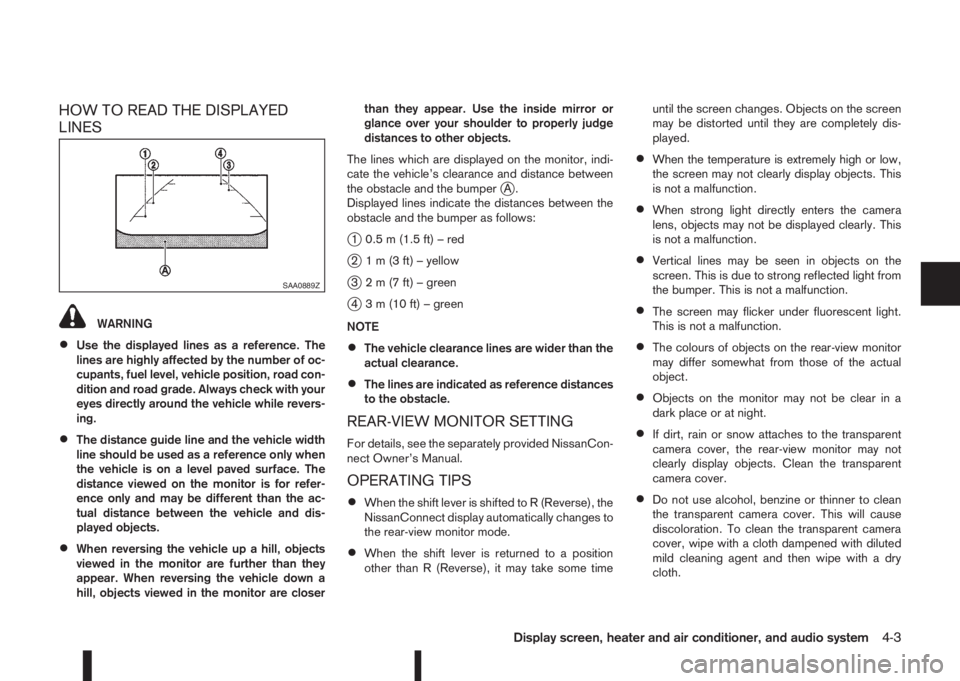
HOW TO READ THE DISPLAYED
LINES
WARNING
•Use the displayed lines as a reference. The
lines are highly affected by the number of oc-
cupants, fuel level, vehicle position, road con-
dition and road grade. Always check with your
eyes directly around the vehicle while revers-
ing.
•The distance guide line and the vehicle width
line should be used as a reference only when
the vehicle is on a level paved surface. The
distance viewed on the monitor is for refer-
ence only and may be different than the ac-
tual distance between the vehicle and dis-
played objects.
•When reversing the vehicle up a hill, objects
viewed in the monitor are further than they
appear. When reversing the vehicle down a
hill, objects viewed in the monitor are closerthan they appear. Use the inside mirror or
glance over your shoulder to properly judge
distances to other objects.
The lines which are displayed on the monitor, indi-
cate the vehicle’s clearance and distance between
the obstacle and the bumper
jA.
Displayed lines indicate the distances between the
obstacle and the bumper as follows:
j1 0.5 m (1.5 ft) – red
j2 1 m (3 ft) – yellow
j3 2 m (7 ft) – green
j4 3 m (10 ft) – green
NOTE
•The vehicle clearance lines are wider than the
actual clearance.
•The lines are indicated as reference distances
to the obstacle.
REAR-VIEW MONITOR SETTING
For details, see the separately provided NissanCon-
nect Owner’s Manual.
OPERATING TIPS
•When the shift lever is shifted to R (Reverse), the
NissanConnect display automatically changes to
the rear-view monitor mode.
•When the shift lever is returned to a position
other than R (Reverse), it may take some timeuntil the screen changes. Objects on the screen
may be distorted until they are completely dis-
played.
•When the temperature is extremely high or low,
the screen may not clearly display objects. This
is not a malfunction.
•When strong light directly enters the camera
lens, objects may not be displayed clearly. This
is not a malfunction.
•Vertical lines may be seen in objects on the
screen. This is due to strong reflected light from
the bumper. This is not a malfunction.
•The screen may flicker under fluorescent light.
This is not a malfunction.
•The colours of objects on the rear-view monitor
may differ somewhat from those of the actual
object.
•Objects on the monitor may not be clear in a
dark place or at night.
•If dirt, rain or snow attaches to the transparent
camera cover, the rear-view monitor may not
clearly display objects. Clean the transparent
camera cover.
•Do not use alcohol, benzine or thinner to clean
the transparent camera cover. This will cause
discoloration. To clean the transparent camera
cover, wipe with a cloth dampened with diluted
mild cleaning agent and then wipe with a dry
cloth.
SAA0889Z
Display screen, heater and air conditioner, and audio system4-3