maintenance NISSAN QASHQAI 2017 Owner´s Manual
[x] Cancel search | Manufacturer: NISSAN, Model Year: 2017, Model line: QASHQAI, Model: NISSAN QASHQAI 2017Pages: 508, PDF Size: 2.68 MB
Page 297 of 508
5-12Starting and driving
passenger car. The vehicle is not
designed for cornering at the same
speeds as conventional passenger
cars. Failure to operate this vehicle
correctly could result in loss of
control and/or a rollover accident.
.Always use tires of the same type,
size, brand, construction (bias, bias-
belted or radial) , and tread pattern
on all four wheels. Install traction
devices on the front wheels when
driving on slippery roads and drive
carefully.
.Be sure to check the brakes imme-
diately after driving in mud or water.
See“Brake system”(P.5-102) for wet
brakes.
.Avoid parking your vehicle on steep
hills. If you get out of the vehicle
and it rolls forward, backward or
sideways, you could be injured.
.Whenever you drive off-road
through sand, mud or water as deep
as the wheel hub, more frequent
maintenance may be required. See
the maintenance schedule shown in
the“9. Maintenance and schedules”
section..Spinning the front wheels on slip-
pery surfaces may cause the AWD
warning message to display and the
AWD system to automatically switch
from the AWD mode to the 2WD
mode. This could reduce traction.
(AWD models)WARNING
Never remove the key or place the
ignition switch in the LOCK position
while driving. The steering wheel will
lock and could cause the driver to lose
control of the vehicle. This could result
in serious vehicle damage or personal
injury.
IGNITION SWITCH (models without
Intelligent Key system)
Page 321 of 508

5-36Starting and driving
JVS1079X
SYSTEM MAINTENANCE
The lane camera unit*Afor the LDW system is
located above the inside mirror.
To keep the proper operation of the LDW
system and prevent a system malfunction, be
sure to observe the following:
.Always keep the windshield clean.
.Do not attach a sticker (including transpar-
ent material) or install an accessory near the
camera unit.
.Do not place reflective materials, such as
white paper or a mirror, on the instrument
panel. The reflection of sunlight may ad-
versely affect the camera unit’s capability ofdetecting the lane markers.
.Do not strike or damage the areas around
the camera unit. Do not touch the camera
lens or remove the screw located on the
camera unit. If the camera unit is damaged
due to an accident, it is recommended that
you visit a NISSAN dealer.
WARNING
Failure to follow the warnings and
instructions for proper use of the LDP
system could result in serious injury or
death.
.The LDP system will not steer the
vehicle or prevent loss of control. It
is the driver’s responsibility to stay
alert, drive safely, keep the vehicle
in the traveling lane, and be in
control of the vehicle at all times.
.The LDP system is primarily in-
tended for use on well-developed
freeways or highways. It may not
detect the lane markers in certain
road, weather, or driving conditions.
LANE DEPARTURE PREVENTION
(LDP) (if so equipped)
Page 326 of 508

Temporary disabled status at high tem-
perature:
If the vehicle is parked in direct sunlight under
high temperature conditions (over approximately
1048F (408C)) and then the LDP system is
turned on, the LDP system may be deactivated
automatically and the following message will
appear on the vehicle information display:
“Unavailable: High Cabin Temperature.” When
the interior temperature is reduced, the system
will resume operating automatically.
SYSTEM MALFUNCTION
If the LDP system malfunctions, it will cancel
automatically. The LDP indicator (orange) will
illuminate and the “Malfunction” warning mes-
sage appear in the display.
If the LDP indicator (orange) illuminates in the
display, pull off the road to a safe location. Turn
the engine off and restart the engine. If the LDP
indicator (orange) continues to illuminate, have
the LDP system checked. It is recommended
that you visit a NISSAN dealer for this service.JVS1079X
SYSTEM MAINTENANCE
The lane camera unit*Afor the LDP system is
located above the inside mirror. To keep the
proper operation of the LDP system and prevent
a system malfunction, be sure to observe the
following:
.Always keep the windshield clean.
.Do not attach a sticker (including transpar-
ent material) or install an accessory near the
camera unit.
.Do not place reflective materials, such as
white paper or a mirror, on the instrument
panel. The reflection of sunlight may ad-
versely affect the camera unit’s capability of
detecting the lane markers..Do not strike or damage the areas around
the camera unit. Do not touch the camera
lens or remove the screw located on the
camera unit. If the camera unit is damaged
due to an accident, it is recommended that
you visit a NISSAN dealer.
Starting and driving5-41
Page 335 of 508

5-50Starting and driving
JVS0649X
SYSTEM MAINTENANCE
The two radar sensors*1for the BSW system
are located near the rear bumper. Always keep
the area near the radar sensors clean.
The radar sensors may be blocked by temporary
ambient conditions such as splashing water,
mist or fog.
The blocked condition may also be caused by
objects such as ice, frost or dirt obstructing the
radar sensors.
Check for and remove objects obstructing the
area around the radar sensors.
Do not attach stickers (including transparent
material) , install accessories or apply additionalpaint near the radar sensors.
Do not strike or damage the area around the
radar sensors.
See a NISSAN dealer or other authorized repair
shop if the area around the radar sensors is
damaged due to a collision.
Radio frequency statement
For USA
FCC : OAYSRR3B
This device complies with part 15 of the
FCC Rules. Operation is subject to the
following two conditions:
(1) This device may not cause harmful
interference, and (2) this device must
accept any interference received, including
interference that may cause undesired
operation.
FCC Warning
Changes or modifications not expressly
approved by the party responsible for
compliance could void the user’s authority
to operate the equipment
For Canada
Applicable law: Canada 310
This device complies with Industry Canada
licence-exempt RSS standard(s) . Opera-
tion is subject to the following two condi-tions: (1) this device may not cause
interference, and (2) this device must
accept any interference, including interfer-
ence that may cause undesired operation
of the device.
Frequency bands: 24.05 – 24.25GHz
Output power: less than 20 milliwatts
Page 342 of 508
JVS0649X
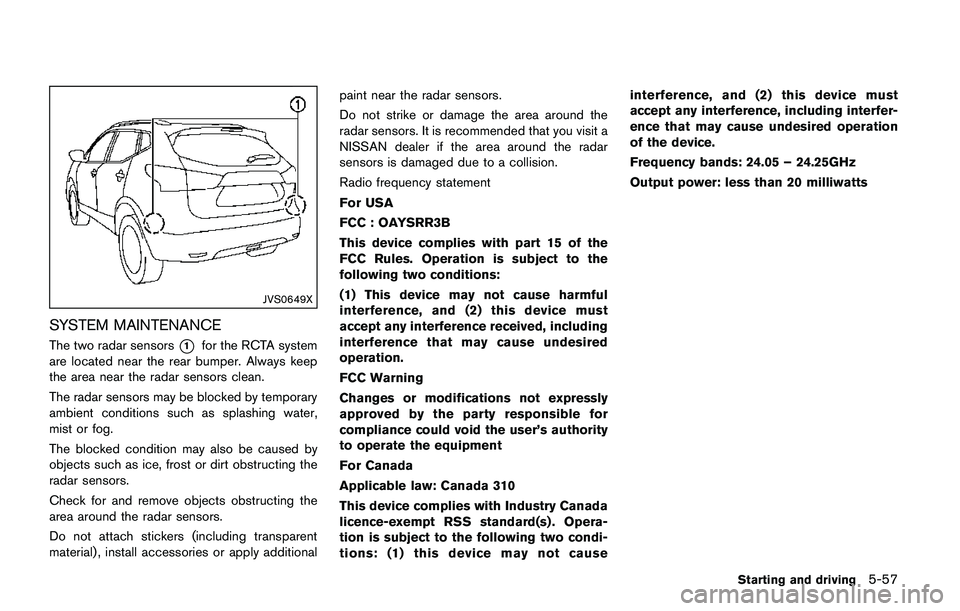
SYSTEM MAINTENANCE
The two radar sensors*1for the RCTA system
are located near the rear bumper. Always keep
the area near the radar sensors clean.
The radar sensors may be blocked by temporary
ambient conditions such as splashing water,
mist or fog.
The blocked condition may also be caused by
objects such as ice, frost or dirt obstructing the
radar sensors.
Check for and remove objects obstructing the
area around the radar sensors.
Do not attach stickers (including transparent
material) , install accessories or apply additionalpaint near the radar sensors.
Do not strike or damage the area around the
radar sensors. It is recommended that you visit a
NISSAN dealer if the area around the radar
sensors is damaged due to a collision.
Radio frequency statement
For USA
FCC : OAYSRR3B
This device complies with part 15 of the
FCC Rules. Operation is subject to the
following two conditions:
(1) This device may not cause harmful
interference, and (2) this device must
accept any interference received, including
interference that may cause undesired
operation.
FCC Warning
Changes or modifications not expressly
approved by the party responsible for
compliance could void the user’s authority
to operate the equipment
For Canada
Applicable law: Canada 310
This device complies with Industry Canada
licence-exempt RSS standard(s) . Opera-
tion is subject to the following two condi-
tions: (1) this device may not causeinterference, and (2) this device must
accept any interference, including interfer-
ence that may cause undesired operation
of the device.
Frequency bands: 24.05 – 24.25GHz
Output power: less than 20 milliwatts
Starting and driving5-57
Page 360 of 508
dealer for this service.
JVS1041X
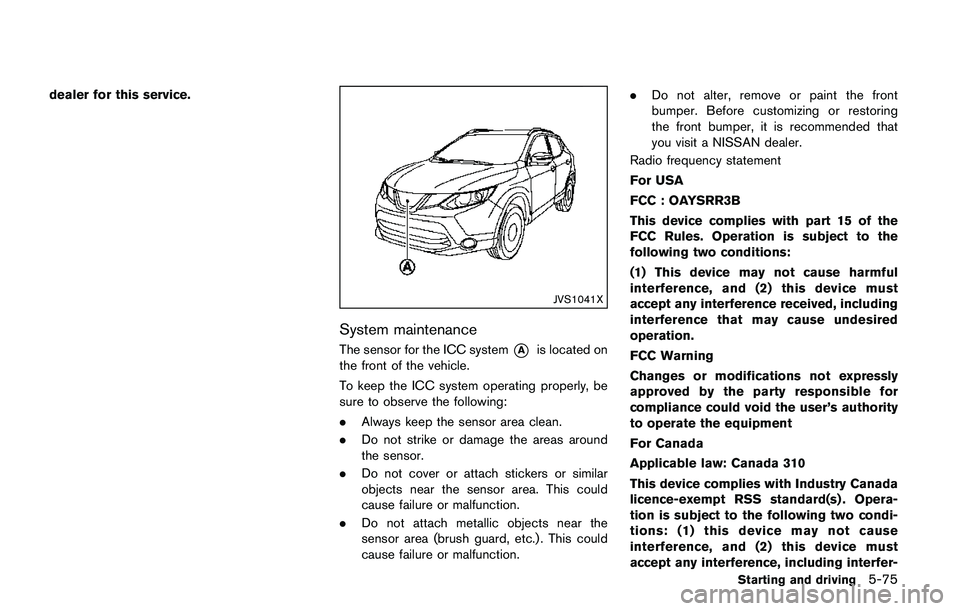
System maintenance
The sensor for the ICC system*Ais located on
the front of the vehicle.
To keep the ICC system operating properly, be
sure to observe the following:
.Always keep the sensor area clean.
.Do not strike or damage the areas around
the sensor.
.Do not cover or attach stickers or similar
objects near the sensor area. This could
cause failure or malfunction.
.Do not attach metallic objects near the
sensor area (brush guard, etc.) . This could
cause failure or malfunction..Do not alter, remove or paint the front
bumper. Before customizing or restoring
the front bumper, it is recommended that
you visit a NISSAN dealer.
Radio frequency statement
For USA
FCC : OAYSRR3B
This device complies with part 15 of the
FCC Rules. Operation is subject to the
following two conditions:
(1) This device may not cause harmful
interference, and (2) this device must
accept any interference received, including
interference that may cause undesired
operation.
FCC Warning
Changes or modifications not expressly
approved by the party responsible for
compliance could void the user’s authority
to operate the equipment
For Canada
Applicable law: Canada 310
This device complies with Industry Canada
licence-exempt RSS standard(s) . Opera-
tion is subject to the following two condi-
tions: (1) this device may not cause
interference, and (2) this device must
accept any interference, including interfer-
Starting and driving5-75
Page 370 of 508
warning light (orange) will illuminate and the
“Unavailable: Front Radar Obstruction” warning
message will appear in the vehicle information
display.
.The sensor area on the front of the vehicle is
covered with dirt or is obstructed.
Action to take
If the warning light (orange) comes on, stop the
vehicle in a safe place and turn the engine off.
Clean the radar cover on the front of the vehicle
with a soft cloth, and restart the engine. If the
warning light continues to illuminate, have the
FEB system checked. It is recommended that
you visit a NISSAN dealer for this service.
.When driving on roads with limited road
structures or buildings (for example, long
bridges, deserts, snow fields, driving next to
long walls) .
Action to take
When the above conditions no longer exist, the
FEB system will resume automatically.
Condition C
When the Vehicle Dynamic Control (VDC)
system is OFF, the FEB brake will not operate.
In this case only visible and audible warning
operates. The FEB system warning light (or-
ange) will illuminate.
Action to takeWhen the VDC system is ON, the FEB system
will resume automatically.
SYSTEM MALFUNCTION
If the FEB system malfunctions, it will be turned
off automatically, a chime will sound, the FEB
system warning light (orange) will illuminate and
the “Malfunction” warning message will appear
in the vehicle information display.
Action to take:
If the FEB system warning light (orange) comes
on, stop the vehicle in a safe location. Turn the
engine off and restart the engine. If the warning
light continues to illuminate, have the FEB
system checked. It is recommended that you
visit a NISSAN dealer for this service.
JVS1041X
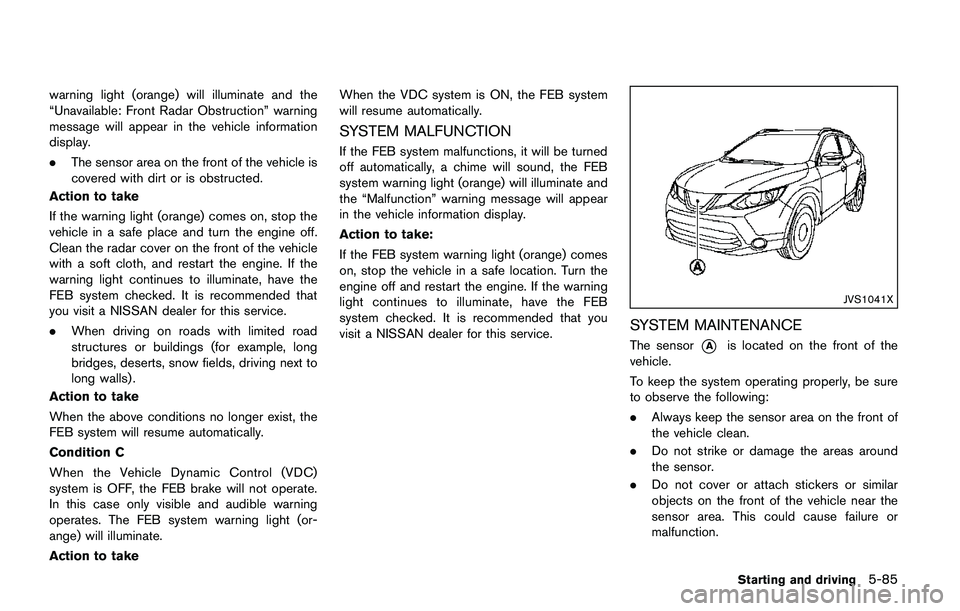
SYSTEM MAINTENANCE
The sensor*Ais located on the front of the
vehicle.
To keep the system operating properly, be sure
to observe the following:
.Always keep the sensor area on the front of
the vehicle clean.
.Do not strike or damage the areas around
the sensor.
.Do not cover or attach stickers or similar
objects on the front of the vehicle near the
sensor area. This could cause failure or
malfunction.
Starting and driving5-85
Page 379 of 508
5-94Starting and driving
JVS1042X
SYSTEM MAINTENANCE
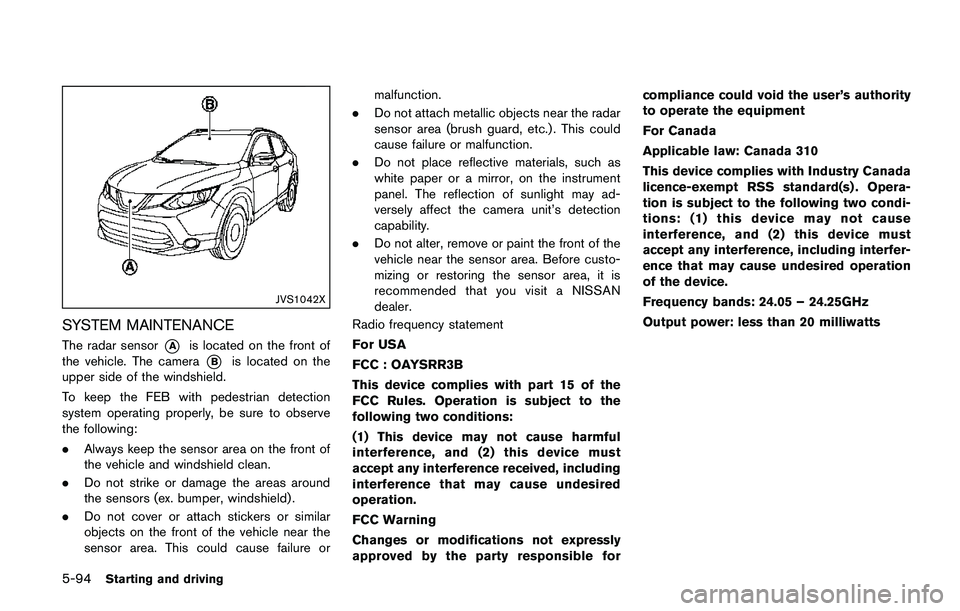
The radar sensor*Ais located on the front of
the vehicle. The camera
*Bis located on the
upper side of the windshield.
To keep the FEB with pedestrian detection
system operating properly, be sure to observe
the following:
.Always keep the sensor area on the front of
the vehicle and windshield clean.
.Do not strike or damage the areas around
the sensors (ex. bumper, windshield) .
.Do not cover or attach stickers or similar
objects on the front of the vehicle near the
sensor area. This could cause failure ormalfunction.
.Do not attach metallic objects near the radar
sensor area (brush guard, etc.) . This could
cause failure or malfunction.
.Do not place reflective materials, such as
white paper or a mirror, on the instrument
panel. The reflection of sunlight may ad-
versely affect the camera unit’s detection
capability.
.Do not alter, remove or paint the front of the
vehicle near the sensor area. Before custo-
mizing or restoring the sensor area, it is
recommended that you visit a NISSAN
dealer.
Radio frequency statement
For USA
FCC : OAYSRR3B
This device complies with part 15 of the
FCC Rules. Operation is subject to the
following two conditions:
(1) This device may not cause harmful
interference, and (2) this device must
accept any interference received, including
interference that may cause undesired
operation.
FCC Warning
Changes or modifications not expressly
approved by the party responsible forcompliance could void the user’s authority
to operate the equipment
For Canada
Applicable law: Canada 310
This device complies with Industry Canada
licence-exempt RSS standard(s) . Opera-
tion is subject to the following two condi-
tions: (1) this device may not cause
interference, and (2) this device must
accept any interference, including interfer-
ence that may cause undesired operation
of the device.
Frequency bands: 24.05 – 24.25GHz
Output power: less than 20 milliwatts
Page 424 of 508
8 Do-it-yourself
Maintenance precautions ........................................................ 8-2
Engine compartment check locations .................................. 8-3
MR20DD engine model ..................................................... 8-4
Engine cooling system ............................................................. 8-4
Checking engine coolant level ......................................... 8-5
Changing engine coolant .................................................. 8-6
Engine oil .................................................................................... 8-6
Checking engine oil level .................................................. 8-6
Changing engine oil and filter .......................................... 8-6
Continuously Variable Transmission (CVT) fluid ............... 8-9
Brake and clutch (if so equipped) fluid ............................... 8-9
Window washer fluid ............................................................ 8-10
Battery ....................................................................................... 8-11
Jump starting ..................................................................... 8-12
Variable voltage control system .......................................... 8-13
Drive belt .................................................................................. 8-13
Spark plugs ............................................................................. 8-14
Replacing spark plugs .................................................... 8-14
Air cleaner ................................................................................ 8-14Windshield wiper blades ..................................................... 8-15
Cleaning ........................................................................... 8-15
Replacing ......................................................................... 8-16
Rear window wiper blade ................................................... 8-17
Brakes ...................................................................................... 8-17
Self-adjusting brakes .................................................... 8-17
Brake pad wear warning .............................................. 8-17
Fuses ........................................................................................ 8-18
Engine compartment ..................................................... 8-18
Passenger compartment .............................................. 8-20
Key fob battery replacement .............................................. 8-21
Intelligent Key battery replacement ................................... 8-23
Lights ........................................................................................ 8-25
Headlights ........................................................................ 8-25
Exterior and interior lights ............................................ 8-27
Wheels and tires ................................................................... 8-29
Tire pressure ................................................................... 8-29
Tire labeling ..................................................................... 8-33
Types of tires ................................................................... 8-35
Tire chains ....................................................................... 8-36
Changing wheels and tires .......................................... 8-37
Page 425 of 508
8-2Do-it-yourself
When performing any inspection or mainte-
nance work on your vehicle, always take care
to prevent serious accidental injury to yourself or
damage to the vehicle. The following are general
precautions which should be closely observed.
WARNING
.Park the vehicle on a level surface,
apply the parking brake securely
and block the wheels to prevent
the vehicle from moving. Move the
shift lever to the P (Park) position
(CVT model) or the shift lever to the
N (Neutral) position (MT model) .
.Be sure the ignition switch is in the
OFF or LOCK position when per-
forming any parts replacement or
repairs.
.If you must work with the engine
running, keep your hands, clothing,
hair and tools away from moving
fans, belts and any other moving
parts.
.It is advisable to secure or remove
any loose clothing and remove any
jewelry, such as rings, watches, etc.
before working on your vehicle..Always wear eye protection when-
ever you work on your vehicle.
.If you must run the engine in an
enclosed space such as a garage, be
sure there is proper ventilation for
exhaust gases to escape.
.Never get under the vehicle while it
is supported only by a jack. If it is
necessary to work under the vehicle,
support it with safety stands.
.Because the fuel lines are under
high pressure even when the engine
is off, it is recommended you visit a
NISSAN dealer for service of the
fuel filter or fuel lines.
.Do not work under the hood while
the engine is hot. Always turn off
the engine and wait until it cools
down.
.If you must work with the engine
running, keep your hands, clothing,
hair and tools away from moving
fans, belts and any other moving
parts.
.Keep smoking materials, flame and
sparks away from fuel and the
battery..On gasoline engine models with the
Multiport Fuel Injection (MFI) sys-
tem, the fuel filter and fuel lines
should be serviced because the fuel
lines are under high pressure even
when the engine is turned off. It is
recommended that you visit a
NISSAN dealer for this service.
.Your vehicle is equipped with an
automatic engine cooling fan. It may
come on at any time without warn-
ing, even if the ignition switch is in
the OFF position and the engine is
not running. To avoid injury, always
disconnect the negative battery
cable before working near the fan.
.Avoid direct contact with used en-
gine oil and coolant. Improperly
disposed engine oil, engine coolant,
and/or other vehicle fluids can hurt
the environment. Always conform to
local regulations for disposal of
vehicle fluids.
MAINTENANCE PRECAUTIONS