maintenance NISSAN QASHQAI 2017 Owner´s Manual
[x] Cancel search | Manufacturer: NISSAN, Model Year: 2017, Model line: QASHQAI, Model: NISSAN QASHQAI 2017Pages: 508, PDF Size: 2.68 MB
Page 125 of 508
2-46Instruments and controls
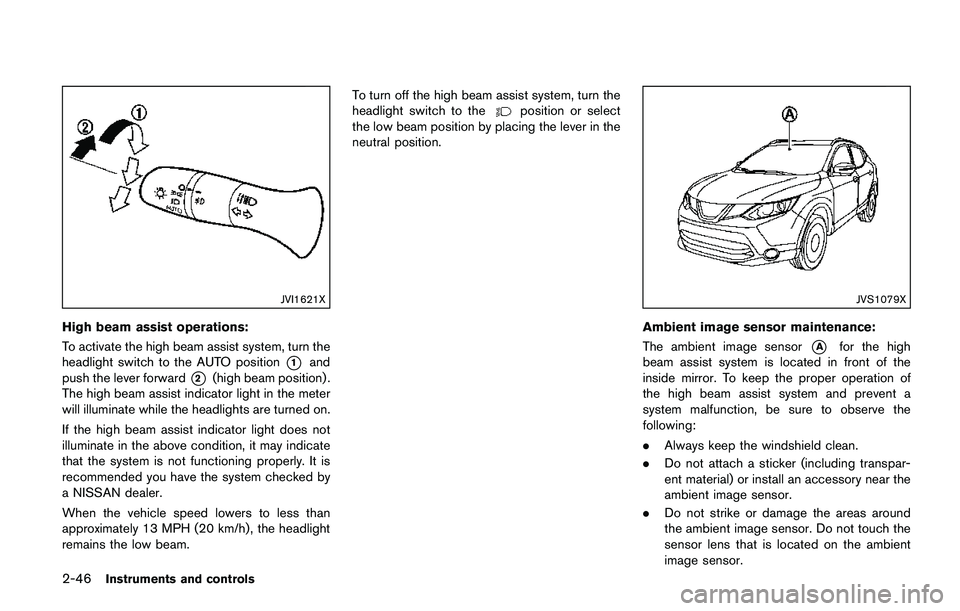
JVI1621X
High beam assist operations:
To activate the high beam assist system, turn the
headlight switch to the AUTO position
*1and
push the lever forward
*2(high beam position) .
The high beam assist indicator light in the meter
will illuminate while the headlights are turned on.
If the high beam assist indicator light does not
illuminate in the above condition, it may indicate
that the system is not functioning properly. It is
recommended you have the system checked by
a NISSAN dealer.
When the vehicle speed lowers to less than
approximately 13 MPH (20 km/h) , the headlight
remains the low beam.To turn off the high beam assist system, turn the
headlight switch to the
position or select
the low beam position by placing the lever in the
neutral position.
JVS1079X
Ambient image sensor maintenance:
The ambient image sensor
*Afor the high
beam assist system is located in front of the
inside mirror. To keep the proper operation of
the high beam assist system and prevent a
system malfunction, be sure to observe the
following:
.Always keep the windshield clean.
.Do not attach a sticker (including transpar-
ent material) or install an accessory near the
ambient image sensor.
.Do not strike or damage the areas around
the ambient image sensor. Do not touch the
sensor lens that is located on the ambient
image sensor.
Page 182 of 508
4 Heater, air conditioner, audio and phone sys-
tems
Safety note .................................................................................. 4-3
Control buttons and functions (models with
navigation system) .................................................................... 4-3
How to use touch screen ................................................. 4-4
How to use the BACK button ......................................... 4-5
How to use the APPS·i button ........................................ 4-5
How to use brightness control button ........................... 4-8
How to use the POWER/VOLUME dial ....................... 4-8
How to use the ENTER
AUDIO/TUNE·SCROLL dial ............................................. 4-8
RearView Monitor (if so equipped) ...................................... 4-8
RearView Monitor system operation .............................. 4-9
How to read the displayed lines ..................................... 4-9
Difference between predictive and
actual distances ................................................................... 4-9
Adjusting the screen ....................................................... 4-11
RearView Monitor system limitations .......................... 4-12
System maintenance ....................................................... 4-13
Around View
ŠMonitor (if so equipped) .......................... 4-14
Around ViewŠMonitor system operation ................... 4-15
Difference between predictive and
actual distances ................................................................ 4-18
How to park with predictive course lines .................. 4-20
How to switch the display ............................................. 4-21
Adjusting the screen ....................................................... 4-21Around View
ŠMonitor system limitations ................ 4-22
System maintenance ..................................................... 4-24
Moving Object Detection (MOD) (if so equipped) ...... 4-25
MOD system operation ................................................ 4-26
Turning MOD on and off .............................................. 4-27
MOD system limitations ............................................... 4-27
System maintenance ..................................................... 4-28
Ventilators ................................................................................ 4-29
Center ventilators ........................................................... 4-29
Side ventilators ............................................................... 4-29
Rear ventilators (if so equipped) ............................... 4-29
Heater and air conditioner .................................................. 4-30
Manual air conditioner and heater ............................. 4-31
Automatic air conditioner and heater ........................ 4-34
Operating tips (for automatic air conditioner) ........ 4-37
Servicing air conditioner .............................................. 4-37
Audio system .......................................................................... 4-38
Audio operation precautions ....................................... 4-38
FM-AM radio with Compact Disc (CD) player ....... 4-48
FM-AM-SAT radio with Compact Disc (CD) player
(Type A) (if so equipped) ............................................. 4-55
FM-AM-SAT radio with Compact Disc (CD) player
(Type B) (if so equipped) ............................................ 4-63
USB (Universal Serial Bus) connection port .......... 4-72
AUX (Auxiliary) input jack ............................................. 4-73
Page 186 of 508
.123/ABC:
Changes the keyboard between numbers
and alphabets.
.Space:
Inserts a space.
.Delete:
Deletes the last inputted character with one
touch. Touch and hold the “Delete” key to
delete all of the characters.
.OK:
Completes the character input.
Touch screen maintenance
If you clean the touch screen, use a dry, soft
cloth. If additional cleaning is necessary, use a
small amount of neutral detergent with a soft
cloth. Never spray the screen with water or
detergent. Dampen the cloth first and then wipe
the screen.
HOW TO USE THE BACK BUTTON
Push the BACK button to return to the previous
screen.
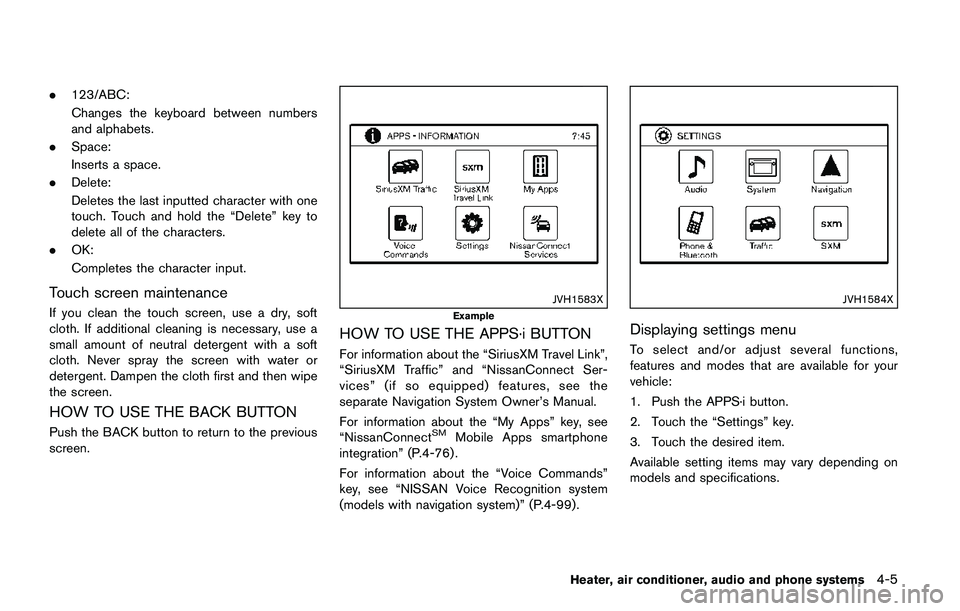
JVH1583X
Example
HOW TO USE THE APPS·i BUTTON
For information about the “SiriusXM Travel Link”,
“SiriusXM Traffic” and “NissanConnect Ser-
vices” (if so equipped) features, see the
separate Navigation System Owner’s Manual.
For information about the “My Apps” key, see
“NissanConnect
SMMobile Apps smartphone
integration” (P.4-76) .
For information about the “Voice Commands”
key, see “NISSAN Voice Recognition system
(models with navigation system)” (P.4-99).
JVH1584X
Displaying settings menu
To select and/or adjust several functions,
features and modes that are available for your
vehicle:
1. Push the APPS·i button.
2. Touch the “Settings” key.
3. Touch the desired item.
Available setting items may vary depending on
models and specifications.
Heater, air conditioner, audio and phone systems4-5
Page 194 of 508
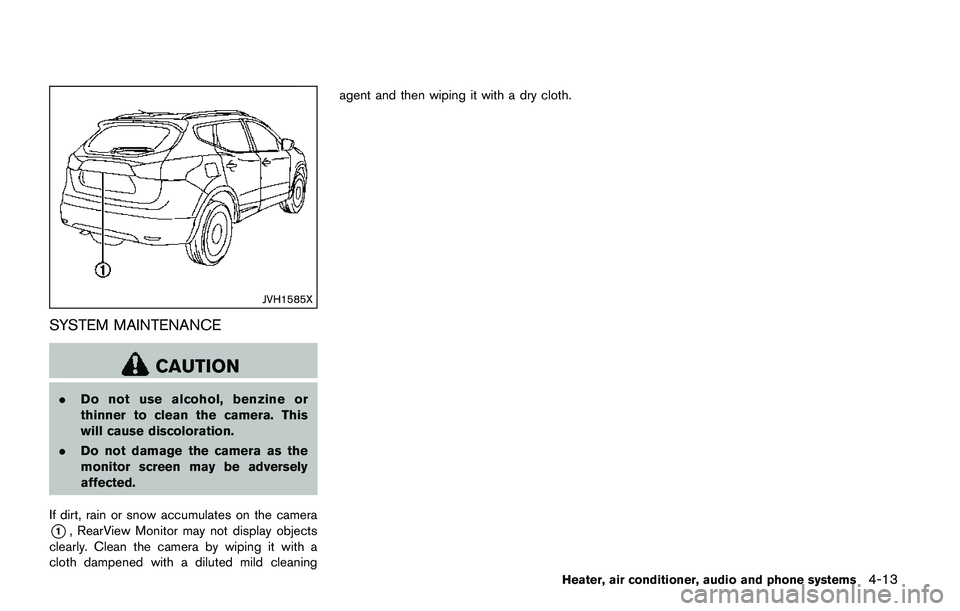
JVH1585X
SYSTEM MAINTENANCE
CAUTION
.Do not use alcohol, benzine or
thinner to clean the camera. This
will cause discoloration.
.Do not damage the camera as the
monitor screen may be adversely
affected.
If dirt, rain or snow accumulates on the camera
*1, RearView Monitor may not display objects
clearly. Clean the camera by wiping it with a
cloth dampened with a diluted mild cleaningagent and then wiping it with a dry cloth.
Heater, air conditioner, audio and phone systems4-13
Page 205 of 508
4-24Heater, air conditioner, audio and phone systems
JVH1588X
SYSTEM MAINTENANCE
CAUTION
.Do not use alcohol, benzine or
thinner to clean the camera. This
will cause discoloration.
.Do not damage the camera as the
monitor screen may be adversely
affected.
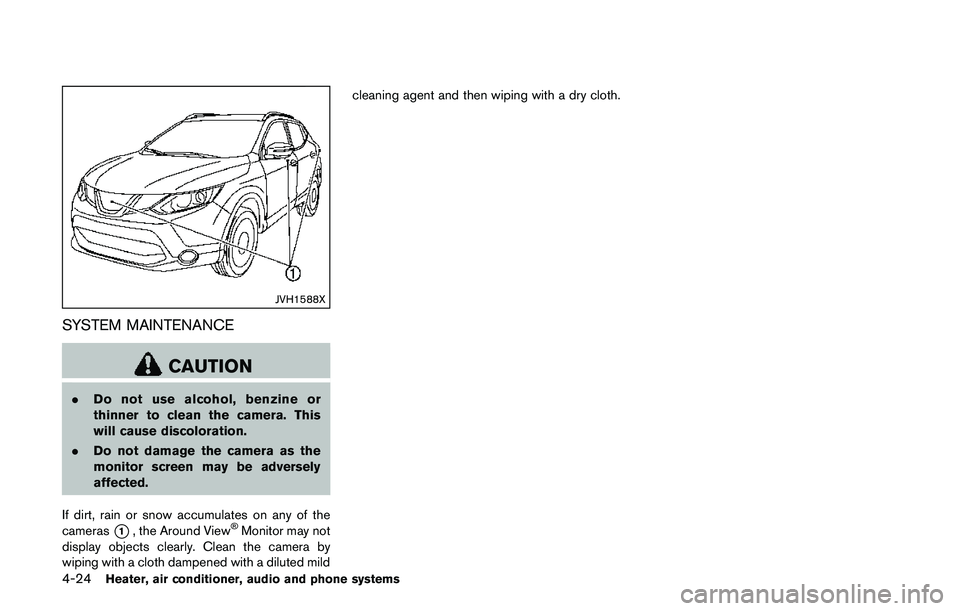
If dirt, rain or snow accumulates on any of the
cameras
*1, the Around ViewŠMonitor may not
display objects clearly. Clean the camera by
wiping with a cloth dampened with a diluted mildcleaning agent and then wiping with a dry cloth.
Page 209 of 508
4-28Heater, air conditioner, audio and phone systems
.When the temperature is extremely
high or low, the screen may not
display objects clearly. This is not a
malfunction.
JVH1588X
SYSTEM MAINTENANCE
CAUTION
.Do not use alcohol, benzine or
thinner to clean the camera. This
will cause discoloration.
.Do not damage the camera as the
monitor screen may be adversely
affected.
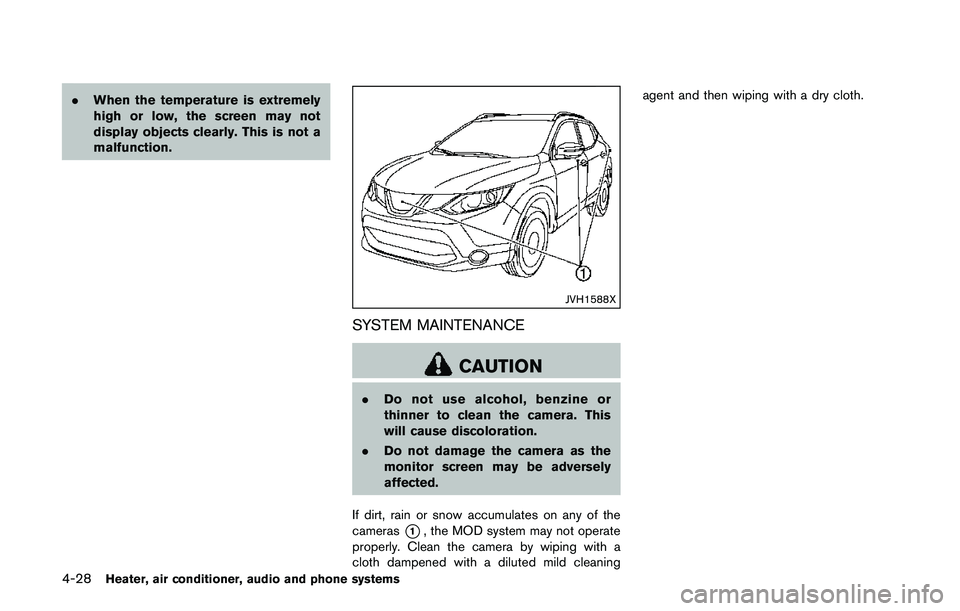
If dirt, rain or snow accumulates on any of the
cameras
*1, the MOD system may not operate
properly. Clean the camera by wiping with a
cloth dampened with a diluted mild cleaningagent and then wiping with a dry cloth.
Page 218 of 508
JVH0727X
JVH0728X
OPERATING TIPS (for automatic air
conditioner)
When the engine coolant temperature and
outside air temperature are low, the air flow
from the foot outlets may not operate for a
maximum of 150 seconds. However, this is not a
malfunction. After the coolant temperature
warms up, air flow from the foot outlets will
operate normally.
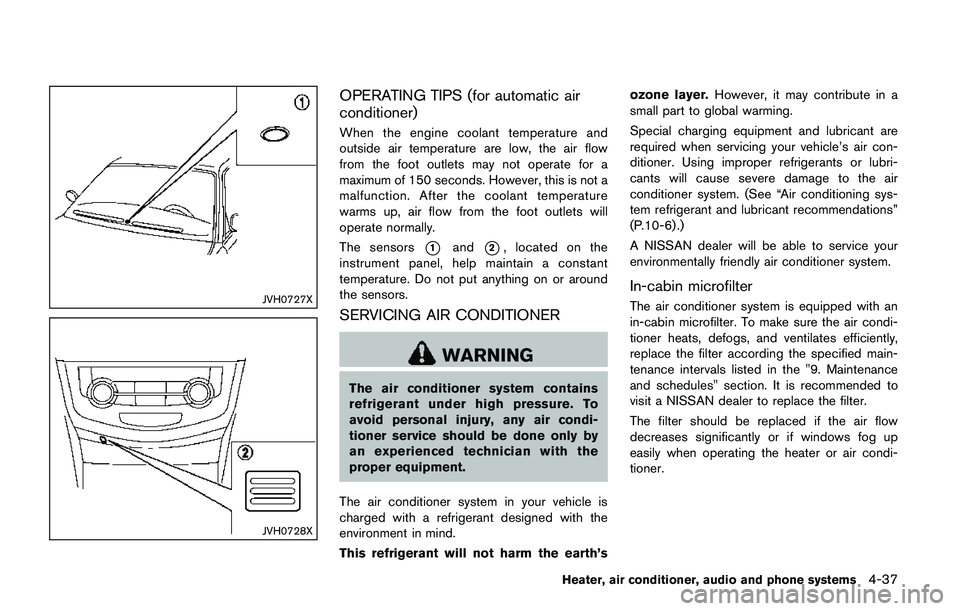
The sensors
*1and*2, located on the
instrument panel, help maintain a constant
temperature. Do not put anything on or around
the sensors.
SERVICING AIR CONDITIONER
WARNING
The air conditioner system contains
refrigerant under high pressure. To
avoid personal injury, any air condi-
tioner service should be done only by
an experienced technician with the
proper equipment.
The air conditioner system in your vehicle is
charged with a refrigerant designed with the
environment in mind.
This refrigerant will not harm the earth’sozone layer.However, it may contribute in a
small part to global warming.
Special charging equipment and lubricant are
required when servicing your vehicle’s air con-
ditioner. Using improper refrigerants or lubri-
cants will cause severe damage to the air
conditioner system. (See “Air conditioning sys-
tem refrigerant and lubricant recommendations”
(P.10-6) .)
A NISSAN dealer will be able to service your
environmentally friendly air conditioner system.
In-cabin microfilter
The air conditioner system is equipped with an
in-cabin microfilter. To make sure the air condi-
tioner heats, defogs, and ventilates efficiently,
replace the filter according the specified main-
tenance intervals listed in the "9. Maintenance
and schedules" section. It is recommended to
visit a NISSAN dealer to replace the filter.
The filter should be replaced if the air flow
decreases significantly or if windows fog up
easily when operating the heater or air condi-
tioner.
Heater, air conditioner, audio and phone systems4-37
Page 286 of 508
5 Starting and driving
Precautions when starting and driving ................................ 5-4
Exhaust gas (carbon monoxide) ...................................... 5-4
Three-way catalyst .............................................................. 5-5
Tire Pressure Monitoring System (TPMS) .................... 5-5
Avoiding collision and rollover ......................................... 5-8
On-pavement and off-road driving precautions .......... 5-8
Off-road recovery ................................................................ 5-9
Rapid air pressure loss ...................................................... 5-9
Drinking alcohol/drugs and driving .............................. 5-10
Driving safety precautions .............................................. 5-10
Ignition switch (models without Intelligent
Key system) ............................................................................. 5-12
Continuously Variable Transmission (CVT) ................ 5-13
Manual Transmission (MT) ............................................. 5-13
Key positions ..................................................................... 5-14
Push-button ignition switch (model with Intelligent
Key system) ............................................................................. 5-14
Operating range for engine start function ................. 5-14
Push-button ignition switch operation ........................ 5-15
Push-button ignition switch positions ......................... 5-16
Emergency engine shut off ............................................ 5-16
Intelligent Key battery discharge .................................. 5-16
Before starting the engine ................................................... 5-17
Starting the engine (model without Intelligent
Key system) ............................................................................. 5-17Starting the engine (model with Intelligent
Key system) ............................................................................ 5-18
Remote engine start (if so equipped) ...................... 5-19
Driving the vehicle ................................................................. 5-20
Continuously Variable Transmission (CVT) ............. 5-20
Manual Transmission (MT) ........................................... 5-25
Parking brake .......................................................................... 5-26
Pedal type ........................................................................ 5-27
Switch type (models with electronic parking
brake system) ................................................................. 5-27
ECO mode system ............................................................... 5-29
ECO Pedal Guide function ......................................... 5-29
Ambient ECO .................................................................. 5-30
ECO Drive Report ......................................................... 5-31
Lane Departure Warning (LDW) (if so equipped) ....... 5-31
LDW system operation ................................................. 5-32
How to enable/disable the LDW system ................. 5-33
LDW system limitations ................................................ 5-34
System temporarily unavailable .................................. 5-35
System malfunction ....................................................... 5-35
System maintenance ..................................................... 5-36
Lane Departure Prevention (LDP) (if so equipped) ..... 5-36
LDP system operation .................................................. 5-37
How to enable/disable the LDP system .................. 5-38
LDP system limitations ................................................. 5-39
Page 287 of 508
System temporarily unavailable ..................................... 5-40
System malfunction .......................................................... 5-41
System maintenance ....................................................... 5-41
Blind Spot Warning (BSW) (if so equipped) ................. 5-42
BSW system operation .................................................. 5-43
How to enable/disable the BSW system .................. 5-44
BSW system limitations ................................................. 5-45
BSW driving situations ................................................... 5-46
System temporarily unavailable ..................................... 5-49
System malfunction .......................................................... 5-49
System maintenance ....................................................... 5-50
Rear Cross Traffic Alert (RCTA) (if so equipped) ......... 5-51
RCTA system operation .................................................. 5-51
How to enable/disable the RCTA system ................. 5-53
RCTA system limitations ................................................. 5-54
System temporarily unavailable ..................................... 5-56
System malfunction .......................................................... 5-56
System maintenance ....................................................... 5-57
Cruise control (if so equipped) .......................................... 5-58
Precautions on cruise control ....................................... 5-58
Cruise control operations ............................................... 5-58
Intelligent Cruise Control (ICC) (if so equipped) .......... 5-60
How to select the cruise control mode ...................... 5-62
Vehicle-to-vehicle distance control mode .................. 5-62
Conventional (fixed speed) cruise control mode ..... 5-76
Forward Emergency Braking (FEB) (if so equipped) ..... 5-80
FEB system operation ..................................................... 5-81
Turning the FEB system ON/OFF ................................ 5-82
FEB system limitations .................................................... 5-83System temporarily unavailable .................................. 5-84
System malfunction ....................................................... 5-85
System maintenance ..................................................... 5-85
Forward Emergency Braking (FEB) with pedestrian
detection system ................................................................... 5-86
FEB with pedestrian detection
system operation ............................................................ 5-87
Turning the FEB with pedestrian detection
system ON/OFF ............................................................. 5-89
FEB with pedestrian detection
system limitations ........................................................... 5-89
System temporarily unavailable .................................. 5-92
System malfunction ....................................................... 5-93
System maintenance ..................................................... 5-94
Break-in schedule ................................................................. 5-95
Fuel Efficient Driving Tips ................................................... 5-95
Increasing fuel economy ...................................................... 5-96
All-Wheel Drive (AWD) (if so equipped) ........................ 5-96
AWD LOCK switch operations .................................. 5-98
Parking/parking on hills ..................................................... 5-100
Electric power steering ..................................................... 5-101
Brake system ....................................................................... 5-102
Braking precautions ................................................... 5-102
Brake assist ......................................................................... 5-102
Brake assist .................................................................. 5-102
Anti-lock Braking System (ABS) ............................ 5-102
Vehicle Dynamic Control (VDC) system ...................... 5-104
Chassis control ................................................................... 5-106
Active Trace Control .................................................. 5-106
Page 290 of 508
THREE-WAY CATALYST
The three-way catalyst is an emission control
device installed in the exhaust system. Exhaust
gases in the three-way catalyst are burned at
high temperatures to help reduce pollutants.
WARNING
.The exhaust gas and the exhaust
system are very hot. Keep people,
animals and flammable materials
away from the exhaust system com-
ponents.
.Do not stop or park the vehicle over
flammable materials such as dry
grass, wastepaper or rags. They
may ignite and cause a fire.
CAUTION
.Do not use leaded gasoline. Depos-
its from leaded gasoline will ser-
iously reduce the three-way
catalyst’s ability to help reduce ex-
haust pollutants.
.Keep your engine tuned up. Mal-
functions in the ignition, fuel injec-tion, or electrical systems can cause
overrich fuel flow into the three-way
catalyst, causing it to overheat. Do
not keep driving if the engine mis-
fires, or if noticeable loss of perfor-
mance or other unusual operating
conditions are detected. Have the
vehicle inspected. It is recom-
mended you visit a NISSAN dealer
for this service.
.Avoid driving with an extremely low
fuel level. Running out of fuel could
cause the engine to misfire, dama-
ging the three-way catalyst.
.Do not race the engine while warm-
ing it up.
.Do not push or tow your vehicle to
start the engine.
TIRE PRESSURE MONITORING SYS-
TEM (TPMS)
Each tire, including the spare (if provided) ,
should be checked monthly when cold and
inflated to the inflation pressure recommended
by the vehicle manufacturer on the vehicle
placard or tire inflation pressure label. (If your
vehicle has tires of a different size than the size
indicated on the vehicle placard or tire inflation
pressure label, you should determine the propertire inflation pressure for those tires.)
As an added safety feature, your vehicle has
been equipped with a Tire Pressure Monitoring
System (TPMS) that illuminates a low tire
pressure telltale when one or more of your tires
is significantly under-inflated. Accordingly, when
the low tire pressure telltale illuminates, you
should stop and check your tires as soon as
possible, and inflate them to the proper pres-
sure. Driving on a significantly under-inflated tire
causes the tire to overheat and can lead to tire
failure. Under-inflation also reduces fuel effi-
ciency and tire tread life, and may affect the
vehicle’s handling and stopping ability.
Please note that the TPMS is not a substitute for
proper tire maintenance, and it is the driver’s
responsibility to maintain correct tire pressure,
even if under-inflation has not reached the level
to trigger illumination of the TPMS low tire
pressure telltale.
Your vehicle has also been equipped with a
TPMS malfunction indicator to indicate when the
system is not operating properly. The TPMS
malfunction indicator is combined with the low
tire pressure telltale. When the system detects a
malfunction, the telltale will flash for approxi-
mately one minute and then remain continuously
illuminated. This sequence will continue upon
subsequent vehicle start-ups as long as the
Starting and driving5-5