wheel NISSAN QASHQAI 2017 Owner´s Manual
[x] Cancel search | Manufacturer: NISSAN, Model Year: 2017, Model line: QASHQAI, Model: NISSAN QASHQAI 2017Pages: 508, PDF Size: 2.68 MB
Page 108 of 508
10. Low Washer Fluid warning (if so
equipped)
This warning appears when the window washer
fluid is at a low level. Add window washer fluid
as necessary. For additional information, refer to
“Window washer fluid” (P.8-10) .
11. Door/liftgate open warning
This warning appears if any of the doors and/or
the liftgate are open or not closed securely. The
vehicle icon indicates which door or the liftgate
is open on the display.
12. Key System Error: See Owner’s
Manual warning (if so equipped)
This warning appears if there is a malfunction in
the Intelligent Key system.
If this warning appears while the engine is
stopped, the engine cannot be started. If this
warning appears while the engine is running, the
vehicle can be driven. However, it is recom-
mended that you visit a NISSAN dealer for repair
as soon as possible.
13. Loose Fuel Cap warning
This warning appears when the fuel-filler cap is
not tightened correctly after the vehicle has
been refueled. For additional information, refer to
“Fuel-filler cap” (P.3-27) .
14. Tire Pressure Low — Add Air
warning
This warning appears when the low tire pressure
warning light in the meter illuminates and low tire
pressure is detected. The warning appears each
time the ignition switch is placed in the ON
position as long as the low tire pressure warning
light remains illuminated. If this warning appears,
stop the vehicle and adjust the pressure to the
recommended COLD tire pressure shown on
the Tire and Loading Information label. (See
“Low tire pressure warning light” (P.2-13) and
“Tire Pressure Monitoring System (TPMS)” (P.5-
5) .)
15. Low Oil Pressure Stop Vehicle
warning
This warning appears if low engine oil pressure
is detected. If the warning appears during
normal driving, pull off the road in a safe area
and stop the engine immediately. It is recom-
mended that you call a NISSAN dealer.
The low oil pressure warning is not designed to
indicate a low oil level. Use the dipstick to checkthe oil level. (See “Engine oil” (P.8-6) .)
CAUTION
Running the engine with the engine oil
pressure warning displayed could
cause serious damage to the engine.
16. AWD Error: See Owner’s Manual
warning (if so equipped)
This warning appears when the All-Wheel Drive
(AWD) system is not functioning properly while
the engine is running. Reduce vehicle speed and
have the system checked. It is recommended
that you visit a NISSAN dealer for this service.
See “All-Wheel Drive (AWD)” (P.5-96) .
17. AWD High Temp. Stop vehicle
warning (if so equipped)
This warning may appear while trying to free a
stuck vehicle due to increased oil temperature.
The driving mode may change to Two-Wheel
Drive (2WD) . If this warning is displayed, stop
the vehicle with the engine idling, as soon as it is
safe to do so. Then if the warning turns off, you
can continue driving. See “All-Wheel Drive
(AWD)” (P.5-96) .
Instruments and controls2-29
Page 109 of 508
2-30Instruments and controls
18. Tire Size Incorrect: See Owner’s
Manual warning (if so equipped)
This warning may appear if there is a large
difference between the diameters of the front
and rear wheels and tires. Pull off the road in a
safe area, with the engine idling. Check that all
the tire sizes are the same, that the tire pressure
is correct and that the tires are not excessively
worn. See “All-Wheel Drive (AWD)” (P.5-96) .
19. Battery Voltage Low Charge Battery
warning
This warning appears when the battery voltage
is low and the battery needs to be charged.
20. Shipping Mode On Push Storage
Fuse warning
This warning may appear if the extended storage
fuse switch is not pushed in (switched on) .
When this warning appears, push in (switch on)
the extended storage fuse switch to turn off the
warning. For more information, see “Extended
storage fuse switch” (P.8-21) .
21. Power will turn off to save the battery
warning
This warning appears after the ignition switch is
in the ON position for a certain period of time.
22. Power turned off to save the battery
warning
This warning appears after the ignition switch is
automatically turned OFF to save the battery.
23. Reminder: Turn OFF Headlights
warning
This warning appears when the driver side door
is opened with the headlight switch is left ON
and the ignition switch is placed in the OFF or
LOCK position. Place the headlight switch in
OFF or AUTO (if so equipped) position. For
additional information, see “Headlight and turn
signal switch” (P.2-43) .
24. Headlight System Error: See Own-
er’s Manual warning (if so equipped)
This warning appears if the LED headlights are
malfunctioning. Have the system checked. It is
recommended that you visit a NISSAN dealer for
this service.
25. Timer Alert — Time for a driver
break? indicator
This indicator appears when the set “Time for a
driver break?” indicator activates. You can set
the time for up to 6 hours.
26. Chassis Control System Error: See
Owner’s Manual warning
This warning appears if the chassis control
module detects an error in the chassis control
system. Have the system checked. It is recom-
mended that you visit a NISSAN dealer for this
service. (See “Chassis control” (P.5-106) .)
27. Cruise control indicator (if so
equipped)
This indicator shows the cruise control system
status. The status is shown by the color.
See “Cruise control” (P.5-58) for details.
28. Intelligent Cruise Control (ICC)
indicator (if so equipped)
This indicator shows the Intelligent Cruise
Control (ICC) system status. The status is
shown by the color. (See “Intelligent Cruise
Control (ICC)” (P.5-60) .)
Page 114 of 508
— Reset the elapsed time and trip od-
ometer.
.All
— Reset all items of “Average Speed”,
“Elapsed time and trip odometer” and
“Fuel economy.”
Once the “Elapsed time and trip odometer 1” is
displayed, you can use
*2buttons to
switch between the “Elapsed time and trip
odometer 1” and “Elapsed time and trip
odometer 2.”
4-5. Fuel economy 1 and 2 (MPG, l
(litre)/100 km or km/l(litre))
Current fuel consumption:
The current fuel consumption mode shows the
current fuel consumption.
Average fuel consumption:
The average fuel consumption 1 mode shows
the average fuel consumption since the last
reset. The average fuel consumption 2 mode
shows the average fuel consumption since the
time the ignition switch was placed in the ON
position. The average fuel consumption 2 is
automatically reset each time the ignition is
placed in the OFF position.
Resetting is done by pushing the OK
*1button.
When the OK
*1button is pushed, the
following menu items are displayed..Cancel
— Return to the previous screen without
resetting.
.Fuel Economy
— Reset the fuel economy.
.All
— Reset all items of “Average Speed”,
“Elapsed time and trip odometer” and
“Fuel economy”.
Once the “Fuel economy 1” is displayed, you
can use
*2buttons to switch between the
“Fuel economy 1” and “Fuel economy 2”.
The display is updated every 30 seconds. For
about the first 1/3 mile (500 m) after a reset, the
display shows “——”.
6. Audio
The audio mode shows the status of audio
information.
7. Navigation (if so equipped)
When the route guidance is set in the navigation
system, this item shows the navigation route
information.
8. Compass (if so equipped)
This display indicates the heading direction of
the vehicle.
9. “4x4-i” display (if so equipped)
When the “4x4-i” display is selected, you can
view the distribution ratio of the transmission
torque to the front and rear wheels during
driving.
10. Chassis control
When Active Trace Control, Active Engine Brake
(Continuously Variable Transmission (CVT)
models) or Active Ride Control system is
operated, it shows the operating condition. It
also shows operating condition of Hill Start
Assist. See “Active Trace Control” (P.5-106) ,
“Active Engine Brake (Continuously Variable
Transmission (CVT) models)” (P.5-107) , “Active
Ride Control” (P.5-108) or “Hill Start Assist
system” (P.5-109)for more details.
11. Tire Pressures
The tire pressure mode shows the pressure of all
four tires while the vehicle is driven.
When the Tire Pressure Low — Add Air warning
appears, the display can be switched to the tire
pressure mode by pushing the OK
*1button to
reveal additional details on the displayed warn-
ing.
Instruments and controls2-35
Page 124 of 508
High beam assist (if so equipped)
The high beam assist system will operate when
the vehicle is driven at speeds of approximately
19 MPH (30 km/h) and above. If an oncoming
vehicle or leading vehicle appears in front of your
vehicle when the headlight high beam is on, the
headlight will be switched to the low beam
automatically.
Precautions on high beam assist:
WARNING
.The high beam assist system is a
convenience but it is not a substi-
tute for safe driving operation. The
driver should remain alert at all
times, ensure safe driving practices
and switch the high beams and low
beam manually when necessary.
.The high beam or low beam may not
switch automatically under the fol-
lowing conditions. Switch the high
beam and low beam manually.
— During bad weather (rain, fog,
snow, wind, etc.) .
— When a light source similar to a
headlight or tail light is in the
vicinity of the vehicle.— When the headlights of the
oncoming vehicle or the leading
vehicle are turned off, when the
color of the light is affected due
to foreign materials on the
lights, or when the light beam
is out of position.
— When there is a sudden, contin-
uous change in brightness.
— When driving on a road that
passes over rolling hills, or a
road that has level differences.
— When driving on a road with
many curves.
— When a sign or mirror-like sur-
face is reflecting intense light
towards the front of the vehicle.
— When the container, etc. being
towed by a leading vehicle is
reflecting intense light.
— When a headlight on your vehi-
cle is damaged or dirty.
— When the vehicle is leaning at
an angle due to a punctured tire,
being towed, etc..The timing of switching the low
beam and high beam may change
under the following situations.
— The brightness of the headlights
of the oncoming vehicle or lead-
ing vehicle.
— The movement and direction of
the oncoming vehicle and the
leading vehicle.
— When only one light on the
oncoming vehicle or the leading
vehicle is illuminated.
— When the oncoming vehicle or
the leading vehicle is a two-
wheeled vehicle.
— Road conditions (incline, curve,
the road surface, etc.) .
— The number of passengers and
the amount of cargo.
Instruments and controls2-45
Page 128 of 508
JVI1569X
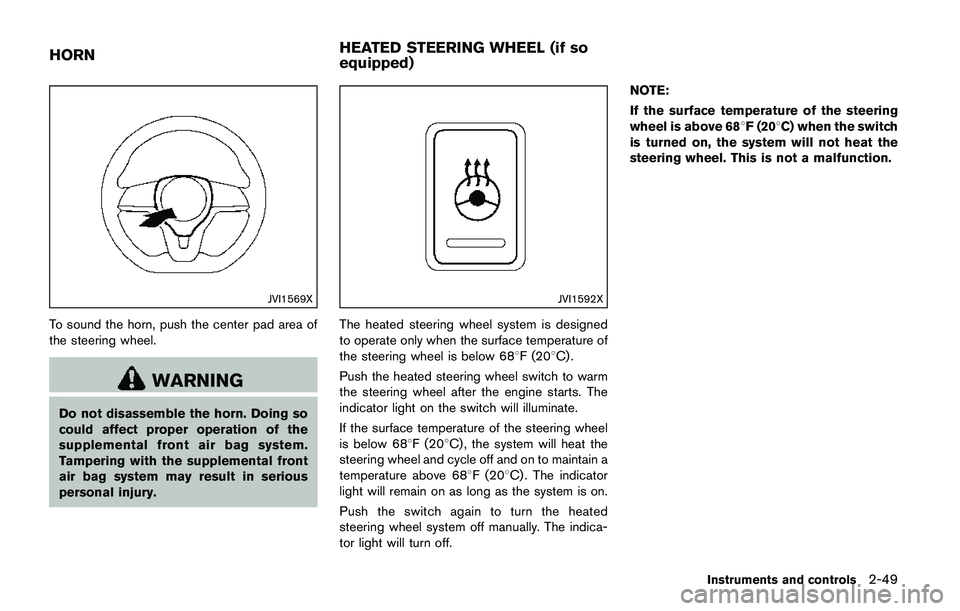
To sound the horn, push the center pad area of
the steering wheel.
WARNING
Do not disassemble the horn. Doing so
could affect proper operation of the
supplemental front air bag system.
Tampering with the supplemental front
air bag system may result in serious
personal injury.
JVI1592X
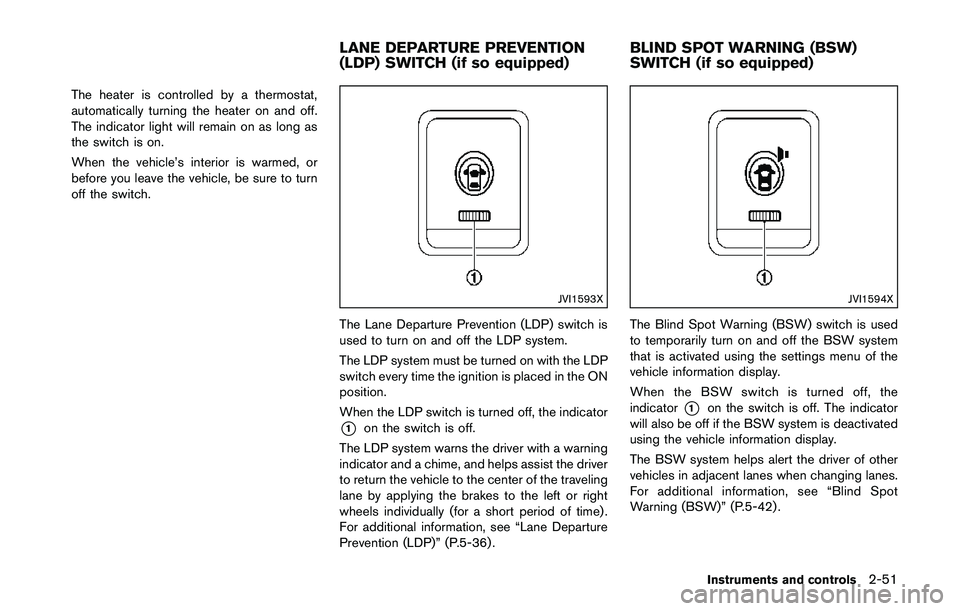
The heated steering wheel system is designed
to operate only when the surface temperature of
the steering wheel is below 688F (208C) .
Push the heated steering wheel switch to warm
the steering wheel after the engine starts. The
indicator light on the switch will illuminate.
If the surface temperature of the steering wheel
is below 688F (208C) , the system will heat the
steering wheel and cycle off and on to maintain a
temperature above 688F (208C) . The indicator
light will remain on as long as the system is on.
Push the switch again to turn the heated
steering wheel system off manually. The indica-
tor light will turn off.NOTE:
If the surface temperature of the steering
wheel is above 688F (208C) when the switch
is turned on, the system will not heat the
steering wheel. This is not a malfunction.
Instruments and controls2-49
HORNHEATED STEERING WHEEL (if so
equipped)
Page 130 of 508
The heater is controlled by a thermostat,
automatically turning the heater on and off.
The indicator light will remain on as long as
the switch is on.
When the vehicle’s interior is warmed, or
before you leave the vehicle, be sure to turn
off the switch.
JVI1593X
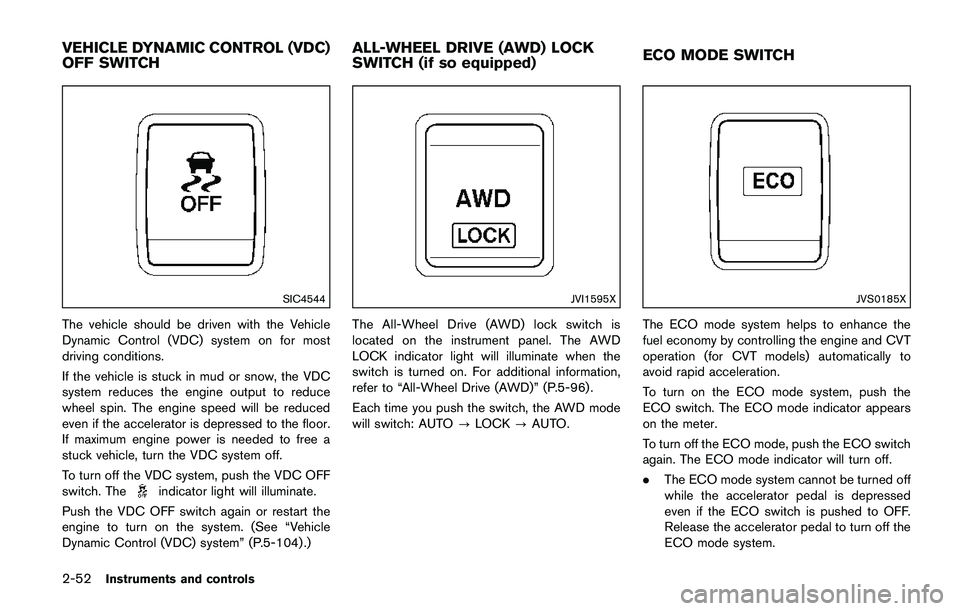
The Lane Departure Prevention (LDP) switch is
used to turn on and off the LDP system.
The LDP system must be turned on with the LDP
switch every time the ignition is placed in the ON
position.
When the LDP switch is turned off, the indicator
*1on the switch is off.
The LDP system warns the driver with a warning
indicator and a chime, and helps assist the driver
to return the vehicle to the center of the traveling
lane by applying the brakes to the left or right
wheels individually (for a short period of time) .
For additional information, see “Lane Departure
Prevention (LDP)” (P.5-36) .
JVI1594X
The Blind Spot Warning (BSW) switch is used
to temporarily turn on and off the BSW system
that is activated using the settings menu of the
vehicle information display.
When the BSW switch is turned off, the
indicator
*1on the switch is off. The indicator
will also be off if the BSW system is deactivated
using the vehicle information display.
The BSW system helps alert the driver of other
vehicles in adjacent lanes when changing lanes.
For additional information, see “Blind Spot
Warning (BSW)” (P.5-42) .
Instruments and controls2-51
LANE DEPARTURE PREVENTION
(LDP) SWITCH (if so equipped)BLIND SPOT WARNING (BSW)
SWITCH (if so equipped)
Page 131 of 508
2-52Instruments and controls
SIC4544
The vehicle should be driven with the Vehicle
Dynamic Control (VDC) system on for most
driving conditions.
If the vehicle is stuck in mud or snow, the VDC
system reduces the engine output to reduce
wheel spin. The engine speed will be reduced
even if the accelerator is depressed to the floor.
If maximum engine power is needed to free a
stuck vehicle, turn the VDC system off.
To turn off the VDC system, push the VDC OFF
switch. The
indicator light will illuminate.
Push the VDC OFF switch again or restart the
engine to turn on the system. (See “Vehicle
Dynamic Control (VDC) system” (P.5-104) .)
JVI1595X
The All-Wheel Drive (AWD) lock switch is
located on the instrument panel. The AWD
LOCK indicator light will illuminate when the
switch is turned on. For additional information,
refer to “All-Wheel Drive (AWD)” (P.5-96) .
Each time you push the switch, the AWD mode
will switch: AUTO?LOCK?AUTO.
JVS0185X
The ECO mode system helps to enhance the
fuel economy by controlling the engine and CVT
operation (for CVT models) automatically to
avoid rapid acceleration.
To turn on the ECO mode system, push the
ECO switch. The ECO mode indicator appears
on the meter.
To turn off the ECO mode, push the ECO switch
again. The ECO mode indicator will turn off.
.The ECO mode system cannot be turned off
while the accelerator pedal is depressed
even if the ECO switch is pushed to OFF.
Release the accelerator pedal to turn off the
ECO mode system.
VEHICLE DYNAMIC CONTROL (VDC)
OFF SWITCHALL-WHEEL DRIVE (AWD) LOCK
SWITCH (if so equipped)ECO MODE SWITCH
Page 176 of 508
JVP0503X
LOOSE FUEL CAP warning message
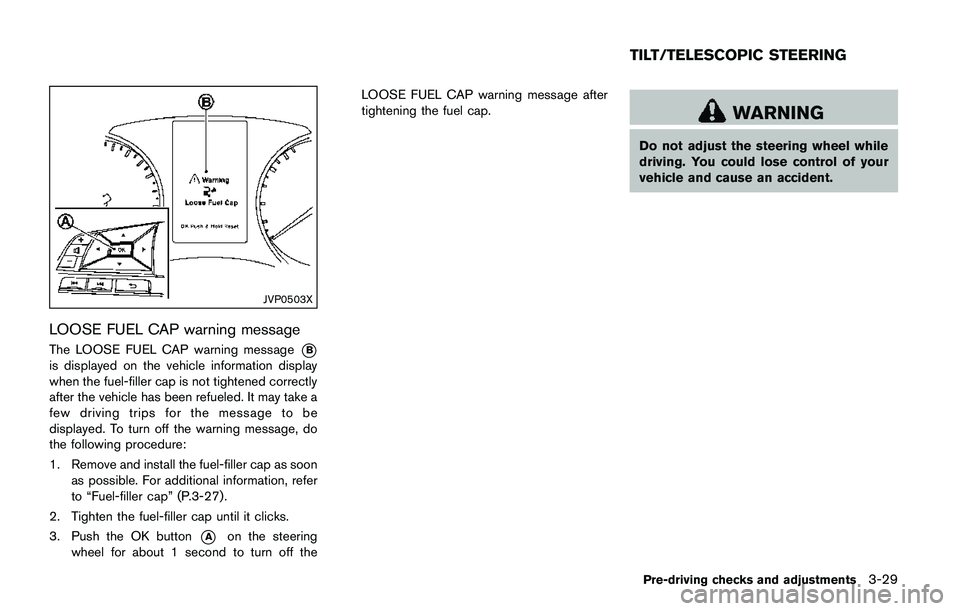
The LOOSE FUEL CAP warning message*B
is displayed on the vehicle information display
when the fuel-filler cap is not tightened correctly
after the vehicle has been refueled. It may take a
few driving trips for the message to be
displayed. To turn off the warning message, do
the following procedure:
1. Remove and install the fuel-filler cap as soon
as possible. For additional information, refer
to “Fuel-filler cap” (P.3-27).
2. Tighten the fuel-filler cap until it clicks.
3. Push the OK button
*Aon the steering
wheel for about 1 second to turn off theLOOSE FUEL CAP warning message after
tightening the fuel cap.
WARNING
Do not adjust the steering wheel while
driving. You could lose control of your
vehicle and cause an accident.
Pre-driving checks and adjustments3-29
TILT/TELESCOPIC STEERING
Page 177 of 508
3-30Pre-driving checks and adjustments
JVP0301X
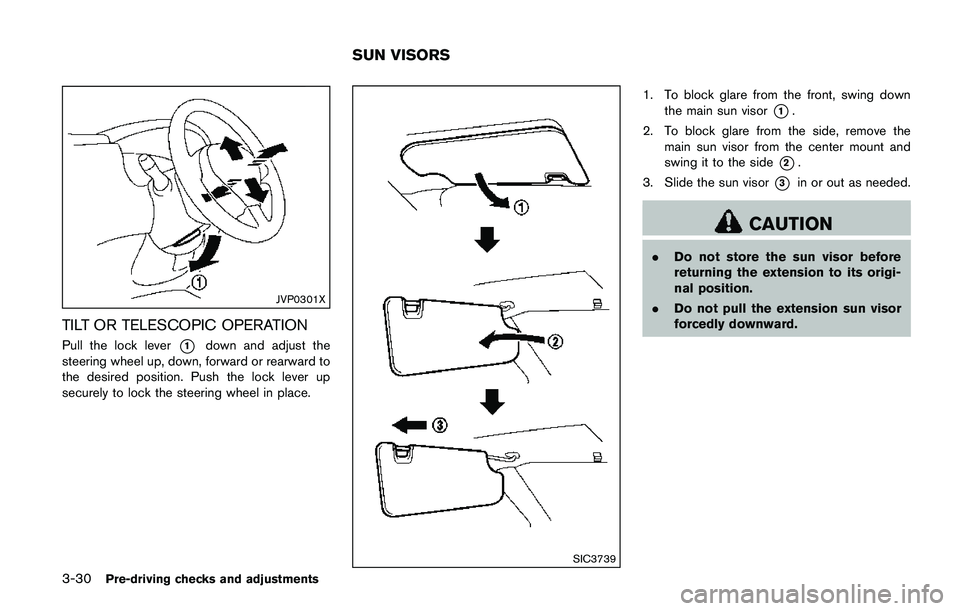
TILT OR TELESCOPIC OPERATION
Pull the lock lever*1down and adjust the
steering wheel up, down, forward or rearward to
the desired position. Push the lock lever up
securely to lock the steering wheel in place.
SIC3739
1. To block glare from the front, swing down
the main sun visor
*1.
2. To block glare from the side, remove the
main sun visor from the center mount and
swing it to the side
*2.
3. Slide the sun visor
*3in or out as needed.
CAUTION
.Do not store the sun visor before
returning the extension to its origi-
nal position.
.Do not pull the extension sun visor
forcedly downward.
SUN VISORS
Page 183 of 508
Steering wheel switch for audio control .................... 4-74
Antenna ............................................................................... 4-75
CD/USB memory care and cleaning .......................... 4-76
NissanConnect
SMMobile Apps smartphone integration
(if so equipped) ...................................................................... 4-76
Registering with NissanConnect
SMMobile Apps ..... 4-76
Connect phone ................................................................. 4-77
Application download ...................................................... 4-77
NissanConnect
SMServices (if so equipped) .................. 4-77
SiriŠEyes Free ....................................................................... 4-78
General Information ......................................................... 4-78
Requirements .................................................................... 4-78
Siri
ŠEyes Free Activation .............................................. 4-78
Operating SiriŠEyes Free ............................................. 4-79
Changing SiriŠEyes Free Settings (models with
navigation system) ........................................................... 4-79
Changing Siri
ŠEyes Free Settings (models without
navigation system) ........................................................... 4-79
Troubleshooting guide ..................................................... 4-81
Car phone or CB radio ........................................................ 4-82
Bluetooth
ŠHands-Free Phone System (models without
navigation system) ................................................................. 4-82
Regulatory information .................................................... 4-83
Using the system .............................................................. 4-84Bluetooth
ŠHands-Free Phone System (models with
navigation system) ................................................................ 4-92
Regulatory information .................................................. 4-93
Control buttons and microphone ............................... 4-94
Voice command .............................................................. 4-94
Connecting procedure .................................................. 4-95
Vehicle phonebook ........................................................ 4-95
Making a call ................................................................... 4-95
Receiving a call .............................................................. 4-95
During a call .................................................................... 4-96
Ending a call ................................................................... 4-96
Text messaging (if so equipped) ............................... 4-96
Phone and Bluetooth
Šsettings .................................. 4-98
NISSAN Voice Recognition system (models with
navigation system) ................................................................ 4-99
Using the system ........................................................... 4-99
System features ........................................................... 4-101
Phone voice commands ............................................ 4-101
Navigation system voice commands ...................... 4-102
Audio system voice commands ............................... 4-102
Information voice commands ................................... 4-103
My APPS voice commands ...................................... 4-103
Help voice commands ............................................... 4-103
Troubleshooting guide ............................................... 4-103