engine NISSAN QASHQAI 2017 Owner´s Manual
[x] Cancel search | Manufacturer: NISSAN, Model Year: 2017, Model line: QASHQAI, Model: NISSAN QASHQAI 2017Pages: 508, PDF Size: 2.68 MB
Page 126 of 508
If the ambient image sensor is damaged due to
an accident, it is recommended you contact a
NISSAN dealer.
Battery saver system
.When the headlight switch is in theorposition while the ignition switch is in
the ON position, the lights will automatically
turn off within a period of time after the
ignition switch has been placed in the OFF
position.
.When the headlight switch remains in the
orposition after the lights auto-
matically turn off, the lights will turn on when
the ignition switch is placed in the ON
position.
CAUTION
.When you turn on the headlight
switch again after the lights auto-
matically turn off, the lights will not
turn off automatically. Be sure to
turn the light switch to the OFF
position when you leave the vehicle
for extended periods of time, other-
wise the battery will be discharged.
.Never leave the light switch on
when the engine is not running forextended periods of time even if the
headlights turn off automatically.
Daytime Running Light (DRL) system
The LED portion of the headlights automatically
illuminate at 100% intensity when the engine is
started and the parking brake released. The LED
Daytime Running Light (DRL) operate with the
headlight switch in the OFF position or in the
position. When you turn the headlight
switch to theposition for full illumination,
the LED lights switch from LED DRL to the park
function.
If the parking brake is applied before the engine
is started, the LED DRL do not illuminate. The
LED DRL illuminate when the parking brake is
released. The LED DRL will remain on until the
ignition switch is placed in the OFF position.
It is necessary at dusk to turn the headlight
switch ON for interior controls and switches to
illuminate, as those remain OFF while the switch
is in the OFF position.
WARNING
When the LED DRL system is active, tail
lights on your vehicle are not on. It is
necessary at dusk to turn on yourheadlights. Failure to do so could cause
an accident injuring yourself and
others.
Instruments and controls2-47
Page 128 of 508
JVI1569X
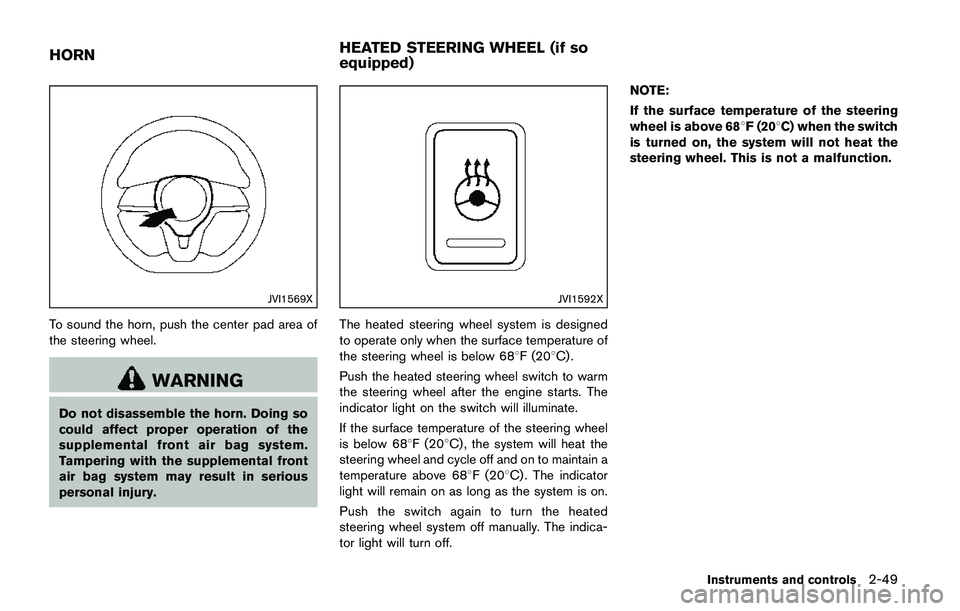
To sound the horn, push the center pad area of
the steering wheel.
WARNING
Do not disassemble the horn. Doing so
could affect proper operation of the
supplemental front air bag system.
Tampering with the supplemental front
air bag system may result in serious
personal injury.
JVI1592X
The heated steering wheel system is designed
to operate only when the surface temperature of
the steering wheel is below 688F (208C) .
Push the heated steering wheel switch to warm
the steering wheel after the engine starts. The
indicator light on the switch will illuminate.
If the surface temperature of the steering wheel
is below 688F (208C) , the system will heat the
steering wheel and cycle off and on to maintain a
temperature above 688F (208C) . The indicator
light will remain on as long as the system is on.
Push the switch again to turn the heated
steering wheel system off manually. The indica-
tor light will turn off.NOTE:
If the surface temperature of the steering
wheel is above 688F (208C) when the switch
is turned on, the system will not heat the
steering wheel. This is not a malfunction.
Instruments and controls2-49
HORNHEATED STEERING WHEEL (if so
equipped)
Page 129 of 508
2-50Instruments and controls
WARNING
Do not use or allow occupants to use
the seat heater if you or the occupants
cannot monitor elevated seat tempera-
tures or have an inability to feel pain in
body parts that contact the seat. Use of
the seat heater by such people could
result in serious injury.
CAUTION
.The battery could run down if the
seat heater is operated while the
engine is not running.
.Do not use the seat heater for
extended periods or when no one
is using the seat.
.Do not put anything on the seat
which insulates heat, such as a
blanket, cushion, seat cover, etc.
Otherwise, the seat may become
overheated.
.Do not place anything hard or heavy
on the seat or pierce it with a pin or
similar object. This may result indamage to the heater.
.Any liquid spilled on the heated seat
should be removed immediately
with a dry cloth.
.When cleaning the seat, never use
gasoline, thinner, or any similar
materials.
.If any malfunctions are found or the
heated seat does not operate, turn
the switch off and have the system
checked. It is recommended you
visit a NISSAN dealer for this ser-
vice.
JVR0322X
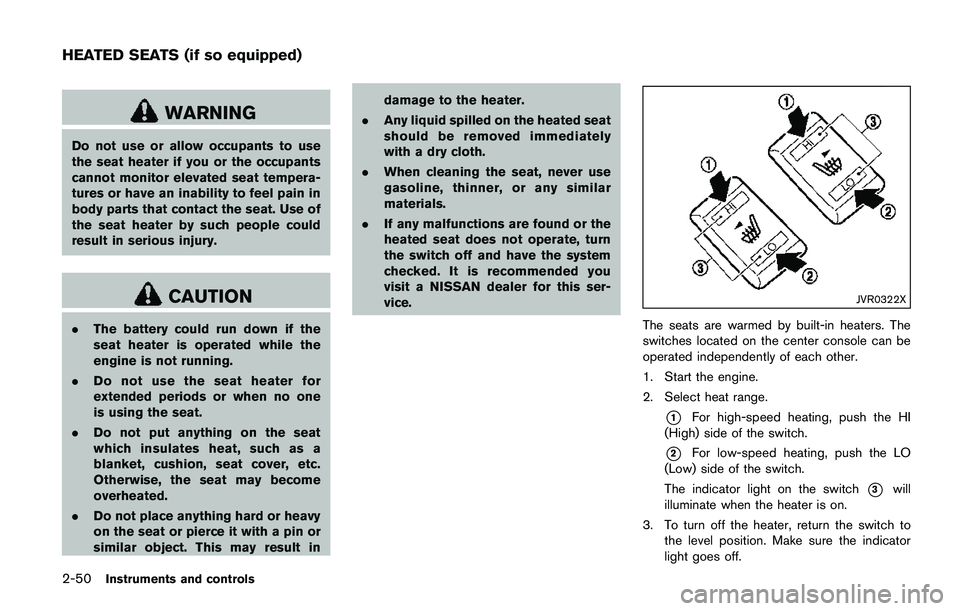
The seats are warmed by built-in heaters. The
switches located on the center console can be
operated independently of each other.
1. Start the engine.
2. Select heat range.
*1For high-speed heating, push the HI
(High) side of the switch.
*2For low-speed heating, push the LO
(Low) side of the switch.
The indicator light on the switch
*3will
illuminate when the heater is on.
3. To turn off the heater, return the switch to
the level position. Make sure the indicator
light goes off.
HEATED SEATS (if so equipped)
Page 131 of 508
2-52Instruments and controls
SIC4544
The vehicle should be driven with the Vehicle
Dynamic Control (VDC) system on for most
driving conditions.
If the vehicle is stuck in mud or snow, the VDC
system reduces the engine output to reduce
wheel spin. The engine speed will be reduced
even if the accelerator is depressed to the floor.
If maximum engine power is needed to free a
stuck vehicle, turn the VDC system off.
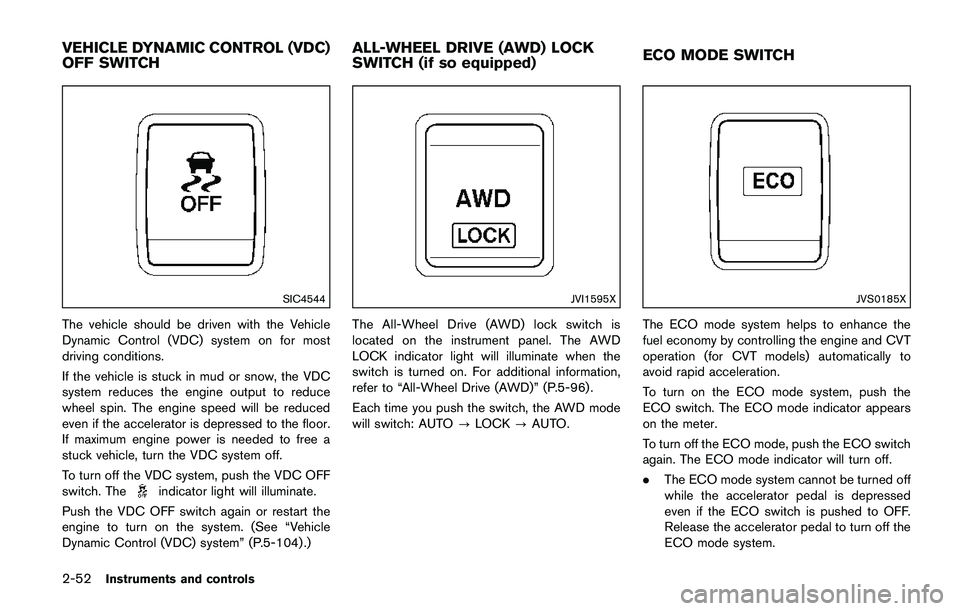
To turn off the VDC system, push the VDC OFF
switch. The
indicator light will illuminate.
Push the VDC OFF switch again or restart the
engine to turn on the system. (See “Vehicle
Dynamic Control (VDC) system” (P.5-104) .)
JVI1595X
The All-Wheel Drive (AWD) lock switch is
located on the instrument panel. The AWD
LOCK indicator light will illuminate when the
switch is turned on. For additional information,
refer to “All-Wheel Drive (AWD)” (P.5-96) .
Each time you push the switch, the AWD mode
will switch: AUTO?LOCK?AUTO.
JVS0185X
The ECO mode system helps to enhance the
fuel economy by controlling the engine and CVT
operation (for CVT models) automatically to
avoid rapid acceleration.
To turn on the ECO mode system, push the
ECO switch. The ECO mode indicator appears
on the meter.
To turn off the ECO mode, push the ECO switch
again. The ECO mode indicator will turn off.
.The ECO mode system cannot be turned off
while the accelerator pedal is depressed
even if the ECO switch is pushed to OFF.
Release the accelerator pedal to turn off the
ECO mode system.
VEHICLE DYNAMIC CONTROL (VDC)
OFF SWITCHALL-WHEEL DRIVE (AWD) LOCK
SWITCH (if so equipped)ECO MODE SWITCH
Page 132 of 508
.The ECO mode system will turn off auto-
matically if a malfunction occurs in the
system.
.Turn off the ECO mode system when
acceleration is required such as when:
— driving with a heavy load of passengers
or cargo in the vehicle
— driving on a steep uphill slope
JVI0878X
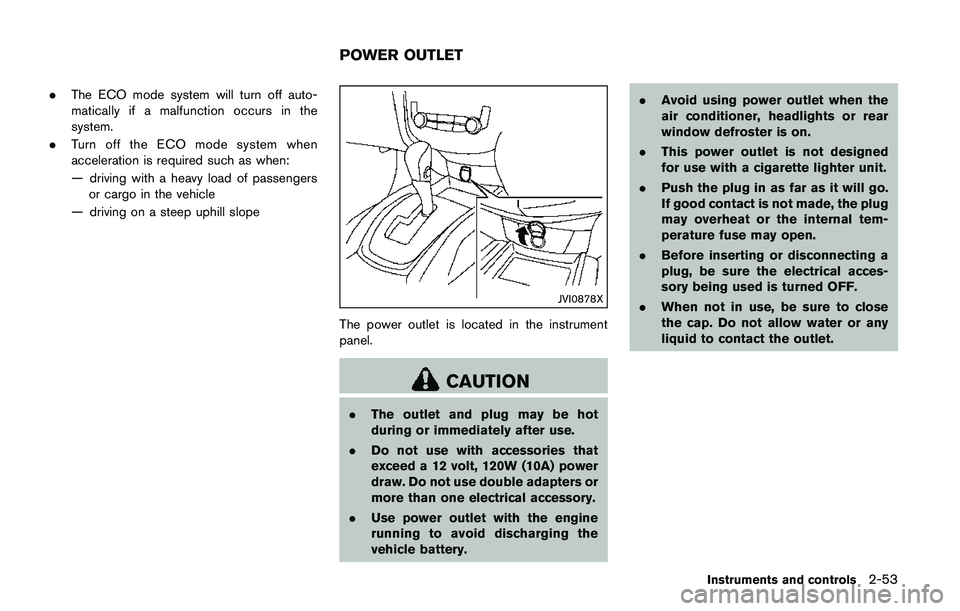
The power outlet is located in the instrument
panel.
CAUTION
.The outlet and plug may be hot
during or immediately after use.
.Do not use with accessories that
exceed a 12 volt, 120W (10A) power
draw. Do not use double adapters or
more than one electrical accessory.
.Use power outlet with the engine
running to avoid discharging the
vehicle battery..Avoid using power outlet when the
air conditioner, headlights or rear
window defroster is on.
.This power outlet is not designed
for use with a cigarette lighter unit.
.Push the plug in as far as it will go.
If good contact is not made, the plug
may overheat or the internal tem-
perature fuse may open.
.Before inserting or disconnecting a
plug, be sure the electrical acces-
sory being used is turned OFF.
.When not in use, be sure to close
the cap. Do not allow water or any
liquid to contact the outlet.
Instruments and controls2-53
POWER OUTLET
Page 144 of 508
a malfunction, push and hold the moonroof
switch to the close position
*1.
Depending on the environment or driving
conditions, the auto reverse function may
be activated if an impact or load similar to
something being caught in the moonroof
occurs.
If the moonroof does not operate
If the moonroof does not operate properly,
perform the following procedure to initialize the
moonroof operation system.
1. If the moonroof is open, close it fully by
repeatedly pushing the moonroof switch to
the close position
*1to tilt the moonroof
up.
2. Push and hold the switch to the close
position
*1.
3. Release the moonroof switch after the
moonroof moves slightly up and down.
4. Push and hold the switch to the open
position
*2to fully tilt the moonroof down.
5. Check if the moonroof switch operates
normally.
If the moonroof does not operate properly after
performing the procedure above, have your
moonroof checked and repaired. It is recom-
mended you visit a NISSAN dealer for thisservice.
CAUTION
.Do not leave the light switch on
when the engine is not running for
extended periods of time to prevent
the battery from being discharged.
.Turn off the lights when you leave
the vehicle.
Instruments and controls2-65
INTERIOR LIGHTS
Page 148 of 508
3 Pre-driving checks and adjustments
Keys .............................................................................................. 3-2
NISSAN Vehicle Immobilizer System key (if
so equipped) ........................................................................ 3-2
Intelligent Key (if so equipped) ........................................ 3-3
Doors ............................................................................................ 3-5
Locking with key .................................................................. 3-5
Locking with inside lock knob .......................................... 3-6
Locking with power door lock switch ............................ 3-7
Automatic door locks ......................................................... 3-7
Child safety rear door lock ............................................... 3-7
Remote keyless entry system (if so equipped) ................. 3-8
How to use remote keyless entry system ..................... 3-9
Intelligent Key system (if so equipped) ............................ 3-11
Intelligent Key operating range ..................................... 3-13
Door locks/unlocks precaution ..................................... 3-13
Intelligent Key operation ................................................. 3-14
Battery saver system ....................................................... 3-16
Warning lights and audible reminders ........................ 3-16
Troubleshooting guide ..................................................... 3-17
How to use remote keyless entry function ................ 3-18Remote engine start (if so equipped) .............................. 3-22
Remote engine start operating range ....................... 3-22
Remote starting the engine ......................................... 3-22
Extending engine run time ........................................... 3-23
Canceling a remote start ............................................. 3-23
Conditions the remote engine start will
not work ............................................................................ 3-23
Hood ......................................................................................... 3-24
Liftgate ..................................................................................... 3-25
Liftgate release lever ..................................................... 3-26
Fuel-filler door ........................................................................ 3-27
Opening the fuel-filler door ......................................... 3-27
Fuel-filler cap .................................................................. 3-27
Tilt/telescopic steering ......................................................... 3-29
Tilt or telescopic operation .......................................... 3-30
Sun visors ................................................................................ 3-30
Mirrors ..................................................................................... 3-31
Inside mirror ..................................................................... 3-31
Outside mirrors ............................................................... 3-31
Vanity mirror ..................................................................... 3-33
Page 164 of 508
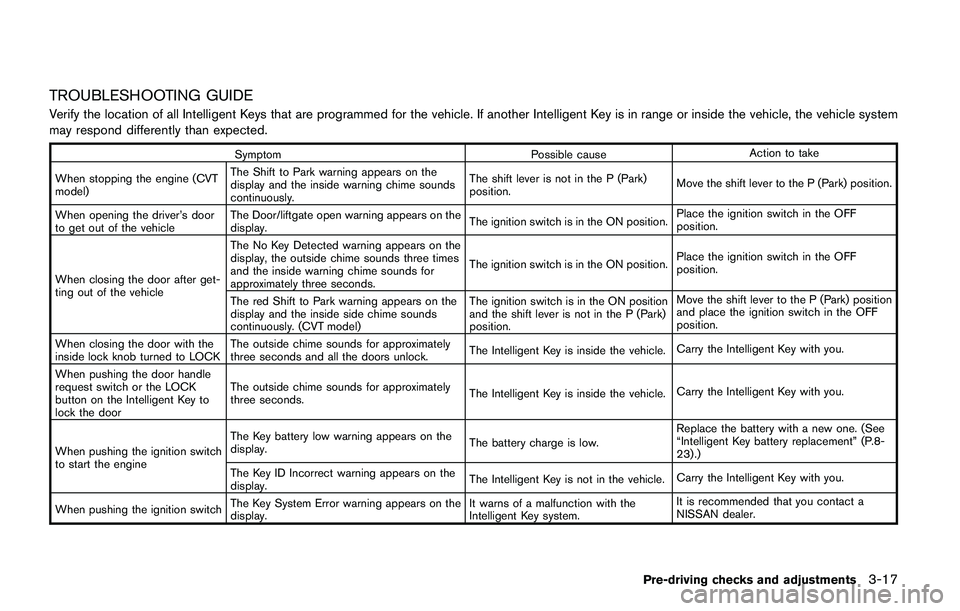
TROUBLESHOOTING GUIDE
Verify the location of all Intelligent Keys that are programmed for the vehicle. If another Intelligent Key is in range or inside the vehicle, the vehicle system
may respond differently than expected.
Symptom Possible causeAction to take
When stopping the engine (CVT
model)The Shift to Park warning appears on the
display and the inside warning chime sounds
continuously.The shift lever is not in the P (Park)
position.Move the shift lever to the P (Park) position.
When opening the driver’s door
to get out of the vehicleThe Door/liftgate open warning appears on the
display.The ignition switch is in the ON position.Place the ignition switch in the OFF
position.
When closing the door after get-
ting out of the vehicleThe No Key Detected warning appears on the
display, the outside chime sounds three times
and the inside warning chime sounds for
approximately three seconds.The ignition switch is in the ON position.Place the ignition switch in the OFF
position.
The red Shift to Park warning appears on the
display and the inside side chime sounds
continuously. (CVT model)The ignition switch is in the ON position
and the shift lever is not in the P (Park)
position.Move the shift lever to the P (Park) position
and place the ignition switch in the OFF
position.
When closing the door with the
inside lock knob turned to LOCKThe outside chime sounds for approximately
three seconds and all the doors unlock.The Intelligent Key is inside the vehicle.Carry the Intelligent Key with you.
When pushing the door handle
request switch or the LOCK
button on the Intelligent Key to
lock the doorThe outside chime sounds for approximately
three seconds.The Intelligent Key is inside the vehicle.Carry the Intelligent Key with you.
When pushing the ignition switch
to start the engineThe Key battery low warning appears on the
display.The battery charge is low.Replace the battery with a new one. (See
“Intelligent Key battery replacement” (P.8-
23) .)
The Key ID Incorrect warning appears on the
display.The Intelligent Key is not in the vehicle.Carry the Intelligent Key with you.
When pushing the ignition switchThe Key System Error warning appears on the
display.It warns of a malfunction with the
Intelligent Key system.It is recommended that you contact a
NISSAN dealer.
Pre-driving checks and adjustments3-17
Page 166 of 508
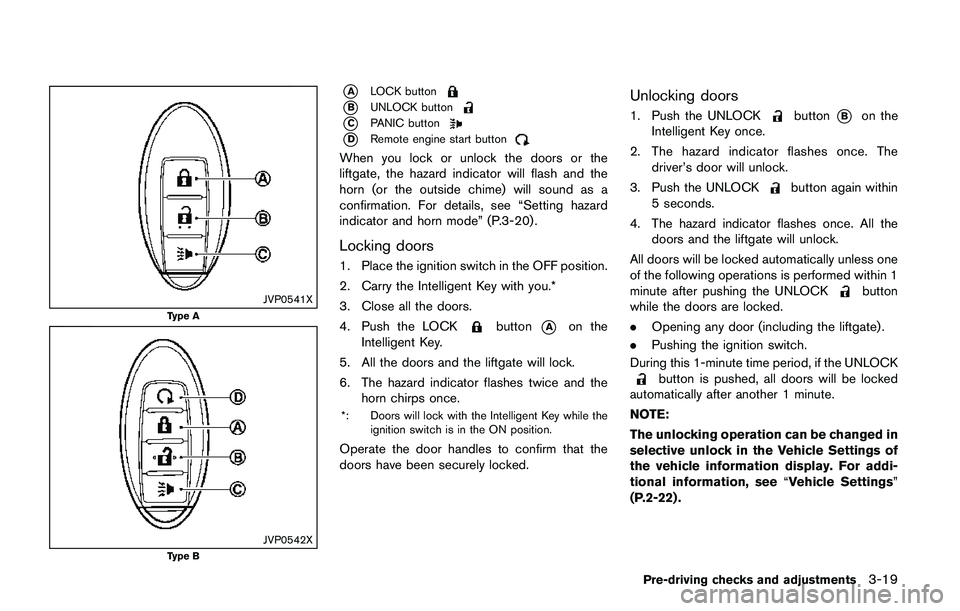
JVP0541X
Type A
JVP0542XType B
*ALOCK button
*BUNLOCK button
*CPANIC button
*DRemote engine start button
When you lock or unlock the doors or the
liftgate, the hazard indicator will flash and the
horn (or the outside chime) will sound as a
confirmation. For details, see “Setting hazard
indicator and horn mode” (P.3-20) .
Locking doors
1. Place the ignition switch in the OFF position.
2. Carry the Intelligent Key with you.*
3. Close all the doors.
4. Push the LOCK
button*Aon the
Intelligent Key.
5. All the doors and the liftgate will lock.
6. The hazard indicator flashes twice and the
horn chirps once.
*: Doors will lock with the Intelligent Key while the
ignition switch is in the ON position.
Operate the door handles to confirm that the
doors have been securely locked.
Unlocking doors
1. Push the UNLOCKbutton*Bon the
Intelligent Key once.
2. The hazard indicator flashes once. The
driver’s door will unlock.
3. Push the UNLOCK
button again within
5 seconds.
4. The hazard indicator flashes once. All the
doors and the liftgate will unlock.
All doors will be locked automatically unless one
of the following operations is performed within 1
minute after pushing the UNLOCK
button
while the doors are locked.
.Opening any door (including the liftgate) .
.Pushing the ignition switch.
During this 1-minute time period, if the UNLOCK
button is pushed, all doors will be locked
automatically after another 1 minute.
NOTE:
The unlocking operation can be changed in
selective unlock in the Vehicle Settings of
the vehicle information display. For addi-
tional information, see“Vehicle Settings”
(P.2-22) .
Pre-driving checks and adjustments3-19
Page 167 of 508
3-20Pre-driving checks and adjustments
Using panic alarm
If you are near your vehicle and feel threatened,
you may activate the alarm to call attention as
follows:
1. Push the PANIC
button*Con the
Intelligent Key formore than 0.5 seconds.
2. The theft warning alarm and headlights will
stay on for 25 seconds.
3. The panic alarm stops when:
.It has run for 25 seconds, or.Any of the buttons on the Intelligent Key
is pushed. (Note: the PANIC button must
be pushed for more than 0.5 seconds.)
Remote engine start (if so equipped)
The remote engine startbutton*Dis on
the Intelligent Key if the vehicle has remote
engine start function. This function allows the
engine to start from outside the vehicle. See
“Remote engine start” (P.3-22) .
Setting hazard indicator and horn mode
This vehicle is set in hazard indicator and horn
mode when you first receive the vehicle.
In hazard indicator and horn mode, when the
LOCK
button*Ais pushed, the hazard
indicator flashes twice and the horn chirps once.
When the UNLOCK
button*Bis pushed,
the hazard indicator flashes once.
If horns are not necessary, the system can be
switched to the hazard indicator mode.
In hazard indicator mode, when the LOCK
button is pushed, the hazard indicator flashes
twice. When the UNLOCKbutton is
pushed, neither the hazard indicator nor the
horn operates.