engine NISSAN QASHQAI 2017 Owner´s Manual
[x] Cancel search | Manufacturer: NISSAN, Model Year: 2017, Model line: QASHQAI, Model: NISSAN QASHQAI 2017Pages: 508, PDF Size: 2.68 MB
Page 215 of 508
4-34Heater, air conditioner, audio and phone systems
defog the windshield. The air recirculation mode
automatically turns off, allowing outside air to be
drawn into the passenger compartment to
further improve the defogging performance.
The air conditioner is always on in front defroster
or
mode, regardless of whether the
indicator light is on or off.
NOTE:
.The air conditioner system should be
operated for approximately 10 minutes
at least once a month. This helps
prevent damage to the air conditioner
system due to the lack of lubrication.
.A visible mist may be seen coming
from the ventilators in hot, humid
conditions as the air is cooled rapidly.
This does not indicate a malfunction.
.If the engine coolant temperature be-
comes too high, the air recirculation
mode will be activated and the indica-
tor light will come on automatically.
.If the engine coolant temperature
gauge indicates engine coolant tem-
perature over the normal range, turn
the air conditioner off. (See“If your
vehicle overheats”(P.6-11) .)
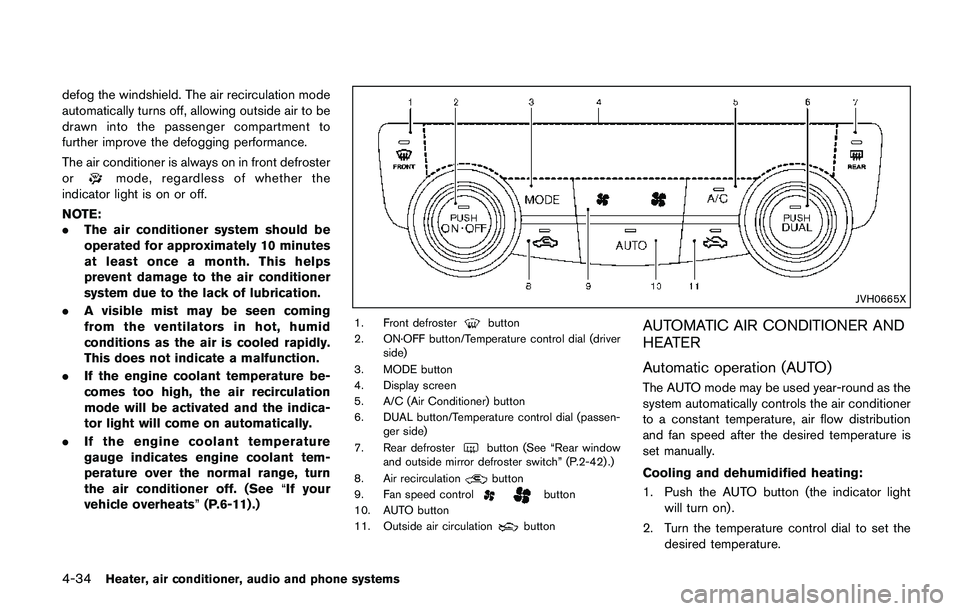
JVH0665X
1. Front defrosterbutton
2. ON·OFF button/Temperature control dial (driver
side)
3. MODE button
4. Display screen
5. A/C (Air Conditioner) button
6. DUAL button/Temperature control dial (passen-
ger side)
7. Rear defroster
button (See “Rear window
and outside mirror defroster switch” (P.2-42) .)
8. Air recirculation
button
9. Fan speed controlbutton
10. AUTO button
11. Outside air circulation
button
AUTOMATIC AIR CONDITIONER AND
HEATER
Automatic operation (AUTO)
The AUTO mode may be used year-round as the
system automatically controls the air conditioner
to a constant temperature, air flow distribution
and fan speed after the desired temperature is
set manually.
Cooling and dehumidified heating:
1. Push the AUTO button (the indicator light
will turn on) .
2. Turn the temperature control dial to set the
desired temperature.
Page 217 of 508

4-36Heater, air conditioner, audio and phone systems
sponding temperature control dial.
Also turning the passenger’s side tempera-
ture control dial changes only the front
passenger’s side temperature. (The DUAL
indicator light will illuminate and DUAL will
appear on the display.)
.To cancel the separate temperature setting,
push the DUAL button (the indicator light
will turn off) and the driver’s side tempera-
ture setting will be applied to both the driver
and passenger sides.
Air intake control:
.Push the air recirculation
button to
recirculate interior air inside the vehicle. The
indicator light on the button will come on.
The air recirculation cannot be activated
when the air conditioner is in the front
defrosting mode.
.Push the outside air circulation
button
to draw outside air into the passenger
compartment. The indicator light on the
button will come on.
.To control the air intake automatically, push
and hold either the air recirculation
button or the outside air circulationbutton (whichever button with the indicator
light illuminated) . The indicator lights (both
air recirculation
and outside air circula-
tionbuttons) will flash twice, and thenthe air intake will switch to automatic control.
When the automatic control is set, the
system automatically alternates between
the outside air circulation and the air
recirculation modes. (The indicator light of
the active mode will turn on.)
NOTE:
Even if the system is manually set to the air
recirculation mode, when both outside
temperature and coolant temperature are
low, the system may automatically switch
to the outside air circulation mode.
To turn the system off:
To turn off the heater and air conditioner, push
the ON·OFF button.
Push the ON·OFF button again, the system will
turn on in the mode which was used immediately
before the system was turned off.
Remote engine start logic (if so
equipped)
When the remote engine start function is
activated, the vehicles equipped with the auto-
matic air conditioner and heater may go into
automatic heating or cooling mode depending
on the outside and cabin temperatures. During
this period, the display and the buttons will be
inoperable until the ignition switch is placed in
the ON position. When the temperature is low,the rear defroster and the heated steering wheel
(if so equipped) may also be activated auto-
matically with the activation of the remote engine
start function. (See “Remote engine start” (P.3-
22) .)
Page 218 of 508
JVH0727X
JVH0728X
OPERATING TIPS (for automatic air
conditioner)
When the engine coolant temperature and
outside air temperature are low, the air flow
from the foot outlets may not operate for a
maximum of 150 seconds. However, this is not a
malfunction. After the coolant temperature
warms up, air flow from the foot outlets will
operate normally.
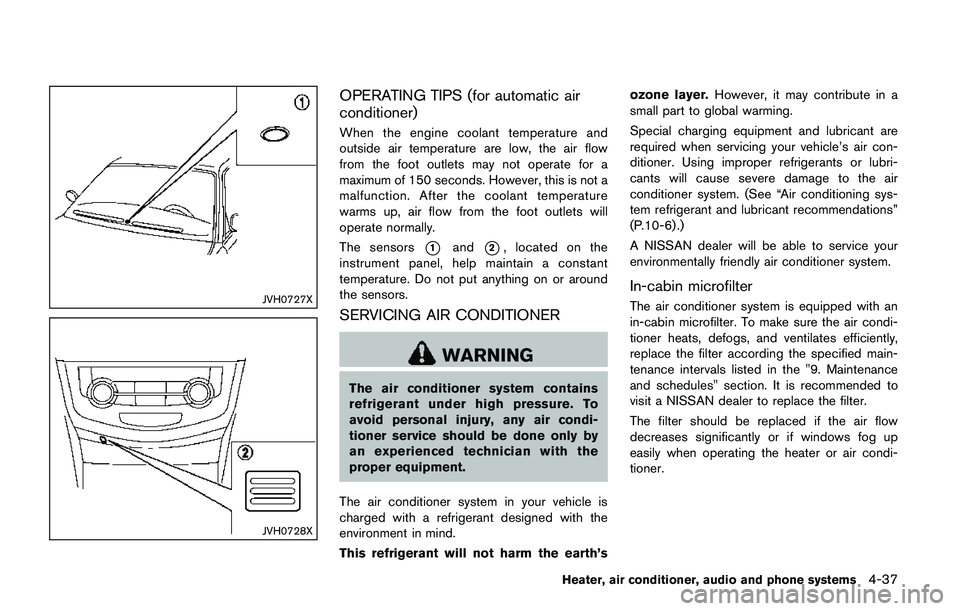
The sensors
*1and*2, located on the
instrument panel, help maintain a constant
temperature. Do not put anything on or around
the sensors.
SERVICING AIR CONDITIONER
WARNING
The air conditioner system contains
refrigerant under high pressure. To
avoid personal injury, any air condi-
tioner service should be done only by
an experienced technician with the
proper equipment.
The air conditioner system in your vehicle is
charged with a refrigerant designed with the
environment in mind.
This refrigerant will not harm the earth’sozone layer.However, it may contribute in a
small part to global warming.
Special charging equipment and lubricant are
required when servicing your vehicle’s air con-
ditioner. Using improper refrigerants or lubri-
cants will cause severe damage to the air
conditioner system. (See “Air conditioning sys-
tem refrigerant and lubricant recommendations”
(P.10-6) .)
A NISSAN dealer will be able to service your
environmentally friendly air conditioner system.
In-cabin microfilter
The air conditioner system is equipped with an
in-cabin microfilter. To make sure the air condi-
tioner heats, defogs, and ventilates efficiently,
replace the filter according the specified main-
tenance intervals listed in the "9. Maintenance
and schedules" section. It is recommended to
visit a NISSAN dealer to replace the filter.
The filter should be replaced if the air flow
decreases significantly or if windows fog up
easily when operating the heater or air condi-
tioner.
Heater, air conditioner, audio and phone systems4-37
Page 219 of 508
4-38Heater, air conditioner, audio and phone systems
AUDIO OPERATION PRECAUTIONS
Radio
Place the ignition switch in the ACC or ON
position and push the FM·AM button to turn on
the radio. If you listen to the radio with the
engine not running, the ignition switch should be
placed in the ACC position.
Radio reception is affected by station signal
strength, distance from radio transmitter, build-
ings, bridges, mountains and other external
influences. Intermittent changes in reception
quality normally are caused by these external
influences.
Using a cellular phone in or near the
vehicle may influence radio reception
quality.
Radio reception:
Your vehicle radio system is equipped with
state-of-the-art electronic circuits to enhance
radio reception. These circuits are designed to
extend reception range, and to enhance the
quality of that reception.
However there are some general characteristics
of both FM and AM radio signals that can affect
radio reception quality in a moving vehicle, even
when the finest equipment is used. These
characteristics are completely normal in a given
reception area, and do not indicate any mal-function in your vehicle radio system.
Reception conditions will constantly change
because of vehicle movement. Buildings, terrain,
signal distance and interference from other
vehicles can work against ideal reception.
Described below are some of the factors that
can affect your radio reception.
Some cellular phones or other devices may
cause interference or a buzzing noise to come
from the audio system speakers. Storing the
device in a different location may reduce or
eliminate the noise.
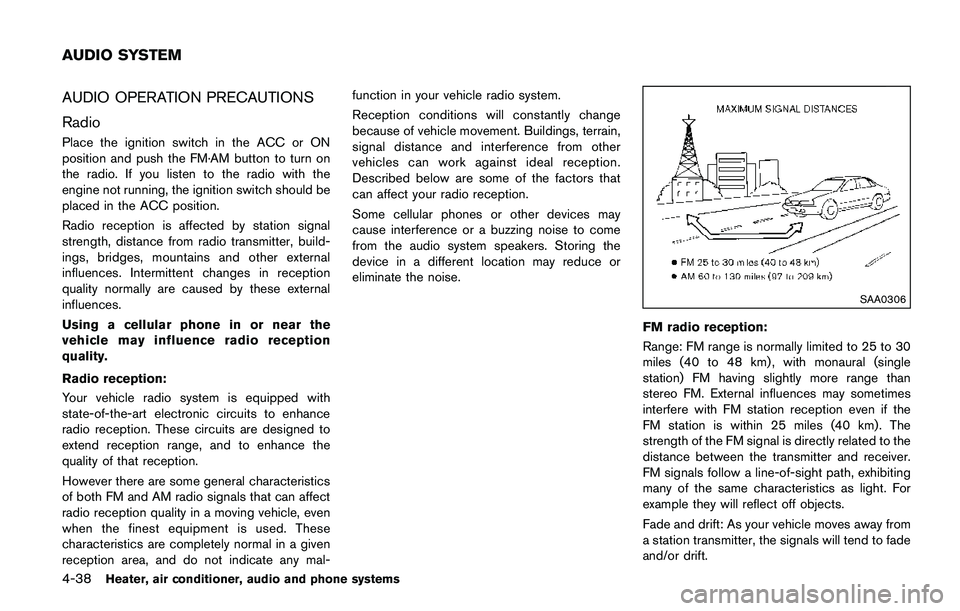
SAA0306
FM radio reception:
Range: FM range is normally limited to 25 to 30
miles (40 to 48 km) , with monaural (single
station) FM having slightly more range than
stereo FM. External influences may sometimes
interfere with FM station reception even if the
FM station is within 25 miles (40 km). The
strength of the FM signal is directly related to the
distance between the transmitter and receiver.
FM signals follow a line-of-sight path, exhibiting
many of the same characteristics as light. For
example they will reflect off objects.
Fade and drift: As your vehicle moves away from
a station transmitter, the signals will tend to fade
and/or drift.
AUDIO SYSTEM
Page 263 of 508
4-82Heater, air conditioner, audio and phone systems
When installing a car phone or a CB radio in
your vehicle, be sure to observe the following
precautions, otherwise the new equipment may
adversely affect the electronic control modules
and electronic control system harness.
WARNING
.A cellular phone should not be used
for any purpose while driving so full
attention may be given to vehicle
operation. Some jurisdictions prohi-
bit the use of cellular phones while
driving.
.If you must make a call while your
vehicle is in motion, the hands-free
cellular phone operational mode (if
so equipped) is highly recom-
mended. Exercise extreme caution
at all times so full attention may be
given to vehicle operation.
.If a conversation in a moving vehicle
requires you to take notes, pull off
the road to a safe location and stop
your vehicle before doing so.
CAUTION
.Keep the antenna as far away as
possible from the electronic control
modules.
.Keep the antenna wire more than 8
in (20 cm) away from the electronic
control system harness. Do not
route the antenna wire next to any
harness.
.Adjust the antenna standing-wave
ratio as recommended by the man-
ufacturer.
.Connect the ground wire from the
CB radio chassis to the body.
.For details, it is recommended you
visit a NISSAN dealer.
WARNING
.Use a phone after stopping your
vehicle in a safe location. If you
have to use a phone while driving,
exercise extreme caution at all
times so full attention may be given
to vehicle operation.
.If you are unable to devote full
attention to vehicle operation while
talking on the phone, pull off the
road to a safe location and stop
your vehicle.
CAUTION
To avoid draining the vehicle battery,
use a phone after starting the engine.
Your vehicle is equipped with the Bluetooth
Š
Hands-Free Phone System. If you have a
compatible BluetoothŠenabled cellular phone,
you can set up the wireless connection between
your cellular phone and the in-vehicle phone
module. With Bluetooth
Šwireless technology,
you can make or receive a hands-free telephone
call with your cellular phone in the vehicle.
CAR PHONE OR CB RADIOBluetooth
ŠHANDS-FREE PHONE
SYSTEM (models without
navigation system)
Page 273 of 508
4-92Heater, air conditioner, audio and phone systems
.Auto Reply (if so equipped)
Select to turn on or off the Auto Reply
function. When enabled, the vehicle will
automatically send a predefined text
message to the sender when a text
message is received while driving.
.Auto Reply Message (if so equipped)
Select to choose the message that is
sent when the Auto Reply function is
enabled. Choose from “I’m Driving” or
one of the three custom messages
stored in the system.
.Vehicle Signature On/Off (if so equipped)
Select to choose whether or not the
vehicle signature is added to outgoing
text messages from the vehicle. This
message cannot be changed or custo-
mized.
WARNING
.Use a phone after stopping your
vehicle in a safe location. If you
have to use a phone while driving,
exercise extreme caution at all
times so full attention may be given
to vehicle operation.
.If you are unable to devote full
attention to vehicle operation while
talking on the phone, pull off the
road to a safe location and stop
your vehicle.
CAUTION
To avoid discharging the vehicle bat-
tery, use a phone after starting the
engine.
Your vehicle is equipped with the Bluetooth
Š
Hands-Free Phone System. If you have a
compatible BluetoothŠenabled cellular phone,
you can set up the wireless connection between
your cellular phone and the in-vehicle phone
module. With Bluetooth
Šwireless technology,
you can make or receive a hands-free telephonecall with your cellular phone in the vehicle.
Once your cellular phone is connected to the in-
vehicle phone module, no other phone connect-
ing procedure is required. Your phone is
automatically connected with the in-vehicle
phone module when the ignition switch is
placed in the ON position with the connected
cellular phone turned on and carried in the
vehicle.
You can register up to five different Bluetooth
Š
cellular phones to the in-vehicle phone module.
However, you can talk on only one cellular phone
at a time.
NISSAN Voice Recognition system supports the
phone commands, so dialing a phone number
using your voice is possible. For more details,
see “NISSAN Voice Recognition system (mod-
els with navigation system)” (P.4-99).
Before using the Bluetooth
ŠHands-Free Phone
System, refer to the following notes.
.Set up the wireless connection between a
cellular phone and the in-vehicle phone
module before using the Hands-Free Phone
System.
.Some Bluetooth
Šenabled cellular phones
may not be recognized by the in-vehicle
phone module. Please visit www.nissanusa.
com/bluetooth or www.nissan.ca/bluetooth
for a recommended phone list and connect-
BluetoothŠHANDS-FREE PHONE
SYSTEM (models with navigation
system)
Page 286 of 508
5 Starting and driving
Precautions when starting and driving ................................ 5-4
Exhaust gas (carbon monoxide) ...................................... 5-4
Three-way catalyst .............................................................. 5-5
Tire Pressure Monitoring System (TPMS) .................... 5-5
Avoiding collision and rollover ......................................... 5-8
On-pavement and off-road driving precautions .......... 5-8
Off-road recovery ................................................................ 5-9
Rapid air pressure loss ...................................................... 5-9
Drinking alcohol/drugs and driving .............................. 5-10
Driving safety precautions .............................................. 5-10
Ignition switch (models without Intelligent
Key system) ............................................................................. 5-12
Continuously Variable Transmission (CVT) ................ 5-13
Manual Transmission (MT) ............................................. 5-13
Key positions ..................................................................... 5-14
Push-button ignition switch (model with Intelligent
Key system) ............................................................................. 5-14
Operating range for engine start function ................. 5-14
Push-button ignition switch operation ........................ 5-15
Push-button ignition switch positions ......................... 5-16
Emergency engine shut off ............................................ 5-16
Intelligent Key battery discharge .................................. 5-16
Before starting the engine ................................................... 5-17
Starting the engine (model without Intelligent
Key system) ............................................................................. 5-17Starting the engine (model with Intelligent
Key system) ............................................................................ 5-18
Remote engine start (if so equipped) ...................... 5-19
Driving the vehicle ................................................................. 5-20
Continuously Variable Transmission (CVT) ............. 5-20
Manual Transmission (MT) ........................................... 5-25
Parking brake .......................................................................... 5-26
Pedal type ........................................................................ 5-27
Switch type (models with electronic parking
brake system) ................................................................. 5-27
ECO mode system ............................................................... 5-29
ECO Pedal Guide function ......................................... 5-29
Ambient ECO .................................................................. 5-30
ECO Drive Report ......................................................... 5-31
Lane Departure Warning (LDW) (if so equipped) ....... 5-31
LDW system operation ................................................. 5-32
How to enable/disable the LDW system ................. 5-33
LDW system limitations ................................................ 5-34
System temporarily unavailable .................................. 5-35
System malfunction ....................................................... 5-35
System maintenance ..................................................... 5-36
Lane Departure Prevention (LDP) (if so equipped) ..... 5-36
LDP system operation .................................................. 5-37
How to enable/disable the LDP system .................. 5-38
LDP system limitations ................................................. 5-39
Page 288 of 508
Active Engine Brake (Continuously Variable
Transmission (CVT) models) ...................................... 5-107
Active Ride Control ...................................................... 5-108
Hill Start Assist system ..................................................... 5-109
Cold weather driving .......................................................... 5-110
Freeing a frozen door lock .......................................... 5-110
Anti-freeze ....................................................................... 5-110Battery ............................................................................ 5-110
Draining of coolant water .......................................... 5-110
Tire equipment ............................................................. 5-110
Special winter equipment ......................................... 5-110
Driving on snow or ice .............................................. 5-110
Page 289 of 508
5-4Starting and driving
WARNING
.Do not leave children or adults who
would normally require the support
of others alone in your vehicle. Pets
should not be left alone either. They
could accidentally injure themselves
or others through inadvertent op-
eration of the vehicle. Also, on hot,
sunny days, temperatures in a
closed vehicle could quickly become
high enough to cause severe or
possibly fatal injuries to people or
animals.
.Properly secure all cargo with ropes
or straps to help prevent it from
sliding or shifting. Do not place
cargo higher than the seatbacks. In
a sudden stop or collision, unse-
cured cargo could cause personal
injury.
EXHAUST GAS (carbon monoxide)
WARNING
.Do not breathe exhaust gas; it
contains colorless and odorless
carbon monoxide. Carbon monoxide
is dangerous. It can cause uncon-
sciousness or death.
.If you suspect that exhaust fumes
are entering the vehicle, drive with
all windows fully open, and have the
vehicle inspected immediately.
.Do not run the engine in closed
spaces such as a garage.
.Do not park the vehicle with the
engine running for an extended
period of time.
.Keep the liftgate closed while driv-
ing, otherwise exhaust gas could be
drawn into the passenger compart-
ment. If you must drive with the
liftgate open, follow these precau-
tions:
— Open all the windows.
— Turn the air recirculation mode
off and set the fan speed control
to the highest level to circulatethe air.
.If a special body or other equipment
is added for recreational or other
usage, follow the manufacturer’s
recommendation to prevent carbon
monoxide entry into the vehicle.
(Some recreational vehicle appli-
ances such as stoves, refrigerators,
heaters, etc. may also generate
carbon monoxide.)
.The exhaust system and body
should be inspected by a qualified
mechanic whenever:
— Your vehicle is raised while
being serviced.
— You suspect that exhaust fumes
are entering into the passenger
compartment.
— You notice a change in the
sound of the exhaust system.
— You have had an accident invol-
ving damage to the exhaust
system, underbody, or rear of
the vehicle.
PRECAUTIONS WHEN STARTING
AND DRIVING
Page 290 of 508
THREE-WAY CATALYST
The three-way catalyst is an emission control
device installed in the exhaust system. Exhaust
gases in the three-way catalyst are burned at
high temperatures to help reduce pollutants.
WARNING
.The exhaust gas and the exhaust
system are very hot. Keep people,
animals and flammable materials
away from the exhaust system com-
ponents.
.Do not stop or park the vehicle over
flammable materials such as dry
grass, wastepaper or rags. They
may ignite and cause a fire.
CAUTION
.Do not use leaded gasoline. Depos-
its from leaded gasoline will ser-
iously reduce the three-way
catalyst’s ability to help reduce ex-
haust pollutants.
.Keep your engine tuned up. Mal-
functions in the ignition, fuel injec-tion, or electrical systems can cause
overrich fuel flow into the three-way
catalyst, causing it to overheat. Do
not keep driving if the engine mis-
fires, or if noticeable loss of perfor-
mance or other unusual operating
conditions are detected. Have the
vehicle inspected. It is recom-
mended you visit a NISSAN dealer
for this service.
.Avoid driving with an extremely low
fuel level. Running out of fuel could
cause the engine to misfire, dama-
ging the three-way catalyst.
.Do not race the engine while warm-
ing it up.
.Do not push or tow your vehicle to
start the engine.
TIRE PRESSURE MONITORING SYS-
TEM (TPMS)
Each tire, including the spare (if provided) ,
should be checked monthly when cold and
inflated to the inflation pressure recommended
by the vehicle manufacturer on the vehicle
placard or tire inflation pressure label. (If your
vehicle has tires of a different size than the size
indicated on the vehicle placard or tire inflation
pressure label, you should determine the propertire inflation pressure for those tires.)
As an added safety feature, your vehicle has
been equipped with a Tire Pressure Monitoring
System (TPMS) that illuminates a low tire
pressure telltale when one or more of your tires
is significantly under-inflated. Accordingly, when
the low tire pressure telltale illuminates, you
should stop and check your tires as soon as
possible, and inflate them to the proper pres-
sure. Driving on a significantly under-inflated tire
causes the tire to overheat and can lead to tire
failure. Under-inflation also reduces fuel effi-
ciency and tire tread life, and may affect the
vehicle’s handling and stopping ability.
Please note that the TPMS is not a substitute for
proper tire maintenance, and it is the driver’s
responsibility to maintain correct tire pressure,
even if under-inflation has not reached the level
to trigger illumination of the TPMS low tire
pressure telltale.
Your vehicle has also been equipped with a
TPMS malfunction indicator to indicate when the
system is not operating properly. The TPMS
malfunction indicator is combined with the low
tire pressure telltale. When the system detects a
malfunction, the telltale will flash for approxi-
mately one minute and then remain continuously
illuminated. This sequence will continue upon
subsequent vehicle start-ups as long as the
Starting and driving5-5