engine NISSAN QASHQAI 2017 Owner´s Manual
[x] Cancel search | Manufacturer: NISSAN, Model Year: 2017, Model line: QASHQAI, Model: NISSAN QASHQAI 2017Pages: 508, PDF Size: 2.68 MB
Page 307 of 508
5-22Starting and driving
position to R (Reverse) .
N (Neutral):
Neither forward nor reverse gear is engaged.
The engine can be started in this position. You
may shift to N (Neutral) and restart a stalled
engine while the vehicle is moving.
D (Drive):
Use this position for all normal forward driving.
Manual shift mode
When the shift lever is shifted from the D (Drive)
position to the manual shift gate, the transmis-
sion enters the manual shift mode. Shift ranges
can be selected manually by moving the shift
lever up or down.
In the manual shift mode, the shift range is
displayed on the position indicator in the meter.
Shift ranges up or down one by one as follows:
M1?
M2?
M3?
M4?
M5?
M6?
M7
//////
.When shifting up, move the shift lever to the
+ (up) side. The transmission shifts to a
higher range.
.When shifting down, move the shift lever to
theí(down) side. The transmission shifts to
a lower range..Moving the shift lever to the same side twice
will shift the ranges in succession. However,
if this motion is rapidly done, the second
shifting may not be completed properly.
.When canceling the manual shift mode,
return the shift lever to the D (Drive) position.
The transmission returns to the normal
driving mode.
M7 (7th):
Use this position for all normal forward driving.
However, you need to shift down the gears
manually when accelerating or passing another
vehicle.
M6 (6th) and M5 (5th):
Use these positions when driving up long
slopes, or for engine braking when driving down
long slopes.
M4 (4th) , M3 (3rd) and M2 (2nd) :
Use these positions for hill climbing or engine
braking on downhill grades.
M1 (1st):
Use this position when climbing steep hills
slowly or driving slowly through deep snow,
sand or mud, or for maximum engine braking on
steep downhill grades.
.Remember not to drive at high speeds for
extended periods of time in lower than M7range. This reduces fuel economy.
.In the manual shift mode, the transmis-
sion may not shift to the selected
range. This helps maintain driving per-
formance and reduces the chance of
vehicle damage or loss of control.
.In the manual shift mode, the transmis-
sion automatically shifts down to 1st
gear before the vehicle comes to a
stop. When accelerating again, it is
necessary to shift up to the desired
range.
.When the CVT fluid temperature is extre-
mely low, the manual shift mode may not
work and automatically shift as a drive mode.
This is not a malfunction. In this case, return
the shift lever to the D (Drive) position and
drive for a while and then shift to the manual
shift mode.
.When the CVT fluid temperature is high, the
shift range may upshift at a lower engine
speed than usual. This is not a malfunction.
Accelerator downshift — In D position —
For passing or hill climbing, fully depress the
accelerator pedal to the floor. This shifts the
transmission down into a lower gear, depending
on the vehicle speed.
Page 308 of 508
High fluid temperature protection mode
This transmission has a high fluid temperature
protection mode. If the fluid temperature be-
comes too high (for example, when climbing
steep grades in high temperature with heavy
loads) , engine power and, under some condi-
tions, vehicle speed will be decreased auto-
matically to reduce the chance of transmission
damage. Vehicle speed can be controlled with
the accelerator pedal, but the engine and vehicle
speed may be limited.
Fail-safe
If the vehicle is driven under extreme
conditions, such as excessive wheel spin-
ning and subsequent hard braking, the
fail-safe system may be activated. The MIL
may illuminate to indicate the fail-safe
mode is activated. (See “Malfunction In-
dicator Light (MIL)” (P.2-16) .) This will
occur even if all electrical circuits are
functioning properly. In this case, place
the ignition switch in the OFF position and
wait for 10 seconds. Then turn the switch
back to the ON position. The vehicle
should return to its normal operating
condition. If it does not return to its normal
operating condition, have the transmission
checked and repaired, if necessary. It is
recommended you visit a NISSAN dealerfor this service.
WARNING
When the high fluid temperature pro-
tection mode or fail-safe operation
occurs, vehicle speed may be gradually
reduced. The reduced speed may be
lower than other traffic, which could
increase the chance of a collision. Be
especially careful when driving. If ne-
cessary, pull to the side of the road at a
safe place and allow the transmission
to return to normal operation, or have it
repaired if necessary.
Adaptive Shift Control (ASC)
The Adaptive Shift Control automatically oper-
ates when the transmission is in the “D” (Drive)
position and selects an appropriate gear de-
pending on the road conditions such as uphill or
downhill.
Control on uphill and curving roads:
A low gear is maintained that suits the degree of
the slope to allow smooth driving with a small
number of shifts.Control on downhill roads:
The Adaptive Shift Control shifts to a low gear
that suits the degree of the slope when the
accelerator pedal is depressed, and uses the
engine braking to help driving in the downhill.
Control on winding roads:
A low gear is maintained on continuous curves
that involve repeated acceleration and decelera-
tion, so that smooth acceleration is available
instantly when the accelerator pedal is de-
pressed.
NOTE:
.Adaptive Shift Control may not operate
when the transmission oil temperature
is low immediately after the start of
driving or when it is very hot.
.During some driving situations, hard
braking for example, the Adaptive Shift
Control may automatically operate. The
transmission may automatically shift to
a lower gear for engine braking. This
increases engine speed but not vehicle
speed. Vehicle speed is controlled by
the accelerator pedal when the vehicle
is in the Adaptive Shift Control mode.
.When the Adaptive Shift Control oper-
ates, the transmission sometimes
maintains a lower gear for a longer
period of time than when Adaptive
Starting and driving5-23
Page 309 of 508
5-24Starting and driving
Shift Control is not operating. Engine
speed will be higher for a specific
vehicle speed while Adaptive Shift
Control is operating than when Adap-
tive Shift Control is not operating.
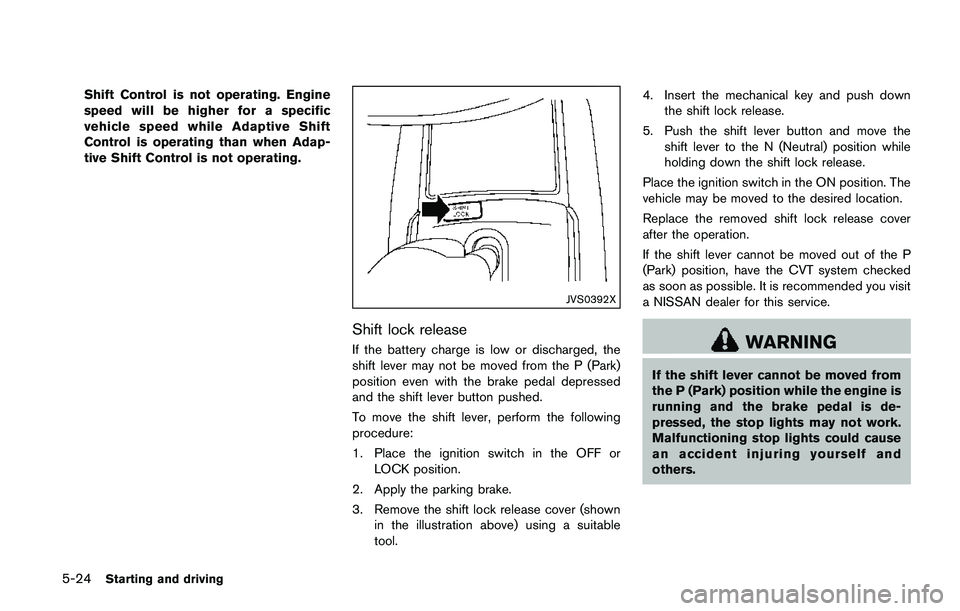
JVS0392X
Shift lock release
If the battery charge is low or discharged, the
shift lever may not be moved from the P (Park)
position even with the brake pedal depressed
and the shift lever button pushed.
To move the shift lever, perform the following
procedure:
1. Place the ignition switch in the OFF or
LOCK position.
2. Apply the parking brake.
3. Remove the shift lock release cover (shown
in the illustration above) using a suitable
tool.4. Insert the mechanical key and push down
the shift lock release.
5. Push the shift lever button and move the
shift lever to the N (Neutral) position while
holding down the shift lock release.
Place the ignition switch in the ON position. The
vehicle may be moved to the desired location.
Replace the removed shift lock release cover
after the operation.
If the shift lever cannot be moved out of the P
(Park) position, have the CVT system checked
as soon as possible. It is recommended you visit
a NISSAN dealer for this service.WARNING
If the shift lever cannot be moved from
the P (Park) position while the engine is
running and the brake pedal is de-
pressed, the stop lights may not work.
Malfunctioning stop lights could cause
an accident injuring yourself and
others.
Page 310 of 508
MANUAL TRANSMISSION (MT)
WARNING
.Do not downshift abruptly on slip-
pery roads. This may cause a loss of
control.
.Do not over-rev the engine when
shifting to a lower gear. This may
cause a loss of control or engine
damage.
.When the high fluid temperature
protection mode or fail-safe opera-
tion occurs, vehicle speed may be
gradually reduced. The reduced
speed may be lower than other
traffic, which could increase the
chance of a collision. Be especially
careful when driving. If necessary,
pull to the side of the road at a safe
place and allow the transmission to
return to normal operation, or have
it repaired if necessary.
CAUTION
.Do not rest your foot on the clutch
pedal while driving. This may da-
mage the clutch.
.Fully depress the clutch pedal be-
fore shifting to help prevent trans-
mission damage.
.Stop your vehicle completely before
shifting into R (Reverse) .
.When the vehicle is stopped for a
period of time, for example at a stop
light, shift to N (Neutral) and release
the clutch pedal with the foot brake
applied.
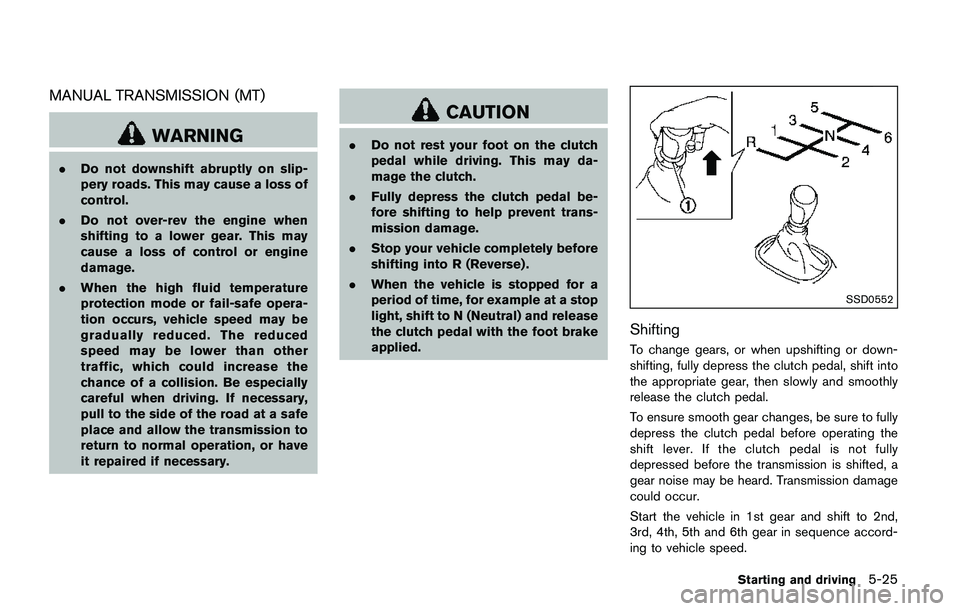
SSD0552
Shifting
To change gears, or when upshifting or down-
shifting, fully depress the clutch pedal, shift into
the appropriate gear, then slowly and smoothly
release the clutch pedal.
To ensure smooth gear changes, be sure to fully
depress the clutch pedal before operating the
shift lever. If the clutch pedal is not fully
depressed before the transmission is shifted, a
gear noise may be heard. Transmission damage
could occur.
Start the vehicle in 1st gear and shift to 2nd,
3rd, 4th, 5th and 6th gear in sequence accord-
ing to vehicle speed.
Starting and driving5-25
Page 311 of 508
5-26Starting and driving
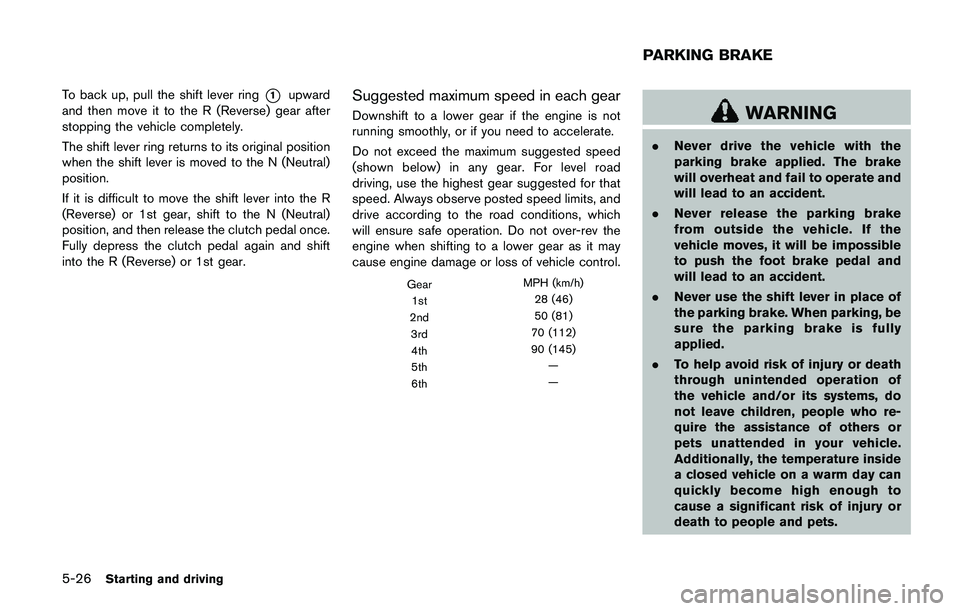
To back up, pull the shift lever ring*1upward
and then move it to the R (Reverse) gear after
stopping the vehicle completely.
The shift lever ring returns to its original position
when the shift lever is moved to the N (Neutral)
position.
If it is difficult to move the shift lever into the R
(Reverse) or 1st gear, shift to the N (Neutral)
position, and then release the clutch pedal once.
Fully depress the clutch pedal again and shift
into the R (Reverse) or 1st gear.Suggested maximum speed in each gear
Downshift to a lower gear if the engine is not
running smoothly, or if you need to accelerate.
Do not exceed the maximum suggested speed
(shown below) in any gear. For level road
driving, use the highest gear suggested for that
speed. Always observe posted speed limits, and
drive according to the road conditions, which
will ensure safe operation. Do not over-rev the
engine when shifting to a lower gear as it may
cause engine damage or loss of vehicle control.
GearMPH (km/h)
1st28 (46)
2nd50 (81)
3rd70 (112)
4th90 (145)
5th—
6th—
WARNING
.Never drive the vehicle with the
parking brake applied. The brake
will overheat and fail to operate and
will lead to an accident.
.Never release the parking brake
from outside the vehicle. If the
vehicle moves, it will be impossible
to push the foot brake pedal and
will lead to an accident.
.Never use the shift lever in place of
the parking brake. When parking, be
sure the parking brake is fully
applied.
.To help avoid risk of injury or death
through unintended operation of
the vehicle and/or its systems, do
not leave children, people who re-
quire the assistance of others or
pets unattended in your vehicle.
Additionally, the temperature inside
a closed vehicle on a warm day can
quickly become high enough to
cause a significant risk of injury or
death to people and pets.
PARKING BRAKE
Page 312 of 508
SPA2331
PEDAL TYPE
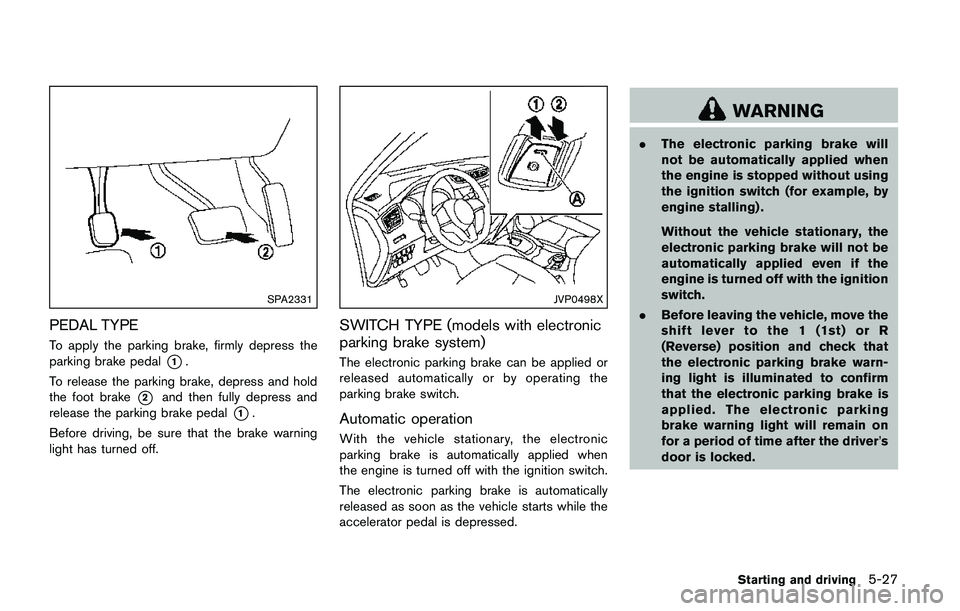
To apply the parking brake, firmly depress the
parking brake pedal
*1.
To release the parking brake, depress and hold
the foot brake
*2and then fully depress and
release the parking brake pedal
*1.
Before driving, be sure that the brake warning
light has turned off.
JVP0498X
SWITCH TYPE (models with electronic
parking brake system)
The electronic parking brake can be applied or
released automatically or by operating the
parking brake switch.
Automatic operation
With the vehicle stationary, the electronic
parking brake is automatically applied when
the engine is turned off with the ignition switch.
The electronic parking brake is automatically
released as soon as the vehicle starts while the
accelerator pedal is depressed.
WARNING
.The electronic parking brake will
not be automatically applied when
the engine is stopped without using
the ignition switch (for example, by
engine stalling) .
Without the vehicle stationary, the
electronic parking brake will not be
automatically applied even if the
engine is turned off with the ignition
switch.
.Before leaving the vehicle, move the
shift lever to the 1 (1st) or R
(Reverse) position and check that
the electronic parking brake warn-
ing light is illuminated to confirm
that the electronic parking brake is
applied. The electronic parking
brake warning light will remain on
for a period of time after the driver’s
door is locked.
Starting and driving5-27
Page 313 of 508
5-28Starting and driving
CAUTION
When parking in an area where the
outside temperature is below 328F
(08C) , do not apply the parking brake
to prevent it from freezing.
For safe parking, place the shift lever in
the 1 (1st) or R (Reverse) position and
securely block the wheels.
NOTE:
.To keep the electronic parking brake
released after the engine is turned off,
place the ignition switch in the OFF
position, depress the brake pedal and
push down the parking brake switch
before opening the driver’s door.
.If a malfunction occurs in the electric
parking brake system (for example, due
to battery discharge) , it is recom-
mended to contact a NISSAN dealer.
Manual operation
The electronic parking brake will not be auto-
matically applied if the engine is stopped without
using the ignition switch (for example, by engine
stalling) . In such a case, you have to apply the
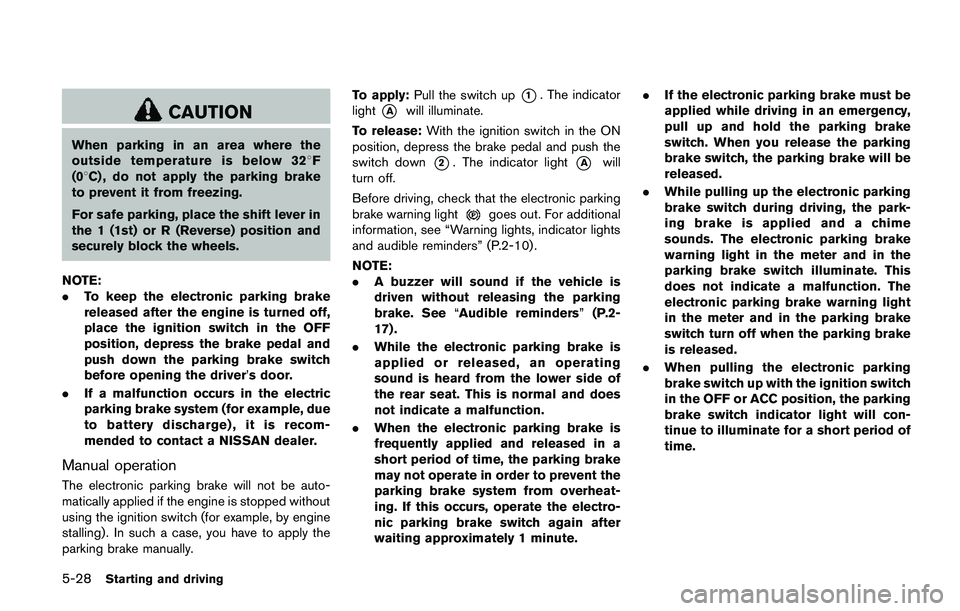
parking brake manually.To apply:Pull the switch up
*1. The indicator
light
*Awill illuminate.
To release:With the ignition switch in the ON
position, depress the brake pedal and push the
switch down
*2. The indicator light*Awill
turn off.
Before driving, check that the electronic parking
brake warning light
goes out. For additional
information, see “Warning lights, indicator lights
and audible reminders” (P.2-10) .
NOTE:
.A buzzer will sound if the vehicle is
driven without releasing the parking
brake. See“Audible reminders”(P.2-
17) .
.While the electronic parking brake is
applied or released, an operating
sound is heard from the lower side of
the rear seat. This is normal and does
not indicate a malfunction.
.When the electronic parking brake is
frequently applied and released in a
short period of time, the parking brake
may not operate in order to prevent the
parking brake system from overheat-
ing. If this occurs, operate the electro-
nic parking brake switch again after
waiting approximately 1 minute..If the electronic parking brake must be
applied while driving in an emergency,
pull up and hold the parking brake
switch. When you release the parking
brake switch, the parking brake will be
released.
.While pulling up the electronic parking
brake switch during driving, the park-
ing brake is applied and a chime
sounds. The electronic parking brake
warning light in the meter and in the
parking brake switch illuminate. This
does not indicate a malfunction. The
electronic parking brake warning light
in the meter and in the parking brake
switch turn off when the parking brake
is released.
.When pulling the electronic parking
brake switch up with the ignition switch
in the OFF or ACC position, the parking
brake switch indicator light will con-
tinue to illuminate for a short period of
time.
Page 314 of 508
JVS0185X
The ECO mode system helps to enhance the
fuel economy by controlling the engine and CVT
operation (for CVT models) automatically to
avoid rapid acceleration.
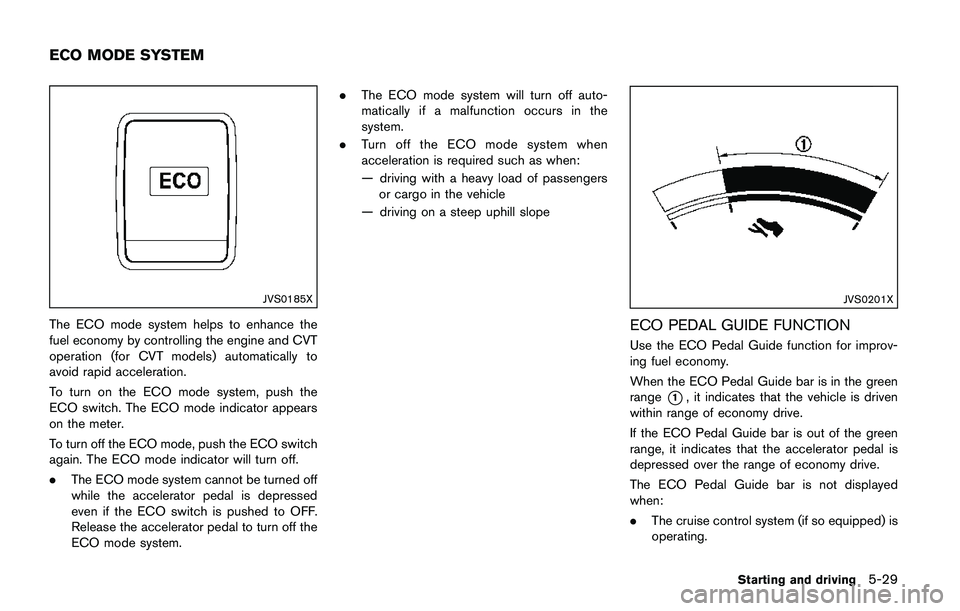
To turn on the ECO mode system, push the
ECO switch. The ECO mode indicator appears
on the meter.
To turn off the ECO mode, push the ECO switch
again. The ECO mode indicator will turn off.
.The ECO mode system cannot be turned off
while the accelerator pedal is depressed
even if the ECO switch is pushed to OFF.
Release the accelerator pedal to turn off the
ECO mode system..The ECO mode system will turn off auto-
matically if a malfunction occurs in the
system.
.Turn off the ECO mode system when
acceleration is required such as when:
— driving with a heavy load of passengers
or cargo in the vehicle
— driving on a steep uphill slope
JVS0201X
ECO PEDAL GUIDE FUNCTION
Use the ECO Pedal Guide function for improv-
ing fuel economy.
When the ECO Pedal Guide bar is in the green
range
*1, it indicates that the vehicle is driven
within range of economy drive.
If the ECO Pedal Guide bar is out of the green
range, it indicates that the accelerator pedal is
depressed over the range of economy drive.
The ECO Pedal Guide bar is not displayed
when:
.The cruise control system (if so equipped) is
operating.
Starting and driving5-29
ECO MODE SYSTEM
Page 319 of 508
5-34Starting and driving
3. Use thebuttons to navigate in the menu
and use the “OK” button to select or change
an item:
.Select “Lane” and press the “OK” button.
Use the “OK” button to check/uncheck
the box for “Warning”.
NOTE:
If you disable the LDW system, the system
will remain disabled the next time you start
the vehicle’s engine.
LDW SYSTEM LIMITATIONS
WARNING
Listed below are the system limitations
for the LDW system. Failure to follow
the warnings and instructions for prop-
er use of the LDW system could result in
serious injury or death.
.The system will not operate at
speeds below approximately 37
MPH (60 km/h) or if it cannot detect
lane markers.
.Excessive noise will interfere with
the warning chime sound, and the
chime may not be heard..Do not use the LDW system under
the following conditions as it may
not function properly:
— During bad weather (rain, fog,
snow, etc.) .
— When driving on slippery roads,
such as on ice or snow.
— When driving on winding or
uneven roads.
— When there is a lane closure due
to road repairs.
— When driving in a makeshift or
temporary lane.
— When driving on roads where
the lane width is too narrow.
— When driving without normal
tire conditions (for example, tire
wear, low tire pressure, installa-
tion of spare tire, tire chains,
non-standard wheels) .
— When the vehicle is equipped
with non-original brake parts or
suspension parts.
.The system may not function prop-
erly under the following conditions:— On roads where there are multi-
ple parallel lane markers; lane
markers that are faded or not
painted clearly; yellow painted
lane markers; non-standard lane
markers; or lane markers cov-
ered with water, dirt, snow, etc.
— On roads where discontinued
lane markers are still detect-
able.
— On roads where there are sharp
curves.
— On roads where there are shar-
ply contrasting objects, such as
shadows, snow, water, wheel
ruts, seams or lines remaining
after road repairs. (The LDW
system could detect these items
as lane markers.)
— On roads where the traveling
lane merges or separates.
— When the vehicle’s traveling di-
rection does not align with the
lane marker.
— When traveling close to the
vehicle in front of you, which
obstructs the lane camera unit
Page 320 of 508
detection range.
— When rain, snow, dirt or object
adheres to the windshield in
front of the lane camera unit.
— When the headlights are not
bright due to dirt on the lens or
if the aiming is not adjusted
properly.
— When strong light enters the
lane camera unit. (For example,
the light directly shines on the
front of the vehicle at sunrise or
sunset.)
— When a sudden change in
brightness occurs. (For example,
when the vehicle enters or exits
a tunnel or under a bridge.)
SYSTEM TEMPORARILY UNAVAIL-
ABLE
Condition A:
If the vehicle is parked in direct sunlight under
high temperature conditions (over approximately
1048F (408C)) and then started, the LDW
system may be deactivated automatically, the
LDW indicator will flash and the following
message will appear in the vehicle informationdisplay. - “Unavailable: High Cabin Tempera-
ture”
When the interior temperature is reduced, the
LDW system will resume operating automatically
and the LDW indicator will stop flashing.
Condition B:
The warning function of the LDW system is not
designed to work under the following condi-
tions:
.When you operate the lane change signal
and change traveling lanes in the direction of
the signal. (The LDW system will become
operable again approximately 2 seconds
after the lane change signal is turned off.)
.When the vehicle speed lowers to less than
approximately 37 MPH (60 km/h) .
Action to take:
After the above conditions have finished and the
necessary operating conditions are satisfied, the
LDW system will resume.SYSTEM MALFUNCTION
If the LDW system malfunctions, it will cancel
automatically and “Malfunction” will appear in
the vehicle information display. If “Malfunction”
appears in the vehicle information display, pull
off the road to a safe location and stop the
vehicle. Place the ignition switch in the OFF
position and restart the engine. If “Malfunction”continues to appear in the vehicle information
display, have the system checked. It is recom-
mended that you visit a NISSAN dealer for this
service.
Starting and driving5-35