steering NISSAN QASHQAI 2017 Owner´s Manual
[x] Cancel search | Manufacturer: NISSAN, Model Year: 2017, Model line: QASHQAI, Model: NISSAN QASHQAI 2017Pages: 508, PDF Size: 2.68 MB
Page 328 of 508

JVS1091X
*1Side indicator light
*2Vehicle information display
*3Steering-wheel-mounted controls (left side)
*4Blind Spot Warning (BSW) switch (for models
without LDP system)
BSW SYSTEM OPERATION
The BSW system operates above approximately
20 MPH (32 km/h) .
If the radar sensors detect a vehicle in the
detection zone, the side indicator light
*1
illuminates.If the turn signal is then activated, the system
chimes (twice) and the side indicator light
flashes. The side indicator light continues to
flash until the detected vehicle leaves the
detection zone.
The side indicator light illuminates for a few
seconds when the ignition switch is placed in
the ON position.
The brightness of the side indicator light is
adjusted automatically depending on the bright-
ness of the ambient light.
If a vehicle comes into the detection zone after
the driver activates the turn signal, then only the
side indicator light flashes and no chime sounds.
For additional information, refer to “BSW driving
situations” (P.5-46).
Starting and driving5-43
Page 329 of 508

5-44Starting and driving
JVS1092X
*1Vehicle information display
*2Steering-wheel-mounted controls (left side)
*3Blind Spot Warning (BSW) switch (for models
without LDP system)
HOW TO ENABLE/DISABLE THE BSW
SYSTEM
Perform the following steps to enable or disablethe BSW system.
1. Press the
button until “Settings”
displays in the vehicle information display
and then press “OK” button. Use the
button to select “Driver Assistance”. Then
press the “OK” button.2. Select “Driving Aids” and press the “OK”
button.
3. Use the
buttons to navigate in the menu
and use the “OK” button to select or change
an item.
.Select “Blind Spot” and press the “OK”
button.
Use the “OK” button to check/uncheck
the box for “Warning.”
For models without LDP system:
To enable the BSW system, push the Blind Spot
Warning (BSW) switch on the instrument panel
after starting the engine.
The BSW ON indicator on the vehicle informa-
tion display will appear. Push the BSW switch
again to disable the BSW system. The BSW ON
indicator on the vehicle information display will
turn off.
NOTE:
The system will retain current settings in
the vehicle information display even if the
engine is restarted.
Page 336 of 508

WARNING
Failure to follow the warnings and
instructions for proper use of the RCTA
system could result in serious injury or
death.
.The RCTA system is not a replace-
ment for proper driving procedures
and is not designed to prevent
contact with vehicles or objects.
When backing out of a parking
space, always use the side and rear
mirrors and turn and look in the
direction your vehicle will move.
Never rely solely on the RCTA sys-
tem.
The RCTA system will assist you when backing
out from a parking space. When the vehicle is in
reverse, the system is designed to detect other
vehicles approaching from the right or left of the
vehicle. If the system detects cross traffic, it will
alert you.
JVS0953X
*1Side indicator light
*2Vehicle information display
*3Steering-wheel-mounted controls (left side)
RCTA SYSTEM OPERATION
The RCTA system can help alert the driver of an
approaching vehicle when the driver is backing
out of a parking space.
When the shift position is in R (Reverse) and the
vehicle speed is less than approximately 5 MPH
(8 km/h) , the RCTA system is operational.
Starting and driving5-51
REAR CROSS TRAFFIC ALERT
(RCTA) (if so equipped)
Page 338 of 508

JVS0942X
*1Vehicle information display
*2Steering-wheel-mounted controls (left side)
HOW TO ENABLE/DISABLE THE
RCTA SYSTEM
Perform the following steps to enable or disable
the RCTA system.1. Press the
button until “Settings”
displays in the vehicle information display
and then press “OK” button. Use the
button to select “Driver Assistance” Then
press the “OK” button.
2. Use the button to select “Parking Aids” then
press the OK button.3. Select “Cross Traffic” and press the “OK”
button.
4. Use the “OK” button to enable or disable the
system.
NOTE:
The system setting will be retained even if
the engine is restarted.
Starting and driving5-53
Page 349 of 508
5-64Starting and driving
erates or decelerates your vehicle according to
the speed of the vehicle ahead. Depress the
accelerator to properly accelerate your vehicle
when acceleration is required for a lane change.
Depress the brake pedal when deceleration is
required to maintain a safe distance to the
vehicle ahead due to its sudden braking or if a
vehicle cuts in. Always stay alert when using the
ICC system.
JVS0957X
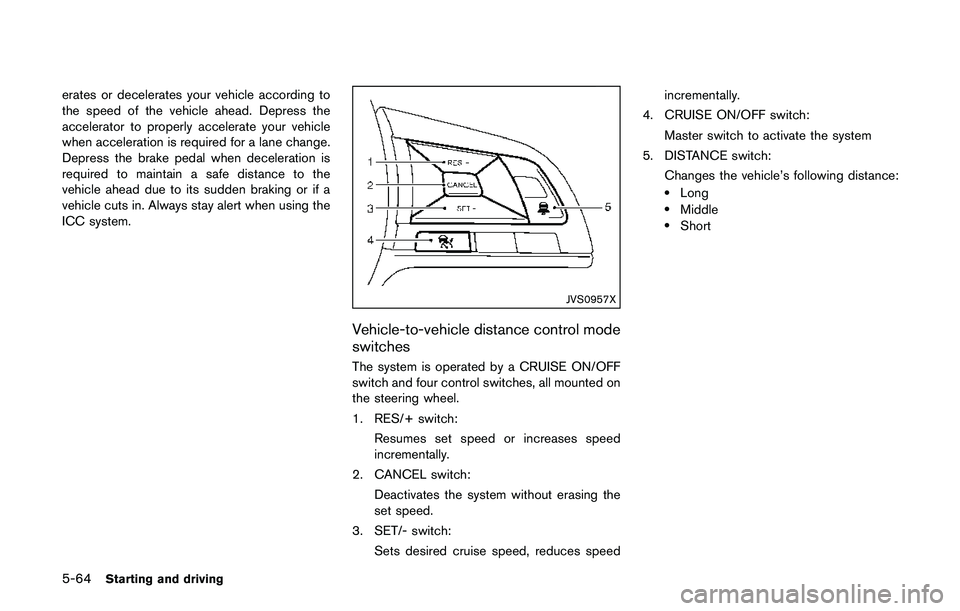
Vehicle-to-vehicle distance control mode
switches
The system is operated by a CRUISE ON/OFF
switch and four control switches, all mounted on
the steering wheel.
1. RES/+ switch:
Resumes set speed or increases speed
incrementally.
2. CANCEL switch:
Deactivates the system without erasing the
set speed.
3. SET/- switch:
Sets desired cruise speed, reduces speedincrementally.
4. CRUISE ON/OFF switch:
Master switch to activate the system
5. DISTANCE switch:
Changes the vehicle’s following distance:
.Long.Middle.Short
Page 355 of 508
5-70Starting and driving
.The chime sounds.
.The vehicle ahead detection indicator blinks.
The warning chime may not sound in some
cases when there is a short distance between
vehicles. Some examples are:
.When the vehicles are traveling at the same
speed and the distance between vehicles is
not changing
.When the vehicle ahead is traveling faster
and the distance between vehicles is
increasing
.When a vehicle cuts in near your vehicle
The warning chime will not sound when:
.Your vehicle approaches other vehicles that
are parked or moving slowly.
.The accelerator pedal is depressed, over-
riding the system.
NOTE:
The approach warning chime may sound
and the system display may blink when the
radar sensor detects objects on the side of
the vehicle or on the side of the road. This
may cause the ICC system to decelerate or
accelerate the vehicle. The radar sensor
may detect these objects when the vehicle
is driven on winding roads, narrow roads,
hilly roads or when entering or exiting a
curve. In these cases you will have tomanually control the proper distance
ahead of your vehicle.
Also, the sensor sensitivity can be affected by
vehicle operation (steering maneuver or driving
position in the lane) or traffic or vehicle condition
(for example, if a vehicle is being driven with
some damage) .
Automatic cancellation
A chime sounds under the following conditions
and the control is automatically canceled.
.When the vehicle ahead is not detected and
your vehicle is traveling below the speed of
15 MPH (24 km/h)
.When the system judges the vehicle is at
standstill
.When the shift lever is not in the D (Drive)
position or manual shift mode
.When the parking brake is applied
.When the VDC system is turned off
.When VDC (including the traction control
system) operates
.When distance measurement becomes im-
paired due to adhesion of dirt or obstruction
to the sensor
.When a wheel slips
.When the radar signal is temporarily inter-
rupted
Vehicle-to-vehicle distance control mode
limitations
WARNING
Listed below are the system limitations
for the ICC system. Failure to operate
the vehicle in accordance with these
system limitations could result in ser-
ious injury or death.
.The system is primarily intended for
use on straight, dry, open roads with
light traffic. It is not advisable to use
the system in city traffic or con-
gested areas.
.This system will not adapt automa-
tically to road conditions. This sys-
tem should be used in evenly
flowing traffic. Do not use the
system on roads with sharp curves,
or on icy roads, in heavy rain or in
fog.
.As there is a performance limit to
the distance control function, never
rely solely on the ICC system. This
system does not correct careless,
inattentive or absent-minded driv-
ing, or overcome poor visibility in
Page 358 of 508
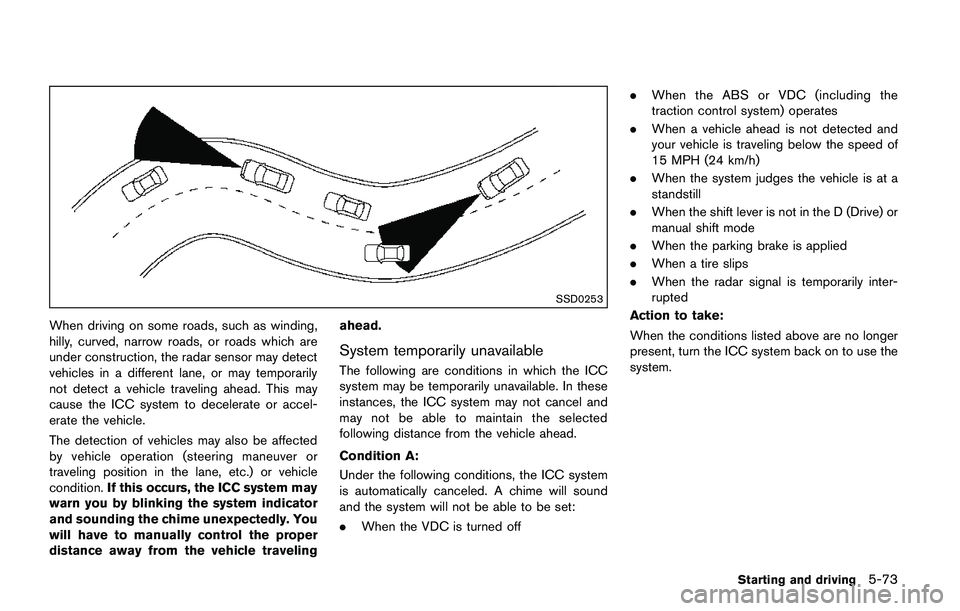
SSD0253
When driving on some roads, such as winding,
hilly, curved, narrow roads, or roads which are
under construction, the radar sensor may detect
vehicles in a different lane, or may temporarily
not detect a vehicle traveling ahead. This may
cause the ICC system to decelerate or accel-
erate the vehicle.
The detection of vehicles may also be affected
by vehicle operation (steering maneuver or
traveling position in the lane, etc.) or vehicle
condition.If this occurs, the ICC system may
warn you by blinking the system indicator
and sounding the chime unexpectedly. You
will have to manually control the proper
distance away from the vehicle travelingahead.
System temporarily unavailable
The following are conditions in which the ICC
system may be temporarily unavailable. In these
instances, the ICC system may not cancel and
may not be able to maintain the selected
following distance from the vehicle ahead.
Condition A:
Under the following conditions, the ICC system
is automatically canceled. A chime will sound
and the system will not be able to be set:
.When the VDC is turned off.When the ABS or VDC (including the
traction control system) operates
.When a vehicle ahead is not detected and
your vehicle is traveling below the speed of
15 MPH (24 km/h)
.When the system judges the vehicle is at a
standstill
.When the shift lever is not in the D (Drive) or
manual shift mode
.When the parking brake is applied
.When a tire slips
.When the radar signal is temporarily inter-
rupted
Action to take:
When the conditions listed above are no longer
present, turn the ICC system back on to use the
system.
Starting and driving5-73
Page 366 of 508
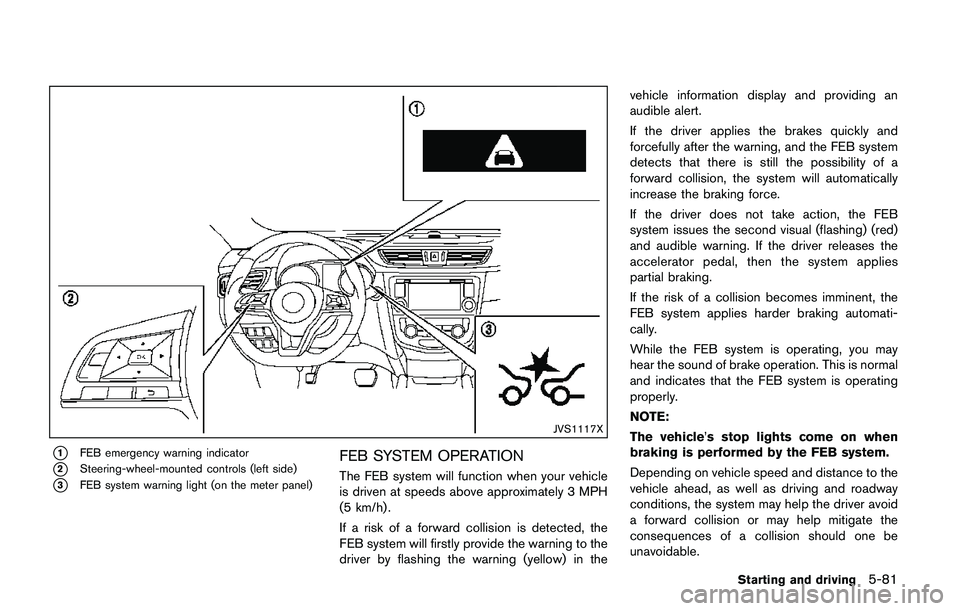
JVS1117X
*1FEB emergency warning indicator
*2Steering-wheel-mounted controls (left side)
*3FEB system warning light (on the meter panel)
FEB SYSTEM OPERATION
The FEB system will function when your vehicle
is driven at speeds above approximately 3 MPH
(5 km/h) .
If a risk of a forward collision is detected, the
FEB system will firstly provide the warning to the
driver by flashing the warning (yellow) in thevehicle information display and providing an
audible alert.
If the driver applies the brakes quickly and
forcefully after the warning, and the FEB system
detects that there is still the possibility of a
forward collision, the system will automatically
increase the braking force.
If the driver does not take action, the FEB
system issues the second visual (flashing) (red)
and audible warning. If the driver releases the
accelerator pedal, then the system applies
partial braking.
If the risk of a collision becomes imminent, the
FEB system applies harder braking automati-
cally.
While the FEB system is operating, you may
hear the sound of brake operation. This is normal
and indicates that the FEB system is operating
properly.
NOTE:
The vehicle’s stop lights come on when
braking is performed by the FEB system.
Depending on vehicle speed and distance to the
vehicle ahead, as well as driving and roadway
conditions, the system may help the driver avoid
a forward collision or may help mitigate the
consequences of a collision should one be
unavoidable.
Starting and driving5-81
Page 367 of 508
5-82Starting and driving
If the driver is handling the steering wheel,
accelerating or braking, the FEB system will
function later or will not function.
The automatic braking will cease under the
following conditions:
.When the steering wheel is turned as far as
necessary to avoid a collision.
.When the accelerator pedal is depressed.
.When there is no longer a vehicle detected
ahead.
If the FEB system has stopped the vehicle, the
vehicle will remain at a standstill for approxi-
mately 2 seconds before the brakes are
released.
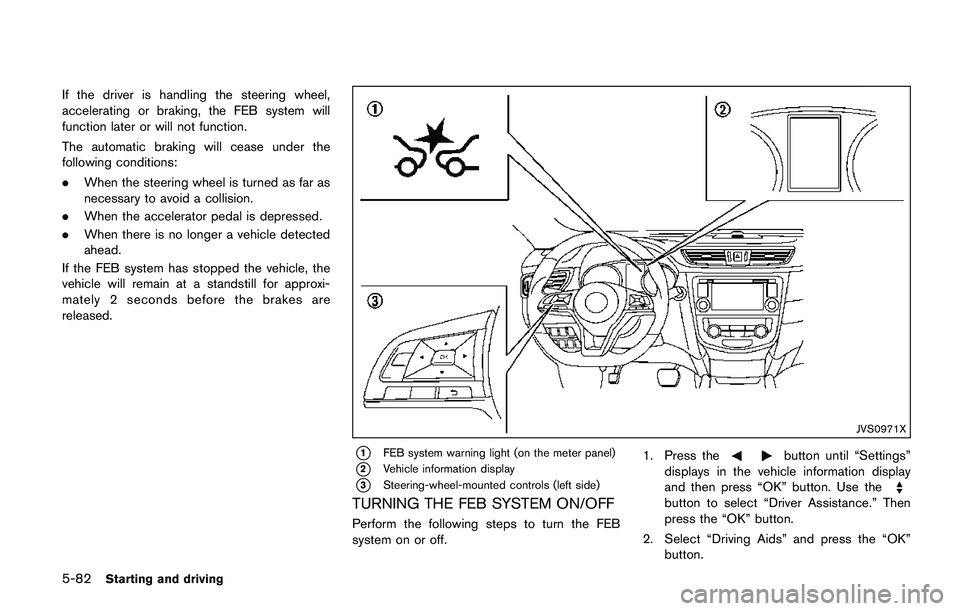
JVS0971X
*1FEB system warning light (on the meter panel)
*2Vehicle information display
*3Steering-wheel-mounted controls (left side)
TURNING THE FEB SYSTEM ON/OFF
Perform the following steps to turn the FEB
system on or off.1. Press the
button until “Settings”
displays in the vehicle information display
and then press “OK” button. Use the
button to select “Driver Assistance.” Then
press the “OK” button.
2. Select “Driving Aids” and press the “OK”
button.
Page 369 of 508
5-84Starting and driving
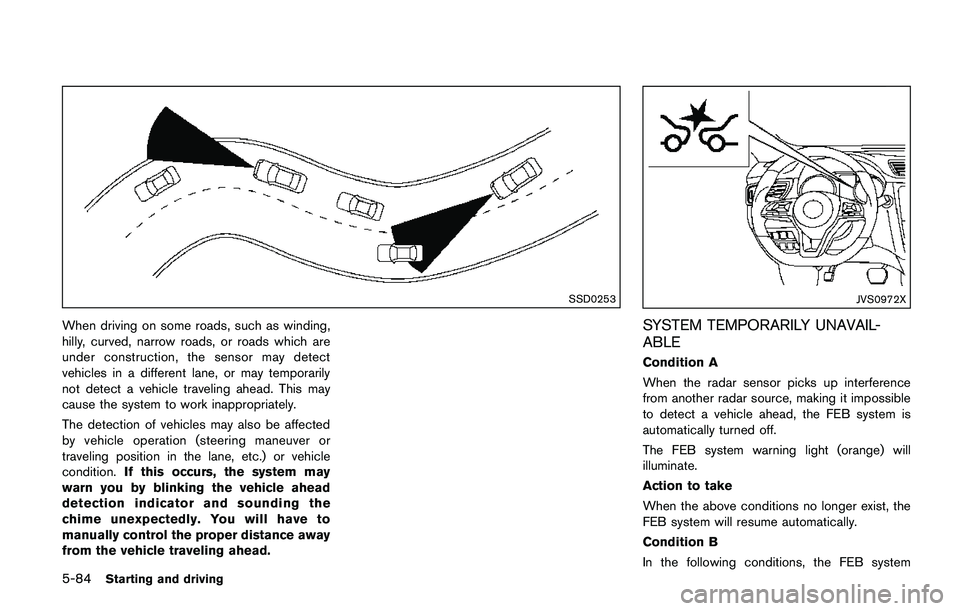
SSD0253
When driving on some roads, such as winding,
hilly, curved, narrow roads, or roads which are
under construction, the sensor may detect
vehicles in a different lane, or may temporarily
not detect a vehicle traveling ahead. This may
cause the system to work inappropriately.
The detection of vehicles may also be affected
by vehicle operation (steering maneuver or
traveling position in the lane, etc.) or vehicle
condition.If this occurs, the system may
warn you by blinking the vehicle ahead
detection indicator and sounding the
chime unexpectedly. You will have to
manually control the proper distance away
from the vehicle traveling ahead.
JVS0972X
SYSTEM TEMPORARILY UNAVAIL-
ABLE
Condition A
When the radar sensor picks up interference
from another radar source, making it impossible
to detect a vehicle ahead, the FEB system is
automatically turned off.
The FEB system warning light (orange) will
illuminate.
Action to take
When the above conditions no longer exist, the
FEB system will resume automatically.
Condition B
In the following conditions, the FEB system