steering NISSAN QASHQAI 2017 Owner´s Manual
[x] Cancel search | Manufacturer: NISSAN, Model Year: 2017, Model line: QASHQAI, Model: NISSAN QASHQAI 2017Pages: 508, PDF Size: 2.68 MB
Page 372 of 508
JVS1042X
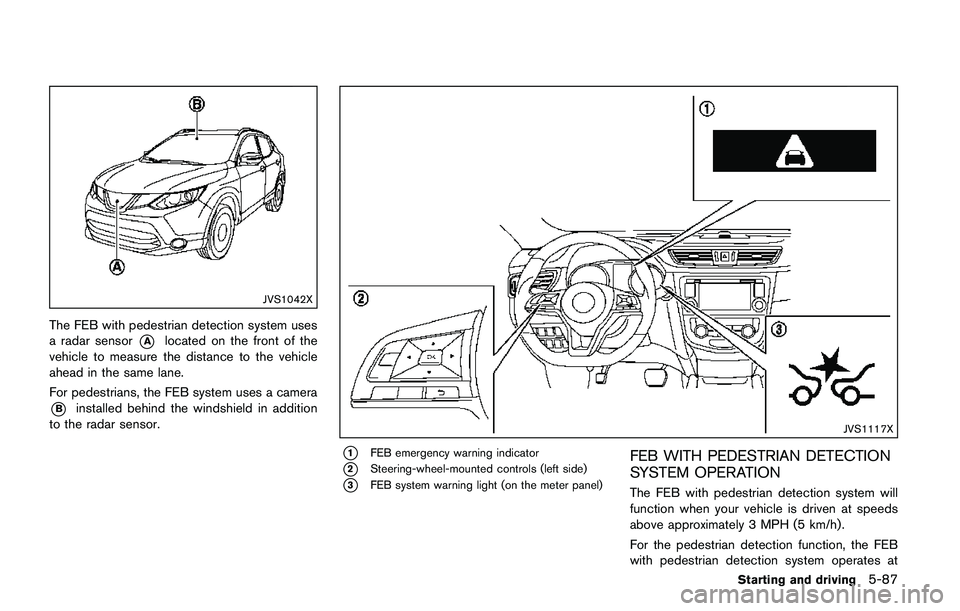
The FEB with pedestrian detection system uses
a radar sensor
*Alocated on the front of the
vehicle to measure the distance to the vehicle
ahead in the same lane.
For pedestrians, the FEB system uses a camera
*Binstalled behind the windshield in addition
to the radar sensor.
JVS1117X
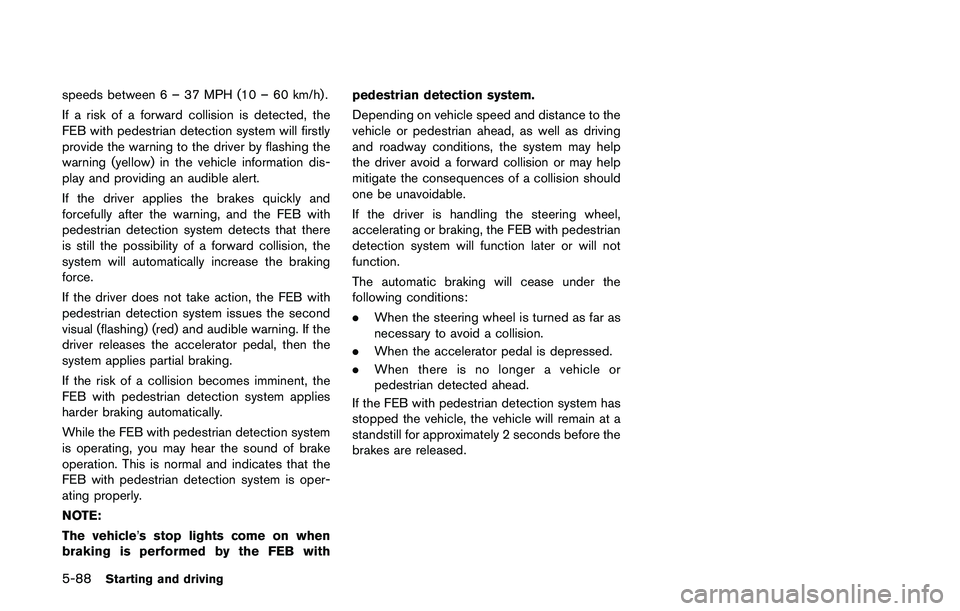
*1FEB emergency warning indicator
*2Steering-wheel-mounted controls (left side)
*3FEB system warning light (on the meter panel)
FEB WITH PEDESTRIAN DETECTION
SYSTEM OPERATION
The FEB with pedestrian detection system will
function when your vehicle is driven at speeds
above approximately 3 MPH (5 km/h) .
For the pedestrian detection function, the FEB
with pedestrian detection system operates at
Starting and driving5-87
Page 373 of 508
5-88Starting and driving
speeds between 6 – 37 MPH (10 – 60 km/h) .
If a risk of a forward collision is detected, the
FEB with pedestrian detection system will firstly
provide the warning to the driver by flashing the
warning (yellow) in the vehicle information dis-
play and providing an audible alert.
If the driver applies the brakes quickly and
forcefully after the warning, and the FEB with
pedestrian detection system detects that there
is still the possibility of a forward collision, the
system will automatically increase the braking
force.
If the driver does not take action, the FEB with
pedestrian detection system issues the second
visual (flashing) (red) and audible warning. If the
driver releases the accelerator pedal, then the
system applies partial braking.
If the risk of a collision becomes imminent, the
FEB with pedestrian detection system applies
harder braking automatically.
While the FEB with pedestrian detection system
is operating, you may hear the sound of brake
operation. This is normal and indicates that the
FEB with pedestrian detection system is oper-
ating properly.
NOTE:
The vehicle’s stop lights come on when
braking is performed by the FEB withpedestrian detection system.
Depending on vehicle speed and distance to the
vehicle or pedestrian ahead, as well as driving
and roadway conditions, the system may help
the driver avoid a forward collision or may help
mitigate the consequences of a collision should
one be unavoidable.
If the driver is handling the steering wheel,
accelerating or braking, the FEB with pedestrian
detection system will function later or will not
function.
The automatic braking will cease under the
following conditions:
.When the steering wheel is turned as far as
necessary to avoid a collision.
.When the accelerator pedal is depressed.
.When there is no longer a vehicle or
pedestrian detected ahead.
If the FEB with pedestrian detection system has
stopped the vehicle, the vehicle will remain at a
standstill for approximately 2 seconds before the
brakes are released.
Page 374 of 508
JVS0971X
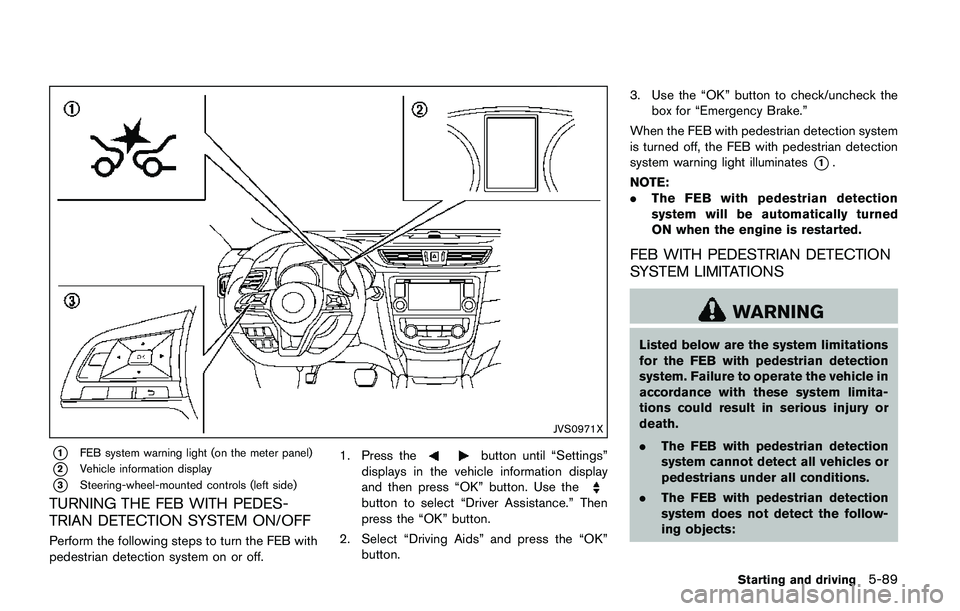
*1FEB system warning light (on the meter panel)
*2Vehicle information display
*3Steering-wheel-mounted controls (left side)
TURNING THE FEB WITH PEDES-
TRIAN DETECTION SYSTEM ON/OFF
Perform the following steps to turn the FEB with
pedestrian detection system on or off.1. Press the
button until “Settings”
displays in the vehicle information display
and then press “OK” button. Use the
button to select “Driver Assistance.” Then
press the “OK” button.
2. Select “Driving Aids” and press the “OK”
button.3. Use the “OK” button to check/uncheck the
box for “Emergency Brake.”
When the FEB with pedestrian detection system
is turned off, the FEB with pedestrian detection
system warning light illuminates
*1.
NOTE:
.The FEB with pedestrian detection
system will be automatically turned
ON when the engine is restarted.
FEB WITH PEDESTRIAN DETECTION
SYSTEM LIMITATIONS
WARNING
Listed below are the system limitations
for the FEB with pedestrian detection
system. Failure to operate the vehicle in
accordance with these system limita-
tions could result in serious injury or
death.
.The FEB with pedestrian detection
system cannot detect all vehicles or
pedestrians under all conditions.
.The FEB with pedestrian detection
system does not detect the follow-
ing objects:
Starting and driving5-89
Page 377 of 508
5-92Starting and driving
SSD0253
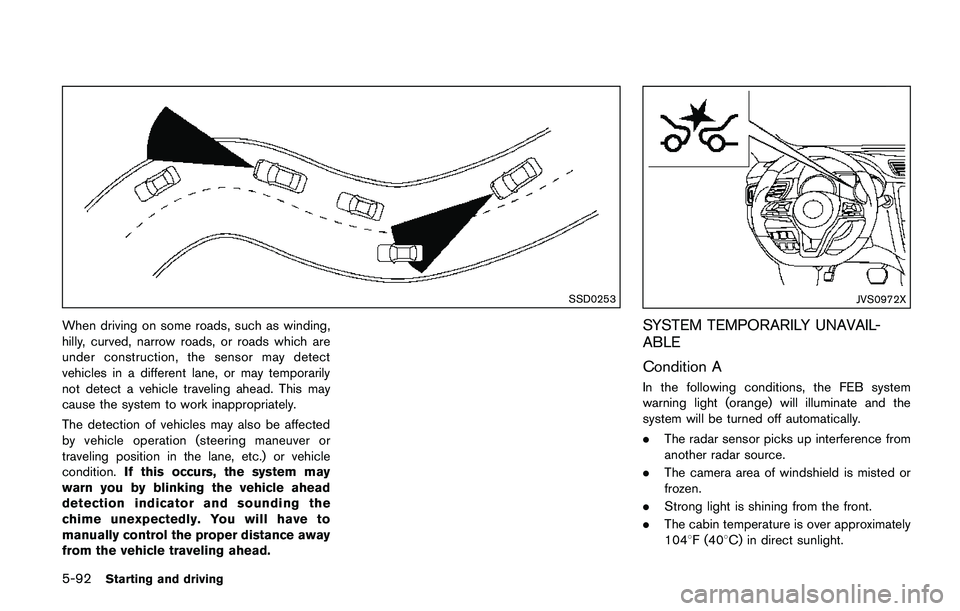
When driving on some roads, such as winding,
hilly, curved, narrow roads, or roads which are
under construction, the sensor may detect
vehicles in a different lane, or may temporarily
not detect a vehicle traveling ahead. This may
cause the system to work inappropriately.
The detection of vehicles may also be affected
by vehicle operation (steering maneuver or
traveling position in the lane, etc.) or vehicle
condition.If this occurs, the system may
warn you by blinking the vehicle ahead
detection indicator and sounding the
chime unexpectedly. You will have to
manually control the proper distance away
from the vehicle traveling ahead.
JVS0972X
SYSTEM TEMPORARILY UNAVAIL-
ABLE
Condition A
In the following conditions, the FEB system
warning light (orange) will illuminate and the
system will be turned off automatically.
.The radar sensor picks up interference from
another radar source.
.The camera area of windshield is misted or
frozen.
.Strong light is shining from the front.
.The cabin temperature is over approximately
1048F (408C) in direct sunlight.
Page 386 of 508
wheel gently touches the curb.
.HEADED UPHILL WITH CURB:*2
Turn the wheels away from the curb and
move the vehicle back until the curb side
wheel gently touches the curb.
.HEADED UPHILL OR DOWNHILL, NO
CURB:
*3
Turn the wheels toward the side of the
road so the vehicle will move away from
the center of the road if it moves.
4.Models with Intelligent Key system:
Place the ignition switch in the OFF position.
Models without Intelligent Key system:
Place the ignition switch in the LOCK
position and remove the key.
WARNING
.If the engine is not running or is
turned off while driving, the power
assist for the steering will not work.
Steering will be harder to operate.
.When the electric power steering
warning light illuminates with the
engine running, the power assist for
the steering will cease operation.
You will still have control of the
vehicle but the steering will be
harder to operate.
The electric power steering is designed to
provide power assist while driving to operate
the steering wheel with light force.
When the steering wheel is operated repeatedly
or continuously while parking or driving at a very
low speed, the power assist for the steering
wheel will be reduced. This is to prevent
overheating of the electric power steering and
protect it from getting damaged. While the
power assist is reduced, steering wheel opera-
tion will become heavy. When the temperature
of the electric power steering goes down, the
power assist level will return to normal. Avoid
repeating such steering wheel operations thatcould cause the electric power steering to
overheat.
You may hear a noise when the steering wheel is
operated quickly. However, this is not a mal-
function.
If the electric power steering warning light
illuminates while the engine is running, it may
indicate the electric power steering is not
functioning properly and may need servicing.
Have the electric power steering checked. It is
recommended that you visit a NISSAN dealer for
this service. (See “Electric power steering
warning light” (P.2-12).)
When the electric power steering warning light
illuminates with the engine running, the power
assist for the steering will cease operation. You
will still have control of the vehicle. However,
greater steering effort is needed, especially in
sharp turns and at low speeds.
The mode of the Power Steering can be
changed to:
.NORMAL
.SPORT
For more information, see “Vehicle information
display” (P.2-18) .
Starting and driving5-101
ELECTRIC POWER STEERING
Page 388 of 508
surfaces even with ABS. Stopping
distances may also be longer on
rough, gravel or snow covered
roads, or if you are using tire chains.
Always maintain a safe distance
from the vehicle in front of you.
Ultimately, the driver is responsible
for safety.
.Tire type and condition may also
affect braking effectiveness.
— When replacing tires, install the
specified size of tires on all four
wheels.
— When installing a spare tire,
make sure that it is the proper
size and type as specified on the
Tire and Loading Information
label. See“Tire and Loading
Information label”(P.10-10) of
this manual.
— For detailed information, see
“Wheels and tires”(P.8-29) of
this manual.
The Anti-lock Braking System (ABS) controls
the brakes so the wheels do not lock during hard
braking or when braking on slippery surfaces.
The system detects the rotation speed at eachwheel and varies the brake fluid pressure to
prevent each wheel from locking and sliding. By
preventing each wheel from locking, the system
helps the driver maintain steering control and
helps to minimize swerving and spinning on
slippery surfaces.
Using the system
Depress the brake pedal and hold it down.
Depress the brake pedal with firm steady
pressure, but do not pump the brakes. The
ABS will operate to prevent the wheels from
locking up. Steer the vehicle to avoid obstacles.
WARNING
Do not pump the brake pedal. Doing so
may result in increased stopping dis-
tances.
Self-test feature
The ABS includes electronic sensors, electric
pumps, hydraulic solenoids and a computer. The
computer has a built-in diagnostic feature that
tests the system each time you start the engine
and move the vehicle at a low speed in forward
or reverse. When the self-test occurs, you may
hear a “clunk” noise and/or feel a pulsation in the
brake pedal. This is normal and does notindicate a malfunction. If the computer senses
a malfunction, it switches the ABS off and
illuminates the ABS warning light on the
instrument panel. The brake system then oper-
ates normally, but without anti-lock assistance.
If the ABS warning light illuminates during the
self-test or while driving, have the vehicle
checked. It is recommended you visit a NISSAN
dealer for this service.
Normal operation
The ABS operates at speeds above 3 to 6 MPH
(5 to 10 km/h) . The speed varies according to
road conditions.
When the ABS senses that one or more wheels
are close to locking up, the actuator rapidly
applies and releases hydraulic pressure. This
action is similar to pumping the brakes very
quickly. You may feel a pulsation in the brake
pedal and hear a noise from under the hood or
feel a vibration from the actuator when it is
operating. This is normal and indicates that the
ABS is operating properly. However, the pulsa-
tion may indicate that road conditions are
hazardous and extra care is required while
driving.
Starting and driving5-103
Page 389 of 508
5-104Starting and driving
The Vehicle Dynamic Control (VDC) system
uses various sensors to monitor driver inputs
and vehicle motion. Under certain driving con-
ditions, the VDC system helps to perform the
following functions.
.Controls brake pressure to reduce wheel
slip on one slipping drive wheel so power is
transferred to a non slipping drive wheel on
the same axle.
.Controls brake pressure and engine output
to reduce drive wheel slip based on vehicle
speed (traction control function) .
.Controls brake pressure at individual wheels
and engine output to help the driver maintain
control of the vehicle in the following
conditions:
— understeer (vehicle tends to not follow
the steered path despite increased
steering input)
— oversteer (vehicle tends to spin due to
certain road or driving conditions) .
The VDC system can help the driver to maintain
control of the vehicle, but it cannot prevent loss
of vehicle control in all driving situations.
When the VDC system operates, the VDC
warning light
in the instrument panel flashes
so note the following:
.The road may be slippery or the system may
determine some action is required to helpkeep the vehicle on the steered path.
.You may feel a pulsation in the brake pedal
and hear a noise or vibration from under the
hood. This is normal and indicates that the
VDC system is working properly.
.Adjust your speed and driving to the road
conditions.
If a malfunction occurs in the system, the VDC
warning light
illuminates in the instrument
panel. The VDC system automatically turns off.
The VDC OFF switch is used to turn off the VDC
system. The VDC off indicator
illuminates to
indicate the VDC system is off. When the VDC
switch is used to turn off the system, the VDC
system still operates to prevent one drive wheel
from slipping by transferring power to a non
slipping drive wheel. The VDC warning light
flashes if this occurs. All other VDC functions
are off, and the VDC warning lightwill not
flash. The VDC system is automatically reset to
on when the ignition switch is placed in the off
position then back to the on position.
See “Vehicle Dynamic Control (VDC) warning
light” (P.2-15) and “Vehicle Dynamic Control
(VDC) off indicator light” (P.2-17).
The computer has a built-in diagnostic feature
that tests the system each time you start the
engine and move the vehicle forward or in
reverse at a slow speed. When the self-testoccurs, you may hear a “clunk” noise and/or feel
a pulsation in the brake pedal. This is normal and
is not an indication of a malfunction.
WARNING
.The VDC system is designed to help
improve driving stability but does
not prevent accidents due to abrupt
steering operation at high speeds or
by careless or dangerous driving
techniques. Reduce vehicle speed
and be especially careful when driv-
ing and cornering on slippery sur-
faces and always drive carefully.
.Do not modify the vehicle’s suspen-
sion. If suspension parts such as
shock absorbers, struts, springs,
stabilizer bars, bushings and
wheels are not NISSAN recom-
mended for your vehicle or are
extremely deteriorated, the VDC
system may not operate properly.
This could adversely affect vehicle
handling performance, and the VDC
warning light
may illuminate.
.If brake related parts such as brake
pads, rotors and calipers are not
NISSAN recommended or are extre-
VEHICLE DYNAMIC CONTROL (VDC)
SYSTEM
Page 391 of 508
5-106Starting and driving
The chassis control is an electric control module
that includes the following functions:
.Active Trace Control
.Active Engine Brake
.Active Ride Control
ACTIVE TRACE CONTROL
This system senses driving based on the driver’s
steering and acceleration/braking patterns, and
controls brake pressure at individual wheels to
aid tracing at corners and help smooth vehicle
response.
The Active Trace Control can be set to ON
(enabled) or OFF (disabled) through the Vehicle
Information Display “Settings” page. See “Ve-
hicle information display” (P.2-18) for more
information.
When the Vehicle Dynamic Control (VDC) OFF
switch is used to turn off the VDC system, the
Active Trace Control is also turned off.
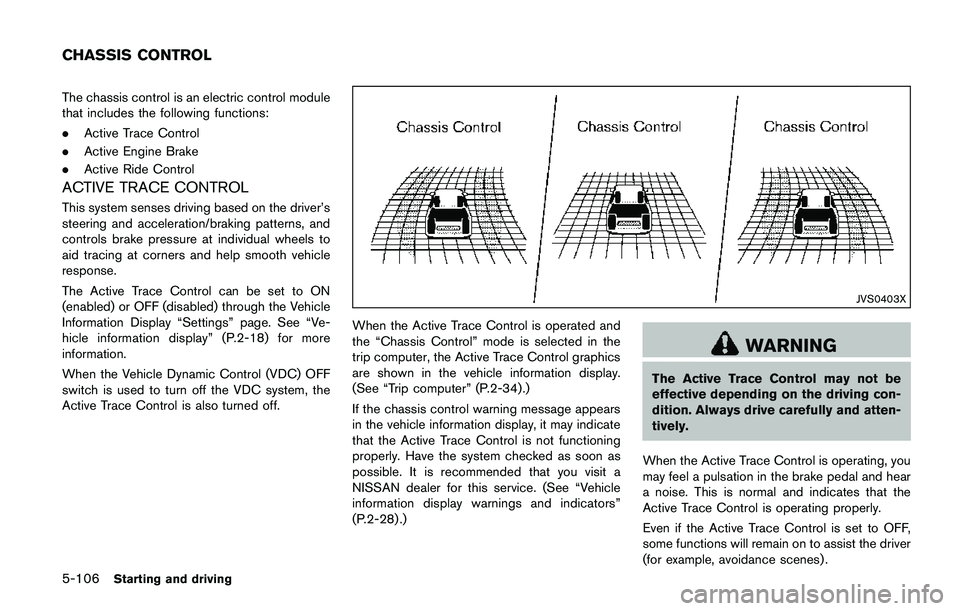
JVS0403X
When the Active Trace Control is operated and
the “Chassis Control” mode is selected in the
trip computer, the Active Trace Control graphics
are shown in the vehicle information display.
(See “Trip computer” (P.2-34).)
If the chassis control warning message appears
in the vehicle information display, it may indicate
that the Active Trace Control is not functioning
properly. Have the system checked as soon as
possible. It is recommended that you visit a
NISSAN dealer for this service. (See “Vehicle
information display warnings and indicators”
(P.2-28) .)
WARNING
The Active Trace Control may not be
effective depending on the driving con-
dition. Always drive carefully and atten-
tively.
When the Active Trace Control is operating, you
may feel a pulsation in the brake pedal and hear
a noise. This is normal and indicates that the
Active Trace Control is operating properly.
Even if the Active Trace Control is set to OFF,
some functions will remain on to assist the driver
(for example, avoidance scenes) .
CHASSIS CONTROL
Page 392 of 508
ACTIVE ENGINE BRAKE (Continuously
Variable Transmission (CVT) models)
The Active Engine Brake function adds subtle
deceleration by controlling CVT gear ratio,
depending on the cornering condition calculated
from driver’s steering input and plural sensors.
This benefit to easier traceability and less
workload of adjusting speed with braking at
corners.
The Active Engine Brake also adds subtle
deceleration with gear ratio control according
to driver’s brake pedal operation.
The Active Engine Brake can be set to ON
(enabled) or OFF (disabled) through the Vehicle
Information Display “Settings” page. See “Ve-
hicle information display” (P.2-18) for more
information.
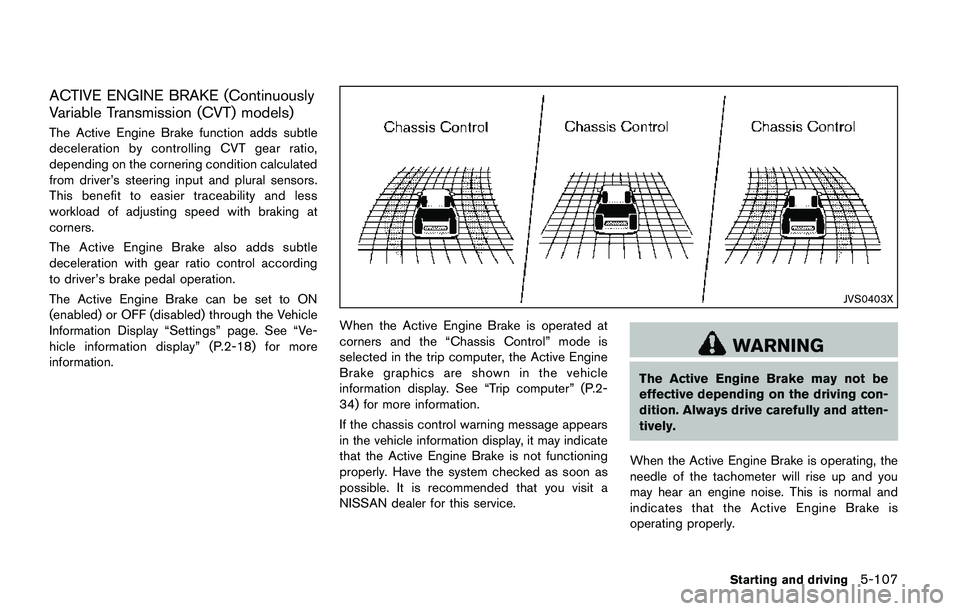
JVS0403X
When the Active Engine Brake is operated at
corners and the “Chassis Control” mode is
selected in the trip computer, the Active Engine
Brake graphics are shown in the vehicle
information display. See “Trip computer” (P.2-
34) for more information.
If the chassis control warning message appears
in the vehicle information display, it may indicate
that the Active Engine Brake is not functioning
properly. Have the system checked as soon as
possible. It is recommended that you visit a
NISSAN dealer for this service.
WARNING
The Active Engine Brake may not be
effective depending on the driving con-
dition. Always drive carefully and atten-
tively.
When the Active Engine Brake is operating, the
needle of the tachometer will rise up and you
may hear an engine noise. This is normal and
indicates that the Active Engine Brake is
operating properly.
Starting and driving5-107
Page 396 of 508
.Allow more stopping distance under
these conditions. Braking should be
started sooner than on dry pave-
ment.
.Allow greater following distances
on slippery roads.
.Watch for slippery spots (glare ice) .
These may appear on an otherwise
clear road in shaded areas. If a
patch of ice is seen ahead, brake
before reaching it. Try not to brake
while on the ice, and avoid any
sudden steering maneuvers.
.Do not use cruise control on slip-
pery roads.
.Snow can trap dangerous exhaust
gases under your vehicle. Keep
snow clear of the exhaust pipe and
from around your vehicle.
Starting and driving5-111