wheel NISSAN QASHQAI 2017 Owner´s Manual
[x] Cancel search | Manufacturer: NISSAN, Model Year: 2017, Model line: QASHQAI, Model: NISSAN QASHQAI 2017Pages: 508, PDF Size: 2.68 MB
Page 355 of 508
5-70Starting and driving
.The chime sounds.
.The vehicle ahead detection indicator blinks.
The warning chime may not sound in some
cases when there is a short distance between
vehicles. Some examples are:
.When the vehicles are traveling at the same
speed and the distance between vehicles is
not changing
.When the vehicle ahead is traveling faster
and the distance between vehicles is
increasing
.When a vehicle cuts in near your vehicle
The warning chime will not sound when:
.Your vehicle approaches other vehicles that
are parked or moving slowly.
.The accelerator pedal is depressed, over-
riding the system.
NOTE:
The approach warning chime may sound
and the system display may blink when the
radar sensor detects objects on the side of
the vehicle or on the side of the road. This
may cause the ICC system to decelerate or
accelerate the vehicle. The radar sensor
may detect these objects when the vehicle
is driven on winding roads, narrow roads,
hilly roads or when entering or exiting a
curve. In these cases you will have tomanually control the proper distance
ahead of your vehicle.
Also, the sensor sensitivity can be affected by
vehicle operation (steering maneuver or driving
position in the lane) or traffic or vehicle condition
(for example, if a vehicle is being driven with
some damage) .
Automatic cancellation
A chime sounds under the following conditions
and the control is automatically canceled.
.When the vehicle ahead is not detected and
your vehicle is traveling below the speed of
15 MPH (24 km/h)
.When the system judges the vehicle is at
standstill
.When the shift lever is not in the D (Drive)
position or manual shift mode
.When the parking brake is applied
.When the VDC system is turned off
.When VDC (including the traction control
system) operates
.When distance measurement becomes im-
paired due to adhesion of dirt or obstruction
to the sensor
.When a wheel slips
.When the radar signal is temporarily inter-
rupted
Vehicle-to-vehicle distance control mode
limitations
WARNING
Listed below are the system limitations
for the ICC system. Failure to operate
the vehicle in accordance with these
system limitations could result in ser-
ious injury or death.
.The system is primarily intended for
use on straight, dry, open roads with
light traffic. It is not advisable to use
the system in city traffic or con-
gested areas.
.This system will not adapt automa-
tically to road conditions. This sys-
tem should be used in evenly
flowing traffic. Do not use the
system on roads with sharp curves,
or on icy roads, in heavy rain or in
fog.
.As there is a performance limit to
the distance control function, never
rely solely on the ICC system. This
system does not correct careless,
inattentive or absent-minded driv-
ing, or overcome poor visibility in
Page 364 of 508
the desired speed.
3. Push, then quickly release the SET/- switch.
Each time you do this, the set speed will
decrease by about 1 MPH (1.6 km/h) .
To resume the preset speed,push and
release the RES/+ switch. The vehicle will
resume the last set cruising speed when the
vehicle speed is over 25 MPH (40 km/h) .
System temporarily unavailable
A chime sounds under the following conditions
and the control is automatically canceled.
.When the vehicle slows down more than 8
MPH (13 km/h) below the set speed
.When the shift lever is not in the D (Drive) or
manual shift mode
.When the parking brake is applied.
.When the VDC (including the traction
control system) operates
.When a wheel slips
JVS1003X
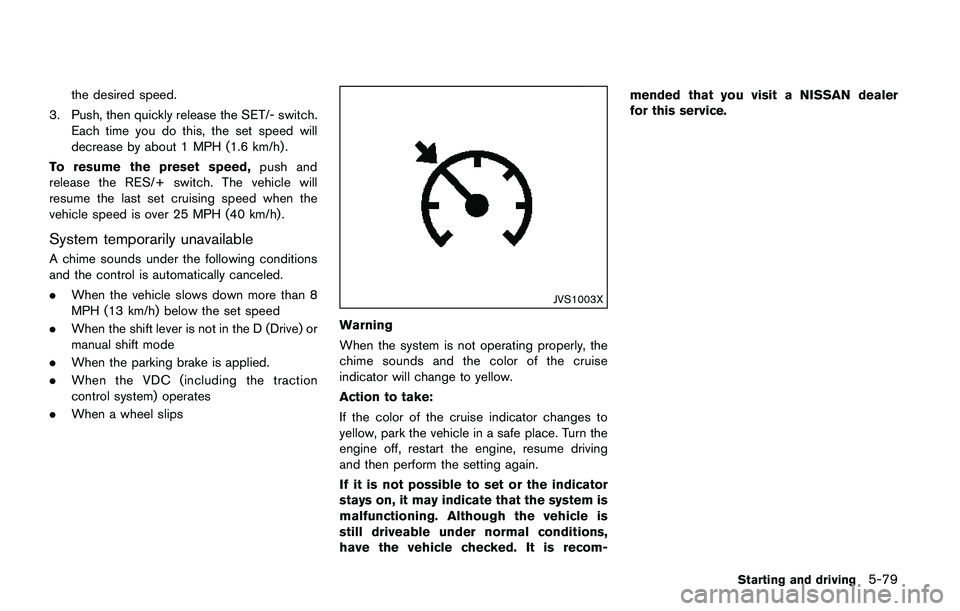
Warning
When the system is not operating properly, the
chime sounds and the color of the cruise
indicator will change to yellow.
Action to take:
If the color of the cruise indicator changes to
yellow, park the vehicle in a safe place. Turn the
engine off, restart the engine, resume driving
and then perform the setting again.
If it is not possible to set or the indicator
stays on, it may indicate that the system is
malfunctioning. Although the vehicle is
still driveable under normal conditions,
have the vehicle checked. It is recom-mended that you visit a NISSAN dealer
for this service.
Starting and driving5-79
Page 366 of 508
JVS1117X
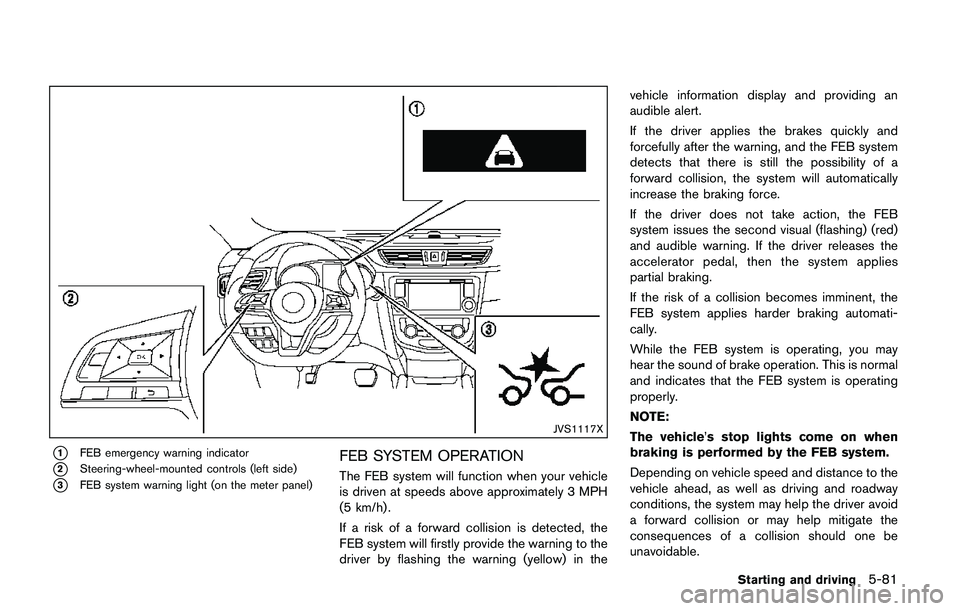
*1FEB emergency warning indicator
*2Steering-wheel-mounted controls (left side)
*3FEB system warning light (on the meter panel)
FEB SYSTEM OPERATION
The FEB system will function when your vehicle
is driven at speeds above approximately 3 MPH
(5 km/h) .
If a risk of a forward collision is detected, the
FEB system will firstly provide the warning to the
driver by flashing the warning (yellow) in thevehicle information display and providing an
audible alert.
If the driver applies the brakes quickly and
forcefully after the warning, and the FEB system
detects that there is still the possibility of a
forward collision, the system will automatically
increase the braking force.
If the driver does not take action, the FEB
system issues the second visual (flashing) (red)
and audible warning. If the driver releases the
accelerator pedal, then the system applies
partial braking.
If the risk of a collision becomes imminent, the
FEB system applies harder braking automati-
cally.
While the FEB system is operating, you may
hear the sound of brake operation. This is normal
and indicates that the FEB system is operating
properly.
NOTE:
The vehicle’s stop lights come on when
braking is performed by the FEB system.
Depending on vehicle speed and distance to the
vehicle ahead, as well as driving and roadway
conditions, the system may help the driver avoid
a forward collision or may help mitigate the
consequences of a collision should one be
unavoidable.
Starting and driving5-81
Page 367 of 508
5-82Starting and driving
If the driver is handling the steering wheel,
accelerating or braking, the FEB system will
function later or will not function.
The automatic braking will cease under the
following conditions:
.When the steering wheel is turned as far as
necessary to avoid a collision.
.When the accelerator pedal is depressed.
.When there is no longer a vehicle detected
ahead.
If the FEB system has stopped the vehicle, the
vehicle will remain at a standstill for approxi-
mately 2 seconds before the brakes are
released.
JVS0971X
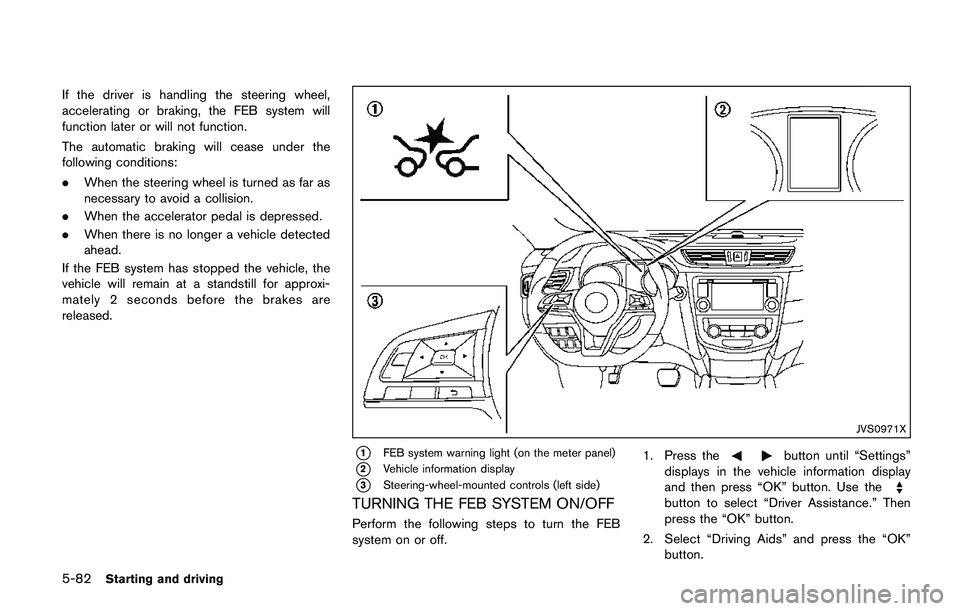
*1FEB system warning light (on the meter panel)
*2Vehicle information display
*3Steering-wheel-mounted controls (left side)
TURNING THE FEB SYSTEM ON/OFF
Perform the following steps to turn the FEB
system on or off.1. Press the
button until “Settings”
displays in the vehicle information display
and then press “OK” button. Use the
button to select “Driver Assistance.” Then
press the “OK” button.
2. Select “Driving Aids” and press the “OK”
button.
Page 372 of 508
JVS1042X
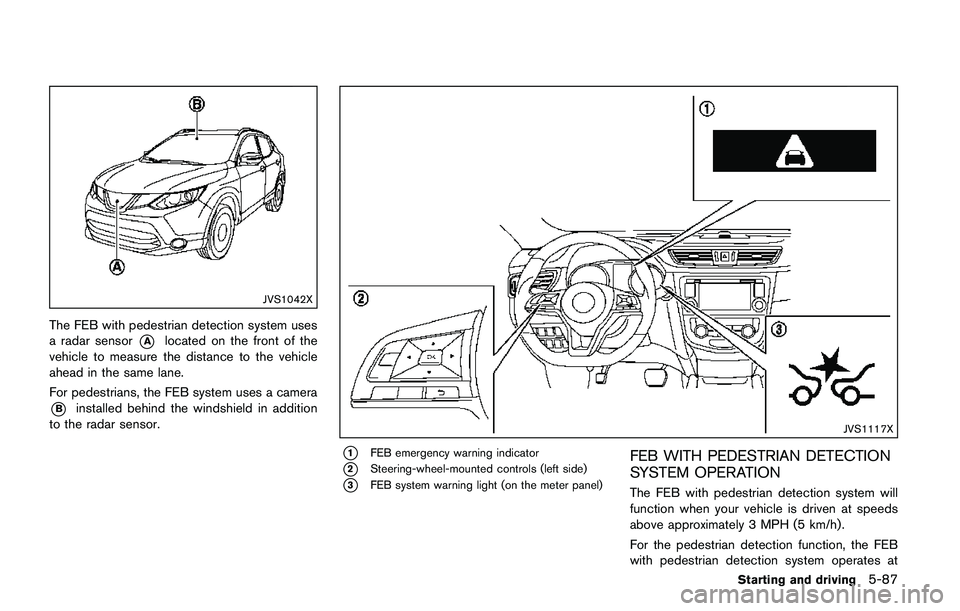
The FEB with pedestrian detection system uses
a radar sensor
*Alocated on the front of the
vehicle to measure the distance to the vehicle
ahead in the same lane.
For pedestrians, the FEB system uses a camera
*Binstalled behind the windshield in addition
to the radar sensor.
JVS1117X
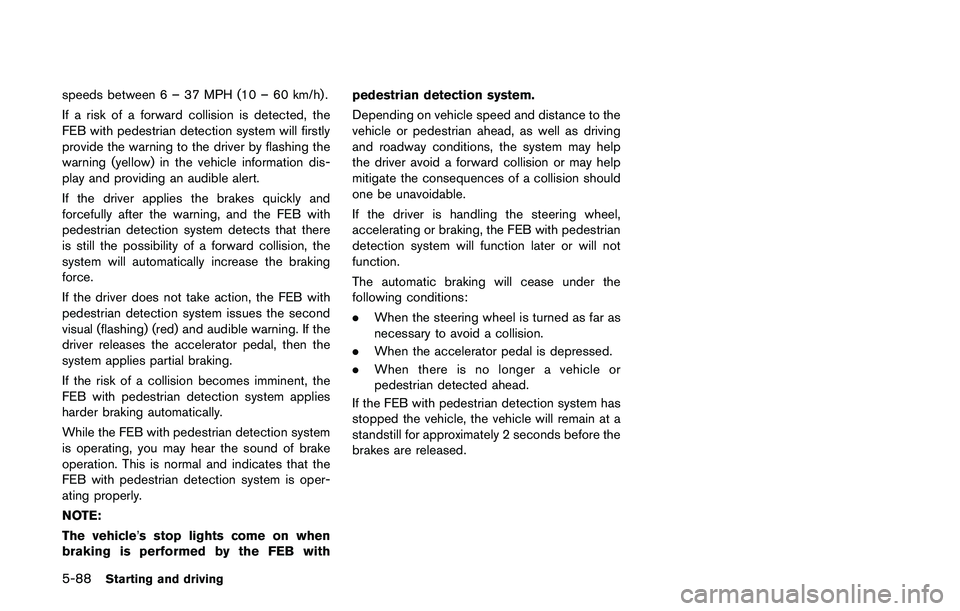
*1FEB emergency warning indicator
*2Steering-wheel-mounted controls (left side)
*3FEB system warning light (on the meter panel)
FEB WITH PEDESTRIAN DETECTION
SYSTEM OPERATION
The FEB with pedestrian detection system will
function when your vehicle is driven at speeds
above approximately 3 MPH (5 km/h) .
For the pedestrian detection function, the FEB
with pedestrian detection system operates at
Starting and driving5-87
Page 373 of 508
5-88Starting and driving
speeds between 6 – 37 MPH (10 – 60 km/h) .
If a risk of a forward collision is detected, the
FEB with pedestrian detection system will firstly
provide the warning to the driver by flashing the
warning (yellow) in the vehicle information dis-
play and providing an audible alert.
If the driver applies the brakes quickly and
forcefully after the warning, and the FEB with
pedestrian detection system detects that there
is still the possibility of a forward collision, the
system will automatically increase the braking
force.
If the driver does not take action, the FEB with
pedestrian detection system issues the second
visual (flashing) (red) and audible warning. If the
driver releases the accelerator pedal, then the
system applies partial braking.
If the risk of a collision becomes imminent, the
FEB with pedestrian detection system applies
harder braking automatically.
While the FEB with pedestrian detection system
is operating, you may hear the sound of brake
operation. This is normal and indicates that the
FEB with pedestrian detection system is oper-
ating properly.
NOTE:
The vehicle’s stop lights come on when
braking is performed by the FEB withpedestrian detection system.
Depending on vehicle speed and distance to the
vehicle or pedestrian ahead, as well as driving
and roadway conditions, the system may help
the driver avoid a forward collision or may help
mitigate the consequences of a collision should
one be unavoidable.
If the driver is handling the steering wheel,
accelerating or braking, the FEB with pedestrian
detection system will function later or will not
function.
The automatic braking will cease under the
following conditions:
.When the steering wheel is turned as far as
necessary to avoid a collision.
.When the accelerator pedal is depressed.
.When there is no longer a vehicle or
pedestrian detected ahead.
If the FEB with pedestrian detection system has
stopped the vehicle, the vehicle will remain at a
standstill for approximately 2 seconds before the
brakes are released.
Page 374 of 508
JVS0971X
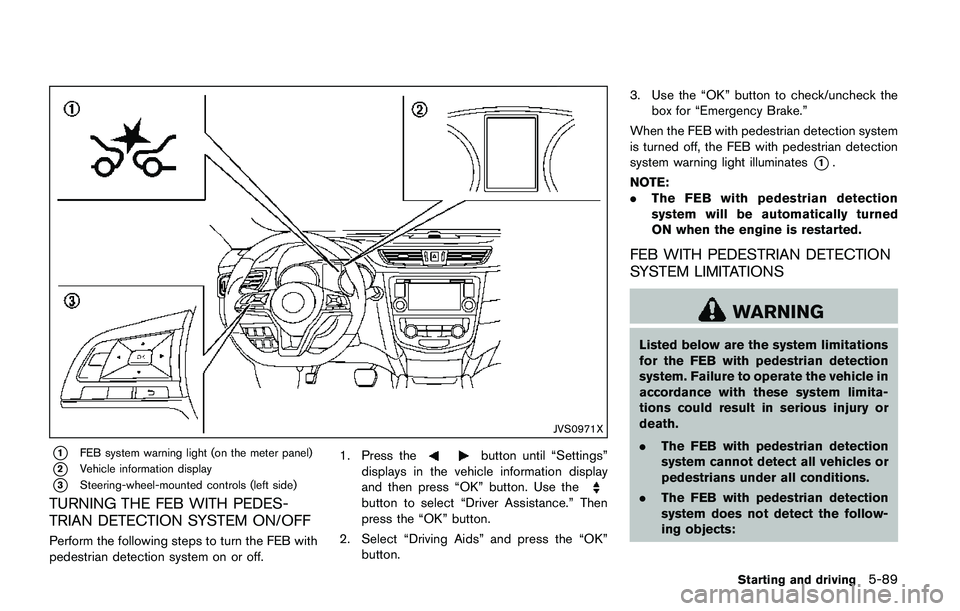
*1FEB system warning light (on the meter panel)
*2Vehicle information display
*3Steering-wheel-mounted controls (left side)
TURNING THE FEB WITH PEDES-
TRIAN DETECTION SYSTEM ON/OFF
Perform the following steps to turn the FEB with
pedestrian detection system on or off.1. Press the
button until “Settings”
displays in the vehicle information display
and then press “OK” button. Use the
button to select “Driver Assistance.” Then
press the “OK” button.
2. Select “Driving Aids” and press the “OK”
button.3. Use the “OK” button to check/uncheck the
box for “Emergency Brake.”
When the FEB with pedestrian detection system
is turned off, the FEB with pedestrian detection
system warning light illuminates
*1.
NOTE:
.The FEB with pedestrian detection
system will be automatically turned
ON when the engine is restarted.
FEB WITH PEDESTRIAN DETECTION
SYSTEM LIMITATIONS
WARNING
Listed below are the system limitations
for the FEB with pedestrian detection
system. Failure to operate the vehicle in
accordance with these system limita-
tions could result in serious injury or
death.
.The FEB with pedestrian detection
system cannot detect all vehicles or
pedestrians under all conditions.
.The FEB with pedestrian detection
system does not detect the follow-
ing objects:
Starting and driving5-89
Page 375 of 508
5-90Starting and driving
— Small pedestrians (including
small children) , animals and cy-
clists.
— Pedestrians in wheelchairs or
using mobile transport such as
scooters, child-operated toys, or
skateboards.
— Pedestrians who are seated or
otherwise not in a full upright
standing or walking position.
— Obstacles on the roadway
— Oncoming vehicles
— Crossing vehicles
— Obstacles on the roadside
.The FEB with pedestrian detection
system has some performance lim-
itations.
— If a stationary vehicle is in the
vehicle’s path, the FEB with
pedestrian detection system will
not function when the vehicle is
driven at speeds over approxi-
mately 50 MPH (80 km/h) .
— For pedestrian detection, the
FEB with pedestrian detection
system will not function whenthe vehicle is driven at speeds
over approximately 37 MPH (60
km/h) or below approximately 6
MPH (10 km/h) .
.The FEB with pedestrian detection
system may not function for pedes-
trians in darkness or in tunnels,
even if there is street lighting in
the area.
.For pedestrians, the FEB with pe-
destrian detection system will not
issue the first warning.
.The FEB with pedestrian detection
system may not function if the
vehicle ahead is narrow (for exam-
ple a motorcycle) .
.The FEB with pedestrian detection
system may not function if speed
difference between the two vehicles
is too small.
.The radar sensor may not function
properly or detect a vehicle ahead in
the following conditions:
— Poor visibility (conditions such
as rain, snow, fog, dust storms,
sandstorms, and road spray
from other vehicles)— Driving on a steep downhill
slope or roads with sharp
curves.
— Driving on a bumpy road sur-
face, such as an uneven dirt
road.
— If dirt, ice, snow or other materi-
al is covering the radar sensor
area.
— Interference by other radar
sources.
.The camera may not function prop-
erly or detect a vehicle ahead in the
following conditions:
— The camera area of windshield
is fogged up, or covered with
dirt, water drops, ice, snow, etc.
— Strong light (for example, sun-
light or high beams from on-
coming vehicles) enters the
front camera. Strong light
causes the area around the
pedestrian to be cast in a sha-
dow, making it difficult to see.
— A sudden change in brightness
occurs. (For example, when the
vehicle enters or exits a tunnel
Page 381 of 508
5-96Starting and driving
fuel and reduces emissions.
8. Buy an automated pass for toll roads.
.Automated passes permit drivers to use
special lanes to maintain cruising speed
through the toll and avoid stopping and
starting.
9. Winter warm up.
.Limit idling time to minimize impact to fuel
economy.
.Vehicles typically need no more than 30
seconds of idling at start-up to effectively
circulate the engine oil before driving.
.Your vehicle will reach its ideal operating
temperature more quickly while driving
versus idling.
10. Keeping your vehicle cool.
.Park your vehicle in a covered parking
area or in the shade whenever possible.
.When entering a hot vehicle, opening the
windows will help to reduce the inside
temperature faster, resulting in reduced
demand on your A/C system..Keep your engine tuned up.
.Follow the recommended scheduled main-
tenance.
.Keep the tires inflated to the correct
pressure. Low tire pressure increases tire
wear and lowers fuel economy.
.Keep the wheels in correct alignment.
Improper alignment increases tire wear and
lowers fuel economy.
.Use the recommended viscosity engine oil.
(See “Engine oil and oil filter recommenda-
tion” (P.10-5) .)If any malfunction occurs in the AWD system
while the engine is running, warning messages
appear in the vehicle information display.
INCREASING FUEL ECONOMYALL-WHEEL DRIVE (AWD) (if so
equipped)
Page 382 of 508
JVS1120X
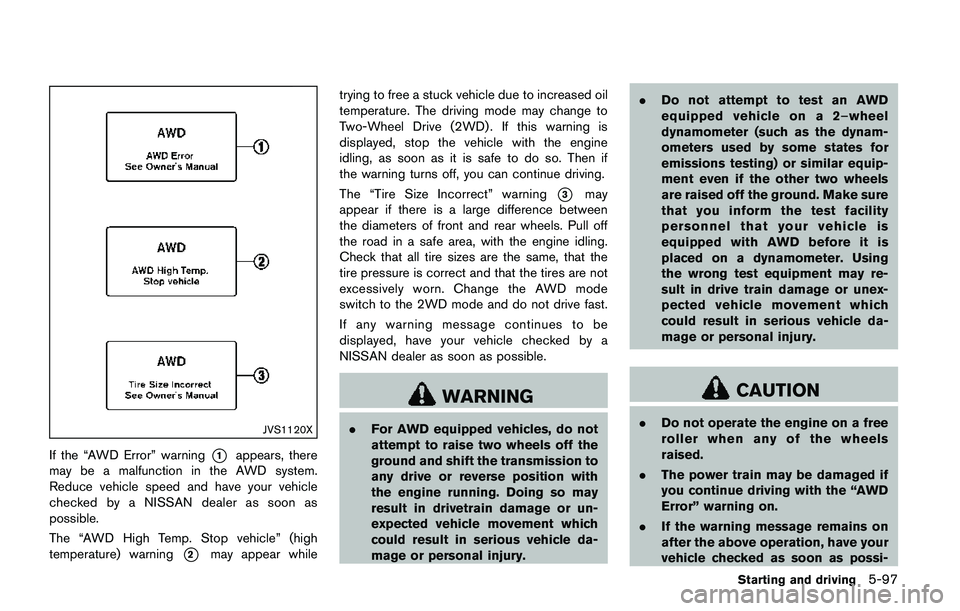
If the “AWD Error” warning*1appears, there
may be a malfunction in the AWD system.
Reduce vehicle speed and have your vehicle
checked by a NISSAN dealer as soon as
possible.
The “AWD High Temp. Stop vehicle” (high
temperature) warning
*2may appear whiletrying to free a stuck vehicle due to increased oil
temperature. The driving mode may change to
Two-Wheel Drive (2WD) . If this warning is
displayed, stop the vehicle with the engine
idling, as soon as it is safe to do so. Then if
the warning turns off, you can continue driving.
The “Tire Size Incorrect” warning
*3may
appear if there is a large difference between
the diameters of front and rear wheels. Pull off
the road in a safe area, with the engine idling.
Check that all tire sizes are the same, that the
tire pressure is correct and that the tires are not
excessively worn. Change the AWD mode
switch to the 2WD mode and do not drive fast.
If any warning message continues to be
displayed, have your vehicle checked by a
NISSAN dealer as soon as possible.
WARNING
.For AWD equipped vehicles, do not
attempt to raise two wheels off the
ground and shift the transmission to
any drive or reverse position with
the engine running. Doing so may
result in drivetrain damage or un-
expected vehicle movement which
could result in serious vehicle da-
mage or personal injury..Do not attempt to test an AWD
equipped vehicle on a 2–wheel
dynamometer (such as the dynam-
ometers used by some states for
emissions testing) or similar equip-
ment even if the other two wheels
are raised off the ground. Make sure
that you inform the test facility
personnel that your vehicle is
equipped with AWD before it is
placed on a dynamometer. Using
the wrong test equipment may re-
sult in drive train damage or unex-
pected vehicle movement which
could result in serious vehicle da-
mage or personal injury.
CAUTION
.Do not operate the engine on a free
roller when any of the wheels
raised.
.The power train may be damaged if
you continue driving with the “AWD
Error” warning on.
.If the warning message remains on
after the above operation, have your
vehicle checked as soon as possi-
Starting and driving5-97