coolant temperature NISSAN QASHQAI 2017 Owner´s Manual
[x] Cancel search | Manufacturer: NISSAN, Model Year: 2017, Model line: QASHQAI, Model: NISSAN QASHQAI 2017Pages: 508, PDF Size: 2.68 MB
Page 17 of 508
0-8Illustrated table of contents
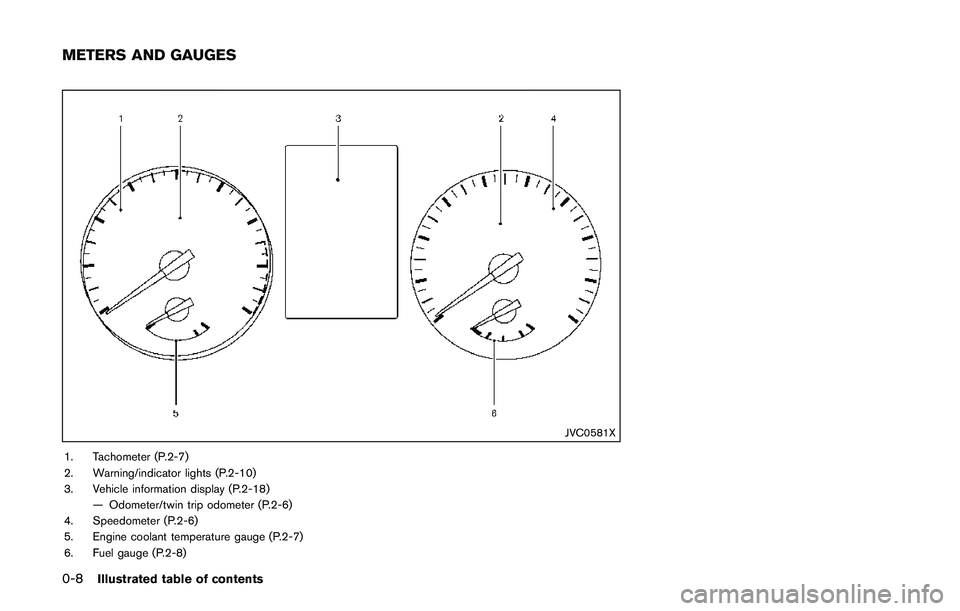
JVC0581X
1. Tachometer (P.2-7)
2. Warning/indicator lights (P.2-10)
3. Vehicle information display (P.2-18)
— Odometer/twin trip odometer (P.2-6)
4. Speedometer (P.2-6)
5. Engine coolant temperature gauge (P.2-7)
6. Fuel gauge (P.2-8)
METERS AND GAUGES
Page 80 of 508
2 Instruments and controls
Cockpit ........................................................................................ 2-3
Instrument panel ........................................................................ 2-4
Meters and gauges ................................................................... 2-5
Speedometer and odometer ............................................ 2-6
Tachometer ........................................................................... 2-7
Engine coolant temperature gauge ................................ 2-7
Fuel gauge ............................................................................ 2-8
Instrument brightness control .......................................... 2-9
Continuously Variable Transmission (CVT) position
indicator (if so equipped) .................................................. 2-9
Warning lights, indicator lights and
audible reminders ................................................................... 2-10
Checking lights ................................................................. 2-10
Warning lights ................................................................... 2-10
Indicator lights ................................................................... 2-16
Audible reminders ............................................................ 2-17
Vehicle information display .................................................. 2-18
How to use the vehicle information display .............. 2-19
Startup display .................................................................. 2-19
Settings ............................................................................... 2-19
Vehicle information display warnings
and indicators .................................................................... 2-28
Trip computer .................................................................... 2-34
Clock and outside air temperature .............................. 2-36Security systems ................................................................... 2-36
Vehicle Security System ............................................... 2-36
NISSAN Vehicle Immobilizer System ........................ 2-38
Wiper and washer switch ................................................... 2-39
Windshield wiper and washer operation ................. 2-40
Rear window wiper and washer switch .......................... 2-41
Rear window and outside mirror defroster switch ....... 2-42
Headlight and turn signal switch ....................................... 2-43
Headlight switch ............................................................ 2-43
Turn signal switch .......................................................... 2-48
Fog light switch (if so equipped) .............................. 2-48
Horn .......................................................................................... 2-49
Heated steering wheel (if so equipped) ......................... 2-49
Heated seats (if so equipped) ........................................... 2-50
Lane Departure Prevention (LDP) switch (if
so equipped) .......................................................................... 2-51
Blind Spot Warning (BSW) switch (if so equipped) ..... 2-51
Vehicle Dynamic Control (VDC) off switch .................... 2-52
All-wheel drive (AWD) lock switch (if so equipped) ..... 2-52
ECO mode switch ................................................................ 2-52
Power outlet ............................................................................ 2-53
Storage .................................................................................... 2-54
Cup holders ..................................................................... 2-54
Soft bottle holders ......................................................... 2-54
Cargo area (if so equipped) ....................................... 2-55
Page 84 of 508
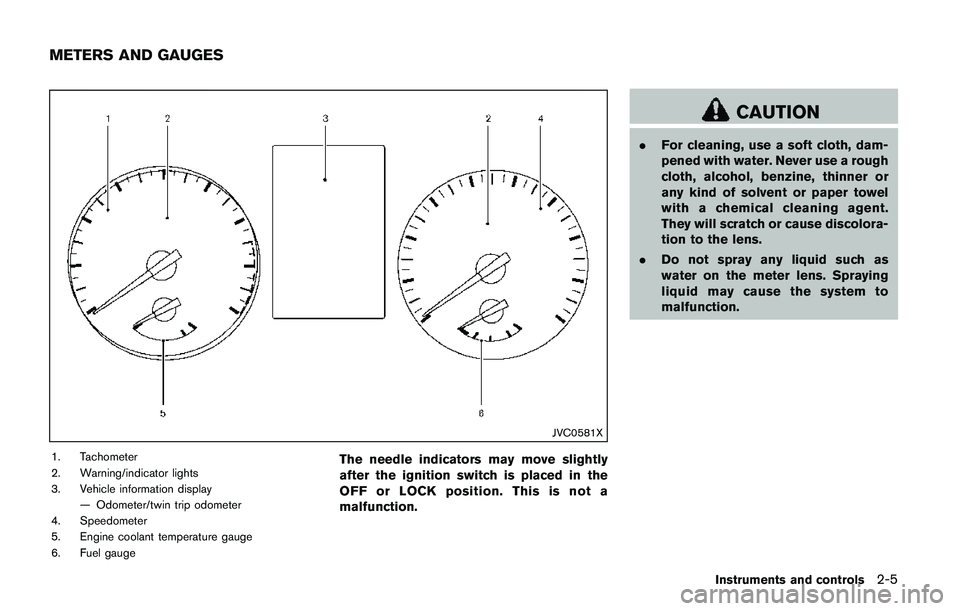
JVC0581X
1. Tachometer
2. Warning/indicator lights
3. Vehicle information display
— Odometer/twin trip odometer
4. Speedometer
5. Engine coolant temperature gauge
6. Fuel gaugeThe needle indicators may move slightly
after the ignition switch is placed in the
OFF or LOCK position. This is not a
malfunction.
CAUTION
.For cleaning, use a soft cloth, dam-
pened with water. Never use a rough
cloth, alcohol, benzine, thinner or
any kind of solvent or paper towel
with a chemical cleaning agent.
They will scratch or cause discolora-
tion to the lens.
.Do not spray any liquid such as
water on the meter lens. Spraying
liquid may cause the system to
malfunction.
Instruments and controls2-5
METERS AND GAUGES
Page 86 of 508
Resetting twin trip odometer:
Push the TRIP RESET switch
*3for more than
1 second to reset the trip odometer to zero.
JVI0951X
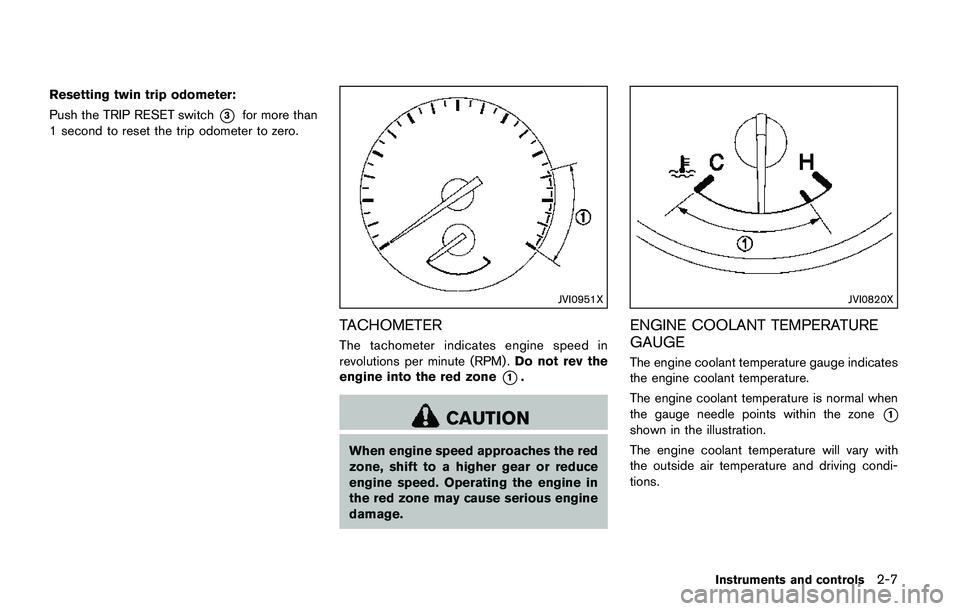
TACHOMETER
The tachometer indicates engine speed in
revolutions per minute (RPM) .Do not rev the
engine into the red zone
*1.
CAUTION
When engine speed approaches the red
zone, shift to a higher gear or reduce
engine speed. Operating the engine in
the red zone may cause serious engine
damage.
JVI0820X
ENGINE COOLANT TEMPERATURE
GAUGE
The engine coolant temperature gauge indicates
the engine coolant temperature.
The engine coolant temperature is normal when
the gauge needle points within the zone
*1
shown in the illustration.
The engine coolant temperature will vary with
the outside air temperature and driving condi-
tions.
Instruments and controls2-7
Page 87 of 508
2-8Instruments and controls
CAUTION
.If the gauge indicates the engine
coolant temperature is near the hot
(H) end of the normal range, reduce
vehicle speed to decrease the tem-
perature.
.If the gauge is over the normal
range, stop the vehicle as soon as
safely possible and let the engine
idle.
.If the engine is overheated, contin-
ued operation of the vehicle may
seriously damage the engine. (See
“If your vehicle overheats” (P.6-11)
for immediate action required.)
JVI0640X
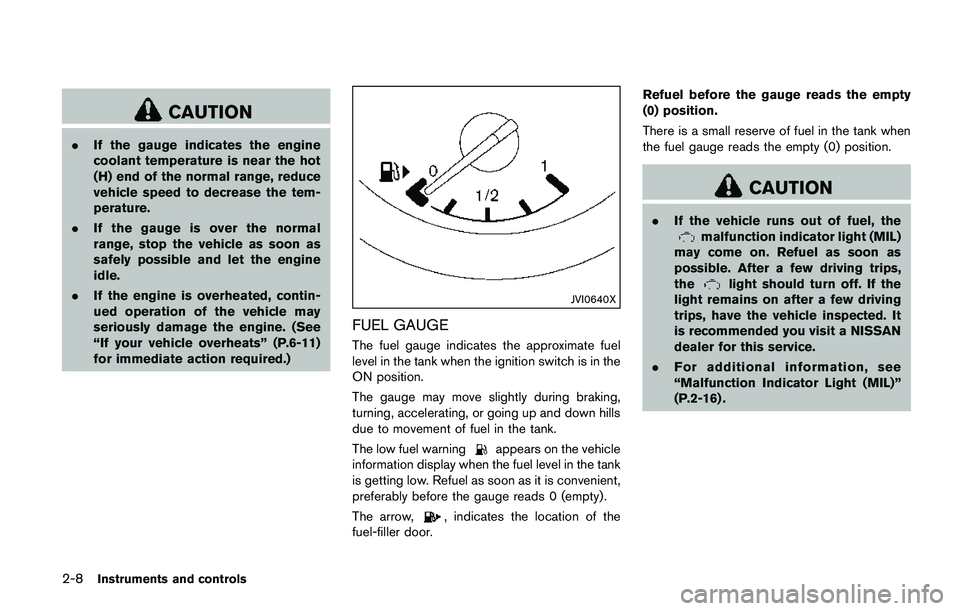
FUEL GAUGE
The fuel gauge indicates the approximate fuel
level in the tank when the ignition switch is in the
ON position.
The gauge may move slightly during braking,
turning, accelerating, or going up and down hills
due to movement of fuel in the tank.
The low fuel warning
appears on the vehicle
information display when the fuel level in the tank
is getting low. Refuel as soon as it is convenient,
preferably before the gauge reads 0 (empty) .
The arrow,
, indicates the location of the
fuel-filler door.Refuel before the gauge reads the empty
(0) position.
There is a small reserve of fuel in the tank when
the fuel gauge reads the empty (0) position.
CAUTION
.If the vehicle runs out of fuel, themalfunction indicator light (MIL)
may come on. Refuel as soon as
possible. After a few driving trips,
the
light should turn off. If the
light remains on after a few driving
trips, have the vehicle inspected. It
is recommended you visit a NISSAN
dealer for this service.
.For additional information, see
“Malfunction Indicator Light (MIL)”
(P.2-16) .
Page 215 of 508
4-34Heater, air conditioner, audio and phone systems
defog the windshield. The air recirculation mode
automatically turns off, allowing outside air to be
drawn into the passenger compartment to
further improve the defogging performance.
The air conditioner is always on in front defroster
or
mode, regardless of whether the
indicator light is on or off.
NOTE:
.The air conditioner system should be
operated for approximately 10 minutes
at least once a month. This helps
prevent damage to the air conditioner
system due to the lack of lubrication.
.A visible mist may be seen coming
from the ventilators in hot, humid
conditions as the air is cooled rapidly.
This does not indicate a malfunction.
.If the engine coolant temperature be-
comes too high, the air recirculation
mode will be activated and the indica-
tor light will come on automatically.
.If the engine coolant temperature
gauge indicates engine coolant tem-
perature over the normal range, turn
the air conditioner off. (See“If your
vehicle overheats”(P.6-11) .)
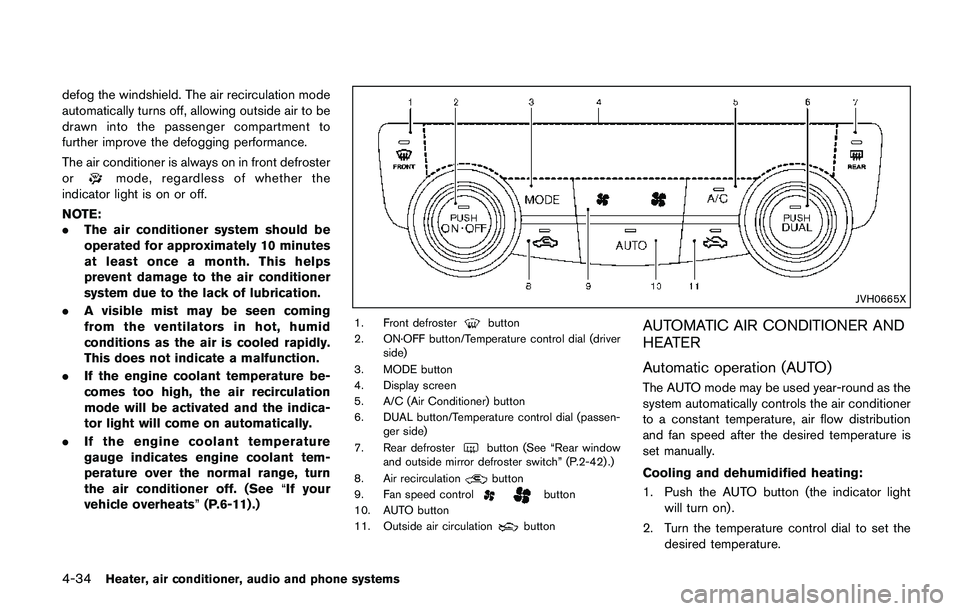
JVH0665X
1. Front defrosterbutton
2. ON·OFF button/Temperature control dial (driver
side)
3. MODE button
4. Display screen
5. A/C (Air Conditioner) button
6. DUAL button/Temperature control dial (passen-
ger side)
7. Rear defroster
button (See “Rear window
and outside mirror defroster switch” (P.2-42) .)
8. Air recirculation
button
9. Fan speed controlbutton
10. AUTO button
11. Outside air circulation
button
AUTOMATIC AIR CONDITIONER AND
HEATER
Automatic operation (AUTO)
The AUTO mode may be used year-round as the
system automatically controls the air conditioner
to a constant temperature, air flow distribution
and fan speed after the desired temperature is
set manually.
Cooling and dehumidified heating:
1. Push the AUTO button (the indicator light
will turn on) .
2. Turn the temperature control dial to set the
desired temperature.
Page 217 of 508

4-36Heater, air conditioner, audio and phone systems
sponding temperature control dial.
Also turning the passenger’s side tempera-
ture control dial changes only the front
passenger’s side temperature. (The DUAL
indicator light will illuminate and DUAL will
appear on the display.)
.To cancel the separate temperature setting,
push the DUAL button (the indicator light
will turn off) and the driver’s side tempera-
ture setting will be applied to both the driver
and passenger sides.
Air intake control:
.Push the air recirculation
button to
recirculate interior air inside the vehicle. The
indicator light on the button will come on.
The air recirculation cannot be activated
when the air conditioner is in the front
defrosting mode.
.Push the outside air circulation
button
to draw outside air into the passenger
compartment. The indicator light on the
button will come on.
.To control the air intake automatically, push
and hold either the air recirculation
button or the outside air circulationbutton (whichever button with the indicator
light illuminated) . The indicator lights (both
air recirculation
and outside air circula-
tionbuttons) will flash twice, and thenthe air intake will switch to automatic control.
When the automatic control is set, the
system automatically alternates between
the outside air circulation and the air
recirculation modes. (The indicator light of
the active mode will turn on.)
NOTE:
Even if the system is manually set to the air
recirculation mode, when both outside
temperature and coolant temperature are
low, the system may automatically switch
to the outside air circulation mode.
To turn the system off:
To turn off the heater and air conditioner, push
the ON·OFF button.
Push the ON·OFF button again, the system will
turn on in the mode which was used immediately
before the system was turned off.
Remote engine start logic (if so
equipped)
When the remote engine start function is
activated, the vehicles equipped with the auto-
matic air conditioner and heater may go into
automatic heating or cooling mode depending
on the outside and cabin temperatures. During
this period, the display and the buttons will be
inoperable until the ignition switch is placed in
the ON position. When the temperature is low,the rear defroster and the heated steering wheel
(if so equipped) may also be activated auto-
matically with the activation of the remote engine
start function. (See “Remote engine start” (P.3-
22) .)
Page 218 of 508
JVH0727X
JVH0728X
OPERATING TIPS (for automatic air
conditioner)
When the engine coolant temperature and
outside air temperature are low, the air flow
from the foot outlets may not operate for a
maximum of 150 seconds. However, this is not a
malfunction. After the coolant temperature
warms up, air flow from the foot outlets will
operate normally.
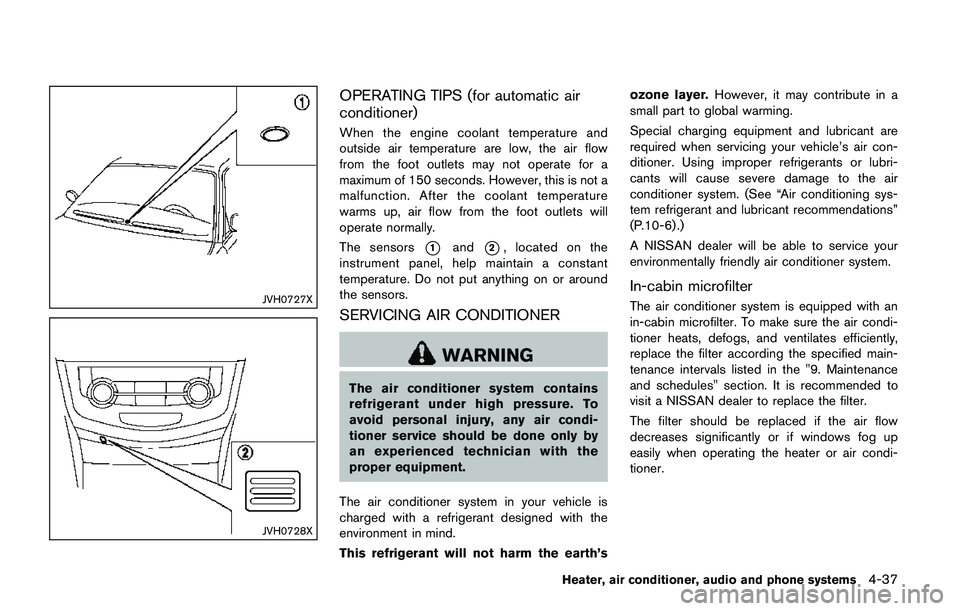
The sensors
*1and*2, located on the
instrument panel, help maintain a constant
temperature. Do not put anything on or around
the sensors.
SERVICING AIR CONDITIONER
WARNING
The air conditioner system contains
refrigerant under high pressure. To
avoid personal injury, any air condi-
tioner service should be done only by
an experienced technician with the
proper equipment.
The air conditioner system in your vehicle is
charged with a refrigerant designed with the
environment in mind.
This refrigerant will not harm the earth’sozone layer.However, it may contribute in a
small part to global warming.
Special charging equipment and lubricant are
required when servicing your vehicle’s air con-
ditioner. Using improper refrigerants or lubri-
cants will cause severe damage to the air
conditioner system. (See “Air conditioning sys-
tem refrigerant and lubricant recommendations”
(P.10-6) .)
A NISSAN dealer will be able to service your
environmentally friendly air conditioner system.
In-cabin microfilter
The air conditioner system is equipped with an
in-cabin microfilter. To make sure the air condi-
tioner heats, defogs, and ventilates efficiently,
replace the filter according the specified main-
tenance intervals listed in the "9. Maintenance
and schedules" section. It is recommended to
visit a NISSAN dealer to replace the filter.
The filter should be replaced if the air flow
decreases significantly or if windows fog up
easily when operating the heater or air condi-
tioner.
Heater, air conditioner, audio and phone systems4-37
Page 395 of 508
5-110Starting and driving
FREEING A FROZEN DOOR LOCK
To prevent a door lock from freezing, apply
deicer through the key hole. If the lock becomes
frozen, heat the key before inserting it into the
key hole, or use the Intelligent Key system or the
remote keyless entry key fob.
ANTI-FREEZE
In the winter when it is anticipated that the
outside temperature will drop below 328F(08C) ,
check the anti-freeze to assure proper winter
protection. For additional information, see “En-
gine cooling system” (P.8-4) .
BATTERY
If the battery is not fully charged during
extremely cold weather conditions, the battery
fluid may freeze and damage the battery. To
maintain maximum efficiency, the battery should
be checked regularly. For additional information,
see “Battery” (P.8-11) .
DRAINING OF COOLANT WATER
If the vehicle is to be left outside without anti-
freeze, drain the cooling system, including the
engine block. Refill before operating the vehicle.
For details, see “Engine cooling system” (P.8-4) .
TIRE EQUIPMENT
SUMMER tires have a tread designed to provide
superior performance on dry pavement. How-
ever, the performance of these tires will be
substantially reduced in snowy and icy condi-
tions. If you operate your vehicle on snowy or icy
roads, NISSAN recommends the use of MUD &
SNOW or ALL SEASON tires on all four wheels.
It is recommended you consult a NISSAN dealer
for the tire type, size, speed rating and
availability information.
For additional traction on icy roads, studded
tires may be used. However, some U.S. states
and Canadian provinces prohibit their use.
Check local, state and provincial laws before
installing studded tires.
Skid and traction capabilities of studded
snow tires, on wet or dry surfaces, may be
poorer than that of non-studded snow
tires.
Tire chains may be used. For details, see “Tire
chains” (P.8-36) of this manual.
All-Wheel Drive (AWD) model
If you install snow tires, they must also be the
same size, brand, construction and tread pattern
on all four wheels.
SPECIAL WINTER EQUIPMENT
It is recommended that the following items be
carried in the vehicle during winter:
.A scraper and stiff-bristled brush to remove
ice and snow from the windows and wiper
blades.
.A sturdy, flat board to be placed under the
jack to give it firm support.
.A shovel to dig the vehicle out of snow-
drifts.
.Extra window washer fluid to refill the
reservoir tank.
DRIVING ON SNOW OR ICE
WARNING
.Wet ice (328F, 08C and freezing rain) ,
very cold snow or ice can be slick
and very hard to drive on. The
vehicle will have much less traction
or“grip”under these conditions. Try
to avoid driving on wet ice until the
road is salted or sanded.
.Whatever the condition, drive with
caution. Accelerate and slow down
with care. If accelerating or down-
shifting too fast, the drive wheels
will lose even more traction.
COLD WEATHER DRIVING
Page 408 of 508
7. Start the engine of the booster vehicle*B
and let it run for a few minutes.
8. Keep the engine speed of the booster
vehicle
*Bat about 2,000 rpm, and start
the engine of the vehicle
*Abeing jump
started.
CAUTION
Do not keep the starter motor engaged
for more than 10 seconds. If the engine
does not start right away, place the
ignition switch in the OFF position and
wait 10 seconds before trying again.
9. After starting your engine, carefully discon-
nect the negative cable and then the positive
cable (
*4?*3?*2?*1).
10. Replace the vent caps (if so equipped) . Be
sure to dispose of the cloth used to cover
the vent holes as it may be contaminated
with corrosive acid.Do not attempt to start the engine by pushing.
CAUTION
.Continuously Variable Transmission
(CVT) models cannot be push-
started or tow-started. Attempting
to do so may cause transmission
damage.
.Three-way catalyst equipped mod-
els should not be started by pushing
since the three way catalyst may be
damaged.
.Never try to start the vehicle by
towing it; when the engine starts,
the forward surge could cause the
vehicle to collide with the tow
vehicle.
WARNING
.Never continue driving if your vehi-
cle overheats. Doing so could cause
a vehicle fire.
.Never open the hood if steam is
coming out.
.Never remove the radiator or cool-
ant reservoir cap while the engine is
hot. If the radiator or coolant reser-
voir cap is removed when the engine
is hot, pressurized hot water will
spurt out and possibly cause burn-
ing, scalding or serious injury.
.If steam or coolant is coming from
the engine, stand clear of the vehi-
cle to prevent getting burned.
.The engine cooling fan will start at
anytime when the coolant tempera-
ture exceeds preset degrees.
.Be careful not to allow your hands,
hair, jewelry or clothing to come into
contact with, or to get caught in the
cooling fan or drive belts.
If your vehicle is overheating (indicated by an
extremely high temperature gauge reading) , or if
In case of emergency6-11
PUSH STARTING IF YOUR VEHICLE OVERHEATS