turn signal NISSAN QASHQAI 2017 Owner´s Manual
[x] Cancel search | Manufacturer: NISSAN, Model Year: 2017, Model line: QASHQAI, Model: NISSAN QASHQAI 2017Pages: 508, PDF Size: 2.68 MB
Page 12 of 508
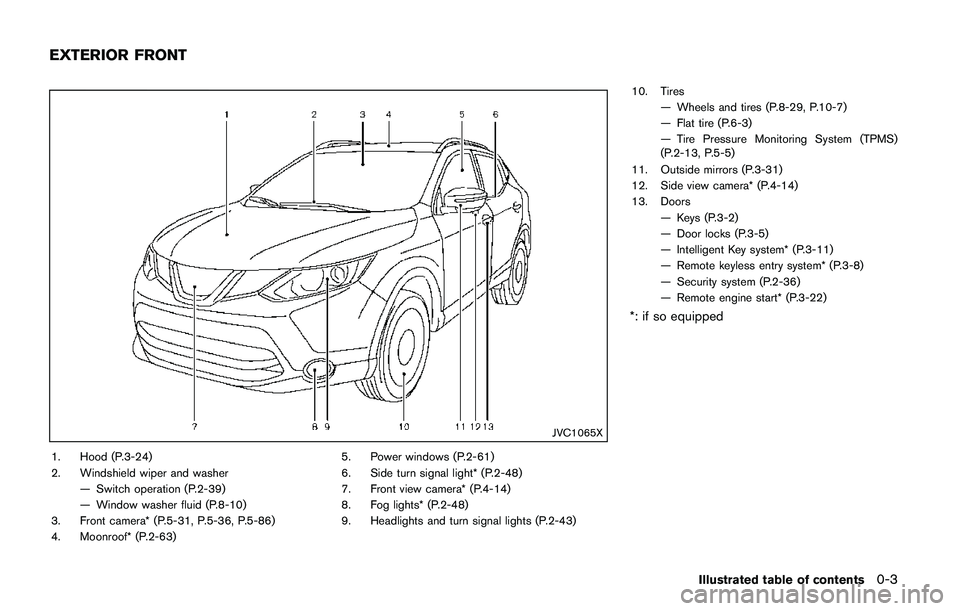
JVC1065X
1. Hood (P.3-24)
2. Windshield wiper and washer
— Switch operation (P.2-39)
— Window washer fluid (P.8-10)
3. Front camera* (P.5-31, P.5-36, P.5-86)
4. Moonroof* (P.2-63)5. Power windows (P.2-61)
6. Side turn signal light* (P.2-48)
7. Front view camera* (P.4-14)
8. Fog lights* (P.2-48)
9. Headlights and turn signal lights (P.2-43)10. Tires
— Wheels and tires (P.8-29, P.10-7)
— Flat tire (P.6-3)
— Tire Pressure Monitoring System (TPMS)
(P.2-13, P.5-5)
11. Outside mirrors (P.3-31)
12. Side view camera* (P.4-14)
13. Doors
— Keys (P.3-2)
— Door locks (P.3-5)
— Intelligent Key system* (P.3-11)
— Remote keyless entry system* (P.3-8)
— Security system (P.2-36)
— Remote engine start* (P.3-22)
*: if so equipped
Illustrated table of contents0-3
EXTERIOR FRONT
Page 15 of 508
0-6Illustrated table of contents
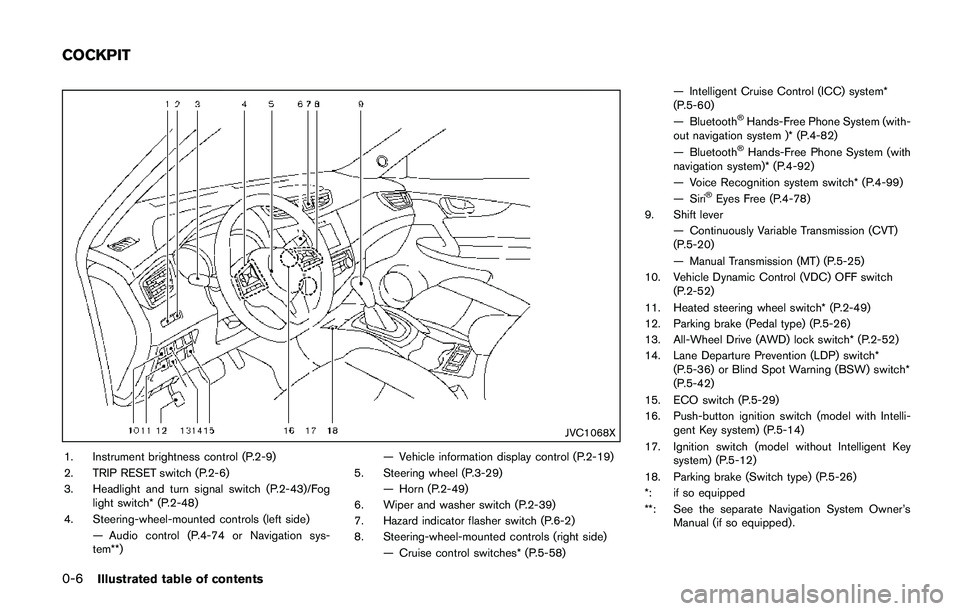
JVC1068X
1. Instrument brightness control (P.2-9)
2. TRIP RESET switch (P.2-6)
3. Headlight and turn signal switch (P.2-43)/Fog
light switch* (P.2-48)
4. Steering-wheel-mounted controls (left side)
— Audio control (P.4-74 or Navigation sys-
tem**)— Vehicle information display control (P.2-19)
5. Steering wheel (P.3-29)
— Horn (P.2-49)
6. Wiper and washer switch (P.2-39)
7. Hazard indicator flasher switch (P.6-2)
8. Steering-wheel-mounted controls (right side)
— Cruise control switches* (P.5-58)— Intelligent Cruise Control (ICC) system*
(P.5-60)
— Bluetooth
ŠHands-Free Phone System (with-
out navigation system )* (P.4-82)
— Bluetooth
ŠHands-Free Phone System (with
navigation system)* (P.4-92)
— Voice Recognition system switch* (P.4-99)
— Siri
ŠEyes Free (P.4-78)
9. Shift lever
— Continuously Variable Transmission (CVT)
(P.5-20)
— Manual Transmission (MT) (P.5-25)
10. Vehicle Dynamic Control (VDC) OFF switch
(P.2-52)
11. Heated steering wheel switch* (P.2-49)
12. Parking brake (Pedal type) (P.5-26)
13. All-Wheel Drive (AWD) lock switch* (P.2-52)
14. Lane Departure Prevention (LDP) switch*
(P.5-36) or Blind Spot Warning (BSW) switch*
(P.5-42)
15. ECO switch (P.5-29)
16. Push-button ignition switch (model with Intelli-
gent Key system) (P.5-14)
17. Ignition switch (model without Intelligent Key
system) (P.5-12)
18. Parking brake (Switch type) (P.5-26)
*: if so equipped
**: See the separate Navigation System Owner’s
Manual (if so equipped) .
COCKPIT
Page 19 of 508
0-10Illustrated table of contents
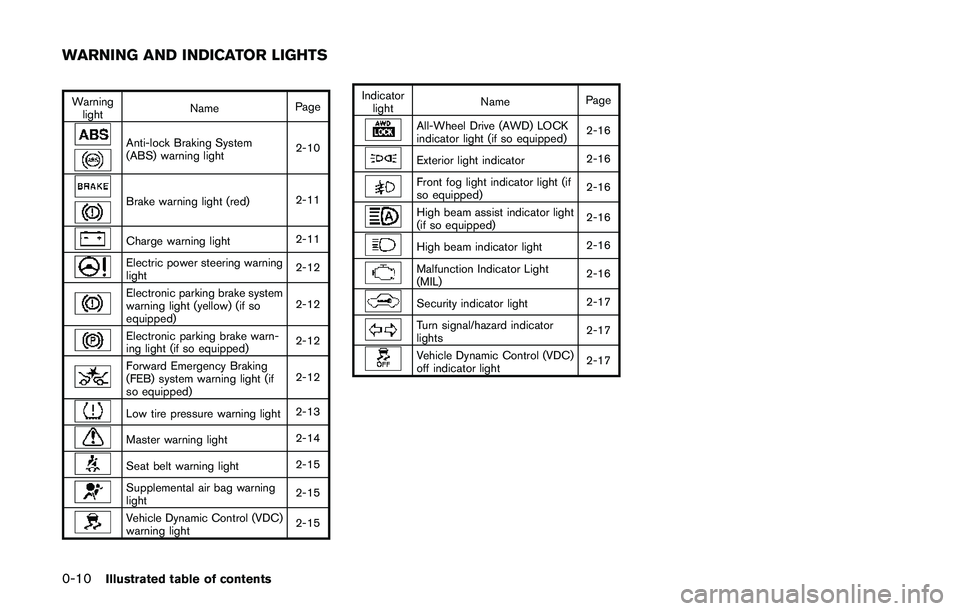
Warning
lightNamePage
Anti-lock Braking System
(ABS) warning light2-10
Brake warning light (red)2-11
Charge warning light2-11
Electric power steering warning
light2-12
Electronic parking brake system
warning light (yellow) (if so
equipped)2-12
Electronic parking brake warn-
ing light (if so equipped)2-12
Forward Emergency Braking
(FEB) system warning light (if
so equipped)2-12
Low tire pressure warning light2-13
Master warning light2-14
Seat belt warning light2-15
Supplemental air bag warning
light2-15
Vehicle Dynamic Control (VDC)
warning light2-15Indicator
lightNamePage
All-Wheel Drive (AWD) LOCK
indicator light (if so equipped)2-16
Exterior light indicator2-16
Front fog light indicator light (if
so equipped)2-16
High beam assist indicator light
(if so equipped)2-16
High beam indicator light2-16
Malfunction Indicator Light
(MIL)2-16
Security indicator light2-17
Turn signal/hazard indicator
lights2-17
Vehicle Dynamic Control (VDC)
off indicator light2-17
WARNING AND INDICATOR LIGHTS
Page 80 of 508
2 Instruments and controls
Cockpit ........................................................................................ 2-3
Instrument panel ........................................................................ 2-4
Meters and gauges ................................................................... 2-5
Speedometer and odometer ............................................ 2-6
Tachometer ........................................................................... 2-7
Engine coolant temperature gauge ................................ 2-7
Fuel gauge ............................................................................ 2-8
Instrument brightness control .......................................... 2-9
Continuously Variable Transmission (CVT) position
indicator (if so equipped) .................................................. 2-9
Warning lights, indicator lights and
audible reminders ................................................................... 2-10
Checking lights ................................................................. 2-10
Warning lights ................................................................... 2-10
Indicator lights ................................................................... 2-16
Audible reminders ............................................................ 2-17
Vehicle information display .................................................. 2-18
How to use the vehicle information display .............. 2-19
Startup display .................................................................. 2-19
Settings ............................................................................... 2-19
Vehicle information display warnings
and indicators .................................................................... 2-28
Trip computer .................................................................... 2-34
Clock and outside air temperature .............................. 2-36Security systems ................................................................... 2-36
Vehicle Security System ............................................... 2-36
NISSAN Vehicle Immobilizer System ........................ 2-38
Wiper and washer switch ................................................... 2-39
Windshield wiper and washer operation ................. 2-40
Rear window wiper and washer switch .......................... 2-41
Rear window and outside mirror defroster switch ....... 2-42
Headlight and turn signal switch ....................................... 2-43
Headlight switch ............................................................ 2-43
Turn signal switch .......................................................... 2-48
Fog light switch (if so equipped) .............................. 2-48
Horn .......................................................................................... 2-49
Heated steering wheel (if so equipped) ......................... 2-49
Heated seats (if so equipped) ........................................... 2-50
Lane Departure Prevention (LDP) switch (if
so equipped) .......................................................................... 2-51
Blind Spot Warning (BSW) switch (if so equipped) ..... 2-51
Vehicle Dynamic Control (VDC) off switch .................... 2-52
All-wheel drive (AWD) lock switch (if so equipped) ..... 2-52
ECO mode switch ................................................................ 2-52
Power outlet ............................................................................ 2-53
Storage .................................................................................... 2-54
Cup holders ..................................................................... 2-54
Soft bottle holders ......................................................... 2-54
Cargo area (if so equipped) ....................................... 2-55
Page 82 of 508
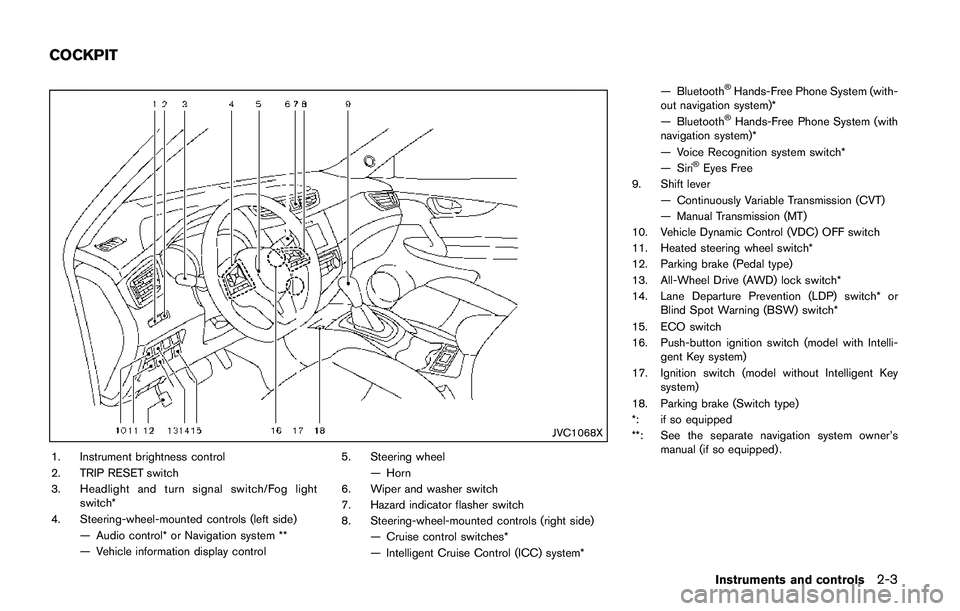
JVC1068X
1. Instrument brightness control
2. TRIP RESET switch
3. Headlight and turn signal switch/Fog light
switch*
4. Steering-wheel-mounted controls (left side)
— Audio control* or Navigation system **
— Vehicle information display control5. Steering wheel
— Horn
6. Wiper and washer switch
7. Hazard indicator flasher switch
8. Steering-wheel-mounted controls (right side)
— Cruise control switches*
— Intelligent Cruise Control (ICC) system*— Bluetooth
ŠHands-Free Phone System (with-
out navigation system)*
— Bluetooth
ŠHands-Free Phone System (with
navigation system)*
— Voice Recognition system switch*
— Siri
ŠEyes Free
9. Shift lever
— Continuously Variable Transmission (CVT)
— Manual Transmission (MT)
10. Vehicle Dynamic Control (VDC) OFF switch
11. Heated steering wheel switch*
12. Parking brake (Pedal type)
13. All-Wheel Drive (AWD) lock switch*
14. Lane Departure Prevention (LDP) switch* or
Blind Spot Warning (BSW) switch*
15. ECO switch
16. Push-button ignition switch (model with Intelli-
gent Key system)
17. Ignition switch (model without Intelligent Key
system)
18. Parking brake (Switch type)
*: if so equipped
**: See the separate navigation system owner’s
manual (if so equipped) .
Instruments and controls2-3
COCKPIT
Page 89 of 508
2-10Instruments and controls
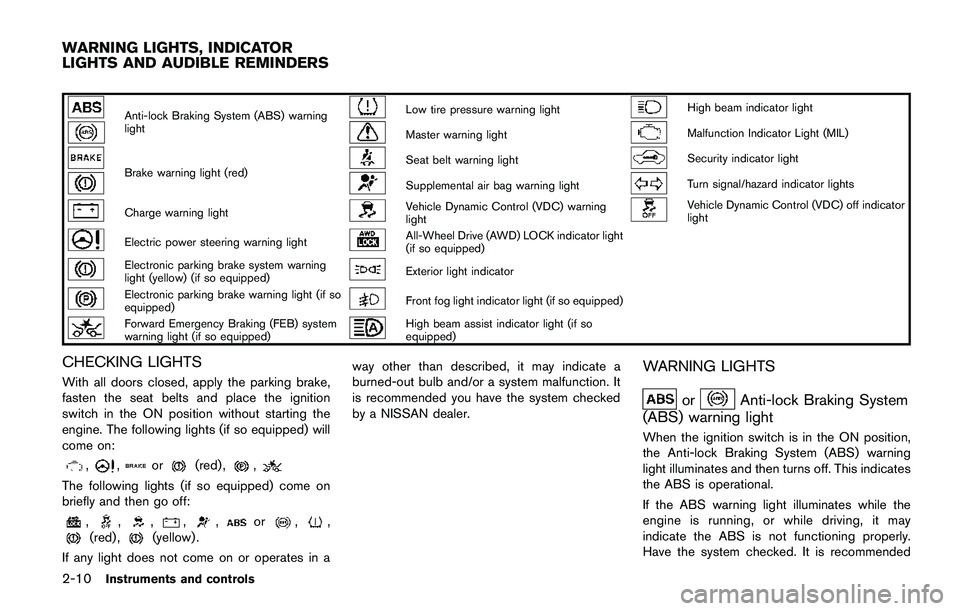
Anti-lock Braking System (ABS) warning
lightLow tire pressure warning lightHigh beam indicator light
Master warning lightMalfunction Indicator Light (MIL)
Brake warning light (red)Seat belt warning lightSecurity indicator light
Supplemental air bag warning lightTurn signal/hazard indicator lights
Charge warning lightVehicle Dynamic Control (VDC) warning
lightVehicle Dynamic Control (VDC) off indicator
light
Electric power steering warning lightAll-Wheel Drive (AWD) LOCK indicator light
(if so equipped)
Electronic parking brake system warning
light (yellow) (if so equipped)Exterior light indicator
Electronic parking brake warning light (if so
equipped)Front fog light indicator light (if so equipped)
Forward Emergency Braking (FEB) system
warning light (if so equipped)High beam assist indicator light (if so
equipped)
CHECKING LIGHTS
With all doors closed, apply the parking brake,
fasten the seat belts and place the ignition
switch in the ON position without starting the
engine. The following lights (if so equipped) will
come on:
,,or(red) ,,
The following lights (if so equipped) come on
briefly and then go off:
,,,,,or,,(red) ,(yellow) .
If any light does not come on or operates in away other than described, it may indicate a
burned-out bulb and/or a system malfunction. It
is recommended you have the system checked
by a NISSAN dealer.
WARNING LIGHTS
orAnti-lock Braking System
(ABS) warning light
When the ignition switch is in the ON position,
the Anti-lock Braking System (ABS) warning
light illuminates and then turns off. This indicates
the ABS is operational.
If the ABS warning light illuminates while the
engine is running, or while driving, it may
indicate the ABS is not functioning properly.
Have the system checked. It is recommended
WARNING LIGHTS, INDICATOR
LIGHTS AND AUDIBLE REMINDERS
Page 96 of 508
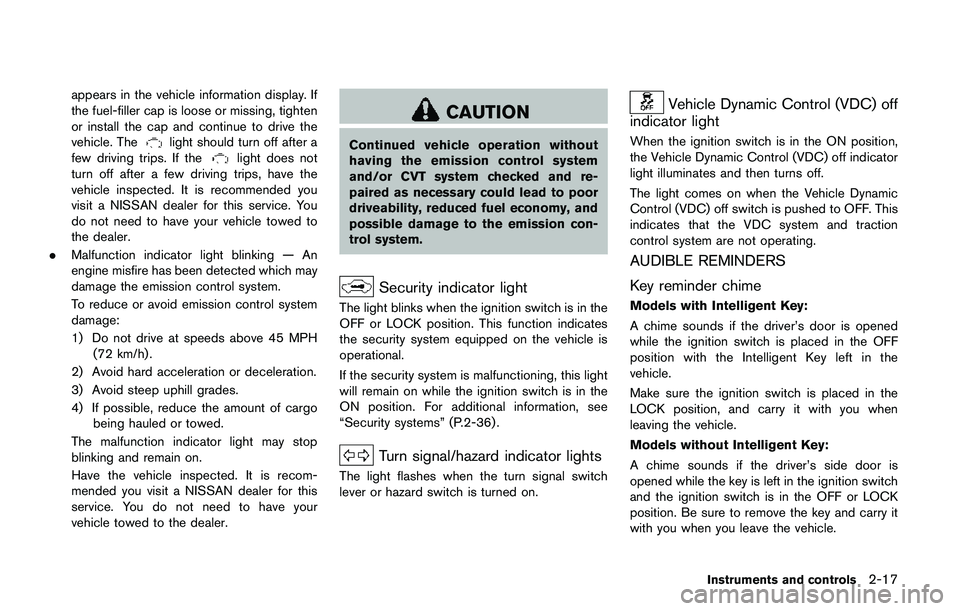
appears in the vehicle information display. If
the fuel-filler cap is loose or missing, tighten
or install the cap and continue to drive the
vehicle. The
light should turn off after a
few driving trips. If thelight does not
turn off after a few driving trips, have the
vehicle inspected. It is recommended you
visit a NISSAN dealer for this service. You
do not need to have your vehicle towed to
the dealer.
.Malfunction indicator light blinking — An
engine misfire has been detected which may
damage the emission control system.
To reduce or avoid emission control system
damage:
1) Do not drive at speeds above 45 MPH
(72 km/h) .
2) Avoid hard acceleration or deceleration.
3) Avoid steep uphill grades.
4) If possible, reduce the amount of cargo
being hauled or towed.
The malfunction indicator light may stop
blinking and remain on.
Have the vehicle inspected. It is recom-
mended you visit a NISSAN dealer for this
service. You do not need to have your
vehicle towed to the dealer.
CAUTION
Continued vehicle operation without
having the emission control system
and/or CVT system checked and re-
paired as necessary could lead to poor
driveability, reduced fuel economy, and
possible damage to the emission con-
trol system.
Security indicator light
The light blinks when the ignition switch is in the
OFF or LOCK position. This function indicates
the security system equipped on the vehicle is
operational.
If the security system is malfunctioning, this light
will remain on while the ignition switch is in the
ON position. For additional information, see
“Security systems” (P.2-36) .
Turn signal/hazard indicator lights
The light flashes when the turn signal switch
lever or hazard switch is turned on.
Vehicle Dynamic Control (VDC) off
indicator light
When the ignition switch is in the ON position,
the Vehicle Dynamic Control (VDC) off indicator
light illuminates and then turns off.
The light comes on when the Vehicle Dynamic
Control (VDC) off switch is pushed to OFF. This
indicates that the VDC system and traction
control system are not operating.
AUDIBLE REMINDERS
Key reminder chime
Models with Intelligent Key:
A chime sounds if the driver’s door is opened
while the ignition switch is placed in the OFF
position with the Intelligent Key left in the
vehicle.
Make sure the ignition switch is placed in the
LOCK position, and carry it with you when
leaving the vehicle.
Models without Intelligent Key:
A chime sounds if the driver’s side door is
opened while the key is left in the ignition switch
and the ignition switch is in the OFF or LOCK
position. Be sure to remove the key and carry it
with you when you leave the vehicle.
Instruments and controls2-17
Page 109 of 508
2-30Instruments and controls
18. Tire Size Incorrect: See Owner’s
Manual warning (if so equipped)
This warning may appear if there is a large
difference between the diameters of the front
and rear wheels and tires. Pull off the road in a
safe area, with the engine idling. Check that all
the tire sizes are the same, that the tire pressure
is correct and that the tires are not excessively
worn. See “All-Wheel Drive (AWD)” (P.5-96) .
19. Battery Voltage Low Charge Battery
warning
This warning appears when the battery voltage
is low and the battery needs to be charged.
20. Shipping Mode On Push Storage
Fuse warning
This warning may appear if the extended storage
fuse switch is not pushed in (switched on) .
When this warning appears, push in (switch on)
the extended storage fuse switch to turn off the
warning. For more information, see “Extended
storage fuse switch” (P.8-21) .
21. Power will turn off to save the battery
warning
This warning appears after the ignition switch is
in the ON position for a certain period of time.
22. Power turned off to save the battery
warning
This warning appears after the ignition switch is
automatically turned OFF to save the battery.
23. Reminder: Turn OFF Headlights
warning
This warning appears when the driver side door
is opened with the headlight switch is left ON
and the ignition switch is placed in the OFF or
LOCK position. Place the headlight switch in
OFF or AUTO (if so equipped) position. For
additional information, see “Headlight and turn
signal switch” (P.2-43) .
24. Headlight System Error: See Own-
er’s Manual warning (if so equipped)
This warning appears if the LED headlights are
malfunctioning. Have the system checked. It is
recommended that you visit a NISSAN dealer for
this service.
25. Timer Alert — Time for a driver
break? indicator
This indicator appears when the set “Time for a
driver break?” indicator activates. You can set
the time for up to 6 hours.
26. Chassis Control System Error: See
Owner’s Manual warning
This warning appears if the chassis control
module detects an error in the chassis control
system. Have the system checked. It is recom-
mended that you visit a NISSAN dealer for this
service. (See “Chassis control” (P.5-106) .)
27. Cruise control indicator (if so
equipped)
This indicator shows the cruise control system
status. The status is shown by the color.
See “Cruise control” (P.5-58) for details.
28. Intelligent Cruise Control (ICC)
indicator (if so equipped)
This indicator shows the Intelligent Cruise
Control (ICC) system status. The status is
shown by the color. (See “Intelligent Cruise
Control (ICC)” (P.5-60) .)
Page 122 of 508
JVI1616X
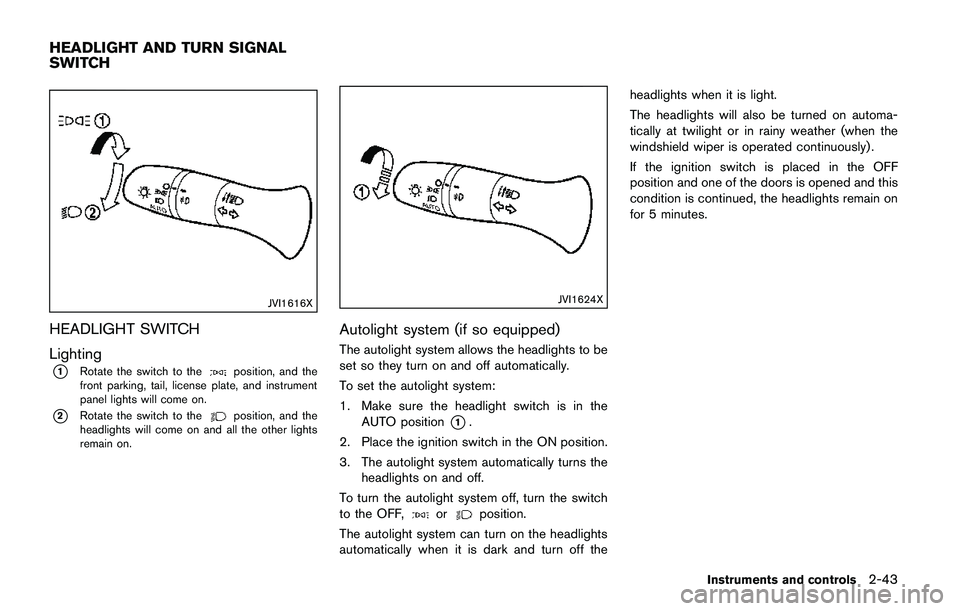
HEADLIGHT SWITCH
Lighting
*1Rotate the switch to theposition, and the
front parking, tail, license plate, and instrument
panel lights will come on.
*2Rotate the switch to theposition, and the
headlights will come on and all the other lights
remain on.
JVI1624X
Autolight system (if so equipped)
The autolight system allows the headlights to be
set so they turn on and off automatically.
To set the autolight system:
1. Make sure the headlight switch is in the
AUTO position
*1.
2. Place the ignition switch in the ON position.
3. The autolight system automatically turns the
headlights on and off.
To turn the autolight system off, turn the switch
to the OFF,
orposition.
The autolight system can turn on the headlights
automatically when it is dark and turn off theheadlights when it is light.
The headlights will also be turned on automa-
tically at twilight or in rainy weather (when the
windshield wiper is operated continuously) .
If the ignition switch is placed in the OFF
position and one of the doors is opened and this
condition is continued, the headlights remain on
for 5 minutes.
Instruments and controls2-43
HEADLIGHT AND TURN SIGNAL
SWITCH
Page 127 of 508
2-48Instruments and controls
JVI1591X
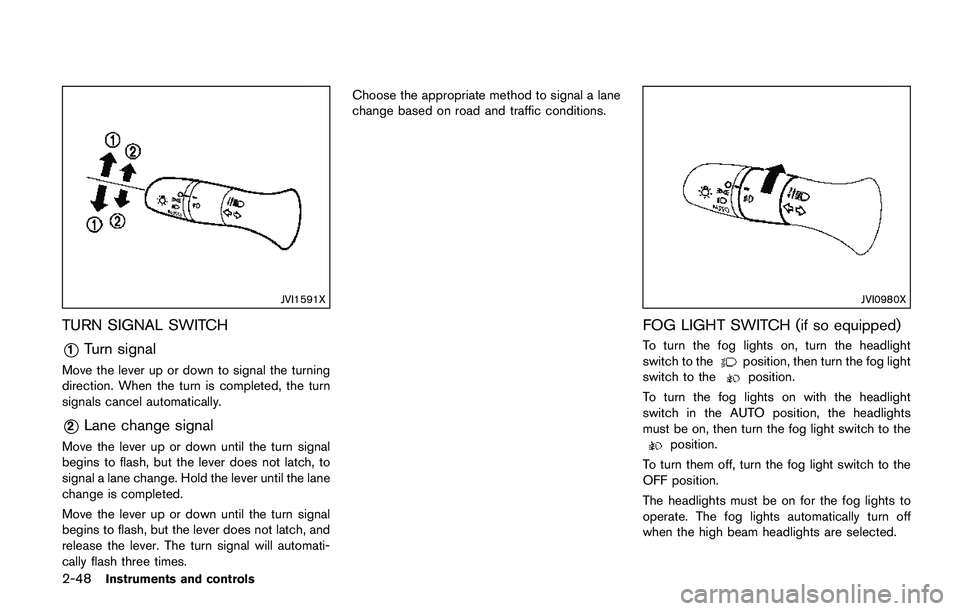
TURN SIGNAL SWITCH
*1Turn signal
Move the lever up or down to signal the turning
direction. When the turn is completed, the turn
signals cancel automatically.
*2Lane change signal
Move the lever up or down until the turn signal
begins to flash, but the lever does not latch, to
signal a lane change. Hold the lever until the lane
change is completed.
Move the lever up or down until the turn signal
begins to flash, but the lever does not latch, and
release the lever. The turn signal will automati-
cally flash three times.Choose the appropriate method to signal a lane
change based on road and traffic conditions.
JVI0980X
FOG LIGHT SWITCH (if so equipped)
To turn the fog lights on, turn the headlight
switch to theposition, then turn the fog light
switch to theposition.
To turn the fog lights on with the headlight
switch in the AUTO position, the headlights
must be on, then turn the fog light switch to the
position.
To turn them off, turn the fog light switch to the
OFF position.
The headlights must be on for the fog lights to
operate. The fog lights automatically turn off
when the high beam headlights are selected.