warning NISSAN QASHQAI 2019 Owner´s Manual
[x] Cancel search | Manufacturer: NISSAN, Model Year: 2019, Model line: QASHQAI, Model: NISSAN QASHQAI 2019Pages: 500, PDF Size: 2.38 MB
Page 321 of 500
WAF0052X
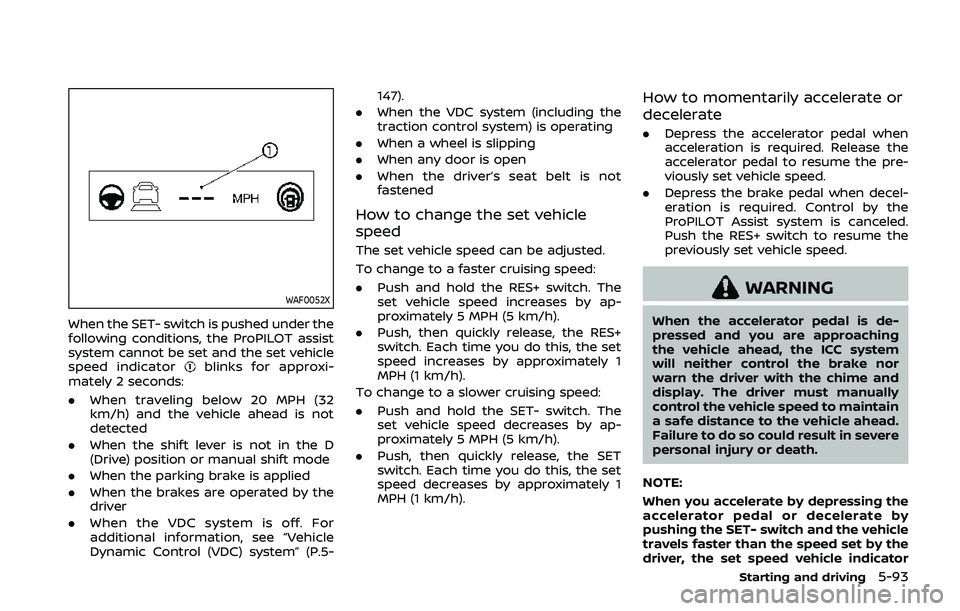
When the SET- switch is pushed under the
following conditions, the ProPILOT assist
system cannot be set and the set vehicle
speed indicator
blinks for approxi-
mately 2 seconds:
. When traveling below 20 MPH (32
km/h) and the vehicle ahead is not
detected
. When the shift lever is not in the D
(Drive) position or manual shift mode
. When the parking brake is applied
. When the brakes are operated by the
driver
. When the VDC system is off. For
additional information, see “Vehicle
Dynamic Control (VDC) system” (P.5- 147).
. When the VDC system (including the
traction control system) is operating
. When a wheel is slipping
. When any door is open
. When the driver’s seat belt is not
fastened
How to change the set vehicle
speed
The set vehicle speed can be adjusted.
To change to a faster cruising speed:
.Push and hold the RES+ switch. The
set vehicle speed increases by ap-
proximately 5 MPH (5 km/h).
. Push, then quickly release, the RES+
switch. Each time you do this, the set
speed increases by approximately 1
MPH (1 km/h).
To change to a slower cruising speed:
. Push and hold the SET- switch. The
set vehicle speed decreases by ap-
proximately 5 MPH (5 km/h).
. Push, then quickly release, the SET
switch. Each time you do this, the set
speed decreases by approximately 1
MPH (1 km/h).
How to momentarily accelerate or
decelerate
.Depress the accelerator pedal when
acceleration is required. Release the
accelerator pedal to resume the pre-
viously set vehicle speed.
. Depress the brake pedal when decel-
eration is required. Control by the
ProPILOT Assist system is canceled.
Push the RES+ switch to resume the
previously set vehicle speed.
WARNING
When the accelerator pedal is de-
pressed and you are approaching
the vehicle ahead, the ICC system
will neither control the brake nor
warn the driver with the chime and
display. The driver must manually
control the vehicle speed to maintain
a safe distance to the vehicle ahead.
Failure to do so could result in severe
personal injury or death.
NOTE:
When you accelerate by depressing the
accelerator pedal or decelerate by
pushing the SET- switch and the vehicle
travels faster than the speed set by the
driver, the set speed vehicle indicator
Starting and driving5-93
Page 325 of 500
HOW TO CANCEL THE PROPILOT
ASSIST SYSTEM
To cancel the ProPILOT assist system, use
one of the following methods:
.Push the CANCEL switch.
. Tap the brake pedal (except at a
standstill).
. Push the ProPILOT assist switch to
turn the system off. The ProPILOT
assist status indicator will turn off.
When the ProPILOT assist system is
canceled while the vehicle is stopped,
the electronic parking brake is automati-
cally activated.
WARNING
To prevent the vehicle from moving
or rolling unexpectedly, which could
result in serious personal injury or
property damage, before exiting the
vehicle make sure to push the Pro-
PILOT assist switch to turn the sys-
tem off, place the shift lever in the P
(Park) position, and turn the engine
off.
INTELLIGENT CRUISE CONTROL
(ICC) (models with ProPILOT assist)
WARNING
Failure to follow the warnings and
instructions for proper use of the ICC
system could result in serious injury
or death.
. The ICC system is only an aid to
assist the driver and is not a
collision warning or avoidance
device. It is recommended for
highway use only and it is not
intended for city driving. It is the
driver’s responsibility to stay
alert, drive safely, and be in con-
trol of the vehicle at all times.
. There are limitations to the ICC
system capability. The ICC system
does not function in all driving,
traffic, weather, and road condi-
tions. It is the driver’s responsi-
bility to stay alert, drive safely,
keep the vehicle in the traveling
lane, and be in control of the
vehicle at all times.
. Always observe posted speed
limits and do not set the speed
over them. .
The ICC system does not react to
stationary and slow moving vehi-
cles.
. Always drive carefully and atten-
tively when using the ICC system.
Read and understand the Owner’s
Manual thoroughly before using
the ICC system. To avoid serious
injury or death, do not rely on the
system to prevent accidents or to
control the vehicle’s speed in
emergency situations. Do not
use the ICC system except in
appropriate road and traffic con-
ditions.
ICC system operation
The ICC system is designed to maintain a
selected distance from the vehicle in front
of you and can reduce the speed to
match a slower vehicle ahead. The sys-
tem decelerates the vehicle as necessary
and if the vehicle ahead comes to a stop,
the vehicle decelerates to a standstill.
However, the ICC system can only apply
up to 40% of the vehicle’s total braking
power. This system should only be used
when traffic conditions allow vehicle
speeds to remain fairly constant or when
vehicle speeds change gradually. If a
vehicle moves into the traveling lane
Starting and driving5-97
Page 326 of 500
5-98Starting and driving
ahead or if a vehicle traveling ahead
rapidly decelerates, the distance between
vehicles may become closer because the
ICC system cannot decelerate the vehicle
quickly enough. If this occurs, the ICC
system sounds a warning chime and
blinks the system display to notify the
driver to take necessary action.
The ICC system cancels and a warning
chime sounds if the speed is below
approximately 15 MPH (24 km/h) and a
vehicle is not detected ahead.
The ICC system operates as follows:
.When there are no vehicles traveling
ahead, the ICC system maintains the
speed set by the driver. The set speed
range is between approximately 20
and 90 MPH (32 and 144 km/h).
. When there is a vehicle traveling
ahead, the ICC system adjusts the
speed to maintain the distance, se-
lected by the driver, from the vehicle
ahead. If the vehicle ahead comes to a
stop, the vehicle decelerates to a
standstill. Once your vehicle stops,
the ICC system keeps the vehicle
stopped.
. When your vehicle is stopped for less
than 3 seconds and the vehicle ahead
begins to move, your vehicle will start
moving again automatically. .
When your vehicle is at a standstill for
more than 3 seconds and the vehicle
ahead begins to accelerate, push the
RES+ switch or lightly depress the
accelerator pedal. The ICC system
starts to follow the vehicle ahead.
. When the vehicle traveling ahead
moves to a different traveling lane,
the ICC system accelerates and main-
tains vehicle speed up to the set
speed.
The ICC system does not control vehicle
speed or warn you when you approach
stationary and slow moving vehicles. You
must pay attention to vehicle operation
to maintain proper distance from vehicles
ahead when approaching toll gates or
traffic congestion.
SSD0254
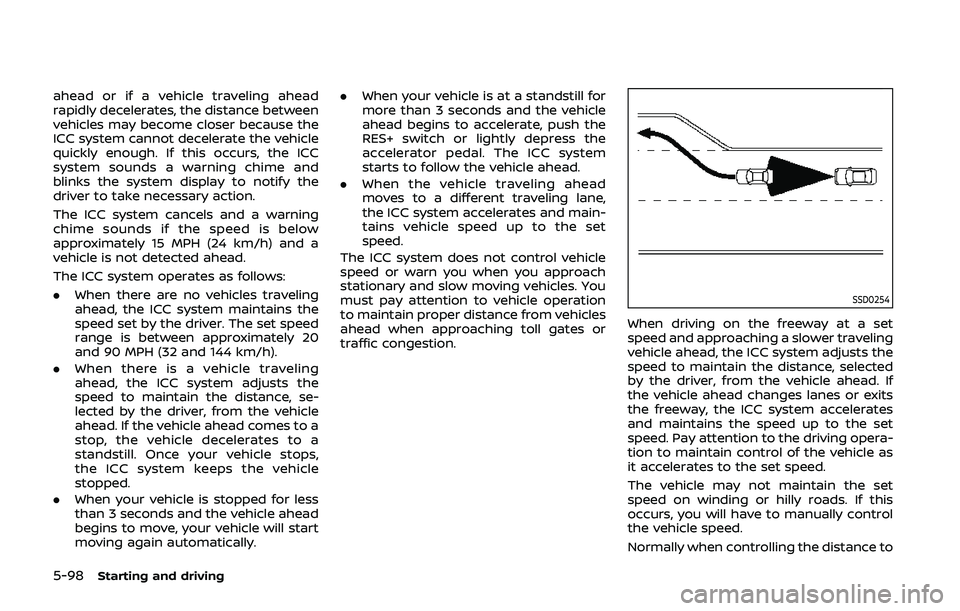
When driving on the freeway at a set
speed and approaching a slower traveling
vehicle ahead, the ICC system adjusts the
speed to maintain the distance, selected
by the driver, from the vehicle ahead. If
the vehicle ahead changes lanes or exits
the freeway, the ICC system accelerates
and maintains the speed up to the set
speed. Pay attention to the driving opera-
tion to maintain control of the vehicle as
it accelerates to the set speed.
The vehicle may not maintain the set
speed on winding or hilly roads. If this
occurs, you will have to manually control
the vehicle speed.
Normally when controlling the distance to
Page 329 of 500
Approach warning
If your vehicle comes closer to the vehicle
ahead due to rapid deceleration of that
vehicle or if another vehicle cuts in, the
system warns the driver with the chime
and ICC system display. Decelerate by
depressing the brake pedal to maintain a
safe vehicle distance if:
.The chime sounds.
. The vehicle ahead detection indicator
and set distance indicator blink.
. You judge it necessary to maintain a
safe distance.
The warning chime may not sound in
some cases when there is a short dis-
tance between vehicles. Some examples
are:
. When the vehicles are traveling at the
same speed and the distance be-
tween vehicles is not changing.
. When the vehicle ahead is traveling
faster and the distance between ve-
hicles is increasing.
. When a vehicle cuts in near your
vehicle.
The warning chime will not sound when:
. Your vehicle approaches other vehi-
cles that are parked or moving slowly.
. The accelerator pedal is depressed,
overriding the system. NOTE:
The approach warning chime may
sound and the system display may
flash when the radar sensor detects
objects on the side of the vehicle or on
the side of the road. This may cause the
ICC system to decelerate or accelerate
the vehicle. The radar sensor may de-
tect these objects when the vehicle is
driven on winding, narrow, or hilly roads
or when the vehicle is entering or
exiting a curve. In these cases, you will
have to manually control the proper
distance ahead of your vehicle.
Also, the sensor sensitivity can be af-
fected by vehicle operation (steering
maneuver or driving position in the
lane) or traffic or vehicle conditions
(for example, if a vehicle is being driven
with some damage).
ICC system limitations
WARNING
Listed below are the system limita-
tions for the ICC system. Failure to
operate the vehicle in accordance
with these system limitations could
result in serious injury or death:
.
The ICC system is primarily in-
tended for use on straight, dry,
open roads with light traffic. It is
not advisable to use the ICC
system in city traffic or congested
areas.
. The ICC system will not adapt
automatically to road conditions.
This system should be used in
evenly flowing traffic. Do not use
the system on roads with sharp
curves or on icy roads, in heavy
rain or in fog.
. As there is a performance limit to
the distance control function,
never rely solely on the ICC sys-
tem. This system does not correct
careless, inattentive or absent-
minded driving or overcome poor
visibility in rain, fog, or other bad
weather. Decelerate the vehicle
speed by depressing the brake
pedal, depending on the distance
to the vehicle ahead and the
surrounding circumstances in or-
der to maintain a safe distance
between vehicles.
. When the ICC system automati-
cally brings the vehicle to a stop,
your vehicle can automatically
accelerate if the vehicle is
stopped for less than approxi-
Starting and driving5-101
Page 333 of 500
able: Front Radar Obstruction” warning
message will appear in the vehicle infor-
mation display.
Action to take:
If the warning message appears, stop the
vehicle in a safe place, place the shift lever
in the P (Park) position, and turn the
engine off. When the radar signal is
temporarily interrupted, clean the sensor
area of the front bumper and restart the
engine. If the “Unavailable: Front Radar
Obstruction” warning message continues
to be displayed, have the system checked.
It is recommended that you visit a NISSAN
dealer for this service.
Condition C:
When driving on roads with limited road
structures or buildings (for example, long
bridges, deserts, snow fields, driving next
to long walls), the system may illuminate
the system warning light and display the
“Unavailable: Front Radar Obstruction”
message.
Action to take:
When the above driving conditions no
longer exist, turn the system back on.ICC system malfunction
If the ICC system malfunctions, it will be
turned off automatically, a chime will
sound, and the speed control status
warning (orange) will illuminate.
Action to take:
If the warning illuminates, stop the vehicle
in a safe place. Turn the engine off, restart
the engine and set the ICC system again.
If it is not possible to set the ICC system or
the warning stays on, it may be a
malfunction. Although the normal driving
can be continued, the ICC system should
be inspected. It is recommended that you
visit a NISSAN dealer for this service.
ICC sensor maintenance
The radar sensor is located on the front of
the vehicle.
To keep the ICC system operating prop-
erly, be sure to observe the following:
.Always keep the sensor area clean.
. Do not strike or damage the areas
around the sensor.
. Do not attach a sticker (including
transparent material) or install an
accessory near the sensor. This could
cause failure or malfunction.
. Do not attach metallic objects near
the sensor area (brush guard, etc.).
This could cause failure or malfunc- tion.
. Do not alter, remove, or paint the front
bumper.
Before customizing or restoring the front
bumper, it is recommended that you visit
a NISSAN dealer.
The camera sensor is located above the
inside mirror.
To keep the proper operation of the
systems and prevent a system malfunc-
tion, be sure to observe the following:
. Always keep the windshield clean.
. Do not attach a sticker (including
transparent material) or install an
accessory near the camera unit.
. Do not place reflective materials, such
as white paper or a mirror, on the
instrument panel. The reflection of
sunlight may adversely affect the
camera unit’s capability of detecting
the lane markers.
. Do not strike or damage the areas
around the camera unit. Do not touch
the camera lens or remove the screw
located on the camera unit.
If the camera unit is damaged due to an
accident, it is recommended that you visit
a NISSAN dealer.
Starting and driving5-105
Page 334 of 500
5-106Starting and driving
STEERING ASSIST
WARNING
Failure to follow the warnings and
instructions for proper use of the
steering assist could result in serious
injury or death.
.The steering assist is not a repla-
cement for proper driving proce-
dures and is not designed to
correct careless, inattentive or
absent-minded driving. The
steering assist will not always
steer the vehicle to keep it in the
lane. It is not designed to prevent
loss of control. It is the driver’s
responsibility to stay alert, drive
safely, keep the vehicle in the
traveling lane, and be in control
of the vehicle at all times.
. As there is a performance limit to
the steering assist’s capability,
never rely solely on the system.
The steering assist does not func-
tion in all driving, traffic, weather,
and road conditions. Always drive
safely, pay attention to the op-
eration of the vehicle, and manu-
ally control your vehicle
appropriately. .
The steering assist is intended for
use on well-developed freeways
or highways with gentle (moder-
ate) curves. To avoid risk of an
accident,do not use this system
on local or non-highway roads.
. The steering assist only steers
the vehicle to maintain its posi-
tion in the center of a lane. The
vehicle will not steer to avoid
objects in the road in front of
the vehicle or to avoid a vehicle
moving into your lane.
. It is the driver’s responsibility to
stay alert, drive safely, keep the
vehicle in the traveling lane, and
be in control of the vehicle at all
times. Never take your hands off
the steering wheel when driving.
Always keep your hands on the
steering wheel and drive your
vehicle safely.
. Always drive carefully and atten-
tively when using the steering
assist. Read and understand the
Owner’s Manual thoroughly be-
fore using the steering assist. To
avoid serious injury or death, do
not rely on the system to prevent
accidents or to control the vehi-
cle’s speed in emergency situa-
tions. Do not use the steering assist except in appropriate road
and traffic conditions.
Steering assist operation
The steering assist controls the steering
system to help keep your vehicle near the
center of the lane when driving. The
steering assist is combined with the
Intelligent Cruise Control (ICC) system.
For additional information, see “Intelligent
Cruise Control (ICC) (models with ProPI-
LOT assist)” (P.5-97).
The steering assist can be activated when
the following conditions are met:
.
The ICC system is activated.
. Lane markers on both sides are clearly
detected.
. A vehicle ahead is detected (when the
vehicle is driven at speeds under 37
MPH (60 km/h)).
. The driver grips the steering wheel.
. The vehicle is driven at the center of
the lane.
. The turn signals are not operated.
. The windshield wiper is not operated
in the low or high speed operation
(the steering assist function is dis-
abled after the wiper operates for
approximately 10 seconds).
Page 335 of 500
WAF0062X
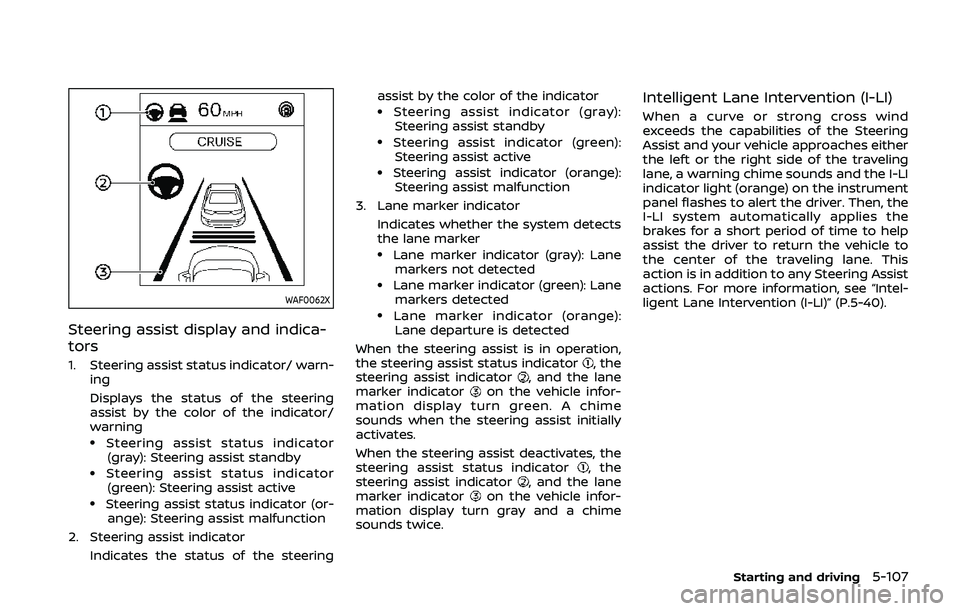
Steering assist display and indica-
tors
1. Steering assist status indicator/ warn-ing
Displays the status of the steering
assist by the color of the indicator/
warning
.Steering assist status indicator
(gray): Steering assist standby
.Steering assist status indicator(green): Steering assist active
.Steering assist status indicator (or- ange): Steering assist malfunction
2. Steering assist indicator Indicates the status of the steering assist by the color of the indicator
.Steering assist indicator (gray):
Steering assist standby
.Steering assist indicator (green):
Steering assist active
.Steering assist indicator (orange): Steering assist malfunction
3. Lane marker indicator
Indicates whether the system detects
the lane marker
.Lane marker indicator (gray): Lanemarkers not detected
.Lane marker indicator (green): Lanemarkers detected
.Lane marker indicator (orange):Lane departure is detected
When the steering assist is in operation,
the steering assist status indicator
, the
steering assist indicator, and the lane
marker indicatoron the vehicle infor-
mation display turn green. A chime
sounds when the steering assist initially
activates.
When the steering assist deactivates, the
steering assist status indicator
, the
steering assist indicator, and the lane
marker indicatoron the vehicle infor-
mation display turn gray and a chime
sounds twice.
Intelligent Lane Intervention (I-LI)
When a curve or strong cross wind
exceeds the capabilities of the Steering
Assist and your vehicle approaches either
the left or the right side of the traveling
lane, a warning chime sounds and the I-LI
indicator light (orange) on the instrument
panel flashes to alert the driver. Then, the
I-LI system automatically applies the
brakes for a short period of time to help
assist the driver to return the vehicle to
the center of the traveling lane. This
action is in addition to any Steering Assist
actions. For more information, see “Intel-
ligent Lane Intervention (I-LI)” (P.5-40).
Starting and driving5-107
Page 336 of 500
5-108Starting and driving
WAO0002X
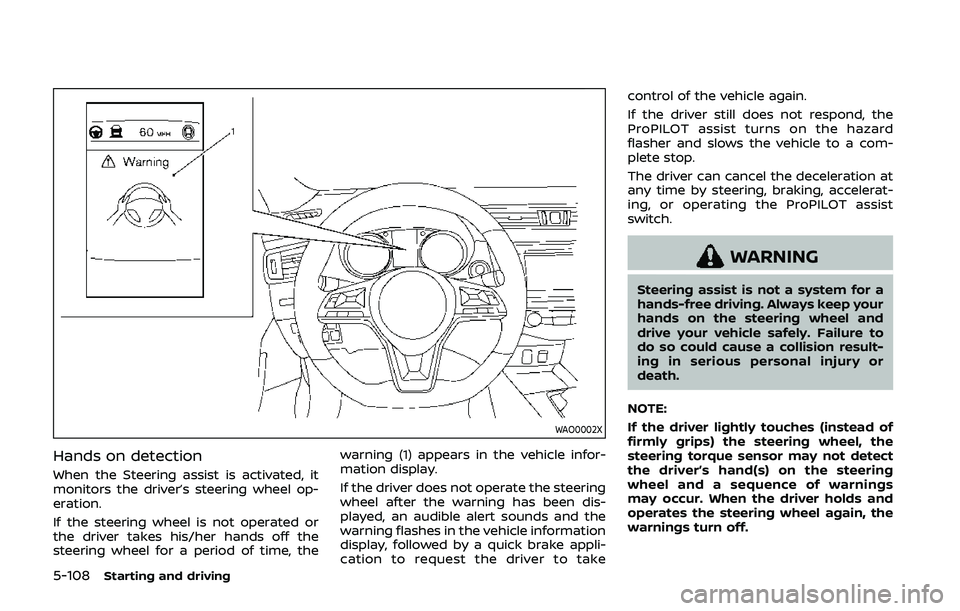
Hands on detection
When the Steering assist is activated, it
monitors the driver’s steering wheel op-
eration.
If the steering wheel is not operated or
the driver takes his/her hands off the
steering wheel for a period of time, thewarning (1) appears in the vehicle infor-
mation display.
If the driver does not operate the steering
wheel after the warning has been dis-
played, an audible alert sounds and the
warning flashes in the vehicle information
display, followed by a quick brake appli-
cation to request the driver to takecontrol of the vehicle again.
If the driver still does not respond, the
ProPILOT assist turns on the hazard
flasher and slows the vehicle to a com-
plete stop.
The driver can cancel the deceleration at
any time by steering, braking, accelerat-
ing, or operating the ProPILOT assist
switch.
WARNING
Steering assist is not a system for a
hands-free driving. Always keep your
hands on the steering wheel and
drive your vehicle safely. Failure to
do so could cause a collision result-
ing in serious personal injury or
death.
NOTE:
If the driver lightly touches (instead of
firmly grips) the steering wheel, the
steering torque sensor may not detect
the driver’s hand(s) on the steering
wheel and a sequence of warnings
may occur. When the driver holds and
operates the steering wheel again, the
warnings turn off.
Page 337 of 500
Steering assist limitations
WARNING
.In the following situations, the
camera may not detect lane mar-
kers correctly or may detect lane
markers incorrectly and the
steering assist may not operate
properly:
— When driving on roads where
there are multiple parallel
lane markers, lane markers
that are faded or not painted
clearly, non-standard lane
markers, or lane markers cov-
ered with water, dirt, snow,
etc.
— When driving on roads with discontinued lane markers
— When driving on roads with a widening or narrowing lane
width
— When driving on roads where there are multiple lanes or
unclear lane markers due to
road construction
— When driving on roads where there are sharply contrasting
objects, such as shadows, snow, water, wheel ruts,
seams, or lines remaining
after road repairs (the steer-
ing assist could detect these
items as lane markers)
— When driving on roads where the traveling lane merges or
separates
. Do not use the steering assist
under the following conditions
because the system may not
properly detect lane markers.
Doing so could cause a loss of
vehicle control and result in an
accident.
— During bad weather (rain, fog,
snow, dust, etc.)
— When rain, snow, sand, etc., is thrown up by the wheels of
other vehicles
— When dirt, oil, ice, snow, water, or another object adheres to
the camera unit
— When the lens of the camera unit is foggy
— When strong light (for exam- ple, sunlight or high beams
from oncoming vehicles)
shines on the camera — When the headlights are not
bright due to dirt on the lens
or the headlights are off in
tunnels or darkness
— When a sudden change in brightness occurs (for exam-
ple, when the vehicle enters or
exits a tunnel or is under a
bridge)
— When driving on roads where the traveling lane merges or
separates or where there are
temporary lane markers be-
cause of road construction
— When there is a lane closure due to road repairs
— When driving on a bumpy road surface, such as an uneven
dirt road
— When driving on sharp curves or winding roads
— When driving on repeated up- hill and downhill roads
. Do not use the steering assist
under the following conditions
because the system will not op-
erate properly:
— When driving with a tire that is
not within normal tire condi-
Starting and driving5-109
Page 338 of 500
5-110Starting and driving
tions (for example, tire wear,
abnormal tire pressure, instal-
lation of a spare tire, tire
chains, non-standard wheels)
— When the vehicle is equipped with non-original brake or
suspension parts
— When an object such as a sticker or cargo obstructs the
camera
— When excessively heavy bag- gage is loaded in the rear seat
or luggage area of your vehi-
cle
— When the vehicle load capa- city is exceeded
. Excessive noise will interfere with
the warning chime sound, and
the beep may not be heard.
. For the ProPILOT assist system to
operate properly, the windshield
in front of the camera must be
clean. Replace worn wiper blades.
The correct size wiper blades
must be used to help make sure
the windshield is kept clean. Only
use Genuine NISSAN wiper blades,
or equivalent wiper blades, that
are specifically designed for use
on your vehicle model and model year. It is recommended that you
visit your NISSAN dealer for the
correct parts for your vehicle.
Steering Assist temporary standby
Automatic standby due to driving op-
eration:
When the driver activates the turn signal,
the Steering Assist is temporarily placed
in a standby mode. (The Steering Assist
restarts automatically when the operat-
ing conditions are met again.)
Automatic standby:
In the following cases, a warning mes-
sage is displayed along with the chime,
and the Steering Assist is placed in a
temporary standby mode. (The Steering
Assist restarts automatically when the
operating conditions are met again.)
.
When lane markers on both sides are
no longer detected
. When a vehicle ahead is no longer
detected under approximately 37 MPH
(60 km/h)
Steering assist cancel
Under the following conditions, the steer-
ing assist cancels, and the steering assist
status indicator and the steering assist
indicator turn off:
.When unusual lane markers appear in
the traveling lane or when the lane
marker cannot be correctly detected
for some time due to certain condi-
tions (for example, a snow rut, the
reflection of light on a rainy day, the
presence of several unclear lane mar-
kers)
. When the windshield wiper operates
in the low or high speed operation
(the steering assist is disabled when
the wiper operates for more than
approximately 10 seconds)
Action to take:
Turn the ICC system off using the CANCEL
switch. When the conditions listed above
are no longer present, turn the ICC
system on again.
Steering assist malfunction
When the system malfunctions, it turns
off automatically. The steering assist
status warning (orange) illuminates. A
chime may sound depending on the
situation.