warning NISSAN QASHQAI 2019 Owner´s Manual
[x] Cancel search | Manufacturer: NISSAN, Model Year: 2019, Model line: QASHQAI, Model: NISSAN QASHQAI 2019Pages: 500, PDF Size: 2.38 MB
Page 339 of 500
Action to take:
Stop the vehicle in a safe location, place
the shift lever in the P (Park) position, turn
the engine off, restart the engine, resume
driving, and set the ICC system again. If
the warning (orange) continues to illumi-
nate, the steering assist is malfunctioning.
Although the vehicle is still drivable under
normal conditions, have the system
checked. It is recommended that you visit
a NISSAN dealer for this service.
Steering assist maintenance
The camera is located above the inside
mirror.
To keep the proper operation of the
system and prevent a system malfunc-
tion, be sure to observe the following:
.Always keep the windshield clean.
. Do not attach a sticker (including
transparent material) or install an
accessory near the camera unit.
. Do not place reflective materials, such
as white paper or a mirror, on the
instrument panel. The reflection of
sunlight may adversely affect the
camera unit’s capability of detecting
the lane markers.
. Do not strike or damage the areas
around the camera unit. Do not touch
the camera lens or remove the screw
located on the camera unit. If the camera unit is damaged due to an
accident, it is recommendedthat you visit
a NISSAN dealer.
Radio frequency statement:
For USA
FCC ID OAYARS4B
This device complies with Part 15 of the
FCC Rules. Operation is subject to the
following two conditions:
1. This device may not cause harmful interference, and
2. This device must accept any interfer- ence received, including interference
that may cause undesired operation.
FCC Warning
Changes or modifications not expressly
approved by the party responsible for
compliance could void the user’s author-
ity to operate the equipment.
For Canada
Model: ARS4–B
IC: 4135A-ARS4B
FCC ID: OAYARS4B
This device complies with Part 15 of the
FCC Rules and with Industry Canada
licenceexempt RSS standard(s). Operation
is subject to the following two conditions: 1. This device may not cause harmful
interference, and
2. This device must accept any interfer- ence received, including interference
that may cause undesired operation.
Le present appareil est conforme aux CNR
d’Industrie Canada applicables aux appa-
reils radio exempts de licence. L’exploita-
tion est autorisee aux deux conditions
suivantes:
1. L’appareil ne doit pas produire de brouillage, et
2. L’utilisateur de l’appareil doit accepter tout brouillage radioelectrique subi,
meme si le brouillage est susceptible
d’en compromettre le fonctionne-
ment.
Radio Frequency Radiation Exposure In-
formation:
This equipment complies with FCC radia-
tion exposure limits set forth for an
uncontrolled environment.
This equipment should be installed and
operated with minimum distance of 30
cm between the radiator and your body.
The transmitter must not be co-located
or operating in conjunction with any
other antenna or transmitter.
Cet equipement est conforme aux limites
d’exposition aux rayonnements IC eta-
Starting and driving5-111
Page 340 of 500
5-112Starting and driving
blies pour un environnement non con-
trole. Cet equipement doit etre installe et
utilise avec un minimum de 30 cm de
distance entre la source de rayonnement
et votre corps.
FCC Notice
Changes or modifications not expressly
approved by the party responsible for
compliance could void the user’s author-
ity to operate the equipment.
CONVENTIONAL (fixed speed)
CRUISE CONTROL MODE
NOTE:
ProPILOT assist provides no approach
warnings, automatic braking, or steer-
ing assist in the conventional (fixed
speed) cruise control mode.
This mode allows driving at a speed
between 25 to 90 MPH (40 to 144 km/h)
without keeping your foot on the accel-
erator pedal.
WARNING
.In the conventional (fixed speed)
cruise control mode, a warning
chime does not sound to warn
you if you are too close to the
vehicle ahead, as neither the pre-
sence of the vehicle ahead nor the vehicle-to-vehicle distance is
detected.
. Pay special attention to the dis-
tance between your vehicle and
the vehicle a head of you or a
collision could occur.
. Always confirm the setting in the
ICC system display.
. Do not use the conventional
(fixed speed) cruise control mode
when driving under the following
conditions:
— When it is not possible to keep
the vehicle at a set speed
— In heavy traffic or in traffic that varies in speed
— On winding or hilly roads
— On slippery roads (rain, snow, ice, etc.)
— In very windy areas
. Doing so could cause a loss of
vehicle control and result in an
accident.
WAF0063X
Conventional (fixed speed) cruise
control switches
1. RES+ switch:
Resumes set speed or increases speed
incrementally
2. CANCEL switch: Deactivates the system without eras-
ing the set speed
3. ProPILOT Assist switch: Turns the ProPILOT Assist system on
or off
4. SET- switch: Sets desired cruise speed or reduces
speed incrementally
Page 341 of 500
WAF0064X
Conventional (fixed speed) cruise
control mode display and indica-
tors
The display is located in the vehicle
information display.
1. Cruise indicator:This indicator indicates the condition
of the ICC system depending on a
color.
.Cruise control ON indicator (gray):Indicates that the ProPILOT Assist
switch is on
.Cruise control SET indicator (green):Indicates that the cruising speed is
set
.Cruise control warning (yellow): In-dicates that there is a malfunction
in the ICC system
2. Set vehicle speed indicator: This indicator indicates the set vehicle
speed.
WAF0065X
Operating conventional (fixed
speed) cruise control mode
To turn on the conventional (fixed speed)
cruise control mode, push and hold the
ProPILOT assist switch
for longer than
about 1.5 seconds.
When pushing the ProPILOT assist switch
on, the conventional (fixed speed) cruise
control mode display and indicators
are
displayed in the vehicle information dis-
play. After you hold the ProPILOT assist
switch on for longer than about 1.5
seconds, the ICC system display turns
off. The cruise indicator appears. You can
now set your desired cruising speed.
Pushing the ProPILOT assist switch again
Starting and driving5-113
Page 342 of 500
5-114Starting and driving
will turn the system completely off. When
the ignition switch is placed in the OFF
position, the system is also automatically
turned off.
To use the ICC system again, quickly push
and release the ProPILOT assist switch
(vehicle-to-vehicle distance control
mode) or push and hold it (conventional
cruise control mode) again to turn it on.
WARNING
To avoid accidentally engaging
cruise control, make sure to turn
the ProPILOT assist switch off when
not using the ICC system.WAF0066X
To set cruising speed, accelerate your
vehicle to the desired speed, push the SET
—
switch and release it. (The color of
the cruise indicator changes to green and
set vehicle speed indicator comes on.)
Take your foot off the accelerator pedal.
Your vehicle will maintain the set speed.
. To pass another vehicle, depress the
accelerator pedal. When you release
the pedal, the vehicle will return to the
previously set speed.
. The vehicle may not maintain the set
speed when going up or down steep
hills. If this happens, manually main-
tain vehicle speed.
To cancel the preset speed, use any of the following methods:
1. Push the CANCEL switch. The vehicle
speed indicator will turn off.
2. Tap the brake pedal. The vehicle speed indicator will turn off.
3. Turn the ProPILOT assist switch off. Both the cruise indicator and vehicle
speed indicator will turn off.
To reset at a faster cruising speed, use
one of the following three methods:
1. Depress the accelerator pedal. When the vehicle attains the desired speed,
push and release the SET- switch.
2. Push and hold the RES+ switch. When the vehicle attains the desired speed,
release the switch.
3. Push, then quickly release the RES+ switch. Each time you do this, the set
speed will increase by about 1 MPH (1.6
km/h).
To reset at a slower cruising speed, use
one of the following three methods:
1. Lightly tap the brake pedal. When the vehicle attains the desired speed,
push the SET— switch and release it.
2. Push and hold the SET- switch. Re- lease the switch when the vehicle
slows down to the desired speed.
Page 343 of 500
3. Push, then quickly release the SET—switch. Each time you do this, the set
speed will decrease by about 1 MPH
(1.6 km/h).
To resume the preset speed, push and
release the RES+ switch. The vehicle will
resume the last set cruising speed when
the vehicle speed is over 25 MPH (40
km/h).
WARNING
Failure to follow the warnings and
instructions for proper use of the
AEB system could result in serious
personal injury or death.
. The AEB system is a supplemen-
tal aid to the driver. It is not a
replacement for the driver’s at-
tention to traffic conditions or
responsibility to drive safely. It
cannot prevent accidents due to
carelessness or dangerous driv-
ing techniques.
. The AEB system does not func-
tion in all driving, traffic, weather
and road conditions.
The AEB system can assist the driver
when there is a risk of a forward collision
with the vehicle ahead in the traveling
lane.
JVS1041X
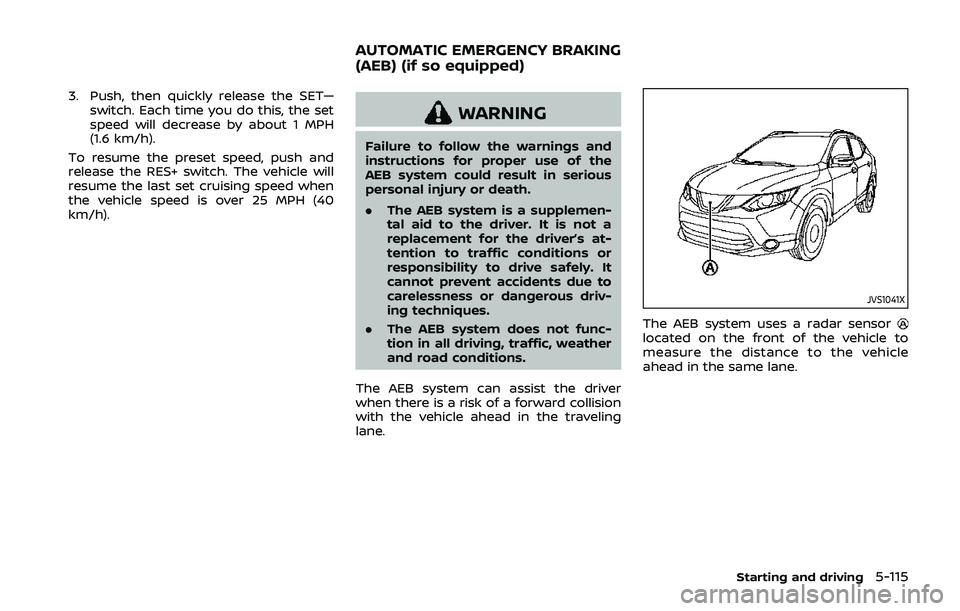
The AEB system uses a radar sensorlocated on the front of the vehicle to
measure the distance to the vehicle
ahead in the same lane.
Starting and driving5-115
AUTOMATIC EMERGENCY BRAKING
(AEB) (if so equipped)
Page 344 of 500
5-116Starting and driving
JVS1117X
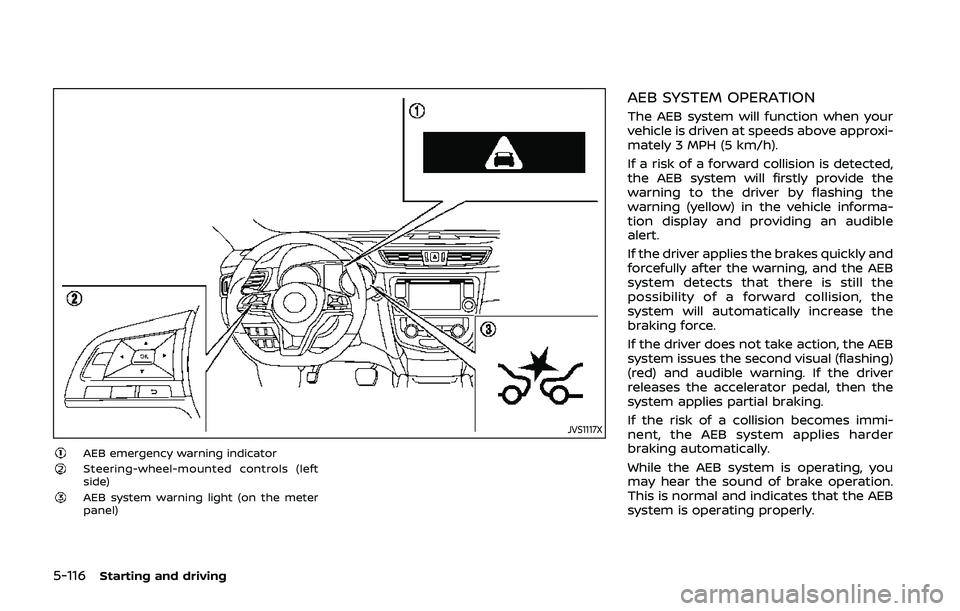
AEB emergency warning indicatorSteering-wheel-mounted controls (left
side)
AEB system warning light (on the meter
panel)
AEB SYSTEM OPERATION
The AEB system will function when your
vehicle is driven at speeds above approxi-
mately 3 MPH (5 km/h).
If a risk of a forward collision is detected,
the AEB system will firstly provide the
warning to the driver by flashing the
warning (yellow) in the vehicle informa-
tion display and providing an audible
alert.
If the driver applies the brakes quickly and
forcefully after the warning, and the AEB
system detects that there is still the
possibility of a forward collision, the
system will automatically increase the
braking force.
If the driver does not take action, the AEB
system issues the second visual (flashing)
(red) and audible warning. If the driver
releases the accelerator pedal, then the
system applies partial braking.
If the risk of a collision becomes immi-
nent, the AEB system applies harder
braking automatically.
While the AEB system is operating, you
may hear the sound of brake operation.
This is normal and indicates that the AEB
system is operating properly.
Page 346 of 500
5-118Starting and driving
JVS0971X
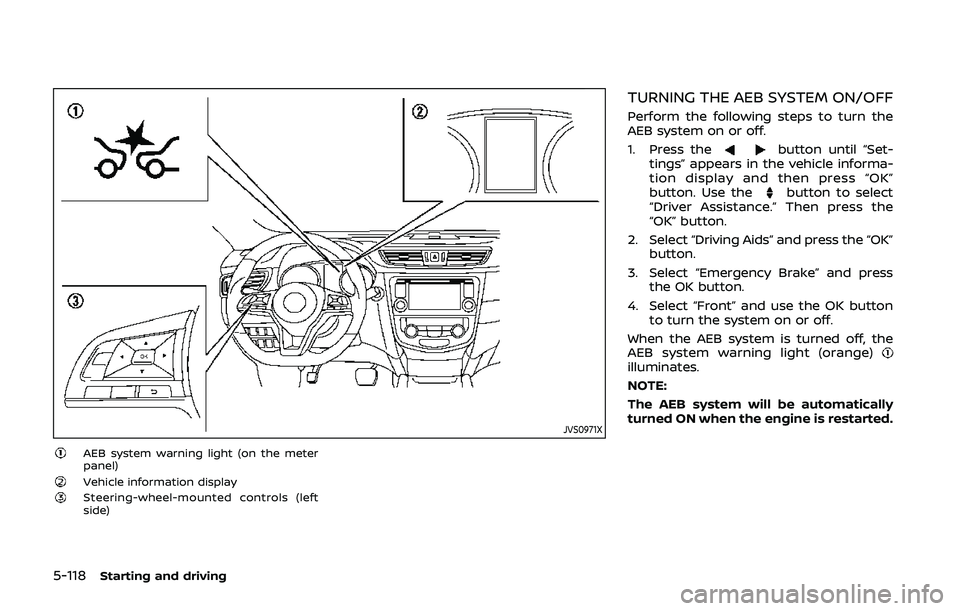
AEB system warning light (on the meter
panel)
Vehicle information displaySteering-wheel-mounted controls (left
side)
TURNING THE AEB SYSTEM ON/OFF
Perform the following steps to turn the
AEB system on or off.
1. Press the
button until “Set-
tings” appears in the vehicle informa-
tion display and then press “OK”
button. Use the
button to select
“Driver Assistance.” Then press the
“OK” button.
2. Select “Driving Aids” and press the “OK” button.
3. Select “Emergency Brake” and press the OK button.
4. Select “Front” and use the OK button to turn the system on or off.
When the AEB system is turned off, the
AEB system warning light (orange)
illuminates.
NOTE:
The AEB system will be automatically
turned ON when the engine is restarted.
Page 347 of 500
AEB SYSTEM LIMITATIONS
WARNING
Listed below are the system limita-
tions for the AEB system. Failure to
operate the vehicle in accordance
with these system limitations could
result in serious injury or death.
.The AEB system cannot detect all
vehicles under all conditions.
. The radar sensor does not detect
the following objects:
— Pedestrians, animals or obsta-
cles in the roadway
— Oncoming vehicles
— Crossing vehicles
. The radar sensor has some per-
formance limitations. If a station-
ary vehicle is in the vehicle’s path,
the AEB system will not function
when the vehicle is driven at
speeds over approximately 50
MPH (80 km/h).
. The radar sensor may not detect
a vehicle ahead in the following
conditions: — Dirt, ice, snow or other materi-
al covering the radar sensor.
— Interference by other radar sources.
— Snow or road spray from tra- veling vehicles.
— If the vehicle ahead is narrow (e.g. motorcycle)
— When driving on a steep downhill slope or roads with
sharp curves.
. In some road or traffic conditions,
the AEB system may unexpect-
edly apply partial braking. When
acceleration is necessary, con-
tinue to depress the accelerator
pedal to override the system.
. The AEB system may react to a
roadside object (traffic sign,
guard rail etc.).
. Braking distances increase on
slippery surfaces.
. The system is designed to auto-
matically check the sensor’s func-
tionality, within certain
limitations. The system may not
detect some forms of obstruction
of the sensor area such as ice,
snow, stickers, for example. In these cases, the system may not
be able to warn the driver prop-
erly. Be sure that you check, clean
and clear the sensor area regu-
larly.
. Excessive noise will interfere with
the warning chime sound, and
the chime may not be heard.
Starting and driving5-119
Page 348 of 500
5-120Starting and driving
SSD0253
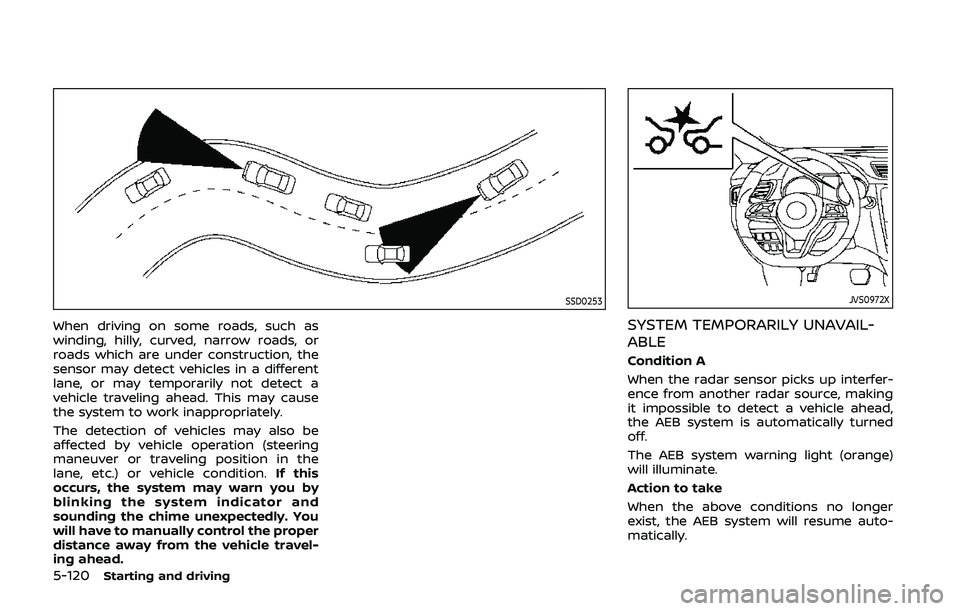
When driving on some roads, such as
winding, hilly, curved, narrow roads, or
roads which are under construction, the
sensor may detect vehicles in a different
lane, or may temporarily not detect a
vehicle traveling ahead. This may cause
the system to work inappropriately.
The detection of vehicles may also be
affected by vehicle operation (steering
maneuver or traveling position in the
lane, etc.) or vehicle condition.If this
occurs, the system may warn you by
blinking the system indicator and
sounding the chime unexpectedly. You
will have to manually control the proper
distance away from the vehicle travel-
ing ahead.
JVS0972X
SYSTEM TEMPORARILY UNAVAIL-
ABLE
Condition A
When the radar sensor picks up interfer-
ence from another radar source, making
it impossible to detect a vehicle ahead,
the AEB system is automatically turned
off.
The AEB system warning light (orange)
will illuminate.
Action to take
When the above conditions no longer
exist, the AEB system will resume auto-
matically.
Page 349 of 500
Condition B
In the following conditions, the “Unavail-
able: Front Radar Obstruction” warning
message will appear in the vehicle infor-
mation display.
.The sensor area on the front of the
vehicle is covered with dirt or is
obstructed.
Action to take
If the message appears, stop the vehicle
in a safe place and turn the engine off.
Clean the radar cover on the front of the
vehicle with a soft cloth, and restart the
engine. If the warning message continues
to illuminate, have the AEB system
checked. It is recommended that you visit
a NISSAN dealer for this service.
. When driving on roads with limited
road structures or buildings (for ex-
ample, long bridges, deserts, snow
fields, driving next to long walls).
Action to take
When the above conditions no longer
exist, the AEB system will resume auto-
matically.
Condition C
When the Vehicle Dynamic Control (VDC)
system is OFF, the AEB brake will not
operate. In this case only visible and
audible warning operates. The AEB sys-
tem warning light (orange) will illuminate. Action to take
When the VDC system is ON, the AEB
system will resume automatically.
SYSTEM MALFUNCTION
If the AEB system malfunctions, it will be
turned off automatically, a chime will
sound, the AEB system warning light
(orange) will illuminate and the “Malfunc-
tion” warning message will appear in the
vehicle information display.
Action to take:
If the AEB system warning light (orange)
comes on, stop the vehicle in a safe
location. Turn the engine off and restart
the engine. If the warning light continues
to illuminate, have the AEB system
checked. It is recommended that you visit
a NISSAN dealer for this service.
JVS1041X
SYSTEM MAINTENANCE
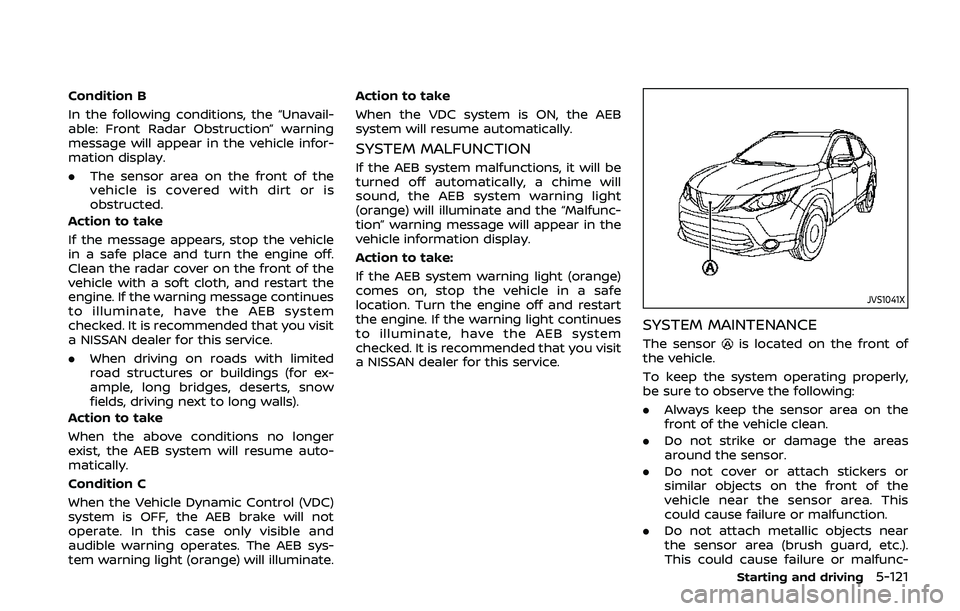
The sensoris located on the front of
the vehicle.
To keep the system operating properly,
be sure to observe the following:
. Always keep the sensor area on the
front of the vehicle clean.
. Do not strike or damage the areas
around the sensor.
. Do not cover or attach stickers or
similar objects on the front of the
vehicle near the sensor area. This
could cause failure or malfunction.
. Do not attach metallic objects near
the sensor area (brush guard, etc.).
This could cause failure or malfunc-
Starting and driving5-121