drive NISSAN QASHQAI 2019 Owner´s Manual
[x] Cancel search | Manufacturer: NISSAN, Model Year: 2019, Model line: QASHQAI, Model: NISSAN QASHQAI 2019Pages: 500, PDF Size: 2.38 MB
Page 76 of 500
1-56Safety — Seats, seat belts and supplemental restraint system
They are designed to inflate on the side
where the vehicle is impacted. They may
not inflate in certain side collisions.
Curtain air bags are also designed to
inflate in certain types of rollover colli-
sions or near rollovers. As a result, certain
vehicle movements (for example, during
severe off-roading) may cause the curtain
air bags to inflate.
Vehicle damage (or lack of it) is not
always an indication of proper side air
bag and curtain air bag operation.
When the side air bags and curtain air
bags inflate, a fairly loud noise may be
heard, followed by release of smoke. This
smoke is not harmful and does not
indicate a fire. Care should be taken not
to inhale it, as it may cause irritation and
choking. Those with a history of a breath-
ing condition should get fresh air
promptly.
Side air bags, along with the use of seat
belts, help to cushion the impact force on
the chest and pelvic area of the front
occupants. Curtain air bags help to cush-
ion the impact force to the head of
occupants in the front and rear outboard
seating positions. They can help save lives
and reduce serious injuries. However, an
inflating side air bag or curtain air bag
may cause abrasions or other injuries.
Side air bags and curtain air bags do notprovide restraint to the lower body.
The seat belts should be correctly worn
and the driver and passenger seated
upright as far as practical away from the
side air bags. Rear seat passengers
should be seated as far away as practical
from the door finishers and side roof rails.
The side air bags and curtain air bags
inflate quickly in order to help protect the
occupants. Because of this, the force of
the side air bags and curtain air bags
inflating can increase the risk of injury if
the occupant is too close to, or is against,
these air bag modules during inflation.
The side air bag will deflate quickly after
the collision is over. The curtain air bag
will remain inflated for a short time.
The side air bags and curtain air bags
operate only when the ignition switch is
in the ON position.
After placing the ignition switch in the
ON position, the supplemental air bag
warning light illuminates. The supple-
mental air bag warning light will turn
off after about 7 seconds if the systems
are operational.
WARNING
.
Do not place any objects near the
seatback of the front seats. Also,
do not place any objects (an
umbrella, bag, etc.) between the
front door finisher and the front
seat. Such objects may become
dangerous projectiles and cause
injury if a side air bag inflates.
. Right after inflation, several side
air bag and curtain air bag sys-
tem components will be hot. Do
not touch them; you may severely
burn yourself.
. No unauthorized changes should
be made to any components or
wiring of the side air bag and
curtain air bag systems. This is to
prevent damage to or accidental
inflation of the side air bag and
curtain air bag systems.
. Do not make unauthorized
changes to your vehicle’s electri-
cal system, suspension system or
side panel. This could affect prop-
er operation of the side air bag
and curtain air bag systems.
. Tampering with the side air bag
system may result in serious per-
Page 81 of 500

2 Instruments and controls
Cockpit ........................................................................\
.......................... 2-3
Instrument panel ........................................................................\
.. 2-4
Meters and gauges ..................................................................... 2-5Speedometer and odometer ........................................ 2-6
Tachometer ........................................................................\
........ 2-7
Engine coolant temperature gauge ....................... 2-7
Fuel gauge ........................................................................\
........... 2-8
Instrument brightness control .................................... 2-9
Continuously Variable Transmission (CVT)
position indicator (if so equipped) ........................... 2-9
Warning lights, indicator lights and
audible reminders ..................................................................... 2-10 Checking lights ..................................................................... 2-11
Warning lights ........................................................................\
2-11
Indicator lights ...................................................................... 2-16
Audible reminders .............................................................. 2-18
Vehicle information display ............................................... 2-19 How to use the vehicle
information display ........................................................... 2-20
Startup display ...................................................................... 2-20
Settings ........................................................................\
............... 2-21
Vehicle information display warnings
and indicators ........................................................................\
2-31
Trip computer ........................................................................\
2-39
Clock and outside air temperature ...................... 2-41 Security systems ....................................................................... 2-42
Vehicle Security System .............................................. 2-42
NISSAN Vehicle Immobilizer System ................. 2-43
Wiper and washer switch ................................................... 2-45 Windshield wiper and washer operation ...... 2-45
Rear window wiper and washer switch ................. 2-46
Rear window and outside mirror
defroster switch ........................................................................\
. 2-47
Headlight and turn signal switch ................................ 2-48 Headlight switch ............................................................... 2-48
Turn signal switch ........................................................... 2-53
Fog light switch (if so equipped) ......................... 2-54
Horn ........................................................................\
............................. 2-54
Heated steering wheel (if so equipped) .................. 2-54
Heated seats (if so equipped) ......................................... 2-55
Dynamic driver assistance switch (models
without ProPILOT assist) (if so equipped) ............. 2-56
Steering assist switch (models with ProPILOT
assist) (if so equipped) .......................................................... 2-57
Vehicle Dynamic Control (VDC) off switch ........... 2-57
Intelligent 4x4 LOCK switch (if so equipped) ...... 2-58
Rear door alert ........................................................................\
.... 2-58
ECO mode switch ..................................................................... 2-59
Power outlet ........................................................................\
......... 2-60 USB (Universal Serial Bus)
charging connector ........................................................ 2-61
Page 82 of 500

Storage ........................................................................\
...................... 2-62Cup holders ........................................................................\
..... 2-62
Soft bottle holders ............................................................. 2-62
Cargo area ........................................................................\
....... 2-63
Glove box ........................................................................\
........... 2-64
Console box ........................................................................\
..... 2-64
Sunglasses holder .............................................................. 2-64
Card holder (driver’s side) ............................................ 2-65
Luggage hooks ..................................................................... 2-65
Parcel shelf ........................................................................\
....... 2-66
Roof rack (if so equipped) .................................................. 2-67
Windows ........................................................................\
.................... 2-68 Power windows .................................................................... 2-68
Moonroof (if so equipped) .................................................. 2-71
Power moonroof ................................................................. 2-71
Interior lights ........................................................................\
....... 2-73 Interior light switch ........................................................... 2-73 Console light (if so equipped) ................................. 2-74
Map lights ........................................................................\
....... 2-74
Room light ........................................................................\
.... 2-74
Vanity mirror light (if so equipped) .................... 2-75
Cargo light ........................................................................\
..... 2-75
HomeLink® Universal Transceiver (if
so equipped) ........................................................................\
......... 2-76 Programming HomeLink® ......................................... 2-76
Programming HomeLink® for Canadian
customers and gate openers ................................. 2-78
Operating the HomeLink®
Universal Transceiver .................................................... 2-78
Programming troubleshooting ............................. 2-78
Clearing the programmed information .......... 2-79
Reprogramming a single
HomeLink® button ........................................................... 2-79
If your vehicle is stolen ................................................ 2-79
Page 83 of 500
WAA0056X
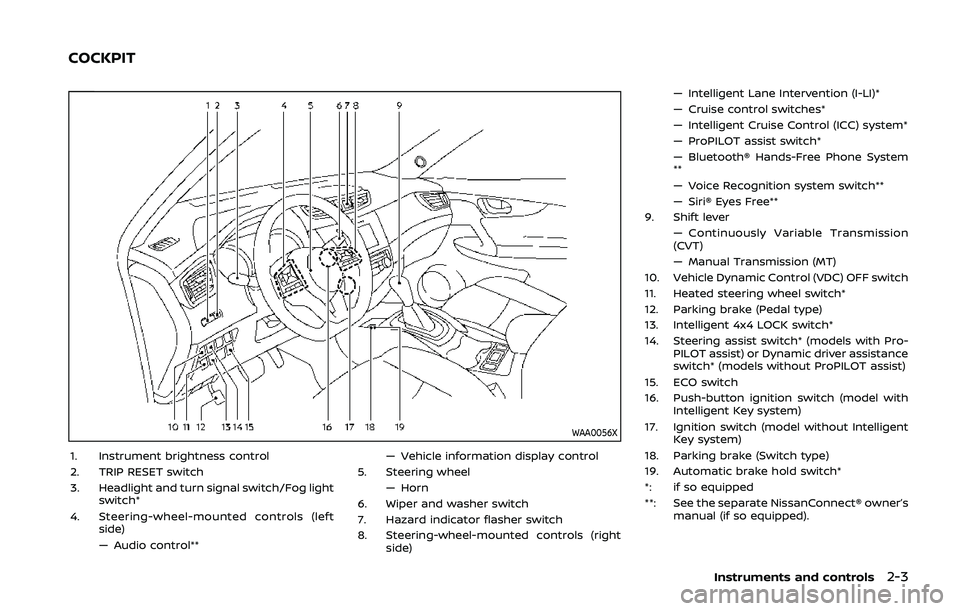
1. Instrument brightness control
2. TRIP RESET switch
3. Headlight and turn signal switch/Fog lightswitch*
4. Steering-wheel-mounted controls (left side)
— Audio control** — Vehicle information display control
5. Steering wheel — Horn
6. Wiper and washer switch
7. Hazard indicator flasher switch
8. Steering-wheel-mounted controls (right side) — Intelligent Lane Intervention (I-LI)*
— Cruise control switches*
— Intelligent Cruise Control (ICC) system*
— ProPILOT assist switch*
— Bluetooth® Hands-Free Phone System
**
— Voice Recognition system switch**
— Siri® Eyes Free**
9. Shift lever — Continuously Variable Transmission
(CVT)
— Manual Transmission (MT)
10. Vehicle Dynamic Control (VDC) OFF switch
11. Heated steering wheel switch*
12. Parking brake (Pedal type)
13. Intelligent 4x4 LOCK switch*
14. Steering assist switch* (models with Pro- PILOT assist) or Dynamic driver assistance
switch* (models without ProPILOT assist)
15. ECO switch
16. Push-button ignition switch (model with Intelligent Key system)
17. Ignition switch (model without Intelligent Key system)
18. Parking brake (Switch type)
19. Automatic brake hold switch*
*: if so equipped
**: See the separate NissanConnect® owner’s manual (if so equipped).
Instruments and controls2-3
COCKPIT
Page 84 of 500
2-4Instruments and controls
JVC1090X
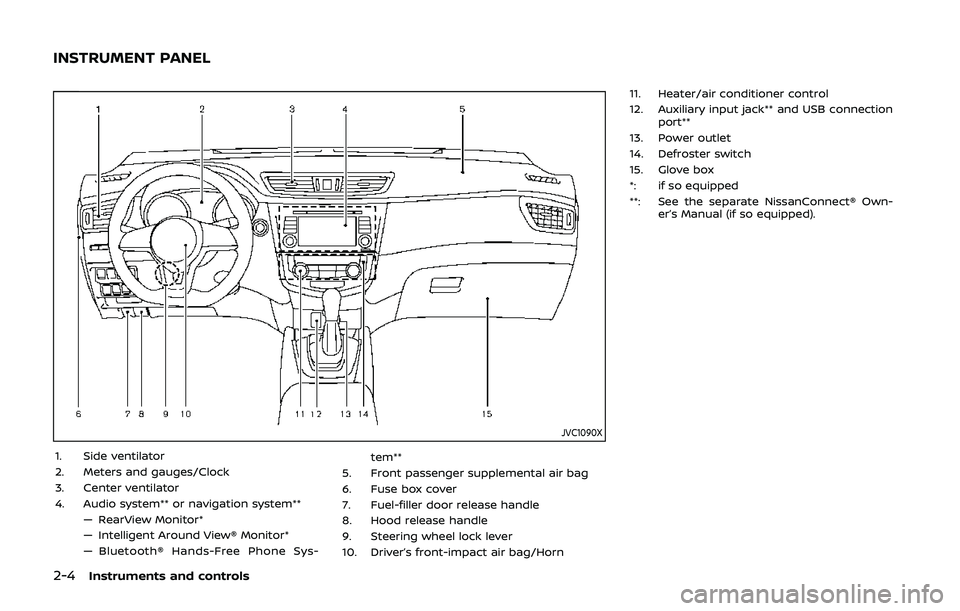
1. Side ventilator
2. Meters and gauges/Clock
3. Center ventilator
4. Audio system** or navigation system**— RearView Monitor*
— Intelligent Around View® Monitor*
— Bluetooth® Hands-Free Phone Sys- tem**
5. Front passenger supplemental air bag
6. Fuse box cover
7. Fuel-filler door release handle
8. Hood release handle
9. Steering wheel lock lever
10. Driver’s front-impact air bag/Horn 11. Heater/air conditioner control
12. Auxiliary input jack** and USB connection
port**
13. Power outlet
14. Defroster switch
15. Glove box
*: if so equipped
**: See the separate NissanConnect® Own- er’s Manual (if so equipped).
INSTRUMENT PANEL
Page 86 of 500
2-6Instruments and controls
JVI1006XSpeedometer
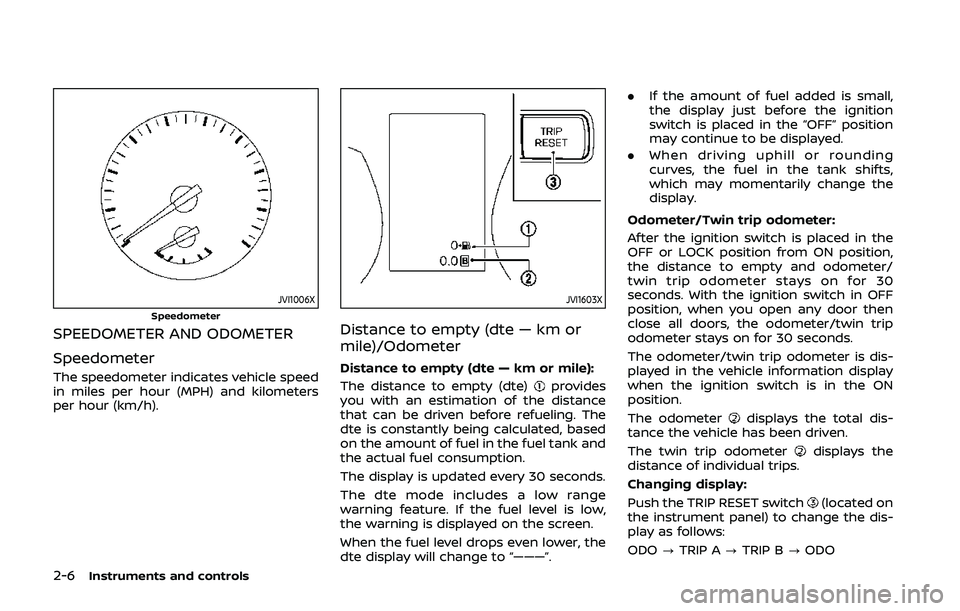
SPEEDOMETER AND ODOMETER
Speedometer
The speedometer indicates vehicle speed
in miles per hour (MPH) and kilometers
per hour (km/h).
JVI1603X
Distance to empty (dte — km or
mile)/Odometer
Distance to empty (dte — km or mile):
The distance to empty (dte)
provides
you with an estimation of the distance
that can be driven before refueling. The
dte is constantly being calculated, based
on the amount of fuel in the fuel tank and
the actual fuel consumption.
The display is updated every 30 seconds.
The dte mode includes a low range
warning feature. If the fuel level is low,
the warning is displayed on the screen.
When the fuel level drops even lower, the
dte display will change to “———”. .
If the amount of fuel added is small,
the display just before the ignition
switch is placed in the “OFF” position
may continue to be displayed.
. When driving uphill or rounding
curves, the fuel in the tank shifts,
which may momentarily change the
display.
Odometer/Twin trip odometer:
After the ignition switch is placed in the
OFF or LOCK position from ON position,
the distance to empty and odometer/
twin trip odometer stays on for 30
seconds. With the ignition switch in OFF
position, when you open any door then
close all doors, the odometer/twin trip
odometer stays on for 30 seconds.
The odometer/twin trip odometer is dis-
played in the vehicle information display
when the ignition switch is in the ON
position.
The odometer
displays the total dis-
tance the vehicle has been driven.
The twin trip odometer
displays the
distance of individual trips.
Changing display:
Push the TRIP RESET switch
(located on
the instrument panel) to change the dis-
play as follows:
ODO ?TRIP A ?TRIP B ?ODO
Page 90 of 500
2-10Instruments and controls
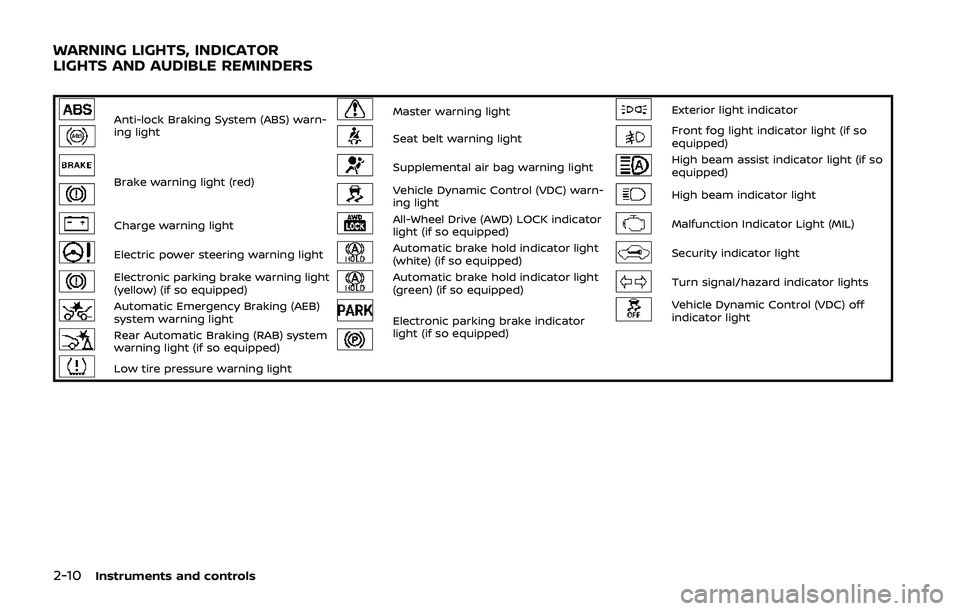
Anti-lock Braking System (ABS) warn-
ing lightMaster warning lightExterior light indicator
Seat belt warning lightFront fog light indicator light (if so
equipped)
Brake warning light (red)Supplemental air bag warning lightHigh beam assist indicator light (if so
equipped)
Vehicle Dynamic Control (VDC) warn-
ing lightHigh beam indicator light
Charge warning lightAll-Wheel Drive (AWD) LOCK indicator
light (if so equipped)Malfunction Indicator Light (MIL)
Electric power steering warning lightAutomatic brake hold indicator light
(white) (if so equipped)Security indicator light
Electronic parking brake warning light
(yellow) (if so equipped)Automatic brake hold indicator light
(green) (if so equipped)Turn signal/hazard indicator lights
Automatic Emergency Braking (AEB)
system warning lightElectronic parking brake indicator
light (if so equipped)Vehicle Dynamic Control (VDC) off
indicator light
Rear Automatic Braking (RAB) system
warning light (if so equipped)
Low tire pressure warning light
WARNING LIGHTS, INDICATOR
LIGHTS AND AUDIBLE REMINDERS
Page 91 of 500
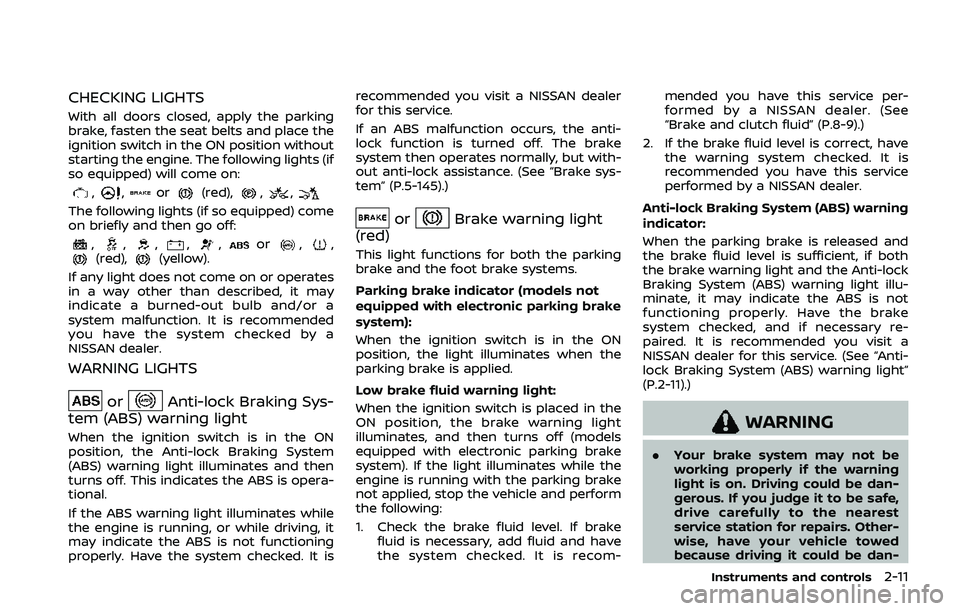
CHECKING LIGHTS
With all doors closed, apply the parking
brake, fasten the seat belts and place the
ignition switch in the ON position without
starting the engine. The following lights (if
so equipped) will come on:
,,or(red),,,
The following lights (if so equipped) come
on briefly and then go off:
,,,,,or,,(red),(yellow).
If any light does not come on or operates
in a way other than described, it may
indicate a burned-out bulb and/or a
system malfunction. It is recommended
you have the system checked by a
NISSAN dealer.
WARNING LIGHTS
orAnti-lock Braking Sys-
tem (ABS) warning light
When the ignition switch is in the ON
position, the Anti-lock Braking System
(ABS) warning light illuminates and then
turns off. This indicates the ABS is opera-
tional.
If the ABS warning light illuminates while
the engine is running, or while driving, it
may indicate the ABS is not functioning
properly. Have the system checked. It is recommended you visit a NISSAN dealer
for this service.
If an ABS malfunction occurs, the anti-
lock function is turned off. The brake
system then operates normally, but with-
out anti-lock assistance. (See “Brake sys-
tem” (P.5-145).)
orBrake warning light
(red)
This light functions for both the parking
brake and the foot brake systems.
Parking brake indicator (models not
equipped with electronic parking brake
system):
When the ignition switch is in the ON
position, the light illuminates when the
parking brake is applied.
Low brake fluid warning light:
When the ignition switch is placed in the
ON position, the brake warning light
illuminates, and then turns off (models
equipped with electronic parking brake
system). If the light illuminates while the
engine is running with the parking brake
not applied, stop the vehicle and perform
the following:
1. Check the brake fluid level. If brake fluid is necessary, add fluid and have
the system checked. It is recom- mended you have this service per-
formed by a NISSAN dealer. (See
“Brake and clutch fluid” (P.8-9).)
2. If the brake fluid level is correct, have the warning system checked. It is
recommended you have this service
performed by a NISSAN dealer.
Anti-lock Braking System (ABS) warning
indicator:
When the parking brake is released and
the brake fluid level is sufficient, if both
the brake warning light and the Anti-lock
Braking System (ABS) warning light illu-
minate, it may indicate the ABS is not
functioning properly. Have the brake
system checked, and if necessary re-
paired. It is recommended you visit a
NISSAN dealer for this service. (See “Anti-
lock Braking System (ABS) warning light”
(P.2-11).)
WARNING
. Your brake system may not be
working properly if the warning
light is on. Driving could be dan-
gerous. If you judge it to be safe,
drive carefully to the nearest
service station for repairs. Other-
wise, have your vehicle towed
because driving it could be dan-
Instruments and controls2-11
Page 92 of 500
2-12Instruments and controls
gerous.
. Pressing the brake pedal with the
engine stopped and/or low brake
fluid level may increase your
stopping distance and braking
will require greater pedal effort
as well as pedal travel.
. If the brake fluid level is below the
minimum or MIN mark on the
brake fluid reservoir, do not drive
until the brake system has been
checked. It is recommended you
visit a NISSAN dealer for this
service.
Charge warning light
If the light illuminates while the engine is
running, it may indicate the charging
system is not functioning properly. Turn
the engine off and check the alternator
belt. If the belt is loose, broken, missing or
if the light remains on, have your vehicle
serviced immediately. It is recommended
you visit a NISSAN dealer for this service.
CAUTION
Do not continue driving if the alter-
nator belt is loose, broken or miss- ing.
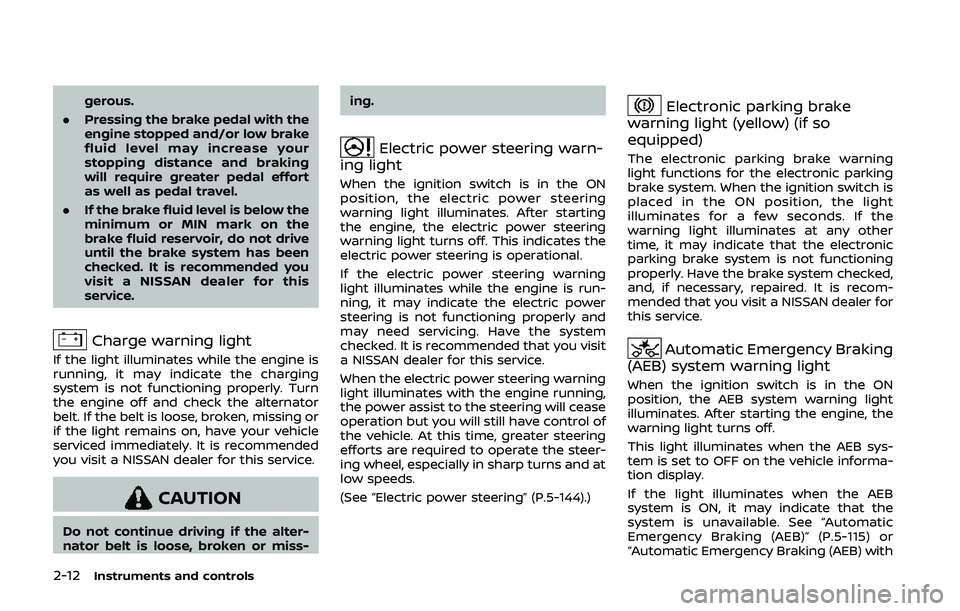
Electric power steering warn-
ing light
When the ignition switch is in the ON
position, the electric power steering
warning light illuminates. After starting
the engine, the electric power steering
warning light turns off. This indicates the
electric power steering is operational.
If the electric power steering warning
light illuminates while the engine is run-
ning, it may indicate the electric power
steering is not functioning properly and
may need servicing. Have the system
checked. It is recommended that you visit
a NISSAN dealer for this service.
When the electric power steering warning
light illuminates with the engine running,
the power assist to the steering will cease
operation but you will still have control of
the vehicle. At this time, greater steering
efforts are required to operate the steer-
ing wheel, especially in sharp turns and at
low speeds.
(See “Electric power steering” (P.5-144).)
Electronic parking brake
warning light (yellow) (if so
equipped)
The electronic parking brake warning
light functions for the electronic parking
brake system. When the ignition switch is
placed in the ON position, the light
illuminates for a few seconds. If the
warning light illuminates at any other
time, it may indicate that the electronic
parking brake system is not functioning
properly. Have the brake system checked,
and, if necessary, repaired. It is recom-
mended that you visit a NISSAN dealer for
this service.
Automatic Emergency Braking
(AEB) system warning light
When the ignition switch is in the ON
position, the AEB system warning light
illuminates. After starting the engine, the
warning light turns off.
This light illuminates when the AEB sys-
tem is set to OFF on the vehicle informa-
tion display.
If the light illuminates when the AEB
system is ON, it may indicate that the
system is unavailable. See “Automatic
Emergency Braking (AEB)” (P.5-115) or
“Automatic Emergency Braking (AEB) with
Page 93 of 500
pedestrian detection system” (P.5-122).
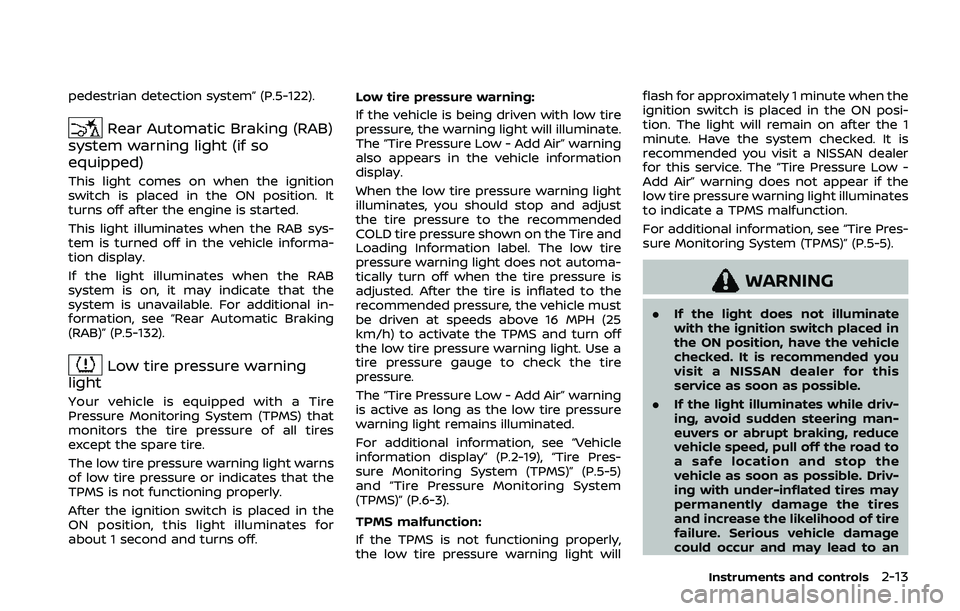
Rear Automatic Braking (RAB)
system warning light (if so
equipped)
This light comes on when the ignition
switch is placed in the ON position. It
turns off after the engine is started.
This light illuminates when the RAB sys-
tem is turned off in the vehicle informa-
tion display.
If the light illuminates when the RAB
system is on, it may indicate that the
system is unavailable. For additional in-
formation, see “Rear Automatic Braking
(RAB)” (P.5-132).
Low tire pressure warning
light
Your vehicle is equipped with a Tire
Pressure Monitoring System (TPMS) that
monitors the tire pressure of all tires
except the spare tire.
The low tire pressure warning light warns
of low tire pressure or indicates that the
TPMS is not functioning properly.
After the ignition switch is placed in the
ON position, this light illuminates for
about 1 second and turns off. Low tire pressure warning:
If the vehicle is being driven with low tire
pressure, the warning light will illuminate.
The “Tire Pressure Low - Add Air” warning
also appears in the vehicle information
display.
When the low tire pressure warning light
illuminates, you should stop and adjust
the tire pressure to the recommended
COLD tire pressure shown on the Tire and
Loading Information label. The low tire
pressure warning light does not automa-
tically turn off when the tire pressure is
adjusted. After the tire is inflated to the
recommended pressure, the vehicle must
be driven at speeds above 16 MPH (25
km/h) to activate the TPMS and turn off
the low tire pressure warning light. Use a
tire pressure gauge to check the tire
pressure.
The “Tire Pressure Low - Add Air” warning
is active as long as the low tire pressure
warning light remains illuminated.
For additional information, see “Vehicle
information display” (P.2-19), “Tire Pres-
sure Monitoring System (TPMS)” (P.5-5)
and “Tire Pressure Monitoring System
(TPMS)” (P.6-3).
TPMS malfunction:
If the TPMS is not functioning properly,
the low tire pressure warning light will flash for approximately 1 minute when the
ignition switch is placed in the ON posi-
tion. The light will remain on after the 1
minute. Have the system checked. It is
recommended you visit a NISSAN dealer
for this service. The “Tire Pressure Low -
Add Air” warning does not appear if the
low tire pressure warning light illuminates
to indicate a TPMS malfunction.
For additional information, see “Tire Pres-
sure Monitoring System (TPMS)” (P.5-5).
WARNING
.
If the light does not illuminate
with the ignition switch placed in
the ON position, have the vehicle
checked. It is recommended you
visit a NISSAN dealer for this
service as soon as possible.
. If the light illuminates while driv-
ing, avoid sudden steering man-
euvers or abrupt braking, reduce
vehicle speed, pull off the road to
a safe location and stop the
vehicle as soon as possible. Driv-
ing with under-inflated tires may
permanently damage the tires
and increase the likelihood of tire
failure. Serious vehicle damage
could occur and may lead to an
Instruments and controls2-13